Node Positioning in React Diagram
21 Aug 202610 minutes to read
Node positioning in the React Diagram component allows precise control over where nodes appear on the diagram canvas. Understanding positioning fundamentals enables developers to create well-organized diagrams with nodes placed exactly where needed.
To customize the position of nodes in the React Diagram component, refer to the video link below.
Position
-
Position of a node is controlled by using its
offsetXandoffsetYproperties. By default, these offset properties represent the distance between the origin of the diagram’s page and node’s center point. These offset values are measured in pixels. -
You may expect these offset values to represent the distance between page origin and node’s top-left corner instead of center. The Pivot property helps to solve this problem. Default value of the node’s
pivotpoint is (0.5, 0.5), meaning the center of the node. -
The size of the node can be controlled by using its
widthandheightproperties. -
Rotation of a node is controlled by using its
rotateAngleproperty.
Understanding Pivot Points
The pivot point determines which part of the node the offset coordinates reference. The following table illustrates how different pivot values affect node positioning:
| Pivot | Offset Behavior |
|---|---|
| (0.5, 0.5) | offsetX and offsetY values are considered as the node’s center point. |
| (0, 0) | offsetX and offsetY values position the node’s top-left corner. |
| (1, 1) | offsetX and offsetY values position the node’s bottom-right corner. |
| (0, 1) | offsetX and offsetY values position the node’s bottom-left corner. |
| (1, 0) | offsetX and offsetY values position the node’s top-right corner. |
NOTE
The pivot values range between 0 and 1, where 0 represents the top/left edge, 0.5 represents the center, and 1 represents the bottom/right edge of the node.
The following code illustrates how to change the pivot value.
import * as React from "react";
import * as ReactDOM from "react-dom";
import { DiagramComponent } from "@syncfusion/ej2-react-diagrams";
// A node is created and stored in nodes array.
let node = [{
        // Position of the node
        offsetX: 250,
        offsetY: 250,
        // Size of the node
        width: 100,
        height: 100,
        pivot: {
            x: 0,
            y: 0
        },
        style: {
            fill: '#6BA5D7',
            strokeColor: 'white'
        }
        // Text(label) added to the node
    }];
let diagramInstance;
function App() {
    return (<DiagramComponent id="container" ref={(diagram) => (diagramInstance = diagram)} width={'100%'} height={'600px'} nodes={node} created={() => {
            diagramInstance.select([diagramInstance.nodes[0]]);
        }}/>);
}
const root = ReactDOM.createRoot(document.getElementById('diagram'));
root.render(<App />);
import * as React from "react";
import * as ReactDOM from "react-dom";
import {
Diagram,
DiagramComponent,
NodeModel
} from "@syncfusion/ej2-react-diagrams";
// A node is created and stored in nodes array.
let node: NodeModel[] = [{
// Position of the node
offsetX: 250,
offsetY: 250,
// Size of the node
width: 100,
height: 100,
pivot: {
x: 0,
y: 0
},
style: {
fill: '#6BA5D7',
strokeColor: 'white'
}
// Text(label) added to the node
}];
let diagramInstance: DiagramComponent;
function App() {
return (
<DiagramComponent
id="container"
ref={(diagram) => (diagramInstance = diagram)}
width={'100%'}
height={'600px'}
nodes={node}
created={() => {
diagramInstance.select([diagramInstance.nodes[0]]);
}}
// render initialized Diagram
/>
);
}
const root = ReactDOM.createRoot(document.getElementById('diagram'));
root.render(<App />);Minimum and Maximum Size for Nodes
The size constraints ensure nodes maintain appropriate dimensions during resizing operations. The minWidth and minHeight properties define the smallest allowable size for a node during resize operations. Similarly, the maxWidth and maxHeight properties define the largest allowable size. These constraints apply during interactive resize operations performed by the user.
By default, when the min/max size properties are not set, nodes are unconstrained and can be resized freely.
These constraints are particularly useful when creating diagrams where nodes need to maintain specific size ranges for visual consistency or functional requirements.
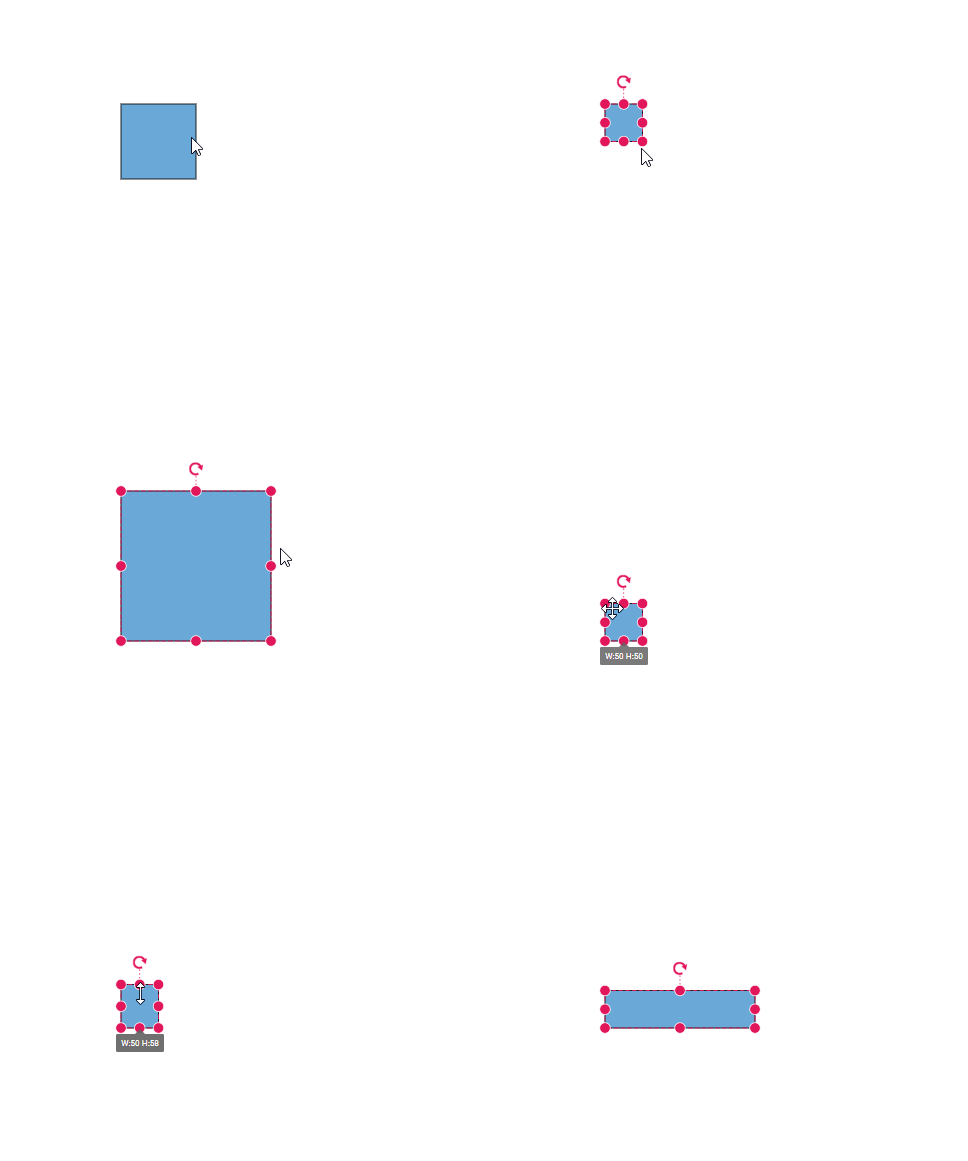
import * as React from 'react';
import * as ReactDOM from 'react-dom';
import { DiagramComponent } from '@syncfusion/ej2-react-diagrams';
let diagramInstance;
// A node is created and stored in nodes array.
let node = [
  {
    id: 'Start',
    width: 100,
    height: 100,
    offsetX: 250,
    offsetY: 250,
    minWidth: 50,
    minHeight: 50,
    maxWidth: 200,
    maxHeight: 200,
    annotations: [
      {
        content: 'Node1',
      },
    ],
  },
];
// initialize Diagram component
function App() {
  return (
    <DiagramComponent
      id="container"
      ref={(diagram) => (diagramInstance = diagram)}
      nodes={node}
      width={'100%'}
      height={'600px'}
    />
  );
}
const root = ReactDOM.createRoot(document.getElementById('diagram'));
root.render(<App />);
import * as React from 'react';
import * as ReactDOM from 'react-dom';
import { DiagramComponent, NodeModel } from '@syncfusion/ej2-react-diagrams';
let diagramInstance;
// A node is created and stored in nodes array.
let node: NodeModel[] = [
{
id: 'Start',
width: 100,
height: 100,
offsetX: 250,
offsetY: 250,
minWidth: 50,
minHeight: 50,
maxWidth: 200,
maxHeight: 200,
annotations: [
{
content: 'Node1',
},
],
},
];
// initialize Diagram component
function App() {
return (
<DiagramComponent
id="container"
ref={(diagram) => (diagramInstance = diagram)}
nodes={node}
width={'100%'}
height={'600px'}
/>
);
}
const root = ReactDOM.createRoot(document.getElementById('diagram'));
root.render(<App />);