Swimlane in React Diagram
Swimlanes are specialized diagram nodes that visualize business processes by organizing activities into distinct lanes or sections. Each lane typically represents a department, role, or responsibility area, making it easy to understand who is responsible for each step in a process. Swimlanes are particularly useful for workflow documentation, process mapping, and cross-functional process analysis.
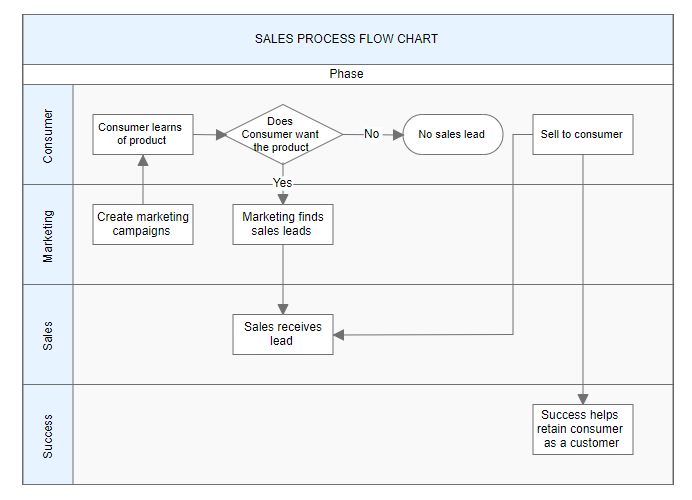
Create a Swimlane
To create a swimlane, set the node’s shape type to swimlane. Swimlanes are arranged horizontally by default and require proper configuration of headers and lanes to function correctly.
The following code example demonstrates how to define a basic swimlane object:
import * as React from "react";
import * as ReactDOM from "react-dom";
import { DiagramComponent } from "@syncfusion/ej2-react-diagrams";
// A node is created and stored in nodes array.
let node = [{
        id: 'swimlane',
        shape: {
            // Set the node type as swimlane
            type: 'SwimLane',
            lanes: [
                {
                    id: 'stackCanvas1',
                    height: 100,
                },
            ],
            phases: [
                {
                    id: 'phase1', offset: 170,
                    header: { annotation: { content: 'Phase' } }
                },
            ],
            phaseSize: 20,
        },
        offsetX: 300,
        offsetY: 200,
        height: 200,
        width: 350
    }];
// initialize Diagram component
function App() {
    return (<DiagramComponent id="container" width={'100%'} height={'600px'} nodes={node}/>);
}
const root = ReactDOM.createRoot(document.getElementById('diagram'));
root.render(<App />);
import * as React from "react";
import * as ReactDOM from "react-dom";
import { DiagramComponent, NodeModel } from "@syncfusion/ej2-react-diagrams";
// A node is created and stored in nodes array.
let node: NodeModel[] = [{
id: 'swimlane',
shape: {
// Set the node type as swimlane
type: 'SwimLane',
lanes: [
{
id: 'stackCanvas1',
height: 100,
},
],
phases: [
{
id: 'phase1', offset: 170,
header: { annotation: { content: 'Phase' } }
},
],
phaseSize: 20,
},
offsetX: 300,
offsetY: 200,
height: 200,
width: 350
}];
// initialize Diagram component
function App() {
return (
<DiagramComponent
id="container"
width={'100%'}
height={'600px'}
nodes={node}
/>
);
}
const root = ReactDOM.createRoot(document.getElementById('diagram'));
root.render(<App />);NOTE
When setting a Swimlane’s ID, ensure that it does not contain white spaces, does not start with numbers or special characters, and does not include special characters like underscores (_) or spaces.
Orientation
Swimlanes support two orientation modes to accommodate different layout requirements and design preferences.
Horizontal Orientation (default)
Lanes are arranged from top to bottom, with the header positioned on the left side. This orientation works well for processes that flow from left to right.
Vertical Orientation
Lanes are arranged from left to right, with the header positioned at the top. This orientation suits processes that flow from top to bottom.
import * as React from 'react';
import * as ReactDOM from 'react-dom';
import { DiagramComponent } from '@syncfusion/ej2-react-diagrams';
// A node is created and stored in nodes array.
let node = [
  {
    id: 'swimlane1',
    shape: {
      type: 'SwimLane',
      orientation: 'Horizontal',
      //Intialize header to swimlane
      header: {
        annotation: {
          content: 'Horizontal Swimlane',
        },
        height: 50,
        style: { fontSize: 11 },
      },
      lanes: [
        {
          id: 'stackCanvas1',
          height: 100,
          header: {
            annotation: { content: 'CUSTOMER' },
            width: 50,
            style: { fontSize: 11 },
          },
        },
      ],
      phases: [
        {
          id: 'phase1',
          offset: 150,
          addInfo: { name: 'phase1' },
          header: {
            annotation: {
              content: 'First phase',
            },
          },
        },
        {
          id: 'phase2',
          offset: 200,
          header: { annotation: { content: 'Second phase' } },
        },
      ],
      phaseSize: 40,
    },
    offsetX: 300,
    offsetY: 200,
    height: 200,
    width: 350,
  },
  {
    id: 'swimlane2',
    shape: {
      type: 'SwimLane',
      orientation: 'Vertical',
      //Intialize header to swimlane
      header: {
        annotation: {
          content: 'Vertical Swimlane',
        },
        height: 50,
        style: { fontSize: 11 },
      },
      lanes: [
        {
          id: 'stackCanvas1',
          height: 100,
          header: {
            annotation: { content: 'CUSTOMER' },
            width: 50,
            style: { fontSize: 11 },
          },
        },
      ],
      phases: [
        {
          id: 'phase1',
          offset: 120,
          addInfo: { name: 'phase1' },
          header: {
            annotation: {
              content: 'First phase',
            },
          },
        },
        {
          id: 'phase2',
          offset: 200,
          header: { annotation: { content: 'Second phase' } },
        },
      ],
      phaseSize: 40,
    },
    offsetX: 800,
    offsetY: 200,
    height: 200,
    width: 350,
  },
];
// initialize Diagram component
function App() {
  return (
    <DiagramComponent
      id="container"
      width={'100%'}
      height={'600px'}
      nodes={node}
    />
  );
}
const root = ReactDOM.createRoot(document.getElementById('diagram'));
root.render(<App />);
import * as React from "react";
import * as ReactDOM from "react-dom";
import { DiagramComponent, NodeModel } from "@syncfusion/ej2-react-diagrams";
// A node is created and stored in nodes array.
let node: NodeModel[] = [{
id: 'swimlane1',
shape: {
type: 'SwimLane',
orientation: 'Horizontal',
//Intialize header to swimlane
header: {
annotation: {
content: 'Horizontal Swimlane',
},
height: 50,
style: { fontSize: 11 },
},
lanes: [
{
id: 'stackCanvas1',
height: 100,
header: {
annotation: { content: 'CUSTOMER' },
width: 50,
style: { fontSize: 11 },
},
},
],
phases: [
{
id: 'phase1',
offset: 150,
addInfo: { name: 'phase1' },
header: {
annotation: {
content: 'First phase',
},
},
},
{
id: 'phase2',
offset: 200,
header: { annotation: { content: 'Second phase' } },
},
],
phaseSize: 40,
},
offsetX: 300,
offsetY: 200,
height: 200,
width: 350,
},
{
id: 'swimlane2',
shape: {
type: 'SwimLane',
orientation: 'Vertical',
//Intialize header to swimlane
header: {
annotation: {
content: 'Vertical Swimlane',
},
height: 50,
style: { fontSize: 11 },
},
lanes: [
{
id: 'stackCanvas1',
height: 100,
header: {
annotation: { content: 'CUSTOMER' },
width: 50,
style: { fontSize: 11 },
},
},
],
phases: [
{
id: 'phase1',
offset: 120,
addInfo: { name: 'phase1' },
header: {
annotation: {
content: 'First phase',
},
},
},
{
id: 'phase2',
offset: 200,
header: { annotation: { content: 'Second phase' } },
},
],
phaseSize: 40,
},
offsetX: 800,
offsetY: 200,
height: 200,
width: 350,
},];
// initialize Diagram component
function App() {
return (
<DiagramComponent
id="container"
width={'100%'}
height={'600px'}
nodes={node}
/>
);
}
const root = ReactDOM.createRoot(document.getElementById('diagram'));
root.render(<App />);Headers
The header serves as the primary identifying element of a swimlane, providing a title or description for the entire swimlane container. The header property allows customization of both content and appearance.
NOTE
By using this header, the swimlane interaction will be performed, like selection, dragging,etc.
The following code example illustrates how to define a swimlane header.
import * as React from "react";
import * as ReactDOM from "react-dom";
import { DiagramComponent } from "@syncfusion/ej2-react-diagrams";
// A node is created and stored in nodes array.
let node = [{
        shape: {
            type: 'SwimLane',
            orientation: 'Horizontal',
            // Intialize header to swimlane
            header: {
                annotation: { content: 'ONLINE PURCHASE STATUS' },
                height: 50, style: { fontSize: 11 },
            },
            lanes: [
                {
                    id: 'stackCanvas1',
                    height: 100,
                },
            ],
            phases: [
                {
                    id: 'phase1', offset: 170,
                    header: { annotation: { content: 'Phase' } }
                },
            ],
            phaseSize: 20,
        },
        offsetX: 300, offsetY: 200,
        height: 200,
        width: 350
    }];
// initialize Diagram component
function App() {
    return (<DiagramComponent id="container" width={'100%'} height={'600px'} nodes={node}/>);
}
const root = ReactDOM.createRoot(document.getElementById('diagram'));
root.render(<App />);
import * as React from "react";
import * as ReactDOM from "react-dom";
import { DiagramComponent, NodeModel } from "@syncfusion/ej2-react-diagrams";
// A node is created and stored in nodes array.
let node: NodeModel[] = [{
shape: {
type: 'SwimLane',
orientation: 'Horizontal',
// Intialize header to swimlane
header: {
annotation: { content: 'ONLINE PURCHASE STATUS' },
height: 50, style: { fontSize: 11 },
},
lanes: [
{
id: 'stackCanvas1',
height: 100,
},
],
phases: [
{
id: 'phase1', offset: 170,
header: { annotation: { content: 'Phase' } }
},
],
phaseSize: 20,
},
offsetX: 300, offsetY: 200,
height: 200,
width: 350
}];
// initialize Diagram component
function App() {
return (
<DiagramComponent
id="container"
width={'100%'}
height={'600px'}
nodes={node}
/>
);
}
const root = ReactDOM.createRoot(document.getElementById('diagram'));
root.render(<App />);Header Customization
Swimlane headers can be extensively customized to match design requirements and improve visual clarity. The dimensions can be controlled using width and height properties. Visual styling, including background color and text formatting, can be applied through the style property. The swimlane’s orientation can be controlled using the orientation property.
NOTE
By default, the swimlane orientation is Horizontal.
The following code example illustrates how to customize the swimlane header.
import * as React from "react";
import * as ReactDOM from "react-dom";
import { DiagramComponent } from "@syncfusion/ej2-react-diagrams";
// A node is created and stored in nodes array.
let node = [{
        shape: {
            type: 'SwimLane',
            orientation: 'Horizontal',
            // customize the swimlane header
            header: {
                annotation: { content: 'SALES PROCESS FLOW CHART', },
                height: 70, style: { fontSize: 11 }, style: { fill: 'pink' },
            },
            lanes: [
                {
                    id: 'stackCanvas1',
                    height: 100,
                },
            ],
            phases: [
                {
                    id: 'phase1', offset: 170,
                    header: { annotation: { content: 'Phase' } }
                },
            ],
            phaseSize: 20,
        },
        offsetX: 300, offsetY: 200,
        height: 200,
        width: 350
    }];
// initialize Diagram component
function App() {
    return (<DiagramComponent id="container" width={'100%'} height={'600px'} nodes={node}/>);
}
const root = ReactDOM.createRoot(document.getElementById('diagram'));
root.render(<App />);
import * as React from "react";
import * as ReactDOM from "react-dom";
import { DiagramComponent, NodeModel } from "@syncfusion/ej2-react-diagrams";
// A node is created and stored in nodes array.
let node: NodeModel[] = [{
shape: {
type: 'SwimLane',
orientation: 'Horizontal',
// customize the swimlane header
header: {
annotation: { content: 'SALES PROCESS FLOW CHART', },
height: 70, style: { fontSize: 11 }, style: { fill: 'pink' },
},
lanes: [
{
id: 'stackCanvas1',
height: 100,
},
],
phases: [
{
id: 'phase1', offset: 170,
header: { annotation: { content: 'Phase' } }
},
],
phaseSize: 20,
},
offsetX: 300, offsetY: 200,
height: 200,
width: 350
}];
// initialize Diagram component
function App() {
return (
<DiagramComponent
id="container"
width={'100%'}
height={'600px'}
nodes={node}
/>
);
}
const root = ReactDOM.createRoot(document.getElementById('diagram'));
root.render(<App />);Dynamic Header Customization
Headers can be modified programmatically during runtime to respond to user interactions or changing business requirements. This capability enables dynamic updating of swimlane titles, styling, and other properties based on application state or user input.
import * as React from "react";
import * as ReactDOM from "react-dom";
import { DiagramComponent } from "@syncfusion/ej2-react-diagrams";
// A node is created and stored in nodes array.
let node = [{
        shape: {
            type: 'SwimLane',
            orientation: 'Horizontal',
            // Intialize header to swimlane
            header: {
                annotation: { content: 'SALES PROCESS FLOW CHART', },
                height: 70, style: { fontSize: 11 }, style: { fill: 'pink' },
            },
            lanes: [
                {
                    id: 'stackCanvas1',
                    height: 100,
                },
            ],
            phases: [
                {
                    id: 'phase1', offset: 170,
                    header: { annotation: { content: 'Phase' } }
                },
            ],
            phaseSize: 20,
        },
        offsetX: 300, offsetY: 200,
        height: 200,
        width: 350
    }];
// initialize Diagram component
let diagramInstance;
function App() {
    const updateHeaderStyle = () => {
        if (diagramInstance) {
            // change the swimlane header style dynamically
            diagramInstance.nodes[0].shape.header.style.fill = 'red';
            // Refresh the diagram
            diagramInstance.dataBind();
        }
    };
    return (
        <div>
            <button onClick={updateHeaderStyle}>updateHeaderStyle</button>
            <DiagramComponent id="container" ref={(diagram) => (diagramInstance = diagram)} width={'100%'} height={'600px'} nodes={node} />
        </div>
    );
}
const root = ReactDOM.createRoot(document.getElementById('diagram'));
root.render(<App />);
import * as React from "react";
import * as ReactDOM from "react-dom";
import { DiagramComponent, NodeModel } from "@syncfusion/ej2-react-diagrams";
// A node is created and stored in nodes array.
let node: NodeModel[] = [{
shape: {
type: 'SwimLane',
orientation: 'Horizontal',
// Intialize header to swimlane
header: {
annotation: { content: 'SALES PROCESS FLOW CHART', },
height: 70, style: { fontSize: 11 }, style: { fill: 'pink' },
},
lanes: [
{
id: 'stackCanvas1',
height: 100,
},
],
phases: [
{
id: 'phase1', offset: 170,
header: { annotation: { content: 'Phase' } }
},
],
phaseSize: 20,
},
offsetX: 300, offsetY: 200,
height: 200,
width: 350
}];
// initialize Diagram component
let diagramInstance: DiagramComponent;
function App() {
const updateHeaderStyle = () => {
if (diagramInstance) {
// change the swimlane header style dynamically
diagramInstance.nodes[0].shape.header.style.fill = 'red';
// Refresh the diagram
diagramInstance.dataBind();
}
};
return (
<div>
<button onClick={updateHeaderStyle}>updateHeaderStyle</button>
<DiagramComponent
id="container"
ref={(diagram) => (diagramInstance = diagram)}
width={'100%'}
height={'600px'}
nodes={node}
/>
</div>
);
}
const root = ReactDOM.createRoot(document.getElementById('diagram'));
root.render(<App />);Header Editing
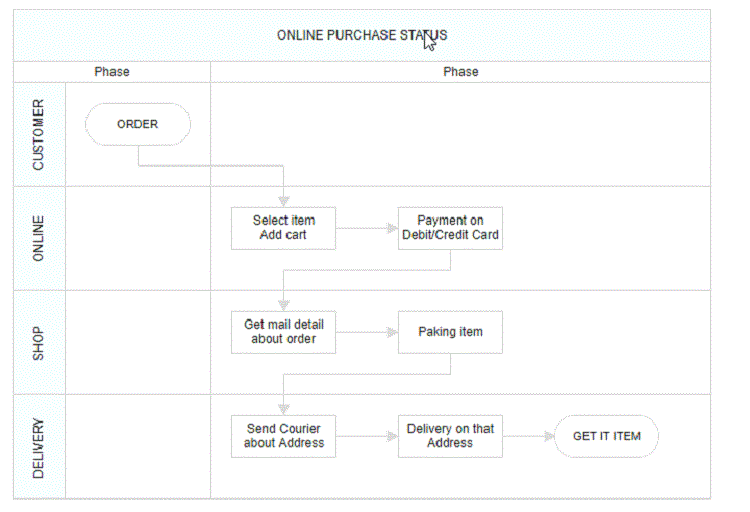
Diagram provides the support to edit swimlane headers at runtime. We achieve the header editing by double click event. Double clicking the header label will enables the editing of that. The following image illustrates how to edit the swimlane header.
 .
.
Limitations
- Connectors cannot be added directly to swimlane.