How can I help you?
Splitter in React Gantt Chart Component
30 Apr 202624 minutes to read
The splitter in the React Gantt Chart component divides the TreeGrid pane and Chart pane, enabling flexible width allocation for project visualization. Configured via the splitterSettings property, the splitter supports pixel or percentage-based positioning, column-based alignment, and predefined view modes. The setSplitterPosition method adjusts positioning dynamically, while the splitterResizeStart, splitterResizing, and splitterResized events handle resize interactions. The splitter includes ARIA labels for accessibility, ensuring screen reader compatibility, and adapts to responsive designs, though narrow screens may limit visible columns or timeline segments. By default, both panels are visible with equal width.
Configure splitter position
Set the splitter position using splitterSettings.position with pixel (e.g., “300px”) or percentage (e.g., “30%”) values to define the TreeGrid pane width, or align to a column edge with splitterSettings.columnIndex.
The following example sets a percentage-based splitter position. This configuration allocates 50% width to the TreeGrid panel.
import * as React from 'react';
import * as ReactDOM from 'react-dom';
import { GanttComponent } from '@syncfusion/ej2-react-gantt';
import { data } from './datasource';

function App() {
  let taskSettings = {
    id: 'TaskID',
    name: 'TaskName',
    startDate: 'StartDate',
    duration: 'Duration',
    progress: 'Progress',
    parentID: 'ParentID'
  };
  let splitterSettings = {
    position: '50%'
  };

  return (
    <GanttComponent
      height="430px"
      dataSource={data}
      taskFields={taskSettings}
      splitterSettings={splitterSettings}>
    </GanttComponent>
  );
}

ReactDOM.render(<App />, document.getElementById('root'));
import * as React from 'react';
import * as ReactDOM from 'react-dom';
import { GanttComponent, TaskFieldsModel, SplitterSettingsModel } from '@syncfusion/ej2-react-gantt';
import { data } from './datasource';
function App() {
let taskSettings: TaskFieldsModel = {
id: 'TaskID',
name: 'TaskName',
startDate: 'StartDate',
duration: 'Duration',
progress: 'Progress',
parentID: 'ParentID'
};
let splitterSettings: SplitterSettingsModel = {
position: '50%',
};
return (
<GanttComponent
height="430px"
dataSource={data}
taskFields={taskSettings}
splitterSettings={splitterSettings}>
</GanttComponent>
);
}
ReactDOM.render(<App />, document.getElementById('root'));<!DOCTYPE html>
<html lang="en">
<head>
<title>Syncfusion React Gantt</title>
<meta charset="utf-8" />
<meta name="viewport" content="width=device-width, initial-scale=1.0" />
<meta name="description" content="Essential JS 2 for React Components" />
<meta name="author" content="Syncfusion" />
<link href="https://cdn.syncfusion.com/ej2/33.2.3/tailwind3.css" rel="stylesheet" type="text/css"/>
<link href="https://maxcdn.bootstrapcdn.com/bootstrap/3.3.7/css/bootstrap.min.css" rel="stylesheet" />
<script src="https://cdnjs.cloudflare.com/ajax/libs/systemjs/0.19.38/system.js"></script>
<script src="systemjs.config.js"></script>
<style>
#loader {
color: #008cff;
height: 40px;
left: 45%;
position: absolute;
top: 45%;
width: 30%;
}
</style>
</head>
<body>
<div id='root'>
<div id='loader'>Loading....</div>
</div>
</body>
</html>If both position and columnIndex are defined in splitterSettings, only
positionis applied because it takes precedence overcolumnIndex.
Configure view modes
Set predefined view modes with splitterSettings.view:
- Default: Displays both TreeGrid and Chart panels.
- Grid: Shows only the TreeGrid panel for data-focused views.
- Chart: Shows only the Chart panel for timeline visualization.
The following example configures the Grid view mode. This configuration prioritizes the TreeGrid for detailed task analysis.
import * as React from 'react';
import * as ReactDOM from 'react-dom';
import { GanttComponent } from '@syncfusion/ej2-react-gantt';
import { data } from './datasource';

function App() {
  let taskSettings = {
    id: 'TaskID',
    name: 'TaskName',
    startDate: 'StartDate',
    duration: 'Duration',
    progress: 'Progress',
    parentID: 'ParentID'
  };

  const labelSettings = {
    leftLabel: 'TaskName'
  };

  const splitterSettings = {
    view: 'Grid',
  };

  return (
    <GanttComponent
      height="430px"
      dataSource={data}
      taskFields={taskSettings}
      labelSettings={labelSettings}
      treeColumnIndex={1}
      splitterSettings={splitterSettings}
    >
    </GanttComponent>
  );
}

ReactDOM.render(<App />, document.getElementById('root'));
import * as React from 'react';
import * as ReactDOM from 'react-dom';
import { GanttComponent, TaskFieldsModel, SplitterSettingsModel, LabelSettingsModel } from '@syncfusion/ej2-react-gantt';
import { data } from './datasource';
function App() {
let taskSettings: TaskFieldsModel = {
id: 'TaskID',
name: 'TaskName',
startDate: 'StartDate',
duration: 'Duration',
progress: 'Progress',
parentID: 'ParentID'
};
const labelSettings: LabelSettingsModel = {
leftLabel: 'TaskName'
};
const splitterSettings: SplitterSettingsModel = {
view: 'Grid',
};
return (
<GanttComponent
height="430px"
dataSource={data}
taskFields={taskSettings}
labelSettings={labelSettings}
treeColumnIndex={1}
splitterSettings={splitterSettings}
>
</GanttComponent>
);
}
ReactDOM.render(<App />, document.getElementById('root'));<!DOCTYPE html>
<html lang="en">
<head>
<title>Syncfusion React Gantt</title>
<meta charset="utf-8" />
<meta name="viewport" content="width=device-width, initial-scale=1.0" />
<meta name="description" content="Essential JS 2 for React Components" />
<meta name="author" content="Syncfusion" />
<link href="https://cdn.syncfusion.com/ej2/33.2.3/tailwind3.css" rel="stylesheet" type="text/css"/>
<link href="https://maxcdn.bootstrapcdn.com/bootstrap/3.3.7/css/bootstrap.min.css" rel="stylesheet" />
<script src="https://cdnjs.cloudflare.com/ajax/libs/systemjs/0.19.38/system.js"></script>
<script src="systemjs.config.js"></script>
<style>
#loader {
color: #008cff;
height: 40px;
left: 45%;
position: absolute;
top: 45%;
width: 30%;
}
</style>
</head>
<body>
<div id='root'>
<div id='loader'>Loading....</div>
</div>
</body>
</html>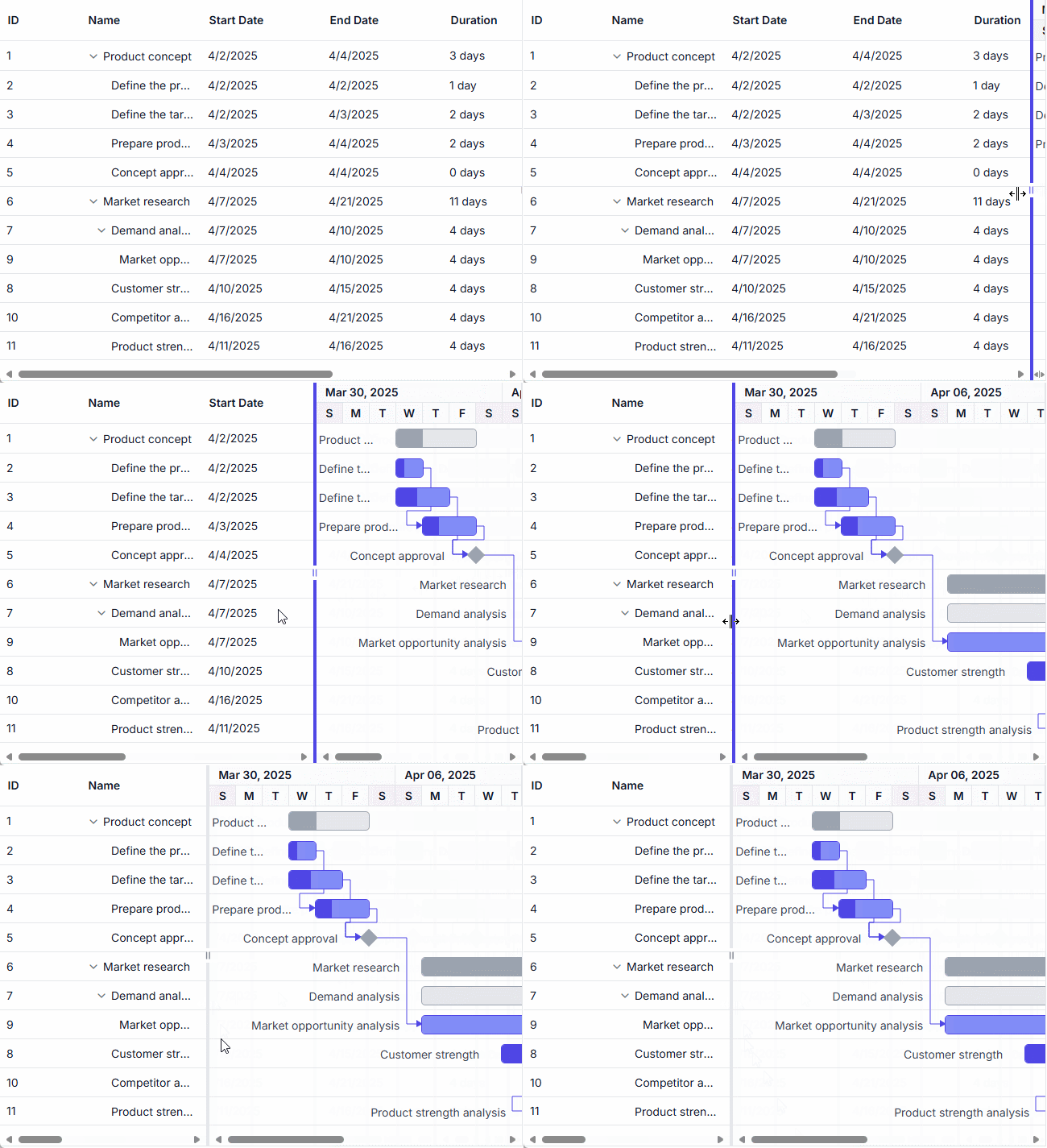
Adjust splitter position dynamically
Change the splitter position using the setSplitterPosition method with pixel, percentage, or column index values, triggered by events like window resizing or button clicks.
The following example adjusts the splitter dynamically:
import * as React from 'react';
import * as ReactDOM from 'react-dom';
import { GanttComponent, TaskFieldsModel } from '@syncfusion/ej2-react-gantt';
import { DropDownListComponent, ChangeEventArgs } from '@syncfusion/ej2-react-dropdowns';
import { ButtonComponent } from '@syncfusion/ej2-react-buttons';
import { data } from './datasource';

function App() {
  let ganttRef = null;

  const taskSettings = {
    id: 'TaskID',
    name: 'TaskName',
    startDate: 'StartDate',
    duration: 'Duration',
    progress: 'Progress',
    parentID: 'ParentID'
  };

  const dropData = [
    { id: 'Default', mode: 'Default' },
    { id: 'Grid', mode: 'Grid' },
    { id: 'Chart', mode: 'Chart' }
  ];

  const fields = { text: 'mode', value: 'id' };

  const changeByPosition = () => {
    ganttRef.setSplitterPosition('50%', 'position');
  };

  const changeByIndex = () => {
    ganttRef.setSplitterPosition(1, 'columnIndex');
  };

  const onChange = (e) => {
    let viewType = e.value;
    ganttRef.setSplitterPosition(viewType, 'view');
  };

  return (
    <div>
      <ButtonComponent id="changeByPosition" onClick={changeByPosition}>Change By Position</ButtonComponent>
      <br /><br />
      <ButtonComponent id="changeByIndex" onClick={changeByIndex}>Change By Index</ButtonComponent>
      <br />
      <div style=>
        Splitter View
        <DropDownListComponent
          dataSource={dropData}
          value="Default"
          fields={fields}
          change={onChange}>
        </DropDownListComponent>
      </div>
      <GanttComponent
        id="ganttDefault"
        height="430px"
        dataSource={data}
        taskFields={taskSettings}
        ref={gantt => ganttRef = gantt}>
      </GanttComponent>
    </div>
  );
}

ReactDOM.render(<App />, document.getElementById('root'));
import * as React from 'react';
import * as ReactDOM from 'react-dom';
import { GanttComponent, TaskFieldsModel } from '@syncfusion/ej2-react-gantt';
import { DropDownListComponent, ChangeEventArgs } from '@syncfusion/ej2-react-dropdowns';
import { ButtonComponent } from '@syncfusion/ej2-react-buttons';
import { data } from './datasource';
function App() {
let ganttRef: GanttComponent | null = null;
const taskSettings: TaskFieldsModel = {
id: 'TaskID',
name: 'TaskName',
startDate: 'StartDate',
duration: 'Duration',
progress: 'Progress',
parentID: 'ParentID'
};
const dropData: Object[] = [
{ id: 'Default', mode: 'Default' },
{ id: 'Grid', mode: 'Grid' },
{ id: 'Chart', mode: 'Chart' }
];
const fields: Object = { text: 'mode', value: 'id' };
const changeByPosition = (): void => {
ganttRef.setSplitterPosition('50%', 'position');
};
const changeByIndex = (): void => {
ganttRef.setSplitterPosition(1, 'columnIndex');
};
const onChange = (e: ChangeEventArgs): void => {
let viewType: string = e.value as string;
ganttRef.setSplitterPosition(viewType, 'view');
};
return (
<div>
<ButtonComponent id="changeByPosition" onClick={changeByPosition}>Change By Position</ButtonComponent>
<br /><br />
<ButtonComponent id="changeByIndex" onClick={changeByIndex}>Change By Index</ButtonComponent>
<br />
<div style=>
Splitter View
<DropDownListComponent
dataSource={dropData}
value="Default"
fields={fields}
change={onChange}>
</DropDownListComponent>
</div>
<GanttComponent
id="ganttDefault"
height="430px"
dataSource={data}
taskFields={taskSettings}
ref={gantt => ganttRef = gantt}>
</GanttComponent>
</div>
);
}
ReactDOM.render(<App />, document.getElementById('root'));<!DOCTYPE html>
<html lang="en">
<head>
<title>Syncfusion React Gantt</title>
<meta charset="utf-8" />
<meta name="viewport" content="width=device-width, initial-scale=1.0" />
<meta name="description" content="Essential JS 2 for React Components" />
<meta name="author" content="Syncfusion" />
<link href="https://cdn.syncfusion.com/ej2/33.2.3/tailwind3.css" rel="stylesheet" type="text/css"/>
<link href="https://maxcdn.bootstrapcdn.com/bootstrap/3.3.7/css/bootstrap.min.css" rel="stylesheet" />
<script src="https://cdnjs.cloudflare.com/ajax/libs/systemjs/0.19.38/system.js"></script>
<script src="systemjs.config.js"></script>
<style>
#loader {
color: #008cff;
height: 40px;
left: 45%;
position: absolute;
top: 45%;
width: 30%;
}
</style>
</head>
<body>
<div id='root'>
<div id='loader'>Loading....</div>
</div>
</body>
</html>Customize splitter appearance
Customize the splitter’s appearance in the Gantt Chart component by handling the dataBound, splitterResizing and splitterResized events to dynamically adjust styles, such as the background color or visibility of the resize handler. This enhances visual feedback during splitter interactions, improving usability for resizing the TreeGrid and Chart panels. The splitter retains ARIA labels for accessibility, ensuring screen reader compatibility.
The following example customizes the splitter’s background and hides the resize handler during resizing:
import * as React from 'react';
import * as ReactDOM from 'react-dom';
import { GanttComponent } from '@syncfusion/ej2-react-gantt';
import { data } from './datasource';

function App() {
  let ganttRef = null;

  const taskFields = {
    id: 'TaskID',
    name: 'TaskName',
    startDate: 'StartDate',
    endDate: 'EndDate',
    duration: 'Duration',
    progress: 'Progress',
    dependency: 'Predecessor',
    parentID: 'ParentID'
  };

  const splitterSettings = { columnIndex: 2 };

  const onDataBound = () => {
    const splitterBar = ganttRef.element.querySelector('.e-split-bar');
    if (splitterBar) {
      splitterBar.addEventListener('mouseover', () => {
        splitterBar.style.background = 'grey';
        const resizeHandler = splitterBar.querySelector('.e-resize-handler');
        if (resizeHandler) resizeHandler.style.visibility = 'hidden';
      });
      splitterBar.addEventListener('mouseleave', () => {
        splitterBar.style.background = '#dee2e6';
        const resizeHandler = splitterBar.querySelector('.e-resize-handler');
        if (resizeHandler) resizeHandler.style.visibility = 'visible';
      });
    }
  };

  const onSplitterResizing = () => {
    const splitterBar = ganttRef.element.querySelector('.e-split-bar');
    if (splitterBar) {
      splitterBar.style.background = 'grey';
      const resizeHandler = splitterBar.querySelector('.e-resize-handler');
      if (resizeHandler) resizeHandler.style.visibility = 'hidden';
    }
  };

  const onSplitterResized = () => {
    const splitterBar = ganttRef.element.querySelector('.e-split-bar');
    if (splitterBar) {
      splitterBar.style.background = '#dee2e6';
      const resizeHandler = splitterBar.querySelector('.e-resize-handler');
      if (resizeHandler) resizeHandler.style.visibility = 'visible';
    }
  };

  return (
    <div className="control-section">
      <GanttComponent
        height="410px"
        dataSource={data}
        taskFields={taskFields}
        splitterSettings={splitterSettings}
        treeColumnIndex={1}
        dataBound={onDataBound}
        splitterResizing={onSplitterResizing}
        splitterResized={onSplitterResized}
        ref={gantt => ganttRef = gantt}>
      </GanttComponent>
    </div>
  );
}

ReactDOM.render(<App />, document.getElementById('root'));
import * as React from 'react';
import * as ReactDOM from 'react-dom';
import { GanttComponent, TaskFieldsModel, SplitterSettingsModel, ISplitterResizedEventArgs } from '@syncfusion/ej2-react-gantt';
import { ResizingEventArgs } from '@syncfusion/ej2-layouts';
import { data } from './datasource';
function App() {
let ganttRef: GanttComponent | null = null;
const taskFields: TaskFieldsModel = {
id: 'TaskID',
name: 'TaskName',
startDate: 'StartDate',
endDate: 'EndDate',
duration: 'Duration',
progress: 'Progress',
dependency: 'Predecessor',
parentID: 'ParentID'
};
const splitterSettings: SplitterSettingsModel = { columnIndex: 2 };
const onDataBound = (): void => {
const splitterBar = ganttRef.element.querySelector('.e-split-bar') as HTMLElement;
if (splitterBar) {
splitterBar.addEventListener('mouseover', () => {
splitterBar.style.background = 'grey';
const resizeHandler = splitterBar.querySelector('.e-resize-handler') as HTMLElement;
if (resizeHandler) resizeHandler.style.visibility = 'hidden';
});
splitterBar.addEventListener('mouseleave', () => {
splitterBar.style.background = '#dee2e6';
const resizeHandler = splitterBar.querySelector('.e-resize-handler') as HTMLElement;
if (resizeHandler) resizeHandler.style.visibility = 'visible';
});
}
};
const onSplitterResizing = (args: ResizingEventArgs): void => {
const splitterBar = ganttRef.element.querySelector('.e-split-bar') as HTMLElement;
if (splitterBar) {
splitterBar.style.background = 'grey';
const resizeHandler = splitterBar.querySelector('.e-resize-handler') as HTMLElement;
if (resizeHandler) resizeHandler.style.visibility = 'hidden';
}
};
const onSplitterResized = (args: ISplitterResizedEventArgs): void => {
const splitterBar = ganttRef.element.querySelector('.e-split-bar') as HTMLElement;
if (splitterBar) {
splitterBar.style.background = '#dee2e6';
const resizeHandler = splitterBar.querySelector('.e-resize-handler') as HTMLElement;
if (resizeHandler) resizeHandler.style.visibility = 'visible';
}
};
return (
<div className="control-section">
<GanttComponent
height="410px"
dataSource={data}
taskFields={taskFields}
splitterSettings={splitterSettings}
treeColumnIndex={1}
dataBound={onDataBound}
splitterResizing={onSplitterResizing}
splitterResized={onSplitterResized}
ref={gantt => ganttRef = gantt}>
</GanttComponent>
</div>
);
}
ReactDOM.render(<App />, document.getElementById('root'));<!DOCTYPE html>
<html lang="en">
<head>
<title>Syncfusion React Gantt</title>
<meta charset="utf-8" />
<meta name="viewport" content="width=device-width, initial-scale=1.0" />
<meta name="description" content="Essential JS 2 for React Components" />
<meta name="author" content="Syncfusion" />
<link href="https://cdn.syncfusion.com/ej2/33.2.3/tailwind3.css" rel="stylesheet" type="text/css"/>
<link href="https://maxcdn.bootstrapcdn.com/bootstrap/3.3.7/css/bootstrap.min.css" rel="stylesheet" />
<script src="https://cdnjs.cloudflare.com/ajax/libs/systemjs/0.19.38/system.js"></script>
<script src="systemjs.config.js"></script>
<style>
#loader {
color: #008cff;
height: 40px;
left: 45%;
position: absolute;
top: 45%;
width: 30%;
}
</style>
</head>
<body>
<div id='root'>
<div id='loader'>Loading....</div>
</div>
</body>
</html>