How to create nested Dialog in ASP.NET CORE Dialog
14 Sep 20262 minutes to read
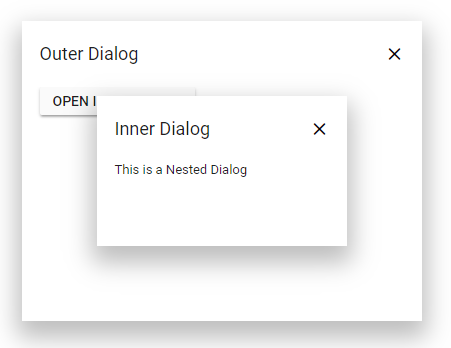
A Dialog can be nested within another Dialog. The following sample demonstrates a parent Dialog with a child Dialog (inner Dialog) contained within it.
Implementation Steps
Step 1:
Create two div elements with ids #dialog and #innerDialog in your CSHTML view file.
Step 2:
Initialize both Dialogs in your CSHTML markup. One Dialog is initialized as the parent Dialog, and the other as the child Dialog with its target property configured.
Step 3:
Set the inner Dialog’s target property to "#dialog" (the ID of the parent Dialog element). This constrains the child Dialog within the parent’s boundaries.
<div id='container' style="height:400px;">
    <ejs-button id="targetButton" content="Open Dialog"></ejs-button>
    <ejs-dialog id="dialog" header="Outer Dialog" showCloseIcon="true" created="onCreated" target="#container" height="300px" closeOnEscape="false" width="400px">
        <e-dialog-animationsettings effect="None"></e-dialog-animationsettings>
        <e-content-template>
            <button class="e-control e-btn" id="innerButton" role="button">Open InnerDialog</button>
        </e-content-template>
    </ejs-dialog>
    <ejs-dialog id='innerDialog' showCloseIcon="true" header="Inner Dialog" closeOnEscape="false" content="This is a Nested Dialog" target="#dialog" height="150px" width="250px">
        <e-dialog-animationsettings effect="None"></e-dialog-animationsettings>
    </ejs-dialog>
</div>
<script>
    window.onload = function () {
        document.getElementById('targetButton').onclick = function () {
            var dialog = document.getElementById("dialog").ej2_instances[0];
            var innerDialog = document.getElementById("innerDialog").ej2_instances[0];
            dialog.show();
            innerDialog.show();
        }
    }
    function onCreated() {
        document.getElementById("innerButton").addEventListener("click", function () {
            var innerDialog = document.getElementById("innerDialog").ej2_instances[0];
            innerDialog.show();
        })
    }
</script>
public class HomeController : Controller
{
public ActionResult Index()
{
return View();
}
}