Data Binding in Vue Scheduler
14 Sep 202624 minutes to read
The Schedule component supports data binding through DataManager, which provides both RESTful data-service binding and JavaScript object array binding. The dataSource property can be assigned either a DataManager instance or a JavaScript object array. The component supports the following types of data binding:
- Local data
- Remote data
Binding Local Data
To bind local JSON data to the Schedule component, assign a JavaScript object array to the dataSource property within eventSettings. Local data can also be supplied as a DataManager instance assigned to the Schedule dataSource property.
<template>
  <div id='app'>
    <div id='container'>
      <ejs-schedule :height='height' :selectedDate='selectedData' :eventSettings='eventSettings'></ejs-schedule>
    </div>
  </div>
</template>

<script setup>
import { provide } from "vue";
import { ScheduleComponent as EjsSchedule, Day, Week, WorkWeek, Month, Agenda } from '@syncfusion/ej2-vue-schedule';

const scheduleData = [{
  Id: 1,
  Subject: 'Explosion of Betelgeuse Star',
  StartTime: new Date(2018, 1, 15, 9, 30),
  EndTime: new Date(2018, 1, 15, 11, 0)
}, {
  Id: 2,
  Subject: 'Thule Air Crash Report',
  StartTime: new Date(2018, 1, 12, 12, 0),
  EndTime: new Date(2018, 1, 12, 14, 0)
}, {
  Id: 3,
  Subject: 'Blue Moon Eclipse',
  StartTime: new Date(2018, 1, 13, 9, 30),
  EndTime: new Date(2018, 1, 13, 11, 0)
}, {
  Id: 4,
  Subject: 'Meteor Showers in 2018',
  StartTime: new Date(2018, 1, 14, 13, 0),
  EndTime: new Date(2018, 1, 14, 14, 30)
}];

const height = '550px';
const eventSettings = {
  dataSource: scheduleData
}
const selectedData = new Date(2018, 1, 15);

provide('schedule', [Day, Week, WorkWeek, Month, Agenda]);
</script>
<style>
@import "../node_modules/@syncfusion/ej2-base/styles/material3.css";
@import "../node_modules/@syncfusion/ej2-vue-buttons/styles/material3.css";
@import "../node_modules/@syncfusion/ej2-vue-calendars/styles/material3.css";
@import "../node_modules/@syncfusion/ej2-vue-dropdowns/styles/material3.css";
@import "../node_modules/@syncfusion/ej2-vue-inputs/styles/material3.css";
@import "../node_modules/@syncfusion/ej2-vue-navigations/styles/material3.css";
@import "../node_modules/@syncfusion/ej2-vue-popups/styles/material3.css";
@import "../node_modules/@syncfusion/ej2-vue-schedule/styles/material3.css";
</style><template>
<div id='app'>
<div id='container'>
<ejs-schedule :height='height' :selectedDate='selectedData' :eventSettings='eventSettings'></ejs-schedule>
</div>
</div>
</template>
<script>
import { ScheduleComponent, Day, Week, WorkWeek, Month, Agenda } from '@syncfusion/ej2-vue-schedule';
let scheduleData = [{
Id: 1,
Subject: 'Explosion of Betelgeuse Star',
StartTime: new Date(2018, 1, 15, 9, 30),
EndTime: new Date(2018, 1, 15, 11, 0)
}, {
Id: 2,
Subject: 'Thule Air Crash Report',
StartTime: new Date(2018, 1, 12, 12, 0),
EndTime: new Date(2018, 1, 12, 14, 0)
}, {
Id: 3,
Subject: 'Blue Moon Eclipse',
StartTime: new Date(2018, 1, 13, 9, 30),
EndTime: new Date(2018, 1, 13, 11, 0)
}, {
Id: 4,
Subject: 'Meteor Showers in 2018',
StartTime: new Date(2018, 1, 14, 13, 0),
EndTime: new Date(2018, 1, 14, 14, 30)
}];
export default {
name: "App",
components: {
"ejs-schedule": ScheduleComponent
},
data() {
return {
height: '550px',
eventSettings: {
dataSource: scheduleData
},
selectedData: new Date(2018, 1, 15),
}
},
provide: {
schedule: [Day, Week, WorkWeek, Month, Agenda]
}
}
</script>
<style>
@import "../node_modules/@syncfusion/ej2-base/styles/material3.css";
@import "../node_modules/@syncfusion/ej2-vue-buttons/styles/material3.css";
@import "../node_modules/@syncfusion/ej2-vue-calendars/styles/material3.css";
@import "../node_modules/@syncfusion/ej2-vue-dropdowns/styles/material3.css";
@import "../node_modules/@syncfusion/ej2-vue-inputs/styles/material3.css";
@import "../node_modules/@syncfusion/ej2-vue-navigations/styles/material3.css";
@import "../node_modules/@syncfusion/ej2-vue-popups/styles/material3.css";
@import "../node_modules/@syncfusion/ej2-vue-schedule/styles/material3.css";
</style>By default,
DataManagerusesJsonAdaptorfor binding local data.
You can also bind different field names to the default event fields as well as include additional
custom fieldsto the event object collection which can be referred here.
Binding Remote Data
Any kind of remote data services can be bound to the Scheduler. To do so, create an instance of DataManager and provide the service URL to the url option of DataManager and then assign it to the dataSource property within eventSettings.
Using ODataV4Adaptor
ODataV4 is a standardized protocol for creating and consuming data services. The following example demonstrates retrieving data from an ODataV4 service using DataManager. To connect with ODataV4 service endpoints, use ODataV4Adaptor.
<template>
    <div id='app'>
        <div id='container'>
            <ejs-schedule height='550px' :selectedDate='selectedDate' :eventSettings='eventSettings'
                :readOnly='readOnly'></ejs-schedule>
        </div>
    </div>
</template>
<script setup>
import { provide } from "vue";
import { DataManager, ODataV4Adaptor } from '@syncfusion/ej2-data';
import { ScheduleComponent as EjsSchedule, Day, Week, WorkWeek, Month, Agenda, View } from '@syncfusion/ej2-vue-schedule';

const dataManager = new DataManager({
    url: 'https://services.odata.org/V4/Northwind/Northwind.svc/Orders/',
    adaptor: new ODataV4Adaptor(),
    crossDomain: true
});

const selectedDate = new Date(1996, 6, 9);
const readOnly = true;
const eventSettings = {
    dataSource: dataManager,
    fields: {
        id: 'Id',
        subject: { name: 'ShipName' },
        location: { name: 'ShipCountry' },
        description: { name: 'ShipAddress' },
        startTime: { name: 'OrderDate' },
        endTime: { name: 'RequiredDate' },
        recurrenceRule: { name: 'ShipRegion' }
    }
}

provide('schedule', [Day, Week, WorkWeek, Month, Agenda]);

</script>
<style>
@import "../node_modules/@syncfusion/ej2-base/styles/material3.css";
@import "../node_modules/@syncfusion/ej2-vue-buttons/styles/material3.css";
@import "../node_modules/@syncfusion/ej2-vue-calendars/styles/material3.css";
@import "../node_modules/@syncfusion/ej2-vue-dropdowns/styles/material3.css";
@import "../node_modules/@syncfusion/ej2-vue-inputs/styles/material3.css";
@import "../node_modules/@syncfusion/ej2-vue-navigations/styles/material3.css";
@import "../node_modules/@syncfusion/ej2-vue-popups/styles/material3.css";
@import "../node_modules/@syncfusion/ej2-vue-schedule/styles/material3.css";
</style><template>
<div id='app'>
<div id='container'>
<ejs-schedule height='550px' :selectedDate='selectedDate' :eventSettings='eventSettings'
:readOnly='readOnly'></ejs-schedule>
</div>
</div>
</template>
<script>
import { DataManager, ODataV4Adaptor } from '@syncfusion/ej2-data';
import { ScheduleComponent, Day, Week, WorkWeek, Month, Agenda } from '@syncfusion/ej2-vue-schedule';
let dataManager = new DataManager({
url: 'https://services.odata.org/V4/Northwind/Northwind.svc/Orders/',
adaptor: new ODataV4Adaptor(),
crossDomain: true
});
export default {
name: "App",
components: {
"ejs-schedule": ScheduleComponent
},
data() {
return {
selectedDate: new Date(1996, 6, 9),
readOnly: true,
eventSettings: {
dataSource: dataManager,
fields: {
id: 'Id',
subject: { name: 'ShipName' },
location: { name: 'ShipCountry' },
description: { name: 'ShipAddress' },
startTime: { name: 'OrderDate' },
endTime: { name: 'RequiredDate' },
recurrenceRule: { name: 'ShipRegion' }
}
}
};
},
provide: {
schedule: [Day, Week, WorkWeek, Month, Agenda]
}
}
</script>
<style>
@import "../node_modules/@syncfusion/ej2-base/styles/material3.css";
@import "../node_modules/@syncfusion/ej2-vue-buttons/styles/material3.css";
@import "../node_modules/@syncfusion/ej2-vue-calendars/styles/material3.css";
@import "../node_modules/@syncfusion/ej2-vue-dropdowns/styles/material3.css";
@import "../node_modules/@syncfusion/ej2-vue-inputs/styles/material3.css";
@import "../node_modules/@syncfusion/ej2-vue-navigations/styles/material3.css";
@import "../node_modules/@syncfusion/ej2-vue-popups/styles/material3.css";
@import "../node_modules/@syncfusion/ej2-vue-schedule/styles/material3.css";
</style>Filter Events using the in-built Query
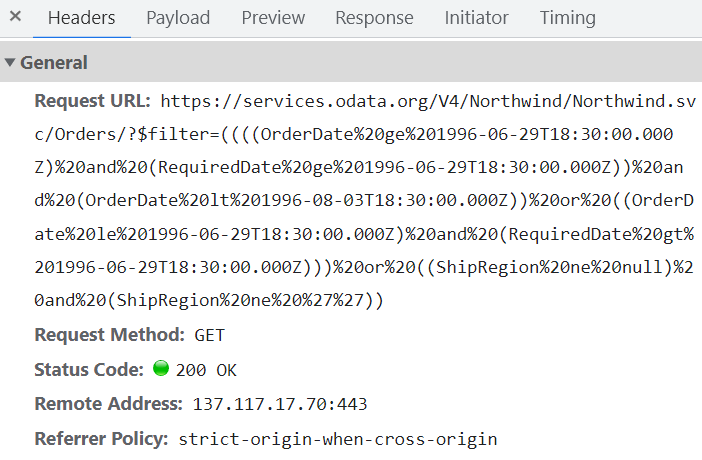
To enable server-side filtering operations based on predetermined conditions, the includeFiltersInQuery API to true. This constructs a filter query using the start date, end date, and recurrence rule, ensuring that only relevant data is requested from the server.
This method greatly improves the component’s performance by reducing the data that needs to be transferred to the client side. As a result, the component’s efficiency and responsiveness are significantly enhanced, resulting in a better user experience. However, it is important to consider the possibility of longer query strings, which may cause issues with the maximum URL length or server limitations on query string length.
<template>
    <div id='app'>
        <div id='container'>
            <ejs-schedule height='550px' :selectedDate='selectedDate' :eventSettings='eventSettings'
                :readOnly='readOnly'></ejs-schedule>
        </div>
    </div>
</template>
<script setup>
import { provide } from "vue";
import { DataManager, ODataV4Adaptor, Query } from '@syncfusion/ej2-data';
import { ScheduleComponent as EjsSchedule, Day, Week, WorkWeek, Month, Agenda } from '@syncfusion/ej2-vue-schedule';

let dataManager = new DataManager({
    url: 'https://services.odata.org/V4/Northwind/Northwind.svc/Orders/',
    adaptor: new ODataV4Adaptor(),
    crossDomain: true
});

const selectedDate = new Date(1996, 6, 9);
const readOnly = true;
const eventSettings = {
    query: new Query(),
    includeFiltersInQuery: true,
    dataSource: dataManager, fields: {
        id: 'Id',
        subject: { name: 'ShipName' },
        location: { name: 'ShipCountry' },
        description: { name: 'ShipAddress' },
        startTime: { name: 'OrderDate' },
        endTime: { name: 'RequiredDate' },
        recurrenceRule: { name: 'ShipRegion' }
    }
}

provide('schedule', [Day, Week, WorkWeek, Month, Agenda]);

</script>
<style>
@import "../node_modules/@syncfusion/ej2-base/styles/material3.css";
@import "../node_modules/@syncfusion/ej2-vue-buttons/styles/material3.css";
@import "../node_modules/@syncfusion/ej2-vue-calendars/styles/material3.css";
@import "../node_modules/@syncfusion/ej2-vue-dropdowns/styles/material3.css";
@import "../node_modules/@syncfusion/ej2-vue-inputs/styles/material3.css";
@import "../node_modules/@syncfusion/ej2-vue-navigations/styles/material3.css";
@import "../node_modules/@syncfusion/ej2-vue-popups/styles/material3.css";
@import "../node_modules/@syncfusion/ej2-vue-schedule/styles/material3.css";
</style><template>
<div id='app'>
<div id='container'>
<ejs-schedule height='550px' :selectedDate='selectedDate' :eventSettings='eventSettings'
:readOnly='readOnly'></ejs-schedule>
</div>
</div>
</template>
<script>
import { DataManager, ODataV4Adaptor, Query } from '@syncfusion/ej2-data';
import { ScheduleComponent, Day, Week, WorkWeek, Month, Agenda } from '@syncfusion/ej2-vue-schedule';
let dataManager = new DataManager({
url: 'https://services.odata.org/V4/Northwind/Northwind.svc/Orders/',
adaptor: new ODataV4Adaptor(),
crossDomain: true
});
export default {
name: "App",
components: {
"ejs-schedule": ScheduleComponent
},
data() {
return {
selectedDate: new Date(1996, 6, 9),
readOnly: true,
eventSettings: {
query: new Query(),
includeFiltersInQuery: true,
dataSource: dataManager, fields: {
id: 'Id',
subject: { name: 'ShipName' },
location: { name: 'ShipCountry' },
description: { name: 'ShipAddress' },
startTime: { name: 'OrderDate' },
endTime: { name: 'RequiredDate' },
recurrenceRule: { name: 'ShipRegion' }
}
}
};
},
provide: {
schedule: [Day, Week, WorkWeek, Month, Agenda]
}
}
</script>
<style>
@import "../node_modules/@syncfusion/ej2-base/styles/material3.css";
@import "../node_modules/@syncfusion/ej2-vue-buttons/styles/material3.css";
@import "../node_modules/@syncfusion/ej2-vue-calendars/styles/material3.css";
@import "../node_modules/@syncfusion/ej2-vue-dropdowns/styles/material3.css";
@import "../node_modules/@syncfusion/ej2-vue-inputs/styles/material3.css";
@import "../node_modules/@syncfusion/ej2-vue-navigations/styles/material3.css";
@import "../node_modules/@syncfusion/ej2-vue-popups/styles/material3.css";
@import "../node_modules/@syncfusion/ej2-vue-schedule/styles/material3.css";
</style>The following image represents how the parameters are passed using ODataV4 filter.
Using Custom Adaptor
Custom adaptors can be created by extending available built‑in adaptors. The following example demonstrates the custom adaptor usage and how to add a custom field EventID for the appointments by overriding the built-in response processing using the processResponse method of the ODataV4Adaptor.
<template>
    <div id='app'>
        <div id='container'>
            <ejs-schedule height='550px' :selectedDate='selectedDate' :eventSettings='eventSettings'
                :readOnly='readOnly'>
            </ejs-schedule>
        </div>
    </div>
</template>
<script setup>
import { provide } from "vue";
import { DataManager, ODataV4Adaptor, Query } from '@syncfusion/ej2-data';
import { ScheduleComponent as EjsSchedule, Day, Week, WorkWeek, Month, Agenda, View } from '@syncfusion/ej2-vue-schedule';

class CustomAdaptor extends ODataV4Adaptor {
    processResponse() {
        let i = 0;
        // calling base class processResponse function
        let original = super.processResponse.apply(this, arguments);
        // adding employee id
        original.forEach((item) => item['EventID'] = ++i);
        return original;
    }
}
let dataManager = new DataManager({
    url: 'https://services.odata.org/V4/Northwind/Northwind.svc/Orders/',
    adaptor: new CustomAdaptor(),
    crossDomain: true
});

const selectedDate = new Date(1996, 6, 9);
const readOnly = true;
const eventSettings = {
    dataSource: dataManager,
    fields: {
        id: 'Id',
        subject: { name: 'ShipName' },
        location: { name: 'ShipCountry' },
        description: { name: 'ShipAddress' },
        startTime: { name: 'OrderDate' },
        endTime: { name: 'RequiredDate' },
        recurrenceRule: { name: 'ShipRegion' }
    }
}

provide('schedule', [Day, Week, WorkWeek, Month, Agenda]);
</script>
<style>
@import "../node_modules/@syncfusion/ej2-base/styles/material3.css";
@import "../node_modules/@syncfusion/ej2-vue-buttons/styles/material3.css";
@import "../node_modules/@syncfusion/ej2-vue-calendars/styles/material3.css";
@import "../node_modules/@syncfusion/ej2-vue-dropdowns/styles/material3.css";
@import "../node_modules/@syncfusion/ej2-vue-inputs/styles/material3.css";
@import "../node_modules/@syncfusion/ej2-vue-navigations/styles/material3.css";
@import "../node_modules/@syncfusion/ej2-vue-popups/styles/material3.css";
@import "../node_modules/@syncfusion/ej2-vue-schedule/styles/material3.css";
</style><template>
<div id='app'>
<div id='container'>
<ejs-schedule height='550px' :selectedDate='selectedDate' :eventSettings='eventSettings'
:readOnly='readOnly'></ejs-schedule>
</div>
</div>
</template>
<script>
import { DataManager, ODataV4Adaptor } from '@syncfusion/ej2-data';
import { ScheduleComponent, Day, Week, WorkWeek, Month, Agenda, View } from '@syncfusion/ej2-vue-schedule';
class CustomAdaptor extends ODataV4Adaptor {
processResponse() {
let i = 0;
// calling base class processResponse function
let original = super.processResponse.apply(this, arguments);
// adding employee id
original.forEach((item) => item['EventID'] = ++i);
return original;
}
}
let dataManager = new DataManager({
url: 'https://services.odata.org/V4/Northwind/Northwind.svc/Orders/',
adaptor: new CustomAdaptor(),
crossDomain: true
});
export default {
name: "App",
components: {
"ejs-schedule": ScheduleComponent
},
data() {
return {
selectedDate: new Date(1996, 6, 9),
readOnly: true,
eventSettings: {
dataSource: dataManager,
fields: {
id: 'Id',
subject: { name: 'ShipName' },
location: { name: 'ShipCountry' },
description: { name: 'ShipAddress' },
startTime: { name: 'OrderDate' },
endTime: { name: 'RequiredDate' },
recurrenceRule: { name: 'ShipRegion' }
}
}
};
},
provide: {
schedule: [Day, Week, WorkWeek, Month, Agenda]
}
}
</script>
<style>
@import "../node_modules/@syncfusion/ej2-base/styles/material3.css";
@import "../node_modules/@syncfusion/ej2-vue-buttons/styles/material3.css";
@import "../node_modules/@syncfusion/ej2-vue-calendars/styles/material3.css";
@import "../node_modules/@syncfusion/ej2-vue-dropdowns/styles/material3.css";
@import "../node_modules/@syncfusion/ej2-vue-inputs/styles/material3.css";
@import "../node_modules/@syncfusion/ej2-vue-navigations/styles/material3.css";
@import "../node_modules/@syncfusion/ej2-vue-popups/styles/material3.css";
@import "../node_modules/@syncfusion/ej2-vue-schedule/styles/material3.css";
</style>Loading Data via AJAX Post
The event data can be loaded using an external AJAX request and assigned to the dataSource property of Scheduler. In the following example, data is retrieved from the server through an AJAX call and assigned to the Schedule component inside the onSuccess callback.
<template>
  <div id='app'>
    <div id='container'>
      <ejs-schedule height='550px' :selectedDate='selectedDate' :eventSettings='eventSettings'></ejs-schedule>
    </div>
  </div>
</template>
<script setup>
import { provide, ref } from "vue";
import { Ajax } from '@syncfusion/ej2-base';
import { ScheduleComponent as EjsSchedule, Day, Week, WorkWeek, Month, Agenda } from '@syncfusion/ej2-vue-schedule';

let dataManager = ref([]);
let ajax = new Ajax('Home/GetData', 'GET', false);
ajax.onSuccess = function (value) {
  dataManager = value;
};
ajax.send();

const selectedDate = new Date(2017, 5, 11);
const eventSettings = { dataSource: dataManager };

provide('schedule', [Day, Week, WorkWeek, Month, Agenda]);

</script><template>
<div id='app'>
<div id='container'>
<ejs-schedule height='550px' :selectedDate='selectedDate' :eventSettings='eventSettings'></ejs-schedule>
</div>
</div>
</template>
<script>
import { Ajax } from '@syncfusion/ej2-base';
import { ScheduleComponent, Day, Week, WorkWeek, Month, Agenda, View } from '@syncfusion/ej2-vue-schedule';
let dataManager = [];
let ajax = new Ajax('Home/GetData', 'GET', false);
ajax.onSuccess = function (value) {
dataManager = value;
};
ajax.send();
export default {
components: {
'ejs-schedule': ScheduleComponent
},
data() {
return {
selectedDate: new Date(2017, 5, 11),
eventSettings: { dataSource: dataManager }
};
},
provide: {
schedule: [Day, Week, WorkWeek, Month, Agenda]
}
}
</script>Definition for the controller method
GetDatacan be referred here.
Passing Additional Parameters to the Server
To send an additional custom parameter to the server-side post, you need to make use of the addParams method of Query. Now, assign this Query object with additional parameters to the query property of Scheduler.
<template>
    <div id='app'>
        <div id='container'>
            <ejs-schedule height='550px' :selectedDate='selectedDate' :eventSettings='eventSettings'
                :readOnly='readOnly'>
            </ejs-schedule>
        </div>
    </div>
</template>
<script setup>
import { provide } from "vue";
import { DataManager, ODataV4Adaptor, Query } from '@syncfusion/ej2-data';
import { ScheduleComponent as EjsSchedule, Day, Week, WorkWeek, Month, Agenda } from '@syncfusion/ej2-vue-schedule';

let dataManager = new DataManager({
    url: 'https://services.odata.org/V4/Northwind/Northwind.svc/Orders/',
    adaptor: new ODataV4Adaptor(),
    crossDomain: true
});

let dataQuery = new Query().addParams('readOnly', 'true');

const selectedDate = new Date(1996, 6, 9);
const readOnly = true;
const eventSettings = {
    dataSource: dataManager, query: dataQuery,
    fields: {
        id: 'Id',
        subject: { name: 'ShipName' },
        location: { name: 'ShipCountry' },
        description: { name: 'ShipAddress' },
        startTime: { name: 'OrderDate' },
        endTime: { name: 'RequiredDate' },
        recurrenceRule: { name: 'ShipRegion' }
    }
}

provide('schedule', [Day, Week, WorkWeek, Month, Agenda]);

</script>
<style>
@import "../node_modules/@syncfusion/ej2-base/styles/material3.css";
@import "../node_modules/@syncfusion/ej2-vue-buttons/styles/material3.css";
@import "../node_modules/@syncfusion/ej2-vue-calendars/styles/material3.css";
@import "../node_modules/@syncfusion/ej2-vue-dropdowns/styles/material3.css";
@import "../node_modules/@syncfusion/ej2-vue-inputs/styles/material3.css";
@import "../node_modules/@syncfusion/ej2-vue-navigations/styles/material3.css";
@import "../node_modules/@syncfusion/ej2-vue-popups/styles/material3.css";
@import "../node_modules/@syncfusion/ej2-vue-schedule/styles/material3.css";
</style><template>
<div id='app'>
<div id='container'>
<ejs-schedule height='550px' :selectedDate='selectedDate' :eventSettings='eventSettings'
:readOnly='readOnly'></ejs-schedule>
</div>
</div>
</template>
<script>
import { DataManager, ODataV4Adaptor, Query } from '@syncfusion/ej2-data';
import { ScheduleComponent, Day, Week, WorkWeek, Month, Agenda } from '@syncfusion/ej2-vue-schedule';
let dataManager = new DataManager({
url: 'https://services.odata.org/V4/Northwind/Northwind.svc/Orders/',
adaptor: new ODataV4Adaptor(),
crossDomain: true
});
let dataQuery = new Query().addParams('readOnly', 'true');
export default {
name: "App",
components: {
"ejs-schedule": ScheduleComponent
},
data() {
return {
selectedDate: new Date(1996, 6, 9),
readOnly: true,
eventSettings: {
dataSource: dataManager, query: dataQuery,
fields: {
id: 'Id',
subject: { name: 'ShipName' },
location: { name: 'ShipCountry' },
description: { name: 'ShipAddress' },
startTime: { name: 'OrderDate' },
endTime: { name: 'RequiredDate' },
recurrenceRule: { name: 'ShipRegion' }
}
}
};
},
provide: {
schedule: [Day, Week, WorkWeek, Month, Agenda]
}
}
</script>
<style>
@import "../node_modules/@syncfusion/ej2-base/styles/material3.css";
@import "../node_modules/@syncfusion/ej2-vue-buttons/styles/material3.css";
@import "../node_modules/@syncfusion/ej2-vue-calendars/styles/material3.css";
@import "../node_modules/@syncfusion/ej2-vue-dropdowns/styles/material3.css";
@import "../node_modules/@syncfusion/ej2-vue-inputs/styles/material3.css";
@import "../node_modules/@syncfusion/ej2-vue-navigations/styles/material3.css";
@import "../node_modules/@syncfusion/ej2-vue-popups/styles/material3.css";
@import "../node_modules/@syncfusion/ej2-vue-schedule/styles/material3.css";
</style>The parameters added using the
queryproperty will be sent along with the data request sent to the server on every scheduler actions.
Handling Failure Actions
During the time of Scheduler interacting with server, there are chances that some server-side exceptions may occur. You can acquire those error messages or exception details in client-side using the actionFailure event of Scheduler.
The argument passed to the actionFailure event contains the error details returned from the server.
<template>
    <div id='app'>
        <div id='container'>
            <ejs-schedule ref='scheduleObj' height='530px' :selectedDate='selectedDate' :eventSettings='eventSettings'
                :readOnly='readOnly' :actionFailure='onActionFailure'>
            </ejs-schedule>
        </div>
    </div>
</template>
<script setup>
import { provide } from "vue";
import { DataManager } from '@syncfusion/ej2-data';
import { ScheduleComponent as EjsSchedule, Day, Week, WorkWeek, Month, Agenda } from '@syncfusion/ej2-vue-schedule';

const scheduleObj = ref(null);
const dataManager = new DataManager({
    url: 'http://some.com/invalidUrl'
});

const selectedDate = new Date(2017, 5, 11);
const readOnly = true;
const eventSettings = { dataSource: dataManager };

const onActionFailure = function () {
    let span = document.createElement('span');
    let schedule = scheduleObj.value.ej2Instances;
    schedule.element.parentNode.insertBefore(span, schedule.element);
    span.style.color = '#FF0000'
    span.innerHTML = 'Server exception: 404 Not found';
}

provide('schedule', [Day, Week, WorkWeek, Month, Agenda]);
</script>
<style>
@import "../node_modules/@syncfusion/ej2-base/styles/material3.css";
@import "../node_modules/@syncfusion/ej2-vue-buttons/styles/material3.css";
@import "../node_modules/@syncfusion/ej2-vue-calendars/styles/material3.css";
@import "../node_modules/@syncfusion/ej2-vue-dropdowns/styles/material3.css";
@import "../node_modules/@syncfusion/ej2-vue-inputs/styles/material3.css";
@import "../node_modules/@syncfusion/ej2-vue-navigations/styles/material3.css";
@import "../node_modules/@syncfusion/ej2-vue-popups/styles/material3.css";
@import "../node_modules/@syncfusion/ej2-vue-schedule/styles/material3.css";
</style><template>
<div id='app'>
<div id='container'>
<ejs-schedule ref='scheduleObj' height='530px' :selectedDate='selectedDate' :eventSettings='eventSettings'
:readOnly='readOnly' :actionFailure='onActionFailure'>
</ejs-schedule>
</div>
</div>
</template>
<script>
import { DataManager } from '@syncfusion/ej2-data';
import { ScheduleComponent, Day, Week, WorkWeek, Month, Agenda } from '@syncfusion/ej2-vue-schedule';
const dataManager = new DataManager({
url: 'http://some.com/invalidUrl'
});
export default {
name: "App",
components: {
"ejs-schedule": ScheduleComponent
},
data() {
return {
selectedDate: new Date(2017, 5, 11),
readOnly: true,
eventSettings: { dataSource: dataManager }
};
},
methods: {
onActionFailure: function () {
let span = document.createElement('span');
let scheduleObj = this.$refs.scheduleObj.ej2Instances;
scheduleObj.element.parentNode.insertBefore(span, scheduleObj.element);
span.style.color = '#FF0000'
span.innerHTML = 'Server exception: 404 Not found';
}
},
provide: {
schedule: [Day, Week, WorkWeek, Month, Agenda]
}
}
</script>
<style>
@import "../node_modules/@syncfusion/ej2-base/styles/material3.css";
@import "../node_modules/@syncfusion/ej2-vue-buttons/styles/material3.css";
@import "../node_modules/@syncfusion/ej2-vue-calendars/styles/material3.css";
@import "../node_modules/@syncfusion/ej2-vue-dropdowns/styles/material3.css";
@import "../node_modules/@syncfusion/ej2-vue-inputs/styles/material3.css";
@import "../node_modules/@syncfusion/ej2-vue-navigations/styles/material3.css";
@import "../node_modules/@syncfusion/ej2-vue-popups/styles/material3.css";
@import "../node_modules/@syncfusion/ej2-vue-schedule/styles/material3.css";
</style>The
actionFailureevent will be triggered not only on server returning errors, but also when there is an exception while processing any of the Scheduler CRUD actions.
Scheduler CRUD Actions
The CRUD (Create, Read, Update and Delete) actions can be performed easily on Scheduler appointments using the various adaptors available within the DataManager. Most preferably, we will be using UrlAdaptor for performing CRUD actions on scheduler appointments.
<template>
  <div id='app'>
    <div id='container'>
      <ejs-schedule height='550px' :selectedDate='selectedDate' :eventSettings='eventSettings'></ejs-schedule>
    </div>
  </div>
</template>
<script setup>
import { provide } from 'vue';
import { ScheduleComponent as EjsSchedule, Day, Week, WorkWeek, Month, Agenda } from '@syncfusion/ej2-vue-schedule';
import { DataManager, UrlAdaptor } from '@syncfusion/ej2-data';

let dataManager = new DataManager({
  url: 'Home/GetData', // 'controller/actions'
  crudUrl: 'Home/UpdateData',
  adaptor: new UrlAdaptor
});

const selectedDate = new Date(2017, 5, 11);
const eventSettings = { dataSource: dataManager };

provide('schedule', [Day, Week, WorkWeek, Month, Agenda])

</script><template>
<div id='app'>
<div id='container'>
<ejs-schedule height='550px' :selectedDate='selectedDate' :eventSettings='eventSettings'></ejs-schedule>
</div>
</div>
</template>
<script>
import { ScheduleComponent, Day, Week, WorkWeek, Month, Agenda } from '@syncfusion/ej2-vue-schedule';
import { DataManager, UrlAdaptor } from '@syncfusion/ej2-data';
let dataManager = new DataManager({
url: 'Home/GetData', // 'controller/actions'
crudUrl: 'Home/UpdateData',
adaptor: new UrlAdaptor
});
export default {
components: {
'ejs-schedule': ScheduleComponent
},
data() {
return {
selectedDate: new Date(2017, 5, 11),
eventSettings: { dataSource: dataManager }
};
},
provide: {
schedule: [Day, Week, WorkWeek, Month, Agenda]
}
}
</script>The server-side controller code to handle the CRUD operations are as follows.
using System;
using System.Collections.Generic;
using System.Linq;
using System.Web;
using System.Web.Mvc;
using ScheduleSample.Models;

namespace ScheduleSample.Controllers
{
    public class HomeController : Controller
    {
        ScheduleDataDataContext db = new ScheduleDataDataContext();
        public ActionResult Index()
        {
            return View();
        }
        public JsonResult LoadData()  // Here we get the Start and End Date and based on that can filter the data and return to Scheduler
        {
            var data = db.ScheduleEventDatas.ToList();
            return Json(data, JsonRequestBehavior.AllowGet);
        }

        [HttpPost]
        public JsonResult UpdateData(EditParams param)
        {
            if (param.action == "insert" || (param.action == "batch" && param.added != null)) // this block of code will execute while inserting the appointments
            {
                var value = (param.action == "insert") ? param.value : param.added[0];
                int intMax = db.ScheduleEventDatas.ToList().Count > 0 ? db.ScheduleEventDatas.ToList().Max(p => p.Id) : 1;
                DateTime startTime = Convert.ToDateTime(value.StartTime);
                DateTime endTime = Convert.ToDateTime(value.EndTime);
                ScheduleEventData appointment = new ScheduleEventData()
                {
                    Id = intMax + 1,
                    StartTime = startTime.ToLocalTime(),
                    EndTime = endTime.ToLocalTime(),
                    Subject = value.Subject,
                    IsAllDay = value.IsAllDay,
                    StartTimezone = value.StartTimezone,
                    EndTimezone = value.EndTimezone,
                    RecurrenceRule = value.RecurrenceRule,
                    RecurrenceID = value.RecurrenceID,
                    RecurrenceException = value.RecurrenceException
                };
                db.ScheduleEventDatas.InsertOnSubmit(appointment);
                db.SubmitChanges();
            }
            if (param.action == "update" || (param.action == "batch" && param.changed != null)) // this block of code will execute while updating the appointment
            {
                var value = (param.action == "update") ? param.value : param.changed[0];
                var filterData = db.ScheduleEventDatas.Where(c => c.Id == Convert.ToInt32(value.Id));
                if (filterData.Count() > 0)
                {
                    DateTime startTime = Convert.ToDateTime(value.StartTime);
                    DateTime endTime = Convert.ToDateTime(value.EndTime);
                    ScheduleEventData appointment = db.ScheduleEventDatas.Single(A => A.Id == Convert.ToInt32(value.Id));
                    appointment.StartTime = startTime.ToLocalTime();
                    appointment.EndTime = endTime.ToLocalTime();
                    appointment.StartTimezone = value.StartTimezone;
                    appointment.EndTimezone = value.EndTimezone;
                    appointment.Subject = value.Subject;
                    appointment.IsAllDay = value.IsAllDay;
                    appointment.RecurrenceRule = value.RecurrenceRule;
                    appointment.RecurrenceID = value.RecurrenceID;
                    appointment.RecurrenceException = value.RecurrenceException;
                }
                db.SubmitChanges();
            }
            if (param.action == "remove" || (param.action == "batch" && param.deleted != null)) // this block of code will execute while removing the appointment
            {
                if (param.action == "remove")
                {
                    int key = Convert.ToInt32(param.key);
                    ScheduleEventData appointment = db.ScheduleEventDatas.Where(c => c.Id == key).FirstOrDefault();
                    if (appointment != null) db.ScheduleEventDatas.DeleteOnSubmit(appointment);
                }
                else
                {
                    foreach (var apps in param.deleted)
                    {
                        ScheduleEventData appointment = db.ScheduleEventDatas.Where(c => c.Id == apps.Id).FirstOrDefault();
                        if (appointment != null) db.ScheduleEventDatas.DeleteOnSubmit(appointment);
                    }
                }
                db.SubmitChanges();
            }
            var data = db.ScheduleEventDatas.ToList();
            return Json(data, JsonRequestBehavior.AllowGet);
        }

        public class EditParams
        {
            public string key { get; set; }
            public string action { get; set; }
            public List<ScheduleEventData> added { get; set; }
            public List<ScheduleEventData> changed { get; set; }
            public List<ScheduleEventData> deleted { get; set; }
            public ScheduleEventData value { get; set; }
        }
    }
}
Configuring Scheduler with Google API service
A custom Google Calendar URL can be assigned to the DataManager, which is then used as the dataSource. Since the events data retrieved from the Google Calendar will be in its own object format, therefore it needs to be resolved manually within the Scheduler’s dataBinding event. Within this event, the event fields needs to be mapped properly and then assigned to the result.
<template>
  <div id='app'>
    <div id='container'>
      <ejs-schedule :height='height' :currentView='currentView' :readonly='readonly' :eventSettings='eventSettings'
        :dataBinding='onDataBinding'>
      </ejs-schedule>
    </div>
  </div>
</template>

<script setup>
import { provide } from "vue";
import { DataManager, WebApiAdaptor } from '@syncfusion/ej2-data';
import { ScheduleComponent as EjsSchedule, Day, Week, WorkWeek, Month, Agenda } from '@syncfusion/ej2-vue-schedule';

var calendarId = 'en.usa%[email protected]';
var publicKey = 'AIzaSyBgbX_tgmVanBP4yafDPPXxWr70sjbKAXM';
var dataManager = new DataManager({
  url: 'https://www.googleapis.com/calendar/v3/calendars/' + calendarId + '/events?key=' + publicKey,
  adaptor: new WebApiAdaptor,
  crossDomain: true
});


const height = '550px';
const eventSettings = {
  dataSource: dataManager
};
const readonly = true;
const currentView = 'Month'

const onDataBinding = function (e) {
  var items = e.result.items;
  var scheduleData = [];
  if (items.length > 0) {
    for (var i = 0; i < items.length; i++) {
      var event = items[i];
      var when = event.start.dateTime;
      var start = event.start.dateTime;
      var end = event.end.dateTime;
      if (!when) {
        when = event.start.date;
        start = event.start.date;
        end = event.end.date;
      }
      scheduleData.push({
        Id: event.id,
        Subject: event.summary,
        StartTime: new Date(start),
        EndTime: new Date(end),
        IsAllDay: !event.start.dateTime
      });
    }
  }
  e.result = scheduleData;
}

provide('schedule', [Day, Week, WorkWeek, Month, Agenda]);


</script>
<style>
@import "../node_modules/@syncfusion/ej2-base/styles/material3.css";
@import "../node_modules/@syncfusion/ej2-vue-buttons/styles/material3.css";
@import "../node_modules/@syncfusion/ej2-vue-calendars/styles/material3.css";
@import "../node_modules/@syncfusion/ej2-vue-dropdowns/styles/material3.css";
@import "../node_modules/@syncfusion/ej2-vue-inputs/styles/material3.css";
@import "../node_modules/@syncfusion/ej2-vue-navigations/styles/material3.css";
@import "../node_modules/@syncfusion/ej2-vue-popups/styles/material3.css";
@import "../node_modules/@syncfusion/ej2-vue-schedule/styles/material3.css";
</style><template>
<div id='app'>
<div id='container'>
<ejs-schedule :height='height' :currentView='currentView' :readonly='readonly' :eventSettings='eventSettings'
:dataBinding='onDataBinding'></ejs-schedule>
</div>
</div>
</template>
<script>
import { DataManager, WebApiAdaptor } from '@syncfusion/ej2-data';
import { ScheduleComponent, Day, Week, WorkWeek, Month, Agenda } from '@syncfusion/ej2-vue-schedule';
var calendarId = 'en.usa%[email protected]';
var publicKey = 'AIzaSyBgbX_tgmVanBP4yafDPPXxWr70sjbKAXM';
var dataManager = new DataManager({
url: 'https://www.googleapis.com/calendar/v3/calendars/' + calendarId + '/events?key=' + publicKey,
adaptor: new WebApiAdaptor,
crossDomain: true
});
export default {
name: "App",
components: {
"ejs-schedule": ScheduleComponent
},
data() {
return {
height: '550px',
eventSettings: {
dataSource: dataManager
},
readonly: true,
currentView: 'Month'
}
},
methods: {
onDataBinding: function (e) {
var items = e.result.items;
var scheduleData = [];
if (items.length > 0) {
for (var i = 0; i < items.length; i++) {
var event = items[i];
var when = event.start.dateTime;
var start = event.start.dateTime;
var end = event.end.dateTime;
if (!when) {
when = event.start.date;
start = event.start.date;
end = event.end.date;
}
scheduleData.push({
Id: event.id,
Subject: event.summary,
StartTime: new Date(start),
EndTime: new Date(end),
IsAllDay: !event.start.dateTime
});
}
}
e.result = scheduleData;
}
},
provide: {
schedule: [Day, Week, WorkWeek, Month, Agenda]
}
}
</script>
<style>
@import "../node_modules/@syncfusion/ej2-base/styles/material3.css";
@import "../node_modules/@syncfusion/ej2-vue-buttons/styles/material3.css";
@import "../node_modules/@syncfusion/ej2-vue-calendars/styles/material3.css";
@import "../node_modules/@syncfusion/ej2-vue-dropdowns/styles/material3.css";
@import "../node_modules/@syncfusion/ej2-vue-inputs/styles/material3.css";
@import "../node_modules/@syncfusion/ej2-vue-navigations/styles/material3.css";
@import "../node_modules/@syncfusion/ej2-vue-popups/styles/material3.css";
@import "../node_modules/@syncfusion/ej2-vue-schedule/styles/material3.css";
</style>For more information, refer to the Vue Scheduler feature tour page for its groundbreaking feature representations and explore the Vue Scheduler example to knows how to present and manipulate data.