Getting started with React Form Renderer component
The Form Renderer is a powerful, schema-driven component that enables you to build and render complex forms with ease using a structured JSON schema definition. It streamlines form creation, customization, and data capture by letting you declaratively define form layouts, fields, and validation rules, and then render the form with a simple component property binding.
This guide provides step-by-step instructions for setting up a Vite + React project with TypeScript and integrating the Syncfusion® React Form Renderer component. For other setup flows (Create React App, framework host setups), see See Also.
Prerequisites
- Install a supported Node.js LTS release and npm (or another Node package manager) before continuing.
- Ensure your environment meets the System Requirements for Syncfusion® React UI Components.
- Supported React and Syncfusion package combinations are listed in the Version Compatibility guide. This walkthrough assumes React 18+ with the default Vite + React + TypeScript scaffolding.
Set up the Vite project
To create a new React application, run one of the following commands based on your preferred language:
React with JavaScript
npm create vite@latest my-project -- --template reactyarn create vite my-project --template reactReact with TypeScript
npm create vite@latest my-project -- --template react-tsyarn create vite my-project --template react-tsDuring the setup process, the CLI will prompt you for a few configuration options. Select the following:
- Which linter to use? → ESLint
- Install with npm and start now? → Yes
Selecting Yes automatically installs the project dependencies and starts the development server.
After verifying that the application starts successfully, terminate the development server in the terminal and proceed to the next step.
Then, navigate to the project directory:
cd my-projectAdd Syncfusion® React packages
All Syncfusion Essential® JS 2 packages are published to the npm registry.
To install the React Form Renderer package, use the following command:
npm install @syncfusion/ej2-react-form-rendereryarn add @syncfusion/ej2-react-form-rendererImport Syncfusion® CSS styles
Themes for Syncfusion® React components can be applied using CSS or SASS files from the npm theme packages, CDN, CRG, or Theme Studio. For more information, see the themes documentation.
This guide uses the Material 3 theme as an example, sourced from the theme package. To install the Material 3 theme package, use the following command:
npm install @syncfusion/ej2-material3-themeyarn add @syncfusion/ej2-material3-themeBy default, Vite projects include a src/index.css file with default styles. These default styles may conflict with Syncfusion component styles. Clear all content from the src/index.css file to prevent style conflicts.
The required styles for the Form Renderer are imported in the src/App.css file:
@import "@syncfusion/ej2-material3-theme/styles/material3.css";Adding the Form Renderer component
Now, add the React Form Renderer component to the src/App.tsx file by importing and using it within the application.
The Form Renderer is a schema-driven component. Create your form by passing a JSON schema to the schema property of the <FormRendererComponent> element, and capture the submitted form data through the submit event.
Add the following code to the src/App.tsx file:
import { FormRendererComponent, Schema } from '@syncfusion/ej2-react-form-renderer';
import './App.css';

function App() {
  const schema: Schema = {
    "version": "0.1.0",
    "properties": {
      "emailAddress": {
        "id": "textbox_1785491685456_167",
        "name": "emailAddress",
        "type": "string",
        "label": "Email Address",
        "textboxType": "email",
        "required": true,
        "widget": "textbox"
      },
      "password": {
        "id": "textbox_1785491685456_537",
        "name": "password",
        "type": "string",
        "label": "Password",
        "textboxType": "password",
        "required": true,
        "minLength": 6,
        "widget": "textbox"
      },
      "rememberMe": {
        "id": "checkbox_1785491685456_262",
        "name": "rememberMe",
        "type": "boolean",
        "label": "Remember Me",
        "widget": "checkbox"
      },
      "submit": {
        "id": "submit_button_initial",
        "name": "defaultFormsubmit",
        "type": "button",
        "label": "Submit",
        "buttonType": "submit",
        "widget": "button",
        "style": "primary",
        "disabled": false
      }
    },
    "layout": [
      {
        "type": "field",
        "propertyId": "emailAddress"
      },
      {
        "type": "field",
        "propertyId": "password"
      },
      {
        "type": "field",
        "propertyId": "rememberMe"
      },
      {
        "type": "field",
        "propertyId": "submit"
      }
    ],
    "settings": {
      "name": "Untitled Form"
    }
  };

  const onSubmit = (args: any) => {
    if (args.data) {
      console.log(args.data, args.isValid);
    }
  };

  return (
    <FormRendererComponent schema={schema} submit={onSubmit} />
  );
}

export default App;
import { FormRendererComponent } from '@syncfusion/ej2-react-form-renderer';
import './App.css';
function App() {
const schema = {
"version": "0.1.0",
"properties": {
"emailAddress": {
"id": "textbox_1785491685456_167",
"name": "emailAddress",
"type": "string",
"label": "Email Address",
"textboxType": "email",
"required": true,
"widget": "textbox"
},
"password": {
"id": "textbox_1785491685456_537",
"name": "password",
"type": "string",
"label": "Password",
"textboxType": "password",
"required": true,
"minLength": 6,
"widget": "textbox"
},
"rememberMe": {
"id": "checkbox_1785491685456_262",
"name": "rememberMe",
"type": "boolean",
"label": "Remember Me",
"widget": "checkbox"
},
"submit": {
"id": "submit_button_initial",
"name": "defaultFormsubmit",
"type": "button",
"label": "Submit",
"buttonType": "submit",
"widget": "button",
"style": "primary",
"disabled": false
}
},
"layout": [
{ "type": "field", "propertyId": "emailAddress" },
{ "type": "field", "propertyId": "password" },
{ "type": "field", "propertyId": "rememberMe" },
{ "type": "field", "propertyId": "submit" }
],
"settings": {
"name": "Untitled Form"
}
};
const onSubmit = (args) => {
if (args.data) {
console.log(args.data, args.isValid);
}
};
return (
<FormRendererComponent schema={schema} submit={onSubmit} />
);
}
export default App;Run the application
Run the npm run dev command in the terminal to start the development server. This command compiles your code and serves the application locally, opening it in the browser.
npm run devWhen the build succeeds, Vite reports a local URL (default: http://localhost:5173). Open that URL in a browser to view the Form Renderer. If the port is already in use, Vite automatically picks the next free port and prints the new URL in the terminal.
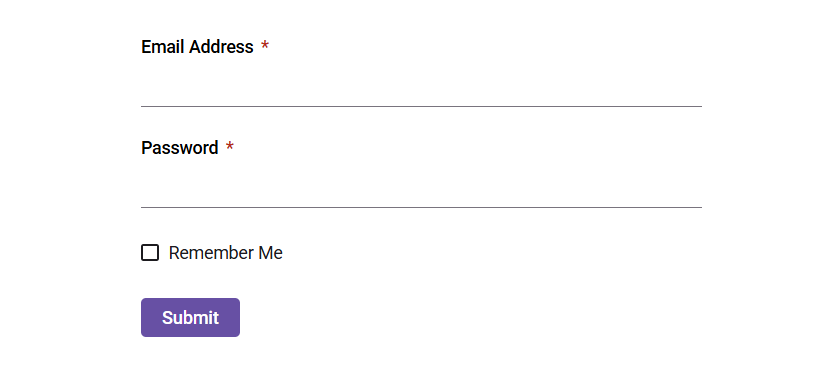
The output will appear as follows:
See Also
- Getting Started with Vite + React — alternative Vite-focused walkthrough
- Getting Started with Create React App — using CRA as the bundler
- Getting Started with React and ASP.NET Core — server-side integration
- Getting Started with Next.js
- Getting Started with React and Electron
- Upgrade Guide