How can I help you?
Getting Started with the Vue TreeMap Component in Vue 3
18 Mar 202623 minutes to read
This guide demonstrates how to set up the Syncfusion® Vue TreeMap component in a Vue 3 project using Vite as the build tool, alongside either the Composition API or Options API for component logic management.
Composition API vs Options API
Vue 3 supports two approaches for writing components:
-
Composition API: Introduced in Vue 3, this approach organizes component logic as reusable functions called composition functions. It provides greater flexibility for code organization and reuse, making it ideal for complex components or shared logic patterns.
-
Options API: The traditional Vue approach where component logic is organized into defined options (data, methods, computed properties, watchers, and life cycle hooks). This approach remains fully supported and is familiar to Vue 2 developers.
Prerequisites
System requirements for Syncfusion® Vue UI components
Set up the Vite project
A recommended approach for beginning with Vue is to scaffold a project using Vite. To create a new Vite project, use one of the commands that are specific to either NPM or Yarn.
npm create vite@latestor
yarn create viteUsing one of the above commands will lead to a series of configuration prompts. Follow these steps to complete the setup:
-
Define the project name: Specify the project name directly. For this guide, the project is named
my-project.
? Project name: » my-project-
Select the framework: Choose
Vuefrom the available framework options to create a Vue 3 project.
? Select a framework: » - Use arrow-keys. Return to submit.
Vanilla
> Vue
  React
  Preact
  Lit
  Svelte
Others-
Select the variant: Choose
JavaScriptto build the Vite project using JavaScript and Vue.
? Select a variant: » - Use arrow-keys. Return to submit.
> JavaScript
  TypeScript
  Customize with create-vue ↗
Nuxt ↗-
Install dependencies: After completing the above steps to create the
my-project, run the following command to install its dependencies:
cd my-project
npm install
or
cd my-project
yarn install
Now that my-project is ready to run with default settings, let’s add Syncfusion® components to the project.
Add Syncfusion® Vue packages
Syncfusion® Vue component packages are available at npmjs.com. To use Syncfusion® Vue components in the project, install the corresponding npm package.
This article uses the Vue TreeMap component as an example. To use the Vue TreeMap component in the project, the @syncfusion/ej2-vue-treemap package needs to be installed using the following command:
npm install @syncfusion/ej2-vue-treemap --saveor
yarn add @syncfusion/ej2-vue-treemapAdd Syncfusion® Vue TreeMap Component
Follow these steps to add the Vue TreeMap component using either the Composition API or Options API:
- Import and register the TreeMap component and required modules in the
scriptsection of the src/App.vue file. For the Composition API, add thesetupattribute to thescripttag.
<script setup>
import { TreeMapComponent as EjsTreemap, TreeMapLegend } from "@syncfusion/ej2-vue-treemap";
import { TreeMap } from '@syncfusion/ej2-treemap';
TreeMap.Inject(TreeMapLegend);
</script><script>
import { TreeMapComponent, TreeMapLegend } from "@syncfusion/ej2-vue-treemap";
//Component registration
export default {
name: "App",
components: {
'ejs-treemap': TreeMapComponent
}
}
</script>- In the
templatesection, define the TreeMap component with properties such as dataSource, weightValuePath, leafItemSettings, and legendSettings.
<template>
  <ejs-treemap id="treemap" :dataSource="dataSource" :weightValuePath="weightValuePath" :leafItemSettings="leafItemSettings" :equalColorValuePath="equalColorValuePath" :legendSettings="legendSettings"></ejs-treemap>
</template>- In the
scriptsection, declare the values for the properties defined in thetemplatesection.
<script setup>
    const dataSource= [
            { Title: 'State wise International Airport count in South America', State: "Brazil", Count: 25 },
            { Title: 'State wise International Airport count in South America', State: "Colombia", Count: 12 },
            { Title: 'State wise International Airport count in South America', State: "Argentina", Count: 9 },
            { Title: 'State wise International Airport count in South America', State: "Ecuador", Count: 7 },
            { Title: 'State wise International Airport count in South America', State: "Chile", Count: 6 },
            { Title: 'State wise International Airport count in South America', State: "Peru", Count: 3 },
            { Title: 'State wise International Airport count in South America', State: "Venezuela", Count: 3 },
            { Title: 'State wise International Airport count in South America', State: "Bolivia", Count: 2 },
            { Title: 'State wise International Airport count in South America', State: "Paraguay", Count: 2 },
            { Title: 'State wise International Airport count in South America', State: "Uruguay", Count: 2 },
            { Title: 'State wise International Airport count in South America', State: "Falkland Islands",Count: 1 },
            { Title: 'State wise International Airport count in South America', State: "French Guiana", Count:1 },
            { Title: 'State wise International Airport count in South America', State: "Guyana", Count: 1 },
            { Title: 'State wise International Airport count in South America', State: "Suriname", Count: 1 }
    ];
    const weightValuePath = 'Count';
    const equalColorValuePath = "Count";
    const leafItemSettings = {
          labelPath: "State",
          colorMapping: [
              { value: "25", color: "#634D6F" },
              { value: "12", color: "#B34D6D" },
              { value: "9", color: "#557C5C" },
              { value: "7", color: "#44537F" },
              { value: "6", color: "#637392" },
              { value: "3", color: "#7C754D" },
              { value: "2", color: "#2E7A64" },
              { value: "1", color: "#95659A" }
            ]
          };
    const legendSettings = {
            visible: true
    };
</script><script>
data() {
return {
dataSource: [
{ Title: 'State wise International Airport count in South America', State: "Brazil", Count: 25 },
{ Title: 'State wise International Airport count in South America', State: "Colombia", Count: 12 },
{ Title: 'State wise International Airport count in South America', State: "Argentina", Count: 9 },
{ Title: 'State wise International Airport count in South America', State: "Ecuador", Count: 7 },
{ Title: 'State wise International Airport count in South America', State: "Chile", Count: 6 },
{ Title: 'State wise International Airport count in South America', State: "Peru", Count: 3 },
{ Title: 'State wise International Airport count in South America', State: "Venezuela", Count: 3 },
{ Title: 'State wise International Airport count in South America', State: "Bolivia", Count: 2 },
{ Title: 'State wise International Airport count in South America', State: "Paraguay", Count: 2 },
{ Title: 'State wise International Airport count in South America', State: "Uruguay", Count: 2 },
{ Title: 'State wise International Airport count in South America', State: "Falkland Islands",Count: 1 },
{ Title: 'State wise International Airport count in South America', State: "French Guiana", Count:1 },
{ Title: 'State wise International Airport count in South America', State: "Guyana", Count: 1 },
{ Title: 'State wise International Airport count in South America', State: "Suriname", Count: 1 }
],
weightValuePath: 'Count',
equalColorValuePath: "Count",
leafItemSettings: {
labelPath: "State",
colorMapping: [
{ value: "25", color: "#634D6F" },
{ value: "12", color: "#B34D6D" },
{ value: "9", color: "#557C5C" },
{ value: "7", color: "#44537F" },
{ value: "6", color: "#637392" },
{ value: "3", color: "#7C754D" },
{ value: "2", color: "#2E7A64" },
{ value: "1", color: "#95659A" }
]
},
legendSettings: {
visible: true
}
};
}
</script>Here is the summarized code for the above steps in the src/App.vue file:
<template>
     <ejs-treemap id="treemap" :dataSource="dataSource" :weightValuePath="weightValuePath" :leafItemSettings="leafItemSettings" :equalColorValuePath="equalColorValuePath" :legendSettings="legendSettings"></ejs-treemap>
</template>

<script setup>
import { TreeMapComponent as EjsTreemap, TreeMapLegend } from "@syncfusion/ej2-vue-treemap";
import { TreeMap } from '@syncfusion/ej2-treemap';
TreeMap.Inject(TreeMapLegend);
const dataSource= [
            { Title: 'State wise International Airport count in South America', State: "Brazil", Count: 25 },
            { Title: 'State wise International Airport count in South America', State: "Colombia", Count: 12 },
            { Title: 'State wise International Airport count in South America', State: "Argentina", Count: 9 },
            { Title: 'State wise International Airport count in South America', State: "Ecuador", Count: 7 },
            { Title: 'State wise International Airport count in South America', State: "Chile", Count: 6 },
            { Title: 'State wise International Airport count in South America', State: "Peru", Count: 3 },
            { Title: 'State wise International Airport count in South America', State: "Venezuela", Count: 3 },
            { Title: 'State wise International Airport count in South America', State: "Bolivia", Count: 2 },
            { Title: 'State wise International Airport count in South America', State: "Paraguay", Count: 2 },
            { Title: 'State wise International Airport count in South America', State: "Uruguay", Count: 2 },
            { Title: 'State wise International Airport count in South America', State: "Falkland Islands",Count: 1 },
            { Title: 'State wise International Airport count in South America', State: "French Guiana", Count:1 },
            { Title: 'State wise International Airport count in South America', State: "Guyana", Count: 1 },
            { Title: 'State wise International Airport count in South America', State: "Suriname", Count: 1 }
  ];
  const weightValuePath = 'Count';
  const equalColorValuePath = "Count";
  const leafItemSettings = {
        labelPath: "State",
        colorMapping: [
            { value: "25", color: "#634D6F" },
            { value: "12", color: "#B34D6D" },
            { value: "9", color: "#557C5C" },
            { value: "7", color: "#44537F" },
            { value: "6", color: "#637392" },
            { value: "3", color: "#7C754D" },
            { value: "2", color: "#2E7A64" },
            { value: "1", color: "#95659A" }
          ]
        };
  const legendSettings = {
          visible: true
  };
</script><template>
<ejs-treemap id="treemap" :dataSource="dataSource" :weightValuePath="weightValuePath" :leafItemSettings="leafItemSettings" :equalColorValuePath="equalColorValuePath" :legendSettings="legendSettings"></ejs-treemap>
</template>
<script>
import { TreeMapComponent, TreeMapLegend } from "@syncfusion/ej2-vue-treemap";
// Component registration
export default {
name: "App",
// Declaring component and its directives
components: {
'ejs-treemap': TreeMapComponent
},
// Bound properties declarations
data() {
return {
dataSource: [
{ Title: 'State wise International Airport count in South America', State: "Brazil", Count: 25 },
{ Title: 'State wise International Airport count in South America', State: "Colombia", Count: 12 },
{ Title: 'State wise International Airport count in South America', State: "Argentina", Count: 9 },
{ Title: 'State wise International Airport count in South America', State: "Ecuador", Count: 7 },
{ Title: 'State wise International Airport count in South America', State: "Chile", Count: 6 },
{ Title: 'State wise International Airport count in South America', State: "Peru", Count: 3 },
{ Title: 'State wise International Airport count in South America', State: "Venezuela", Count: 3 },
{ Title: 'State wise International Airport count in South America', State: "Bolivia", Count: 2 },
{ Title: 'State wise International Airport count in South America', State: "Paraguay", Count: 2 },
{ Title: 'State wise International Airport count in South America', State: "Uruguay", Count: 2 },
{ Title: 'State wise International Airport count in South America', State: "Falkland Islands",Count: 1 },
{ Title: 'State wise International Airport count in South America', State: "French Guiana", Count:1 },
{ Title: 'State wise International Airport count in South America', State: "Guyana", Count: 1 },
{ Title: 'State wise International Airport count in South America', State: "Suriname", Count: 1 }
],
weightValuePath: 'Count',
equalColorValuePath: "Count",
leafItemSettings: {
labelPath: "State",
colorMapping: [
{ value: "25", color: "#634D6F" },
{ value: "12", color: "#B34D6D" },
{ value: "9", color: "#557C5C" },
{ value: "7", color: "#44537F" },
{ value: "6", color: "#637392" },
{ value: "3", color: "#7C754D" },
{ value: "2", color: "#2E7A64" },
{ value: "1", color: "#95659A" }
]
},
legendSettings: {
visible: true
}
};
},
provide: {
treemap:[TreeMapLegend]
}
};
</script>Run the project
To run the project, use the following command:
npm run devor
yarn run devThe output will appear as follows:
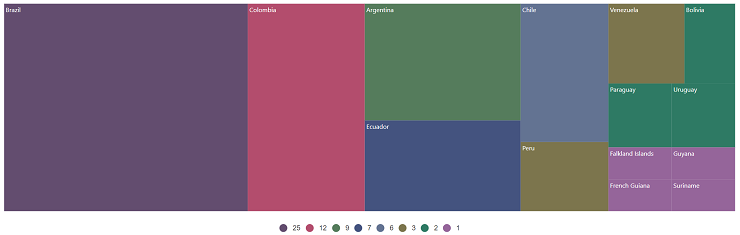
Sample: vue3-treemap-getting-started.