Build the SkyBook Sample
This page is a complete end-to-end walkthrough: you will create a small but real React application, the SkyBook flight-booking app, using the Composer Playground, an A2A agent, and the Syncfusion A2UI for React package renderer.
You will:
- Use the Composer to author three surfaces for SkyBook (Search Flight, Flight Results, Booking Confirmed).
- Copy the JSON files out of the Composer.
- Bind them to a Syncfusion A2UI Agent with one method call:
agent.set_design(...). - Build the SkyBook React app and run it against the agent.
By the end you will have a running chat app whose agent emits three locked A2UI surfaces on demand.
If any Composer terminology is unfamiliar (Create, Workspace, Gallery, Playground, Catalog), see Walkthrough first.
What you will build
SkyBook is a three-stage flight-booking experience. Each stage is one surface, copied from the Composer as its own JSON file:
| Stage | Trigger | Purpose |
|---|---|---|
| 1 — Search Flight | Any booking request | Collect flight route, cabin, dates, passenger details, accessibility needs |
| 2 — Flight Results | Button click with event:{name:"submit_booking"}
|
Recap captured fields, show computed fare breakdown, require explicit agreement |
| 3 — Booking Confirmed | Button click with event:{name:"confirm_booking"}
|
Final receipt with booking reference, itinerary, passenger summary, and amount paid |
Step 1 — Create the three SkyBook surfaces in the Composer
For each of the three stages below, you author one surface in the Composer. The flow per surface is identical:
- Open the Composer and go to the Create page.
- Paste the corresponding prompt (provided below) into the prompt box and click Generate UI.
- Review the surface on the Workspace page. Use the AI Assistant tab to tweak fields or labels as needed.
- Click Copy JSON.
- Save the JSON to the matching file in your agent repo (see Step 2).
You can also start from the Gallery and copy the closest template, then refine it in Workspace.
Surface 1 — Search Flight form
Composer prompt
Build a single-page SkyWave Airlines flight booking form. Use two Card sections stacked vertically with 16px gaps. Card 1 ‘Flight Details’ has, in order, a ‘From’ TextBox, a ‘To’ TextBox, a ‘Trip Type’ DropDownList with options One-Way and Round-Trip, a ‘Cabin Class’ DropDownList with options Economy / Business / First Class, a ‘Departure Date’ DatePicker, a ‘Return Date’ DatePicker, and an ‘Adults’ NumericTextBox defaulting to 1 with min 1 and max 9. Card 2 ‘Passenger Details’ has a ‘Full Name’ TextBox, a ‘Date of Birth’ DatePicker, an ‘Email’ TextBox, a ‘Phone’ TextBox, and a ‘Wheelchair assistance required’ CheckBox. Below both cards place a primary ‘Review Booking’ button aligned to the right edge. Use the SkyWave brand: green primary AppBar, soft borders, 16px gaps.
Save as: examples/designs/stage1-flight-search.json
Surface 2 — Flight Results
Composer prompt
Build a single-page SkyWave Airlines booking confirmation page. Use four Card sections stacked vertically with 20px gaps. Card 1 ‘Flight Details’ shows the route as ‘{origin} → {destination}’ as a large heading, with a row of four labeled pairs: Departure, Cabin, Passengers (e.g. ‘2 Adults’), and Trip Type. Card 2 ‘Passenger Details’ shows three labeled pairs: Full Name, Email, Phone. Card 3 ‘Fare Breakdown’ lists Base Fare, Taxes & Fees, and a bold Total Payable, with an information note that the fare is non-refundable after 24 hours. Card 4 ‘Confirm Booking’ has an agreement Checkbox for fare rules followed by two buttons in a row: a ‘Modify Booking’ outline button and a primary ‘Confirm & Pay’ success button. Use the SkyWave brand: green primary AppBar, soft borders, 16px gaps.
Save as: examples/designs/stage2-flight-results.json
Surface 3 — Booking Confirmed
Composer prompt
Build a single-page SkyWave Airlines booking confirmed page. At the top, render a green Success Message with the text ‘Booking Confirmed! Reference: {bookingRef}.’ Below it, render four Card sections stacked vertically with 20px gaps. Card 1 ‘Booking Reference’ shows the booking reference as a large bold purple heading. Card 2 ‘Flight Details’ shows the route ‘{origin} → {destination}’ as a heading, then a labeled summary list of Departure Date, Cabin Class, Trip Type, and Passengers. Card 3 ‘Passenger Details’ shows the full name, email, and phone as labeled pairs. Card 4 ‘Amount Paid’ lists Base Fare, Taxes & Fees, and a bold Total Paid. Below the cards, render an information Message reminding the customer that a confirmation email has been sent and they need a valid photo ID on the day of travel. Use the SkyWave brand: green primary AppBar, soft borders, 16px gaps.
Save as: examples/designs/stage3-booking-confirmation.json
For the canonical, full JSON for each surface, see the
examples/designs/directory in the syncfusion-a2ui-agent repository.
Step 2 — Save the copied JSON into your agent
After copying each surface from the Composer, drop each JSON into a designs folder inside the agent project:
syncfusion-a2ui-agent/
└── examples/
    └── designs/
        ├── stage1-flight-search.json
        ├── stage2-flight-results.json
        └── stage3-booking-confirmation.json
The directory becomes a multi-page catalog. When the agent is asked for a flight, it picks the right page based on the request; when the user clicks a button in a surface, the action loops back to the agent and the next surface replaces it.
Step 3 — Bind the designs to the agent with set design
The reference agent, FlightBookingAgent, lives in examples/flight_booking_agent.py. It calls agent.set_design(...) once in its constructor and locks the three designs into the system prompt.
from __future__ import annotations
import logging
import os
from typing import Union
from syncfusion_a2ui_agent import SyncfusionAgent
from syncfusion_a2ui_agent.providers.base import AIProvider

_log = logging.getLogger("syncfusion_a2ui_agent")

DESIGNS_DIR = os.path.join(os.path.dirname(os.path.abspath(__file__)), "designs")
_LLM_SPEED_KNOBS: dict[str, Union[str, int]] = {
    "reasoning_effort": "low", "verbosity": "low", "max_completion_tokens": 4096,
}

_REQUIRED_ENV_VARS = ("AZURE_API_KEY", "AZURE_API_BASE", "AZURE_API_VERSION", "MODEL_NAME",)

class FlightBookingAgent(SyncfusionAgent):
    """Echoes one of the three pre-defined SkyWave pages per request."""
    def __init__(self, model: Union[str, AIProvider, type[AIProvider]]) -> None:
        super().__init__(model=model)
        if not os.path.isdir(DESIGNS_DIR):
            raise FileNotFoundError(
                f"Designs directory not found: {DESIGNS_DIR!r}. "
                "Create it with stage1/stage2/stage3 .json files before "
                "starting the agent."
            )
        self.set_design(DESIGNS_DIR)

        skills_path = os.environ.get("SKILLS_PATH", "")
        if skills_path:
            registry = self.enable_skills(skills_path)
            skills = registry.all_skills()
            _log.info("Loaded %d skill(s) from %s: %s", len(skills), skills_path, [s.name for s in skills])
        else:
            _log.warning("SKILLS_PATH not set - skill routing disabled. Add SKILLS_PATH=<path> to your .env to enable it.")

    def extend_system_prompt(self) -> str:
        return (
            "You are the SkyWave Airlines flight-booking assistant. "
            "Echo the design above verbatim (same surfaceId, same components, "
            "same dataModel). Vary only the data values. "
            "Out of scope -> workspace surface with AppBar + Message "
            "(severity Information, content 'I can only assist with "
            "SkyWave Airlines flight bookings.') + Button 'Book a Flight'."
        )


def _require_env(env_path: str) -> None:
    if not os.path.isfile(env_path):
        raise FileNotFoundError(
            f".env file not found at {env_path!r}. Copy .env.example to .env "
            "and fill in your Azure OpenAI credentials before starting the agent."
        )
    missing = [name for name in _REQUIRED_ENV_VARS if not os.environ.get(name)]
    if missing:
        raise EnvironmentError("Missing required environment variables: " + ", ".join(missing) + ".")


def main() -> None:
    from dotenv import load_dotenv
    from syncfusion_a2ui_agent.providers.azure_openai_provider import AzureOpenAIProvider
    env_path = os.path.join(os.path.dirname(__file__), ".env")
    load_dotenv(env_path)
    _require_env(env_path)
    provider = AzureOpenAIProvider(
        api_key=os.environ["AZURE_API_KEY"],
        azure_endpoint=os.environ["AZURE_API_BASE"],
        api_version=os.environ["AZURE_API_VERSION"],
        azure_deployment=os.environ["MODEL_NAME"],
        **_LLM_SPEED_KNOBS,
    )
    agent = FlightBookingAgent(model=provider)
    agent.serve(host="127.0.0.1", port=10006)

if __name__ == "__main__": main()
The call to self.set_design(DESIGNS_DIR) loads and validates the designs: every design in designs/ is loaded, validated, concatenated into a single markdown catalog, and embedded into the system prompt. The LLM is told to echo the design verbatim and only vary data values.
Step 4 — Start the agent
# 1. Clone the agent repo
git clone https://github.com/syncfusion/syncfusion-a2ui-agent.git
cd syncfusion-a2ui-agent

# 2. Install the ADK and the example package (contains FlightBookingAgent)
python -m pip install -e ".[dev]"
python -m pip install -e examples

# 3. Configure your AI provider credentials
cp examples/.env.example examples/.env
# Open examples/.env and fill in AZURE_API_KEY, AZURE_API_BASE, MODEL_NAME, etc.

# 4. Drop your Composer JSON files into examples/designs/
#    (stage1-flight-search.json, stage2-flight-results.json, stage3-booking-confirmation.json)

# 5. Start the FlightBookingAgent as an A2A server
python examples/flight_booking_agent.py
# A2A server listening on http://127.0.0.1:10006
Step 5 — Create the React app
In a separate terminal, scaffold the React app that consumes the agent.
npm create vite@latest skybook -- --template react-ts
cd skybook
npm install @syncfusion/ej2-react-a2ui @syncfusion/ej2-react-inputs @syncfusion/ej2-react-buttons @syncfusion/ej2-base --save
For the full prerequisite list (Node.js version, React 19, theme selection), see Getting Started with A2UI for React.
Configure the agent URL in skybook/.env:
# Agent serves at 127.0.0.1:10006 (from Step 4)
VITE_AGENT_URL=http://127.0.0.1:10006
Replace src/App.tsx with the chat + surface shell. The TSX wires up the welcome view, the chat view, the three stage cards, the MessageProcessor, and the <SyncfusionA2UIProvider/> renderer.
import { useEffect, useMemo, useRef, useState } from 'react';
import { syncfusionCatalog, SyncfusionA2UIProvider } from '@syncfusion/ej2-react-a2ui';
import { TextBoxComponent, ChangeEventArgs } from '@syncfusion/ej2-react-inputs';
import { ButtonComponent } from '@syncfusion/ej2-react-buttons';
import { MessageProcessor } from '@a2ui/web_core/v0_9';
import type { SurfaceModel } from '@a2ui/web_core/v0_9';
import type { ReactComponentImplementation } from '@a2ui/react/v0_9';
import './App.css';

type Role = 'user' | 'bot';

interface ChatMessage { id: string; role: Role; text: string; ts: number; }
interface Stage { id: 'search' | 'results' | 'booking'; step: number; icon: string; title: string; tagline: string; copy: string; highlights: string[]; starterPrompt: string; }

const STAGES: Stage[] = [
  { id: 'search', step: 1, icon: '🔎', title: 'Search Flights', tagline: 'Find the best route', copy: 'Trip type, dates, cabin & travellers.', highlights: ['Round trip / One way / Multi-city', 'Premium cabin filters'], starterPrompt: 'Show me the flight search form.' },
  { id: 'results', step: 2, icon: '🛫', title: 'Flight Results', tagline: 'Compare and choose', copy: 'Sortable fare grid with airline, time & price.', highlights: ['Sortable fare grid', 'One-click selection'], starterPrompt: 'Show me the flight results page.' },
  { id: 'booking', step: 3, icon: '🔒', title: 'Booking & Confirmation', tagline: 'Confirm & get ticket', copy: 'Review trip & confirm.', highlights: ['Passenger & itinerary summary', 'Confirmation message'], starterPrompt: 'Show me the booking and Confirmation page.' },
];
const AGENT_URL = (import.meta.env.VITE_AGENT_URL as string | undefined) ?? 'http://localhost:10006';

function summarizeAction(action: any): string {
  if (!action || typeof action !== 'object') return 'Submitted your selection.';
  const name: string = action.name ?? action.action ?? '';
  const ctx = action.context ?? {};
  const from = ctx.from ?? ctx.origin;
  const to = ctx.to ?? ctx.destination;
  const date = ctx.departureDate ?? ctx.date;
  const pax = ctx.adults != null ? `${ctx.adults} adult${Number(ctx.adults) === 1 ? '' : 's'}` + (ctx.children ? `, ${ctx.children} child${Number(ctx.children) === 1 ? '' : 'ren'}` : '') : '';
  switch (name) {
    case 'selectFlight':
      return `Your selected flight will be booked shortly.`
    case 'searchFlights':
      return `Searching for flights${from && to ? ` from ${from} to ${to}` : ''}${date ? ` on ${date}` : ''}${pax ? ` for ${pax}` : ''}.`;
    default:
      return `Triggered “${name || 'action'}”.`;
  }
}

function newId(prefix: string): string { return `${prefix}-${Date.now()}-${Math.random().toString(36).slice(2, 7)}`; }

export default function App() {
  const [surface, setSurface] = useState<SurfaceModel<ReactComponentImplementation> | null>(null);
  const [prompt, setPrompt] = useState('');
  const [messages, setMessages] = useState<ChatMessage[]>([]);
  const [isSending, setIsSending] = useState(false);
  const [view, setView] = useState<'welcome' | 'chat'>('welcome');
  const [activeStage, setActiveStage] = useState<Stage | null>(null);
  const chatBodyRef = useRef<HTMLDivElement | null>(null);
  const processor = useMemo(() => new MessageProcessor<ReactComponentImplementation>([syncfusionCatalog], (action) => { pushMessage('bot', summarizeAction(action)); void sendToAgent(JSON.stringify(action), true); }), [],);
  const pushMessage = (role: Role, text: string) => { setMessages((prev) => [...prev, { id: newId('m'), role, text, ts: Date.now() }]); };

  async function sendToAgent(text: string, silent: boolean) {
    if (!text.trim()) return;
    setIsSending(true);
    if (!silent) setPrompt('');
    try {
      const res = await fetch(AGENT_URL, { method: 'POST', headers: { 'content-type': 'application/json' }, body: JSON.stringify({ jsonrpc: '2.0', id: newId('req'), method: 'message/send', params: { message: { kind: 'message', messageId: newId('msg'), role: 'user', parts: [{ text }], }, }, }), });
      const envelope = await res.json();
      const a2uiMessages = envelope?.result?.artifacts?.[0]?.parts?.[0]?.data?.a2uiEnvelope;
      if (a2uiMessages) {
        processor.processMessages(a2uiMessages); if (!silent) { pushMessage('bot', 'I have prepared a tailored result for you.',); }
      } else { if (!silent) { pushMessage('bot', "Hmm, I couldn't reach the booking service just now. Please try again in a moment.",); } }
    } catch (e: any) {
      console.error('[A2UI] fetch error', e); if (!silent) pushMessage('bot', `Something went wrong: ${e?.message ?? e}`);
    } finally { setIsSending(false); }
  }

  async function sendUserPrompt(text: string) { if (!text.trim()) return; pushMessage('user', text); await sendToAgent(text, false); }

  useEffect(() => {
    const created = processor.onSurfaceCreated(setSurface);
    const removed = processor.onSurfaceDeleted((id) => { setSurface((prev) => (prev && prev.id === id ? null : prev)); });
    return () => { created.unsubscribe(); removed.unsubscribe(); };
  }, [processor]);

  useEffect(() => { chatBodyRef.current?.scrollTo({ top: chatBodyRef.current.scrollHeight }); }, [messages, isSending]);

  const resetSurfaces = () => { for (const id of Array.from(processor.model.surfacesMap.keys())) { processor.model.deleteSurface(id); } };
  const openStage = (stage: Stage) => { setActiveStage(stage); setView('chat'); void sendUserPrompt(stage.starterPrompt); };
  const sendPrompt = (text: string) => { if (!text.trim()) return; if (view === 'welcome') setView('chat'); void sendUserPrompt(text); };
  const backHome = () => { resetSurfaces(); setActiveStage(null); setView('welcome'); setMessages([]); };

  return (
    <div className="app-shell">
      <header className="app-header">
        <div className="brand"><div className="brand-mark" aria-hidden="true">✈</div><div className="brand-text"><div className="brand-name">SkyBook</div><div className="brand-sub">Enterprise Flight Booking</div></div></div>
        <nav className="app-nav">{view === 'chat' && (<button className="nav-cta" onClick={backHome} type="button"> ← Home</button>)}</nav>
      </header>
      <main className="app-body">
        <section className="chat-pane" aria-label="Flight booking assistant">
          {view === 'welcome' ? (
            <div className="chat-welcome">
              <div className="hero-badge"><span className="hero-dot" /> AI-powered travel concierge</div>
              <h1 className="hero-title">SkyBook — Enterprise Flight Booking<span className="hero-accent"> three steps to take off.</span></h1>
              <p className="hero-sub">Pick a stage to open the corresponding view on the right. You can keep chatting to refine the result, change dates, upgrade the cabin, or confirm the booking.</p>
              <div className="stage-grid">
                {STAGES.map((s) => (
                  <button key={s.id} className={`stage-card stage-card--${s.id}`} type="button" onClick={() => openStage(s)}>
                    <div className="stage-icon">{s.icon}</div>
                    <div className="stage-title">{s.title}</div>
                    <div className="stage-step">Step {s.step}</div>
                    <div className="stage-copy">{s.copy}</div>
                    <ul className="stage-highlights">{s.highlights.map((h) => (<li key={h}><span className="stage-bullet">✓</span> {h}</li>))}</ul>
                    <span className="stage-arrow" aria-hidden="true">Open →</span>
                  </button>
                ))}
              </div>

              <div className="welcome-cta">
                <TextBoxComponent value={prompt} change={(e: ChangeEventArgs) => setPrompt(String(e.value ?? ''))} placeholder='Try: "Find me a flight from New York to London next Friday"' floatLabelType="Auto" cssClass="welcome-input" />
                <ButtonComponent isPrimary content="Ask SkyBook" disabled={!prompt.trim()} onClick={() => sendPrompt(prompt)} />
              </div>
            </div>
          ) : (
            <div className="chat-room">
              <div className="chat-room-header">
                <div className="bot-avatar" aria-hidden="true">🤖</div>
                <div className="bot-meta"><div className="bot-name">SkyBook Assistant</div><div className="bot-status"><span className="status-dot" /> Online · typically replies in seconds</div></div>
                {activeStage && (<div className="chat-stage-pill" title={`Step ${activeStage.step}`}>{activeStage.icon} {activeStage.title}</div>)}
              </div>

              <div className="chat-body" ref={chatBodyRef}>
                {messages.length === 0 && (<div className="chat-empty">👋 Hi! Pick a stage from the home page, or just tell me what you need.</div>)}
                {messages.map((m) => (<div key={m.id} className={`chat-bubble chat-bubble--${m.role}`}>{m.role === 'bot' && (<div className="chat-avatar" aria-hidden="true">🤖</div>)}<div className="chat-text">{m.text}</div></div>))}
                {isSending && (<div className="chat-bubble chat-bubble--bot"><div className="chat-avatar" aria-hidden="true">🤖</div><div className="chat-text typing"><span /><span /><span /></div></div>)}
              </div>

              <form className="chat-input-row" onSubmit={(e) => { e.preventDefault(); if (prompt.trim() && !isSending) sendPrompt(prompt); }}>
                <TextBoxComponent value={prompt} change={(e: ChangeEventArgs) => setPrompt(String(e.value ?? ''))} placeholder="Message SkyBook…" floatLabelType="Never" cssClass="chat-input" />
                <ButtonComponent isPrimary content={isSending ? '…' : 'Send'} disabled={!prompt.trim() || isSending} onClick={() => sendPrompt(prompt)} />
              </form>
            </div>
          )}
        </section>

        <section className="surface-pane" aria-label="Booking result">
          {surface ? (<SyncfusionA2UIProvider key={surface.id} surface={surface} />) : (
            <div className="surface-placeholder">
              <div className="surface-placeholder-inner">
                <div className="surface-icon">🛫</div><h3>Pick a stage to begin</h3><p> Search flights, browse results, or jump straight to the booking & Confirmation view — the chosen A2UI surface will render here in real time.</p><ul className="surface-bullets"><li>Step 1 — Search Flights</li><li>Step 2 — Flight Results</li><li>Step 3 — Booking & Confirmation</li></ul>
              </div>
            </div>
          )}
        </section>
      </main>
    </div>
  );
}html, body, #root { margin: 0; padding: 0; width: 100%; height: 100%; font-family: 'Segoe UI', system-ui, -apple-system, 'Helvetica Neue', sans-serif; background: #eef1f6; color: #0f172a; -webkit-font-smoothing: antialiased; }
* { box-sizing: border-box; }
.app-shell { width: 100%; height: 100vh; display: flex; flex-direction: column; overflow: hidden; background: radial-gradient(1200px 600px at 0% -10%, #dde6ff 0%, transparent 60%), radial-gradient(900px 500px at 100% 0%, #d6f3ec 0%, transparent 55%), linear-gradient(180deg, #f6f8fc 0%, #eef1f6 100%); }
.app-header { display: flex; align-items: center; justify-content: space-between; padding: 14px 28px; background: rgba(255, 255, 255, 0.85); backdrop-filter: saturate(180%) blur(8px); -webkit-backdrop-filter: saturate(180%) blur(8px); border-bottom: 1px solid rgba(15, 23, 42, 0.08); flex-shrink: 0; z-index: 2; }
.brand { display: flex; align-items: center; gap: 12px; }
.brand-mark { width: 38px; height: 38px; border-radius: 10px; display: grid; place-items: center; font-size: 20px; color: #fff; background: linear-gradient(135deg, #2563eb 0%, #22ad78 100%); box-shadow: 0 6px 18px rgba(37, 99, 235, 0.35); }
.brand-name { font-weight: 700; font-size: 16px; line-height: 1.1; color: #0f172a; }
.brand-sub { font-size: 12px; color: #64748b; }
.app-nav { display: flex; align-items: center; gap: 6px; }
.nav-link { text-decoration: none; color: #334155; font-size: 14px; padding: 8px 12px; border-radius: 8px; transition: background .15s ease; }
.nav-link:hover { background: rgba(15, 23, 42, 0.06); }
.nav-cta { margin-left: 6px; border: 0; cursor: pointer; background: linear-gradient(135deg, #2563eb 0%, #22ad78 100%); color: #fff; font-weight: 600; font-size: 14px; padding: 9px 16px; border-radius: 999px; box-shadow: 0 6px 18px rgba(37, 99, 235, 0.25); transition: transform .15s ease, box-shadow .15s ease; }
.nav-cta:hover { transform: translateY(-1px); box-shadow: 0 10px 22px rgba(37, 99, 235, 0.35); }
.app-body { flex: 1; display: grid; grid-template-columns: minmax(300px, 0.8fr) minmax(420px, 1.4fr); gap: 20px; padding: 20px 24px 24px; min-height: 0; }
@media (max-width: 980px) {.app-body { grid-template-columns: 1fr; }
}
.chat-pane { background: rgba(255, 255, 255, 0.9); border: 1px solid rgba(15, 23, 42, 0.08); border-radius: 16px; box-shadow: 0 20px 50px -30px rgba(15, 23, 42, 0.25); display: flex; flex-direction: column; min-height: 0; overflow: hidden; }
.chat-welcome { padding: 24px 24px 20px; overflow: hidden; height: 100%; }
.hero-badge { display: inline-flex; align-items: center; gap: 8px; padding: 4px 10px; font-size: 11px; font-weight: 600; color: #1d4ed8; background: #e0ecff; border-radius: 999px; margin-bottom: 10px; }
.hero-dot { width: 7px; height: 7px; border-radius: 50%; background: #22ad78; box-shadow: 0 0 0 4px rgba(34, 173, 120, 0.18); }
.hero-title { font-size: 22px; line-height: 1.15; margin: 0 0 6px; font-weight: 800; color: #0b1220; letter-spacing: -0.02em; }
.hero-accent { background: linear-gradient(135deg, #2563eb 0%, #22ad78 100%); -webkit-background-clip: text; background-clip: text; color: transparent; }
.hero-sub { margin: 0 0 14px; font-size: 13px; color: #475569; max-width: 48ch; line-height: 1.45; }
.suggestion-grid { display: grid; grid-template-columns: repeat(2, minmax(0, 1fr)); gap: 12px; margin-bottom: 22px; }
.suggestion-card { display: grid; grid-template-columns: 38px 1fr auto; align-items: center; gap: 12px; padding: 14px 14px; background: #fff; border: 1px solid #e2e8f0; border-radius: 12px; cursor: pointer; text-align: left; transition: transform .15s ease, box-shadow .15s ease, border-color .15s ease; }
.suggestion-card:hover { transform: translateY(-2px); border-color: #93c5fd; box-shadow: 0 12px 24px -16px rgba(37, 99, 235, 0.35); }
.suggestion-icon { width: 38px; height: 38px; display: grid; place-items: center; font-size: 20px; background: #f1f5f9; border-radius: 10px; }
.suggestion-text { display: flex; flex-direction: column; min-width: 0; }
.suggestion-title { font-weight: 600; font-size: 14px; color: #0f172a; }
.suggestion-prompt { font-size: 12px; color: #64748b; white-space: nowrap; overflow: hidden; text-overflow: ellipsis; }
.suggestion-arrow { color: #94a3b8; font-size: 18px; }
.feature-strip { display: grid; grid-template-columns: repeat(2, minmax(0, 1fr)); gap: 10px; margin-bottom: 22px; }
.feature-pill { display: grid; grid-template-columns: 30px 1fr; gap: 10px; align-items: flex-start; padding: 12px; background: #f8fafc; border: 1px solid #eef2f7; border-radius: 10px; }
.feature-icon { font-size: 18px; }
.feature-title { font-weight: 600; font-size: 13px; color: #0f172a; }
.feature-copy { font-size: 12px; color: #64748b; line-height: 1.45; }
.welcome-cta { display: flex; gap: 10px; align-items: flex-end; padding: 12px; background: #fff; border: 1px solid #e2e8f0; border-radius: 12px; box-shadow: 0 8px 24px -18px rgba(15, 23, 42, 0.2); }
.welcome-cta .e-input-group { flex: 1; }
.welcome-foot { margin-top: 10px; font-size: 12px; color: #64748b; }
.welcome-foot kbd { background: #f1f5f9; border: 1px solid #e2e8f0; border-bottom-width: 2px; border-radius: 4px; padding: 1px 6px; font-family: inherit; font-size: 11px; }
.chat-room { display: flex; flex-direction: column; height: 100%; min-height: 0; }
.chat-room-header { display: grid; grid-template-columns: 44px 1fr auto; gap: 12px; align-items: center; padding: 14px 18px; background: linear-gradient(135deg, rgba(37, 99, 235, 0.06), rgba(34, 173, 120, 0.06)); border-bottom: 1px solid #e2e8f0; }
.bot-avatar { width: 44px; height: 44px; border-radius: 50%; display: grid; place-items: center; font-size: 22px; background: linear-gradient(135deg, #2563eb 0%, #22ad78 100%); color: #fff; box-shadow: 0 6px 16px rgba(37, 99, 235, 0.35); }
.bot-name { font-weight: 700; font-size: 15px; color: #0f172a; }
.bot-status { font-size: 12px; color: #475569; display: flex; align-items: center; gap: 6px; }
.status-dot { width: 8px; height: 8px; border-radius: 50%; background: #22ad78; box-shadow: 0 0 0 3px rgba(34, 173, 120, 0.2); }
.back-link { background: transparent; border: 1px solid #e2e8f0; border-radius: 999px; padding: 6px 12px; font-size: 12px; color: #334155; cursor: pointer; transition: background .15s ease; }
.back-link:hover { background: #f1f5f9; }
.chat-body { flex: 1; min-height: 0; overflow-y: auto; padding: 18px 18px 8px; background: radial-gradient(600px 300px at 50% -20%, rgba(37, 99, 235, 0.05), transparent 60%), #fbfcfe; display: flex; flex-direction: column; gap: 10px; }
.chat-empty { margin: auto; max-width: 32ch; text-align: center; color: #64748b; font-size: 14px; line-height: 1.5; }
.chat-bubble { display: flex; align-items: flex-end; gap: 8px; max-width: 85%; animation: bubble-in .25s ease both; }
@keyframes bubble-in {from { opacity: 0; transform: translateY(6px); }
to { opacity: 1; transform: translateY(0); }
}
.chat-bubble--user { align-self: flex-end; flex-direction: row-reverse; }
.chat-bubble--bot { align-self: flex-start; }
.chat-text { padding: 10px 14px; border-radius: 16px; font-size: 14px; line-height: 1.45; white-space: pre-wrap; word-wrap: break-word; box-shadow: 0 4px 12px -8px rgba(15, 23, 42, 0.2); }
.chat-bubble--user .chat-text { background: linear-gradient(135deg, #2563eb 0%, #1d4ed8 100%); color: #fff; border-bottom-right-radius: 4px; }
.chat-bubble--bot .chat-text { background: #fff; color: #0f172a; border: 1px solid #e2e8f0; border-bottom-left-radius: 4px; }
.chat-avatar { width: 30px; height: 30px; flex: 0 0 30px; border-radius: 50%; display: grid; place-items: center; background: linear-gradient(135deg, #2563eb 0%, #22ad78 100%); color: #fff; font-size: 16px; }
.typing { display: inline-flex; gap: 4px; padding: 12px 14px; }
.typing span { width: 7px; height: 7px; border-radius: 50%; background: #94a3b8; animation: typing 1s infinite ease-in-out; }
.typing span:nth-child(2) { animation-delay: .15s; }
.typing span:nth-child(3) { animation-delay: .3s; }
@keyframes typing {0%, 80%, 100% { transform: translateY(0); opacity: .4; }
40% { transform: translateY(-4px); opacity: 1; }
}
.chat-input-row { display: flex; gap: 8px; align-items: center; padding: 12px 14px 14px; border-top: 1px solid #e2e8f0; background: #fff; }
.chat-input-row .e-input-group { flex: 1; }
.stage-grid { display: grid; grid-template-columns: 1fr; gap: 10px; margin-bottom: 14px; }
.stage-card { position: relative; text-align: left; cursor: pointer; border: 1px solid #e2e8f0; background: linear-gradient(180deg, #ffffff 0%, #f8fafc 100%); border-radius: 14px; padding: 14px 16px; display: grid; grid-template-columns: 44px 1fr auto; grid-template-rows: auto auto; grid-template-areas: "icon title step" "icon hl arrow"; column-gap: 12px; row-gap: 4px; align-items: start; transition: transform .15s ease, box-shadow .15s ease, border-color .15s ease; font: inherit; color: inherit; min-height: 64px; box-shadow: 0 6px 18px -16px rgba(15, 23, 42, 0.25); overflow: hidden; }
.stage-card::before { content: ''; position: absolute; inset: 0 0 auto 0; height: 3px; background: linear-gradient(90deg, #2563eb 0%, #22ad78 100%); opacity: .85; }
.stage-card:hover { transform: translateY(-1px); border-color: #93c5fd; box-shadow: 0 18px 30px -24px rgba(37, 99, 235, 0.45); }
.stage-card--search { background-image: linear-gradient(160deg, rgba(37, 99, 235, 0.06), transparent 60%), linear-gradient(180deg, #ffffff, #f8fafc); }
.stage-card--results { background-image: linear-gradient(160deg, rgba(34, 173, 120, 0.06), transparent 60%), linear-gradient(180deg, #ffffff, #f8fafc); }
.stage-card--booking { background-image: linear-gradient(160deg, rgba(234, 179, 8, 0.07), transparent 60%), linear-gradient(180deg, #ffffff, #f8fafc); }
.stage-icon { grid-area: icon; grid-row: 1 / span 2; align-self: center; width: 44px; height: 44px; display: grid; place-items: center; font-size: 20px; background: linear-gradient(135deg, #2563eb 0%, #22ad78 100%); color: #fff; border-radius: 10px; box-shadow: 0 6px 16px rgba(37, 99, 235, 0.25); }
.stage-step { grid-area: step; align-self: start; justify-self: end; font-size: 10px; font-weight: 700; letter-spacing: .08em; text-transform: uppercase; color: #1d4ed8; background: #e0ecff; padding: 3px 8px; border-radius: 999px; }
.stage-title { grid-area: title; align-self: center; font-size: 15px; font-weight: 800; color: #0f172a; letter-spacing: -0.01em; line-height: 1.2; }
.stage-tagline { display: none; }
.stage-copy { display: none; }
.stage-highlights { grid-area: hl; list-style: none; padding: 0; margin: 0; display: flex; flex-direction: row; flex-wrap: wrap; align-items: center; gap: 4px 12px; }
.stage-highlights li { font-size: 12px; color: #475569; display: inline-flex; align-items: center; gap: 4px; white-space: nowrap; }
.stage-bullet { color: #22ad78; font-weight: 800; }
.stage-arrow { grid-area: arrow; align-self: center; justify-self: end; font-size: 12px; font-weight: 700; color: #1d4ed8; background: #e0ecff; padding: 5px 12px; border-radius: 999px; white-space: nowrap; }
.chat-stage-pill { display: inline-flex; align-items: center; gap: 6px; padding: 5px 12px; background: linear-gradient(135deg, #2563eb 0%, #22ad78 100%); color: #fff; font-size: 12px; font-weight: 700; border-radius: 999px; box-shadow: 0 4px 12px -6px rgba(37, 99, 235, 0.5); }
.surface-pane { background: rgba(255, 255, 255, 0.9); border: 1px solid rgba(15, 23, 42, 0.08); border-radius: 16px; box-shadow: 0 20px 50px -30px rgba(15, 23, 42, 0.25); overflow: auto; min-height: 0; }
.surface-placeholder { height: 100%; display: grid; place-items: center; padding: 24px; }
.surface-placeholder-inner { text-align: center; max-width: 380px; }
.surface-icon { font-size: 56px; margin-bottom: 8px; filter: drop-shadow(0 8px 16px rgba(37, 99, 235, 0.2)); }
.surface-placeholder h3 { margin: 0 0 8px; font-size: 20px; color: #0f172a; font-weight: 700; }
.surface-placeholder p { margin: 0 0 14px; font-size: 14px; color: #64748b; line-height: 1.5; }
.surface-bullets { list-style: none; padding: 0; margin: 0; display: inline-flex; flex-direction: column; gap: 6px; text-align: left; }
.surface-bullets li { font-size: 13px; color: #334155; padding-left: 22px; position: relative; }
.surface-bullets li::before { content: '✓'; position: absolute; left: 0; top: 0; color: #22ad78; font-weight: 700; }
.a2ui-status { padding: 6px 16px; font-size: 12px; color: #475569; background: #f8fafc; border-top: 1px solid #e2e8f0; }
.welcome-input .e-input-group, .chat-input .e-input-group { border-radius: 10px; }
.e-btn.e-primary { background: linear-gradient(135deg, #2563eb 0%, #1d4ed8 100%) !important; border-color: #1d4ed8 !important; }
.e-btn.e-primary:disabled { background: #94a3b8 !important; border-color: #94a3b8 !important; }
.chat-body::-webkit-scrollbar, .surface-pane::-webkit-scrollbar { width: 8px; }
.chat-body::-webkit-scrollbar-thumb, .surface-pane::-webkit-scrollbar-thumb { background: #cbd5e1; border-radius: 4px; }
.chat-body::-webkit-scrollbar-thumb:hover, .surface-pane::-webkit-scrollbar-thumb:hover { background: #94a3b8; }
.surface-pane .a2ui-grid .e-gridcontent, .surface-pane .a2ui-grid .e-gridheader, .surface-pane .a2ui-grid .e-content, .surface-pane .a2ui-grid .e-headercontent { scrollbar-width: thin; scrollbar-color: #cbd5e1 #f1f5f9; }
.surface-pane .a2ui-grid .e-gridcontent::-webkit-scrollbar, .surface-pane .a2ui-grid .e-gridheader::-webkit-scrollbar, .surface-pane .a2ui-grid .e-content::-webkit-scrollbar, .surface-pane .a2ui-grid .e-headercontent::-webkit-scrollbar { width: 10px; height: 10px; background: #f1f5f9; }
.surface-pane .a2ui-grid .e-gridcontent::-webkit-scrollbar-thumb, .surface-pane .a2ui-grid .e-gridheader::-webkit-scrollbar-thumb, .surface-pane .a2ui-grid .e-content::-webkit-scrollbar-thumb, .surface-pane .a2ui-grid .e-headercontent::-webkit-scrollbar-thumb { background: #cbd5e1; border-radius: 5px; border: 2px solid #f1f5f9; }
.surface-pane .a2ui-grid .e-gridcontent::-webkit-scrollbar-thumb:hover, .surface-pane .a2ui-grid .e-gridheader::-webkit-scrollbar-thumb:hover, .surface-pane .a2ui-grid .e-content::-webkit-scrollbar-thumb:hover, .surface-pane .a2ui-grid .e-headercontent::-webkit-scrollbar-thumb:hover { background: #94a3b8; }
.surface-pane .a2ui-grid .e-gridcontent::-webkit-scrollbar-track, .surface-pane .a2ui-grid .e-gridheader::-webkit-scrollbar-track, .surface-pane .a2ui-grid .e-content::-webkit-scrollbar-track, .surface-pane .a2ui-grid .e-headercontent::-webkit-scrollbar-track { background: #f1f5f9; }
.surface-pane .a2ui-grid .e-pager { background: #f8fafc; border-top: 1px solid #e2e8f0; }
.surface-pane .a2ui-grid .e-pager .e-pagercontainer, .surface-pane .a2ui-grid .e-pager .e-numericitem, .surface-pane .a2ui-grid .e-pager .e-prevpagedisabled, .surface-pane .a2ui-grid .e-pager .e-nextpagedisabled, .surface-pane .a2ui-grid .e-pager .e-prevpage, .surface-pane .a2ui-grid .e-pager .e-nextpage, .surface-pane .a2ui-grid .e-pager .e-lastpage, .surface-pane .a2ui-grid .e-pager .e-firstpage { color: #475569; background: transparent; }
.surface-pane .a2ui-grid .e-pager .e-currentitem, .surface-pane .a2ui-grid .e-pager .e-currentitem:hover { background: #2563eb; color: #fff; border-color: #2563eb; }
@media (max-width: 980px) { .app-body { grid-template-columns: 1fr; padding: 12px 14px; gap: 14px; } .app-header { padding: 10px 16px; } .chat-welcome { padding: 20px 18px; } .hero-title { font-size: 26px; } .hero-sub { font-size: 14px; } .stage-card { padding: 10px 12px; } .stage-title { font-size: 14px; } .chat-room-header { padding: 10px 14px; } .chat-body { padding: 14px 12px 6px; } .chat-bubble { max-width: 92%; } .chat-input-row { padding: 10px 12px 12px; } } @media (max-width: 640px) { .app-shell { height: 100dvh; } .app-body { grid-template-columns: 1fr; padding: 8px 10px; gap: 10px; min-height: 0; } .app-header { padding: 8px 12px; } .brand-mark { width: 32px; height: 32px; font-size: 17px; border-radius: 8px; } .brand-name { font-size: 14px; } .brand-sub { font-size: 11px; } .nav-cta { font-size: 12px; padding: 7px 12px; } .chat-pane, .surface-pane { border-radius: 12px; } .chat-welcome { padding: 16px 14px; } .hero-badge { font-size: 11px; padding: 4px 10px; margin-bottom: 12px; } .hero-title { font-size: 22px; line-height: 1.2; } .hero-sub { font-size: 13px; margin-bottom: 16px; } .stage-grid { gap: 8px; margin-bottom: 14px; } .stage-card { grid-template-columns: 36px 1fr auto; padding: 10px; column-gap: 10px; } .stage-icon { width: 36px; height: 36px; font-size: 17px; border-radius: 8px; } .stage-step { font-size: 9px; padding: 2px 6px; } .stage-title { font-size: 13px; } .stage-highlights li { font-size: 11px; } .welcome-cta { flex-direction: column; align-items: stretch; gap: 8px; padding: 10px; } .chat-room-header { padding: 8px 12px; gap: 8px; } .bot-avatar { width: 36px; height: 36px; font-size: 18px; } .bot-name { font-size: 13px; } .bot-status { font-size: 11px; } .chat-stage-pill { font-size: 10px; padding: 3px 8px; } .chat-body { padding: 12px 10px 6px; gap: 8px; } .chat-bubble { max-width: 95%; } .chat-text { font-size: 13px; padding: 8px 12px; } .chat-avatar { width: 26px; height: 26px; font-size: 14px; } .chat-input-row { padding: 8px 10px 10px; gap: 6px; } .surface-pane { border-radius: 12px; } .surface-placeholder-inner { max-width: 280px; } .surface-icon { font-size: 44px; } .surface-placeholder h3 { font-size: 17px; } .surface-placeholder p { font-size: 13px; } }Run the app:
npm run devOpen the URL it prints (typically http://localhost:5173/).
Step 6 — Walk through it
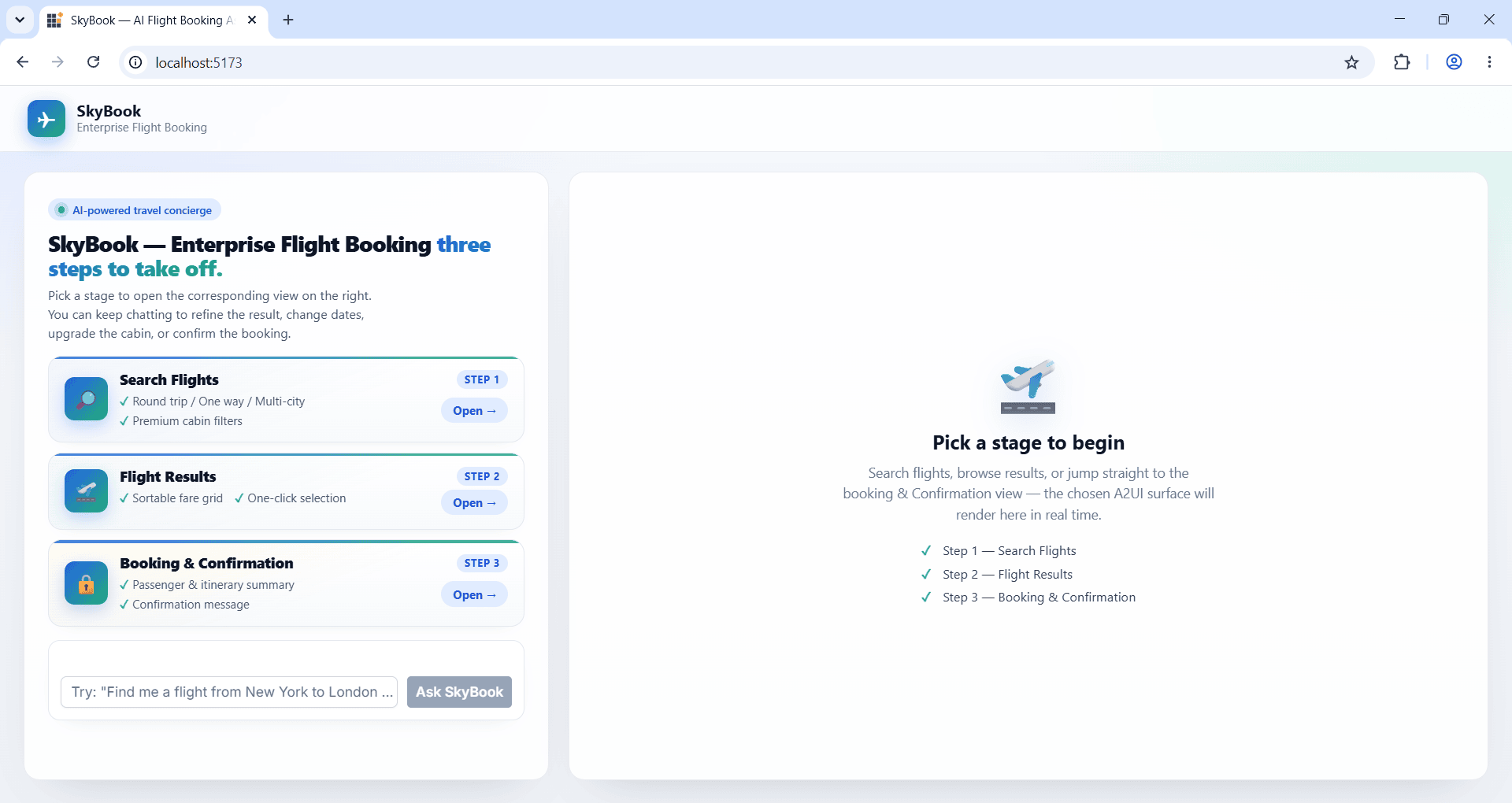
- The welcome view opens with three stage cards (Search Flights, Flight Results, Booking & Confirmation) and a free-form prompt input.
- Click a stage card, or type a free-form flight request, to switch to the chat view.
- Type into the prompt box and hit Send. The browser posts a JSON-RPC message/send request to the agent and renders the returned surface.
- Click any button inside the rendered surface. The button’s
eventis summarized into a chat bubble and re-posted to the agent; the next surface replaces the current one.
That is the whole loop, repeated:
| What you write | What happens at runtime |
|---|---|
TextBoxComponent (welcome prompt + chat input) |
User picks a stage card, or types a free-form request. |
ButtonComponent (Ask SkyBook / Send) |
Browser fires sendPrompt(...) and switches to the chat view. |
fetch(AGENT_URL, …) with parts: [{ text }]
|
The browser POSTs a JSON-RPC message/send envelope carrying the user’s text query. |
processor.processMessages(messages) |
The agent’s a2uiEnvelope is validated; on every createSurface the matching SurfaceModel is stored and fires onSurfaceCreated. |
<SyncfusionA2UIProvider surface={surface}/> |
The Syncfusion component tree mounts in the right-hand surface pane. |
| User clicks a button inside the surface | The processor’s action callback fires; the action is summarized into a chat bubble and re-posted to the agent as a { data: action } part on the next message/send request (A2UI v0.9 production format). |
Troubleshooting
Most A2UI JSON, agent binding, and prompt issues are covered in Common Questions. The one environment-specific item for the SkyBook sample:
| Issue | Solution |
|---|---|
| SkyBook app cannot find the agent | Confirm VITE_AGENT_URL in skybook/.env matches the URL the agent is serving on (default http://127.0.0.1:10006). Restart npm run dev after editing the .env so Vite picks up the new value. |
What you have built
You have a working template for any A2UI app:
- Composer side: three surfaces authored in the Composer, locked into agreed-upon JSON.
-
Agent side:
set_design(...)binds those surfaces into the system prompt, locking structure across requests. -
App side: a small React shell that posts JSON-RPC, runs the
MessageProcessor, and renders surfaces with<SyncfusionA2UIProvider/>.
Add a fourth surface to examples/designs/, refresh the agent, and the React app picks it up automatically.