Syncfusion React A2UI Overview
The Syncfusion A2UI for React package bridges the A2UI v0.9 agent-to-UI protocol with Syncfusion’s production-grade EJ2 React component library. It lets an AI agent stream a sequence of structured UI messages, instead of raw HTML or plain text, that the host application renders as fully interactive, data-bound Syncfusion components: DataGrid, Chart, Scheduler, and more.
In short, the package converts chat-based agent responses into fully functional React user interfaces without requiring manual component development.
Syncfusion A2UI for React is currently in preview (beta) and is published on npm. The package is feature-complete for the listed components, but the API, catalog ID, and Zod schemas may evolve before the first stable release. The A2UI v0.9 wire format is stable; minor additive changes (new components, new properties) are expected.
What problem does it solve?
Modern AI agents are expected to do more than return text. A user who asks “Show me last quarter’s sales by region” expects an interactive chart, not a markdown table. A user who asks “Schedule a meeting with the design team next Tuesday” expects a calendar picker, not a confirmation string.
A2UI is an open protocol that uses a lightweight JSON-RPC-based message format. It lets agents describe user interfaces declaratively rather than as raw markup.
The protocol specifies four message types — createSurface, updateComponents, updateDataModel, and deleteSurface — and a tree of named components. The host app runs these messages through a MessageProcessor to build a SurfaceModel and render it.
The package provides the Syncfusion implementation of the rendering layer:
- Ships a catalog of more than 50 Syncfusion EJ2 React adapters that implement the A2UI component contract.
- Validates every message against a Zod schema at runtime, so malformed agent output is rejected with a clear error instead of failing silently.
- Binds the data and user actions between Syncfusion widgets and the A2UI
DataModelautomatically. - Provides a
<SyncfusionA2UIProvider />renderer that wraps the resulting surface in an error boundary.
Core concepts
Before diving into the end-to-end workflow, here are the terms used throughout this documentation.
- Agent: Any AI application that consumes a user prompt and produces A2UI v0.9 messages (for example, a chat backend backed by a hosted LLM).
-
MessageProcessor: A runtime component that receives A2UI messages, validates each one against the bundled Zod schemas, and incrementally assembles aSurfaceModel. -
SurfaceModel: An in-memory tree representation of every component, widget, and layout decision the agent has emitted for a given UI surface. -
Catalog: A registry that maps A2UI component names (for example, DataGrid, Chart) to concrete renderer implementations. The package ships
syncfusionCatalog, which extendsbasicCatalogwith Syncfusion EJ2 adapters. -
DataModel: A reactive key-value store that backs A2UI bindings, where paths such as “${user.name}” resolve to values stored in the
DataModeland update automatically when those values change. -
SyncfusionA2UIProvider: A React component that renders a
SurfaceModelas interactive Syncfusion EJ2 components.
How it works
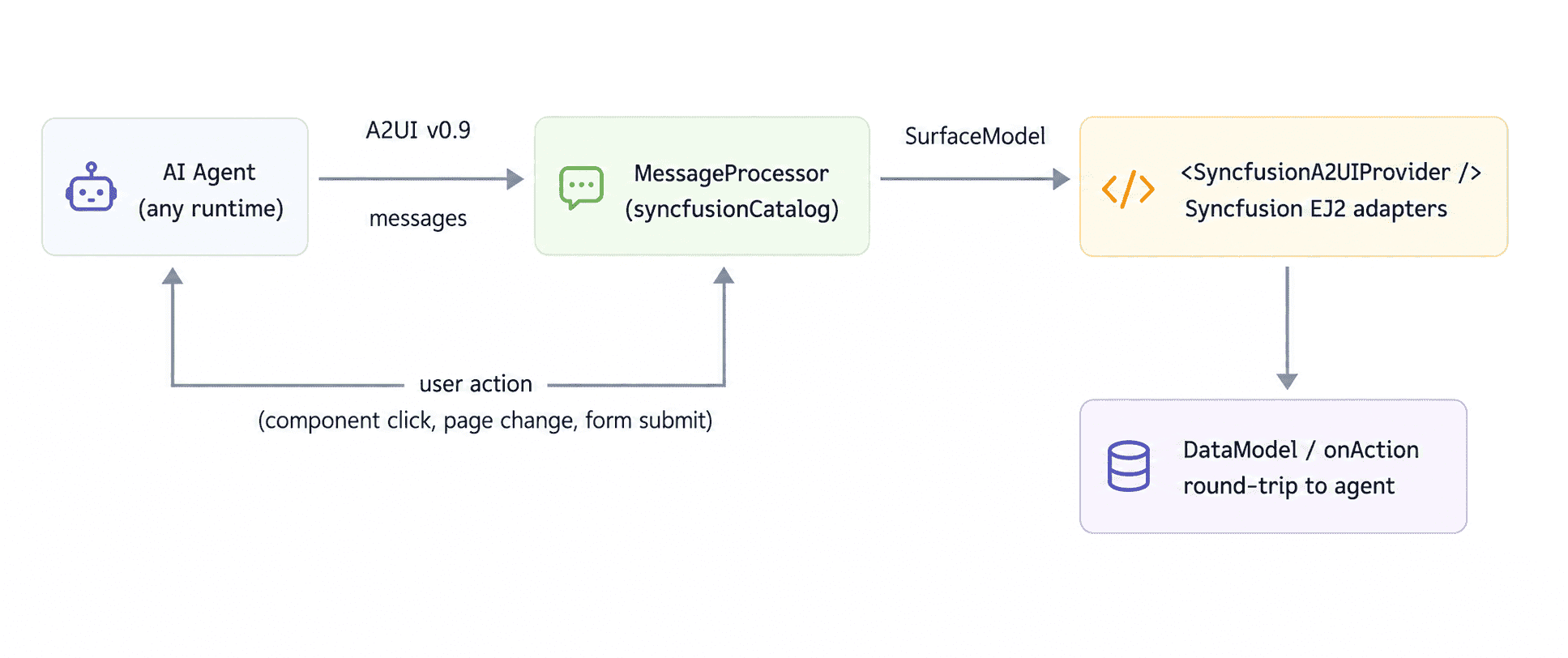
Figure: End-to-end A2UI message processing workflow.
The diagram illustrates how A2UI messages flow from the agent through the host application and are rendered as Syncfusion EJ2 React components. This loop repeats as long as the surface is active.
- The user sends a prompt to an A2UI-compatible agent (any framework, any LLM).
- The agent emits a stream of A2UI v0.9 messages.
- The host app passes them to a
MessageProcessorconfigured withsyncfusionCatalog. - The processor validates each message against the bundled Zod schemas, builds a
SurfaceModel, and emits it ononSurfaceCreated. -
<SyncfusionA2UIProvider surface={surface}/>walks the model and renders every component with its Syncfusion adapter. - The user interacts with the surface; the action handler forwards the action to the agent, which produces the next message stream. The cycle repeats.
Who is it for?
The package is for teams that want to combine the power of a generative agent with the look, feel, accessibility, and feature depth of Syncfusion EJ2:
- Application builders adding a conversational, AI-driven layer to an existing Syncfusion-powered product.
- Internal tooling teams giving non-developers a natural-language way to explore operational data (grids, charts, schedulers, dashboards).
- Customer support / CRM teams that need the agent to show real, interactive forms and reports, not just text suggestions.
- Anyone shipping Syncfusion React UIs who wants the same components to be reachable from a chat surface, an MCP server, or an autonomous agent.
Because every adapter renders a real Syncfusion EJ2 React component, the generated surfaces inherit the accessibility capabilities provided by the underlying widgets, including ARIA roles, keyboard navigation, and high-contrast theme support.
What you get in the package
-
A2UI primitives: Column, Row, Text, Image, Icon, Divider, and other layout primitives, included in
syncfusionCatalog, which extendsbasicCatalog. -
SyncfusionA2UIProvider: A one-line renderer (mount as
<SyncfusionA2UIProvider/>) with a built-inSurfaceErrorBoundarythat turns render errors into a graceful inline message instead of crashing the host app. -
syncfusionCatalog: the A2UI Catalog instance, ready to pass straight to
MessageProcessor. - TypeScript declarations and Zod schemas for every component, so the host app and any agent SDK can share one source of truth for the wire format.
When to use it and when not to use it
Use Syncfusion A2UI for React when:
- You are building (or already have) a React app that uses Syncfusion EJ2 components and want a chat or agent surface in front of it.
- You want the agent to emit interactive Syncfusion widgets (grids, charts, schedulers) that the user can manipulate, not just static screenshots or pre-rendered HTML.
- You want runtime validation of every agent message against a Zod schema.
- You need bidirectional data binding so the agent can react to what users do within the surface.
Consider the plain A2UI React package when:
- You are prototyping and do not need the feature depth of Syncfusion components.
- Your design system uses a different React component library and you do not want to bring in EJ2.
Need help?
Two support channels are available while you integrate Syncfusion A2UI for React: