Customization in React Mention
Show or hide React Mention character
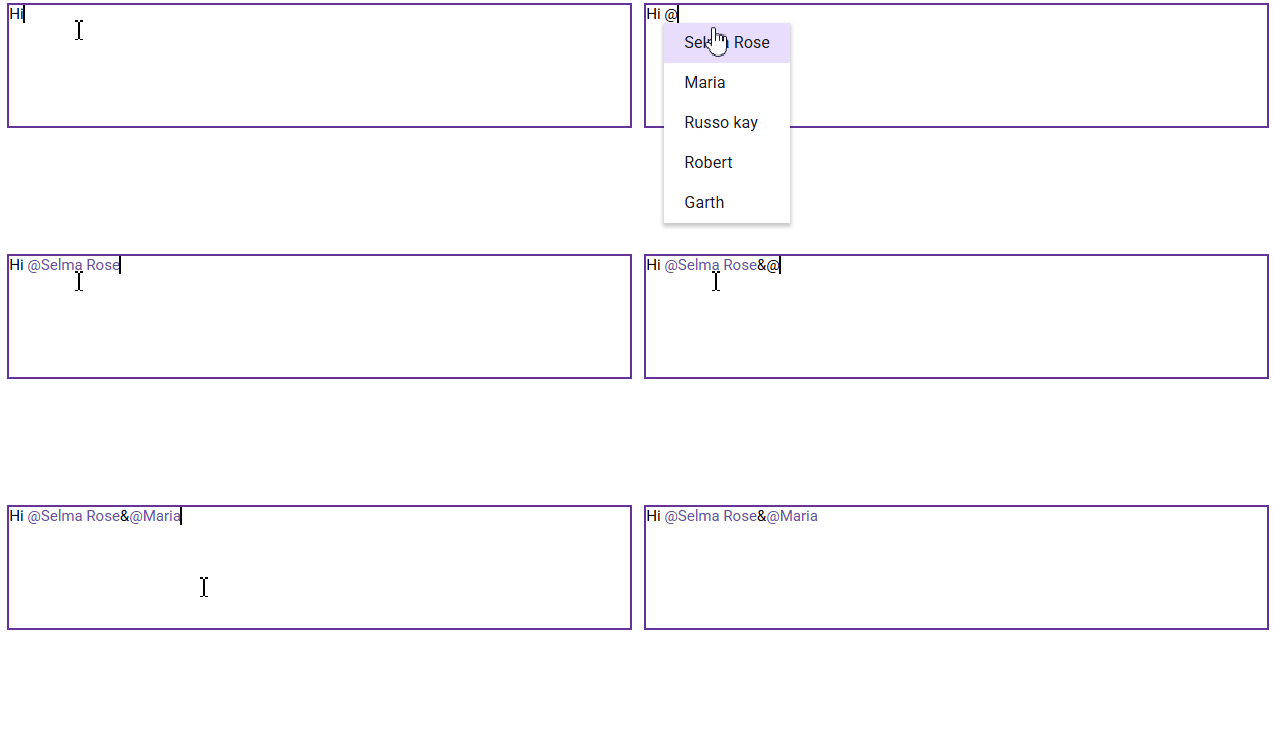
By default, the showMentionChar property is disabled and does not display the mention character with the selected text. Enable the showMentionChar property to display the configured mentionChar along with the selected text content.
[Class-component]
import * as React from 'react';
import * as ReactDOM from 'react-dom';
import { MentionComponent } from '@syncfusion/ej2-react-dropdowns';
export default class App extends React.Component {
    // Defines the target in which the Mention component is rendered.
    mentionTarget = '#mentionElement';
    // Defines the array of data.
    userData = [
        { Name: "Selma Rose", EmailId: "[email protected]" },
        { Name: "Maria", EmailId: "[email protected]" },
        { Name: "Russo kay", EmailId: "[email protected]" },
        { Name: "Robert", EmailId: "[email protected]" },
        { Name: "Garth", EmailId: "[email protected]" }
    ];
    fields = { text: 'Name' };
    render() {
        return (<div id='mention_default'>
        <table>
          <tr>
            <td>
              <label id="comment">Comments</label>
              <div id="mentionElement" placeholder='Type @ and tag user'></div>
            </td>
          </tr>
        </table>
      <MentionComponent target={this.mentionTarget} dataSource={this.userData} fields={this.fields} showMentionChar={true}></MentionComponent>
      </div>);
    }
}
ReactDOM.render(<App />, document.getElementById('sample'));
import * as React from 'react';
import * as ReactDOM from 'react-dom';
import { MentionComponent } from '@syncfusion/ej2-react-dropdowns';
export default class App extends React.Component<{}, {}> {
// Defines the target in which the Mention component is rendered.
private mentionTarget: string = '#mentionElement';
// Defines the array of data.
private userData:{ [key: string]: Object }[] = [
{ Name : "Selma Rose", EmailId : "[email protected]"},
{ Name : "Maria", EmailId : "[email protected]" },
{ Name : "Russo kay", EmailId : "[email protected]" },
{ Name : "Robert", EmailId : "[email protected]" },
{ Name : "Garth", EmailId : "[email protected]" }
];
private fields: Object = {text:'Name'};
public render() {
return (
<div id='mention_default'>
<table>
<tr>
<td>
<label id="comment">Comments</label>
<div id="mentionElement" placeholder='Type @ and tag user'></div>
</td>
</tr>
</table>
<MentionComponent target={this.mentionTarget} dataSource={this.userData} fields={this.fields}showMentionChar= {true}></MentionComponent>
</div>
);
}
}
ReactDOM.render(<App />, document.getElementById('sample'));[Functional-component]
import * as React from 'react';
import * as ReactDOM from 'react-dom';
import { MentionComponent } from '@syncfusion/ej2-react-dropdowns';
function App() {
    // Defines the target in which the Mention component is rendered.
    let mentionTarget = '#mentionElement';
    // Defines the array of data.
    let userData = [
        { Name: "Selma Rose", EmailId: "[email protected]" },
        { Name: "Maria", EmailId: "[email protected]" },
        { Name: "Russo kay", EmailId: "[email protected]" },
        { Name: "Robert", EmailId: "[email protected]" },
        { Name: "Garth", EmailId: "[email protected]" }
    ];
    let fields = { text: 'Name' };
    return (<div id='mention_default'>
        <table>
          <tr>
            <td>
              <label id="comment">Comments</label>
              <div id="mentionElement" placeholder='Type @ and tag user'></div>
            </td>
          </tr>
        </table>
      <MentionComponent target={mentionTarget} dataSource={userData} fields={fields} showMentionChar={true}></MentionComponent>
      </div>);
}
ReactDOM.render(<App />, document.getElementById('sample'));
import * as React from 'react';
import * as ReactDOM from 'react-dom';
import { MentionComponent } from '@syncfusion/ej2-react-dropdowns';
function App (){
// Defines the target in which the Mention component is rendered.
let mentionTarget: string = '#mentionElement';
// Defines the array of data.
let userData:{ [key: string]: Object }[] = [
{ Name : "Selma Rose", EmailId : "[email protected]"},
{ Name : "Maria", EmailId : "[email protected]" },
{ Name : "Russo kay", EmailId : "[email protected]" },
{ Name : "Robert", EmailId : "[email protected]" },
{ Name : "Garth", EmailId : "[email protected]" }
];
let fields: Object = {text:'Name'};
return (
<div id='mention_default'>
<table>
<tr>
<td>
<label id="comment">Comments</label>
<div id="mentionElement" placeholder='Type @ and tag user'></div>
</td>
</tr>
</table>
<MentionComponent target={mentionTarget} dataSource={userData} fields={fields}showMentionChar= {true}></MentionComponent>
</div>
);
}
ReactDOM.render(<App />, document.getElementById('sample'));Adding the suffix character after selection
The React Mention has provided support to specify the custom suffix to append alongside the mentioned selected item while inserting. You can append space or new line character as suffixText.
[Class-component]
import { MentionComponent } from '@syncfusion/ej2-react-dropdowns';
import * as React from 'react';
import * as ReactDOM from "react-dom";
export default class App extends React.Component {
mentionTarget = '#mentionElement';
userData = [
{ Country: "Australia", Code: "AU" },
{ Country: "Bermuda", Code: "BM" },
{ Country: "Canada", Code: "CA" },
{ Country: "Cameroon", Code: "CM" },
{ Country: "Denmark", Code: "DK" }
];
fields = { text: 'Country' };
render() {
return (<div id='mention_default'>
<table>
<tr>
<td>
<label id="comment">Comments</label>
<div id="mentionElement" placeholder='Type @ and tag country'></div>
</td>
</tr>
</table>
<MentionComponent target={this.mentionTarget} dataSource={this.userData} fields={this.fields} showMentionChar={true} suffixText={' '}></MentionComponent>
</div>);
}
}
ReactDOM.render(<App />, document.getElementById('sample'));import { MentionComponent } from '@syncfusion/ej2-react-dropdowns';
import * as React from 'react';
import * as ReactDOM from "react-dom";
export default class App extends React.Component<{}, {}> {
private mentionTarget: string = '#mentionElement';
private userData:{ [key: string]: Object }[] = [
{ Country : "Australia", Code : "AU" },
{ Country : "Bermuda" , Code : "BM" },
{ Country : "Canada" , Code : "CA" },
{ Country : "Cameroon" , Code : "CM" },
{ Country : "Denmark" , Code : "DK" }
];
private fields: Object = {text:'Country'};
public render() {
return (
<div id='mention_default'>
<table>
<tr>
<td>
<label id="comment">Comments</label>
<div id="mentionElement" placeholder='Type @ and tag country' ></div>
</td>
</tr>
</table>
<MentionComponent target={this.mentionTarget} dataSource={this.userData} fields={this.fields} showMentionChar= {true} suffixText={' '}></MentionComponent>
</div>
);
}
}
ReactDOM.render(<App />, document.getElementById('sample'));[Functional-component]
import { MentionComponent } from '@syncfusion/ej2-react-dropdowns';
import * as React from 'react';
import * as ReactDOM from "react-dom";
function App() {
let mentionTarget = '#mentionElement';
let userData = [
{ Country: "Australia", Code: "AU" },
{ Country: "Bermuda", Code: "BM" },
{ Country: "Canada", Code: "CA" },
{ Country: "Cameroon", Code: "CM" },
{ Country: "Denmark", Code: "DK" }
];
let fields = { text: 'Country' };
return (<div id='mention_default'>
<table>
<tr>
<td>
<label id="comment">Comments</label>
<div id="mentionElement" placeholder='Type @ and tag country'></div>
</td>
</tr>
</table>
<MentionComponent target={mentionTarget} dataSource={userData} fields={fields} showMentionChar={true} suffixText={' '}></MentionComponent>
</div>);
}
ReactDOM.render(<App />, document.getElementById('sample'));import { MentionComponent } from '@syncfusion/ej2-react-dropdowns';
import * as React from 'react';
import * as ReactDOM from "react-dom";
function App (){
let mentionTarget: string = '#mentionElement';
let userData:{ [key: string]: Object }[] = [
{ Country : "Australia", Code : "AU" },
{ Country : "Bermuda" , Code : "BM" },
{ Country : "Canada" , Code : "CA" },
{ Country : "Cameroon" , Code : "CM" },
{ Country : "Denmark" , Code : "DK" }
];
let fields: Object = {text:'Country'};
return (
<div id='mention_default'>
<table>
<tr>
<td>
<label id="comment">Comments</label>
<div id="mentionElement" placeholder='Type @ and tag country' ></div>
</td>
</tr>
</table>
<MentionComponent target={mentionTarget} dataSource={userData} fields={fields} showMentionChar= {true} suffixText={' '}></MentionComponent>
</div>
);
}
ReactDOM.render(<App />, document.getElementById('sample'));Configure the popup list
Customize the suggestion list width and height using the popupHeight and popupWidth properties.
By default, the popup list width is set to auto and automatically adjusts based on the suggestion data. The popup list height is set to 300px.
[Class-component]
import { MentionComponent } from '@syncfusion/ej2-react-dropdowns';
import * as React from 'react';
import * as ReactDOM from "react-dom";
export default class App extends React.Component {
    mentionTarget = '#mentionElement';
    sportsData = [
        { ID: "game1", Game: "Badminton" },
        { ID: "game2", Game: "Football" },
        { ID: "game3", Game: "Tennis" },
        { ID: "game4", Game: "Hockey" },
        { ID: "game5", Game: "Basketball" },
        { ID: "game6", Game: "Cricket" }
    ];
    fields = { text: 'Game' };
    render() {
        return (<div id='mention_default'>
        <table>
          <tr>
            <td>
              <label id="comment">Comments</label>
              <div id="mentionElement" placeholder='Type @ and tag sport'></div>
            </td>
          </tr>
        </table>
        <MentionComponent target={this.mentionTarget} dataSource={this.sportsData} fields={this.fields} popupHeight={'200px'} popupWidth={'250px'}></MentionComponent>
      </div>);
    }
}
ReactDOM.render(<App />, document.getElementById('sample'));
import { MentionComponent } from '@syncfusion/ej2-react-dropdowns';
import * as React from 'react';
import * as ReactDOM from "react-dom";
export default class App extends React.Component<{}, {}> {
private mentionTarget: string = '#mentionElement';
private sportsData: {[key: string]: Object}[] = [
{ ID : "game1" ,Game : "Badminton"},
{ ID : "game2" ,Game : "Football" },
{ ID : "game3" ,Game : "Tennis"},
{ ID : "game4" ,Game : "Hockey"},
{ ID : "game5" ,Game : "Basketball"},
{ ID : "game6" ,Game : "Cricket"}
];
private fields: Object = {text:'Game'};
public render() {
return (
<div id='mention_default'>
<table>
<tr>
<td>
<label id="comment">Comments</label>
<div id="mentionElement" placeholder='Type @ and tag sport' ></div>
</td>
</tr>
</table>
<MentionComponent target={this.mentionTarget} dataSource={this.sportsData} fields={this.fields} popupHeight={'200px'} popupWidth={'250px'}></MentionComponent>
</div>
);
}
}
ReactDOM.render(<App />, document.getElementById('sample'));[Functional-component]
import { MentionComponent } from '@syncfusion/ej2-react-dropdowns';
import * as React from 'react';
import * as ReactDOM from "react-dom";
function App() {
    let mentionTarget = '#mentionElement';
    let sportsData = [
        { ID: "game1", Game: "Badminton" },
        { ID: "game2", Game: "Football" },
        { ID: "game3", Game: "Tennis" },
        { ID: "game4", Game: "Hockey" },
        { ID: "game5", Game: "Basketball" },
        { ID: "game6", Game: "Cricket" }
    ];
    let fields = { text: 'Game' };
    return (<div id='mention_default'>
        <table>
          <tr>
            <td>
              <label id="comment">Comments</label>
              <div id="mentionElement" placeholder='Type @ and tag sport'></div>
            </td>
          </tr>
        </table>
        <MentionComponent target={mentionTarget} dataSource={sportsData} fields={fields} popupHeight={'200px'} popupWidth={'250px'}></MentionComponent>
      </div>);
}
ReactDOM.render(<App />, document.getElementById('sample'));
import { MentionComponent } from '@syncfusion/ej2-react-dropdowns';
import * as React from 'react';
import * as ReactDOM from "react-dom";
function App() {
let mentionTarget: string = '#mentionElement';
let sportsData: {[key: string]: Object}[] = [
{ ID : "game1" ,Game : "Badminton"},
{ ID : "game2" ,Game : "Football" },
{ ID : "game3" ,Game : "Tennis"},
{ ID : "game4" ,Game : "Hockey"},
{ ID : "game5" ,Game : "Basketball"},
{ ID : "game6" ,Game : "Cricket"}
];
let fields: Object = {text:'Game'};
return (
<div id='mention_default'>
<table>
<tr>
<td>
<label id="comment">Comments</label>
<div id="mentionElement" placeholder='Type @ and tag sport' ></div>
</td>
</tr>
</table>
<MentionComponent target={mentionTarget} dataSource={sportsData} fields={fields} popupHeight={'200px'} popupWidth={'250px'}></MentionComponent>
</div>
);
}
ReactDOM.render(<App />, document.getElementById('sample'));Trigger character
You can customize the trigger character by using the mentionChar property in the Mention component. The trigger character triggers the suggestion list to display in the target area.
By default, the mentionChar is @.
Leading Space Requirement
The requireLeadingSpace property in Mention controls whether a space is needed before triggering the Mention suggestion popup.
When set to false, the mention can be activated without a preceding space. When set to true, a space is required before the mention character to activate suggestions.
[Class-component]
import * as React from 'react';
import * as ReactDOM from 'react-dom';
import { MentionComponent } from '@syncfusion/ej2-react-dropdowns';
export default class App extends React.Component {
    // Defines the target in which the Mention component is rendered.
    mentionTarget = '#mentionElement';
    // Defines the array of data.
    userData = [
        { Name: "Selma Rose", EmailId: "[email protected]" },
        { Name: "Maria", EmailId: "[email protected]" },
        { Name: "Russo kay", EmailId: "[email protected]" },
        { Name: "Robert", EmailId: "[email protected]" },
        { Name: "Garth", EmailId: "[email protected]" }
    ];
    fields = { text: 'Name' };
    render() {
        return (<div id='mention_default'>
        <table>
          <tr>
            <td>
              <label id="comment">Comments</label>
              <div id="mentionElement" placeholder='Type @ and tag user'></div>
            </td>
          </tr>
        </table>
      <MentionComponent target={this.mentionTarget} dataSource={this.userData} fields={this.fields} requireLeadingSpace={false}></MentionComponent>
      </div>);
    }
}
ReactDOM.render(<App />, document.getElementById('sample'));
import * as React from 'react';
import * as ReactDOM from 'react-dom';
import { MentionComponent } from '@syncfusion/ej2-react-dropdowns';
export default class App extends React.Component<{}, {}> {
// Defines the target in which the Mention component is rendered.
private mentionTarget: string = '#mentionElement';
// Defines the array of data.
private userData:{ [key: string]: Object }[] = [
{ Name : "Selma Rose", EmailId : "[email protected]"},
{ Name : "Maria", EmailId : "[email protected]" },
{ Name : "Russo kay", EmailId : "[email protected]" },
{ Name : "Robert", EmailId : "[email protected]" },
{ Name : "Garth", EmailId : "[email protected]" }
];
private fields: Object = {text:'Name'};
public render() {
return (
<div id='mention_default'>
<table>
<tr>
<td>
<label id="comment">Comments</label>
<div id="mentionElement" placeholder='Type @ and tag user'></div>
</td>
</tr>
</table>
<MentionComponent target={this.mentionTarget} dataSource={this.userData} fields={this.fields} requireLeadingSpace={false}></MentionComponent>
</div>
);
}
}
ReactDOM.render(<App />, document.getElementById('sample'));[Functional-component]
import * as React from 'react';
import * as ReactDOM from 'react-dom';
import { MentionComponent } from '@syncfusion/ej2-react-dropdowns';
function App() {
    // Defines the target in which the Mention component is rendered.
    let mentionTarget = '#mentionElement';
    // Defines the array of data.
    let userData = [
        { Name: "Selma Rose", EmailId: "[email protected]" },
        { Name: "Maria", EmailId: "[email protected]" },
        { Name: "Russo kay", EmailId: "[email protected]" },
        { Name: "Robert", EmailId: "[email protected]" },
        { Name: "Garth", EmailId: "[email protected]" }
    ];
    let fields = { text: 'Name' };
    return (<div id='mention_default'>
        <table>
          <tr>
            <td>
              <label id="comment">Comments</label>
              <div id="mentionElement" placeholder='Type @ and tag user'></div>
            </td>
          </tr>
        </table>
      <MentionComponent target={mentionTarget} dataSource={userData} fields={fields} requireLeadingSpace={false}></MentionComponent>
      </div>);
}
ReactDOM.render(<App />, document.getElementById('sample'));
import * as React from 'react';
import * as ReactDOM from 'react-dom';
import { MentionComponent } from '@syncfusion/ej2-react-dropdowns';
function App (){
// Defines the target in which the Mention component is rendered.
let mentionTarget: string = '#mentionElement';
// Defines the array of data.
let userData:{ [key: string]: Object }[] = [
{ Name : "Selma Rose", EmailId : "[email protected]"},
{ Name : "Maria", EmailId : "[email protected]" },
{ Name : "Russo kay", EmailId : "[email protected]" },
{ Name : "Robert", EmailId : "[email protected]" },
{ Name : "Garth", EmailId : "[email protected]" }
];
let fields: Object = {text:'Name'};
return (
<div id='mention_default'>
<table>
<tr>
<td>
<label id="comment">Comments</label>
<div id="mentionElement" placeholder='Type @ and tag user'></div>
</td>
</tr>
</table>
<MentionComponent target={mentionTarget} dataSource={userData} fields={fields} requireLeadingSpace={false}></MentionComponent>
</div>
);
}
ReactDOM.render(<App />, document.getElementById('sample'));