How can I help you?
Getting Started with React Inplace editor component
10 Feb 202624 minutes to read
This section explains the steps required to create a simple React In-place Editor component and demonstrate its basic usage in a React environment.
Ready to streamline your Syncfusion® React development? Discover the full potential of Syncfusion® React components with Syncfusion® AI Coding Assistant. Effortlessly integrate, configure, and enhance your projects with intelligent, context-aware code suggestions, streamlined setups, and real-time insights—all seamlessly integrated into your preferred AI-powered IDEs like VS Code, Cursor, Syncfusion® CodeStudio and more. Explore Syncfusion® AI Coding Assistant.
To get started quickly with React Inplace editor, you can watch this video:
Setup for local development
Easily set up a React application using create-vite-app, which provides a faster development environment, smaller bundle sizes, and optimized builds compared to traditional tools like create-react-app. For detailed steps, refer to the Vite installation instructions. Vite sets up your environment using JavaScript and optimizes your application for production.
Note: To create a React application using
create-react-app, refer to this documentation for more details.
To create a new React application, run the following command.
npm create vite@latest my-appThis command will prompt you for a few settings for the new project, such as selecting a framework and a variant.
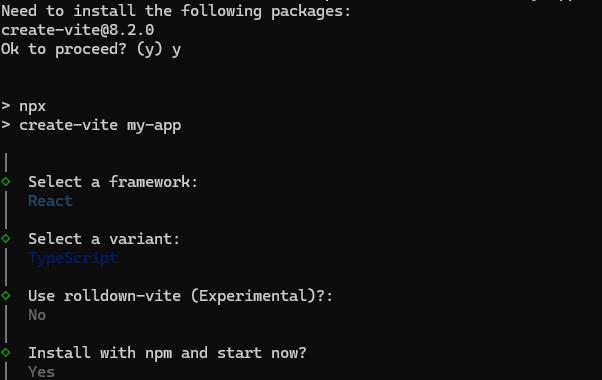
To set up a React application in TypeScript environment, run the following command.
npm create vite@latest my-app -- --template react-ts
cd my-app
npm run dev
To set up a React application in JavaScript environment, run the following command.
npm create vite@latest my-app -- --template react
cd my-app
npm run dev
Adding Syncfusion® In-place Editor packages
All the available Essential® JS 2 packages are published in the npmjs.com public registry.
To install the In-place Editor component, use the following command
npm install @syncfusion/ej2-react-inplace-editor --saveThe –save will instruct NPM to include the In-place Editor package inside of the dependencies section of the package.json.
Adding CSS reference
The following CSS files are available in the ../node_modules/@syncfusion package folder. Add these as references in src/App.css.
@import '../node_modules/@syncfusion/ej2-base/styles/tailwind3.css';
@import '../node_modules/@syncfusion/ej2-buttons/styles/tailwind3.css';
@import '../node_modules/@syncfusion/ej2-calendars/styles/tailwind3.css';
@import '../node_modules/@syncfusion/ej2-dropdowns/styles/tailwind3.css';
@import '../node_modules/@syncfusion/ej2-inputs/styles/tailwind3.css';
@import '../node_modules/@syncfusion/ej2-lists/styles/tailwind3.css';
@import '../node_modules/@syncfusion/ej2-navigations/styles/tailwind3.css';
@import '../node_modules/@syncfusion/ej2-popups/styles/tailwind3.css';
@import '../node_modules/@syncfusion/ej2-richtexteditor/styles/tailwind3.css';
@import '../node_modules/@syncfusion/ej2-splitbuttons/styles/tailwind3.css';
@import '../node_modules/@syncfusion/ej2-react-inplace-editor/styles/tailwind3.css';
To refer App.css in the application then import it in the src/App.tsx file.
Adding In-place Editor component
The React Inplace editor component can be added to the application by following these steps. To get started, add the In-place Editor component to the src/App.tsx file using the following code.
The following in-place editor code should be placed in the src/App.tsx file.
[Class-component]
import { InPlaceEditorComponent } from '@syncfusion/ej2-react-inplace-editor';
import * as React from 'react';
import './App.css';

class App extends React.Component {
  public model = { placeholder: 'Enter employee name' };
  public render() {
    return (
    <InPlaceEditorComponent id='element' model={this.model} type='Text' value='Andrew'/>
    );
  }
}

export default App;
[Functional-component]
import { InPlaceEditorComponent } from '@syncfusion/ej2-react-inplace-editor';
import * as React from 'react';
import './App.css';

function App () {
  const model = { placeholder: 'Enter employee name' };

    return (
    <InPlaceEditorComponent id='element' model={model} type='Text' value='Andrew'/>
    );
}

export default App;
Configuring DropDownList
You can render Essential® JS 2 React DropDownList by changing type property as DropDownList and configure its properties and methods using model property.
In the below sample, type and model values are configured to render the DropDownList component.
[Class-component]
import { InPlaceEditorComponent } from '@syncfusion/ej2-react-inplace-editor';
import * as React from 'react';
import './App.css';

class App extends React.Component {
  public genderData = ['Male', 'Female'];
  public model = { placeholder: 'Select gender', dataSource: this.genderData };
  public render() {
    return (
     <InPlaceEditorComponent id='element' model={this.model} type='DropDownList' mode='Inline'/>
    );
  }
}

export default App;
[Functional-component]
import { InPlaceEditorComponent } from '@syncfusion/ej2-react-inplace-editor';
import * as React from 'react';
import './App.css';

function App () {
  const genderData = ['Male', 'Female'];
  const model = { placeholder: 'Select gender', dataSource: genderData };

    return (
     <InPlaceEditorComponent id='element' model={model} type='DropDownList' mode='Inline'/>
    );
}

export default App;
Integrate DatePicker
You can render Essential® JS2 DatePicker by changing type property as Date and also configure its properties and methods using model property.
In the below sample, type and model values are configured to render the DatePicker component.
[Class-component]
import { InPlaceEditorComponent } from '@syncfusion/ej2-react-inplace-editor';
import * as React from 'react';
import './App.css';

class App extends React.Component {
  public model = { showTodayButton: true };
  public value = new Date('04/12/2018');
  public render() {
    return (
     <InPlaceEditorComponent id='element' model={this.model} type='Date' value={this.value}/>
    );
  }
}

export default App;
[Functional-component]
import { InPlaceEditorComponent } from '@syncfusion/ej2-react-inplace-editor';
import * as React from 'react';
import './App.css';

function App () {
  const model = { showTodayButton: true };
  const value = new Date('04/12/2018');

    return (
     <InPlaceEditorComponent id='element' model={model} type='Date' value={value}/>
    );

}
export default App;
Run the application
Run the npm run dev command in the terminal to start the development server. This command compiles your code and serves the application locally, opening it in the browser.
npm run devThe output appears as follows.
[Class-component]
import { InPlaceEditorComponent } from '@syncfusion/ej2-react-inplace-editor';
import * as React from 'react';
class App extends React.Component {
    genderData = ['Male', 'Female'];
    dateModel = { showTodayButton: true, placeholder: 'Select date of birth' };
    dateValue = new Date('04/12/2018');
    elementModel = { placeholder: 'Enter your name' };
    genderModel = { dataSource: this.genderData, placeholder: 'Select gender' };
    render() {
        return (<div id='container'>
      <div className="control-group">
           <div className="e-heading">
            <h3> Modify Basic Details </h3>
            </div>
            <table>
                <tr>
                    <td>Name</td>
                    <td className='left'>
                        <InPlaceEditorComponent id='element' mode='Inline' value='Andrew' model={this.elementModel}/>
                    </td>
                </tr>
                <tr>
                    <td>Date of Birth</td>
                    <td className='left'>
                        <InPlaceEditorComponent id='dateofbirth' type="Date" mode='Inline' value={this.dateValue} model={this.dateModel}/>
                    </td>
                </tr>
                <tr>
                    <td>Gender</td>
                    <td className='left'>
                        <InPlaceEditorComponent id='gender' type="DropDownList" mode='Inline' value='Male' model={this.genderModel}/>
                    </td>
                </tr>
            </table>
        </div>
        </div>);
    }
}
export default App;
import { InPlaceEditorComponent } from '@syncfusion/ej2-react-inplace-editor';
import * as React from 'react';
class App extends React.Component {
public genderData = ['Male', 'Female'];
public dateModel = { showTodayButton: true, placeholder: 'Select date of birth' };
public dateValue = new Date('04/12/2018');
public elementModel = { placeholder: 'Enter your name' };
public genderModel = { dataSource: this.genderData, placeholder: 'Select gender' };
public render() {
return (
<div id='container'>
<div className="control-group">
<div className="e-heading">
<h3> Modify Basic Details </h3>
</div>
<table>
<tbody>
<tr>
<td>Name</td>
<td className='left'>
<InPlaceEditorComponent id='element' mode='Inline' value='Andrew' model={this.elementModel}/>
</td>
</tr>
<tr>
<td>Date of Birth</td>
<td className='left'>
<InPlaceEditorComponent id='dateofbirth' type="Date" mode='Inline' value={this.dateValue} model={this.dateModel}/>
</td>
</tr>
<tr>
<td>Gender</td>
<td className='left'>
<InPlaceEditorComponent id='gender' type="DropDownList" mode='Inline' value='Male' model={this.genderModel}/>
</td>
</tr>
</tbody>
</table>
</div>
</div>
);
}
}
export default App;[Functional-component]
import { InPlaceEditorComponent } from '@syncfusion/ej2-react-inplace-editor';
import * as React from 'react';
function App() {
    const genderData = ['Male', 'Female'];
    const dateModel = { showTodayButton: true, placeholder: 'Select date of birth' };
    const dateValue = new Date('04/12/2018');
    const elementModel = { placeholder: 'Enter your name' };
    const genderModel = { dataSource: genderData, placeholder: 'Select gender' };
    return (<div id='container'>
        <div className="control-group">
            <div className="e-heading">
              <h3> Modify Basic Details </h3>
              </div>
              <table>
                  <tr>
                      <td>Name</td>
                      <td className='left'>
                          <InPlaceEditorComponent id='element' mode='Inline' value='Andrew' model={elementModel}/>
                      </td>
                  </tr>
                  <tr>
                      <td>Date of Birth</td>
                      <td className='left'>
                          <InPlaceEditorComponent id='dateofbirth' type="Date" mode='Inline' value={dateValue} model={dateModel}/>
                      </td>
                  </tr>
                  <tr>
                      <td>Gender</td>
                      <td className='left'>
                          <InPlaceEditorComponent id='gender' type="DropDownList" mode='Inline' value='Male' model={genderModel}/>
                      </td>
                  </tr>
              </table>
          </div>
          </div>);
}
export default App;
import { InPlaceEditorComponent } from '@syncfusion/ej2-react-inplace-editor';
import * as React from 'react';
function App () {
const genderData = ['Male', 'Female'];
const dateModel = { showTodayButton: true, placeholder: 'Select date of birth' };
const dateValue = new Date('04/12/2018');
const elementModel = { placeholder: 'Enter your name' };
const genderModel = { dataSource: genderData, placeholder: 'Select gender' };
return (
<div id='container'>
<div className="control-group">
<div className="e-heading">
<h3> Modify Basic Details </h3>
</div>
<table>
<tr>
<td>Name</td>
<td className='left'>
<InPlaceEditorComponent id='element' mode='Inline' value='Andrew' model={elementModel}/>
</td>
</tr>
<tr>
<td>Date of Birth</td>
<td className='left'>
<InPlaceEditorComponent id='dateofbirth' type="Date" mode='Inline' value={dateValue} model={dateModel}/>
</td>
</tr>
<tr>
<td>Gender</td>
<td className='left'>
<InPlaceEditorComponent id='gender' type="DropDownList" mode='Inline' value='Male' model={genderModel}/>
</td>
</tr>
</table>
</div>
</div>
);
}
export default App;Submitting data to the server (save)
You can submit editor value to server by configuring the url, adaptor and primaryKey property.
| Property | Usage |
|---|---|
url |
Gets the url for server submit action. |
adaptor |
Specifies the adaptor type that are used by DataManager to communicate with DataSource. |
primarykey |
Defines the unique primary key of editable field which can be used for saving data in data-base. |
primaryKeyproperty is mandatory. If it’s not set, edited data are not sent to the server.
Refresh with modified value
The edited data is submitted to the server and you can see the new values getting reflected in the In-place Editor.
[Class-component]
import { InPlaceEditorComponent } from '@syncfusion/ej2-react-inplace-editor';
import * as React from 'react';
class App extends React.Component {
    frameWorkList = ['Andrew Fuller', 'Janet Leverling', 'Laura Callahan', 'Margaret Hamilt', 'Michael Suyama', 'Nancy Davloio', 'Robert King'];
    model = { dataSource: this.frameWorkList, placeholder: 'Select employee', popupHeight: '200px' };
    url = "https://ej2services.syncfusion.com/development/web-services/api/Editor/UpdateData";
    actionSuccess(e) {
        const newEle = document.getElementById('newValue');
        const oldEle = document.getElementById('oldValue');
        oldEle.textContent = newEle.textContent;
        newEle.textContent = e.value;
    }
    render() {
        return (<div id='container'>
      <div className="control-group">
            Best Employee of the year: <InPlaceEditorComponent id='element' type="DropDownList" mode='Inline' value='Andrew Fuller' name='Employee' url={this.url} primaryKey="Employee" adaptor="UrlAdaptor" model={this.model} actionSuccess={this.actionSuccess}/>
       </div>
       <table style=margin>
           <tr>
              <td style=>
                 Old Value :
              </td>
              <td id="oldValue" style=/>
           </tr>
           <tr>
               <td style=>
                    New Value :
               </td>
               <td id="newValue" style=>
                    Andrew Fuller
               </td>
            </tr>
         </table>
   </div>);
    }
}
export default App;
import { InPlaceEditorComponent } from '@syncfusion/ej2-react-inplace-editor';
import * as React from 'react';
class App extends React.Component<{}, {}> {
public frameWorkList = ['Andrew Fuller', 'Janet Leverling', 'Laura Callahan', 'Margaret Hamilt', 'Michael Suyama', 'Nancy Davloio', 'Robert King'];
public model = { dataSource: this.frameWorkList, placeholder: 'Select employee', popupHeight: '200px' };
public url = "https://ej2services.syncfusion.com/development/web-services/api/Editor/UpdateData";
public actionSuccess(e: any) {
const newEle = document.getElementById('newValue') as HTMLElement;
const oldEle = document.getElementById('oldValue') as HTMLElement;
oldEle.textContent = newEle.textContent;
newEle.textContent = e.value;
}
public render() {
return (
<div id='container'>
<div className="control-group">
Best Employee of the year: <InPlaceEditorComponent id='element' type="DropDownList" mode='Inline' value='Andrew Fuller' name='Employee' url={this.url} primaryKey="Employee" adaptor="UrlAdaptor" model={this.model} actionSuccess={this.actionSuccess} />
</div>
<table style=margin>
<tbody>
<tr>
<td style=>
Old Value :
</td>
<td id="oldValue" style=/>
</tr>
<tr>
<td style=>
New Value :
</td>
<td id="newValue" style=>
Andrew Fuller
</td>
</tr>
</tbody>
</table>
</div>
);
}
}
export default App;[Functional-component]
import { InPlaceEditorComponent } from '@syncfusion/ej2-react-inplace-editor';
import * as React from 'react';
function App() {
    const frameWorkList = ['Andrew Fuller', 'Janet Leverling', 'Laura Callahan', 'Margaret Hamilt', 'Michael Suyama', 'Nancy Davloio', 'Robert King'];
    const model = { dataSource: frameWorkList, placeholder: 'Select employee', popupHeight: '200px' };
    const url = "https://ej2services.syncfusion.com/development/web-services/api/Editor/UpdateData";
    function actionSuccess(e) {
        const newEle = document.getElementById('newValue');
        const oldEle = document.getElementById('oldValue');
        oldEle.textContent = newEle.textContent;
        newEle.textContent = e.value;
    }
    return (<div id='container'>
        <div className="control-group">
              Best Employee of the year: <InPlaceEditorComponent id='element' type="DropDownList" mode='Inline' value='Andrew Fuller' name='Employee' url={url} primaryKey="Employee" adaptor="UrlAdaptor" model={model} actionSuccess={actionSuccess}/>
        </div>
        <table style=margin>
            <tr>
                <td style=>
                  Old Value :
                </td>
                <td id="oldValue" style=/>
            </tr>
            <tr>
                <td style=>
                      New Value :
                </td>
                <td id="newValue" style=>
                      Andrew Fuller
                </td>
              </tr>
          </table>
    </div>);
}
export default App;
import { InPlaceEditorComponent } from '@syncfusion/ej2-react-inplace-editor';
import * as React from 'react';
function App() {
const frameWorkList : string[]= ['Andrew Fuller', 'Janet Leverling', 'Laura Callahan', 'Margaret Hamilt', 'Michael Suyama', 'Nancy Davloio', 'Robert King'];
const model = { dataSource: frameWorkList, placeholder: 'Select employee', popupHeight: '200px' };
const url = "https://ej2services.syncfusion.com/development/web-services/api/Editor/UpdateData";
function actionSuccess(e: any) {
const newEle = document.getElementById('newValue') as HTMLElement;
const oldEle = document.getElementById('oldValue') as HTMLElement;
oldEle.textContent = newEle.textContent;
newEle.textContent = e.value;
}
return (
<div id='container'>
<div className="control-group">
Best Employee of the year: <InPlaceEditorComponent id='element' type="DropDownList" mode='Inline' value='Andrew Fuller' name='Employee' url={url} primaryKey="Employee" adaptor="UrlAdaptor" model={model} actionSuccess={actionSuccess} />
</div>
<table style=margin>
<tr>
<td style=>
Old Value :
</td>
<td id="oldValue" style=/>
</tr>
<tr>
<td style=>
New Value :
</td>
<td id="newValue" style=>
Andrew Fuller
</td>
</tr>
</table>
</div>
);
}
export default App;Refer to the React In-place Editor feature tour page for its groundbreaking feature representations. You can also explore our React In-place Editor component example that shows how to render the In-place Editor in React.