Data Binding in EJ2 TypeScript Scheduler
08 Aug 202624 minutes to read
The Scheduler manages data using the DataManager, which supports both RESTful data service binding and JavaScript object array binding. The dataSource property of the Scheduler can be assigned either an instance of DataManager or a JavaScript object array collection. The Scheduler supports two types of data binding methods:
- Local data
- Remote data
Binding local data
To bind local JSON data to the Scheduler, assign a JavaScript object array to the dataSource option within the eventSettings property. The JSON object dataSource can also be provided as an instance of DataManager and assigned to the Scheduler dataSource property.
import { Schedule, Day, Week, WorkWeek, Month, Agenda } from '@syncfusion/ej2-schedule';

Schedule.Inject(Day, Week, WorkWeek, Month, Agenda);

let scheduleData: object[] = [{
    Id: 1,
    Subject: 'Explosion of Betelgeuse Star',
    StartTime: new Date(2018, 1, 15, 9, 30),
    EndTime: new Date(2018, 1, 15, 11, 0)
}, {
    Id: 2,
    Subject: 'Thule Air Crash Report',
    StartTime: new Date(2018, 1, 12, 12, 0),
    EndTime: new Date(2018, 1, 12, 14, 0)
}, {
    Id: 3,
    Subject: 'Blue Moon Eclipse',
    StartTime: new Date(2018, 1, 13, 9, 30),
    EndTime: new Date(2018, 1, 13, 11, 0)
}, {
    Id: 4,
    Subject: 'Meteor Showers in 2018',
    StartTime: new Date(2018, 1, 14, 13, 0),
    EndTime: new Date(2018, 1, 14, 14, 30)
}];

let scheduleObj: Schedule = new Schedule({
    height: '550px',
    selectedDate: new Date(2018, 1, 15),
    eventSettings: { dataSource: scheduleData }
});
scheduleObj.appendTo('#Schedule');
<!DOCTYPE html>
<html lang="en">
<head>
<title>Schedule Typescript Control</title>
<meta charset="utf-8" />
<meta name="viewport" content="width=device-width, initial-scale=1.0" />
<meta name="description" content="Typescript Schedule Control" />
<meta name="author" content="Syncfusion" />
<link href="index.css" rel="stylesheet" />
<link href="https://cdn.syncfusion.com/ej2/35.1.37/ej2-base/styles/fluent2.css" rel="stylesheet" />
<link href="https://cdn.syncfusion.com/ej2/35.1.37/ej2-buttons/styles/fluent2.css" rel="stylesheet" />
<link href="https://cdn.syncfusion.com/ej2/35.1.37/ej2-calendars/styles/fluent2.css" rel="stylesheet" />
<link href="https://cdn.syncfusion.com/ej2/35.1.37/ej2-dropdowns/styles/fluent2.css" rel="stylesheet" />
<link href="https://cdn.syncfusion.com/ej2/35.1.37/ej2-inputs/styles/fluent2.css" rel="stylesheet" />
<link href="https://cdn.syncfusion.com/ej2/35.1.37/ej2-navigations/styles/fluent2.css" rel="stylesheet" />
<link href="https://cdn.syncfusion.com/ej2/35.1.37/ej2-popups/styles/fluent2.css" rel="stylesheet" />
<link href="https://cdn.syncfusion.com/ej2/35.1.37/ej2-schedule/styles/fluent2.css" rel="stylesheet" />
<script src="https://cdnjs.cloudflare.com/ajax/libs/systemjs/0.19.38/system.js" type="text/javascript"></script>
<script src="systemjs.config.js" type="text/javascript"></script>
</head>
<body>
<div id='loader'>LOADING....</div>
<div id='container'>
<div id="Schedule"></div>
</div>
</body>
</html>By default,
DataManagerusesJsonAdaptorfor binding local data.
Bind different field names to the default event fields and include additional custom fields in the event object collection, as described here.
Binding remote data
The Scheduler supports binding to remote data services. To implement this:
- Create an instance of
DataManager. - Provide the service URL to the
urloption ofDataManager. - Assign the
DataManagerinstance to thedataSourceproperty withineventSettings.
Using ODataV4Adaptor
s
ODataV4 is a standardized protocol for creating and consuming data. To connect with ODataV4 service endpoints, use the ODataV4Adaptor within the DataManager. Refer to the following code example to retrieve data from an ODataV4 service using the DataManager.
import { Schedule, Day, Week, WorkWeek, Month, Agenda } from '@syncfusion/ej2-schedule';
import { DataManager, ODataV4Adaptor, Query } from '@syncfusion/ej2-data';

Schedule.Inject(Day, Week, WorkWeek, Month, Agenda);
let dataManager: DataManager = new DataManager({
    url: 'https://services.odata.org/V4/Northwind/Northwind.svc/Orders/',
    adaptor: new ODataV4Adaptor,
    crossDomain: true
});
let scheduleObj: Schedule = new Schedule({
    height: '550px',
    selectedDate: new Date(1996, 6, 9),
    readonly: true,
    eventSettings: {
        dataSource: dataManager,
        fields: {
            id: 'Id',
            subject: { name: 'ShipName' },
            location: { name: 'ShipCountry' },
            description: { name: 'ShipAddress' },
            startTime: { name: 'OrderDate' },
            endTime: { name: 'RequiredDate' },
            recurrenceRule: { name: 'ShipRegion' }
        }
    }
});
scheduleObj.appendTo('#Schedule');
<!DOCTYPE html>
<html lang="en">
<head>
<title>Schedule Typescript Control</title>
<meta charset="utf-8" />
<meta name="viewport" content="width=device-width, initial-scale=1.0" />
<meta name="description" content="Typescript Schedule Control" />
<meta name="author" content="Syncfusion" />
<link href="index.css" rel="stylesheet" />
<link href="https://cdn.syncfusion.com/ej2/35.1.37/ej2-base/styles/fluent2.css" rel="stylesheet" />
<link href="https://cdn.syncfusion.com/ej2/35.1.37/ej2-buttons/styles/fluent2.css" rel="stylesheet" />
<link href="https://cdn.syncfusion.com/ej2/35.1.37/ej2-calendars/styles/fluent2.css" rel="stylesheet" />
<link href="https://cdn.syncfusion.com/ej2/35.1.37/ej2-dropdowns/styles/fluent2.css" rel="stylesheet" />
<link href="https://cdn.syncfusion.com/ej2/35.1.37/ej2-inputs/styles/fluent2.css" rel="stylesheet" />
<link href="https://cdn.syncfusion.com/ej2/35.1.37/ej2-navigations/styles/fluent2.css" rel="stylesheet" />
<link href="https://cdn.syncfusion.com/ej2/35.1.37/ej2-popups/styles/fluent2.css" rel="stylesheet" />
<link href="https://cdn.syncfusion.com/ej2/35.1.37/ej2-schedule/styles/fluent2.css" rel="stylesheet" />
<script src="https://cdnjs.cloudflare.com/ajax/libs/systemjs/0.19.38/system.js" type="text/javascript"></script>
<script src="systemjs.config.js" type="text/javascript"></script>
</head>
<body>
<div id='loader'>LOADING....</div>
<div id='container'>
<div id="Schedule"></div>
</div>
</body>
</html>Filter events using the in-built query
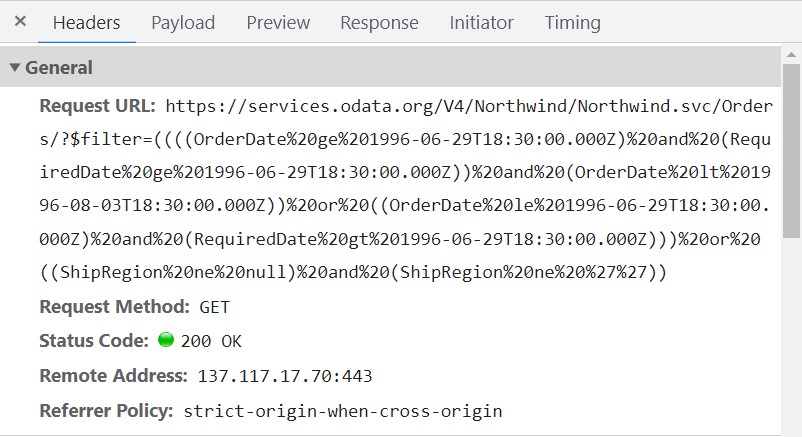
To enable server-side filtering based on the current view range, set the includeFiltersInQuery API to true. This constructs a filter query using the start date, end date, and recurrence rule, allowing the server to return only the relevant data.
This method improves component performance by reducing the amount of data transferred to the client. This enhances efficiency and responsiveness, resulting in a better user experience. However, consider the potential for longer query strings, which may encounter maximum URL length limits or server restrictions.
import { Schedule, Day, Week, WorkWeek, Month, Agenda } from '@syncfusion/ej2-schedule';
import { DataManager, ODataV4Adaptor, Query } from '@syncfusion/ej2-data';

Schedule.Inject(Day, Week, WorkWeek, Month, Agenda);

let dataManager: DataManager = new DataManager({
    url: 'https://services.odata.org/V4/Northwind/Northwind.svc/Orders/',
    adaptor: new ODataV4Adaptor,
    crossDomain: true
});

let scheduleObj: Schedule = new Schedule({
    height: '550px',
    selectedDate: new Date(1996, 6, 9),
    currentView: 'Month',
    readonly: true,
    eventSettings: {
        query: new Query(),
        includeFiltersInQuery: true, dataSource: dataManager,
        fields: {
            id: 'Id',
            subject: { name: 'ShipName' },
            location: { name: 'ShipCountry' },
            description: { name: 'ShipAddress' },
            startTime: { name: 'OrderDate' },
            endTime: { name: 'RequiredDate' },
            recurrenceRule: { name: 'ShipRegion' }
        }
    }
});
scheduleObj.appendTo('#Schedule');
<!DOCTYPE html>
<html lang="en">
<head>
<title>Schedule Typescript Control</title>
<meta charset="utf-8" />
<meta name="viewport" content="width=device-width, initial-scale=1.0" />
<meta name="description" content="Typescript Schedule Control" />
<meta name="author" content="Syncfusion" />
<link href="index.css" rel="stylesheet" />
<link href="https://cdn.syncfusion.com/ej2/35.1.37/ej2-base/styles/fluent2.css" rel="stylesheet" />
<link href="https://cdn.syncfusion.com/ej2/35.1.37/ej2-buttons/styles/fluent2.css" rel="stylesheet" />
<link href="https://cdn.syncfusion.com/ej2/35.1.37/ej2-calendars/styles/fluent2.css" rel="stylesheet" />
<link href="https://cdn.syncfusion.com/ej2/35.1.37/ej2-dropdowns/styles/fluent2.css" rel="stylesheet" />
<link href="https://cdn.syncfusion.com/ej2/35.1.37/ej2-inputs/styles/fluent2.css" rel="stylesheet" />
<link href="https://cdn.syncfusion.com/ej2/35.1.37/ej2-navigations/styles/fluent2.css" rel="stylesheet" />
<link href="https://cdn.syncfusion.com/ej2/35.1.37/ej2-popups/styles/fluent2.css" rel="stylesheet" />
<link href="https://cdn.syncfusion.com/ej2/35.1.37/ej2-schedule/styles/fluent2.css" rel="stylesheet" />
<script src="https://cdnjs.cloudflare.com/ajax/libs/systemjs/0.19.38/system.js" type="text/javascript"></script>
<script src="systemjs.config.js" type="text/javascript"></script>
</head>
<body>
<div id='loader'>LOADING....</div>
<div id='container'>
<div id="Schedule"></div>
</div>
</body>
</html>The following image represents how the parameters are passed using ODataV4 filter.
Using custom adaptor
Create a custom adaptor by extending the built-in adaptors. The following example demonstrates how to create a custom adaptor and add a custom field EventID for appointments by overriding the processResponse method of the ODataV4Adaptor.
import { Schedule, Day, Week, WorkWeek, Month, Agenda } from '@syncfusion/ej2-schedule';
import { DataManager, ODataV4Adaptor, Query } from '@syncfusion/ej2-data';

Schedule.Inject(Day, Week, WorkWeek, Month, Agenda);

class CustomAdaptor extends ODataV4Adaptor {
    processResponse(): Object {
        let i: number = 0;
        // calling base class processResponse function
        let original: Object[] = super.processResponse.apply(this, arguments);
        // adding employee id
        original.forEach((item: Object) => item['EventID'] = ++i);
        return original;
    }
}

let dataManager: DataManager = new DataManager({
    url: 'https://services.odata.org/V4/Northwind/Northwind.svc/Orders/',
    adaptor: new CustomAdaptor
});

let scheduleObj: Schedule = new Schedule({
    height: '550px',
    selectedDate: new Date(1996, 6, 9),
    readonly: true,
    eventSettings: {
        dataSource: dataManager,
        fields: {
            id: 'Id',
            subject: { name: 'ShipName' },
            location: { name: 'ShipCountry' },
            description: { name: 'ShipAddress' },
            startTime: { name: 'OrderDate' },
            endTime: { name: 'RequiredDate' },
            recurrenceRule: { name: 'ShipRegion' }
        }
    }
});
scheduleObj.appendTo('#Schedule');
<!DOCTYPE html>
<html lang="en">
<head>
<title>Schedule Typescript Control</title>
<meta charset="utf-8" />
<meta name="viewport" content="width=device-width, initial-scale=1.0" />
<meta name="description" content="Typescript Schedule Control" />
<meta name="author" content="Syncfusion" />
<link href="index.css" rel="stylesheet" />
<link href="https://cdn.syncfusion.com/ej2/35.1.37/ej2-base/styles/fluent2.css" rel="stylesheet" />
<link href="https://cdn.syncfusion.com/ej2/35.1.37/ej2-buttons/styles/fluent2.css" rel="stylesheet" />
<link href="https://cdn.syncfusion.com/ej2/35.1.37/ej2-calendars/styles/fluent2.css" rel="stylesheet" />
<link href="https://cdn.syncfusion.com/ej2/35.1.37/ej2-dropdowns/styles/fluent2.css" rel="stylesheet" />
<link href="https://cdn.syncfusion.com/ej2/35.1.37/ej2-inputs/styles/fluent2.css" rel="stylesheet" />
<link href="https://cdn.syncfusion.com/ej2/35.1.37/ej2-navigations/styles/fluent2.css" rel="stylesheet" />
<link href="https://cdn.syncfusion.com/ej2/35.1.37/ej2-popups/styles/fluent2.css" rel="stylesheet" />
<link href="https://cdn.syncfusion.com/ej2/35.1.37/ej2-schedule/styles/fluent2.css" rel="stylesheet" />
<script src="https://cdnjs.cloudflare.com/ajax/libs/systemjs/0.19.38/system.js" type="text/javascript"></script>
<script src="systemjs.config.js" type="text/javascript"></script>
</head>
<body>
<div id='loader'>LOADING....</div>
<div id='container'>
<div id="Schedule"></div>
</div>
</body>
</html>Loading data via AJAX post
The Scheduler supports binding event data retrieved via external AJAX requests. Assign the retrieved data to the dataSource property of the Scheduler. In the following code example, data is retrieved from the server using an AJAX request and assigned to the dataSource property within the onSuccess event.
[src/app/app.ts]
import { Ajax } from '@syncfusion/ej2-base';
import { Schedule, Day, Week, WorkWeek, Month, Agenda } from '@syncfusion/ej2-schedule';

Schedule.Inject(Day, Week, WorkWeek, Month, Agenda);
let dataManager: object = [];
let ajax = new Ajax('Home/GetData', 'GET', false);
ajax.onSuccess = function (value) {
    dataManager = value;
};
ajax.send();
let scheduleObj: Schedule = new Schedule({
    height: '550px',
    selectedDate: new Date(2017, 5, 11),
    eventSettings: { dataSource: dataManager }
});
scheduleObj.appendTo('#Schedule');
Definition for the controller method
GetDatacan be referred here.
Passing additional parameters to the server
To send additional custom parameters to the server-side post:
- Use the
addParamsmethod ofQuery. - Assign the
Queryobject with additional parameters to thequeryproperty of the Scheduler.
import { Schedule, Day, Week, WorkWeek, Month, Agenda } from '@syncfusion/ej2-schedule';
import { DataManager, ODataV4Adaptor, Query } from '@syncfusion/ej2-data';

Schedule.Inject(Day, Week, WorkWeek, Month, Agenda);

let dataManager: DataManager = new DataManager({
    url: 'https://services.odata.org/V4/Northwind/Northwind.svc/Orders/',
    adaptor: new ODataV4Adaptor
});
let dataQuery: Query = new Query().addParams('readOnly', 'true');

let scheduleObj: Schedule = new Schedule({
    height: '550px',
    selectedDate: new Date(1996, 6, 9),
    readonly: true,
    eventSettings: {
        dataSource: dataManager, query: dataQuery,
        fields: {
            id: 'Id',
            subject: { name: 'ShipName' },
            location: { name: 'ShipCountry' },
            description: { name: 'ShipAddress' },
            startTime: { name: 'OrderDate' },
            endTime: { name: 'RequiredDate' },
            recurrenceRule: { name: 'ShipRegion' }
        }
    }
});
scheduleObj.appendTo('#Schedule');
<!DOCTYPE html>
<html lang="en">
<head>
<title>Schedule Typescript Control</title>
<meta charset="utf-8" />
<meta name="viewport" content="width=device-width, initial-scale=1.0" />
<meta name="description" content="Typescript Schedule Control" />
<meta name="author" content="Syncfusion" />
<link href="index.css" rel="stylesheet" />
<link href="https://cdn.syncfusion.com/ej2/35.1.37/ej2-base/styles/fluent2.css" rel="stylesheet" />
<link href="https://cdn.syncfusion.com/ej2/35.1.37/ej2-buttons/styles/fluent2.css" rel="stylesheet" />
<link href="https://cdn.syncfusion.com/ej2/35.1.37/ej2-calendars/styles/fluent2.css" rel="stylesheet" />
<link href="https://cdn.syncfusion.com/ej2/35.1.37/ej2-dropdowns/styles/fluent2.css" rel="stylesheet" />
<link href="https://cdn.syncfusion.com/ej2/35.1.37/ej2-inputs/styles/fluent2.css" rel="stylesheet" />
<link href="https://cdn.syncfusion.com/ej2/35.1.37/ej2-navigations/styles/fluent2.css" rel="stylesheet" />
<link href="https://cdn.syncfusion.com/ej2/35.1.37/ej2-popups/styles/fluent2.css" rel="stylesheet" />
<link href="https://cdn.syncfusion.com/ej2/35.1.37/ej2-schedule/styles/fluent2.css" rel="stylesheet" />
<script src="https://cdnjs.cloudflare.com/ajax/libs/systemjs/0.19.38/system.js" type="text/javascript"></script>
<script src="systemjs.config.js" type="text/javascript"></script>
</head>
<body>
<div id='loader'>LOADING....</div>
<div id='container'>
<div id="Schedule"></div>
</div>
</body>
</html>Parameters added using the
queryproperty will be sent with every data request to the server for all Scheduler actions.
Handling failure actions
You can handle server-side exceptions and error messages on the client-side using the Scheduler’s actionFailure event. The event argument contains the error details returned from the server.
import { Schedule, Day, Week, WorkWeek, Month, Agenda } from '@syncfusion/ej2-schedule';
import { DataManager } from '@syncfusion/ej2-data';

Schedule.Inject(Day, Week, WorkWeek, Month, Agenda);

let dataManager: DataManager = new DataManager({
    url: 'http://some.com/invalidUrl'
});

let scheduleObj: Schedule = new Schedule({
    height: '550px',
    selectedDate: new Date(2017, 5, 11),
    eventSettings: { dataSource: dataManager },
    actionFailure: () => {
        let span: HTMLElement = document.createElement('span');
        scheduleObj.element.parentNode.insertBefore(span, scheduleObj.element);
        span.style.color = '#FF0000'
        span.innerHTML = 'Server exception: 404 Not found';
    }
});
scheduleObj.appendTo('#Schedule');
<!DOCTYPE html>
<html lang="en">
<head>
<title>Schedule Typescript Control</title>
<meta charset="utf-8" />
<meta name="viewport" content="width=device-width, initial-scale=1.0" />
<meta name="description" content="Typescript Schedule Control" />
<meta name="author" content="Syncfusion" />
<link href="index.css" rel="stylesheet" />
<link href="https://cdn.syncfusion.com/ej2/35.1.37/ej2-base/styles/fluent2.css" rel="stylesheet" />
<link href="https://cdn.syncfusion.com/ej2/35.1.37/ej2-buttons/styles/fluent2.css" rel="stylesheet" />
<link href="https://cdn.syncfusion.com/ej2/35.1.37/ej2-calendars/styles/fluent2.css" rel="stylesheet" />
<link href="https://cdn.syncfusion.com/ej2/35.1.37/ej2-dropdowns/styles/fluent2.css" rel="stylesheet" />
<link href="https://cdn.syncfusion.com/ej2/35.1.37/ej2-inputs/styles/fluent2.css" rel="stylesheet" />
<link href="https://cdn.syncfusion.com/ej2/35.1.37/ej2-navigations/styles/fluent2.css" rel="stylesheet" />
<link href="https://cdn.syncfusion.com/ej2/35.1.37/ej2-popups/styles/fluent2.css" rel="stylesheet" />
<link href="https://cdn.syncfusion.com/ej2/35.1.37/ej2-schedule/styles/fluent2.css" rel="stylesheet" />
<script src="https://cdnjs.cloudflare.com/ajax/libs/systemjs/0.19.38/system.js" type="text/javascript"></script>
<script src="systemjs.config.js" type="text/javascript"></script>
</head>
<body>
<div id='loader'>LOADING....</div>
<div id='container'>
<div id="Schedule"></div>
</div>
</body>
</html>The
actionFailureevent triggers when the server returns errors or when an exception occurs while processing any Scheduler CRUD action.
Scheduler CRUD actions
CRUD (Create, Read, Update, and Delete) actions can be performed on Scheduler appointments using various adaptors available within the DataManager. The UrlAdaptor is recommended for performing CRUD actions on Scheduler appointments.
import { Schedule, Day, Week, WorkWeek, Month, Agenda } from '@syncfusion/ej2-schedule';
import { DataManager, UrlAdaptor } from '@syncfusion/ej2-data';

Schedule.Inject(Day, Week, WorkWeek, Month, Agenda);
let dataManager: DataManager = new DataManager({
       url: 'Home/GetData', // 'controller/actions'
       crudUrl: 'Home/UpdateData',
       adaptor: new UrlAdaptor
   });

let scheduleObj: Schedule = new Schedule({
    height: '550px',
    selectedDate: new Date(2017, 5, 5),
    eventSettings: { dataSource: dataManager }
});
scheduleObj.appendTo('#Schedule');
The server-side controller code to handle the CRUD operations is as follows:
using System;
using System.Collections.Generic;
using System.Linq;
using System.Web;
using System.Web.Mvc;
using ScheduleSample.Models;

namespace ScheduleSample.Controllers
{
    public class HomeController : Controller
    {
        ScheduleDataDataContext db = new ScheduleDataDataContext();
        public ActionResult Index()
        {
            return View();
        }
        public JsonResult LoadData()  // Here we get the Start and End Date and based on that can filter the data and return to Scheduler
        {
            var data = db.ScheduleEventDatas.ToList();
            return Json(data, JsonRequestBehavior.AllowGet);
        }
        [HttpPost]
        public JsonResult UpdateData(EditParams param)
        {
            if (param.action == "insert" || (param.action == "batch" && param.added != null)) // this block of code will execute while inserting the appointments
            {
                var value = (param.action == "insert") ? param.value : param.added[0];
                int intMax = db.ScheduleEventDatas.ToList().Count > 0 ? db.ScheduleEventDatas.ToList().Max(p => p.Id) : 1;
                DateTime startTime = Convert.ToDateTime(value.StartTime);
                DateTime endTime = Convert.ToDateTime(value.EndTime);
                ScheduleEventData appointment = new ScheduleEventData()
                {
                    Id = intMax + 1,
                    StartTime = startTime.ToLocalTime(),
                    EndTime = endTime.ToLocalTime(),
                    Subject = value.Subject,
                    IsAllDay = value.IsAllDay,
                    StartTimezone = value.StartTimezone,
                    EndTimezone = value.EndTimezone,
                    RecurrenceRule = value.RecurrenceRule,
                    RecurrenceID = value.RecurrenceID,
                    RecurrenceException = value.RecurrenceException
                };
                db.ScheduleEventDatas.InsertOnSubmit(appointment);
                db.SubmitChanges();
            }
            if (param.action == "update" || (param.action == "batch" && param.changed != null)) // this block of code will execute while updating the appointment
            {
                var value = (param.action == "update") ? param.value : param.changed[0];
                var filterData = db.ScheduleEventDatas.Where(c => c.Id == Convert.ToInt32(value.Id));
                if (filterData.Count() > 0)
                {
                    DateTime startTime = Convert.ToDateTime(value.StartTime);
                    DateTime endTime = Convert.ToDateTime(value.EndTime);
                    ScheduleEventData appointment = db.ScheduleEventDatas.Single(A => A.Id == Convert.ToInt32(value.Id));
                    appointment.StartTime = startTime.ToLocalTime();
                    appointment.EndTime = endTime.ToLocalTime();
                    appointment.StartTimezone = value.StartTimezone;
                    appointment.EndTimezone = value.EndTimezone;
                    appointment.Subject = value.Subject;
                    appointment.IsAllDay = value.IsAllDay;
                    appointment.RecurrenceRule = value.RecurrenceRule;
                    appointment.RecurrenceID = value.RecurrenceID;
                    appointment.RecurrenceException = value.RecurrenceException;
                }
                db.SubmitChanges();
            }
            if (param.action == "remove" || (param.action == "batch" && param.deleted != null)) // this block of code will execute while removing the appointment
            {
                if (param.action == "remove")
                {
                    int key = Convert.ToInt32(param.key);
                    ScheduleEventData appointment = db.ScheduleEventDatas.Where(c => c.Id == key).FirstOrDefault();
                    if (appointment != null) db.ScheduleEventDatas.DeleteOnSubmit(appointment);
                }
                else
                {
                    foreach (var apps in param.deleted)
                    {
                        ScheduleEventData appointment = db.ScheduleEventDatas.Where(c => c.Id == apps.Id).FirstOrDefault();
                        if (appointment != null) db.ScheduleEventDatas.DeleteOnSubmit(appointment);
                    }
                }
                db.SubmitChanges();
            }
            var data = db.ScheduleEventDatas.ToList();
            return Json(data, JsonRequestBehavior.AllowGet);
        }

        public class EditParams
        {
            public string key { get; set; }
            public string action { get; set; }
            public List<ScheduleEventData> added { get; set; }
            public List<ScheduleEventData> changed { get; set; }
            public List<ScheduleEventData> deleted { get; set; }
            public ScheduleEventData value { get; set; }
        }
    }
}
Configuring Scheduler with Google API service
A custom Google Calendar URL is assigned to the DataManager and then to the Scheduler dataSource. Since event data retrieved from Google Calendar uses a custom format, it must be manually resolved within the Scheduler’s dataBinding event. In this event, map the fields correctly and assign them to the result.
import { Schedule, Day, Week, WorkWeek, Month, Agenda } from '@syncfusion/ej2-schedule';
import { DataManager, WebApiAdaptor } from '@syncfusion/ej2-data';

Schedule.Inject(Day, Week, WorkWeek, Month, Agenda);

const CALENDAR_ID: string = 'en.usa%[email protected]';
const PUBLIC_KEY: string = 'AIzaSyBgbX_tgmVanBP4yafDPPXxWr70sjbKAXM';

let dataManager: DataManager = new DataManager({
    url: 'https://www.googleapis.com/calendar/v3/calendars/' + CALENDAR_ID + '/events?key=' + PUBLIC_KEY,
    adaptor: new WebApiAdaptor,
    crossDomain: true
});

let scheduleObj: Schedule = new Schedule({
    height: '550px',
    eventSettings: { dataSource: dataManager },
    readonly: true,
    currentView: 'Month',
    timezone: 'UTC',
    dataBinding: (e: { [key: string]: Object }) => {
        let items: { [key: string]: Object }[] = (e.result as { [key: string]: Object }).items as { [key: string]: Object }[];
        let scheduleData: Object[] = [];
        if (items.length > 0) {
            for (let i: number = 0; i < items.length; i++) {
                let event: { [key: string]: Object } = items[i];
                let when: string = (event.start as { [key: string]: Object }).dateTime as string;
                let start: string = (event.start as { [key: string]: Object }).dateTime as string;
                let end: string = (event.end as { [key: string]: Object }).dateTime as string;
                if (!when) {
                    when = (event.start as { [key: string]: Object }).date as string;
                    start = (event.start as { [key: string]: Object }).date as string;
                    end = (event.end as { [key: string]: Object }).date as string;
                }
                scheduleData.push({
                    Id: event.id,
                    Subject: event.summary,
                    StartTime: new Date(start),
                    EndTime: new Date(end),
                    IsAllDay: !(event.start as { [key: string]: Object }).dateTime
                });
            }
        }
        e.result = scheduleData;
    }
});
scheduleObj.appendTo('#Schedule');
<!DOCTYPE html>
<html lang="en">
<head>
<title>Schedule Typescript Control</title>
<meta charset="utf-8" />
<meta name="viewport" content="width=device-width, initial-scale=1.0" />
<meta name="description" content="Typescript Schedule Control" />
<meta name="author" content="Syncfusion" />
<link href="index.css" rel="stylesheet" />
<link href="https://cdn.syncfusion.com/ej2/35.1.37/ej2-base/styles/fluent2.css" rel="stylesheet" />
<link href="https://cdn.syncfusion.com/ej2/35.1.37/ej2-buttons/styles/fluent2.css" rel="stylesheet" />
<link href="https://cdn.syncfusion.com/ej2/35.1.37/ej2-calendars/styles/fluent2.css" rel="stylesheet" />
<link href="https://cdn.syncfusion.com/ej2/35.1.37/ej2-dropdowns/styles/fluent2.css" rel="stylesheet" />
<link href="https://cdn.syncfusion.com/ej2/35.1.37/ej2-inputs/styles/fluent2.css" rel="stylesheet" />
<link href="https://cdn.syncfusion.com/ej2/35.1.37/ej2-navigations/styles/fluent2.css" rel="stylesheet" />
<link href="https://cdn.syncfusion.com/ej2/35.1.37/ej2-popups/styles/fluent2.css" rel="stylesheet" />
<link href="https://cdn.syncfusion.com/ej2/35.1.37/ej2-schedule/styles/fluent2.css" rel="stylesheet" />
<script src="https://cdnjs.cloudflare.com/ajax/libs/systemjs/0.19.38/system.js" type="text/javascript"></script>
<script src="systemjs.config.js" type="text/javascript"></script>
</head>
<body>
<div id='loader'>LOADING....</div>
<div id='container'>
<div id="Schedule"></div>
</div>
</body>
</html>See Also
You can refer to our JavaScript Scheduler feature tour page for its groundbreaking feature representations. You can also explore our JavaScript Scheduler example to knows how to present and manipulate data.