How can I help you?
Text-to-Speech in ASP.NET Core AI AssistView
26 Mar 202620 minutes to read
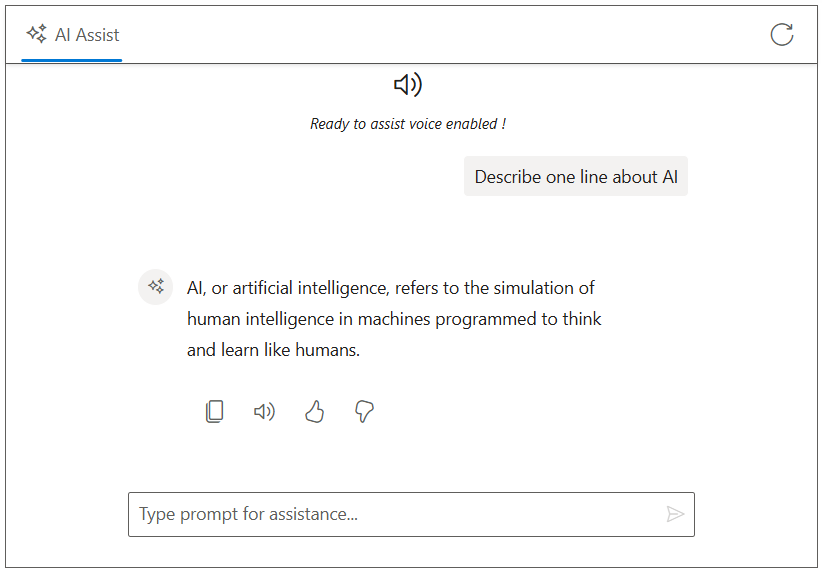
The Syncfusion TypeScript AI AssistView control integrates Text-to-Speech (TTS) functionality using the browser’s Web Speech API, specifically the SpeechSynthesisUtterance interface. This allows AI-generated responses to be converted into spoken audio, enhancing accessibility and user interaction.
Prerequisites
Before integrating Text-to-Speech, ensure the following:
- The Syncfusion AI AssistView control is properly set up in your ASP.NET Core application.
- The AI AssistView control is integrated with Azure OpenAI.
Configure Text-to-Speech
To enable Text-to-Speech functionality, modify the Index.cshtml file to incorporate the Web Speech API. A custom Read Aloud button is added to the response toolbar using the e-aiassistview-responsetoolbarsettings tag helper. When clicked, the itemClicked event extracts plain text from the generated AI response and use the browser SpeechSynthesis API to read it aloud.
@model IndexModel
@using Syncfusion.EJ2.InteractiveChat

<div class="integration-texttospeech-section">
    <ejs-aiassistview id="aiAssistView" bannerTemplate="#bannerContent"
                      promptRequest="onPromptRequest"
                      stopRespondingClick="stopRespondingClick"
                      created="onCreated">
        <e-aiassistview-toolbarsettings items="@Model.ViewModel.Items" itemClicked="toolbarItemClicked"></e-aiassistview-toolbarsettings>
        <e-aiassistview-responsetoolbarsettings items="@Model.ViewModel.ResponseItems" itemClicked="onResponseToolbarItemClicked"></e-aiassistview-responsetoolbarsettings>
    </ejs-aiassistview>
</div>

<script id="bannerContent" type="text/x-jsrender">
    <div class="banner-content">
        <div class="e-icons e-audio"></div>
        <i>Ready to assist voice enabled !</i>
    </div>
</script>

<script src="https://cdn.jsdelivr.net/npm/marked@latest/marked.min.js"></script>
<script>
    var assistObj = null;
    var stopStreaming = false;
    var currentUtterance;

    // Initializes the AIAssistView component reference when created
    function onCreated() {
        assistObj = ej.base.getComponent(document.getElementById("aiAssistView"), "aiassistview");
    }

    // Handles toolbar item clicks, such as clearing the conversation on refresh
    function toolbarItemClicked(args) {
        if (args.item.iconCss === 'e-icons e-refresh') {
            assistObj.prompts = [];
            stopStreaming = true;
        }
    }

    // Handles clicks on response toolbar items, such as copying, reading aloud, liking, or disliking the response
    function onResponseToolbarItemClicked(args) {
        const responseHtml = assistObj.prompts[args.dataIndex].response;
        if (responseHtml) {
            const tempDiv = document.createElement('div');
            tempDiv.innerHTML = responseHtml;
            const text = (tempDiv.textContent || tempDiv.innerText || '').trim();
            if (args.item.iconCss === 'e-icons e-audio' || args.item.iconCss === 'e-icons e-assist-stop') {
                if (currentUtterance) {
                    speechSynthesis.cancel();
                    currentUtterance = null;
                    assistObj.responseToolbarSettings.items[1].iconCss = 'e-icons e-audio';
                    assistObj.responseToolbarSettings.items[1].tooltip = 'Read Aloud';
                } else {
                    const utterance = new SpeechSynthesisUtterance(text);
                    utterance.onend = () => {
                        currentUtterance = null;
                        assistObj.responseToolbarSettings.items[1].iconCss = 'e-icons e-audio';
                        assistObj.responseToolbarSettings.items[1].tooltip = 'Read Aloud';
                    };
                    speechSynthesis.speak(utterance);
                    currentUtterance = utterance;
                    assistObj.responseToolbarSettings.items[1].iconCss = 'e-icons e-assist-stop';
                    assistObj.responseToolbarSettings.items[1].tooltip = 'Stop';
                }
            }
        }
    }

    // Streams the AI response character by character to create a typing effect
    async function streamResponse(response) {
        let lastResponse = '';
        const responseUpdateRate = 10;
        let i = 0;
        const responseLength = response.length;
        while (i < responseLength && !stopStreaming) {
            lastResponse += response[i];
            i++;
            if (i % responseUpdateRate === 0 || i === responseLength) {
                const htmlResponse = marked.parse(lastResponse);
                assistObj.addPromptResponse(htmlResponse, i === responseLength);
                assistObj.scrollToBottom();
            }
            await new Promise(resolve => setTimeout(resolve, 15)); // Delay for streaming effect
        }
    }

    // Handles prompt requests by sending them to the server API endpoint and streaming the response
    function onPromptRequest(args) {
        // Get antiforgery token
        var tokenElement = document.querySelector('input[name="__RequestVerificationToken"]');
        var token = tokenElement ? tokenElement.value : '';

        if (!token) {
            assistObj.addPromptResponse('⚠️ Antiforgery token not found.');
            return;
        }

        fetch('/?handler=GetAIResponse', {
            method: 'POST',
            headers: {
                'Content-Type': 'application/json',
                'RequestVerificationToken': token
            },
            body: JSON.stringify({ prompt: args.prompt || 'Hi' })
        })
        .then(response => {
            if (!response.ok) {
                throw new Error(`HTTP ${response.status}: ${response.statusText}`);
            }
            return response.json();
        })
        .then(responseText => {
            const text = responseText.trim() || 'No response received.';
            stopStreaming = false;
            streamResponse(text);
        })
        .catch(error => {
            console.error('Error fetching AI response:', error);
            assistObj.addPromptResponse('⚠️ Something went wrong while connecting to the AI service. Please try again later.');
            stopStreaming = true;
        });
    }

    // Stops the ongoing streaming response
    function stopRespondingClick() {
        stopStreaming = true;
    }
</script>

<style>
    .integration-texttospeech-section {
        height: 450px;
        width: 650px;
        margin: 0 auto;
    }

    .integration-texttospeech-section .e-view-container {
        margin: auto;
    }

    .integration-texttospeech-section .e-banner-view {
        margin-left: 0;
    }

    .integration-texttospeech-section .banner-content .e-audio:before {
        font-size: 25px;
    }

    .integration-texttospeech-section .banner-content {
        display: flex;
        flex-direction: column;
        gap: 10px;
        text-align: center;
    }
</style>
using Azure;
using Azure.AI.OpenAI;
using Microsoft.AspNetCore.Mvc;
using Microsoft.AspNetCore.Mvc.RazorPages;
using OpenAI.Chat;
namespace WebApplication.Pages
{
public class IndexModel : PageModel
{
public IndexViewModel ViewModel { get; set; } = new IndexViewModel();
public void OnGet()
{
ViewModel.Items = new List<ToolbarItemModel>
{
new ToolbarItemModel { iconCss = "e-icons e-refresh", align = "Right" }
};
ViewModel.ResponseItems = new List<ToolbarItemModel>
{
new ToolbarItemModel { iconCss = "e-icons e-assist-copy", tooltip = "Copy" },
new ToolbarItemModel { iconCss = "e-icons e-audio", tooltip = "Read Aloud" },
new ToolbarItemModel { iconCss = "e-icons e-assist-like", tooltip = "Like" },
new ToolbarItemModel { iconCss = "e-icons e-assist-dislike", tooltip = "Need Improvement" }
};
}
public async Task<IActionResult> OnPostGetAIResponse([FromBody] PromptRequest request)
{
try
{
_logger.LogInformation("Received request with prompt: {Prompt}", request?.Prompt);
if (string.IsNullOrEmpty(request?.Prompt))
{
_logger.LogWarning("Prompt is null or empty.");
return BadRequest("Prompt cannot be empty.");
}
string endpoint = "Your_Azure_OpenAI_Endpoint"; // Replace with your Azure OpenAI endpoint
string apiKey = "YOUR_AZURE_OPENAI_API_KEY"; // Replace with your Azure OpenAI API key
string deploymentName = "YOUR_DEPLOYMENT_NAME"; // Replace with your Azure OpenAI deployment name (e.g., gpt-4o-mini)
var credential = new AzureKeyCredential(apiKey);
var client = new AzureOpenAIClient(new Uri(endpoint), credential);
var chatClient = client.GetChatClient(deploymentName);
var chatCompletionOptions = new ChatCompletionOptions();
var completion = await chatClient.CompleteChatAsync(
new[] { new UserChatMessage(request.Prompt) },
chatCompletionOptions
);
string responseText = completion.Value.Content[0].Text;
if (string.IsNullOrEmpty(responseText))
{
_logger.LogError("Azure OpenAI API returned no text.");
return BadRequest("No response from Azure OpenAI.");
}
_logger.LogInformation("Azure OpenAI response received: {Response}", responseText);
return new JsonResult(responseText);
}
catch (Exception ex)
{
_logger.LogError("Exception in Azure OpenAI call: {Message}", ex.Message);
return BadRequest($"Error generating response: {ex.Message}");
}
}
}
public class IndexViewModel
{
public List<ToolbarItemModel> Items { get; set; } = new List<ToolbarItemModel>();
public List<ToolbarItemModel> ResponseItems { get; set; } = new List<ToolbarItemModel>();
}
public class PromptRequest
{
public string Prompt { get; set; }
}
public class ToolbarItemModel
{
public string align { get; set; }
public string iconCss { get; set; }
public string tooltip { get; set; }
}
}