How can I help you?
Speech-to-Text in ASP.NET Core AI AssistView
25 Mar 202624 minutes to read
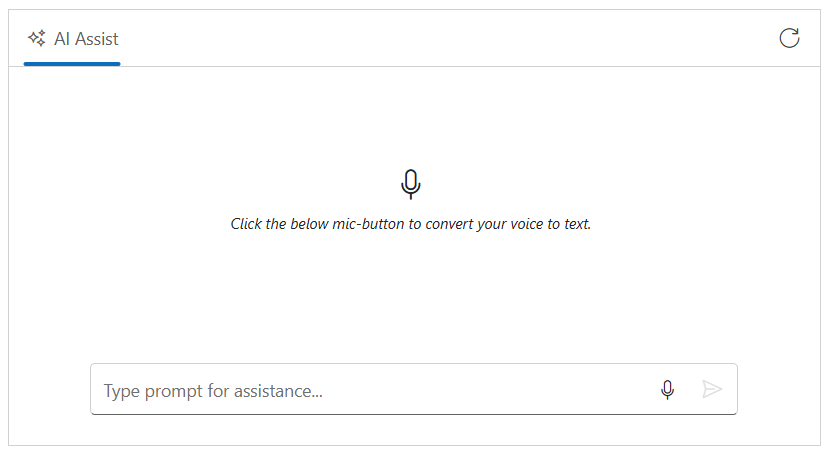
The Syncfusion ASP.NET Core AI AssistView control integrates Speech-to-Text functionality through the browser’s Web Speech API. This enables the conversion of spoken words into text using the device’s microphone, allowing users to interact with the AI AssistView through voice input.
Prerequisites
Before integrating Speech-to-Text, ensure the following:
- The Syncfusion AI AssistView control is properly set up in your ASP.NET Core application.
- The AI AssistView control is integrated with Azure OpenAI.
Enable built-in speech-to-text
You can enable speech-to-text support using the speechToTextSettings property. Set the enable property to true within the speechToTextSettings configuration to activate this feature.
@model IndexModel
@using Syncfusion.EJ2.InteractiveChat

<div class="integration-speechtotext-section">
    <ejs-aiassistview id="aiAssistView" bannerTemplate="#bannerContent"
                      promptRequest="onPromptRequest"
                      created="onCreated">
        <e-aiassistview-toolbarsettings items="@Model.ViewModel.Items" itemClicked="toolbarItemClicked"></e-aiassistview-toolbarsettings>
        <e-aiassistview-speechToTextSettings enable = "true"></e-aiassistview-speechToTextSettings>
    </ejs-aiassistview>
</div>

<script id="bannerContent" type="text/x-jsrender">
    <div class="banner-content">
        <div class="e-icons e-listen-icon"></div>
        <i>Click the below mic-button to convert your voice to text.</i>
    </div>
</script>

<script>
    var assistObj = null;

    function onCreated() {
        assistObj = ej.base.getComponent(document.getElementById("aiAssistView"), "aiassistview");
    }

    function toolbarItemClicked(args) {
        if (args.item.iconCss === 'e-icons e-refresh') {
            assistObj.prompts = [];
        }
    }

    function onPromptRequest(args) {
        if (!args.prompt.trim() || !aiAssistView)
        {
            return;
        }
        var defaultResponse = 'For real-time prompt processing, connect the AIAssistView component to your preferred AI service, such as OpenAI or Azure Cognitive Services. Ensure you obtain the necessary API credentials to authenticate and enable seamless integration.';
        assistObj.addPromptResponse(defaultResponse, true);
    }

</script>

<style>
    .integration-speechtotext-section {
      height: 350px;
      width: 650px;
      margin: 0 auto;
    }

    .integration-speechtotext-section .e-view-container {
      margin: auto;
    }
    .integration-speechtotext-section .e-banner-view {
      margin-left: 0;
    }
    .integration-speechtotext-section .banner-content .e-listen-icon:before {
      font-size: 25px;
    }

    .integration-speechtotext-section .banner-content {
      display: flex;
      flex-direction: column;
      gap: 10px;
      text-align: center;
    }

    .integration-speechtotext-section #assistview-sendButton {
      width: 40px;
      height: 40px;
      font-size: 20px;
      border: none;
      background: none;
      cursor: pointer;
    }

    .integration-speechtotext-section #speechToText.visible,
    .integration-speechtotext-section #assistview-sendButton.visible {
      display: inline-block;
    }

    .integration-speechtotext-section #speechToText,
    .integration-speechtotext-section #assistview-sendButton {
      display: none;
    }

    @@media only screen and (max-width: 750px) {
      .integration-speechtotext-section {
        width: 100%;
      }
    }

    .integration-speechtotext-section .e-footer-wrapper {
      display: flex;
      border: 1px solid #c1c1c1;
      padding: 5px 5px 5px 10px;
      margin: 5px 5px 0 5px;
      border-radius: 30px;
    }

    .integration-speechtotext-section .content-editor {
      width: 100%;
      overflow-y: auto;
      font-size: 14px;
      min-height: 25px;
      max-height: 200px;
      padding: 10px;
    }

    .integration-speechtotext-section .content-editor[contentEditable='true']:empty:before {
      content: attr(placeholder);
      color: #6b7280;
      font-style: italic;
    }

    .integration-speechtotext-section .option-container {
      align-self: flex-end;
    }
</style>
using Azure;
using Azure.AI.OpenAI;
using Microsoft.AspNetCore.Mvc;
using Microsoft.AspNetCore.Mvc.RazorPages;
using OpenAI.Chat;
namespace WebApplication.Pages
{
public class IndexModel : PageModel
{
public IndexViewModel ViewModel { get; set; } = new IndexViewModel();
public void OnGet()
{
// Initialize toolbar items
ViewModel.Items = new List<ToolbarItemModel>
{
new ToolbarItemModel
{
iconCss = "e-icons e-refresh",
align = "Right",
}
};
}
public async Task<IActionResult> OnPostGetAIResponse([FromBody] PromptRequest request)
{
try
{
_logger.LogInformation("Received request with prompt: {Prompt}", request?.Prompt);
if (string.IsNullOrEmpty(request?.Prompt))
{
_logger.LogWarning("Prompt is null or empty.");
return BadRequest("Prompt cannot be empty.");
}
string endpoint = "Your_Azure_OpenAI_Endpoint"; // Replace with your Azure OpenAI endpoint
string apiKey = "YOUR_AZURE_OPENAI_API_KEY"; // Replace with your Azure OpenAI API key
string deploymentName = "YOUR_DEPLOYMENT_NAME"; // Replace with your Azure OpenAI deployment name (e.g., gpt-4o-mini)
var credential = new AzureKeyCredential(apiKey);
var client = new AzureOpenAIClient(new Uri(endpoint), credential);
var chatClient = client.GetChatClient(deploymentName);
var chatCompletionOptions = new ChatCompletionOptions();
var completion = await chatClient.CompleteChatAsync(
new[] { new UserChatMessage(request.Prompt) },
chatCompletionOptions
);
string responseText = completion.Value.Content[0].Text;
if (string.IsNullOrEmpty(responseText))
{
_logger.LogError("Azure OpenAI API returned no text.");
return BadRequest("No response from Azure OpenAI.");
}
_logger.LogInformation("Azure OpenAI response received: {Response}", responseText);
return new JsonResult(responseText);
}
catch (Exception ex)
{
_logger.LogError("Exception in Azure OpenAI call: {Message}", ex.Message);
return BadRequest($"Error generating response: {ex.Message}");
}
}
}
public class IndexViewModel
{
public List<ToolbarItemModel> Items { get; set; } = new List<ToolbarItemModel>();
}
public class PromptRequest
{
public string Prompt { get; set; }
}
public class ToolbarItemModel
{
public string align { get; set; }
public string iconCss { get; set; }
}
}
Configure speech recognition language
The lang property allows you to set the language code for speech recognition. By default, it uses the browser’s language settings, but you can specify a custom language code (e.g., ‘en-US’, ‘es-ES’, ‘fr-FR’, etc.). This ensures that the speech recognition engine recognizes and transcribes speech in the specified language accurately.
Configure speech button settings
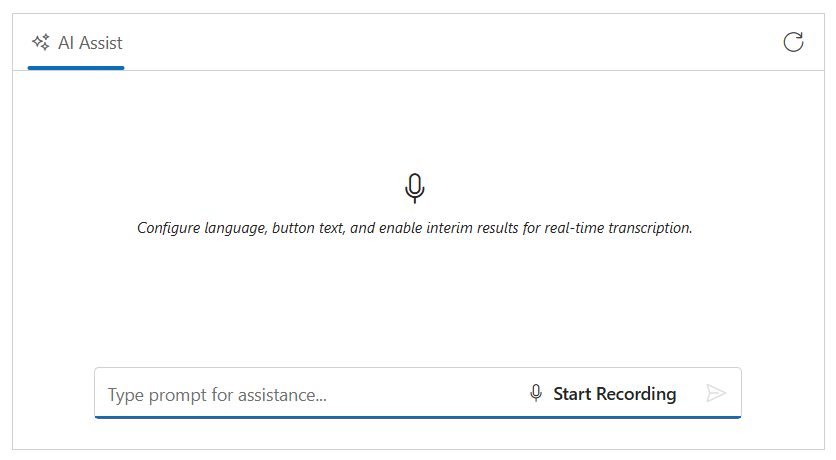
The buttonSettings property lets you customize the microphone button’s appearance and text content by configuring the content (text displayed when idle), stopContent (text displayed when recording), iconCss (icon when idle), and stopIconCss (icon when recording). This allows you to tailor the UI to match your application’s design and provide clear visual feedback to users.
Enable interim results
The allowInterimResults property enables real-time transcription results while the user is still speaking. When set to true, the speech recognition engine returns interim transcripts (partial results) as it processes the audio. This provides immediate feedback to users, allowing them to see their speech being recognized in real-time before the final transcript is generated.
This example demonstrates how to set up the AI AssistView with all these speech recognition features enabled:
@model IndexModel
@using Syncfusion.EJ2.InteractiveChat

@{
    var buttonSettings = new {
        content = "Start Recording",
        stopContent = "Stop Recording",
        iconCss = "e-icons e-microphone",
        stopIconCss = "e-icons e-microphone-off"
    };
}
<div class="integration-speechtotext-section">
    <ejs-aiassistview id="aiAssistView" bannerTemplate="#bannerContent"
                      promptRequest="onPromptRequest"
                      created="onCreated">
        <e-aiassistview-toolbarsettings items="@Model.ViewModel.Items" itemClicked="toolbarItemClicked"></e-aiassistview-toolbarsettings>
        <e-aiassistview-speechToTextSettings enable = "true" lang= "en-US" allowInterimResults = "true" buttonSettings="buttonSettings"></e-aiassistview-speechToTextSettings>
    </ejs-aiassistview>
</div>

<script id="bannerContent" type="text/x-jsrender">
    <div class="banner-content">
        <div class="e-icons e-listen-icon"></div>
        <i>Configure language, button text, and enable interim results for real-time transcription.</i>
    </div>
</script>

<script>
    var assistObj = null;
    function onCreated() {
        assistObj = ej.base.getComponent(document.getElementById("aiAssistView"), "aiassistview");
    }

    function toolbarItemClicked(args) {
        if (args.item.iconCss === 'e-icons e-refresh') {
            assistObj.prompts = [];
        }
    }

    function onPromptRequest(args) {
        if (!args.prompt.trim() || !aiAssistView)
        {
            return;
        }
        const defaultResponse = 'For real-time prompt processing, connect the AIAssistView component to your preferred AI service, such as OpenAI or Azure Cognitive Services. Ensure you obtain the necessary API credentials to authenticate and enable seamless integration.';
        assistObj.addPromptResponse(defaultResponse, true);
    }

</script>

<style>
   .integration-speechtotext-section {
    height: 350px;
    width: 650px;
    margin: 0 auto;
}

.integration-speechtotext-section .e-view-container {
    margin: auto;
}

.integration-speechtotext-section .e-banner-view {
    margin-left: 0;
}

.integration-speechtotext-section .banner-content .e-listen-icon:before {
    font-size: 25px;
}

.integration-speechtotext-section .banner-content {
    display: flex;
    flex-direction: column;
    gap: 10px;
    text-align: center;
}

.integration-speechtotext-section #assistview-sendButton {
    width: 40px;
    height: 40px;
    font-size: 20px;
    border: none;
    background: none;
    cursor: pointer;
}

.integration-speechtotext-section #speechToText.visible,
.integration-speechtotext-section #assistview-sendButton.visible {
    display: inline-block;
}

.integration-speechtotext-section #speechToText,
.integration-speechtotext-section #assistview-sendButton {
    display: none;
}

@@media only screen and (max-width: 750px) {
    .integration-speechtotext-section {
        width: 100%;
    }
}

.integration-speechtotext-section .e-footer-wrapper {
    display: flex;
    border: 1px solid #c1c1c1;
    padding: 5px 5px 5px 10px;
    margin: 5px 5px 0 5px;
    border-radius: 30px;
}

.integration-speechtotext-section .content-editor {
    width: 100%;
    overflow-y: auto;
    font-size: 14px;
    min-height: 25px;
    max-height: 200px;
    padding: 10px;
}

.integration-speechtotext-section .content-editor[contentEditable='true']:empty:before {
    content: attr(placeholder);
    color: #6b7280;
    font-style: italic;
}

.integration-speechtotext-section .option-container {
    align-self: flex-end;
}
</style>
using Azure;
using Azure.AI.OpenAI;
using Microsoft.AspNetCore.Mvc;
using Microsoft.AspNetCore.Mvc.RazorPages;
using OpenAI.Chat;
namespace WebApplication.Pages
{
public class IndexModel : PageModel
{
public IndexViewModel ViewModel { get; set; } = new IndexViewModel();
public void OnGet()
{
// Initialize toolbar items
ViewModel.Items = new List<ToolbarItemModel>
{
new ToolbarItemModel
{
iconCss = "e-icons e-refresh",
align = "Right",
}
};
}
}
public class IndexViewModel
{
public List<ToolbarItemModel> Items { get; set; } = new List<ToolbarItemModel>();
}
public class ToolbarItemModel
{
public string align { get; set; }
public string iconCss { get; set; }
}
}
Configure tooltip settings
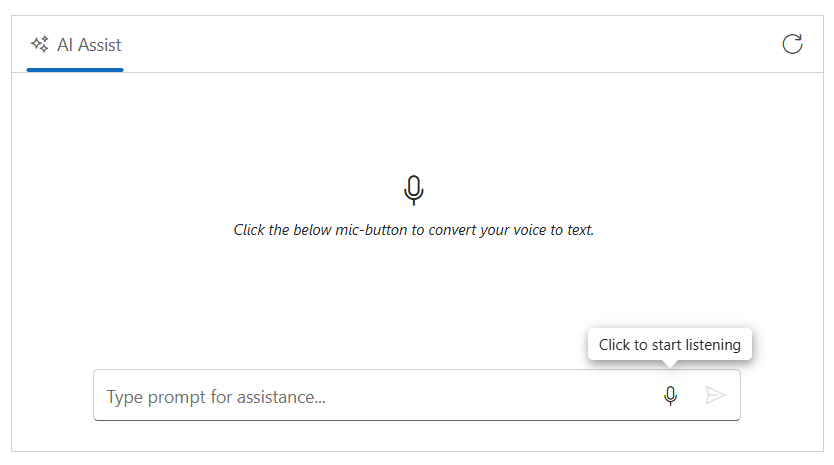
You can customize the tooltips to the microphone button using the tooltipSettings property.
@model IndexModel
@using Syncfusion.EJ2.InteractiveChat

@{
    var tooltipSettings = new {
        content = "Click to start listening",
        stopContent = "Click to stop listening",
        position = "TopCenter"
    };
}
<div class="integration-speechtotext-section">
    <ejs-aiassistview id="aiAssistView" bannerTemplate="#bannerContent"
                      promptRequest="onPromptRequest"
                      created="onCreated">
        <e-aiassistview-toolbarsettings items="@Model.ViewModel.Items" itemClicked="toolbarItemClicked"></e-aiassistview-toolbarsettings>
        <e-aiassistview-speechToTextSettings enable = "true" tooltipSettings="tooltipSettings"></e-aiassistview-speechToTextSettings>
    </ejs-aiassistview>
</div>

<script id="bannerContent" type="text/x-jsrender">
    <div class="banner-content">
        <div class="e-icons e-listen-icon"></div>
        <i>Click the below mic-button to convert your voice to text.</i>
    </div>
</script>

<script>
    var assistObj = null;
    function onCreated() {
        assistObj = ej.base.getComponent(document.getElementById("aiAssistView"), "aiassistview");
    }

    function toolbarItemClicked(args) {
        if (args.item.iconCss === 'e-icons e-refresh') {
            assistObj.prompts = [];
        }
    }

    function onPromptRequest(args) {
        if (!args.prompt.trim() || !aiAssistView)
        {
            return;
        }
        const defaultResponse = 'For real-time prompt processing, connect the AIAssistView component to your preferred AI service, such as OpenAI or Azure Cognitive Services. Ensure you obtain the necessary API credentials to authenticate and enable seamless integration.';
        assistObj.addPromptResponse(defaultResponse, true);
    }

</script>

<style>
   .integration-speechtotext-section {
    height: 350px;
    width: 650px;
    margin: 0 auto;
}

.integration-speechtotext-section .e-view-container {
    margin: auto;
}

.integration-speechtotext-section .e-banner-view {
    margin-left: 0;
}

.integration-speechtotext-section .banner-content .e-listen-icon:before {
    font-size: 25px;
}

.integration-speechtotext-section .banner-content {
    display: flex;
    flex-direction: column;
    gap: 10px;
    text-align: center;
}

.integration-speechtotext-section #assistview-sendButton {
    width: 40px;
    height: 40px;
    font-size: 20px;
    border: none;
    background: none;
    cursor: pointer;
}

.integration-speechtotext-section #speechToText.visible,
.integration-speechtotext-section #assistview-sendButton.visible {
    display: inline-block;
}

.integration-speechtotext-section #speechToText,
.integration-speechtotext-section #assistview-sendButton {
    display: none;
}

@@media only screen and (max-width: 750px) {
    .integration-speechtotext-section {
        width: 100%;
    }
}

.integration-speechtotext-section .e-footer-wrapper {
    display: flex;
    border: 1px solid #c1c1c1;
    padding: 5px 5px 5px 10px;
    margin: 5px 5px 0 5px;
    border-radius: 30px;
}

.integration-speechtotext-section .content-editor {
    width: 100%;
    overflow-y: auto;
    font-size: 14px;
    min-height: 25px;
    max-height: 200px;
    padding: 10px;
}

.integration-speechtotext-section .content-editor[contentEditable='true']:empty:before {
    content: attr(placeholder);
    color: #6b7280;
    font-style: italic;
}

.integration-speechtotext-section .option-container {
    align-self: flex-end;
}
</style>
using Azure;
using Azure.AI.OpenAI;
using Microsoft.AspNetCore.Mvc;
using Microsoft.AspNetCore.Mvc.RazorPages;
using OpenAI.Chat;
namespace WebApplication.Pages
{
public class IndexModel : PageModel
{
public IndexViewModel ViewModel { get; set; } = new IndexViewModel();
public void OnGet()
{
// Initialize toolbar items
ViewModel.Items = new List<ToolbarItemModel>
{
new ToolbarItemModel
{
iconCss = "e-icons e-refresh",
align = "Right",
}
};
}
}
public class IndexViewModel
{
public List<ToolbarItemModel> Items { get; set; } = new List<ToolbarItemModel>();
}
public class ToolbarItemModel
{
public string align { get; set; }
public string iconCss { get; set; }
}
}
Speech to text events
The speech-to-text functionality provides events like onStart (when recognition starts), onStop (when it stops), transcriptChanged (when transcript updates), and onError (when errors occur).
@model IndexModel
@using Syncfusion.EJ2.InteractiveChat

<div class="integration-speechtotext-section">
    <div class="speech-events-container">
        <div class="speech-info-panel">
            <div class="speech-status">
                <label>Recording Status:</label>
                <span id="recordingStatus" class="status-indicator ready">Ready to record</span>
            </div>
            <div class="transcript-section">
                <label>Live Transcript:</label>
                <div id="transcriptDisplay" class="transcript-display">Waiting for speech input...</div>
            </div>
            <div class="error-section" id="errorMessage" style="display: none;">
                <span class="error-text"></span>
            </div>
        </div>
    </div>
    <ejs-aiassistview id="aiAssistView" bannerTemplate="#bannerContent"
                      promptRequest="onPromptRequest"
                      created="onCreated">
        <e-aiassistview-toolbarsettings items="@Model.ViewModel.Items" itemClicked="toolbarItemClicked"></e-aiassistview-toolbarsettings>
        <e-aiassistview-speechToTextSettings enable= "true" onStart="onSpeechStart", onStop="onSpeechStop", transcriptChanged="onTranscriptChanged", onError="onSpeechError" ></e-aiassistview-speechToTextSettings>
    </ejs-aiassistview>
</div>

<script id="bannerContent" type="text/x-jsrender">
    <div class="banner-content">
        <div class="e-icons e-listen-icon"></div>
        <i>Click the below mic-button to convert your voice to text.</i>
    </div>
</script>

<script>
    var assistObj = null;
    var lastTranscript = '';
    function onCreated() {
        assistObj = ej.base.getComponent(document.getElementById("aiAssistView"), "aiassistview");
    }

     // Speech event handlers
    function onSpeechStart(args) {
        // Show visual feedback when recording begins
        const recordingIndicator = document.getElementById('recordingStatus');
        if (recordingIndicator) {
            recordingIndicator.textContent = 'Recording...';
            recordingIndicator.className = 'status-indicator recording';
        }
        // Hide error message when recording starts
        const errorMessage = document.getElementById('errorMessage');
        if (errorMessage) {
            errorMessage.style.display = 'none';
        }
    }

    function onSpeechStop(args) {
        // Hide visual feedback when recording ends
        const recordingIndicator = document.getElementById('recordingStatus');
        if (recordingIndicator) {
            recordingIndicator.textContent = 'Ready to record';
            recordingIndicator.className = 'status-indicator ready';
        }

        // Update transcript display to show final state
        const transcriptDisplay = document.getElementById('transcriptDisplay');
        if (transcriptDisplay && lastTranscript) {
            transcriptDisplay.textContent = lastTranscript;
            transcriptDisplay.style.fontStyle = 'normal';
        }

        // Clear the stored transcript for next session after a delay to allow user to see it
        setTimeout(function() {
            lastTranscript = '';
            if (transcriptDisplay) {
                transcriptDisplay.textContent = 'Waiting for speech input...';
            }
        }, 2000);
    }

    function onTranscriptChanged(args) {
        // Access transcript from various possible property names
        const currentTranscript = args.text || args.value || args.transcript || (args.result && args.result.transcript) || '';
        const isFinal = args.isFinal || args.final || (args.result && args.result.isFinal) || false;

        // Store the transcript for use in onSpeechStop
        if (currentTranscript) {
            lastTranscript = currentTranscript;
        }

        // Update UI with interim results in real-time
        const transcriptDisplay = document.getElementById('transcriptDisplay');
        if (transcriptDisplay) {
            transcriptDisplay.textContent = currentTranscript;
            transcriptDisplay.style.fontStyle = isFinal ? 'normal' : 'italic';
        }
    }

    function onSpeechError(args) {
        // Display error message to user
        const errorMessage = document.getElementById('errorMessage');
        if (errorMessage) {
            const errorText = errorMessage.querySelector('.error-text');
            if (errorText) {
                errorText.textContent = 'Error: ' + (args.error || 'Speech recognition error occurred');
            }
            errorMessage.style.display = 'block';
        }
        // Reset recording status
        const recordingIndicator = document.getElementById('recordingStatus');
        if (recordingIndicator) {
            recordingIndicator.textContent = 'Ready to record';
            recordingIndicator.className = 'status-indicator ready';
        }
    }

    function toolbarItemClicked(args) {
        if (args.item.iconCss === 'e-icons e-refresh') {
            assistObj.prompts = [];
        }
    }

    function onPromptRequest(args) {
        if (!args.prompt.trim() || !aiAssistView)
        {
            return;
        }
        const defaultResponse = 'For real-time prompt processing, connect the AIAssistView component to your preferred AI service, such as OpenAI or Azure Cognitive Services. Ensure you obtain the necessary API credentials to authenticate and enable seamless integration.';
        assistObj.addPromptResponse(defaultResponse, true);
    }

</script>

<style>
.integration-speechtotext-section {
    height: auto;
    width: 650px;
    margin: 0 auto;
}

.speech-events-container {
    margin-bottom: 20px;
}

.speech-info-panel {
    background: #f5f5f5;
    border: 1px solid #ddd;
    border-radius: 8px;
    padding: 20px;
    margin-bottom: 15px;
    box-shadow: 0 2px 4px rgba(0, 0, 0, 0.1);
}

.speech-status {
    display: flex;
    align-items: center;
    margin-bottom: 15px;
    gap: 10px;
}

.speech-status label {
    font-weight: 600;
    color: #333;
    min-width: 120px;
}

.status-indicator {
    display: inline-block;
    padding: 6px 12px;
    border-radius: 20px;
    font-weight: 500;
    font-size: 13px;
}

.status-indicator.ready {
    background-color: #e8f5e9;
    color: #2e7d32;
}

.status-indicator.recording {
    background-color: #ffebee;
    color: #c62828;
    animation: pulse 1s infinite;
}

@keyframes pulse {

    0%,
    100% {
        opacity: 1;
    }

    50% {
        opacity: 0.7;
    }
}

.transcript-section {
    margin-bottom: 15px;
}

.transcript-section label {
    display: block;
    font-weight: 600;
    color: #333;
    margin-bottom: 8px;
}

.transcript-display {
    background: white;
    border: 1px solid #ddd;
    border-radius: 6px;
    padding: 12px;
    min-height: 60px;
    max-height: 120px;
    overflow-y: auto;
    font-size: 14px;
    line-height: 1.5;
    color: #333;
}

.transcript-display:empty::before {
    content: "Waiting for speech input...";
    color: #999;
    font-style: italic;
}

.error-section {
    background-color: #ffebee;
    border: 1px solid #ef5350;
    border-radius: 6px;
    padding: 12px;
    margin-top: 15px;
}

.error-text {
    color: #c62828;
    font-weight: 500;
    font-size: 13px;
}

.integration-speechtotext-section .e-view-container {
    margin: auto;
    height: 400px;
}

.integration-speechtotext-section .e-banner-view {
    margin-left: 0;
}

.integration-speechtotext-section .banner-content .e-listen-icon:before {
    font-size: 25px;
}

.integration-speechtotext-section .banner-content {
    display: flex;
    flex-direction: column;
    gap: 10px;
    text-align: center;
}

.integration-speechtotext-section #assistview-sendButton {
    width: 40px;
    height: 40px;
    font-size: 20px;
    border: none;
    background: none;
    cursor: pointer;
}

.integration-speechtotext-section #speechToText.visible,
.integration-speechtotext-section #assistview-sendButton.visible {
    display: inline-block;
}

.integration-speechtotext-section #speechToText,
.integration-speechtotext-section #assistview-sendButton {
    display: none;
}

@@media only screen and (max-width: 750px) {
    .integration-speechtotext-section {
        width: 100%;
    }
}

.integration-speechtotext-section .e-footer-wrapper {
    display: flex;
    border: 1px solid #c1c1c1;
    padding: 5px 5px 5px 10px;
    margin: 5px 5px 0 5px;
    border-radius: 30px;
}

.integration-speechtotext-section .content-editor {
    width: 100%;
    overflow-y: auto;
    font-size: 14px;
    min-height: 25px;
    max-height: 200px;
    padding: 10px;
}

.integration-speechtotext-section .content-editor[contentEditable='true']:empty:before {
    content: attr(placeholder);
    color: #6b7280;
    font-style: italic;
}

.integration-speechtotext-section .option-container {
    align-self: flex-end;
}
</style>
using Azure;
using Azure.AI.OpenAI;
using Microsoft.AspNetCore.Mvc;
using Microsoft.AspNetCore.Mvc.RazorPages;
using OpenAI.Chat;
namespace WebApplication.Pages
{
public class IndexModel : PageModel
{
public IndexViewModel ViewModel { get; set; } = new IndexViewModel();
public void OnGet()
{
// Initialize toolbar items
ViewModel.Items = new List<ToolbarItemModel>
{
new ToolbarItemModel
{
iconCss = "e-icons e-refresh",
align = "Right",
}
};
}
}
public class IndexViewModel
{
public List<ToolbarItemModel> Items { get; set; } = new List<ToolbarItemModel>();
}
public class ToolbarItemModel
{
public string align { get; set; }
public string iconCss { get; set; }
}
}Browser Compatibility
The SpeechToText control relies on the Speech Recognition API, which has limited browser support. Refer to the Browser Compatibility section for detailed information.