Getting Started with Vue Stock Chart
11 Aug 202621 minutes to read
This article provides a step-by-step guide for setting up a Vite project with a JavaScript environment and integrating the Syncfusion® Vue Stock Chart component using the Composition API / Options API.
The Composition API is a new feature introduced in Vue.js 3 that provides an alternative way to organize and reuse component logic. It allows developers to write components as functions that use smaller, reusable functions called composition functions to manage their properties and behavior.
The Options API is the traditional way of writing Vue.js components, where the component logic is organized into a series of options that define the component’s properties and behavior. These options include data, methods, computed properties, watchers, life cycle hooks, and more.
Prerequisites
Ensure that the development environment meets the required criteria listed in System requirements for Syncfusion® Vue UI components.
Set Up the Vite Project
Create a Vite project using either npm or Yarn.
npm
npm create vite@latest my-app -- --template vueyarn
yarn create vite my-app --template vueIf Vite prompts you to install dependencies and start the project immediately, select No. The Syncfusion package is installed in a later step.
Navigate to the project directory:
cd my-appInstall the project dependencies using either npm or Yarn.
npm
npm installyarn
yarn installNow that my-app is set up, let’s add Syncfusion® components to the project.
Note: To create a TypeScript project, use
npm create vite@latest my-app -- --template vue-tsoryarn create vite my-app --template vue-ts.
Add Syncfusion® Vue Stock Chart Packages
Syncfusion® Vue component packages are available at npmjs.com. To use Syncfusion® Vue components in the project, install the corresponding npm package.
This article uses the Vue Stock Chart component as an example. To use the Vue Stock Chart component in the project, the @syncfusion/ej2-vue-charts package needs to be installed using either npm or Yarn:
npm
npm install @syncfusion/ej2-vue-chartsyarn
yarn add @syncfusion/ej2-vue-chartsNote: npm v5+ saves packages to
dependenciesby default;--saveis not required.
Import Syncfusion® CSS styles
Syncfusion® Vue Stock Chart component themes can be applied using CSS or SASS from npm theme packages, CDN, CRG or Theme Studio.
This example uses the Material 3 theme for the Stock Chart component. To install the Material 3 theme package, use the following command:
npm install @syncfusion/ej2-material3-themeyarn add @syncfusion/ej2-material3-themeThe necessary CSS styles for the Stock Chart component were imported into the <style> section of src/App.vue file. Vite app generates a default styles.css file which we do not need for this example. Before running the sample, delete the content of src/style.css or remove the file if it’s unused.
<style>
  @import "../node_modules/@syncfusion/ej2-material3-theme/styles/stock-chart/index.css";
</style>
Add Syncfusion® Vue Stock Chart Component
Follow the below steps to add the Vue Stock Chart component using Composition API or Options API:
Step 1: First, import and register the Stock Chart component and its child directives in the script section of the src/App.vue file. If you are using the Composition API, you should add the setup attribute to the script tag to indicate that Vue will be using the Composition API.
<script setup>
import { StockChartComponent as EjsStockchart, StockChartSeriesCollectionDirective as EStockchartSeriesCollection, StockChartSeriesDirective as EStockchartSeries, DateTime, CandleSeries } from "@syncfusion/ej2-vue-charts";
</script><script>
import { StockChartComponent, StockChartSeriesCollectionDirective, StockChartSeriesDirective, DateTime, CandleSeries } from "@syncfusion/ej2-vue-charts";
//Component registration
export default {
name: "App",
components: {
"ejs-stockchart": StockChartComponent,
"e-stockchart-series-collection": StockChartSeriesCollectionDirective,
"e-stockchart-series": StockChartSeriesDirective
}
}
</script>Step 2: Declare the values for the dataSource property in the script section.
To hide the period selector and display only the Stock Chart, set enablePeriodSelector to false.
<script setup>
const seriesData = [
        { date: new Date('2012-04-02'), open: 320.71, high: 324.07, low: 317.74, close: 323.78, volume: 45638000 },
        { date: new Date('2012-04-03'), open: 323.03, high: 324.30, low: 319.64, close: 321.63, volume: 40857000 },
        { date: new Date('2012-04-04'), open: 319.54, high: 319.82, low: 315.87, close: 317.89, volume: 32519000 },
        { date: new Date('2012-04-05'), open: 316.44, high: 318.53, low: 314.60, close: 316.48, volume: 46327000 },
        { date: new Date('2012-04-06'), open: 317.20, high: 320.50, low: 315.30, close: 319.80, volume: 38200000 },
        { date: new Date('2012-04-07'), open: 320.00, high: 322.90, low: 318.50, close: 321.10, volume: 35500000 },
        { date: new Date('2012-04-08'), open: 321.50, high: 325.20, low: 320.80, close: 324.70, volume: 41200000 },
        { date: new Date('2012-04-09'), open: 325.00, high: 326.80, low: 322.40, close: 323.90, volume: 39800000 },
        { date: new Date('2012-04-10'), open: 324.20, high: 327.00, low: 323.10, close: 326.10, volume: 42100000 },
        { date: new Date('2012-04-11'), open: 326.30, high: 329.20, low: 325.50, close: 328.70, volume: 44500000 },
        { date: new Date('2012-04-12'), open: 328.90, high: 330.50, low: 326.70, close: 327.80, volume: 36700000 }
];

const enablePeriodSelector = false;
</script><script>
export default {
data() {
return {
seriesData: [
{ date: new Date('2012-04-02'), open: 320.71, high: 324.07, low: 317.74, close: 323.78, volume: 45638000 },
{ date: new Date('2012-04-03'), open: 323.03, high: 324.30, low: 319.64, close: 321.63, volume: 40857000 },
{ date: new Date('2012-04-04'), open: 319.54, high: 319.82, low: 315.87, close: 317.89, volume: 32519000 },
{ date: new Date('2012-04-05'), open: 316.44, high: 318.53, low: 314.60, close: 316.48, volume: 46327000 },
{ date: new Date('2012-04-06'), open: 317.20, high: 320.50, low: 315.30, close: 319.80, volume: 38200000 },
{ date: new Date('2012-04-07'), open: 320.00, high: 322.90, low: 318.50, close: 321.10, volume: 35500000 },
{ date: new Date('2012-04-08'), open: 321.50, high: 325.20, low: 320.80, close: 324.70, volume: 41200000 },
{ date: new Date('2012-04-09'), open: 325.00, high: 326.80, low: 322.40, close: 323.90, volume: 39800000 },
{ date: new Date('2012-04-10'), open: 324.20, high: 327.00, low: 323.10, close: 326.10, volume: 42100000 },
{ date: new Date('2012-04-11'), open: 326.30, high: 329.20, low: 325.50, close: 328.70, volume: 44500000 },
{ date: new Date('2012-04-12'), open: 328.90, high: 330.50, low: 326.70, close: 327.80, volume: 36700000 }
],
enablePeriodSelector: false
};
}
};
</script>Note: Register the feature modules using provide('stockChart', [...]) (Composition API) or the provide option (Options API). This step is essential for the Stock Chart to function properly with the required series types and axes.
Note: If you skip module registration, the chart will not render correctly and you may encounter errors like “Module is not injected” in the browser console.
Step 3: In the template section, define the Stock Chart component with the dataSource property.
<template>
        <ejs-stockchart :enablePeriodSelector="enablePeriodSelector">
            <e-stockchart-series-collection>
                <e-stockchart-series :dataSource="seriesData" type="Candle" volume="volume" xName="date" low="low" high="high" open="open" close="close">
                </e-stockchart-series>
            </e-stockchart-series-collection>
        </ejs-stockchart>
</template>
Here is the complete summarized code for the src/App.vue file:
<template>
        <ejs-stockchart :enablePeriodSelector="enablePeriodSelector">
            <e-stockchart-series-collection>
                <e-stockchart-series :dataSource="seriesData" type="Candle" volume="volume" xName="date" low="low" high="high" open="open" close="close">
                </e-stockchart-series>
            </e-stockchart-series-collection>
        </ejs-stockchart>
</template>

<script setup>
import { provide } from 'vue';
import { StockChartComponent as EjsStockchart, StockChartSeriesCollectionDirective as EStockchartSeriesCollection, StockChartSeriesDirective as EStockchartSeries, DateTime, CandleSeries } from "@syncfusion/ej2-vue-charts";

const seriesData = [
        { date: new Date('2012-04-02'), open: 320.71, high: 324.07, low: 317.74, close: 323.78, volume: 45638000 },
        { date: new Date('2012-04-03'), open: 323.03, high: 324.30, low: 319.64, close: 321.63, volume: 40857000 },
        { date: new Date('2012-04-04'), open: 319.54, high: 319.82, low: 315.87, close: 317.89, volume: 32519000 },
        { date: new Date('2012-04-05'), open: 316.44, high: 318.53, low: 314.60, close: 316.48, volume: 46327000 },
        { date: new Date('2012-04-06'), open: 317.20, high: 320.50, low: 315.30, close: 319.80, volume: 38200000 },
        { date: new Date('2012-04-07'), open: 320.00, high: 322.90, low: 318.50, close: 321.10, volume: 35500000 },
        { date: new Date('2012-04-08'), open: 321.50, high: 325.20, low: 320.80, close: 324.70, volume: 41200000 },
        { date: new Date('2012-04-09'), open: 325.00, high: 326.80, low: 322.40, close: 323.90, volume: 39800000 },
        { date: new Date('2012-04-10'), open: 324.20, high: 327.00, low: 323.10, close: 326.10, volume: 42100000 },
        { date: new Date('2012-04-11'), open: 326.30, high: 329.20, low: 325.50, close: 328.70, volume: 44500000 },
        { date: new Date('2012-04-12'), open: 328.90, high: 330.50, low: 326.70, close: 327.80, volume: 36700000 }
];
const stockChart = [ DateTime, CandleSeries ];
const enablePeriodSelector = false;
provide('stockChart', stockChart);
</script>

<style>
  @import "../node_modules/@syncfusion/ej2-material3-theme/styles/stock-chart/index.css";
</style><template>
<ejs-stockchart :enablePeriodSelector="enablePeriodSelector">
<e-stockchart-series-collection>
<e-stockchart-series :dataSource="seriesData" type="Candle" volume="volume" xName="date" low="low" high="high" open="open" close="close">
</e-stockchart-series>
</e-stockchart-series-collection>
</ejs-stockchart>
</template>
<script>
import { StockChartComponent, StockChartSeriesCollectionDirective, StockChartSeriesDirective, DateTime, CandleSeries } from "@syncfusion/ej2-vue-charts";
//Component registration
export default {
name: "App",
components: {
"ejs-stockchart": StockChartComponent,
"e-stockchart-series-collection": StockChartSeriesCollectionDirective,
"e-stockchart-series": StockChartSeriesDirective
},
data() {
return {
seriesData: [
{ date: new Date('2012-04-02'), open: 320.71, high: 324.07, low: 317.74, close: 323.78, volume: 45638000 },
{ date: new Date('2012-04-03'), open: 323.03, high: 324.30, low: 319.64, close: 321.63, volume: 40857000 },
{ date: new Date('2012-04-04'), open: 319.54, high: 319.82, low: 315.87, close: 317.89, volume: 32519000 },
{ date: new Date('2012-04-05'), open: 316.44, high: 318.53, low: 314.60, close: 316.48, volume: 46327000 },
{ date: new Date('2012-04-06'), open: 317.20, high: 320.50, low: 315.30, close: 319.80, volume: 38200000 },
{ date: new Date('2012-04-07'), open: 320.00, high: 322.90, low: 318.50, close: 321.10, volume: 35500000 },
{ date: new Date('2012-04-08'), open: 321.50, high: 325.20, low: 320.80, close: 324.70, volume: 41200000 },
{ date: new Date('2012-04-09'), open: 325.00, high: 326.80, low: 322.40, close: 323.90, volume: 39800000 },
{ date: new Date('2012-04-10'), open: 324.20, high: 327.00, low: 323.10, close: 326.10, volume: 42100000 },
{ date: new Date('2012-04-11'), open: 326.30, high: 329.20, low: 325.50, close: 328.70, volume: 44500000 },
{ date: new Date('2012-04-12'), open: 328.90, high: 330.50, low: 326.70, close: 327.80, volume: 36700000 }
],
enablePeriodSelector: false
};
},
provide: {
stockChart: [ DateTime, CandleSeries ]
}
};
</script>
<style>
@import "../node_modules/@syncfusion/ej2-material3-theme/styles/stock-chart/index.css";
</style>Run the Project
To run the project, use either npm or Yarn:
npm
npm run devyarn
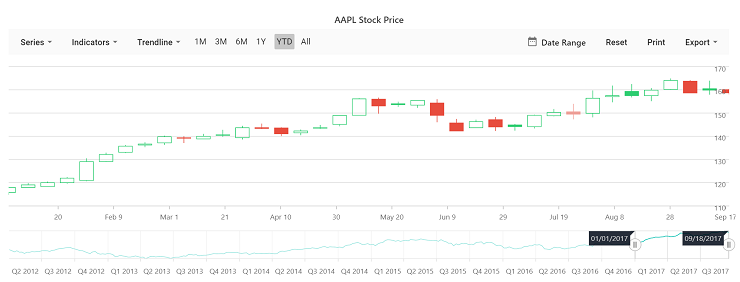
yarn run devThe development server will start and display a message indicating the port number (typically http://localhost:5173). Open your browser and navigate to http://localhost:5173 to view the Stock Chart.
The output will appear as follows:
Sample: You can explore the complete sample project in the vue-3-stock-chart-getting-started repository.
Troubleshooting
The following are common issues and solutions when integrating the Stock Chart component:
-
Chart not rendering: Ensure that all required modules (
DateTime,CandleSeries) are provided usingprovide('stockChart', [...])(Composition API) or theprovideoption (Options API). Verify that the template includes the chart component with proper directives. -
Module not injected error: This error occurs when feature modules are not registered. Confirm that the
providefunction or option includes all necessary modules:DateTimefor date-time axis andCandleSeriesfor candle series type. -
Incorrect data display: Verify that the data object properties match the series configuration attributes (
xName="date",open="open",high="high",low="low",close="close"). Ensure date values are created usingnew Date(). -
OHLC data format issues: Stock Chart expects data with
open,high,low, andcloseproperties for candle series. Verify your data structure matches this format and that all required fields are present.