Getting Started with Vue Smith Chart in Vue 3
12 Aug 202616 minutes to read
This article provides a step-by-step guide to creating a Vite JavaScript project and integrating the Syncfusion® Vue Smith Chart component using either the Composition API or the Options API.
The Composition API groups related logic into reusable functions. The Options API organizes component logic with options such as data, methods, and life cycle hooks. Choose the API that best fits the application’s structure.
Prerequisites
Ensure that the development environment meets the system requirements for Syncfusion® Vue UI components.
Set Up the Vite Project
Create a Vite project using either npm or yarn.
npm
npm create vite@latest my-app -- --template vueyarn
yarn create vite my-app --template vueIf Vite prompts you to install dependencies and start the project immediately, select No. The Syncfusion package is installed in a later step.
Navigate to the project directory:
cd my-appInstall the project dependencies.
npm
npm installyarn
yarn installNote: To create a TypeScript project, use
npm create vite@latest my-app -- --template vue-tsoryarn create vite my-app --template vue-ts.
Add the Syncfusion® Vue Package
Syncfusion® Vue packages are available on npm.
Install the @syncfusion/ej2-vue-charts package. Use a package release compatible with Vue 3 and the Node.js version used by the project.
npm
npm install @syncfusion/ej2-vue-chartsyarn
yarn add @syncfusion/ej2-vue-chartsNote: For TypeScript projects, refer to Vue 3 with the Composition API and TypeScript or Vue 3 with the Options API and TypeScript.
Add the Syncfusion® Vue Smith Chart Component
Follow these steps to add the Vue Smith Chart component using the Composition API or Options API.
Step 1: Import and Register the Component
Import the Smith Chart component, and its series directives used by the example in src/App.vue.
In the Composition API example, alias the component and directive imports to names that match the custom elements used in the template. Components imported in <script setup> are available directly in the template.
<script setup>
import {
  SmithchartComponent as EjsSmithchart,
  SeriesCollectionDirective as ESeriesCollection,
  SeriesDirective as ESeries
} from '@syncfusion/ej2-vue-charts';

</script><script>
import {
SmithchartComponent,
SeriesCollectionDirective,
SeriesDirective
} from '@syncfusion/ej2-vue-charts';
export default {
name: 'App',
components: {
'ejs-smithchart': SmithchartComponent,
'e-seriesCollection': SeriesCollectionDirective,
'e-series': SeriesDirective
}
};
</script>Step 2: Declare the Data and Configuration
Define the series data and Smith Chart configuration values in the script section.
The first series uses dataSource with field mappings. The second series uses points, which accepts resistance and reactance objects directly.
<script setup>
const dataSource = [
  { resistance: 10, reactance: 25 },
  { resistance: 8, reactance: 6 },
  { resistance: 6, reactance: 4.5 },
  { resistance: 4.5, reactance: 2 },
  { resistance: 3.5, reactance: 1.6 },
  { resistance: 2.5, reactance: 1.3 },
  { resistance: 1.5, reactance: 1 },
  { resistance: 0.5, reactance: 0.4 }
];

const points = [
  { resistance: 0, reactance: 0.15 },
  { resistance: 0.3, reactance: 0.2 },
  { resistance: 0.5, reactance: 0.4 },
  { resistance: 1, reactance: 0.8 },
  { resistance: 2.5, reactance: 1.3 },
  { resistance: 4.5, reactance: 2 },
  { resistance: 8, reactance: 6 }
];

const resistance = 'resistance';
const reactance = 'reactance';
const firstSeriesName = 'Transmission 1';
const secondSeriesName = 'Transmission 2';
const title = {
  visible: true,
  text: 'Transmission Line Characteristics'
};
</script><script>
export default {
data() {
return {
dataSource: [
{ resistance: 10, reactance: 25 },
{ resistance: 8, reactance: 6 },
{ resistance: 6, reactance: 4.5 },
{ resistance: 4.5, reactance: 2 },
{ resistance: 3.5, reactance: 1.6 },
{ resistance: 2.5, reactance: 1.3 },
{ resistance: 1.5, reactance: 1 },
{ resistance: 0.5, reactance: 0.4 }
],
points: [
{ resistance: 0, reactance: 0.15 },
{ resistance: 0.3, reactance: 0.2 },
{ resistance: 0.5, reactance: 0.4 },
{ resistance: 1, reactance: 0.8 },
{ resistance: 2.5, reactance: 1.3 },
{ resistance: 4.5, reactance: 2 },
{ resistance: 8, reactance: 6 }
],
resistance: 'resistance',
reactance: 'reactance',
firstSeriesName: 'Transmission 1',
secondSeriesName: 'Transmission 2',
title: {
visible: true,
text: 'Transmission Line Characteristics'
}
};
}
};
</script>Step 3: Define the Smith Chart in the Template
Add the Smith Chart and its series directives to the template section of src/App.vue.
The example uses the following properties:
-
dataSourcebinds an array of data objects to a series. -
pointsassigns resistance and reactance points directly to a series. -
resistancemaps the resistance field indataSource. -
reactancemaps the reactance field indataSource. -
namespecifies the series name used by the legend. -
titleconfigures the chart title.
<template>
  <div id="app">
    <ejs-smithchart id="smithchart" :title="title">
      <e-seriesCollection>
        <e-series :dataSource="dataSource" :resistance="resistance" :reactance="reactance" :name="firstSeriesName"></e-series>
        <e-series :points="points" :name="secondSeriesName"
        ></e-series>
      </e-seriesCollection>
    </ejs-smithchart>
  </div>
</template>
Each dataSource object must contain numeric fields mapped by resistance and reactance. Each object supplied through points must contain numeric resistance and reactance properties.
Here is the summarized code for the above steps. Replace the contents of src/App.vue with either the Composition API or Options API example.
<template>
  <div id="app">
    <ejs-smithchart id="smithchart" :title="title">
      <e-seriesCollection>
        <e-series
          :dataSource="dataSource"
          :resistance="resistance"
          :reactance="reactance"
          :name="firstSeriesName"
        ></e-series>
        <e-series
          :points="points"
          :name="secondSeriesName"
        ></e-series>
      </e-seriesCollection>
    </ejs-smithchart>
  </div>
</template>

<script setup>
import {
  SmithchartComponent as EjsSmithchart,
  SeriesCollectionDirective as ESeriesCollection,
  SeriesDirective as ESeries
} from '@syncfusion/ej2-vue-charts';

const dataSource = [
  { resistance: 10, reactance: 25 },
  { resistance: 8, reactance: 6 },
  { resistance: 6, reactance: 4.5 },
  { resistance: 4.5, reactance: 2 },
  { resistance: 3.5, reactance: 1.6 },
  { resistance: 2.5, reactance: 1.3 },
  { resistance: 1.5, reactance: 1 },
  { resistance: 0.5, reactance: 0.4 }
];

const points = [
  { resistance: 0, reactance: 0.15 },
  { resistance: 0.3, reactance: 0.2 },
  { resistance: 0.5, reactance: 0.4 },
  { resistance: 1, reactance: 0.8 },
  { resistance: 2.5, reactance: 1.3 },
  { resistance: 4.5, reactance: 2 },
  { resistance: 8, reactance: 6 }
];

const resistance = 'resistance';
const reactance = 'reactance';
const firstSeriesName = 'Transmission 1';
const secondSeriesName = 'Transmission 2';
const title = {
  visible: true,
  text: 'Transmission Line Characteristics'
};

</script><template>
<div id="app">
<ejs-smithchart id="smithchart" :title="title">
<e-seriesCollection>
<e-series
:dataSource="dataSource"
:resistance="resistance"
:reactance="reactance"
:name="firstSeriesName"
></e-series>
<e-series
:points="points"
:name="secondSeriesName"
></e-series>
</e-seriesCollection>
</ejs-smithchart>
</div>
</template>
<script>
import {
SmithchartComponent,
SeriesCollectionDirective,
SeriesDirective
} from '@syncfusion/ej2-vue-charts';
export default {
name: 'App',
components: {
'ejs-smithchart': SmithchartComponent,
'e-seriesCollection': SeriesCollectionDirective,
'e-series': SeriesDirective
},
data() {
return {
dataSource: [
{ resistance: 10, reactance: 25 },
{ resistance: 8, reactance: 6 },
{ resistance: 6, reactance: 4.5 },
{ resistance: 4.5, reactance: 2 },
{ resistance: 3.5, reactance: 1.6 },
{ resistance: 2.5, reactance: 1.3 },
{ resistance: 1.5, reactance: 1 },
{ resistance: 0.5, reactance: 0.4 }
],
points: [
{ resistance: 0, reactance: 0.15 },
{ resistance: 0.3, reactance: 0.2 },
{ resistance: 0.5, reactance: 0.4 },
{ resistance: 1, reactance: 0.8 },
{ resistance: 2.5, reactance: 1.3 },
{ resistance: 4.5, reactance: 2 },
{ resistance: 8, reactance: 6 }
],
resistance: 'resistance',
reactance: 'reactance',
firstSeriesName: 'Transmission 1',
secondSeriesName: 'Transmission 2',
title: {
visible: true,
text: 'Transmission Line Characteristics'
}
};
}
};
</script>Run the Project
Save src/App.vue, and then start the development server using either npm or yarn.
npm
npm run devyarn
yarn run devOpen the local URL displayed in the terminal, commonly http://localhost:5173, and verify that the Smith Chart displays two transmission-line series and a title.
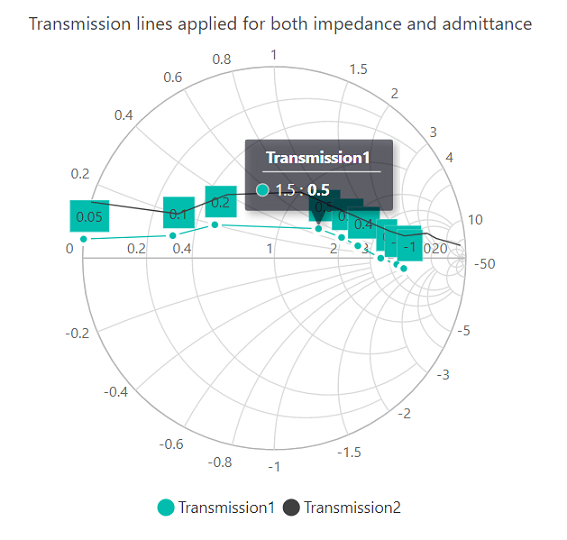
Sample: Explore the Vite-based Vue Smith Chart getting-started sample.
For information about migrating an application from Vue 2 to Vue 3, see the Vue 3 Migration Guide.
Troubleshooting
-
The Smith Chart is not rendered. Verify that the component import is aliased correctly in the Composition API or registered in
componentsin the Options API. -
The series are not displayed. Verify that
SeriesCollectionDirectiveandSeriesDirectiveare imported and exposed or registered and that the series are declared insidee-seriesCollection. -
No data is displayed. Verify that
dataSourcecontains records, theresistanceandreactancemappings match fields in every data object, and both fields contain numeric values. -
An import or runtime error is displayed. Verify that
@syncfusion/ej2-vue-chartsis installed and that its version supports the project’s Vue and Node.js versions.
For additional assistance, refer to the Vue Smith Chart API documentation.