Getting Started with Vue Smith Chart in Vue 2
14 Sep 202610 minutes to read
This article provides a step-by-step guide to creating a Vue 2 application using Vue CLI and integrating the Syncfusion® Vue Smith Chart component.
Prerequisites
Ensure that the development environment meets the system requirements for Syncfusion® Vue UI components.
Note: Vue CLI is in maintenance mode. This guide uses Vue CLI because it describes integration with a Vue 2 application.
Dependencies
The Vue Smith Chart component is available in the @syncfusion/ej2-vue-charts package. The following dependencies are used by the package:
|-- @syncfusion/ej2-vue-charts
    |-- @syncfusion/ej2-charts
    |-- @syncfusion/ej2-base
    |-- @syncfusion/ej2-data
    |-- @syncfusion/ej2-svg-base
    |-- @syncfusion/ej2-pdf-export
    |-- @syncfusion/ej2-compression
    |-- @syncfusion/ej2-file-utils
    |-- @syncfusion/ej2-vue-base
Only the @syncfusion/ej2-vue-charts package must be installed directly. Its required dependencies are installed automatically.
Use a package release that supports Vue 2. Before upgrading, check the Vue system requirements and the package release notes.
Setting Up the Vue 2 Project
Install Vue CLI globally using either npm or yarn, and create a project with the vue create command.
npm
npm install -g @vue/cli
vue create quickstart
yarn
yarn global add @vue/cli
vue create quickstart
When creating the project, select Default ([Vue 2] babel, eslint) from the menu. If this preset is unavailable, select the manual configuration option and choose Vue 2 when prompted for the Vue version.
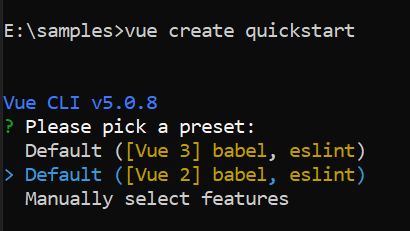
After the project is created, navigate to its directory:
cd quickstartAdd the Syncfusion® Vue Package
Syncfusion® Vue packages are available on npm.
Install the @syncfusion/ej2-vue-charts package using either npm or yarn.
npm
npm install @syncfusion/ej2-vue-chartsyarn
yarn add @syncfusion/ej2-vue-chartsNote: npm v5 and later save installed packages to
dependenciesby default, so the--saveoption is not required.
Add the Syncfusion® Vue Smith Chart Component
Follow these steps to add the Vue Smith Chart component.
Step 1: Import and locally register the Smith Chart component in the script section of src/App.vue.
<script>
import { SmithchartComponent } from '@syncfusion/ej2-vue-charts';

export default {
  components: {
    'ejs-smithchart': SmithchartComponent
  }
};
</script>
Step 2: Define the Smith Chart component in the template section.
<template>
    <ejs-smithchart id="smithchart"></ejs-smithchart>
</template>
At this stage, the component is registered, but no plotted data is displayed until a series is configured.
The following is the complete code for the src/App.vue file:
<template>
    <ejs-smithchart id="smithchart"></ejs-smithchart>
</template>

<script>
import { SmithchartComponent } from '@syncfusion/ej2-vue-charts';

export default {
  components: {
    'ejs-smithchart': SmithchartComponent
  }
}
</script>
Run the Project
Save src/App.vue, and then start the development server using either npm or yarn.
npm
npm run serveyarn
yarn run serveOpen the local URL displayed in the terminal, commonly http://localhost:8080, and verify that the Smith Chart component is rendered. At this stage, no transmission line is displayed because the series data has not been configured yet.
Module Registration
The Smith Chart component uses feature-specific modules. Register only the modules required by the application with the component’s provide option.
The following optional modules are used in this guide:
-
SmithchartLegendenables the legend. -
TooltipRenderenables series tooltips.
import {
  SmithchartComponent,
  SmithchartLegend,
  TooltipRender
} from '@syncfusion/ej2-vue-charts';

export default {
  components: {
    'ejs-smithchart': SmithchartComponent
  },
  provide: {
    smithchart: [SmithchartLegend, TooltipRender]
  }
};
Register SmithchartLegend only when the legend is enabled. Register TooltipRender only when series tooltips are enabled.
Add a Series to the Smith Chart
Import and register SeriesCollectionDirective and SeriesDirective to declare series in the Vue template.
A Smith Chart series can be populated using either dataSource or points.
When dataSource is used, map the source fields with the series resistance and reactance properties. Each data object must contain numeric fields mapped by resistance and reactance.
Alternatively, assign an array of resistance and reactance objects directly to the series points property:
Use either dataSource with field mappings or points for a series according to the application’s data model.
Replace the contents of src/App.vue with the following complete example:
<template>
  <div class="control_wrapper">
    <ejs-smithchart id="smithchart">
      <e-seriesCollection>
        <e-series :dataSource='dataSource' :name='name' :reactance='reactance' :resistance='resistance'></e-series>
        <e-series :points='points' :name='name2'></e-series>
      </e-seriesCollection>
    </ejs-smithchart>
  </div>
</template>
<script>
import { SmithchartComponent, SeriesDirective, SeriesCollectionDirective } from "@syncfusion/ej2-vue-charts";

export default {
  name: "App",
  components: {
    "ejs-smithchart": SmithchartComponent,
    "e-seriesCollection": SeriesCollectionDirective,
    "e-series": SeriesDirective
  },
  data: function () {
    return {
      dataSource: [
        { resistance: 0, reactance: 0.05 }, { resistance: 0, reactance: 0.05 },
        { resistance: 0, reactance: 0.05 }, { resistance: 0, reactance: 0.05 },
        { resistance: 0, reactance: 0.05 }, { resistance: 0, reactance: 0.05 },
        { resistance: 0, reactance: 0.05 }, { resistance: 0, reactance: 0.05 },
        { resistance: 0, reactance: 0.05 }, { resistance: 0, reactance: 0.05 },
        { resistance: 0.3, reactance: 0.1 }, { resistance: 0.5, reactance: 0.2 },
        { resistance: 1.5, reactance: 0.5 }, { resistance: 2.0, reactance: 0.5 },
        { resistance: 2.5, reactance: 0.4 }, { resistance: 3.5, reactance: 0.0 },
        { resistance: 2.5, reactance: 0.4 }, { resistance: 3.5, reactance: 0.0 },
        { resistance: 2.5, reactance: 0.4 }, { resistance: 3.5, reactance: 0.0 },
        { resistance: 4.5, reactance: -0.5 }, { resistance: 5.0, reactance: -1.0 }

      ],
      name: 'Transmission1',
      reactance: 'reactance', resistance: 'resistance',
      points: [{ resistance: 0, reactance: 0.15 }, { resistance: 0, reactance: 0.15 },
      { resistance: 0, reactance: 0.15 }, { resistance: 0.3, reactance: 0.2 },
      { resistance: 0.3, reactance: 0.2 }, { resistance: 0.3, reactance: 0.2 },
      { resistance: 0.3, reactance: 0.2 }, { resistance: 0.3, reactance: 0.2 },
      { resistance: 0.5, reactance: 0.4 }, { resistance: 1.0, reactance: 0.8 },
      { resistance: 2.5, reactance: 1.3 }, { resistance: 3.5, reactance: 1.6 },
      { resistance: 3.5, reactance: 1.6 }, { resistance: 3.5, reactance: 1.6 },
      { resistance: 4.5, reactance: 2.0 }, { resistance: 6.0, reactance: 4.5 },
      { resistance: 8, reactance: 6 }, { resistance: 10, reactance: 25 }],
      name2: 'Transmission2'
    }
  }
}
</script>Troubleshooting
-
The Smith Chart is not rendered. Verify that
SmithchartComponentis imported and registered, the component has valid width and height values, and the browser console contains no component, data, or licensing errors. -
The series is not displayed. Verify that
SeriesCollectionDirectiveandSeriesDirectiveare imported and registered and that the series is declared insidee-series-collection. -
No data is displayed. Verify that
dataSourcecontains records, theresistanceandreactanceproperties match fields in every data object, and both mapped fields contain numeric values. -
The tooltip is not displayed. Set
tooltip.visibletotrue, bind the tooltip object to the series, and registerTooltipRenderwith the exactsmithchartkey. -
A package or Vue version error occurs. Confirm that the installed
@syncfusion/ej2-vue-chartsrelease supports Vue 2 and that all Syncfusion packages use compatible versions.
For additional assistance, refer to the Vue Smith Chart API documentation.