Getting Started with Essential® UI Kit for React
Follow the steps below to get started with Essential® UI Kit for React. You can begin in one of two ways:
- Download the App from GitHub: Get the full free source code and run the app locally to explore the blocks.
- View the Online Demo: Alternatively, you can try out the blocks directly through the online demo to see them in action without needing to download anything.
Get Started by Downloading the App from GitHub
Step 1: Download and Open the App in Visual Studio Code
Download the app from the GitHub link, and then open the same in Visual Studio Code to start working with it.
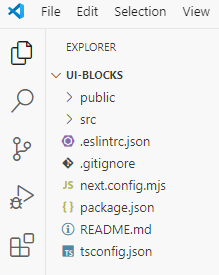
Step 2: Open a New Terminal
In Visual Studio Code, go to the Terminal menu and select New Terminal to open the integrated terminal.
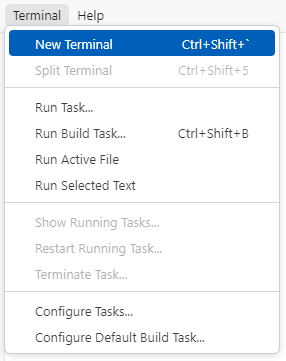
Step 3: Install Dependencies and Run the App
Run the following commands one after the other in the terminal:
-
Install dependencies
Run the command below to install all necessary packages related to the blocks, the Syncfusion® React components, and the sample browser.npm installThis will download and install all the dependencies listed in the package.json file.
-
Serve the App Locally
Once the dependencies are installed, you can run the app locally by starting the React local development server. To do so, run the following command.npm run devThis command will start the local development server, and you’ll see an output in the terminal indicating the app is running. Typically, it will display a local host URL like this:
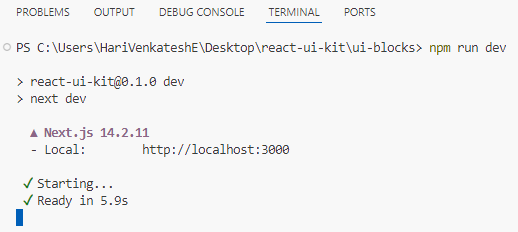
To view the app in your browser, simply Ctrl + Click (or Cmd + Click on macOS) on the local host URL displayed in the terminal. This will open the app in your default browser, allowing you to interact with the blocks.
Step 4: License Key Requirement
The blocks include several Syncfusion® React components that require an active license key for proper display and usage. To activate the license, refer to the topics below:
How to Obtain the License Key
To obtain the license key, visit the following page: Syncfusion® License.
How to Register the License Key in the App
Once you have your license key, register it in the app through any one of the following methods suggested in this link.
By adding the license key, you ensure seamless browsing and usage of the blocks, making them fully functional and free from licensing issues.
Get Started by Viewing the Online Demo
If you prefer a quick demo instead of downloading the app, you can explore the blocks directly through the online demo. Simply visit the official Essential® UI Kit for React website to interact with the blocks.