Getting Started with React Chart in Preact
10 Aug 20266 minutes to read
This article provides a step-by-step guide for setting up a Preact project and integrating the React Charts component.
Preact is a fast and lightweight JavaScript library for building user interfaces, often used as an alternative to React. It uses the same modern API as React but with a much smaller bundle size, which makes it a good choice for projects where file size and load times are critical.
Prerequisites
Refer to the system requirements for Syncfusion React UI components for additional details.
Step 1: Set up the Preact project
To create a new Preact project, run one of the following commands:
npm create preact@latestyarn create preactUsing one of the above commands will lead you to set up additional configurations for the project, as below:
1. Define the project name: We can specify the name of the project directly. Let’s specify the name of the project as my-project for this article.
T  Preact - Fast 3kB alternative to React with the same modern API
|
*  Project directory:
|  my-project
—
2. Choose JavaScript as the framework variant to build this Preact project using JavaScript and React.
T  Preact - Fast 3kB alternative to React with the same modern API
|
*  Project language:
|  > JavaScript
|    TypeScript
—
3. Then configure the project as below for this article.
T  Preact - Fast 3kB alternative to React with the same modern API
|
*  Use router?
|    Yes / > No
—
|
*  Prerender app (SSG)?
|    Yes / > No
—
|
*  Use ESLint?
|    Yes / > No
—
4. Upon completing the aforementioned steps to create my-project, run the following command to jump into the project directory:
cd my-projectNow that my-project is ready to run with default settings, let’s add Syncfusion® components to the project.
Step 2: Add the Syncfusion® React packages
Syncfusion React component packages are available at npmjs.com. Install the React Chart package from the project folder:
npm install @syncfusion/ej2-react-chartsyarn add @syncfusion/ej2-react-chartsStep 3: Add the Chart component
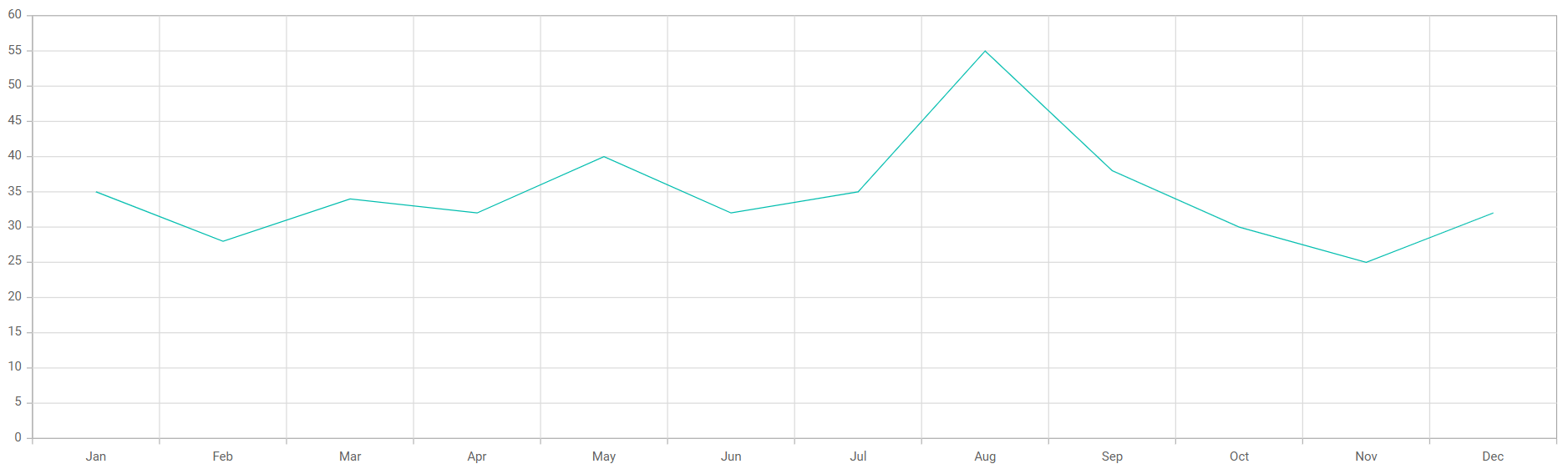
Replace the contents of src/index.jsx with the following code. The example imports the Chart component, mounts it to #app, and renders a line series on a category axis. The LineSeries and Category modules must be injected via the Inject component for the chart to render correctly.
import { render } from 'preact';
import {
  Category,
  ChartComponent,
  Inject,
  LineSeries,
  SeriesCollectionDirective,
  SeriesDirective,
} from '@syncfusion/ej2-react-charts';

export function App() {
  const data = [
    { month: 'Jan', sales: 35 }, { month: 'Feb', sales: 28 },
    { month: 'Mar', sales: 34 }, { month: 'Apr', sales: 32 },
    { month: 'May', sales: 40 }, { month: 'Jun', sales: 32 },
    { month: 'Jul', sales: 35 }, { month: 'Aug', sales: 55 },
    { month: 'Sep', sales: 38 }, { month: 'Oct', sales: 30 },
    { month: 'Nov', sales: 25 }, { month: 'Dec', sales: 32 },
  ];
  const primaryXAxis = { valueType: 'Category' };

  return (
    <ChartComponent id="charts" primaryXAxis={primaryXAxis}>
      <Inject services={[LineSeries, Category]} />
      <SeriesCollectionDirective>
        <SeriesDirective
          dataSource={data}
          xName="month"
          yName="sales"
          name="Sales"
          type="Line"
        />
      </SeriesCollectionDirective>
    </ChartComponent>
  );
}

render(<App />, document.getElementById('app'));
Note: Preact uses
preact/compatto aliasreactandreact-dom. The Preact Vite template wires this up automatically, so no manual aliasing is required.
Step 4: Run the project
Run the project with the following command:
npm run devyarn run devOpen the URL printed in the terminal (for example, http://localhost:5173/, or http://localhost:5174/ if 5173 is in use) in your browser. The application displays the chart as shown below:
Troubleshooting
-
Chart does not render (blank page)
- Confirm that
src/index.jsxends withrender(<App />, document.getElementById('app'))and thatindex.htmlcontains<div id="app"></div>.
- Confirm that
-
Could not find module 'react'or hydration warnings-
The Preact Vite template aliases
reactandreact-domtopreact/compat. If you removed the alias, restore it invite.config.js:import { defineConfig } from 'vite'; import preact from '@preact/preset-vite'; export default defineConfig({ plugins: [preact()], });
-
-
LineSeries is not a registered serviceor empty chart- Verify that
LineSeriesandCategoryare listed in theservicesarray of theInjectcomponent, and that<SeriesDirective type="Line" />is set.
- Verify that