Custom Data Binding in EJ2 TypeScript Data Grid
01 Oct 202624 minutes to read
The custom binding feature in the Data Grid enables managing a custom API for handling data processing externally and then binding the resulting data to the grid. When using custom binding, the grid expects the result to be an object with result (array of records to display) and count (total number of records) properties.
The Data Grid component offers a range of powerful features such as paging, grouping, sorting, and filtering. These actions trigger the dataStateChange event. CRUD actions such as Create, Read, Update, and Delete trigger the (../../api/grid#datasourcechanged) event. These events provide an opportunity to manage and manipulate data according to interactions.
Using the dataStateChange event
The dataStateChange event is triggered whenever an action modifies the state of the grid’s data, such as changing pages, applying sorting, or grouping. This event provides detailed information about the action performed and the current state of the grid, including parameters like page number, sorting details, and filtering criteria.
To implement the dataStateChange event effectively:
-
Subscribe to the event: In the component code, subscribe to the
dataStateChangeevent using the appropriate event handler function. This function is executed whenever the grid is interacted with. -
Handle data state: Inside the event handler function, the event arguments can be accessed to determine the specific actions and intentions. The action property of the event arguments indicates the type of action performed (e.g., paging, sorting, grouping).
The
dataStateChangeevent will not be triggered during the initial rendering.
Handling filtering operation
When a filtering operation is performed in the grid, the dataStateChange event is triggered, providing access to the following arguments within the event.
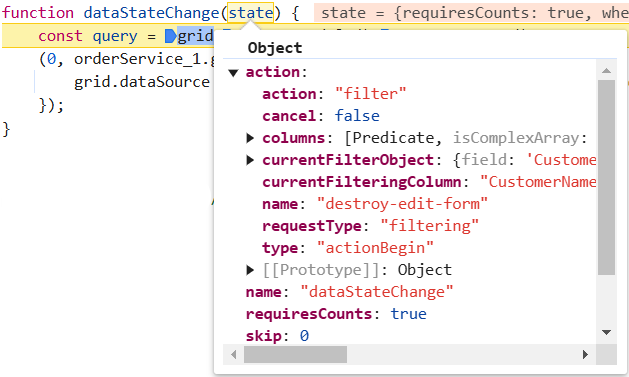
The grid data state for the filter action can be updated as follows:
// Apply filtering
const applyFiltering = (query:Query, filter:Filter)=> {
  // Check if filter columns are specified
  if (filter.columns && filter.columns.length) {
      // Apply filtering for each specified column
    for (let i = 0; i < filter.columns.length; i++) {
      const field = filter.columns[i].field;
      const operator = filter.columns[i].operator;
      const value = filter.columns[i].value;
      query.where(field, operator, value);
    }
  }
  else {
    // Apply filtering based on direct filter conditions
    for (let i = 0; i < filter.length; i++) {
      const { fn, e } = filter[i];
      if (fn === 'onWhere') {
        query.where(e as string);
      }
    }
  }
}
/** GET all data from the server */
export function getOrders(state:any, action:any) {
  const query = new Query();
  // filter
  if (state.where) {
    applyFiltering(query, action.queries);
  }
  query.isCountRequired = true

  // Request the data from server using fetch
  return fetch(baseUrl)
    .then(res => res.json())
    .then(data => {
      // Create a DataManager instance with the fetched data
      const dataManager = new DataManager(data.result);
      // Execute local data operations using the provided query
      const result = dataManager.executeLocal(query);
      // Return the result along with the count of total records
      return {
        result: result, // Result of the data
        count: (result as any).count // Total record count based on fetched data length
      };
    });
}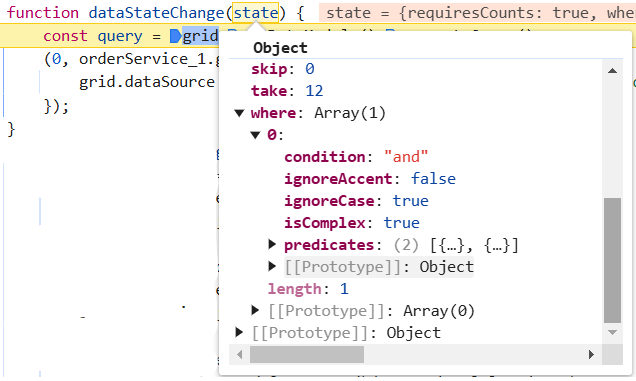
When filtering multiple values, the dataStateChange event returns the predicates as arguments. Predicate execution can be created based on those values.
Handling searching operation
When a search operation is performed in the grid, the dataStateChange event is triggered, allowing access to the following arguments within the event.
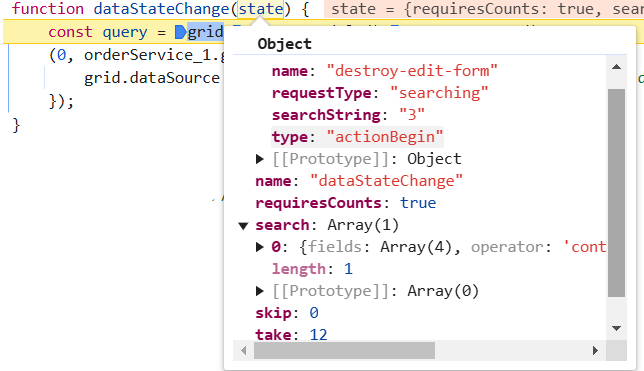
The grid data state for the search action can be updated as follows:
// Apply searching
const applySearching = (query:Query, search:Search[])=> {
  // Check if a search operation is requested
  if (search && search.length > 0) {
    // Extract the search key and fields from the search array
    const { fields, key } = search[0];
    // perform search operation using the field and key on the query
    query.search(key, fields);
  }
}
/** GET all data from the server */
export function getOrders(state:any, action:any) {
  const query = new Query();
  // search
  if (state.search) {
    applySearching(query, state.search);
  };
  query.isCountRequired = true
  // Request the data from server using fetch
  return fetch(baseUrl)
    .then(res => res.json())
    .then(data => {
      // Create a DataManager instance with the fetched data
      const dataManager = new DataManager(data.result);
      // Execute local data operations using the provided query
      const result = dataManager.executeLocal(query);
      // Return the result along with the count of total records
      return {
        result: result, // Result of the data
        count: (result as any).count // Total record count based on fetched data length
      };
    });
  }
Handling sorting operation
When a sorting operation is performed in the grid, the dataStateChange event is triggered, and within this event the following arguments are available.
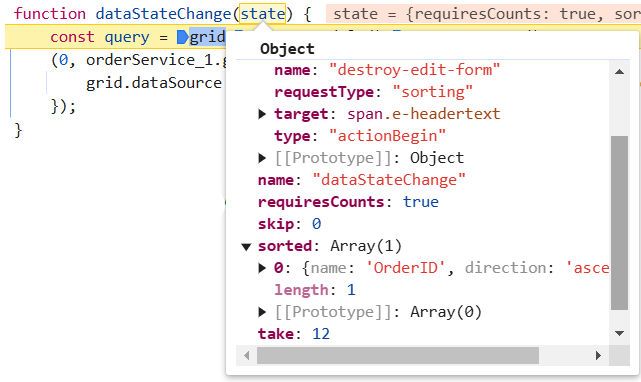
When performing multi-column sorting, the dataStateChange event returns the following arguments.
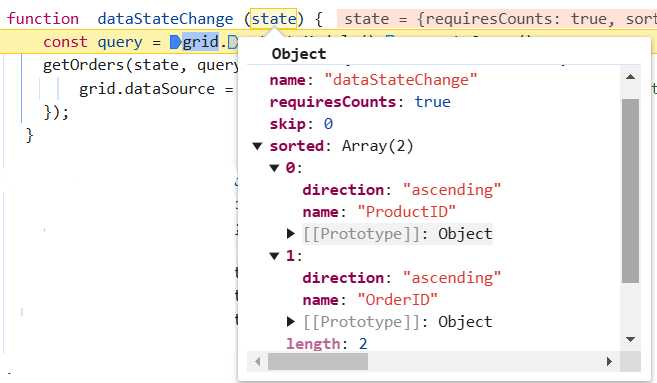
The grid data state for the sort action can be updated as follows:
// Apply sorting
const applySorting = (query:Query, sorted:sortInfo[]) =>{
  // Check if sorting data is available
  if (sorted && sorted.length > 0) {
    // Iterate through each sorting info
    sorted.forEach(sort => {
      // Get the sort field name either by name or field
      const sortField = sort.name || sort.field;
      // Perform sort operation using the query based on the field name and direction
      query.sortBy(sortField, sort.direction);
    });
  }
}
/** GET all data from the server */
export function getOrders(state:any, action:any) {
  const query = new Query();
  // sort
  if (state.sorted) {
    state.sorted.length ? applySorting(query, state.sorted) :
      // initial sorting
      state.sorted.columns.length ? applySorting(query, state.sorted.columns) : null
  }
  query.isCountRequired = true
  // Request the data from server using fetch
  return fetch(baseUrl)
    .then(res => res.json())
    .then(data => {
      // Create a DataManager instance with the fetched data
      const dataManager = new DataManager(data.result);
      // Execute local data operations using the provided query
      const result = dataManager.executeLocal(query);
      // Return the result along with the count of total records
      return {
        result: result, // Result of the data
        count: (result as any).count // Total record count based on fetched data length
      };
    });
}
Handling paging operation
When a paging operation is performed in the grid, the dataStateChange event is triggered, and within this event the following arguments are available.
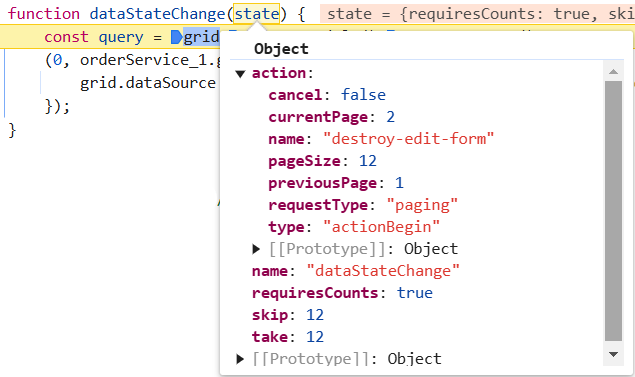
The grid data state for the page action can be updated as follows:
// Apply paging
const applyPaging = (query:Query, state: { take: number; skip: number; })=> {
  // Check if both 'take' and 'skip' values are available
  if (state.take && state.skip) {
    // Calculate pageSkip and pageTake values to get pageIndex and pageSize
    const pageSkip = state.skip / state.take + 1;
    const pageTake = state.take;
    query.page(pageSkip, pageTake);
  }
  // If if only 'take' is available and 'skip' is 0, apply paging for the first page.
  else if (state.skip === 0 && state.take) {
    query.page(1, state.take);
  }
}
/** GET all data from the server */
export function getOrders(state:any, action:any) {
  const query = new Query();
  // page
  applyPaging(query, state)
  query.isCountRequired = true
  // Request the data from server using fetch
  return fetch(baseUrl)
    .then(res => res.json())
    .then(data => {
      // Create a DataManager instance with the fetched data
      const dataManager = new DataManager(data.result);
      // Execute local data operations using the provided query
      const result = dataManager.executeLocal(query);
      // Return the result along with the count of total records
      return {
        result: result, // Result of the data
        count: (result as any).count // Total record count based on fetched data length
      };
    });
}
Handling grouping operation
When a grouping operation is performed in the grid, the dataStateChange event is triggered, providing access to the following arguments within the event.
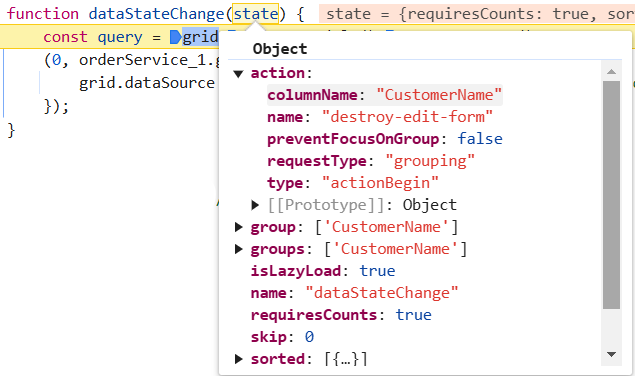
The grid data state for the group action can be updated as follows:
// Apply grouping
const applyGrouping = (query:Query, group:string[]) =>{
  // Check if sorting data is available
  if (group.length > 0) {
    // Iterate through each group info
    group.forEach((column: string) => {
      // perform group operation using the column on the query
      query.group(column);
    });
  }
}
/** GET all data from the server */
export function getOrders(state:any, action:any) {
  const query = new Query();
  // grouping
  if (state.group) {
    state.group.length ? applyGrouping(query, state.group) :
      // initial grouping
      state.group.columns.length ? applyGrouping(query, state.group.columns) : null
  }
  query.isCountRequired = true
  // Request the data from server using fetch
  return fetch(baseUrl)
    .then(res => res.json())
    .then(data => {
      // Create a DataManager instance with the fetched data
      const dataManager = new DataManager(data.result);
      // Execute local data operations using the provided query
      const result = dataManager.executeLocal(query);
      // Return the result along with the count of total records
      return {
        result: result, // Result of the data
        count:(result as any).count // Total record count based on fetched data length
      };
    });
}
- In order to utilize group actions, it is necessary to manage the sorting query within the service.
Lazy load grouping
In EJ2 TypeScript, lazy loading refers to the technique of loading data dynamically when needed, instead of loading everything upfront. Lazy load grouping allows grouped data to be loaded and displayed efficiently by fetching only the required data on demand.
To enable this feature, set the groupSettings.enableLazyLoading property to true. Also, manage the state based on the initial grid action as follows.
const groupSettings:object = { enableLazyLoading: true, columns: ['ProductName'], showGroupedColumn: true, };
const state:DataStateChangeEventArgs = { skip:0, take: 12, group: groupSettings as string[]};
Based on the initial state, the arguments are as shown below.
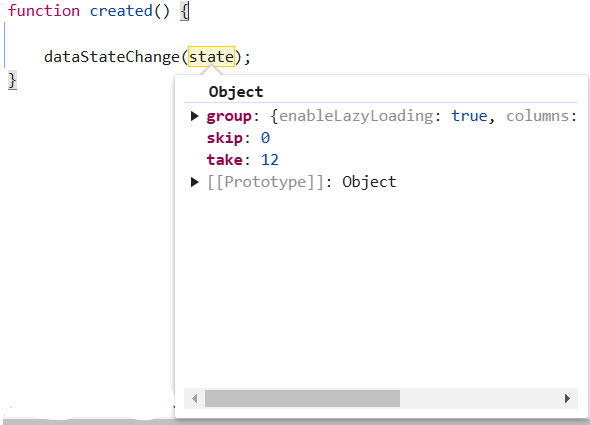
The grid state can be updated as follows:
// Apply grouping
const applyGrouping = (query:Query, group:any) =>{
  // Check if sorting data is available
  if (group.length > 0) {
    // Iterate through each group info
    group.forEach((column: string) => {
      // perform group operation using the column on the query
      query.group(column);
    });
  }
}
// Apply lazy load grouping
const applyLazyLoad = (query:Query, payload:any) => {
  // Configure lazy loading for the main data
  if (payload.isLazyLoad) {
    query.lazyLoad.push({ key: 'isLazyLoad', value: true });
    // If on-demand group loading is enabled, configure lazy loading for grouped data
    if (payload.onDemandGroupInfo) {
      query.lazyLoad.push({
          key: 'onDemandGroupInfo',
          value: payload.action.lazyLoadQuery,
      });
    }
  }
}
/** GET all data from the server */
export function getOrders(state:any, action:any) {
  const query = new Query();
  // grouping
  if (state.group) {
    state.group.length ? applyGrouping(query, state.group) :
      // initial grouping
      state.group.columns.length ? applyGrouping(query, state.group.columns) : null
  }
  // lazy load grouping
  if (state.group) {
    if (state.isLazyLoad) {
      applyLazyLoad(query, state)
    }
    if (state.group.enableLazyLoading) {
      query.lazyLoad.push({ key: 'isLazyLoad', value: true })
    }
  }
  query.isCountRequired = true
  // Request the data from server using fetch
  return fetch(baseUrl)
    .then(res => res.json())
    .then(data => {
      // Create a DataManager instance with the fetched data
      const dataManager = new DataManager(data.result);
      // Execute local data operations using the provided query
      const result = dataManager.executeLocal(query);
      // Return the result along with the count of total records
      return {
        result: result, // Result of the data
        count: (result as any).count // Total record count based on fetched data length
      };
    });
}
Further information can be accessed in the respective documentation for lazy load grouping.
Handling CRUD operations
The Data Grid component provides powerful options for dynamically inserting, deleting, and updating records, enabling data to be modified directly within the grid. This feature is useful for performing CRUD (Create, Read, Update, Delete) operations seamlessly.
Integrating CRUD Operations
To implement CRUD operations using grid, follow these steps:
-
Configure grid settings: Set up the required grid settings, such as editing, adding, and deleting records. Define the toolbar options to support the workflow.
-
Handle data state changes: Use the dataStateChange event to respond to changes in the grid’s data state. This event is triggered when grid actions such as paging or sorting occur.
-
Execute CRUD operations: Within the event handler for dataSourceChanged, implement logic to handle CRUD actions based on the action or requestType property of the event arguments.
-
Call endEdit method: After performing CRUD operations, call the endEdit method to complete the operation and update the grid accordingly.
Insert operation
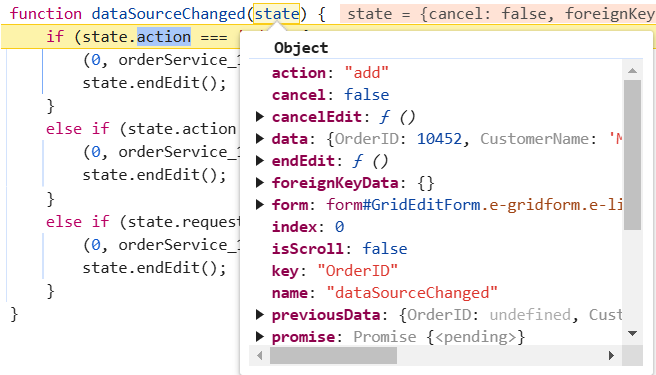
When an insert operation is performed in the grid, the dataSourceChanged event will be triggered, allowing access to the following referenced arguments within the event.
// add
export function addRecord(order:order: Object | Object[] | undefined) {
  return fetch(baseUrl , {
    method: "post",
    headers: { "Content-Type": "application/json" },
    body: JSON.stringify({
      value: order
    })
  })
    .then((data) => {
      return data;
    });
}
Edit operation
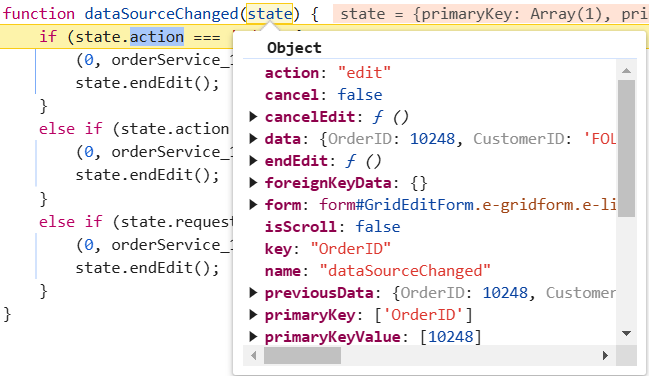
When an edit operation is performed in the grid, the dataSourceChanged event will be triggered, providing access to the following referenced arguments within the event.
// update
export function updateRecord(order:any) {
  return fetch(`${baseUrl}/${order.OrderID}`, {
    method: "put",
    headers: { "Content-Type": "application/json" },
    body: JSON.stringify({
      value: order
    })
  })
    .then(data => {
      return data;
    });
}
Delete operation
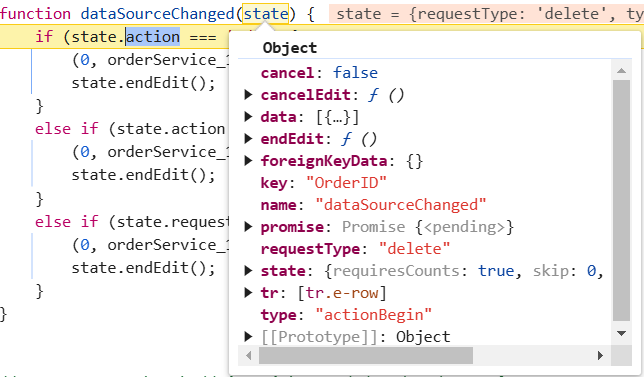
When a delete operation is performed in the grid, the dataSourceChanged event will be triggered, allowing access to the following referenced arguments within the event.
// delete
export function deleteRecord(primaryKey:any) {
  return fetch(`${baseUrl}/${primaryKey}`, {
    method: "delete",
    body: JSON.stringify({
      value: primaryKey
    })
  })
  .then(data => {
    return data;
  });
}
The following example demonstrates binding custom data to handle grid actions and CRUD operations.
import { DataSourceChangedEventArgs, DataStateChangeEventArgs, Grid ,SortSettingsModel,FilterSettingsModel} from '@syncfusion/ej2-grids';
import { getOrders, addRecord, updateRecord, deleteRecord } from '../orderService';
import { Page, Filter, Sort, Group, LazyLoadGroup, Toolbar, Edit, Search } from '@syncfusion/ej2-grids';

Grid.Inject(Page, Filter, Sort, Group, LazyLoadGroup, Toolbar, Edit, Search);

interface CustomDataStateChangeEventArgs extends DataStateChangeEventArgs {
  sort?: SortSettingsModel;
  filter?: FilterSettingsModel;
}
const groupSettings: object= { enableLazyLoading: true, columns: ['ProductName'], showGroupedColumn: true, };
const filterSettings: object = { columns: [{ field: 'CustomerName', matchCase: false, operator: 'startswith', predicate: 'and', value: 'Maria' }] };
const sortSettings: object = { columns: [{ field: 'ProductID', direction: 'Descending' }] }
const state:CustomDataStateChangeEventArgs= { skip: 0, take: 12, group: groupSettings as string[],sort: sortSettings,filter: filterSettings};

let grid: Grid = new Grid({
    allowPaging: true,
    allowFiltering:true,
    allowSorting:true,
    allowGrouping:true,
    created:created,
    groupSettings:groupSettings,
    sortSettings:sortSettings,
    filterSettings:filterSettings,
    dataStateChange: dataStateChange,
    dataSourceChanged: dataSourceChanged,
    editSettings: { allowEditing: true, allowAdding: true, allowDeleting: true },
    toolbar: ['Add', 'Edit', 'Delete', 'Update', 'Cancel','Search'],
    columns: [
        { field: 'OrderID', isPrimaryKey:true,headerText: 'Order ID', textAlign: 'Right', width: 120, type: 'number' },
        { field: 'CustomerName', width: 140, headerText: 'Customer Name', type: 'string' },
        { field: 'ProductID', headerText: 'Product ID' ,width: 120 },
        { field: 'ProductName', headerText: 'Product Name', width: 140}
    ],
    height: 315
});

grid.appendTo('#Grid');

// triggers at initial render of the Grid
function created() {
  // initial state needs to be sent manually
  dataStateChange(state);
}
function  dataStateChange (state:DataStateChangeEventArgs) {
    const query = grid.getDataModule().generateQuery();
    getOrders(state, query).then((result) => {
        grid.dataSource = result.result; // Assign the result to the data property
    });
  }
function dataSourceChanged (state:DataSourceChangedEventArgs) {
  if (state.action === 'add') {
    addRecord(state.data); (state as any).endEdit();
  } else if (state.action === 'edit') {
    updateRecord(state.data); (state as any).endEdit();
  } else if (state.requestType === 'delete') {
    deleteRecord((state as any).data[0].OrderID); (state as any).endEdit();
  }
}
<!DOCTYPE html>
<html lang="en">
<head>
<title>EJ2 Grid</title>
<meta charset="utf-8" />
<meta name="viewport" content="width=device-width, initial-scale=1.0" />
<meta name="description" content="Typescript Grid Control" />
<meta name="author" content="Syncfusion" />
<link href="https://cdn.syncfusion.com/ej2/35.1.37/material3.css" rel="stylesheet" />
<style>
#loader {
color: #008cff;
height: 40px;
left: 45%;
position: absolute;
top: 45%;
width: 30%;
}
</style>
</head>
<body>
<div id='loader'>Loading....</div>
<div id='container'>
<div id='Grid'></div>
</div>
</body>
</html>@import "../../node_modules/@syncfusion/ej2-material3-theme/styles/grid/index.css";import express, { Request, Response } from "express";
import { data, createLazyLoadData } from './app/datasource'; // Adjust path as necessary
const bodyParser = require('body-parser');
const cors = require('cors');
// Generate the data
const app = express();
app.use(cors({
origin: '*', // Update to the correct frontend origin
credentials: true
}));
app.use(bodyParser.json());
// Root route
app.get('/', (req:Request, res:Response) => {
res.send('Server is running');
});
// all records
app.get('/orders', function (req: Request, res:Response) {
res.json({ result: data, count: data.length });
});
// insert
app.post('/orders', function (req:Request, res:Response){
data.splice(0, 0, req.body.value);
res.status(200).send('Row Inserted');
});
// get specific records
app.get('/orders/:OrderID', (req:Request, res:Response) => {
const orderID = parseInt(req.params.OrderID, 10);
const order = data.find((d: { OrderID: number; }) => d.OrderID === orderID);
if (order) {
res.json(order);
} else {
res.status(404).send('Order not found');
}
});
// Remove
app.delete('/orders/:OrderID', function (req:Request, res:Response) {
const orderID = parseInt(req.params.OrderID, 10);
const index = data.findIndex((x: { OrderID: number; }) => x.OrderID === orderID);
if (index !== -1) {
data.splice(index, 1);
res.status(200).send('Row Deleted');
} else {
res.status(404).send('Order not found');
}
});
// Update
app.put('/orders/:OrderID', function (req:Request, res:Response) {
const orderID = parseInt(req.params.OrderID, 10);
const index = data.findIndex((x: { OrderID: number; }) => x.OrderID === orderID);
if (index !== -1) {
// Assuming req.body.value contains the updated record with the same OrderID
data[index] = req.body.value;
res.status(200).send('Row Updated');
} else {
res.status(404).send('Order not found');
}
});
const port = xxxx;// Here xxxx denotes the port number.
app.listen(port, () => {
console.log(`Server running on http://localhost:${port}`);
});import { DataManager, Query,Predicate } from "@syncfusion/ej2-data";
export class OrderService {
}
export {};
const baseUrl = "http://localhost:xxxx/orders"; // Here xxxx denotes the port number.
let gridData:DataManager;
interface sortInfo {
name: string
field:string
direction: string
}
interface FilterColumn {
field: string;
operator: string;
value: any;
}
interface Filter {
columns?: FilterColumn[];
length: number;
[index: number]: {
fn: string;
e: string | Predicate;
};
}
interface Search {
length: number;
fields: string[];
key: string;
operator?: string;
ignoreCase?: boolean;
}
// Apply filtering
const applyFiltering = (query:Query, filter:Filter)=> {
// Check if filter columns are specified
if (filter.columns && filter.columns.length) {
// Apply filtering for each specified column
for (let i = 0; i < filter.columns.length; i++) {
const field = filter.columns[i].field;
const operator = filter.columns[i].operator;
const value = filter.columns[i].value;
query.where(field, operator, value);
}
}
else {
// Apply filtering based on direct filter conditions
for (let i = 0; i < filter.length; i++) {
const { fn, e } = filter[i];
if (fn === 'onWhere') {
query.where(e as string);
}
}
}
}
// Apply searching
const applySearching = (query:Query, search:Search[])=> {
// Check if a search operation is requested
if (search && search.length > 0) {
// Extract the search key and fields from the search array
const { fields, key } = search[0];
// perform search operation using the field and key on the query
query.search(key, fields);
}
}
// Apply sorting
const applySorting = (query:Query, sorted:sortInfo[]) =>{
// Check if sorting data is available
if (sorted && sorted.length > 0) {
// Iterate through each sorting info
sorted.forEach((sort) => {
// Get the sort field name either by name or field
const sortField = sort.name || sort.field;
// Perform sort operation using the query based on the field name and direction
query.sortBy(sortField, sort.direction);
});
}
}
// Apply grouping
const applyGrouping = (query:Query, group:string[]) =>{
// Check if sorting data is available
if (group.length > 0) {
// Iterate through each group info
group.forEach((column: string) => {
// perform group operation using the column on the query
query.group(column);
});
}
}
// Apply lazy load grouping
const applyLazyLoad = (query:Query, payload:any) => {
// Configure lazy loading for the main data
if (payload.isLazyLoad) {
query.lazyLoad.push({ key: 'isLazyLoad', value: true });
// If on-demand group loading is enabled, configure lazy loading for grouped data
if (payload.onDemandGroupInfo) {
query.lazyLoad.push({
key: 'onDemandGroupInfo',
value: payload.action.lazyLoadQuery,
});
}
}
}
// Apply paging
const applyPaging = (query:Query, state: { take: number; skip: number; })=> {
// Check if both 'take' and 'skip' values are available
if (state.take && state.skip) {
// Calculate pageSkip and pageTake values to get pageIndex and pageSize
const pageSkip = state.skip / state.take + 1;
const pageTake = state.take;
query.page(pageSkip, pageTake);
}
// If if only 'take' is available and 'skip' is 0, apply paging for the first page.
else if (state.skip === 0 && state.take) {
query.page(1, state.take);
}
}
export function getOrders(state:any, action:any) {
const query = new Query();
// filter
if (state.where) {
applyFiltering(query, action.queries);
}
// search
if (state.search) {
applySearching(query, state.search);
};
// sort
if (state.sorted) {
state.sorted.length ? applySorting(query, state.sorted) :
// initial sorting
state.sorted.columns.length ? applySorting(query, state.sorted.columns) : null
}
// grouping
if (state.group) {
state.group.length ? applyGrouping(query, state.group) :
// initial grouping
state.group.columns.length ? applyGrouping(query, state.group.columns) : null
}
// lazy load grouping
if (state.group) {
if (state.isLazyLoad) {
applyLazyLoad(query, state)
}
if (state.group.enableLazyLoading) {
query.lazyLoad.push({ key: 'isLazyLoad', value: true })
}
}
// page
applyPaging(query, state)
query.isCountRequired = true
return fetch(baseUrl)
.then(res => res.json())
.then(data => {
// Create a DataManager instance with your fetched data
gridData = new DataManager(data.result);
// Execute local data operations using the provided query
const result = gridData.executeLocal(query);
// Return the result along with the count of total records
return {
result: result, // Result of the data
count: (result as any).count // Total record count based on fetched data length
};
});
}
// add
export function addRecord(order: Object | Object[] | undefined) {
return fetch(baseUrl , {
method: "post",
headers: { "Content-Type": "application/json" },
body: JSON.stringify({
value: order
})
})
.then((data) => {
return data;
});
}
// update
export function updateRecord(order:any) {
return fetch(`${baseUrl}/${order.OrderID}`, {
method: "put",
headers: { "Content-Type": "application/json" },
body: JSON.stringify({
value: order
})
})
.then(data => {
return data;
});
}
// delete
export function deleteRecord(primaryKey:any) {
return fetch(`${baseUrl}/${primaryKey}`, {
method: "delete",
body: JSON.stringify({
value: primaryKey
})
})
.then(data => {
return data;
});
}// datasource.ts
export interface Order {
OrderID: number;
CustomerID: string;
CustomerName: string;
CustomerAddress: string;
ProductName: string;
ProductID: number;
Quantity: string;
}
function createLazyLoadData(): Order[] {
const lazyLoadData: Order[] = []; // Explicitly type lazyLoadData as Order[]
let customerid = ['VINET', 'TOMSP', 'HANAR', 'VICTE', 'SUPRD', 'HANAR', 'CHOPS', 'RICSU', 'WELLI', 'HILAA', 'ERNSH', 'CENTC',
'OTTIK', 'QUEDE', 'RATTC', 'ERNSH', 'FOLKO', 'BLONP', 'WARTH', 'FRANK', 'GROSR', 'WHITC', 'WARTH', 'SPLIR', 'RATTC', 'QUICK', 'VINET',
'MAGAA', 'TORTU', 'MORGK', 'BERGS', 'LEHMS', 'BERGS', 'ROMEY', 'ROMEY', 'LILAS', 'LEHMS', 'QUICK', 'QUICK', 'RICAR', 'REGGC', 'BSBEV',
'COMMI', 'QUEDE', 'TRADH', 'TORTU', 'RATTC', 'VINET', 'LILAS', 'BLONP', 'HUNGO', 'RICAR', 'MAGAA', 'WANDK', 'SUPRD', 'GODOS', 'TORTU',
'OLDWO', 'ROMEY', 'LONEP', 'ANATR', 'HUNGO', 'THEBI', 'DUMON', 'WANDK', 'QUICK', 'RATTC', 'ISLAT', 'RATTC', 'LONEP', 'ISLAT', 'TORTU',
'WARTH', 'ISLAT', 'PERIC', 'KOENE', 'SAVEA', 'KOENE', 'BOLID', 'FOLKO', 'FURIB', 'SPLIR', 'LILAS', 'BONAP', 'MEREP', 'WARTH', 'VICTE',
'HUNGO', 'PRINI', 'FRANK', 'OLDWO', 'MEREP', 'BONAP', 'SIMOB', 'FRANK', 'LEHMS', 'WHITC', 'QUICK', 'RATTC', 'FAMIA'];
let product = ['Chai', 'Chang', 'Aniseed Syrup', 'Chef Anton\'s Cajun Seasoning', 'Chef Anton\'s Gumbo Mix', 'Grandma\'s Boysenberry Spread',
'Uncle Bob\'s Organic Dried Pears', 'Northwoods Cranberry Sauce', 'Mishi Kobe Niku', 'Ikura', 'Queso Cabrales', 'Queso Manchego La Pastora', 'Konbu',
'Tofu', 'Genen Shouyu', 'Pavlova', 'Alice Mutton', 'Carnarvon Tigers', 'Teatime Chocolate Biscuits', 'Sir Rodney\'s Marmalade', 'Sir Rodney\'s Scones',
'Gustaf\'s Knäckebröd', 'Tunnbröd', 'Guaraná Fantástica', 'NuNuCa Nuß-Nougat-Creme', 'Gumbär Gummibärchen', 'Schoggi Schokolade', 'Rössle Sauerkraut',
'Thüringer Rostbratwurst', 'Nord-Ost Matjeshering', 'Gorgonzola Telino', 'Mascarpone Fabioli', 'Geitost', 'Sasquatch Ale', 'Steeleye Stout', 'Inlagd Sill',
'Gravad lax', 'Côte de Blaye', 'Chartreuse verte', 'Boston Crab Meat', 'Jack\'s New England Clam Chowder', 'Singaporean Hokkien Fried Mee', 'Ipoh Coffee',
'Gula Malacca', 'Rogede sild', 'Spegesild', 'Zaanse koeken', 'Chocolade', 'Maxilaku', 'Valkoinen suklaa', 'Manjimup Dried Apples', 'Filo Mix', 'Perth Pasties',
'Tourtière', 'Pâté chinois', 'Gnocchi di nonna Alice', 'Ravioli Angelo', 'Escargots de Bourgogne', 'Raclette Courdavault', 'Camembert Pierrot', 'Sirop d\'érable',
'Tarte au sucre', 'Vegie-spread', 'Wimmers gute Semmelknödel', 'Louisiana Fiery Hot Pepper Sauce', 'Louisiana Hot Spiced Okra', 'Laughing Lumberjack Lager', 'Scottish Longbreads',
'Gudbrandsdalsost', 'Outback Lager', 'Flotemysost', 'Mozzarella di Giovanni', 'Röd Kaviar', 'Longlife Tofu', 'Rhönbräu Klosterbier', 'Lakkalikööri', 'Original Frankfurter grüne Soße'];
let customername = ['Maria', 'Ana Trujillo', 'Antonio Moreno', 'Thomas Hardy', 'Christina Berglund', 'Hanna Moos', 'Frédérique Citeaux', 'Martín Sommer', 'Laurence Lebihan', 'Elizabeth Lincoln',
'Victoria Ashworth', 'Patricio Simpson', 'Francisco Chang', 'Yang Wang', 'Pedro Afonso', 'Elizabeth Brown', 'Sven Ottlieb', 'Janine Labrune', 'Ann Devon', 'Roland Mendel', 'Aria Cruz', 'Diego Roel',
'Martine Rancé', 'Maria Larsson', 'Peter Franken', 'Carine Schmitt', 'Paolo Accorti', 'Lino Rodriguez', 'Eduardo Saavedra', 'José Pedro Freyre', 'André Fonseca', 'Howard Snyder', 'Manuel Pereira',
'Mario Pontes', 'Carlos Hernández', 'Yoshi Latimer', 'Patricia McKenna', 'Helen Bennett', 'Philip Cramer', 'Daniel Tonini', 'Annette Roulet', 'Yoshi Tannamuri', 'John Steel', 'Renate Messner', 'Jaime Yorres',
'Carlos González', 'Felipe Izquierdo', 'Fran Wilson', 'Giovanni Rovelli', 'Catherine Dewey', 'Jean Fresnière', 'Alexander Feuer', 'Simon Crowther', 'Yvonne Moncada', 'Rene Phillips', 'Henriette Pfalzheim',
'Marie Bertrand', 'Guillermo Fernández', 'Georg Pipps', 'Isabel de Castro', 'Bernardo Batista', 'Lúcia Carvalho', 'Horst Kloss', 'Sergio Gutiérrez', 'Paula Wilson', 'Maurizio Moroni', 'Janete Limeira', 'Michael Holz',
'Alejandra Camino', 'Jonas Bergulfsen', 'Jose Pavarotti', 'Hari Kumar', 'Jytte Petersen', 'Dominique Perrier', 'Art Braunschweiger', 'Pascale Cartrain', 'Liz Nixon', 'Liu Wong', 'Karin Josephs', 'Miguel Angel Paolino',
'Anabela Domingues', 'Helvetius Nagy', 'Palle Ibsen', 'Mary Saveley', 'Paul Henriot', 'Rita Müller', 'Pirkko Koskitalo', 'Paula Parente', 'Karl Jablonski', 'Matti Karttunen', 'Zbyszek Piestrzeniewicz'];
let customeraddress = ['507 - 20th Ave. E.\r\nApt. 2A', '908 W. Capital Way', '722 Moss Bay Blvd.', '4110 Old Redmond Rd.', '14 Garrett Hill', 'Coventry House\r\nMiner Rd.', 'Edgeham Hollow\r\nWinchester Way',
'4726 - 11th Ave. N.E.', '7 Houndstooth Rd.', '59 rue de l\'Abbaye', 'Luisenstr. 48', '908 W. Capital Way', '722 Moss Bay Blvd.', '4110 Old Redmond Rd.', '14 Garrett Hill', 'Coventry House\r\nMiner Rd.', 'Edgeham Hollow\r\nWinchester Way',
'7 Houndstooth Rd.', '2817 Milton Dr.', 'Kirchgasse 6', 'Sierras de Granada 9993', 'Mehrheimerstr. 369', 'Rua da Panificadora, 12', '2817 Milton Dr.', 'Mehrheimerstr. 369'];
let quantityperunit= ['10 boxes x 20 bags', '24 - 12 oz bottles', '12 - 550 ml bottles', '48 - 6 oz jars', '36 boxes', '12 - 8 oz jars', '12 - 1 lb pkgs.', '12 - 12 oz jars', '18 - 500 g pkgs.', '12 - 200 ml jars',
'1 kg pkg.', '10 - 500 g pkgs.', '2 kg box', '40 - 100 g pkgs.', '24 - 250 ml bottles', '32 - 500 g boxes', '20 - 1 kg tins', '16 kg pkg.', '10 boxes x 12 pieces', '30 gift boxes', '24 pkgs. x 4 pieces', '24 - 500 g pkgs.', '12 - 250 g pkgs.',
'12 - 355 ml cans', '20 - 450 g glasses', '100 - 250 g bags'];
let OrderID = 10248;
for (let i = 0; i < 100; i++) {
lazyLoadData.push({
'OrderID': OrderID + i,
'CustomerID': customerid[Math.floor(Math.random() * customerid.length)],
'CustomerName': customername[Math.floor(Math.random() * customername.length)],
'CustomerAddress': customeraddress[Math.floor(Math.random() * customeraddress.length)],
'ProductName': product[Math.floor(Math.random() * product.length)],
'ProductID': i,
'Quantity': quantityperunit[Math.floor(Math.random() * quantityperunit.length)]
});
}
return lazyLoadData;
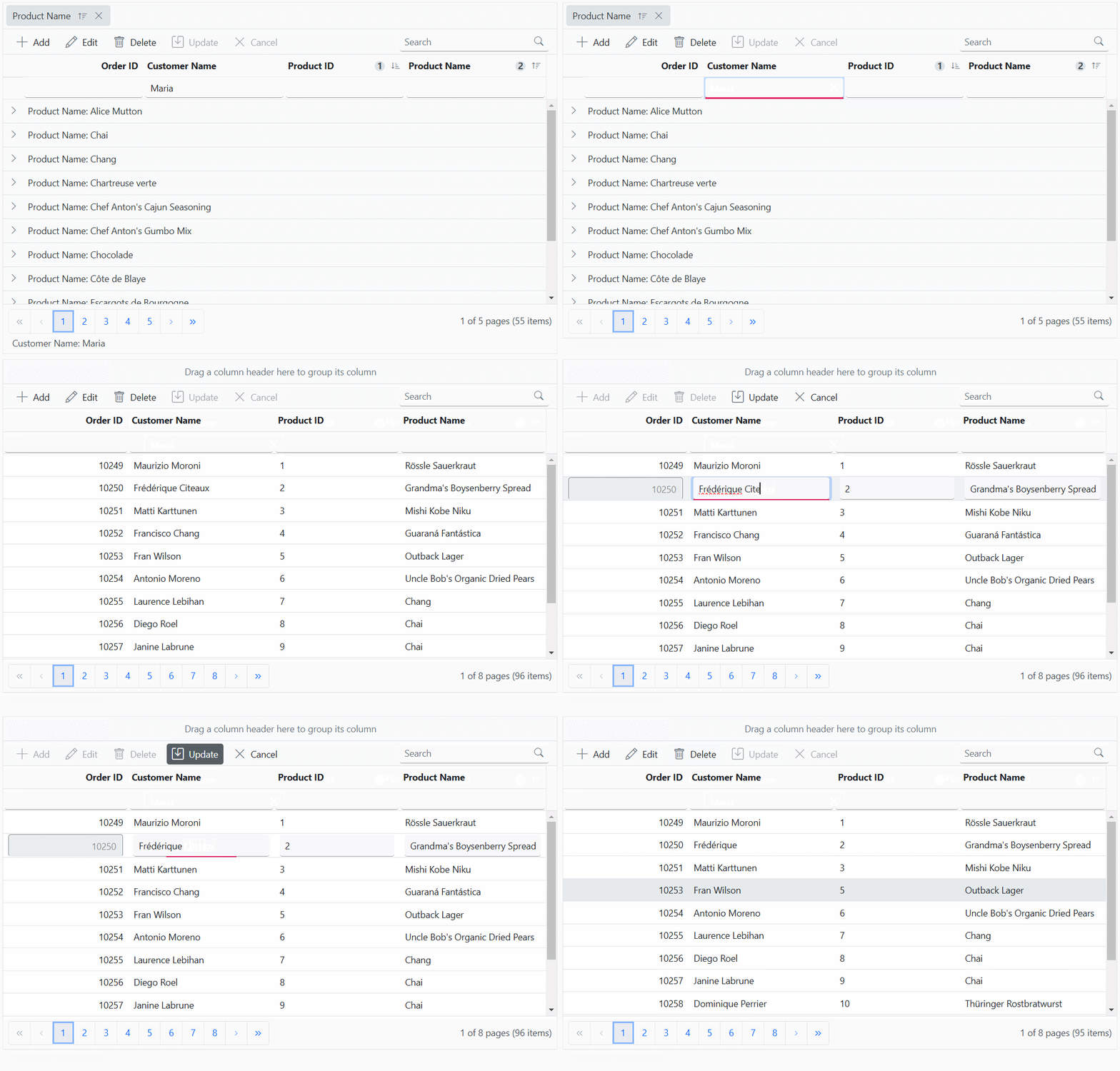
}The following screenshot represents the grid action with custom binding
- While working with grid edit operation, defining the isPrimaryKey property of column is a mandatory step. In case the primary key column is not defined, the edit or delete action will take place on the first row of the grid.
- Need to maintain the same instance for all grid actions.
Export all records in client side
Exporting all records with async pipe proves especially beneficial when dealing with large datasets that require export for offline analysis or sharing purposes.
By default, the Data Grid component exports only the records available on the current page. However, the Data Grid component allows exporting all records, including those from multiple pages, by configuring the pdfExportProperties and excelExportProperties.
To export all records, including those from multiple pages, configure the pdfExportProperties.dataSource for PDF exporting and excelExportProperties.dataSource for Excel exporting within the toolbarClick event handler. Inside this event, set the dataSource property of pdfExportProperties and excelExportProperties for PDF and Excel exporting to include all records.
Excel exporting
To export the complete Grid data to Excel document, utilize the excelExportProperties.dataSource when initiating the Excel export. Use the following code snippet to export all records within the Grid:
  getOrders(state).then((event) => {
    let excelExportProperties = {
      dataSource: (event.result as any).result
    };
    grid.excelExport(excelExportProperties);// Need to call excelExport method of Grid when get the entire data.
  });
PDF exporting
To export the complete Grid data to PDF document, utilize the pdfExportProperties.dataSource when initiating the PDF export. Use the following code snippet to export all records within the Grid:
  getOrders(state).then((event) => {
    let pdfExportProperties = {
      dataSource: (event.result as any).result
    };
    grid.pdfExport(pdfExportProperties);
  });
For further customization on Grid export, refer to the respective documentation for PDF exporting and Excel exporting
The following code example shows exporting all records in client side:
import { DataStateChangeEventArgs, Grid } from '@syncfusion/ej2-grids';
import { getOrders } from '../orderService';
import {  Page, PdfExport, ExcelExport,Toolbar } from '@syncfusion/ej2-grids';
import { ClickEventArgs } from "@syncfusion/ej2-navigations";

Grid.Inject(Page, PdfExport, ExcelExport,Toolbar);
interface CustomDataStateChangeEventArgs extends DataStateChangeEventArgs {
  skip:number;
  take:number;
}
const state:CustomDataStateChangeEventArgs= { skip: 0, take: 10 };
let grid: Grid = new Grid({
    allowPaging: true,
    allowExcelExport:true,
    allowPdfExport:true,
    created:created,
    excelExportComplete:exportComplete,
    pdfExportComplete:exportComplete,
    toolbarClick:toolbarClick,
    dataStateChange: dataStateChange,
    toolbar: ["ExcelExport", "PdfExport"],
    columns: [
        { field: 'OrderID', isPrimaryKey:true,headerText: 'Order ID', textAlign: 'Right', width: 120, type: 'number' },
        { field: 'CustomerName', width: 140, headerText: 'Customer Name', type: 'string' },
        { field: 'ProductID', headerText: 'Product ID' ,width: 120 },
        { field: 'ProductName', headerText: 'Product Name', width: 140}
    ],
    height: 315
});

grid.appendTo('#Grid');
function exportComplete() {
  grid.hideSpinner(); // Hide the spinner when export completed.
}
// Triggers at initial render of the Grid.
function created() {
  // Initial state needs to be sent manually.
  dataStateChange(state);
}
function  dataStateChange (state:DataStateChangeEventArgs) {
    getOrders(state).then((event) => {
        grid.dataSource = event.result; // Assign the result to the dataSource property.
    });
  }
function toolbarClick(args:ClickEventArgs) {
  let state= { action: {}, skip: 0, take: grid.pageSettings.totalRecordsCount };
  switch (args.item.text) {
    case "PDF Export":
      grid.showSpinner(); // Show the spinner when send the post to service.
      (state.action as any).isPdfExport = true;
      // Fetch the entire data while PDF exporting.
      getOrders(state).then((event) => {
        let pdfExportProperties = {
          dataSource: (event.result as any).result
        };
        grid.pdfExport(pdfExportProperties); // Need to call pdfExport method of Grid when get the entire data.
      });
      break;
    case "Excel Export":
      // Fetch the entire data while Excel exporting.
      grid.showSpinner();// Show the spinner when send the post to service.
      (state.action as any).isExcelExport = true;
      getOrders(state).then((event) => {
        let excelExportProperties = {
          dataSource: (event.result as any).result
        };
        grid.excelExport(excelExportProperties);// Need to call excelExport method of Grid when get the entire data.
      });
      break;
  }
}
<!DOCTYPE html>
<html lang="en">
<head>
<title>EJ2 Grid</title>
<meta charset="utf-8" />
<meta name="viewport" content="width=device-width, initial-scale=1.0" />
<meta name="description" content="Typescript Grid Control" />
<meta name="author" content="Syncfusion" />
<link href="https://cdn.syncfusion.com/ej2/35.1.37/material3.css" rel="stylesheet" />
<style>
#loader {
color: #008cff;
height: 40px;
left: 45%;
position: absolute;
top: 45%;
width: 30%;
}
</style>
</head>
<body>
<div id='loader'>Loading....</div>
<div id='container'>
<div id='Grid'></div>
</div>
</body>
</html>@import "../../node_modules/@syncfusion/ej2-material3-theme/styles/grid/index.css";import express, { Request, Response } from "express";
import { data, createLazyLoadData } from './app/datasource';
const bodyParser = require('body-parser');
const cors = require('cors');
// Generate the data.
const app = express();
app.use(cors({
origin: '*', // Update to the correct frontend origin.
credentials: true
}));
app.use(bodyParser.json());
// Root route.
app.get('/', (req:Request, res:Response) => {
res.send('Server is running');
});
// Get all records.
app.get('/orders', function (req: Request, res:Response) {
res.json({ result: data, count: data.length });
});
const port = xxxx;// Here xxxx denotes the port number.
app.listen(port, () => {
console.log(`Server running on http://localhost:${port}`);
});import { DataManager, Query } from "@syncfusion/ej2-data";
export class OrderService {
}
export {};
const baseUrl = "http://localhost:****/orders"; // Here xxxx denotes the port number.
let gridData:DataManager;
// Apply paging.
const applyPaging = (query:Query, state: { take: number; skip: number; })=> {
// Check if both 'take' and 'skip' values are available.
if (state.take && state.skip) {
// Calculate pageSkip and pageTake values to get pageIndex and pageSize.
const pageSkip = state.skip / state.take + 1;
const pageTake = state.take;
query.page(pageSkip, pageTake);
}
// If if only 'take' is available and 'skip' is 0, apply paging for the first page.
else if (state.skip === 0 && state.take) {
query.page(1, state.take);
}
}
export function getOrders(state: any) {
const query = new Query();
applyPaging(query, state)
query.isCountRequired = true
return fetch(baseUrl)
.then(res => res.json())
.then(data => {
// Create a DataManager instance with your fetched data.
gridData = new DataManager(data.result);
// Execute local data operations using the provided query.
const result = gridData.executeLocal(query);
// Return the result along with the count of total records.
return {
result: result, // Result of the data.
count: (result as any).count // Total record count based on fetched data length.
};
});
}export interface Order {
OrderID: number;
CustomerID: string;
CustomerName: string;
CustomerAddress: string;
ProductName: string;
ProductID: number;
Quantity: string;
}
export const data = createLazyLoadData();
export function createLazyLoadData(): Order[] {
const lazyLoadData: Order[] = [];
let customerid = ['VINET', 'TOMSP', 'HANAR', 'VICTE', 'SUPRD', 'HANAR', 'CHOPS', 'RICSU', 'WELLI', 'HILAA', 'ERNSH', 'CENTC',
'OTTIK', 'QUEDE', 'RATTC', 'ERNSH', 'FOLKO', 'BLONP', 'WARTH', 'FRANK', 'GROSR', 'WHITC', 'WARTH', 'SPLIR', 'RATTC', 'QUICK', 'VINET',
'MAGAA', 'TORTU', 'MORGK', 'BERGS', 'LEHMS', 'BERGS', 'ROMEY', 'ROMEY', 'LILAS', 'LEHMS', 'QUICK', 'QUICK', 'RICAR', 'REGGC', 'BSBEV',
'COMMI', 'QUEDE', 'TRADH', 'TORTU', 'RATTC', 'VINET', 'LILAS', 'BLONP', 'HUNGO', 'RICAR', 'MAGAA', 'WANDK', 'SUPRD', 'GODOS', 'TORTU',
'OLDWO', 'ROMEY', 'LONEP', 'ANATR', 'HUNGO', 'THEBI', 'DUMON', 'WANDK', 'QUICK', 'RATTC', 'ISLAT', 'RATTC', 'LONEP', 'ISLAT', 'TORTU',
'WARTH', 'ISLAT', 'PERIC', 'KOENE', 'SAVEA', 'KOENE', 'BOLID', 'FOLKO', 'FURIB', 'SPLIR', 'LILAS', 'BONAP', 'MEREP', 'WARTH', 'VICTE',
'HUNGO', 'PRINI', 'FRANK', 'OLDWO', 'MEREP', 'BONAP', 'SIMOB', 'FRANK', 'LEHMS', 'WHITC', 'QUICK', 'RATTC', 'FAMIA'];
let product = ['Chai', 'Chang', 'Aniseed Syrup', 'Chef Anton\'s Cajun Seasoning', 'Chef Anton\'s Gumbo Mix', 'Grandma\'s Boysenberry Spread',
'Uncle Bob\'s Organic Dried Pears', 'Northwoods Cranberry Sauce', 'Mishi Kobe Niku', 'Ikura', 'Queso Cabrales', 'Queso Manchego La Pastora', 'Konbu',
'Tofu', 'Genen Shouyu', 'Pavlova', 'Alice Mutton', 'Carnarvon Tigers', 'Teatime Chocolate Biscuits', 'Sir Rodney\'s Marmalade', 'Sir Rodney\'s Scones',
'Gustaf\'s Knäckebröd', 'Tunnbröd', 'Guaraná Fantástica', 'NuNuCa Nuß-Nougat-Creme', 'Gumbär Gummibärchen', 'Schoggi Schokolade', 'Rössle Sauerkraut',
'Thüringer Rostbratwurst', 'Nord-Ost Matjeshering', 'Gorgonzola Telino', 'Mascarpone Fabioli', 'Geitost', 'Sasquatch Ale', 'Steeleye Stout', 'Inlagd Sill',
'Gravad lax', 'Côte de Blaye', 'Chartreuse verte', 'Boston Crab Meat', 'Jack\'s New England Clam Chowder', 'Singaporean Hokkien Fried Mee', 'Ipoh Coffee',
'Gula Malacca', 'Rogede sild', 'Spegesild', 'Zaanse koeken', 'Chocolade', 'Maxilaku', 'Valkoinen suklaa', 'Manjimup Dried Apples', 'Filo Mix', 'Perth Pasties',
'Tourtière', 'Pâté chinois', 'Gnocchi di nonna Alice', 'Ravioli Angelo', 'Escargots de Bourgogne', 'Raclette Courdavault', 'Camembert Pierrot', 'Sirop d\'érable',
'Tarte au sucre', 'Vegie-spread', 'Wimmers gute Semmelknödel', 'Louisiana Fiery Hot Pepper Sauce', 'Louisiana Hot Spiced Okra', 'Laughing Lumberjack Lager', 'Scottish Longbreads',
'Gudbrandsdalsost', 'Outback Lager', 'Flotemysost', 'Mozzarella di Giovanni', 'Röd Kaviar', 'Longlife Tofu', 'Rhönbräu Klosterbier', 'Lakkalikööri', 'Original Frankfurter grüne Soße'];
let customername = ['Maria', 'Ana Trujillo', 'Antonio Moreno', 'Thomas Hardy', 'Christina Berglund', 'Hanna Moos', 'Frédérique Citeaux', 'Martín Sommer', 'Laurence Lebihan', 'Elizabeth Lincoln',
'Victoria Ashworth', 'Patricio Simpson', 'Francisco Chang', 'Yang Wang', 'Pedro Afonso', 'Elizabeth Brown', 'Sven Ottlieb', 'Janine Labrune', 'Ann Devon', 'Roland Mendel', 'Aria Cruz', 'Diego Roel',
'Martine Rancé', 'Maria Larsson', 'Peter Franken', 'Carine Schmitt', 'Paolo Accorti', 'Lino Rodriguez', 'Eduardo Saavedra', 'José Pedro Freyre', 'André Fonseca', 'Howard Snyder', 'Manuel Pereira',
'Mario Pontes', 'Carlos Hernández', 'Yoshi Latimer', 'Patricia McKenna', 'Helen Bennett', 'Philip Cramer', 'Daniel Tonini', 'Annette Roulet', 'Yoshi Tannamuri', 'John Steel', 'Renate Messner', 'Jaime Yorres',
'Carlos González', 'Felipe Izquierdo', 'Fran Wilson', 'Giovanni Rovelli', 'Catherine Dewey', 'Jean Fresnière', 'Alexander Feuer', 'Simon Crowther', 'Yvonne Moncada', 'Rene Phillips', 'Henriette Pfalzheim',
'Marie Bertrand', 'Guillermo Fernández', 'Georg Pipps', 'Isabel de Castro', 'Bernardo Batista', 'Lúcia Carvalho', 'Horst Kloss', 'Sergio Gutiérrez', 'Paula Wilson', 'Maurizio Moroni', 'Janete Limeira', 'Michael Holz',
'Alejandra Camino', 'Jonas Bergulfsen', 'Jose Pavarotti', 'Hari Kumar', 'Jytte Petersen', 'Dominique Perrier', 'Art Braunschweiger', 'Pascale Cartrain', 'Liz Nixon', 'Liu Wong', 'Karin Josephs', 'Miguel Angel Paolino',
'Anabela Domingues', 'Helvetius Nagy', 'Palle Ibsen', 'Mary Saveley', 'Paul Henriot', 'Rita Müller', 'Pirkko Koskitalo', 'Paula Parente', 'Karl Jablonski', 'Matti Karttunen', 'Zbyszek Piestrzeniewicz'];
let customeraddress = ['507 - 20th Ave. E.\r\nApt. 2A', '908 W. Capital Way', '722 Moss Bay Blvd.', '4110 Old Redmond Rd.', '14 Garrett Hill', 'Coventry House\r\nMiner Rd.', 'Edgeham Hollow\r\nWinchester Way',
'4726 - 11th Ave. N.E.', '7 Houndstooth Rd.', '59 rue de l\'Abbaye', 'Luisenstr. 48', '908 W. Capital Way', '722 Moss Bay Blvd.', '4110 Old Redmond Rd.', '14 Garrett Hill', 'Coventry House\r\nMiner Rd.', 'Edgeham Hollow\r\nWinchester Way',
'7 Houndstooth Rd.', '2817 Milton Dr.', 'Kirchgasse 6', 'Sierras de Granada 9993', 'Mehrheimerstr. 369', 'Rua da Panificadora, 12', '2817 Milton Dr.', 'Mehrheimerstr. 369'];
let quantityperunit= ['10 boxes x 20 bags', '24 - 12 oz bottles', '12 - 550 ml bottles', '48 - 6 oz jars', '36 boxes', '12 - 8 oz jars', '12 - 1 lb pkgs.', '12 - 12 oz jars', '18 - 500 g pkgs.', '12 - 200 ml jars',
'1 kg pkg.', '10 - 500 g pkgs.', '2 kg box', '40 - 100 g pkgs.', '24 - 250 ml bottles', '32 - 500 g boxes', '20 - 1 kg tins', '16 kg pkg.', '10 boxes x 12 pieces', '30 gift boxes', '24 pkgs. x 4 pieces', '24 - 500 g pkgs.', '12 - 250 g pkgs.',
'12 - 355 ml cans', '20 - 450 g glasses', '100 - 250 g bags'];
let OrderID = 10248;
for (let i = 0; i < 100; i++) {
lazyLoadData.push({
'OrderID': OrderID + i,
'CustomerID': customerid[Math.floor(Math.random() * customerid.length)],
'CustomerName': customername[Math.floor(Math.random() * customername.length)],
'CustomerAddress': customeraddress[Math.floor(Math.random() * customeraddress.length)],
'ProductName': product[Math.floor(Math.random() * product.length)],
'ProductID': i,
'Quantity': quantityperunit[Math.floor(Math.random() * quantityperunit.length)]
});
}
return lazyLoadData;
}Sending additional parameters to the server
The Data Grid component enables inclusion of custom parameters in data requests. This feature is particularly useful when additional information must be sent to the server for processing.
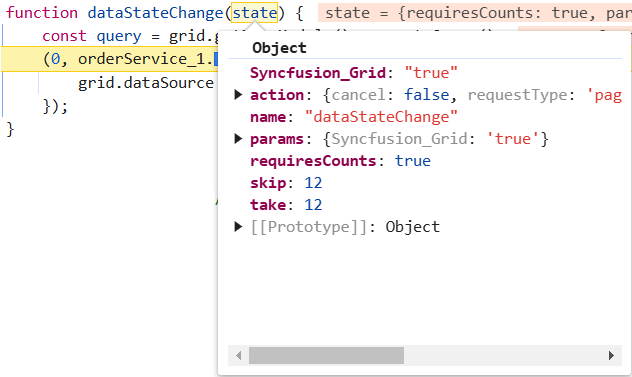
By using the query property of the grid along with the addParams method of the Query class, custom parameters can be incorporated into data requests for every grid action.
To enable custom parameters in data requests for the grid, follow these steps:
1. Bind the Query Object to the Grid: Assign the initialized query object to the query property of the Data Grid component.
2. Initialize the Query Object: Create a new instance of the Query class and use the addParams method to add the custom parameters.
3. Handle Data State Changes: To dynamically update data based on interactions, implement the dataStateChange event handler to execute the query with the updated state.
4. Execute Data Request: In the service, execute the data request by combining the custom parameters with other query parameters such as paging and sorting.
The following example demonstrates sending additional parameters to the server.
import { DataStateChangeEventArgs, Grid } from '@syncfusion/ej2-grids';
import { getOrders} from '../orderService';
import { Page} from '@syncfusion/ej2-grids';
import { Query } from '@syncfusion/ej2-data';

Grid.Inject(Page);

interface CustomDataStateChangeEventArgs extends DataStateChangeEventArgs {
    query?: Query;
    skip?:number;
    take?:number;
}

const query:Query= new Query().addParams('Syncfusion_Grid', 'true')
const state:CustomDataStateChangeEventArgs= { skip: 0, take: 12,query:query};

let grid: Grid = new Grid({
    allowPaging: true,
    created:created,
    query:query,
    dataStateChange: dataStateChange,
    columns: [
        { field: 'OrderID', isPrimaryKey:true,headerText: 'Order ID', textAlign: 'Right', width: 120, type: 'number' },
        { field: 'CustomerName', width: 140, headerText: 'Customer Name', type: 'string' },
        { field: 'ProductID', headerText: 'Product ID' ,width: 120 },
        { field: 'ProductName', headerText: 'Product Name', width: 140}
    ],
    height: 315
});
grid.appendTo('#Grid');

function created() {
  dataStateChange(state);
}
function  dataStateChange (state:DataStateChangeEventArgs) {
    const query = grid.getDataModule().generateQuery();
    getOrders(state, query).then((result) => {
        grid.dataSource = result.result; // Assign the result to the data property
    });
}
<!DOCTYPE html>
<html lang="en">
<head>
<title>EJ2 Grid</title>
<meta charset="utf-8" />
<meta name="viewport" content="width=device-width, initial-scale=1.0" />
<meta name="description" content="Typescript Grid Control" />
<meta name="author" content="Syncfusion" />
<link href="https://cdn.syncfusion.com/ej2/35.1.37/material3.css" rel="stylesheet" />
<style>
#loader {
color: #008cff;
height: 40px;
left: 45%;
position: absolute;
top: 45%;
width: 30%;
}
</style>
</head>
<body>
<div id='loader'>Loading....</div>
<div id='container'>
<div id='Grid'></div>
</div>
</body>
</html>@import "../../node_modules/@syncfusion/ej2-material3-theme/styles/grid/index.css";import express, { Request, Response } from "express";
const { createLazyLoadData } = require('./app/datasource');
const bodyParser = require('body-parser');
const cors = require('cors');
// Generate the data
const app = express();
const data=createLazyLoadData();
app.use(cors({
origin: '*', // Update to the correct frontend origin
credentials: true
}));
app.use(bodyParser.json());
// Root route
app.get('/', (req:Request, res:Response) => {
res.send('Server is running');
});
// all records
app.get('/orders', function (req: Request, res:Response) {
res.json({ result: data, count: data.length });
});
const port = xxxx;// Here xxxx denotes the port number.
app.listen(port, () => {
console.log(`Server running on http://localhost:${port}`);
});import { DataManager, Query,Predicate } from "@syncfusion/ej2-data";
export class OrderService {
}
export {};
const baseUrl = "http://localhost:xxxx/orders"; // Here xxxx denotes the port number.
let gridData:DataManager;
// Apply paging
const applyPaging = (query:Query, state: { take: number; skip: number; })=> {
// Check if both 'take' and 'skip' values are available
if (state.take && state.skip) {
// Calculate pageSkip and pageTake values to get pageIndex and pageSize
const pageSkip = state.skip / state.take + 1;
const pageTake = state.take;
query.page(pageSkip, pageTake);
}
// If if only 'take' is available and 'skip' is 0, apply paging for the first page.
else if (state.skip === 0 && state.take) {
query.page(1, state.take);
}
}
export function getOrders(state:any, action:any) {
const query = new Query();
// page
applyPaging(query, state)
query.isCountRequired = true
query.addParams('Syncfusion_Grid', 'true');
return fetch(baseUrl)
.then(res => res.json())
.then(data => {
// Create a DataManager instance with your fetched data
gridData = new DataManager(data.result);
// Execute local data operations using the provided query
const result = gridData.executeLocal(query);
// Return the result along with the count of total records
return {
result: result, // Result of the data
count: (result as any).count // Total record count based on fetched data length
};
});
}// datasource.ts
export interface Order {
OrderID: number;
CustomerID: string;
CustomerName: string;
CustomerAddress: string;
ProductName: string;
ProductID: number;
Quantity: string;
}
function createLazyLoadData(): Order[] {
const lazyLoadData: Order[] = []; // Explicitly type lazyLoadData as Order[]
let customerid = ['VINET', 'TOMSP', 'HANAR', 'VICTE', 'SUPRD', 'HANAR', 'CHOPS', 'RICSU', 'WELLI', 'HILAA', 'ERNSH', 'CENTC',
'OTTIK', 'QUEDE', 'RATTC', 'ERNSH', 'FOLKO', 'BLONP', 'WARTH', 'FRANK', 'GROSR', 'WHITC', 'WARTH', 'SPLIR', 'RATTC', 'QUICK', 'VINET',
'MAGAA', 'TORTU', 'MORGK', 'BERGS', 'LEHMS', 'BERGS', 'ROMEY', 'ROMEY', 'LILAS', 'LEHMS', 'QUICK', 'QUICK', 'RICAR', 'REGGC', 'BSBEV',
'COMMI', 'QUEDE', 'TRADH', 'TORTU', 'RATTC', 'VINET', 'LILAS', 'BLONP', 'HUNGO', 'RICAR', 'MAGAA', 'WANDK', 'SUPRD', 'GODOS', 'TORTU',
'OLDWO', 'ROMEY', 'LONEP', 'ANATR', 'HUNGO', 'THEBI', 'DUMON', 'WANDK', 'QUICK', 'RATTC', 'ISLAT', 'RATTC', 'LONEP', 'ISLAT', 'TORTU',
'WARTH', 'ISLAT', 'PERIC', 'KOENE', 'SAVEA', 'KOENE', 'BOLID', 'FOLKO', 'FURIB', 'SPLIR', 'LILAS', 'BONAP', 'MEREP', 'WARTH', 'VICTE',
'HUNGO', 'PRINI', 'FRANK', 'OLDWO', 'MEREP', 'BONAP', 'SIMOB', 'FRANK', 'LEHMS', 'WHITC', 'QUICK', 'RATTC', 'FAMIA'];
let product = ['Chai', 'Chang', 'Aniseed Syrup', 'Chef Anton\'s Cajun Seasoning', 'Chef Anton\'s Gumbo Mix', 'Grandma\'s Boysenberry Spread',
'Uncle Bob\'s Organic Dried Pears', 'Northwoods Cranberry Sauce', 'Mishi Kobe Niku', 'Ikura', 'Queso Cabrales', 'Queso Manchego La Pastora', 'Konbu',
'Tofu', 'Genen Shouyu', 'Pavlova', 'Alice Mutton', 'Carnarvon Tigers', 'Teatime Chocolate Biscuits', 'Sir Rodney\'s Marmalade', 'Sir Rodney\'s Scones',
'Gustaf\'s Knäckebröd', 'Tunnbröd', 'Guaraná Fantástica', 'NuNuCa Nuß-Nougat-Creme', 'Gumbär Gummibärchen', 'Schoggi Schokolade', 'Rössle Sauerkraut',
'Thüringer Rostbratwurst', 'Nord-Ost Matjeshering', 'Gorgonzola Telino', 'Mascarpone Fabioli', 'Geitost', 'Sasquatch Ale', 'Steeleye Stout', 'Inlagd Sill',
'Gravad lax', 'Côte de Blaye', 'Chartreuse verte', 'Boston Crab Meat', 'Jack\'s New England Clam Chowder', 'Singaporean Hokkien Fried Mee', 'Ipoh Coffee',
'Gula Malacca', 'Rogede sild', 'Spegesild', 'Zaanse koeken', 'Chocolade', 'Maxilaku', 'Valkoinen suklaa', 'Manjimup Dried Apples', 'Filo Mix', 'Perth Pasties',
'Tourtière', 'Pâté chinois', 'Gnocchi di nonna Alice', 'Ravioli Angelo', 'Escargots de Bourgogne', 'Raclette Courdavault', 'Camembert Pierrot', 'Sirop d\'érable',
'Tarte au sucre', 'Vegie-spread', 'Wimmers gute Semmelknödel', 'Louisiana Fiery Hot Pepper Sauce', 'Louisiana Hot Spiced Okra', 'Laughing Lumberjack Lager', 'Scottish Longbreads',
'Gudbrandsdalsost', 'Outback Lager', 'Flotemysost', 'Mozzarella di Giovanni', 'Röd Kaviar', 'Longlife Tofu', 'Rhönbräu Klosterbier', 'Lakkalikööri', 'Original Frankfurter grüne Soße'];
let customername = ['Maria', 'Ana Trujillo', 'Antonio Moreno', 'Thomas Hardy', 'Christina Berglund', 'Hanna Moos', 'Frédérique Citeaux', 'Martín Sommer', 'Laurence Lebihan', 'Elizabeth Lincoln',
'Victoria Ashworth', 'Patricio Simpson', 'Francisco Chang', 'Yang Wang', 'Pedro Afonso', 'Elizabeth Brown', 'Sven Ottlieb', 'Janine Labrune', 'Ann Devon', 'Roland Mendel', 'Aria Cruz', 'Diego Roel',
'Martine Rancé', 'Maria Larsson', 'Peter Franken', 'Carine Schmitt', 'Paolo Accorti', 'Lino Rodriguez', 'Eduardo Saavedra', 'José Pedro Freyre', 'André Fonseca', 'Howard Snyder', 'Manuel Pereira',
'Mario Pontes', 'Carlos Hernández', 'Yoshi Latimer', 'Patricia McKenna', 'Helen Bennett', 'Philip Cramer', 'Daniel Tonini', 'Annette Roulet', 'Yoshi Tannamuri', 'John Steel', 'Renate Messner', 'Jaime Yorres',
'Carlos González', 'Felipe Izquierdo', 'Fran Wilson', 'Giovanni Rovelli', 'Catherine Dewey', 'Jean Fresnière', 'Alexander Feuer', 'Simon Crowther', 'Yvonne Moncada', 'Rene Phillips', 'Henriette Pfalzheim',
'Marie Bertrand', 'Guillermo Fernández', 'Georg Pipps', 'Isabel de Castro', 'Bernardo Batista', 'Lúcia Carvalho', 'Horst Kloss', 'Sergio Gutiérrez', 'Paula Wilson', 'Maurizio Moroni', 'Janete Limeira', 'Michael Holz',
'Alejandra Camino', 'Jonas Bergulfsen', 'Jose Pavarotti', 'Hari Kumar', 'Jytte Petersen', 'Dominique Perrier', 'Art Braunschweiger', 'Pascale Cartrain', 'Liz Nixon', 'Liu Wong', 'Karin Josephs', 'Miguel Angel Paolino',
'Anabela Domingues', 'Helvetius Nagy', 'Palle Ibsen', 'Mary Saveley', 'Paul Henriot', 'Rita Müller', 'Pirkko Koskitalo', 'Paula Parente', 'Karl Jablonski', 'Matti Karttunen', 'Zbyszek Piestrzeniewicz'];
let customeraddress = ['507 - 20th Ave. E.\r\nApt. 2A', '908 W. Capital Way', '722 Moss Bay Blvd.', '4110 Old Redmond Rd.', '14 Garrett Hill', 'Coventry House\r\nMiner Rd.', 'Edgeham Hollow\r\nWinchester Way',
'4726 - 11th Ave. N.E.', '7 Houndstooth Rd.', '59 rue de l\'Abbaye', 'Luisenstr. 48', '908 W. Capital Way', '722 Moss Bay Blvd.', '4110 Old Redmond Rd.', '14 Garrett Hill', 'Coventry House\r\nMiner Rd.', 'Edgeham Hollow\r\nWinchester Way',
'7 Houndstooth Rd.', '2817 Milton Dr.', 'Kirchgasse 6', 'Sierras de Granada 9993', 'Mehrheimerstr. 369', 'Rua da Panificadora, 12', '2817 Milton Dr.', 'Mehrheimerstr. 369'];
let quantityperunit= ['10 boxes x 20 bags', '24 - 12 oz bottles', '12 - 550 ml bottles', '48 - 6 oz jars', '36 boxes', '12 - 8 oz jars', '12 - 1 lb pkgs.', '12 - 12 oz jars', '18 - 500 g pkgs.', '12 - 200 ml jars',
'1 kg pkg.', '10 - 500 g pkgs.', '2 kg box', '40 - 100 g pkgs.', '24 - 250 ml bottles', '32 - 500 g boxes', '20 - 1 kg tins', '16 kg pkg.', '10 boxes x 12 pieces', '30 gift boxes', '24 pkgs. x 4 pieces', '24 - 500 g pkgs.', '12 - 250 g pkgs.',
'12 - 355 ml cans', '20 - 450 g glasses', '100 - 250 g bags'];
let OrderID = 10248;
for (let i = 0; i < 100; i++) {
lazyLoadData.push({
'OrderID': OrderID + i,
'CustomerID': customerid[Math.floor(Math.random() * customerid.length)],
'CustomerName': customername[Math.floor(Math.random() * customername.length)],
'CustomerAddress': customeraddress[Math.floor(Math.random() * customeraddress.length)],
'ProductName': product[Math.floor(Math.random() * product.length)],
'ProductID': i,
'Quantity': quantityperunit[Math.floor(Math.random() * quantityperunit.length)]
});
}
return lazyLoadData;
}
Offline mode
On remote data binding, all grid actions such as paging, sorting, editing, grouping, filtering, etc., process on server-side. To avoid post back for every action, set the grid to load all data on initialization and make the actions process in client-side. To enable this behavior, use the offline property of DataManager.
import { Grid, Page, Sort, Group } from '@syncfusion/ej2-grids';
import { DataManager, ODataAdaptor } from '@syncfusion/ej2-data';

Grid.Inject(Page, Sort, Group);

let data: DataManager = new DataManager({
    url: 'https://services.syncfusion.com/js/production/api/Orders',
    adaptor: new ODataAdaptor,
    offline: true
});

let grid: Grid = new Grid({
    dataSource: data,
    columns: [
                { field: 'OrderID', headerText: 'Order ID', textAlign: 'Right', width: 120, type: 'number' },
                { field: 'CustomerID', width: 140, headerText: 'Customer ID', type: 'string' },
                { field: 'Freight', headerText: 'Freight', textAlign: 'Right', width: 120, format: 'C' },
                { field: 'OrderDate', headerText: 'Order Date', width: 140, format: 'yMd' }
    ],
    allowPaging: true,
    pageSettings: { pageSize: 7 },
    allowSorting: true,
    allowGrouping: true
});

grid.appendTo('#Grid');
<!DOCTYPE html>
<html lang="en">
<head>
<title>EJ2 Grid</title>
<meta charset="utf-8" />
<meta name="viewport" content="width=device-width, initial-scale=1.0" />
<meta name="description" content="Typescript Grid Control" />
<meta name="author" content="Syncfusion" />
<link href="index.css" rel="stylesheet" />
<link href="https://cdn.syncfusion.com/ej2/35.1.37/material3.css" rel="stylesheet" />
<script src="https://cdnjs.cloudflare.com/ajax/libs/systemjs/0.19.38/system.js"></script>
<script src="systemjs.config.js"></script>
</head>
<body>
<div id='loader'>Loading....</div>
<div id='container'>
<div id='Grid'></div>
</div>
</body>
</html>Creating an API service
To configure a server with EJ2 TypeScript Grid, follow the below steps:
Step 1: Open the terminal and create a new Typescript project using the following command:
git clone https://github.com/SyncfusionExamples/ej2-quickstart-webpack- ej2-quickstartStep 2: Navigate to the project directory and install the required Syncfusion® packages using npm:
cd ej2-quickstart
npm install @syncfusion/ej2-grids --save
npm install @syncfusion/ej2-data --save
Step 3: Add the following styles to the ~/src/styles/styles.css file:
@import "../node_modules/@syncfusion/ej2-material3-theme/styles/grid/index.css";Step 4: Install the necessary packages for setting up an Express server:
npm install express body-parser corsStep 5: Install Concurrently to run both the server and client simultaneously:
npm install concurrently --save-devStep 5: Add the following to the tsconfig.json file:
{
  "compilerOptions": {
    "target": "es2016",
    "module": "commonjs",
    "rootDir": "./src",
    "outDir": "./dist",
    "esModuleInterop": true,
    "forceConsistentCasingInFileNames": true,
    "strict": true,
    "skipLibCheck": true
  }
}
Step 6: Update the scripts section in the package.json to include commands for starting the server and client concurrently:
  "scripts": {
    "start-server": "node dist/server.js",
    "start-client": "webpack-dev-server --mode development",
    "start": "concurrently \"node dist/server.js\" \"npm run start-client\"",
    "build": "tsc"
  }
Step 7: Create a dataSource.ts file to represent the data in the src/app folder, like src/app/dataSource.ts.
// datasource.ts
export interface Order {
    OrderID: number;
    CustomerID: string;
    CustomerName: string;
    CustomerAddress: string;
    ProductName: string;
    ProductID: number;
    Quantity: string;
}
export const data = createLazyLoadData();

export function createLazyLoadData(): Order[] {
    const lazyLoadData: Order[] = []; // Explicitly type lazyLoadData as Order[]

    let customerid = ['VINET', 'TOMSP', 'HANAR', 'VICTE', 'SUPRD', 'HANAR', 'CHOPS', 'RICSU', 'WELLI', 'HILAA', 'ERNSH', 'CENTC',
        'OTTIK', 'QUEDE', 'RATTC', 'ERNSH', 'FOLKO', 'BLONP', 'WARTH', 'FRANK', 'GROSR', 'WHITC', 'WARTH', 'SPLIR', 'RATTC', 'QUICK', 'VINET',
        'MAGAA', 'TORTU', 'MORGK', 'BERGS', 'LEHMS', 'BERGS', 'ROMEY', 'ROMEY', 'LILAS', 'LEHMS', 'QUICK', 'QUICK', 'RICAR', 'REGGC', 'BSBEV',
        'COMMI', 'QUEDE', 'TRADH', 'TORTU', 'RATTC', 'VINET', 'LILAS', 'BLONP', 'HUNGO', 'RICAR', 'MAGAA', 'WANDK', 'SUPRD', 'GODOS', 'TORTU',
        'OLDWO', 'ROMEY', 'LONEP', 'ANATR', 'HUNGO', 'THEBI', 'DUMON', 'WANDK', 'QUICK', 'RATTC', 'ISLAT', 'RATTC', 'LONEP', 'ISLAT', 'TORTU',
        'WARTH', 'ISLAT', 'PERIC', 'KOENE', 'SAVEA', 'KOENE', 'BOLID', 'FOLKO', 'FURIB', 'SPLIR', 'LILAS', 'BONAP', 'MEREP', 'WARTH', 'VICTE',
        'HUNGO', 'PRINI', 'FRANK', 'OLDWO', 'MEREP', 'BONAP', 'SIMOB', 'FRANK', 'LEHMS', 'WHITC', 'QUICK', 'RATTC', 'FAMIA'];

        let product = ['Chai', 'Chang', 'Aniseed Syrup', 'Chef Anton\'s Cajun Seasoning', 'Chef Anton\'s Gumbo Mix', 'Grandma\'s Boysenberry Spread',
        'Uncle Bob\'s Organic Dried Pears', 'Northwoods Cranberry Sauce', 'Mishi Kobe Niku', 'Ikura', 'Queso Cabrales', 'Queso Manchego La Pastora', 'Konbu',
        'Tofu', 'Genen Shouyu', 'Pavlova', 'Alice Mutton', 'Carnarvon Tigers', 'Teatime Chocolate Biscuits', 'Sir Rodney\'s Marmalade', 'Sir Rodney\'s Scones',
        'Gustaf\'s Knäckebröd', 'Tunnbröd', 'Guaraná Fantástica', 'NuNuCa Nuß-Nougat-Creme', 'Gumbär Gummibärchen', 'Schoggi Schokolade', 'Rössle Sauerkraut',
        'Thüringer Rostbratwurst', 'Nord-Ost Matjeshering', 'Gorgonzola Telino', 'Mascarpone Fabioli', 'Geitost', 'Sasquatch Ale', 'Steeleye Stout', 'Inlagd Sill',
        'Gravad lax', 'Côte de Blaye', 'Chartreuse verte', 'Boston Crab Meat', 'Jack\'s New England Clam Chowder', 'Singaporean Hokkien Fried Mee', 'Ipoh Coffee',
        'Gula Malacca', 'Rogede sild', 'Spegesild', 'Zaanse koeken', 'Chocolade', 'Maxilaku', 'Valkoinen suklaa', 'Manjimup Dried Apples', 'Filo Mix', 'Perth Pasties',
        'Tourtière', 'Pâté chinois', 'Gnocchi di nonna Alice', 'Ravioli Angelo', 'Escargots de Bourgogne', 'Raclette Courdavault', 'Camembert Pierrot', 'Sirop d\'érable',
        'Tarte au sucre', 'Vegie-spread', 'Wimmers gute Semmelknödel', 'Louisiana Fiery Hot Pepper Sauce', 'Louisiana Hot Spiced Okra', 'Laughing Lumberjack Lager', 'Scottish Longbreads',
        'Gudbrandsdalsost', 'Outback Lager', 'Flotemysost', 'Mozzarella di Giovanni', 'Röd Kaviar', 'Longlife Tofu', 'Rhönbräu Klosterbier', 'Lakkalikööri', 'Original Frankfurter grüne Soße'];

        let customername = ['Maria', 'Ana Trujillo', 'Antonio Moreno', 'Thomas Hardy', 'Christina Berglund', 'Hanna Moos', 'Frédérique Citeaux', 'Martín Sommer', 'Laurence Lebihan', 'Elizabeth Lincoln',
        'Victoria Ashworth', 'Patricio Simpson', 'Francisco Chang', 'Yang Wang', 'Pedro Afonso', 'Elizabeth Brown', 'Sven Ottlieb', 'Janine Labrune', 'Ann Devon', 'Roland Mendel', 'Aria Cruz', 'Diego Roel',
        'Martine Rancé', 'Maria Larsson', 'Peter Franken', 'Carine Schmitt', 'Paolo Accorti', 'Lino Rodriguez', 'Eduardo Saavedra', 'José Pedro Freyre', 'André Fonseca', 'Howard Snyder', 'Manuel Pereira',
        'Mario Pontes', 'Carlos Hernández', 'Yoshi Latimer', 'Patricia McKenna', 'Helen Bennett', 'Philip Cramer', 'Daniel Tonini', 'Annette Roulet', 'Yoshi Tannamuri', 'John Steel', 'Renate Messner', 'Jaime Yorres',
        'Carlos González', 'Felipe Izquierdo', 'Fran Wilson', 'Giovanni Rovelli', 'Catherine Dewey', 'Jean Fresnière', 'Alexander Feuer', 'Simon Crowther', 'Yvonne Moncada', 'Rene Phillips', 'Henriette Pfalzheim',
        'Marie Bertrand', 'Guillermo Fernández', 'Georg Pipps', 'Isabel de Castro', 'Bernardo Batista', 'Lúcia Carvalho', 'Horst Kloss', 'Sergio Gutiérrez', 'Paula Wilson', 'Maurizio Moroni', 'Janete Limeira', 'Michael Holz',
        'Alejandra Camino', 'Jonas Bergulfsen', 'Jose Pavarotti', 'Hari Kumar', 'Jytte Petersen', 'Dominique Perrier', 'Art Braunschweiger', 'Pascale Cartrain', 'Liz Nixon', 'Liu Wong', 'Karin Josephs', 'Miguel Angel Paolino',
        'Anabela Domingues', 'Helvetius Nagy', 'Palle Ibsen', 'Mary Saveley', 'Paul Henriot', 'Rita Müller', 'Pirkko Koskitalo', 'Paula Parente', 'Karl Jablonski', 'Matti Karttunen', 'Zbyszek Piestrzeniewicz'];

        let customeraddress = ['507 - 20th Ave. E.\r\nApt. 2A', '908 W. Capital Way', '722 Moss Bay Blvd.', '4110 Old Redmond Rd.', '14 Garrett Hill', 'Coventry House\r\nMiner Rd.', 'Edgeham Hollow\r\nWinchester Way',
        '4726 - 11th Ave. N.E.', '7 Houndstooth Rd.', '59 rue de l\'Abbaye', 'Luisenstr. 48', '908 W. Capital Way', '722 Moss Bay Blvd.', '4110 Old Redmond Rd.', '14 Garrett Hill', 'Coventry House\r\nMiner Rd.', 'Edgeham Hollow\r\nWinchester Way',
        '7 Houndstooth Rd.', '2817 Milton Dr.', 'Kirchgasse 6', 'Sierras de Granada 9993', 'Mehrheimerstr. 369', 'Rua da Panificadora, 12', '2817 Milton Dr.', 'Mehrheimerstr. 369'];

        let quantityperunit= ['10 boxes x 20 bags', '24 - 12 oz bottles', '12 - 550 ml bottles', '48 - 6 oz jars', '36 boxes', '12 - 8 oz jars', '12 - 1 lb pkgs.', '12 - 12 oz jars', '18 - 500 g pkgs.', '12 - 200 ml jars',
        '1 kg pkg.', '10 - 500 g pkgs.', '2 kg box', '40 - 100 g pkgs.', '24 - 250 ml bottles', '32 - 500 g boxes', '20 - 1 kg tins', '16 kg pkg.', '10 boxes x 12 pieces', '30 gift boxes', '24 pkgs. x 4 pieces', '24 - 500 g pkgs.', '12 - 250 g pkgs.',
        '12 - 355 ml cans', '20 - 450 g glasses', '100 - 250 g bags'];
    let OrderID = 10248;

    for (let i = 0; i < 100; i++) {
        lazyLoadData.push({
            'OrderID': OrderID + i,
            'CustomerID': customerid[Math.floor(Math.random() * customerid.length)],
            'CustomerName': customername[Math.floor(Math.random() * customername.length)],
            'CustomerAddress': customeraddress[Math.floor(Math.random() * customeraddress.length)],
            'ProductName': product[Math.floor(Math.random() * product.length)],
            'ProductID': i,
            'Quantity': quantityperunit[Math.floor(Math.random() * quantityperunit.length)]
        });
    }

    return lazyLoadData;
}
Step 8: Create server.ts file to set up a basic Express server:
import express, { Request, Response } from "express";
import { data, createLazyLoadData } from './app/datasource'; // Adjust path as necessary
const bodyParser = require('body-parser');
const cors = require('cors');

// Generate the data
const app = express();
app.use(cors({
    origin: '*', // Update to the correct frontend origin
    credentials: true
}));
app.use(bodyParser.json());
// Root route
app.get('/', (req:Request, res:Response) => {
    res.send('Server is running');
});
// all records
app.get('/orders', function (req: Request, res:Response) {
    res.json({ result: data, count: data.length });
});
const port = xxxx;// Here xxxx denotes the port number.
app.listen(port, () => {
    console.log(`Server running on http://localhost:${port}`);
});
Step 9: Create an orderService.ts file inside the src folder (e.g., src/orderService.ts) to handle CRUD operations and grid actions using DataManager:
import { DataManager, Query } from "@syncfusion/ej2-data";

export class OrderService {
}
export {};
const baseUrl = "http://localhost:xxxx/orders"; // Here xxxx denotes the port number.
let gridData:DataManager;
// Apply paging
const applyPaging = (query:Query, state: { take: number; skip: number; })=> {
  // Check if both 'take' and 'skip' values are available
  if (state.take && state.skip) {
    // Calculate pageSkip and pageTake values to get pageIndex and pageSize
    const pageSkip = state.skip / state.take + 1;
    const pageTake = state.take;
    query.page(pageSkip, pageTake);
  }
  // If if only 'take' is available and 'skip' is 0, apply paging for the first page.
  else if (state.skip === 0 && state.take) {
    query.page(1, state.take);
  }
}
export function getOrders(state:any, action:any) {
  const query = new Query();
  // page
  applyPaging(query, state)
  query.isCountRequired = true

  return fetch(baseUrl)
    .then(res => res.json())
    .then(data => {
      // Create a DataManager instance with the fetched data
      gridData = new DataManager(data.result);
      // Execute local data operations using the provided query
      const result = gridData.executeLocal(query);
      // Return the result along with the count of total records
      return {
        result: result, // Result of the data
        count: (result as any).count // Total record count based on fetched data length
      };
    });
}
Step 10: In the app.ts file, import and use the Data Grid component. Use the orderService to fetch and manipulate data.
import { DataSourceChangedEventArgs, DataStateChangeEventArgs, Grid } from '@syncfusion/ej2-grids';
import { getOrders, addRecord, updateRecord, deleteRecord } from '../orderService';
import { Page} from '@syncfusion/ej2-grids';

Grid.Inject(Page);

interface CustomDataStateChangeEventArgs extends DataStateChangeEventArgs {
    query?: Query;
    skip?:number;
    take?:number;
}
const state:CustomDataStateChangeEventArgs= { skip: 0, take: 12,query:query};

let grid: Grid = new Grid({
    allowPaging: true,
    created:created,
    dataStateChange: dataStateChange,
    columns: [
        { field: 'OrderID', isPrimaryKey:true,headerText: 'Order ID', textAlign: 'Right', width: 120, type: 'number' },
        { field: 'CustomerName', width: 140, headerText: 'Customer Name', type: 'string' },
        { field: 'ProductID', headerText: 'Product ID' ,width: 120 },
        { field: 'ProductName', headerText: 'Product Name', width: 140}
    ],
    height: 315
});

grid.appendTo('#Grid');

// triggers at initial render of the Grid
function created() {
  // initial state needs to be sent manually
  dataStateChange(state);
}
function  dataStateChange (state:DataStateChangeEventArgs) {
  const query = grid.getDataModule().generateQuery();
  getOrders(state, query).then((result) => {
    grid.dataSource = result.result; // Assign the result to the data property
  });
}
Step 11: Finally, start both the server and client concurrently using the start script.
npm run build
npm start
Replace https://localhost:xxxx/orders with the actual URL of the API endpoint that provides the data in a consumable format (e.g., JSON).
Fetch result from the DataManager query using external button
By default, Data Grid automatically binds a remote data source using the DataManager. However, in some scenarios, it may be necessary to fetch data dynamically from the server using a query triggered by an external button. This approach provides greater control over when and the manner in which data loads into the grid.
To achieve this, use the executeQuery method of DataManager with a query object. This method enables running a custom query and retrieving results dynamically.
The following example demonstrates the process of fetching data from the server when an external button is clicked and displaying a status message indicating the data fetch status.
import { Grid, Page } from '@syncfusion/ej2-grids';
import { DataManager, WebApiAdaptor, Query, ReturnOption } from '@syncfusion/ej2-data';

Grid.Inject(Page);

let SERVICE_URL = 'https://ej2services.syncfusion.com/production/web-services/api/Orders';
let statusMessage = document.getElementById("statusMessage") as HTMLParagraphElement;
let getData = new DataManager({
    url: SERVICE_URL,
    adaptor: new WebApiAdaptor()
});
let grid = new Grid({
    allowPaging:true,
    columns: [
        { field: 'OrderID', headerText: 'Order ID', width: 120, textAlign: 'Right' },
        { field: 'CustomerID', headerText: 'Customer ID', width: 160 },
        { field: 'EmployeeID', headerText: 'Employee ID', width: 120, textAlign: 'Right' },
        { field: 'Freight', headerText: 'Freight', width: 150, format: "C2", textAlign: 'Right' },
        { field: 'ShipCountry', headerText: 'Ship Country', width: 150 }
    ],
    dataSource: []
});
grid.appendTo('#Grid');

(document.getElementById("fetchButton") as HTMLElement).addEventListener("click", () => {
    statusMessage.textContent = "Fetching data...";
    getData.executeQuery(new Query()).then((e: ReturnOption) => {
        grid.dataSource = e.result;
        statusMessage.textContent = `Data fetched successfully! Total Records: ${e.result.length}`;
    }).catch(() => {
        statusMessage.textContent = "Error fetching data!";
    });
});
<!DOCTYPE html>
<html lang="en">
<head>
<title>EJ2 Grid</title>
<meta charset="utf-8" />
<meta name="viewport" content="width=device-width, initial-scale=1.0" />
<meta name="description" content="Typescript Grid Control" />
<meta name="author" content="Syncfusion" />
<link href="index.css" rel="stylesheet" />
<link href="https://cdn.syncfusion.com/ej2/35.1.37/material3.css" rel="stylesheet" />
<script src="https://cdnjs.cloudflare.com/ajax/libs/systemjs/0.19.38/system.js"></script>
<script src="systemjs.config.js"></script>
</head>
<body>
<div id='loader'>Loading....</div>
<div id='container'>
<button id="fetchButton">Execute Query</button>
<p id="statusMessage" style="text-align:center;color:red"></p>
<div id="Grid"></div>
</div>
</body>
</html>