Phase
Phase are the subprocess which will split each lanes as horizontally or vertically based on the swimlane orientation. We can add multiple number of Phase to swimlane.
The following code example illustrates how to create phase.
import { Diagram, NodeModel } from '@syncfusion/ej2-diagrams';
let node: NodeModel = {
  shape: {
    type: 'SwimLane',
    orientation: 'Horizontal',
    //Intialize header to swimlane
    header: {
      annotation: {
        content: 'ONLINE PURCHASE STATUS',
        style: { fill: '#111111' },
      },
      height: 50,
      style: { fontSize: 11 },
    },
    lanes: [
      {
        id: 'stackCanvas1',
        height: 100,
        header: {
          annotation: { content: 'CUSTOMER' },
          width: 50,
          style: { fontSize: 11 },
        },
      },
    ],
    phases: [
      {
        id: 'phase1',
        offset: 150,
      },
      {
        id: 'phase2',
        offset: 200,
      },
    ],
    phaseSize: 20,
  },
  offsetX: 300,
  offsetY: 200,
  height: 200,
  width: 350,
};
// initialize Diagram component
let diagram: Diagram = new Diagram({
  width: '100%',
  height: '600px',
  // Add node
  nodes: [node],
});
// render initialized Diagram
diagram.appendTo('#element');
<!DOCTYPE html>
<html lang="en">
<head>
<title>EJ2 Diagram</title>
<meta charset="utf-8" />
<meta name="viewport" content="width=device-width, initial-scale=1.0" />
<meta name="description" content="Typescript UI Controls" />
<meta name="author" content="Syncfusion" />
<link href="index.css" rel="stylesheet" />
<script src="https://cdnjs.cloudflare.com/ajax/libs/systemjs/0.19.38/system.js"></script>
<link href="https://cdn.syncfusion.com/ej2/32.1.19/ej2-base/styles/material.css" rel="stylesheet" />
<link href="https://cdn.syncfusion.com/ej2/32.1.19/ej2-buttons/styles/material.css" rel="stylesheet" />
<link href="https://cdn.syncfusion.com/ej2/32.1.19/ej2-popups/styles/material.css" rel="stylesheet" />
<link href="https://cdn.syncfusion.com/ej2/32.1.19/ej2-splitbuttons/styles/material.css" rel="stylesheet" />
<link href="https://cdn.syncfusion.com/ej2/32.1.19/ej2-diagrams/styles/material.css" rel="stylesheet" />
<link href="https://cdn.syncfusion.com/ej2/32.1.19/ej2-navigations/styles/fabric.css" rel="stylesheet" />
<script src="systemjs.config.js"></script>
<script src="https://cdn.syncfusion.com/ej2/syncfusion-helper.js" type ="text/javascript"></script>
</head>
<body>
<div id='loader'>Loading....</div>
<div id='container'>
<div id='element'></div>
</div>
</body>
</html>Dynamically add/remove phase to Lane
You can add the a phase at runtime by using addPhases method and remove phase by using removePhase method. The following code example illustrates how to add and remove phase at run time.
import { Diagram, NodeModel, SwimlaneModel } from '@syncfusion/ej2-diagrams';
let node: NodeModel = {
  id: 'swim1',
  shape: {
    type: 'SwimLane',
    orientation: 'Horizontal',
    //Intialize header to swimlane
    header: {
      annotation: {
        content: 'ONLINE PURCHASE STATUS',
        style: { fill: '#111111' },
      },
      height: 50,
      style: { fontSize: 11 },
    },
    lanes: [
      {
        id: 'stackCanvas1',
        height: 100,
        header: {
          annotation: { content: 'CUSTOMER' },
          width: 50,
          style: { fontSize: 11 },
        },
      },
    ],
    phases: [
      {
        id: 'phase1',
        offset: 120,
        header: { annotation: { content: 'Phase' } },
      },
      {
        id: 'phase2',
        offset: 200,
        header: { annotation: { content: 'Phase' } },
      },
    ],
    phaseSize: 20,
  },
  offsetX: 300,
  offsetY: 200,
  height: 200,
  width: 350,
};
// initialize Diagram component
let diagram: Diagram = new Diagram({
  width: '100%',
  height: '600px',
  // Add node
  nodes: [node],
});
// render initialized Diagram
diagram.appendTo('#element');
(document.getElementById('addPhase') as HTMLInputElement).onclick = () => {
  let swimlane = diagram.getObject('swim1');
  var phase = [
    {
      id: 'phase3',
      offset: 250,
      header: { annotation: { content: 'New Phase' } },
    },
  ];
  /**
   * To add phases
   * parameter 1 - object representing the swimlane to which phases will be added.
   * parameter 2 - objects representing the phases to be added.
   */
  diagram.addPhases(swimlane, phase);
};

(document.getElementById('removePhase') as HTMLInputElement).onclick = () => {
  let swimlane = diagram.getObject('swim1');
  let phase = (swimlane.shape as SwimlaneModel).phases[
    (swimlane.shape as SwimlaneModel).phases.length - 1
  ];
  /**
   * To remove phase
   * parameter 1 - representing the swimlane to remove the phase from.
   * paramter 2 - representing the phase to be removed.
   */
  diagram.removePhase(swimlane, phase);
};
<!DOCTYPE html>
<html lang="en">
<head>
<title>EJ2 Diagram</title>
<meta charset="utf-8" />
<meta name="viewport" content="width=device-width, initial-scale=1.0" />
<meta name="description" content="Typescript UI Controls" />
<meta name="author" content="Syncfusion" />
<link href="index.css" rel="stylesheet" />
<script src="https://cdnjs.cloudflare.com/ajax/libs/systemjs/0.19.38/system.js"></script>
<link href="https://cdn.syncfusion.com/ej2/32.1.19/ej2-base/styles/material.css" rel="stylesheet" />
<link href="https://cdn.syncfusion.com/ej2/32.1.19/ej2-buttons/styles/material.css" rel="stylesheet" />
<link href="https://cdn.syncfusion.com/ej2/32.1.19/ej2-popups/styles/material.css" rel="stylesheet" />
<link href="https://cdn.syncfusion.com/ej2/32.1.19/ej2-splitbuttons/styles/material.css" rel="stylesheet" />
<link href="https://cdn.syncfusion.com/ej2/32.1.19/ej2-diagrams/styles/material.css" rel="stylesheet" />
<link href="https://cdn.syncfusion.com/ej2/32.1.19/ej2-navigations/styles/fabric.css" rel="stylesheet" />
<script src="systemjs.config.js"></script>
<script src="https://cdn.syncfusion.com/ej2/syncfusion-helper.js" type ="text/javascript"></script>
</head>
<body>
<div id='loader'>Loading....</div>
<div id='container'>
<input type="button" value="addPhase" id="addPhase" />
<input type="button" value="removePhase" id="removePhase" />
<div id='element'></div>
</div>
</body>
</html>Customizing phase
- The length of region can be set by using the
offsetproperty of the phase. - Every phase region can be textually described with the
headerproperty of the phase. - You can increase the height of phase by using
phaseSizeproperty of swimlane. - We can provide additional information to the phase by using the
addInfoproperty of the phase.
The following code example illustrates how to customize the phase in swimlane.
import { Diagram, NodeModel } from '@syncfusion/ej2-diagrams';
let node: NodeModel = {
  shape: {
    type: 'SwimLane',
    orientation: 'Horizontal',
    //Intialize header to swimlane
    header: {
      annotation: {
        content: 'ONLINE PURCHASE STATUS',
        style: { fill: '#111111' },
      },
      height: 50,
      style: { fontSize: 11 },
    },
    lanes: [
      {
        id: 'stackCanvas1',
        height: 100,
        header: {
          annotation: { content: 'CUSTOMER' },
          width: 50,
          style: { fontSize: 11 },
        },
      },
    ],
    phases: [
      {
        id: 'phase1',
        offset: 150,
        addInfo: { name: 'phase1' },
        header: {
          annotation: {
            content: 'First phase',
            style: { fill: 'yellow', color: 'red' },
          },
        },
      },
      {
        id: 'phase2',
        offset: 200,
        header: { annotation: { content: 'Second phase' } },
        style: { fill: 'violet' },
      },
    ],
    phaseSize: 40,
  },
  offsetX: 300,
  offsetY: 200,
  height: 200,
  width: 350,
};

// initialize Diagram component
let diagram: Diagram = new Diagram({
  width: '100%',
  height: '600px',
  // Add node
  nodes: [node],
});
// render initialized Diagram
diagram.appendTo('#element');
<!DOCTYPE html>
<html lang="en">
<head>
<title>EJ2 Diagram</title>
<meta charset="utf-8" />
<meta name="viewport" content="width=device-width, initial-scale=1.0" />
<meta name="description" content="Typescript UI Controls" />
<meta name="author" content="Syncfusion" />
<link href="index.css" rel="stylesheet" />
<script src="https://cdnjs.cloudflare.com/ajax/libs/systemjs/0.19.38/system.js"></script>
<link href="https://cdn.syncfusion.com/ej2/32.1.19/ej2-base/styles/material.css" rel="stylesheet" />
<link href="https://cdn.syncfusion.com/ej2/32.1.19/ej2-buttons/styles/material.css" rel="stylesheet" />
<link href="https://cdn.syncfusion.com/ej2/32.1.19/ej2-popups/styles/material.css" rel="stylesheet" />
<link href="https://cdn.syncfusion.com/ej2/32.1.19/ej2-splitbuttons/styles/material.css" rel="stylesheet" />
<link href="https://cdn.syncfusion.com/ej2/32.1.19/ej2-diagrams/styles/material.css" rel="stylesheet" />
<link href="https://cdn.syncfusion.com/ej2/32.1.19/ej2-navigations/styles/fabric.css" rel="stylesheet" />
<script src="systemjs.config.js"></script>
<script src="https://cdn.syncfusion.com/ej2/syncfusion-helper.js" type ="text/javascript"></script>
</head>
<body>
<div id='loader'>Loading....</div>
<div id='container'>
<div id='element'></div>
</div>
</body>
</html>Dynamic customization of phase
You can customize the phase style and text properties dynamically. The following code illustrates how to dynamically customize the phase.
The following code example illustrates how to customize the phase at runtime.
import { Diagram, NodeModel } from '@syncfusion/ej2-diagrams';
let node: NodeModel = {
  id:'swimlane',
  shape: {
    type: 'SwimLane',
    orientation: 'Horizontal',
    //Intialize header to swimlane
    header: {
      annotation: {
        content: 'ONLINE PURCHASE STATUS',
        style: { fill: '#111111' },
      },
      height: 50,
      style: { fontSize: 11 },
    },
    lanes: [
      {
        id: 'stackCanvas1',
        height: 100,
        header: {
          annotation: { content: 'CUSTOMER' },
          width: 50,
          style: { fontSize: 11 },
        },
      },
    ],
    phases: [
      {
        id: 'phase1',
        offset: 150,
        addInfo: { name: 'phase1' },
        header: {
          annotation: {
            content: 'First phase',
            style: { fill: 'yellow', color: 'red' },
          },
        },
      },
      {
        id: 'phase2',
        offset: 200,
        header: { annotation: { content: 'Second phase' } },
        style: { fill: 'violet' },
      },
    ],
    phaseSize: 40,
  },
  offsetX: 300,
  offsetY: 200,
  height: 200,
  width: 350,
};

// initialize Diagram component
let diagram: Diagram = new Diagram({
  width: '100%',
  height: '600px',
  // Add node
  nodes: [node],
});
// render initialized Diagram
diagram.appendTo('#element');

(document.getElementById('updatePhase') as HTMLInputElement).onclick = () =>{
  let swimlane = diagram.nameTable['swimlane'];
  let phase = swimlane.shape.phases[0];
  phase.header.style.fill = 'orange';
  phase.header.annotation.content = 'phase updated';
  diagram.dataBind();
}
<!DOCTYPE html>
<html lang="en">
<head>
<title>EJ2 Diagram</title>
<meta charset="utf-8" />
<meta name="viewport" content="width=device-width, initial-scale=1.0" />
<meta name="description" content="Typescript UI Controls" />
<meta name="author" content="Syncfusion" />
<link href="index.css" rel="stylesheet" />
<script src="https://cdnjs.cloudflare.com/ajax/libs/systemjs/0.19.38/system.js"></script>
<link href="https://cdn.syncfusion.com/ej2/32.1.19/ej2-base/styles/material.css" rel="stylesheet" />
<link href="https://cdn.syncfusion.com/ej2/32.1.19/ej2-buttons/styles/material.css" rel="stylesheet" />
<link href="https://cdn.syncfusion.com/ej2/32.1.19/ej2-popups/styles/material.css" rel="stylesheet" />
<link href="https://cdn.syncfusion.com/ej2/32.1.19/ej2-splitbuttons/styles/material.css" rel="stylesheet" />
<link href="https://cdn.syncfusion.com/ej2/32.1.19/ej2-diagrams/styles/material.css" rel="stylesheet" />
<link href="https://cdn.syncfusion.com/ej2/32.1.19/ej2-navigations/styles/fabric.css" rel="stylesheet" />
<script src="systemjs.config.js"></script>
<script src="https://cdn.syncfusion.com/ej2/syncfusion-helper.js" type ="text/javascript"></script>
</head>
<body>
<div id='loader'>Loading....</div>
<div id='container'>
<input type="button" value="updatePhase" id="updatePhase" />
<div id='element'></div>
</div>
</body>
</html>Phase interaction
Resizing
- The phase can be resized by using its selector.
- You must select the phase header to enable the phase selection.
- Once the phase can be resized, the lane size will be updated automatically.
Resizing helper
- The special resize selector will be used to resize the phase.
- The resize cursor will be available on the left and bottom direction for horizontal, and the top and bottom direction for vertical swimlane.
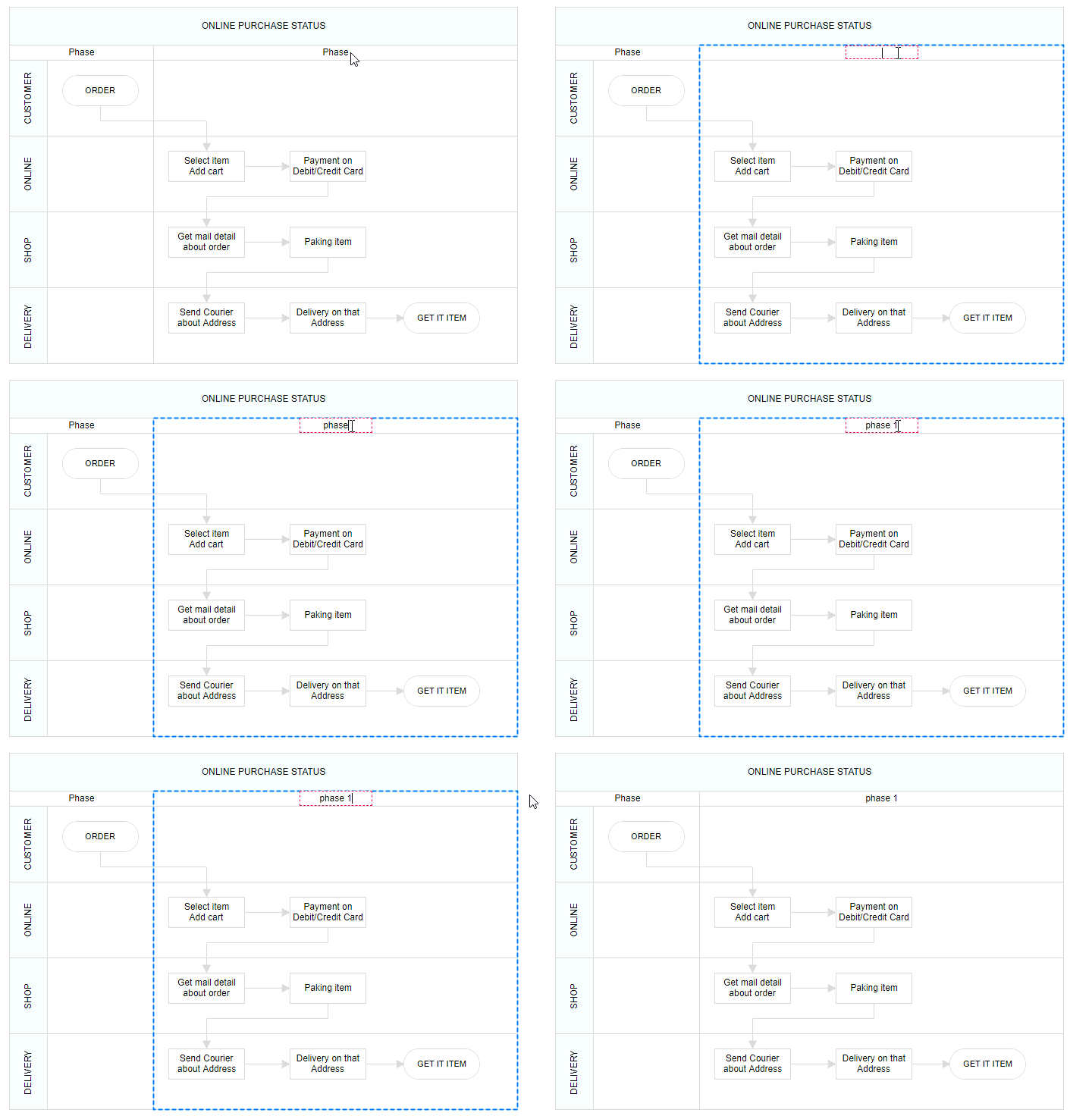
Phase header editing
Diagram provides the support to edit phase headers at runtime. We achieve the header editing by double click event. Double clicking the header label will enables the editing of that. The following image illustrates how to edit the swimlane header.The following image illustrates how to edit the phase header.