Mentions in the ASP.NET Core Rich Text Editor Control
5 Nov 202522 minutes to read
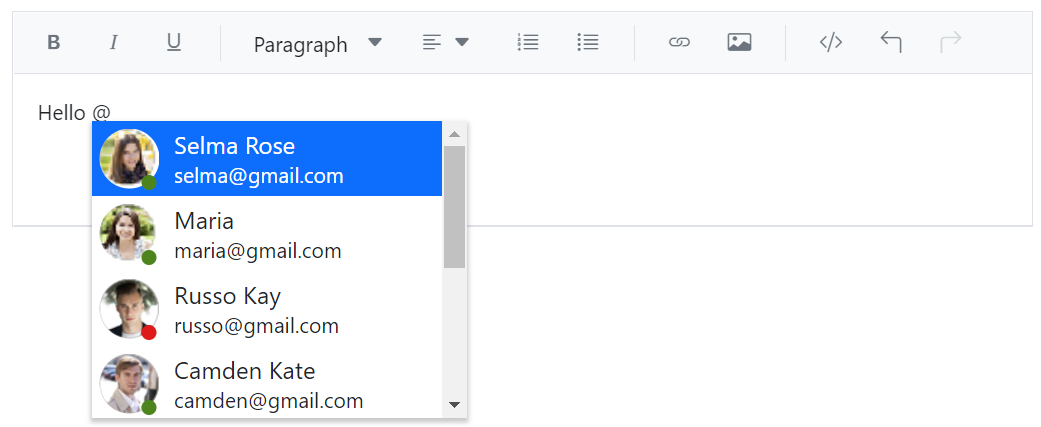
By integrating the Mention component with a Rich Text Editor, users can effortlessly mention or tag other users or objects from a suggested list. This eliminates the need to manually type out names or identifying information, improving efficiency and accuracy.
Setup and configuration
Use the target property of the Mention component to specify the ID of the content editable div element within the Rich Text Editor. When setting the target, make sure to append the suffix _rte-edit-view to the ID. This allows you to enable the Mention functionality within the Rich Text Editor, so that users can mention or tag other users or objects from the suggested list while editing the text.
Using mentions
When the user types the @ symbol followed by a character, the Rich Text Editor displays a list of suggestions. Users can then select an item from the list by:
- Clicking on it
- Typing the name of the item they want to tag
Customizing suggestion list
Minimum input length for Mention suggestions
You can control when the suggestion list appears by setting the minLength property in the Mention control. This property defines the minimum number of characters a user must type after the mention character (@) to trigger the search action. This is especially useful when working with large datasets, as it helps reduce unnecessary queries and improves performance.
By default, minLength is set to 0, which means the suggestion list appears immediately after the mention character is entered. However, you can increase this value to delay the search until the user has typed a specific number of characters.
In the following example, the minLength is set to 3, so the suggestion list will only appear once the user types three or more characters after the @ symbol.
@{
List<EmployeeData> data = new EmployeeData().EmployeeList();
string value = @"<p>Hello <span contenteditable=""false"" class=""e-mention-chip""><a title=""[email protected]"">@@Maria</a></span>​</p>
<p>Welcome to the mention integration with rich text editor demo. Type <code>@@</code> character and tag user from the suggestion list. </p>";
}
<ejs-richtexteditor id="mention_integration" placeholder="Type @@ and tag the name" value="@value"></ejs-richtexteditor>
<ejs-mention id="mention" target="#mention_integration_rte-edit-view" dataSource="@data" minLength="3" suggestionCount="8" >
<e-mention-fields text="Name" Value="EmailId"></e-mention-fields>
</ejs-mention>using System;
using System.Collections.Generic;
using System.Linq;
using System.Threading.Tasks;
namespace WebApplication1.Models
{
public class EmployeeData
{
public string Name { get; set; }
public string EmailId { get; set; }
public List<EmployeeData> EmployeeList()
{
List<EmployeeData> mention = new List<EmployeeData>()
{
new EmployeeData { Name = "Selma Rose" EmailId = "[email protected]" },
new EmployeeData { Name = "Russo Kay", EmailId = "[email protected]" },
new EmployeeData { Name = "Camden Kate", EmailId = "[email protected]" },
new EmployeeData { Name = "Mary Kate", EmailId = "[email protected]" },
new EmployeeData { Name = "Ursula Ann", EmailId = "[email protected]" },
new EmployeeData { Name = "Margaret", EmailId = "[email protected]" },
};
return mention;
}
}
}Customizing suggestion list count
You can control the number of items displayed in the Mention suggestion list using the suggestionCount property. This is particularly useful when working with large datasets, allowing you to limit the number of suggestions shown to the user.
By default, the suggestion list displays 25 items. You can customize this value to show fewer or more items based on your application’s needs.
In the example below, the suggestionCount is set to 5, so only 5 items will be displayed in the suggestion list when the user types the mention character (@).
@{
List<EmployeeData> data = new EmployeeData().EmployeeList();
string value = @"<p>Hello <span contenteditable=""false"" class=""e-mention-chip""><a title=""[email protected]"">@@Maria</a></span>​</p>
<p>Welcome to the mention integration with rich text editor demo. Type <code>@@</code> character and tag user from the suggestion list. </p>";
}
<ejs-richtexteditor id="mention_integration" placeholder="Type @@ and tag the name" value="@value"></ejs-richtexteditor>
<ejs-mention id="mention" target="#mention_integration_rte-edit-view" dataSource="@data" suggestionCount="5" >
<e-mention-fields text="Name" Value="EmailId"></e-mention-fields>
</ejs-mention>using System;
using System.Collections.Generic;
using System.Linq;
using System.Threading.Tasks;
namespace WebApplication1.Models
{
public class EmployeeData
{
public string Name { get; set; }
public string EmailId { get; set; }
public List<EmployeeData> EmployeeList()
{
List<EmployeeData> mention = new List<EmployeeData>()
{
new EmployeeData { Name = "Selma Rose" EmailId = "[email protected]" },
new EmployeeData { Name = "Russo Kay", EmailId = "[email protected]" },
new EmployeeData { Name = "Camden Kate", EmailId = "[email protected]" },
new EmployeeData { Name = "Mary Kate", EmailId = "[email protected]" },
new EmployeeData { Name = "Ursula Ann", EmailId = "[email protected]" },
new EmployeeData { Name = "Margaret", EmailId = "[email protected]" },
new EmployeeData { Name = "Laura Grace", EmailId = "[email protected]" },
new EmployeeData { Name = "Robert", EmailId = "[email protected]" },
new EmployeeData { Name = "Albert", EmailId = "[email protected]" },
new EmployeeData { Name = "Michale", EmailId = "[email protected]" },
new EmployeeData { Name = "Andrew James", EmailId = "[email protected]" },
new EmployeeData { Name = "Rosalie", EmailId = "[email protected]" },
new EmployeeData { Name = "Stella Ruth", EmailId = "[email protected]" },
new EmployeeData { Name = "Richard Rose", EmailId = "[email protected]" },
new EmployeeData { Name = "Gabrielle", EmailId = "[email protected]" },
new EmployeeData { Name = "Thomas", EmailId = "[email protected]" },
};
return mention;
}
}
}Customizing suggestion list using templates
Item template
You can customize how each item appears in the suggestion list using the itemTemplate property. This allows you to display additional details such as email, role, or profile image alongside the mention name.
Display template
Use the displayTemplate property to define how the selected mention appears in the editor content.
For example, by default, the mention chip renders as:
<span contenteditable="false" class="e-mention-chip">@Selma Rose</span>
Using the displayTemplate property, you can customize it to render as a clickable link:
<a href="mailto:[email protected]" title="[email protected]">@Selma Rose</a>
This allows you to create more interactive and informative mentions within the editor.
In the following sample, we configured the following properties:
- displayTemplate -Used to customize how the selected value appears in the editor content.
- allowSpaces - Allow to continue search action if user enter space after mention character while searching.
- suggestionCount - The maximum number of items that will be displayed in the suggestion list.
- itemTemplate - Used to display the customized appearance in suggestion list.
@{
List<EmployeeData> data = new EmployeeData().EmployeeList();
char nameMentionChar = '@';
string value = @"<p>Hello <span contenteditable=""false"" class=""e-mention-chip""><a title=""[email protected]"">@@Maria</a></span>​</p>
<p>Welcome to the mention integration with rich text editor demo. Type <code>@@</code> character and tag user from the suggestion list. </p>";
}
<ejs-richtexteditor id="mention_integration" placeholder="Type @@ and tag the name" actionBegin="actionBegin" value="@value"></ejs-richtexteditor>
<ejs-mention id="mention" target="#mention_integration_rte-edit-view" mentionChar="@nameMentionChar" dataSource="@data" popupHeight="200px" popupWidth="250px" allowSpaces="true" suggestionCount="8" displayTemplate="<a title=${EmailId}>${Name}</a>" itemTemplate="<table><tr><td><div id='mention-TemplateList'><img class='mentionEmpImage' src='./images/${EmployeeImage}' alt='employee'/><span class='e-badge e-badge-success e-badge-overlap e-badge-dot e-badge-bottom ${Status}'></span></div></td><td><span class='person'>${Name}</span><span class='email'>${EmailId}</span></td></tr></table>">
<e-mention-fields text="Name" Value="EmailId"></e-mention-fields>
</ejs-mention>
<style>
#mention-TemplateList {
position: relative;
display: inline-block;
padding:2px;
}
.person {
display: block;
line-height: 18px;
text-indent: 5px;
font-size: 16px;
}
.email {
display: block;
line-height: 22px;
text-indent: 2px;
}
.mentionEmpImage {
display: inline-block;
width: 46px;
height: 46px;
padding: 3px;
border-radius: 25px;
}
#mention-TemplateList .e-badge-success {
left: 76%;
bottom: 4px;
top: auto;
}
#mention_integration_rte-edit-view_popup .e-dropdownbase .e-list-item {
line-height: 8px;
}
#mention-TemplateList .e-badge-success.away {
background-color: #fedd2d;
color: #fff;
}
#mention-TemplateList .e-badge-success.busy {
background-color: #de1a1a;
color: #fff;
}
#mention-TemplateList .e-badge.e-badge-dot {
height: 10px;
width: 10px;
}
#mention_integration .e-mention-chip{
cursor: pointer;
}
</style>
<script type="text/javascript">
function actionBegin(args) {
if (args.requestType === 'EnterAction') {
args.cancel = true;
}
}
</script>using System;
using System.Collections.Generic;
using System.Linq;
using System.Threading.Tasks;
namespace WebApplication1.Models
{
public class EmployeeData
{
public string Name { get; set; }
public string EmployeeImage { get; set; }
public string EmailId { get; set; }
public List<EmployeeData> EmployeeList()
{
List<EmployeeData> mention = new List<EmployeeData>()
{
new EmployeeData { Name = "Selma Rose", EmployeeImage = "3.png", EmailId = "[email protected]" },
new EmployeeData { Name = "Russo Kay", EmployeeImage = "8.png", EmailId = "[email protected]" },
new EmployeeData { Name = "Camden Kate", EmployeeImage = "9.png", EmailId = "[email protected]" },
new EmployeeData { Name = "Mary Kate", EmployeeImage = "4.png", EmailId = "[email protected]" },
new EmployeeData { Name = "Ursula Ann", EmployeeImage = "2.png", EmailId = "[email protected]" },
new EmployeeData { Name = "Margaret", EmployeeImage = "5.png", EmailId = "[email protected]" },
new EmployeeData { Name = "Laura Grace", EmployeeImage = "6.png", EmailId = "[email protected]" },
new EmployeeData { Name = "Robert", EmployeeImage = "8.png", EmailId = "[email protected]" },
new EmployeeData { Name = "Albert", EmployeeImage = "9.png", EmailId = "[email protected]" },
new EmployeeData { Name = "Michale", EmployeeImage = "5.png", EmailId = "[email protected]" },
new EmployeeData { Name = "Andrew James", EmployeeImage = "7.png", EmailId = "[email protected]" },
new EmployeeData { Name = "Rosalie", EmployeeImage = "4.png", EmailId = "[email protected]" },
new EmployeeData { Name = "Stella Ruth", EmployeeImage = "2.png", EmailId = "[email protected]" },
new EmployeeData { Name = "Richard Rose", EmployeeImage = "8.png", EmailId = "[email protected]" },
new EmployeeData { Name = "Gabrielle", EmployeeImage = "3.png", EmailId = "[email protected]" },
new EmployeeData { Name = "Thomas", EmployeeImage = "7.png", EmailId = "[email protected]" },
new EmployeeData { Name = "Charles Danny", EmployeeImage = "8.png", EmailId = "[email protected]" },
new EmployeeData { Name = "Daniel", EmployeeImage = "5.png", EmailId = "[email protected]" },
new EmployeeData { Name = "Matthew", EmployeeImage = "7.png", EmailId = "[email protected]" },
new EmployeeData { Name = "Donald Krish", EmployeeImage = "9.png", EmailId = "[email protected]" },
new EmployeeData { Name = "Yohana", EmployeeImage = "1.png", EmailId = "[email protected]" },
new EmployeeData { Name = "Kevin Paul", EmployeeImage = "5.png", EmailId = "[email protected]" },
};
return mention;
}
}
}