How can I help you?
Lane Management in Angular Diagram Component
29 Aug 202524 minutes to read
Overview
A lane is a functional unit or responsible department of a business process that helps to map a process within the functional unit or between other functional units. In swimlane diagrams, lanes represent different actors, departments, or systems that participate in the process workflow.
The number of lanes can be added to a swimlane. The lanes are automatically stacked inside the swimlane based on the order they are added.
Prerequisites
Before working with lanes, ensure that a swimlane container exists in the diagram. Lanes cannot exist independently and must be contained within a swimlane.
Create an empty lane
The lane id is used to define the name of the lane and is further used to find the lane at runtime for any customization.
The following code example illustrates how to define a swimlane with a lane.
import { Component, ViewEncapsulation, ViewChild } from '@angular/core';
import { DiagramComponent, NodeModel, DiagramModule } from '@syncfusion/ej2-angular-diagrams';

@Component({
imports: [
         DiagramModule
    ],

providers: [ ],
standalone: true,
    selector: "app-container",
    template: `<ejs-diagram #diagram id="diagram" width="100%" height="580px" [nodes]="nodes">
    </ejs-diagram>`,
    encapsulation: ViewEncapsulation.None
})
export class AppComponent {
      public nodes: NodeModel[] = [
        {
            shape: {
                type: 'SwimLane',
                orientation: 'Horizontal',
                header: {
                    annotation: { content: 'ONLINE PURCHASE STATUS' },
                    height: 50, style: { fontSize: 11 },
                },
                 // initialize the lane of swimlane
                lanes: [
                    {
                        id: 'stackCanvas1',
                        // set the lane height
                        height: 100,
                        // set the lane info
                        addInfo:{name:'lane1'}
                    },
                ],
                phases: [
                    {
                    id: 'phase1', offset: 170,
                        header: { annotation: { content: 'Phase' } }
                    }
                ],
                phaseSize: 20,
            },
            offsetX: 300, offsetY: 200,
            height: 200,
            width: 350
        },
      ]
    @ViewChild("diagram")
    public diagram?: DiagramComponent;
}
import { bootstrapApplication } from '@angular/platform-browser';
import { AppComponent } from './app.component';
import 'zone.js';
bootstrapApplication(AppComponent).catch((err) => console.error(err));Create lane header
The header property of a lane allows you to textually describe the lane and customize the appearance of the description.
The following code example illustrates how to define a lane header.
import { Component, ViewEncapsulation, ViewChild } from '@angular/core';
import { DiagramComponent, DiagramModule, NodeModel } from '@syncfusion/ej2-angular-diagrams';

@Component({
imports: [
         DiagramModule
    ],

providers: [ ],
standalone: true,
    selector: "app-container",
    template: `<ejs-diagram #diagram id="diagram" width="100%" height="580px" [nodes]="nodes">
    </ejs-diagram>`,
    encapsulation: ViewEncapsulation.None
})
export class AppComponent {
      public nodes: NodeModel[] = [
        {
            id: 'swimlane',
            shape: {
                type: 'SwimLane',
                orientation: 'Horizontal',
                // Intialize header to swimlane
                header: {
                    annotation: { content: 'ONLINE PURCHASE STATUS' },
                    height: 50, style: { fontSize: 11 },
                },
                 // Intialize lane to swimlane
                lanes: [
                  {
                        id: 'stackCanvas1',
                        height: 100,
                        // Intialize header to lane
                        header: {
                            annotation: { content: 'CUSTOMER' }, width: 50,
                            style: { fontSize: 11 }
                        },
                    },
                ],
                phases: [{
                    id: 'phase1', offset: 170,
                        header: { annotation: { content: 'Phase' } }
                }
                ],
                phaseSize: 20,
            },
            offsetX: 420, offsetY: 270,
            height: 100,
            width: 650
        },
      ]
    @ViewChild("diagram")
    public diagram?: DiagramComponent;
}
import { bootstrapApplication } from '@angular/platform-browser';
import { AppComponent } from './app.component';
import 'zone.js';
bootstrapApplication(AppComponent).catch((err) => console.error(err));Customizing lane and lane header
The size of a lane can be controlled by using the width and height properties of the lane.
The appearance of a lane can be customized by using the style properties.
The appearance of the header annotation can be customized by using the style property of the header annotation.
The following code example illustrates how to customize the lane header.
import { Component, ViewEncapsulation, ViewChild } from '@angular/core';
import { DiagramComponent, DiagramModule, NodeModel } from '@syncfusion/ej2-angular-diagrams';

@Component({
imports: [
         DiagramModule
    ],

providers: [ ],
standalone: true,
    selector: "app-container",
    template: `<ejs-diagram #diagram id="diagram" width="100%" height="580px" [nodes]="nodes">
    </ejs-diagram>`,
    encapsulation: ViewEncapsulation.None
})
export class AppComponent {
      public nodes: NodeModel[] = [
        {
            shape: {
                type: 'SwimLane',
                orientation: 'Horizontal',
                //Intialize header to swimlane
                header: {
                    annotation: { content: 'ONLINE PURCHASE STATUS' },
                    height: 50, style: { fontSize: 11 },
                },
                lanes: [
                    {
                      id: 'stackCanvas1',
                      height: 100,
                      // customization of lane header
                      header: {
                        annotation: { content: 'Online Consumer', style: { fill: 'white', color: 'red' } },
                        width: 30,
                        style: { fontSize: 11, fill: 'red' },
                      },
                      style: { fill: 'violet' },
                    },
                  ],
                phases: [{
                    id: 'phase1', offset: 170,
                        header: { annotation: { content: 'Phase' } }
                }
                ],
                phaseSize: 20,
            },
           offsetX: 300, offsetY: 200,
            height: 200,
            width: 350
        },
      ]
    @ViewChild("diagram")
    public diagram?: DiagramComponent;
}
import { bootstrapApplication } from '@angular/platform-browser';
import { AppComponent } from './app.component';
import 'zone.js';
bootstrapApplication(AppComponent).catch((err) => console.error(err));Dynamic customization of lane header
Lane header style and text properties can be customized dynamically. The following code illustrates how to dynamically customize the lane header.
import { Component, ViewEncapsulation, ViewChild } from '@angular/core';
import { DiagramComponent, DiagramModule, Diagram, NodeModel } from '@syncfusion/ej2-angular-diagrams';

@Component({
imports: [
         DiagramModule
    ],

providers: [ ],
standalone: true,
    selector: "app-container",
    template: `<button (click) = "updateLane()">updateLane</button><ejs-diagram #diagram id="diagram" width="100%" height="580px" [nodes]="nodes" >
    </ejs-diagram>`,
    encapsulation: ViewEncapsulation.None
})
export class AppComponent {
      public nodes: NodeModel[] = [
        {
            shape: {
                type: 'SwimLane',
                orientation: 'Horizontal',
                //Intialize header to swimlane
                header: {
                    annotation: { content: 'ONLINE PURCHASE STATUS' },
                    height: 50, style: { fontSize: 11 },
                },
                lanes: [
                  {
                       id: 'stackCanvas1',
                        height: 100,
                        // customization of lane header
                         header: {
                        annotation: { content: 'Online Consumer' }, width: 30,
                        style: { fontSize: 11, fill: 'red' }
                    },
                    },
                ],
                phases: [{
                    id: 'phase1', offset: 170,
                        header: { annotation: { content: 'Phase' } }
                }
                ],
                phaseSize: 20,
            },
           offsetX: 300, offsetY: 200,
            height: 200,
            width: 350
        },
      ]
    @ViewChild("diagram")
    public diagram?: DiagramComponent;
    public updateLane(): void
    {
        ((this.diagram as Diagram).nodes[0].shape as any).lanes[0].header.style.fill = 'blue';
        ((this.diagram as Diagram).nodes[0].shape as any).lanes[0].header.annotation.style.color = 'white';
        (this.diagram as Diagram).dataBind();
    }
}
import { bootstrapApplication } from '@angular/platform-browser';
import { AppComponent } from './app.component';
import 'zone.js';
bootstrapApplication(AppComponent).catch((err) => console.error(err));Add and remove lanes at runtime
Lanes can be added at runtime by using the addLanes method and removed at runtime using the removeLane method. The following code illustrates how to dynamically add and remove lanes in a swimlane.
import { Component, ViewEncapsulation, ViewChild } from '@angular/core';
import { DiagramComponent, NodeModel, LaneModel, DiagramModule, ShapeModel } from '@syncfusion/ej2-angular-diagrams';

@Component({
    imports: [DiagramModule],
    providers: [],
    standalone: true,
    selector: "app-container",
    template: `
        <button (click)="addLane()">addLane</button>
        <button (click)="removeLane()">removeLane</button>
        <ejs-diagram #diagram id="diagram" width="100%" height="580px" [nodes]="nodes" >
        </ejs-diagram>

    `,
    encapsulation: ViewEncapsulation.None
})
export class AppComponent {
    public nodes: NodeModel[] = [
        {
            id: 'swim1',
            shape: {
                type: 'SwimLane',
                orientation: 'Horizontal',
                //Intialize header to swimlane
                header: {
                    annotation: {
                        content: 'ONLINE PURCHASE STATUS'
                    },
                    height: 50,
                    style: { fontSize: 11 },
                },
                lanes: [
                    {
                        id: 'stackCanvas1',
                        height: 100,
                        // customization of lane header
                        header: {
                            annotation: { content: 'Online Consumer' },
                            style: { fontSize: 11, fill: 'red' },
                        },
                    },
                ],
                phases: [
                    {
                        id: 'phase1',
                        offset: 170,
                        header: { annotation: { content: 'Phase' } },
                    },
                ],
                phaseSize: 20,
            },
            offsetX: 300,
            offsetY: 200,
            height: 200,
            width: 350,
        },
    ];

    @ViewChild("diagram")
    public diagram?: DiagramComponent;
    public addLane(): void {
        if (this.diagram) {
            let swimlane = this.diagram.getObject('swim1');
            let lane: LaneModel[] = [
                {
                    height: 100,
                    style: { fill: 'lightgrey' },
                    header: {
                        annotation: {
                            content: 'New Lane',
                            style: { fill: 'brown', color: 'white', fontSize: 15 },
                        },
                        style: { fill: 'pink' },
                    },
                },
            ];
            /**
             * To add lanes
             * parameter 1 - The swimlane to which lanes will be added.
             * parameter 2 - An array of LaneModel objects representing the lanes to be added.
             * paramter 3 - The index at which the lanes should be inserted (optional).
             */
            this.diagram.addLanes(swimlane, lane, 1);
        }
    }

    public removeLane(): void {
        if (this.diagram) {
            let swimlane: NodeModel = this.diagram.getObject('swim1');
            // To get the last lane in the lane collection
            let lane =  ((swimlane.shape)as ShapeModel | any).lanes[
                ((swimlane.shape) as ShapeModel | any).lanes.length - 1
            ];
            /**
             * To remove lane
             * parameter 1 - The swimlane to remove the lane from.
             * parameter 2 - The lane to be removed
             */
            this.diagram.removeLane(swimlane, lane);
        }
    }
}
import { bootstrapApplication } from '@angular/platform-browser';
import { AppComponent } from './app.component';
import 'zone.js';
bootstrapApplication(AppComponent).catch((err) => console.error(err));Add children to lane
To add nodes to a lane, you should add them to the children collection of the lane.
The following code example illustrates how to add nodes to a lane.
import { Component, ViewEncapsulation, ViewChild } from '@angular/core';
import { DiagramComponent, DiagramModule, NodeModel } from '@syncfusion/ej2-angular-diagrams';

@Component({
imports: [
         DiagramModule
    ],

providers: [ ],
standalone: true,
    selector: "app-container",
    template: `<ejs-diagram #diagram id="diagram" width="100%" height="580px" [nodes]="nodes">
    </ejs-diagram>`,
    encapsulation: ViewEncapsulation.None
})
export class AppComponent {
      public nodes: NodeModel[] = [
        {
          id: 'swimlane',
          orientation: 'Horizontal' as any,
          shape: {
            type: 'SwimLane',
            header: {
              annotation: { content: 'ONLINE PURCHASE STATUS' },
              height: 50, style: { fontSize: 11 },
            },
            lanes: [
              {
                id: 'stackCanvas1',
                height: 100,
                header: {
                  annotation: { content: 'CUSTOMER' }, width: 50,
                  style: { fontSize: 11 }
                },
                // Set the children of lane
                children: [
                  {
                    id: 'node1',
                    annotations: [
                      {
                        content: 'Consumer learns \n of product',
                        style: { fontSize: 11 }
                      }
                    ],
                    margin: { left: 60, top: 30 },
                    height: 40, width: 100,
                  }, {
                    id: 'node2',
                    shape: { type: 'Flow', shape: 'Decision' },
                    annotations: [
                      {
                        content: 'Does \n Consumer want \nthe product',
                        style: { fontSize: 11 }
                      }
                    ],
                    margin: { left: 200, top: 20 },
                    height: 60, width: 120,
                  },
                ],
              },
            ],
            phases: [{
              id: 'phase1', offset: 170,
              header: { annotation: { content: 'Phase' } }
            }
            ],
            phaseSize: 20,
          },
          offsetX: 420, offsetY: 270,
          height: 100,
          width: 650
        }
      ] as unknown as  NodeModel[]
    @ViewChild("diagram")
    public diagram?: DiagramComponent;
}
import { bootstrapApplication } from '@angular/platform-browser';
import { AppComponent } from './app.component';
import 'zone.js';
bootstrapApplication(AppComponent).catch((err) => console.error(err));Add child dynamically into the lane
Child nodes can be inserted into a lane at runtime by using the addNodeToLane method.
import { Component, ViewEncapsulation, ViewChild } from '@angular/core';
import { DiagramComponent, DiagramModule, NodeModel } from '@syncfusion/ej2-angular-diagrams';

@Component({
    imports: [
        DiagramModule
    ],

    providers: [],
    standalone: true,
    selector: "app-container",
    template: `
         <button (click)="addChildToLane()">addChildToLane</button>
        <ejs-diagram #diagram id="diagram" width="100%" height="580px" [nodes]="nodes">
        </ejs-diagram>

    `,
    encapsulation: ViewEncapsulation.None
})
export class AppComponent {
    public nodes: NodeModel[] = [
        {
            id: 'swimlane',
            shape: {
                type: 'SwimLane',
                orientation: 'Horizontal',
                header: {
                    annotation: { content: 'ONLINE PURCHASE STATUS' },
                    height: 50, style: { fontSize: 11 },
                },
                lanes: [
                    {
                        id: 'stackCanvas1',
                        height: 100,
                        header: {
                            annotation: { content: 'CUSTOMER' },
                            width: 50,
                            style: { fontSize: 11 },
                        },
                    },
                ],
                phases: [
                    {
                        id: 'phase1', offset: 150,
                        addInfo: { name: 'phase1' },
                        header: { annotation: { content: 'Phase' } },
                    }
                ],
                phaseSize: 20,
            },
            offsetX: 300, offsetY: 200,
            height: 200,
            width: 350
        },
    ];

    @ViewChild("diagram")
    public diagram?: DiagramComponent;

    public addChildToLane(): void {
        const node = [
            {
                id: 'newNode',
                width: 100,
                height: 50,
            },
        ];
        this.diagram?.addNodeToLane(node as NodeModel, 'swimlane', 'stackCanvas1');
    }
}
import { bootstrapApplication } from '@angular/platform-browser';
import { AppComponent } from './app.component';
import 'zone.js';
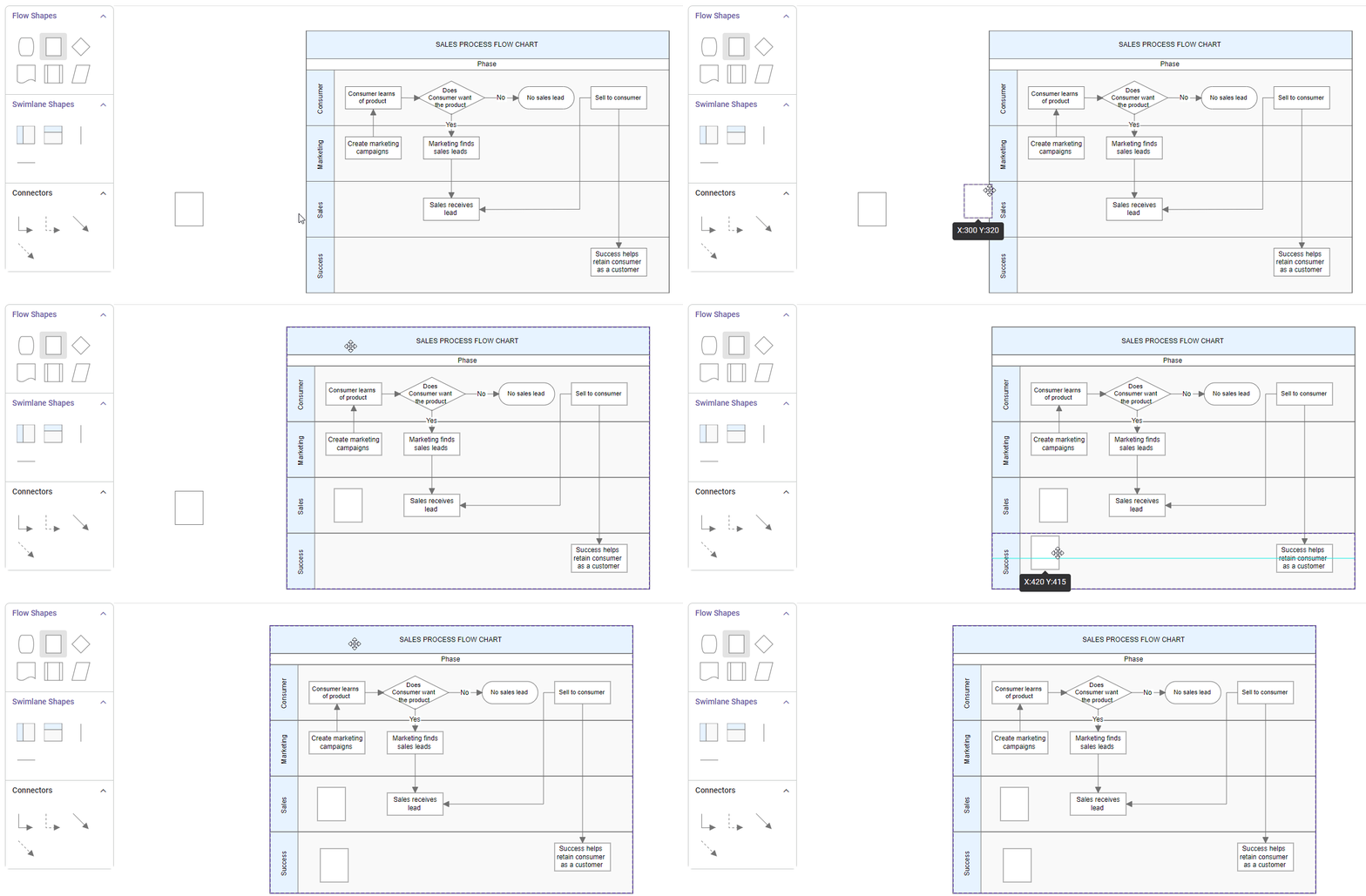
bootstrapApplication(AppComponent).catch((err) => console.error(err));Nodes can also be dragged from the palette or diagram and dropped inside the lane.
Prevent child movement outside lane
To prevent child nodes from moving outside their designated lanes, specific constraints can be used. By default, nodes are allowed to move freely. To restrict their movement, the constraints need to be set accordingly.
Here is an example of how to apply these constraints:
import { Component, ViewEncapsulation, ViewChild } from '@angular/core';
import { DiagramComponent, NodeModel, DiagramModule, NodeConstraints } from '@syncfusion/ej2-angular-diagrams';

@Component({
    imports: [
        DiagramModule
    ],

    providers: [],
    standalone: true,
    selector: "app-container",
    template: `
        <ejs-diagram #diagram id="diagram" width="100%" height="580px" [nodes]="nodes">
        </ejs-diagram>
    `,
    encapsulation: ViewEncapsulation.None
})
export class AppComponent {
    public nodes: NodeModel[] = [
        {
            id: 'swimlane',
            shape: {
                type: 'SwimLane',
                orientation: 'Horizontal',
                //Intialize header to swimlane
                header: {
                    annotation: { content: 'ONLINE PURCHASE STATUS' },
                    height: 50,
                    style: { fontSize: 11 },
                },
                lanes: [
                    {
                        id: 'stackCanvas1',
                        height: 100,
                        header: {
                            annotation: { content: 'CUSTOMER' },
                            width: 50,
                            style: { fontSize: 11 },
                        },
                        // Set the children of lane
                        children: [
                            {
                                id: 'node1',
                                //Preventing node movement outside the lanes
                                constraints:
                                    NodeConstraints.Default | NodeConstraints.AllowMovingOutsideLane,
                                annotations: [
                                    {
                                        content: 'Node dragging disabled outside lane',
                                        style: { fontSize: 11 },
                                    },
                                ],
                                margin: { left: 200, top: 20 },
                                height: 60,
                                width: 120,
                            },
                        ],
                    },
                ],
                phases: [
                    {
                        id: 'phase1',
                        offset: 170,
                        header: { annotation: { content: 'Phase' } },
                    },
                ],
                phaseSize: 20,
            },
            offsetX: 300,
            offsetY: 200,
            height: 200,
            width: 350,
        },
    ]

    @ViewChild("diagram")
    public diagram?: DiagramComponent;
}
import { bootstrapApplication } from '@angular/platform-browser';
import { AppComponent } from './app.component';
import 'zone.js';
bootstrapApplication(AppComponent).catch((err) => console.error(err));Additional information storage
Additional information storage for lanes is similar to nodes. Additional information about a specific lane can be stored by using the addInfo property.
import { Component, ViewEncapsulation, ViewChild } from '@angular/core';
import { DiagramComponent, DiagramModule, NodeModel } from '@syncfusion/ej2-angular-diagrams';

@Component({
    imports: [
        DiagramModule
    ],

    providers: [],
    standalone: true,
    selector: "app-container",
    template: `<ejs-diagram #diagram id="diagram" width="100%" height="580px" [nodes]="nodes" >
    </ejs-diagram>`,
    encapsulation: ViewEncapsulation.None
})
export class AppComponent {
    public nodes: NodeModel[] = [
        {
            shape: {
                type: 'SwimLane',
                orientation: 'Horizontal',
                //Intialize header to swimlane
                header: {
                    annotation: { content: 'ONLINE PURCHASE STATUS' },
                    height: 50, style: { fontSize: 11 },
                },
                // initialize the lane of swimlane
                lanes: [
                    {
                        id: 'stackCanvas1',
                        // set the lane height
                        height: 100,
                        // set the lane info
                        addInfo:{name:'lane1'}
                    },
                ],
                phases: [
                    {
                        id: 'phase1', offset: 170,
                        header: { annotation: { content: 'Phase' } }
                    },
                    ],
                phaseSize: 20,
            },
           offsetX: 300, offsetY: 200,
         height: 200,
         width: 350
        },
    ];

    @ViewChild("diagram")
    public diagram?: DiagramComponent;


}
import { bootstrapApplication } from '@angular/platform-browser';
import { AppComponent } from './app.component';
import 'zone.js';
bootstrapApplication(AppComponent).catch((err) => console.error(err));Lane interaction
Resizing lane
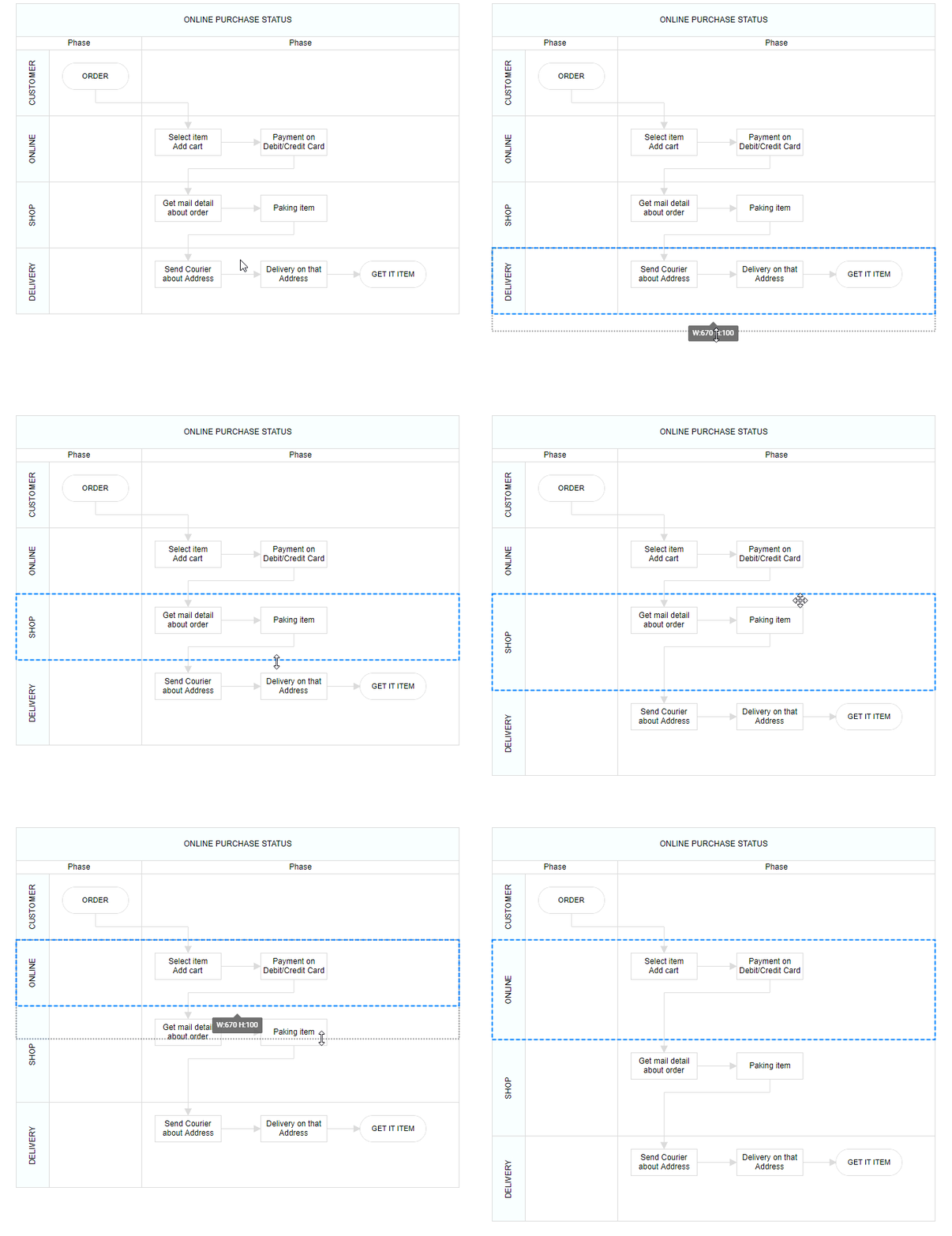
Lanes can be resized in the bottom and left directions.
Lanes can be resized by using the resize selector of the lane.
Once a lane is resized, the swimlane will be resized automatically.
The lane can be resized either by using the resize selector or the tight bounds of the child object. If the child node moves to the edge of the lane, it can be automatically resized. The following image illustrates how to resize the lane.
Lane swapping
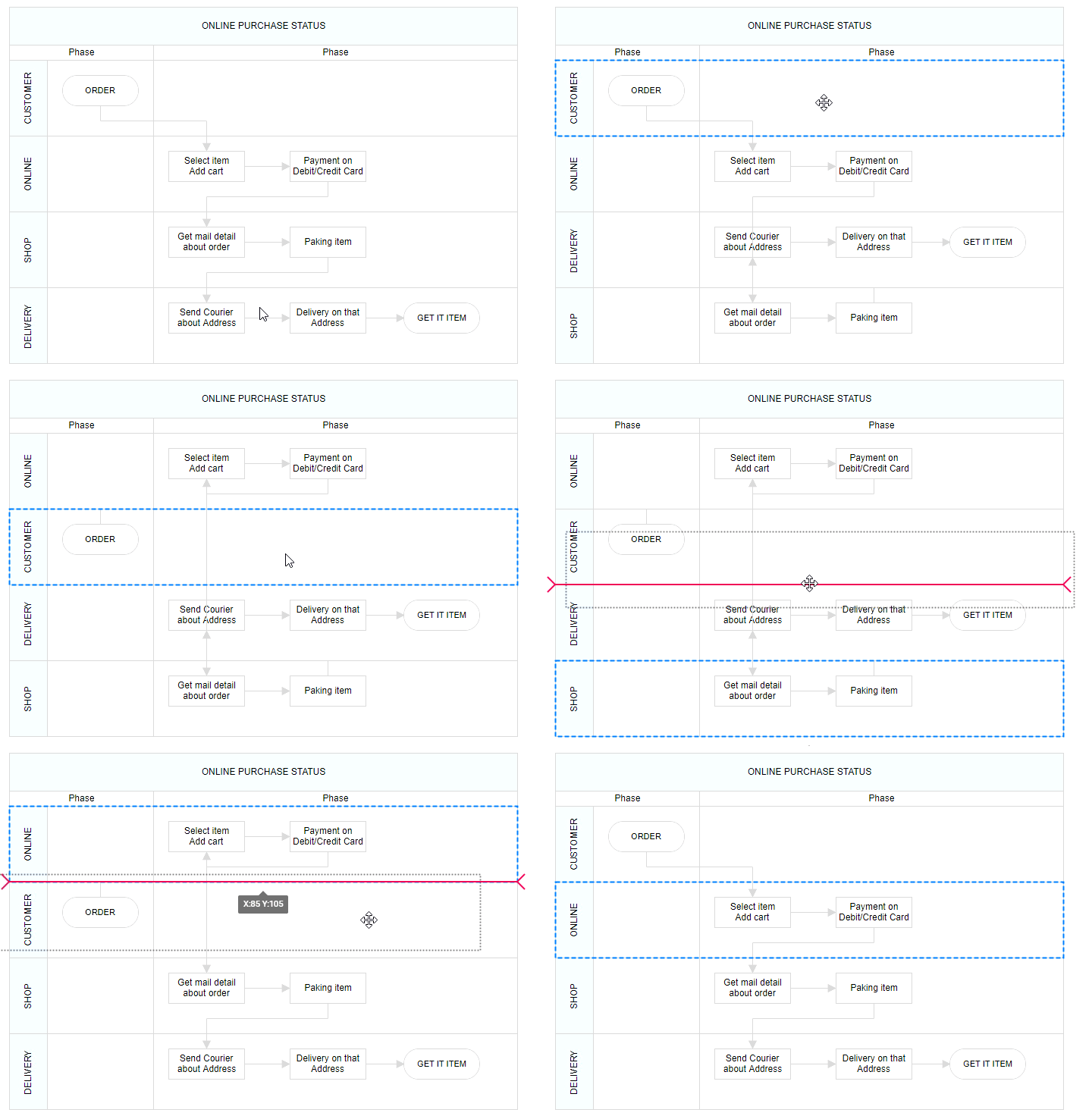
Lanes can be swapped by dragging the lanes over another lane.
A helper should indicate the insertion point while lane swapping. The following image illustrates how to swap lanes.
Disable swimlane lane swapping
Swimlane lane swapping can be disabled by using the property called canMove.
The following code illustrates how to disable a swimlane lane swapping.
import { Component, ViewEncapsulation, ViewChild } from '@angular/core';
import { DiagramComponent, DiagramModule, Diagram, NodeModel } from '@syncfusion/ej2-angular-diagrams';

@Component({
imports: [
         DiagramModule
    ],

providers: [ ],
standalone: true,
    selector: "app-container",
    template: `<ejs-diagram #diagram id="diagram" width="100%" height="580px" [nodes]="nodes" (created)='created($event)'>
    </ejs-diagram>`,
    encapsulation: ViewEncapsulation.None
})
export class AppComponent {
      public nodes: NodeModel[] = [
        {
            shape: {
                type: 'SwimLane',
                orientation: 'Horizontal',
                //Intialize header to swimlane
                header: {
                    annotation: { content: 'ONLINE PURCHASE STATUS' },
                    height: 50, style: { fontSize: 11 },
                },
                lanes: [
                    {
                      id: 'stackCanvas1',
                      height: 100,
                      header: {
                        annotation: { content: 'CUSTOMER' },
                        width: 50,
                        style: { fontSize: 11 },
                      },
                      canMove: false,
                      // Set the children of lane
                      children: [
                        {
                          id: 'node1',
                          annotations: [
                            {
                              content: 'Consumer learns \n of product',
                              style: { fontSize: 11 },
                            },
                          ],
                          margin: { left: 60, top: 30 },
                          height: 40,
                          width: 100,
                        },
                        {
                          id: 'node2',
                          shape: { type: 'Flow', shape: 'Decision' },
                          annotations: [
                            {
                              content: 'Does \n Consumer want \nthe product',
                              style: { fontSize: 11 },
                            },
                          ],
                          margin: { left: 200, top: 20 },
                          height: 60,
                          width: 120,
                        },
                      ],
                    },
                  ],
                phases: [{
                    id: 'phase1', offset: 170,
                        header: { annotation: { content: 'Phase' } }
                }
                ],
                phaseSize: 20,
            },
           offsetX: 300, offsetY: 200,
            height: 200,
            width: 350
        },
      ]
    @ViewChild("diagram")
    public diagram?: DiagramComponent;
     public created(args: Object): void {
         let lane = [{id:"lane1",height:100,canMove: false}];
        (this.diagram as Diagram).addLanes((this.diagram as Diagram).nodes[0],lane,1);
        (this.diagram as Diagram).dataBind();
    }
}
import { bootstrapApplication } from '@angular/platform-browser';
import { AppComponent } from './app.component';
import 'zone.js';
bootstrapApplication(AppComponent).catch((err) => console.error(err));Resize helper
A special resize helper will be used to resize the lanes.
The resize cursor will be available on the left and bottom directions only.
Once the lane is resized, the swimlane will be resized automatically.
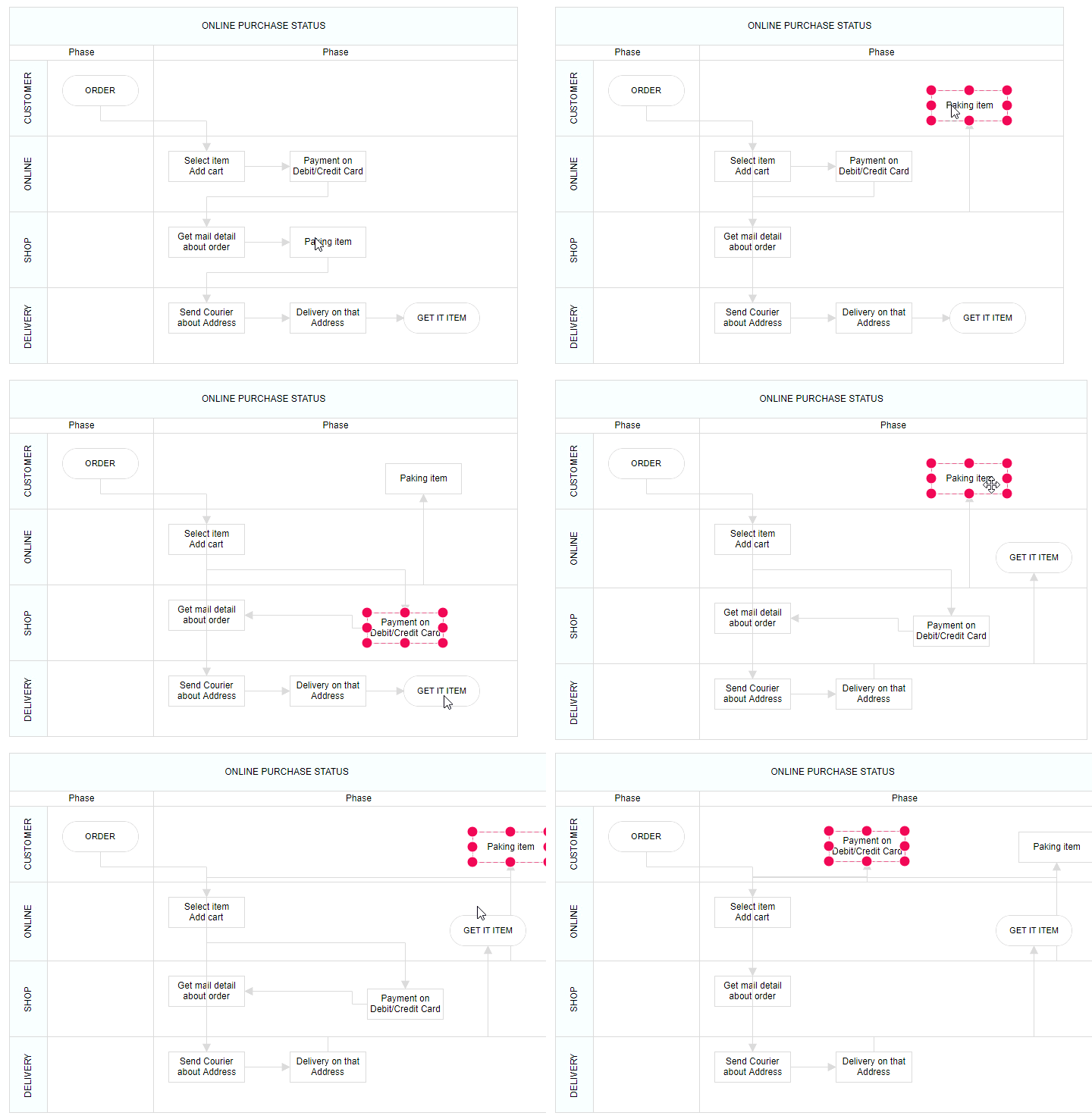
Children interaction in lanes
Child nodes can be resized within swimlanes.
Child nodes can be dragged within lanes.
Child nodes can be interchanged from one lane to another lane.
Child nodes can be dragged and dropped from lanes to the diagram.
Child nodes can be dragged and dropped from the diagram to lanes.
Based on the child node interactions, the lane size should be updated.
The following image illustrates children interaction in lanes.
Lane header editing
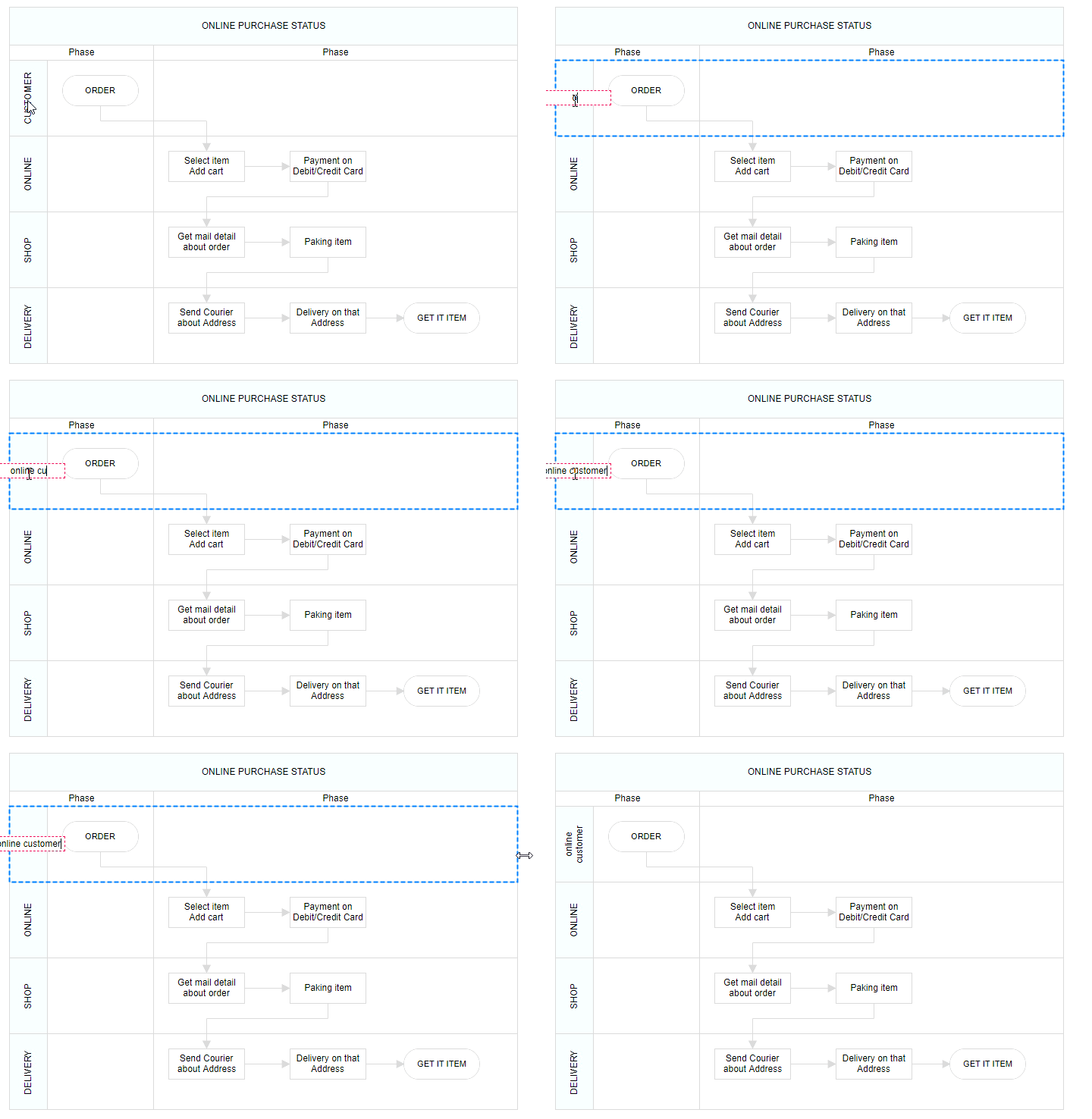
The diagram provides support to edit lane headers at runtime. Header editing is achieved by double-click events. Double-clicking the header label will enable the editing of that header.
The following image illustrates how to edit the lane header.