How can I help you?
Ports in Angular Diagram Component
29 Aug 202524 minutes to read
Ports are specialized connection points on nodes that provide precise control over where connectors attach. Unlike node-to-node connections that automatically adjust their attachment points, ports maintain fixed connection locations even when nodes are moved, rotated, or resized. This makes ports essential for creating stable, predictable diagram layouts and professional flowcharts.
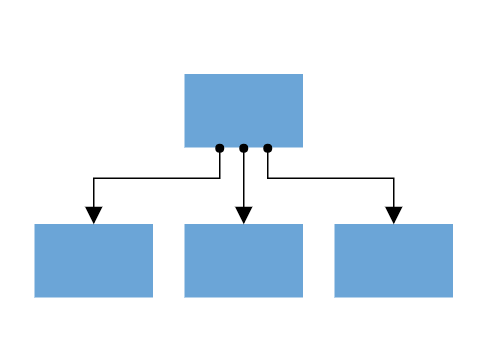
Types of connections
The Diagram component supports two distinct connection methods, each serving different use cases depending on the level of connection control required.
Node to node connection
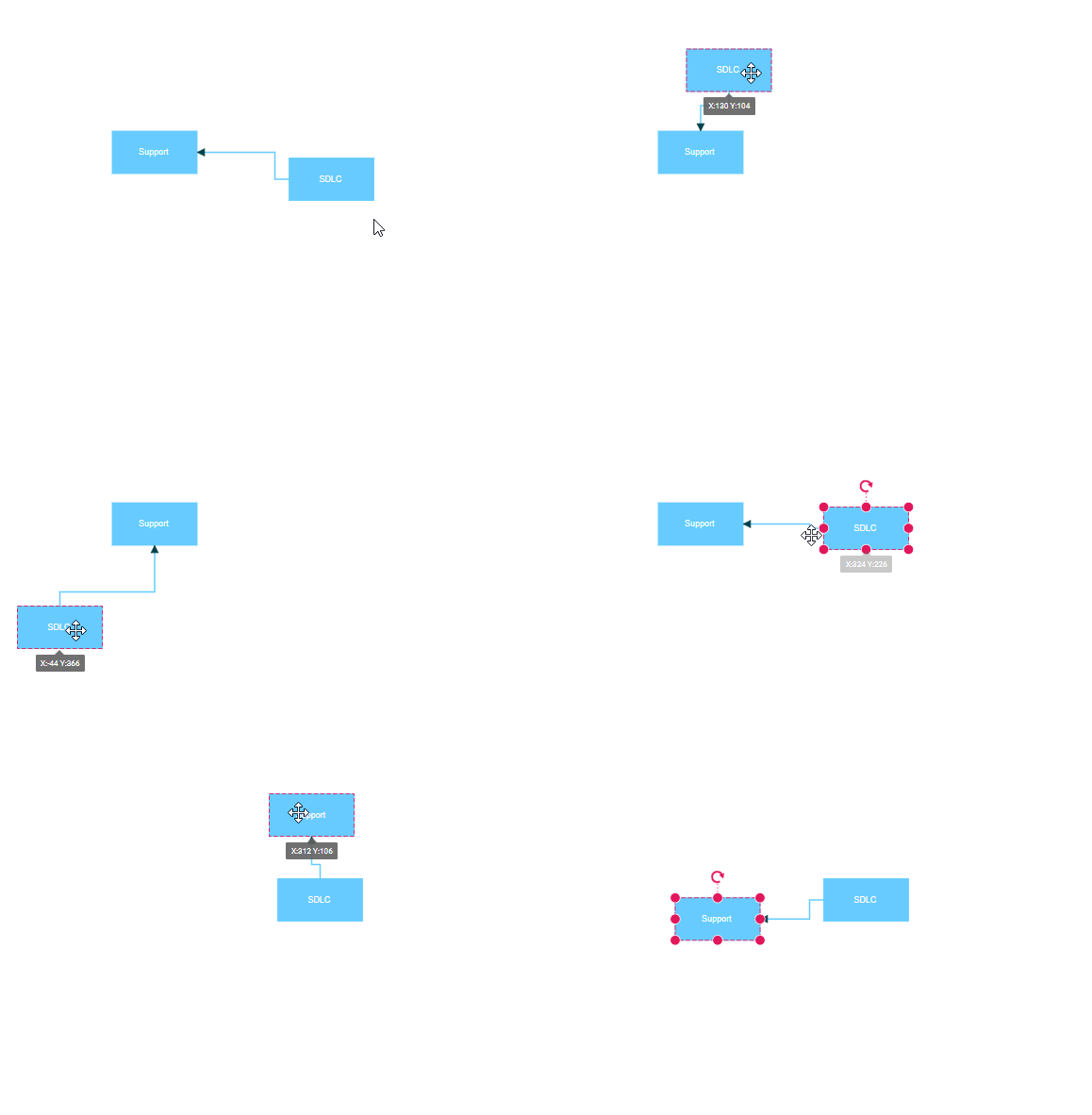
Node to node connections automatically find the optimal attachment point on a node’s boundary. When either connected node moves, the connector dynamically repositions to maintain the shortest path between nodes. This connection type works best for simple diagrams where precise connection points are not critical.
When a connector is connected between two nodes, its end points are automatically docked to the node’s nearest boundary as shown in the following gif.
Port to port connection
Port to port connections attach to specific, predefined points on nodes. These connections remain fixed to their designated ports regardless of node movement, ensuring consistent diagram appearance and reliable connector behavior. This connection type is ideal for technical diagrams, flowcharts, and any scenario requiring precise connector placement.
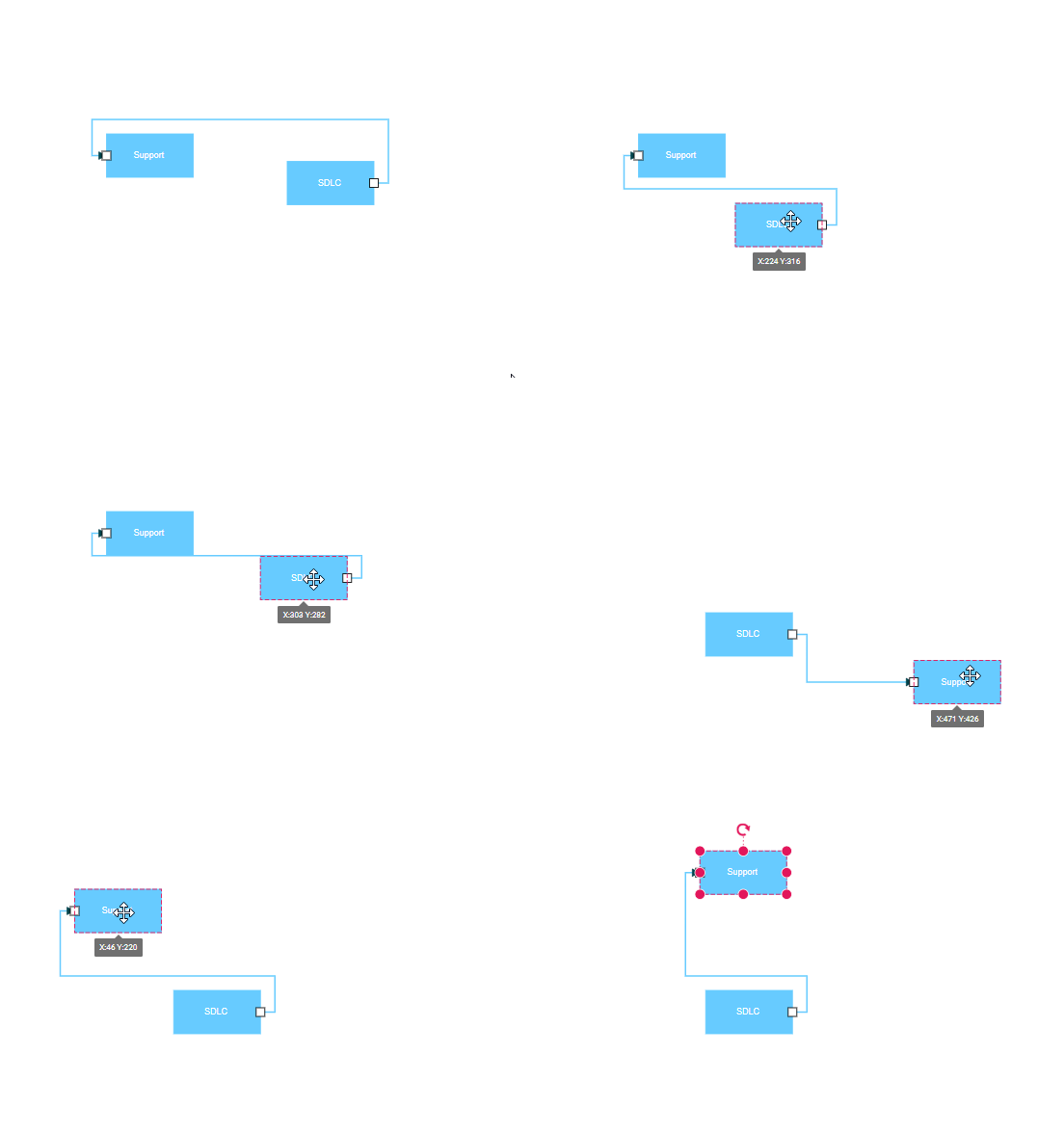
Create port
Ports are defined as objects within a node’s ports collection. The offset property accepts fractional values (0 to 1) that determine the port’s position relative to the node’s bounds, where (0,0) represents the top-left corner and (1,1) represents the bottom-right corner.
The following code demonstrates how to add ports during node initialization:
import { Component, ViewEncapsulation, ViewChild } from '@angular/core';
import { DiagramModule,DiagramComponent, PointPortModel, PortVisibility } from '@syncfusion/ej2-angular-diagrams';

@Component({
imports: [
         DiagramModule
    ],

providers: [ ],
standalone: true,
  selector: "app-container",
  // specifies the template string for the diagram component
  template: `<ejs-diagram #diagram id="diagram" width="100%" height="580px">
        <e-nodes>
            <e-node id='node1' [offsetX]=250 [offsetY]=250 [width]=100 [height]=100  [ports]='ports'></e-node>
        </e-nodes>
    </ejs-diagram>`
})
export class AppComponent {
    @ViewChild("diagram")
    public diagram?: DiagramComponent;
    public ports: PointPortModel[] = [{
        // Define a port with an ID to connect a connector to it
        id:'ports1',
        // Sets the position for the port
        offset: {
            x: 0.5,
            y: 0.5
        },
        visibility: PortVisibility.Visible
    }]

}
import { bootstrapApplication } from '@angular/platform-browser';
import { AppComponent } from './app.component';
import 'zone.js';
bootstrapApplication(AppComponent).catch((err) => console.error(err));NOTE
When setting a port’s ID, ensure that it does not contain white spaces, does not start with numbers or special characters, and does not include special characters like underscores (_) or spaces.
Add ports at runtime
The addPorts method enables dynamic port creation after the diagram has been initialized. This functionality is useful for interactive applications where users can customize node connection points or when ports need to be added based on business logic.
The port’s ID property defines a unique identifier that can be used to reference the port in subsequent operations. If no ID is specified, the system automatically generates a default ID.
import { Component, ViewEncapsulation, ViewChild } from '@angular/core';
import { DiagramModule, Diagram, DiagramComponent, PointPortModel, PortVisibility } from '@syncfusion/ej2-angular-diagrams';

@Component({
imports: [
         DiagramModule
    ],

providers: [ ],
standalone: true,
  selector: "app-container",
  // specifies the template string for the diagram component
  template: `<button (click)='addPort()'>AddPort</button>
    <ejs-diagram #diagram id="diagram" width="100%" height="580px" >
        <e-nodes>
            <e-node id='node1' [offsetX]=250 [offsetY]=250 [width]=100 [height]=100></e-node>
        </e-nodes>
    </ejs-diagram>`
})
export class AppComponent {
    @ViewChild("diagram")
    public diagram?: DiagramComponent;
    public ports: PointPortModel[] = [
        {
            id: 'port1',
            offset: {
                x: 0,
                y: 0.5
            },
            visibility: PortVisibility.Visible
        },
        {
            id: 'port2',
            offset: {
                x: 1,
                y: 0.5
            },
            visibility: PortVisibility.Visible
        },
        {
            id: 'port3',
            offset: {
                x: 0.5,
                y: 0
            },
            visibility: PortVisibility.Visible
        },
        {
            id: 'port4',
            offset: {
                x: 0.5,
                y: 1
            },
            visibility: PortVisibility.Visible
        }
    ]

    addPort(){
        // Method to add ports through run time
        // Parameters:
        // - node: The node to which the port will be added.
        // - port: The port collection to be added to the node.
        (this.diagram as Diagram).addPorts((this.diagram as Diagram).nodes[0], this.ports);
    }
}
import { bootstrapApplication } from '@angular/platform-browser';
import { AppComponent } from './app.component';
import 'zone.js';
bootstrapApplication(AppComponent).catch((err) => console.error(err));Remove ports at runtime
The removePorts method allows dynamic removal of ports from nodes. When a port is removed, any connectors attached to that port are automatically disconnected. This method is particularly useful for creating adaptive interfaces or cleaning up unused connection points.
import { Component, ViewEncapsulation, ViewChild } from '@angular/core';
import { DiagramModule, Diagram, DiagramComponent, PointPortModel, PortVisibility } from '@syncfusion/ej2-angular-diagrams';

@Component({
imports: [
         DiagramModule
    ],

providers: [ ],
standalone: true,
  selector: "app-container",
  // specifies the template string for the diagram component
  template: `<button (click)='removePorts()'>Remove Ports</button>
    <ejs-diagram #diagram id="diagram" width="100%" height="580px" >
        <e-nodes>
            <e-node id='node1' [offsetX]=250 [offsetY]=250 [width]=100 [height]=100 [ports]='ports'></e-node>
        </e-nodes>
    </ejs-diagram>`
})
export class AppComponent {
    @ViewChild("diagram")
    public diagram?: DiagramComponent;
    public ports: PointPortModel[] = [
        {
            id: 'port1',
            offset: {
                x: 0,
                y: 0.5
            },
            visibility: PortVisibility.Visible
        },
        {
            id: 'port2',
            offset: {
                x: 1,
                y: 0.5
            },
            visibility: PortVisibility.Visible
        },
        {
            id: 'port3',
            offset: {
                x: 0.5,
                y: 0
            },
            visibility: PortVisibility.Visible
        },
        {
            id: 'port4',
            offset: {
                x: 0.5,
                y: 1
            },
            visibility: PortVisibility.Visible
        }
    ]
    // Method to remove ports through run time
    removePorts(){
        // Parameters:
        // - node: The node to which the port will be removed.
        // - port: The port collection to be removed to the node.
        (this.diagram as Diagram).removePorts((this.diagram as Diagram).nodes[0] as any, this.ports);
    }
}
import { bootstrapApplication } from '@angular/platform-browser';
import { AppComponent } from './app.component';
import 'zone.js';
bootstrapApplication(AppComponent).catch((err) => console.error(err));Update port at runtime
Port properties can be modified at runtime by directly updating the port object and calling the dataBind method to apply the changes. This approach enables dynamic customization of port appearance, position, and behavior based on application state or user interactions.
The following code example illustrates how to change port properties dynamically:
import { Component, ViewEncapsulation, ViewChild } from '@angular/core';
import { DiagramModule, Diagram, DiagramComponent, PointPortModel, PortVisibility } from '@syncfusion/ej2-angular-diagrams';

@Component({
imports: [
         DiagramModule
    ],

providers: [ ],
standalone: true,
  selector: "app-container",
  // specifies the template string for the diagram component
  template: `<button (click)='updatePorts()'>Update Ports</button>
    <ejs-diagram #diagram id="diagram" width="100%" height="580px" >
        <e-nodes>
            <e-node id='node1' [offsetX]=150 [offsetY]=150 [width]=100 [height]=100 [ports]='ports'></e-node>
        </e-nodes>
    </ejs-diagram>`
})
export class AppComponent {
    @ViewChild("diagram")
    public diagram?: DiagramComponent;
    public ports: PointPortModel[] = [
        {
            id: 'port1',
            offset: { x: 0, y: 0.5 },
            visibility: PortVisibility.Visible,
        },
    ]

    // Method to add ports through run time
    updatePorts(){
        ((this.diagram as Diagram).nodes[0] as any).ports[0].offset = {
            x: 1,
            y: 1
        };
        (this.diagram as Diagram).dataBind();
    }
}
import { bootstrapApplication } from '@angular/platform-browser';
import { AppComponent } from './app.component';
import 'zone.js';
bootstrapApplication(AppComponent).catch((err) => console.error(err));Specify connection direction to port
The connectionDirection property controls the allowed connection flow through a port. This property accepts values that specify whether connectors can connect to the port (incoming), from the port (outgoing), or both directions. This feature is essential for creating directional flowcharts and enforcing proper data flow in technical diagrams.
import { Component, ViewEncapsulation, ViewChild } from '@angular/core';
import {DiagramModule, DiagramComponent, PointPortModel, PortVisibility, PortConnectionDirection } from '@syncfusion/ej2-angular-diagrams';

@Component({
imports: [
         DiagramModule
    ],

providers: [ ],
standalone: true,
    selector: "app-container",
    template: `<button (click)='portDirection()'>Update Port Direction</button>
    <ejs-diagram #diagram id="diagram" width="100%" height="580px" >
        <e-nodes>
            <e-node id='node1' [offsetX]=200 [offsetY]=300 [width]=100 [height]=100 [ports]='port1'>
            </e-node>
            <e-node id='node2' [offsetX]=400 [offsetY]=200 [width]=100 [height]=100 [ports]='port2'>
            </e-node>
        </e-nodes>
        <e-connectors>
            <e-connector id='connector' type='Orthogonal' sourceID='node1' sourcePortID='port1' targetID='node2' targetPortID='port2'>
            </e-connector>
        </e-connectors>
    </ejs-diagram>`,
    encapsulation: ViewEncapsulation.None
})
export class AppComponent {
    @ViewChild("diagram")
    public diagram?: DiagramComponent;
    public port1: PointPortModel[] = [{
        id: 'port1',
        offset: {
            x: 0.5,
            y: 0.5
        },
        visibility: PortVisibility.Visible,
        // Specify the connection Direction
        connectionDirection:'Right',
    }]
    public port2: PointPortModel[] = [
        {
            id: 'port2',
            offset: {
                x: 0,
                y: 0
            },
            visibility: PortVisibility.Visible,
             // Specify the connection Direction
            connectionDirection:'Left',
        },

    ]

    //update port connection direction through run time.
    portDirection(){
        let port = (this.diagram as any).nodes[0].ports[0];
        port.connectionDirection= 'Top';
    }
}
import { bootstrapApplication } from '@angular/platform-browser';
import { AppComponent } from './app.component';
import 'zone.js';
bootstrapApplication(AppComponent).catch((err) => console.error(err));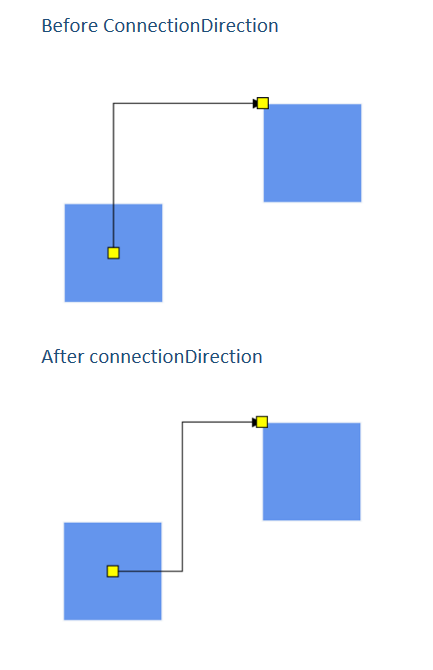
Incoming and outgoing edges of ports
Each port maintains collections of its connected connectors through read-only properties. The inEdges property contains the IDs of all connectors that terminate at the port, while outEdges contains the IDs of connectors that originate from the port. These properties are automatically maintained by the diagram and provide valuable information for traversing connection relationships.
The following code example demonstrates how to access the incoming and outgoing connections of a port:
import { Component, ViewEncapsulation, ViewChild } from '@angular/core';
import { DiagramModule,DiagramComponent, PointPortModel, PortVisibility } from '@syncfusion/ej2-angular-diagrams';

@Component({
imports: [
         DiagramModule
    ],

providers: [ ],
standalone: true,
    selector: "app-container",
    template: `<button (click)='getInEdges()'>Get InEdges</button>
    <button (click)='getOutEdges()'>Get OutEdges</button>
    <ejs-diagram #diagram id="diagram" width="100%" height="580px">
        <e-nodes>
            <e-node id='node1' [offsetX]=250 [offsetY]=250 [width]=100 [height]=100 [ports]='port1'>
            </e-node>
            <e-node id='node2' [offsetX]=250 [offsetY]=400 [width]=100 [height]=100 [ports]='port2'>
            </e-node>
        </e-nodes>
        <e-connectors>
            <e-connector id='connector1' type='Orthogonal' sourceID='node1' sourcePortID='port1' targetID='node2' targetPortID='port3'>
            </e-connector>
            <e-connector id='connector2' type='Orthogonal' sourceID='node2' sourcePortID='port4' targetID='node1' targetPortID='port2'>
            </e-connector>
        </e-connectors>
    </ejs-diagram>`,
    encapsulation: ViewEncapsulation.None
})
export class AppComponent {
    @ViewChild("diagram")
    public diagram?: DiagramComponent;
    public port1: PointPortModel[] = [
        {
            id: 'port1',
            offset: {
                x: 0,
                y: 0.5
            },
            visibility: PortVisibility.Visible,
        },
        {
            id: 'port2',
            offset: {
                x: 0.5,
                y: 0
            },
            visibility: PortVisibility.Visible,
        },
    ]
    public port2: PointPortModel[] = [
        {
            id: 'port3',
            offset: {
                x: 0,
                y: 0.5
            },
            visibility: PortVisibility.Visible,
        },
        {
            id: 'port4',
            offset: {
                x: 0.5,
                y: 1
            },
            visibility: PortVisibility.Visible,
        }
    ]

    //get in edges
    getInEdges(){
        let port = (this.diagram as any).nodes[0].ports[1];
        console.log(port.inEdges[0]);
    }

    // get out edges
    getOutEdges(){
        let port = (this.diagram as any).nodes[0].ports[0];
        console.log(port.outEdges[0]);
    }
}
import { bootstrapApplication } from '@angular/platform-browser';
import { AppComponent } from './app.component';
import 'zone.js';
bootstrapApplication(AppComponent).catch((err) => console.error(err));Additional information to port
The addInfo property allows attachment of custom metadata to ports. This property accepts any object and is useful for storing application-specific data, configuration settings, or contextual information that needs to be associated with particular ports. The stored information persists with the port throughout its life cycle and can be accessed when processing port-related events or operations.
The following code example shows how to attach additional information to a port:
public port: PointPortModel = {
    id: 'port1',
    offset: { x: 0.5, y: 0 },
    addInfo: { position: 'TopCenter', id: 'port1' }
};