Getting Started with Angular Circular Gauge
11 Aug 20265 minutes to read
This article describes the steps to create a simple Circular Gauge and demonstrates its basic usage.
Prerequisites
Ensure your development environment meets the System Requirements for Syncfusion® Angular UI Components, which covers supported Node.js, Angular, and @syncfusion/ej2-angular-circulargauge versions.
You also need a modern code editor such as Visual Studio Code, Cursor, or Syncfusion® CodeStudio.
Setup the Angular application
A straightforward approach to begin with Angular is to create a new application using the Angular CLI. Install Angular CLI globally with the following command:
npm install -g @angular/cliVerify the installation:
ng versionAngular 21 Standalone Architecture: Standalone components are the default in Angular 21. This guide uses the modern standalone architecture. If you need more information about the standalone architecture, refer to the Standalone Guide.
Installing a specific version
To install a particular version of Angular CLI, use:
npm install -g @angular/[email protected]Create an Angular application
With Angular CLI installed, execute this command to generate a new application. When prompted, accept the default options unless you have a specific reason to change them.
ng new syncfusion-angular-app- This command prompts you to configure settings like enabling Angular routing and choosing a stylesheet format. Accept the defaults (no routing, CSS) to follow this guide.
? Which stylesheet format would you like to use? (Use arrow keys)
> CSS             [ https://developer.mozilla.org/docs/Web/CSS                     ]
  Sass (SCSS)     [ https://sass-lang.com/documentation/syntax#scss                ]
  Sass (Indented) [ https://sass-lang.com/documentation/syntax#the-indented-syntax ]
Less [ http://lesscss.org ]- By default, a CSS-based application is created. Use SCSS if required:
ng new syncfusion-angular-app --style=scss- During project setup, when prompted for the Server-side rendering (SSR) option, choose the appropriate configuration.

- Select the required AI tool, or ‘none’ if you do not need any AI tool.
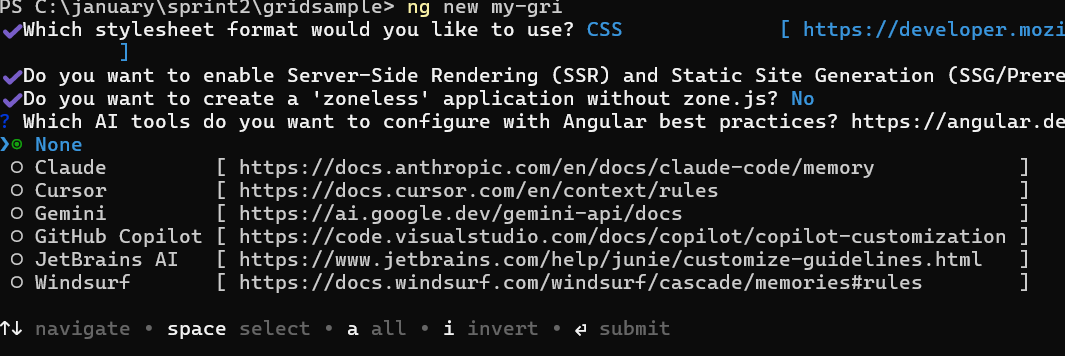
- Navigate to your newly created application directory:
cd syncfusion-angular-appIn Angular 19 and below, the CLI generates files named
app.component.ts,app.component.html,app.component.css, and so on. In Angular 20+, the structure is simpler:src/app/app.ts,app.html, andapp.css(no.component.suffixes).
Adding the Syncfusion® Angular Circular Gauge package
To install the Syncfusion® Angular Circular Gauge package, use the following command:
ng add @syncfusion/ej2-angular-circulargaugeThe ng add command installs the package, registers it in package.json, and configures the required entries in your workspace automatically.
If ng add is unavailable in your setup, install the package manually with:
npm install @syncfusion/ej2-angular-circulargaugeAdd Syncfusion® Angular Circular Gauge component
Open src/app/app.component.ts (Angular 19 and below) or src/app/app.ts (Angular 20+) and replace its contents with the following to render the Circular Gauge component.
import { Component } from '@angular/core';
import { CircularGaugeModule } from '@syncfusion/ej2-angular-circulargauge';

@Component({
    imports: [CircularGaugeModule],
    standalone: true,
    selector: 'app-container',
    // specifies the template string for the Circular Gauge component
    template: `<ejs-circulargauge id="circular-container"></ejs-circulargauge>`
})
export class AppComponent { }
Module Injection
The Circular Gauge component is divided into individual feature-based modules. To use a specific feature, you must inject its service provider. For standalone components, register services in the providers array of the component. This example uses the tooltip feature of the Circular Gauge component.
-
GaugeTooltipService– Inject this provider to use tooltip feature.
The following example demonstrates injecting GaugeTooltipService to enable the tooltip on the Circular Gauge:
import { CircularGaugeModule, GaugeTooltipService } from '@syncfusion/ej2-angular-circulargauge'
import { Component } from '@angular/core';

@Component({
imports: [CircularGaugeModule],
providers: [ GaugeTooltipService ],
standalone: true,
    selector: 'app-root',
    template:
    `<ejs-circulargauge id="circular-container" style='display:block;' [tooltip]="tooltip">
        <e-axes>
            <e-axis>
                <e-pointers>
                    <e-pointer value=35></e-pointer>
                </e-pointers>
            </e-axis>
        </e-axes>
    </ejs-circulargauge>`
})
export class AppComponent {
    public tooltip: Object = {
        enable: true
    };
}
import { bootstrapApplication } from '@angular/platform-browser';
import { AppComponent } from './app.component';
bootstrapApplication(AppComponent).catch((err) => console.error(err));Troubleshooting
-
Module not found: @syncfusion/ej2-angular-circulargauge – The package is not installed. Run
npm install @syncfusion/ej2-angular-circulargauge. -
Compatibility warning about Ivy/Angular version – The ngcc suffix is missing for legacy Angular. Install with
@syncfusion/ej2-angular-circulargauge@ngcc. -
ejs-circulargaugeis not a known element – The module import is missing. ConfirmCircularGaugeModuleis imported in theimportsarray of the standalone component. -
ng servefails with port already in use – The default port4200is occupied. Runng serve --port 4300to use a different port.