Title and Subtitle in Angular Chart
30 Aug 202624 minutes to read
Chart titles and subtitles help provide context for the visualized data. The title typically indicates the main subject or metric represented in the chart, while the subtitle adds supporting details such as data sources, time ranges, or explanatory notes. Both elements can be customized in terms of position, alignment, and style to match application design requirements.
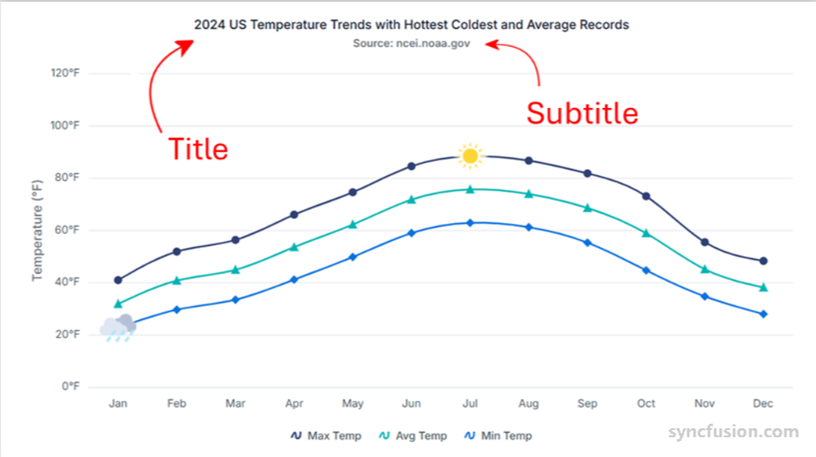
Chart title
Add a chart title using the title property. The title appears at the top of the chart by default and describes the purpose or subject of the visualization.
import { ChartModule } from '@syncfusion/ej2-angular-charts'
import { DateTimeService, StepLineSeriesService, LegendService, CategoryService, LineSeriesService } from '@syncfusion/ej2-angular-charts'
import { TooltipService } from '@syncfusion/ej2-angular-charts'
import { Component, OnInit } from '@angular/core';

@Component({
imports: [
         ChartModule
    ],

providers: [ TooltipService, DateTimeService, StepLineSeriesService, LegendService, CategoryService, LineSeriesService],
standalone: true,
    selector: 'app-container',
    template: `<ejs-chart id="chart-container" [primaryXAxis]='primaryXAxis'[primaryYAxis]='primaryYAxis' [title]='title' [titleStyle]='titleStyle'>
        <e-series-collection>
            <e-series [dataSource]='chartData' type='StepLine' xName='x' yName='y' width=2 name='China' [marker]='marker'></e-series>
            <e-series [dataSource]='chartData' type='StepLine' xName='x' yName='y1' width=2 name='Australia' [marker]='marker'></e-series>
            <e-series [dataSource]='chartData' type='StepLine' xName='x' yName='y2' width=2 name='Japan' [marker]='marker'></e-series>
        </e-series-collection>
    </ejs-chart>`
})
export class AppComponent implements OnInit {
    public primaryXAxis?: Object;
    public chartData?: Object[];
    public title?: string;
    public primaryYAxis?: Object;
    public marker?: Object;
    public titleStyle?: Object;
    ngOnInit(): void {
        this.chartData = [
                { x: new Date(1975, 0, 1), y: 16, y1: 10, y2: 4.5 },
                { x: new Date(1980, 0, 1), y: 12.5, y1: 7.5, y2: 5 },
                { x: new Date(1985, 0, 1), y: 19, y1: 11, y2: 6.5 },
                { x: new Date(1990, 0, 1), y: 14.4, y1: 7, y2: 4.4 },
                { x: new Date(1995, 0, 1), y: 11.5, y1: 8, y2: 5 },
                { x: new Date(2000, 0, 1), y: 14, y1: 6, y2: 1.5 },
                { x: new Date(2005, 0, 1), y: 10, y1: 3.5, y2: 2.5 },
                { x: new Date(2010, 0, 1), y: 16, y1: 7, y2: 3.7 }
        ];
        this.primaryXAxis = {
            title: 'Years',
            lineStyle: { width: 0 },
            labelFormat: 'y',
            intervalType: 'Years',
            valueType: 'DateTime',
            edgeLabelPlacement: 'Shift'
        };
        this.primaryYAxis = {
            title: 'Percentage (%)',
            minimum: 0, maximum: 20, interval: 2,
            labelFormat: '{value}%'
        };
        this.marker = { visible: true, width: 10, height: 10 };
        this.title = 'Unemployment Rates 1975-2010';
        this.titleStyle = {
            fontFamily: "Arial",
            fontStyle: 'italic',
            fontWeight: 'regular',
            color: "#E27F2D",
            size: '23px'
        }
    }

}
import { bootstrapApplication } from '@angular/platform-browser';
import { AppComponent } from './app.component';
import 'zone.js';
bootstrapApplication(AppComponent).catch((err) => console.error(err));Title position
Use the position property within titleStyle to place the title at the left, right, top, or bottom of the chart. Valid values are Top (default), Bottom, Left, Right, and Custom.
Named positions
The following example positions the title at the bottom of the chart.
import { ChartModule } from '@syncfusion/ej2-angular-charts'
import { DateTimeService, StepLineSeriesService, LegendService, CategoryService, LineSeriesService } from '@syncfusion/ej2-angular-charts'
import { TooltipService } from '@syncfusion/ej2-angular-charts'
import { Component, OnInit } from '@angular/core';

@Component({
imports: [
         ChartModule
    ],

providers: [ TooltipService, DateTimeService, StepLineSeriesService, LegendService, CategoryService, LineSeriesService],
standalone: true,
    selector: 'app-container',
    template: `<ejs-chart id="chart-container" [primaryXAxis]='primaryXAxis'[primaryYAxis]='primaryYAxis' [title]='title' [titleStyle]='titleStyle'>
        <e-series-collection>
            <e-series [dataSource]='chartData' type='StepLine' xName='x' yName='y' width=2 name='China' [marker]='marker'></e-series>
            <e-series [dataSource]='chartData' type='StepLine' xName='x' yName='y1' width=2 name='Australia' [marker]='marker'></e-series>
            <e-series [dataSource]='chartData' type='StepLine' xName='x' yName='y2' width=2 name='Japan' [marker]='marker'></e-series>
        </e-series-collection>
    </ejs-chart>`
})
export class AppComponent implements OnInit {
    public primaryXAxis?: Object;
    public chartData?: Object[];
    public title?: string;
    public primaryYAxis?: Object;
    public marker?: Object;
    public titleStyle?: Object;
    ngOnInit(): void {
        this.chartData = [
            { x: new Date(1975, 0, 1), y: 16, y1: 10, y2: 4.5 },
            { x: new Date(1980, 0, 1), y: 12.5, y1: 7.5, y2: 5 },
            { x: new Date(1985, 0, 1), y: 19, y1: 11, y2: 6.5 },
            { x: new Date(1990, 0, 1), y: 14.4, y1: 7, y2: 4.4 },
            { x: new Date(1995, 0, 1), y: 11.5, y1: 8, y2: 5 },
            { x: new Date(2000, 0, 1), y: 14, y1: 6, y2: 1.5 },
            { x: new Date(2005, 0, 1), y: 10, y1: 3.5, y2: 2.5 },
            { x: new Date(2010, 0, 1), y: 16, y1: 7, y2: 3.7 }
        ];
        this.primaryXAxis = {
            title: 'Years',
            lineStyle: { width: 0 },
            labelFormat: 'y',
            intervalType: 'Years',
            valueType: 'DateTime',
            edgeLabelPlacement: 'Shift'
        };
        this.primaryYAxis = {
            title: 'Percentage (%)',
            minimum: 0, maximum: 20, interval: 2,
            labelFormat: '{value}%'
        };
        this.marker = { visible: true, width: 10, height: 10 };
        this.title = 'Unemployment Rates 1975-2010';
        this.titleStyle = {
            position: 'Bottom'
        }
    }

}
import { bootstrapApplication } from '@angular/platform-browser';
import { AppComponent } from './app.component';
import 'zone.js';
bootstrapApplication(AppComponent).catch((err) => console.error(err));Custom position
To manually position the title anywhere within the chart, set position to 'Custom' and use the x and y properties. The values are in pixels and are measured from the top-left corner of the chart area.
import { ChartModule } from '@syncfusion/ej2-angular-charts'
import { DateTimeService, StepLineSeriesService, LegendService, CategoryService, LineSeriesService } from '@syncfusion/ej2-angular-charts'
import { TooltipService } from '@syncfusion/ej2-angular-charts'
import { Component, OnInit } from '@angular/core';

@Component({
imports: [
         ChartModule
    ],

providers: [ TooltipService, DateTimeService, StepLineSeriesService, LegendService, CategoryService, LineSeriesService],
standalone: true,
    selector: 'app-container',
    template: `<ejs-chart id="chart-container" [primaryXAxis]='primaryXAxis'[primaryYAxis]='primaryYAxis' [title]='title' [titleStyle]='titleStyle'>
        <e-series-collection>
            <e-series [dataSource]='chartData' type='StepLine' xName='x' yName='y' width=2 name='China' [marker]='marker'></e-series>
            <e-series [dataSource]='chartData' type='StepLine' xName='x' yName='y1' width=2 name='Australia' [marker]='marker'></e-series>
            <e-series [dataSource]='chartData' type='StepLine' xName='x' yName='y2' width=2 name='Japan' [marker]='marker'></e-series>
        </e-series-collection>
    </ejs-chart>`
})
export class AppComponent implements OnInit {
    public primaryXAxis?: Object;
    public chartData?: Object[];
    public title?: string;
    public primaryYAxis?: Object;
    public marker?: Object;
    public titleStyle?: Object;
    ngOnInit(): void {
        this.chartData = [
            { x: new Date(1975, 0, 1), y: 16, y1: 10, y2: 4.5 },
            { x: new Date(1980, 0, 1), y: 12.5, y1: 7.5, y2: 5 },
            { x: new Date(1985, 0, 1), y: 19, y1: 11, y2: 6.5 },
            { x: new Date(1990, 0, 1), y: 14.4, y1: 7, y2: 4.4 },
            { x: new Date(1995, 0, 1), y: 11.5, y1: 8, y2: 5 },
            { x: new Date(2000, 0, 1), y: 14, y1: 6, y2: 1.5 },
            { x: new Date(2005, 0, 1), y: 10, y1: 3.5, y2: 2.5 },
            { x: new Date(2010, 0, 1), y: 16, y1: 7, y2: 3.7 }
        ];
        this.primaryXAxis = {
            title: 'Years',
            lineStyle: { width: 0 },
            labelFormat: 'y',
            intervalType: 'Years',
            valueType: 'DateTime',
            edgeLabelPlacement: 'Shift'
        };
        this.primaryYAxis = {
            title: 'Percentage (%)',
            minimum: 0, maximum: 20, interval: 2,
            labelFormat: '{value}%'
        };
        this.marker = { visible: true, width: 10, height: 10 };
        this.title = 'Unemployment Rates 1975-2010';
        this.titleStyle = {
            position: 'Custom',
            x: 200,
            y: 20
        }
    }

}
import { bootstrapApplication } from '@angular/platform-browser';
import { AppComponent } from './app.component';
import 'zone.js';
bootstrapApplication(AppComponent).catch((err) => console.error(err));Title alignment
Align the chart title using the textAlignment property. Valid values are Near, Center (default), and Far. When the title is positioned at Top or Bottom, the alignment is horizontal; when positioned at Left or Right, the alignment is vertical.
import { ChartModule } from '@syncfusion/ej2-angular-charts'
import { DateTimeService, StepLineSeriesService, LegendService, CategoryService, LineSeriesService } from '@syncfusion/ej2-angular-charts'
import { TooltipService } from '@syncfusion/ej2-angular-charts'
import { Component, OnInit } from '@angular/core';

@Component({
imports: [
         ChartModule
    ],

providers: [ TooltipService, DateTimeService, StepLineSeriesService, LegendService, CategoryService, LineSeriesService],
standalone: true,
    selector: 'app-container',
    template: `<ejs-chart id="chart-container" [primaryXAxis]='primaryXAxis'[primaryYAxis]='primaryYAxis' [title]='title' [titleStyle]='titleStyle'>
        <e-series-collection>
            <e-series [dataSource]='chartData' type='StepLine' xName='x' yName='y' width=2 name='China' [marker]='marker'></e-series>
            <e-series [dataSource]='chartData' type='StepLine' xName='x' yName='y1' width=2 name='Australia' [marker]='marker'></e-series>
            <e-series [dataSource]='chartData' type='StepLine' xName='x' yName='y2' width=2 name='Japan' [marker]='marker'></e-series>
        </e-series-collection>
    </ejs-chart>`
})
export class AppComponent implements OnInit {
    public primaryXAxis?: Object;
    public chartData?: Object[];
    public title?: string;
    public primaryYAxis?: Object;
    public marker?: Object;
    public titleStyle?: Object;
    ngOnInit(): void {
        this.chartData = [
            { x: new Date(1975, 0, 1), y: 16, y1: 10, y2: 4.5 },
            { x: new Date(1980, 0, 1), y: 12.5, y1: 7.5, y2: 5 },
            { x: new Date(1985, 0, 1), y: 19, y1: 11, y2: 6.5 },
            { x: new Date(1990, 0, 1), y: 14.4, y1: 7, y2: 4.4 },
            { x: new Date(1995, 0, 1), y: 11.5, y1: 8, y2: 5 },
            { x: new Date(2000, 0, 1), y: 14, y1: 6, y2: 1.5 },
            { x: new Date(2005, 0, 1), y: 10, y1: 3.5, y2: 2.5 },
            { x: new Date(2010, 0, 1), y: 16, y1: 7, y2: 3.7 }
        ];
        this.primaryXAxis = {
            title: 'Years',
            lineStyle: { width: 0 },
            labelFormat: 'y',
            intervalType: 'Years',
            valueType: 'DateTime',
            edgeLabelPlacement: 'Shift'
        };
        this.primaryYAxis = {
            title: 'Percentage (%)',
            minimum: 0, maximum: 20, interval: 2,
            labelFormat: '{value}%'
        };
        this.marker = { visible: true, width: 10, height: 10 };
        this.title = 'Unemployment Rates 1975-2010';
        this.titleStyle = {
            position: 'Bottom',
            textAlignment: 'Far'
        }
    }

}
import { bootstrapApplication } from '@angular/platform-browser';
import { AppComponent } from './app.component';
import 'zone.js';
bootstrapApplication(AppComponent).catch((err) => console.error(err));Title styling
Customize the title’s appearance using the titleStyle property. Supported options include size (default 15px), color, fontFamily, fontWeight (default 500), fontStyle (default Normal), opacity (default 1), background, border, and accessibility. The textOverflow option accepts Wrap (default), Trim, or None; use Wrap to wrap the text when the title exceeds the available width. For textAlignment, see Title alignment.
import { ChartModule } from '@syncfusion/ej2-angular-charts'
import { DateTimeService, StepLineSeriesService, LegendService, CategoryService, LineSeriesService } from '@syncfusion/ej2-angular-charts'
import { TooltipService } from '@syncfusion/ej2-angular-charts'
import { Component, OnInit } from '@angular/core';

@Component({
imports: [
         ChartModule
    ],

providers: [ TooltipService, DateTimeService, StepLineSeriesService, LegendService, CategoryService, LineSeriesService],
standalone: true,
    selector: 'app-container',
    template: `<ejs-chart id="chart-container" [primaryXAxis]='primaryXAxis'[primaryYAxis]='primaryYAxis' [title]='title' [titleStyle]='titleStyle'>
        <e-series-collection>
            <e-series [dataSource]='chartData' type='Line' xName='month' yName='sales' width=2 name='China' [marker]='marker'></e-series>
        </e-series-collection>
    </ejs-chart>`
})
export class AppComponent implements OnInit {
    public primaryXAxis?: Object;
    public chartData?: Object[];
    public title?: string;
    public marker?: Object;
    public titleStyle?: Object;
    primaryYAxis: any;
    ngOnInit(): void {
        this.chartData =  [
      { month: 'Jan', sales: 35 }, { month: 'Feb', sales: 28 },
      { month: 'Mar', sales: 34 }, { month: 'Apr', sales: 32 },
      { month: 'May', sales: 40 }, { month: 'Jun', sales: 32 },
      { month: 'Jul', sales: 35 }, { month: 'Aug', sales: 55 },
      { month: 'Sep', sales: 38 }, { month: 'Oct', sales: 30 },
      { month: 'Nov', sales: 25 }, { month: 'Dec', sales: 32 }
];
        this.primaryXAxis = {
            valueType: 'Category',
        };
        this.marker = { visible: true, width: 10, height: 10 };
        this.title = 'Unemployment Rates 1975-2010';
        this.titleStyle = {
           size:'18px', color:'Red', textAlignment: 'Far', textOverflow: 'Wrap'
        }
    }

}
import { bootstrapApplication } from '@angular/platform-browser';
import { AppComponent } from './app.component';
import 'zone.js';
bootstrapApplication(AppComponent).catch((err) => console.error(err));Chart subtitle
Add a subtitle to the chart using the subTitle property. Subtitles help provide additional context such as descriptions, notes, or supporting information related to the chart data. The subtitle is rendered just below the main title.
Subtitle styling
Style the subtitle with the subTitleStyle property, which supports the same options as titleStyle: size, color, fontFamily, fontWeight, fontStyle, opacity, background, border, accessibility, textAlignment, and textOverflow. You can also set position to Top, Bottom, Left, Right, or Custom to control the subtitle placement independently of the title.
import { ChartModule } from '@syncfusion/ej2-angular-charts'
import { DateTimeService, StepLineSeriesService, LegendService, CategoryService, LineSeriesService } from '@syncfusion/ej2-angular-charts'
import { TooltipService } from '@syncfusion/ej2-angular-charts'
import { Component, OnInit } from '@angular/core';

@Component({
imports: [
         ChartModule
    ],

providers: [ TooltipService, DateTimeService, StepLineSeriesService, LegendService, CategoryService, LineSeriesService],
standalone: true,
    selector: 'app-container',
    template: `<ejs-chart id="chart-container" [primaryXAxis]='primaryXAxis'[primaryYAxis]='primaryYAxis' [title]='title' [subTitle]='subTitle' [subTitleStyle]='subTitleStyle'>
        <e-series-collection>
            <e-series [dataSource]='chartData' type='StepLine' xName='x' yName='y' width=2 name='China' [marker]='marker'></e-series>
            <e-series [dataSource]='chartData' type='StepLine' xName='x' yName='y1' width=2 name='Australia' [marker]='marker'></e-series>
            <e-series [dataSource]='chartData' type='StepLine' xName='x' yName='y2' width=2 name='Japan' [marker]='marker'></e-series>
        </e-series-collection>
    </ejs-chart>`
})
export class AppComponent implements OnInit {
    public primaryXAxis?: Object;
    public chartData?: Object[];
    public title?: string;
    public subTitle?: string;
    public primaryYAxis?: Object;
    public marker?: Object;
    public subTitleStyle?: Object;
    ngOnInit(): void {
        this.chartData = [
                { x: new Date(1975, 0, 1), y: 16, y1: 10, y2: 4.5 },
                { x: new Date(1980, 0, 1), y: 12.5, y1: 7.5, y2: 5 },
                { x: new Date(1985, 0, 1), y: 19, y1: 11, y2: 6.5 },
                { x: new Date(1990, 0, 1), y: 14.4, y1: 7, y2: 4.4 },
                { x: new Date(1995, 0, 1), y: 11.5, y1: 8, y2: 5 },
                { x: new Date(2000, 0, 1), y: 14, y1: 6, y2: 1.5 },
                { x: new Date(2005, 0, 1), y: 10, y1: 3.5, y2: 2.5 },
                { x: new Date(2010, 0, 1), y: 16, y1: 7, y2: 3.7 }
        ];
        this.primaryXAxis = {
            title: 'Years',
            lineStyle: { width: 0 },
            labelFormat: 'y',
            intervalType: 'Years',
            valueType: 'DateTime',
            edgeLabelPlacement: 'Shift'
        };
        this.primaryYAxis = {
            title: 'Percentage (%)',
            minimum: 0, maximum: 20, interval: 2,
            labelFormat: '{value}%'
        };
        this.marker = { visible: true, width: 10, height: 10 };
        this.title = 'Unemployment Rates 1975-2010';
        this.subTitle = '(1975-2010)';
        this.subTitleStyle = {
            fontFamily: "Arial",
            fontStyle: 'italic',
            fontWeight: 'regular',
            color: "#E27F2D",
            size: '20px'
        }
    }

}
import { bootstrapApplication } from '@angular/platform-browser';
import { AppComponent } from './app.component';
import 'zone.js';
bootstrapApplication(AppComponent).catch((err) => console.error(err));Troubleshooting
-
Title or subtitle not visible — Confirm the text was assigned to the
titleorsubTitleinput and that the chart element is inside a rendered component. SettitleStyle.colorto a value that contrasts with the chart background. -
Custom position has no effect —
position: 'Custom'only applies when bothxandyare set; values are in pixels relative to the chart area, not the page. -
textOverflow: 'Trim'cuts off text unexpectedly — Provide a widerwidthon the chart, setsizeto a smaller value, or usetextOverflow: 'Wrap'together with a sufficient chart height. -
Standalone component does not render the chart — Ensure
ChartModuleis added to the component’simportsarray and that the relevant series service (for example,LineSeriesServiceorStepLineSeriesService) is inproviders.