Axis Overview in Angular Chart
14 Sep 20261 minute to read
In a chart, an axis refers to the line that defines the boundary of the chart and provides a scale for measuring data. Charts have two axes: the horizontal axis (x-axis) and the vertical axis (y-axis). The following is a quick overview of the axis elements.
-
Axis Types: The
valueTypeproperty determines how axis values are interpreted and rendered. For most types (such asLogarithmicorDateTime), you must inject the matching feature service, for exampleLogarithmicServiceorDateTimeService. For more details see Category Axis, Numeric Axis, DateTime Axis, Logarithmic Axis. - Grid Lines: Grid lines in charts are horizontal and vertical lines that extend from the axis across the plot area. For more details see Grid Line Customization.
- Tick Lines: Tick marks are short lines placed along an axis at regular intervals to indicate the scale. For more details see Tick Line Customization.
- Multiple Axes: Charts can include multiple axes to display different scales or units, often shown as a primary and secondary axis. For more details see Multiple Axis.
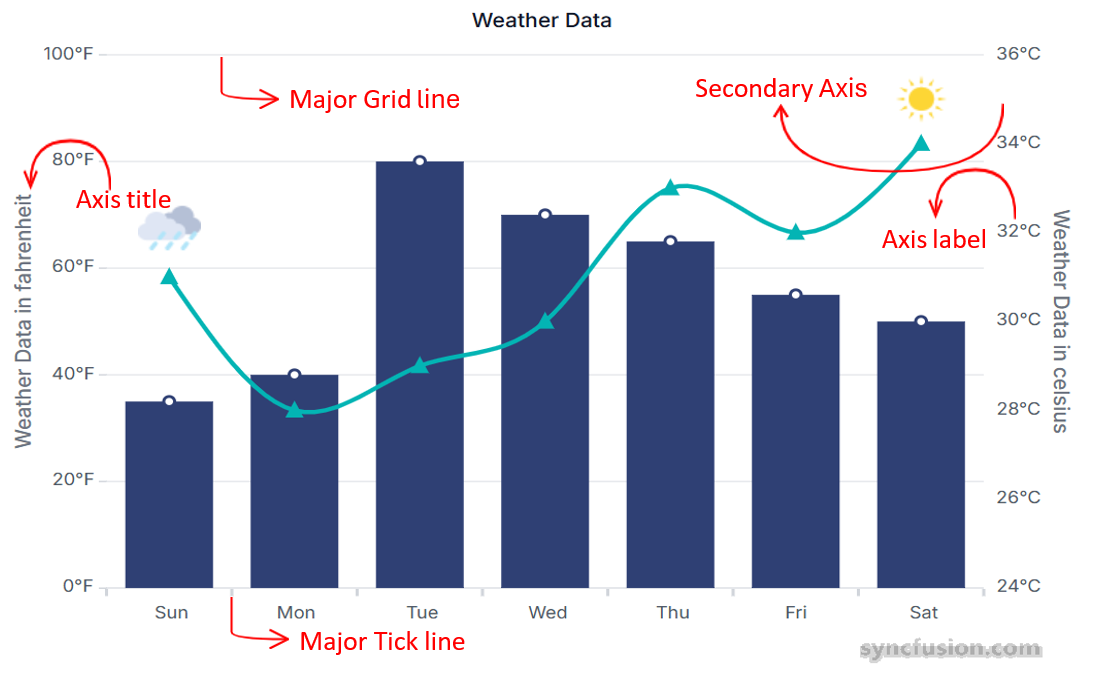
- Axis Label: Axis labels are descriptive texts that appear along the axes of a chart and provide context about the data being presented. For more details see Labels Customization.
- Axis Title: An axis title is a descriptive label that indicates the purpose of the chart’s axis, helping viewers understand what each axis represents. For more details see Title.
See Also
For setup and installation, see Getting Started with Angular Chart.