How can I help you?
Download and Installation
3 Feb 20262 minutes to read
Syncfusion® publishes the Visual Studio Code extension in the Visual Studio Code Marketplace. Install the extension either directly from Visual Studio Code or from the Marketplace website.
Prerequisites
The following prerequisites software needs to be installed for the Syncfusion® Web extension installation and for creating the Syncfusion® Web applications along with any one of the Framework(React, Pure React, Angular, and Vue).
- Visual Studio Code — minimum version 1.38.0
- C# Extension for Visual Studio Code
- Node.js — install a current LTS version
Install through the Visual Studio Code extensions
The following steps explain how to install the Syncfusion® Web extensions from Visual Studio Code Extensions.
-
Open Visual Studio Code.
-
Go to View > Extensions, and open Manage Extensions.
-
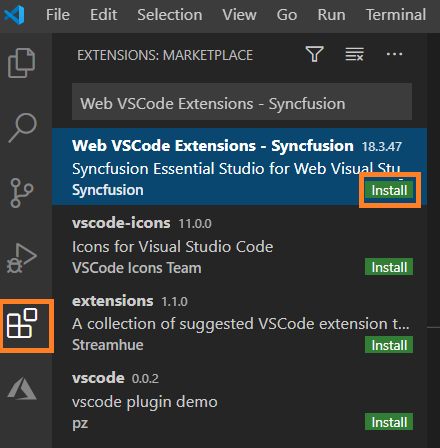
Type “Syncfusion® Web in the search box.
-
Click the Install button on the “Web VSCode Extensions - Syncfusion®“ extension.
-
After the installation, reload the Visual Studio Code using the Reload Required in Visual Studio Code palette.
-
Now, use the Syncfusion® Web extensions from the Visual Studio Code palette.

Install from the Visual Studio Code Marketplace
The following steps explain how to download Syncfusion® Web applications from the Visual Studio Code Marketplace and install them.
-
Open the Syncfusion® Web Extension
-
Click Install from Visual Studio Code Marketplace. The browser opens the popup with the information like “Open Visual Studio Code”. Click Open Visual Studio Code, then Syncfusion® Web Extension will open in Visual Studio Code.
-
Click the Install button in the “Web VSCode Extensions - Syncfusion®“ extension.
-
After the installation, reload the Visual Studio Code using the Reload Required in Visual Studio Code palette.
-
Now, use the Syncfusion® Web extensions from the Visual Studio Code palette.