Lazy Load Grouping in Vue Data Grid
06 Aug 202619 minutes to read
Lazy loading in Vue refers to dynamically loading data as needed, rather than all at once, to enhance application performance by minimizing initial load time.
The Vue Data Grid supports lazy load grouping, which optimizes the rendering of large datasets by loading only the required grouped data on demand. Initially, only the top-level group caption rows are rendered in a collapsed state. Child rows are fetched and displayed dynamically when a group is expanded.
To enable this feature, set the groupSettings.enableLazyLoading property to true.
The following example demonstrates configuring lazy load grouping using the groupSettings.enableLazyLoading property.
<template>
  <div id="app">
    <ejs-grid ref='grid' :dataSource="data" :allowPaging='true' :allowGrouping='true' :groupSettings='groupSettings' height='255px'>
      <e-columns>
        <e-column field='OrderID' headerText='Order ID' textAlign= 'Right' width='80'></e-column>
        <e-column field='ProductName' headerText='Product Name' width='100'></e-column>
        <e-column field='ProductID' headerText='Product ID' width='80'></e-column>
        <e-column field='CustomerName' headerText='Customer Name' width='100'></e-column>
      </e-columns>
    </ejs-grid>
  </div>
</template>
<script setup>
import { provide } from "vue";

import { GridComponent as EjsGrid, ColumnDirective as EColumn, ColumnsDirective as EColumns, Page, Group, LazyLoadGroup } from "@syncfusion/ej2-vue-grids";
import { data } from './datasource.js';
      const groupSettings = { enableLazyLoading: true, columns: ['ProductName', 'CustomerName'] };
  provide('grid',  [Page, Group, LazyLoadGroup]);
</script>
<style>
 @import "../node_modules/@syncfusion/ej2-material3-theme/styles/grid/index.css";
</style><template>
<div id="app">
<ejs-grid ref='grid' :dataSource="data" :allowPaging='true' :allowGrouping='true' :groupSettings='groupSettings' height='255px'>
<e-columns>
<e-column field='OrderID' headerText='Order ID' textAlign= 'Right' width='80'></e-column>
<e-column field='ProductName' headerText='Product Name' width='100'></e-column>
<e-column field='ProductID' headerText='Product ID' width='80'></e-column>
<e-column field='CustomerName' headerText='Customer Name' width='100'></e-column>
</e-columns>
</ejs-grid>
</div>
</template>
<script>
import { GridComponent, ColumnsDirective, ColumnDirective, Page, Group, LazyLoadGroup } from "@syncfusion/ej2-vue-grids";
import { data } from './datasource.js';
export default {
name: "App",
components: {
"ejs-grid":GridComponent,
"e-columns":ColumnsDirective,
"e-column":ColumnDirective
},
data() {
return {
data: data,
groupSettings: { enableLazyLoading: true, columns: ['ProductName', 'CustomerName'] }
};
},
methods: { },
provide: {
grid: [Page, Group, LazyLoadGroup]
}
}
</script>
<style>
@import "../node_modules/@syncfusion/ej2-material3-theme/styles/grid/index.css";
</style>Handling the lazy load grouping at server-side
When using the lazy load grouping feature of the Grid, the UrlAdaptor of DataManager is used to handle server-side operations, including lazy load grouping. Along with the default server request, this feature will additionally send the following details to handle the lazy load grouping:
| Property Name | Description |
|---|---|
isLazyLoad |
Differentiates between default grouping and lazy load grouping. This property is enabled when performing lazy load. |
onDemandGroupInfo |
Contains the details of expanded caption row grouping level, skip, take and filter query of the child records. |
On the server side, these parameters can be accessed through the DataManagerRequest model to handle data retrieval based on the expanded group context. Refer to the screenshots below for illustration.
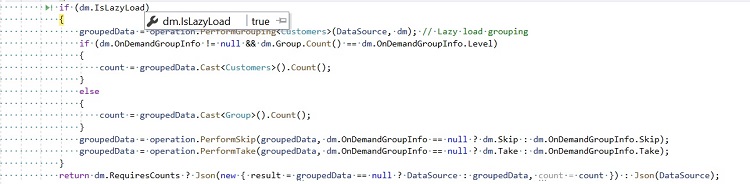
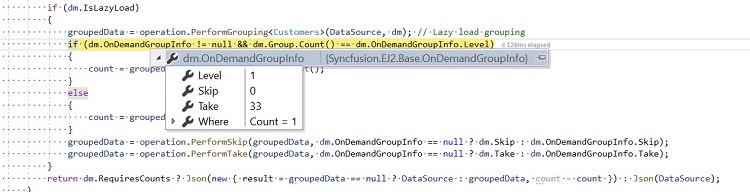
The following code example describes the lazy load grouping handled at the server-side with other the grid actions.
public IActionResult UrlDatasource([FromBody] DataManagerRequest dm)
{
    IEnumerable groupedData = null;
    IEnumerable<Customers> DataSource = customers;
    DataOperations operation = new DataOperations();

    if (dm.Search != null && dm.Search.Count > 0)
    {
        DataSource = operation.PerformSearching(DataSource, dm.Search);  //Search
    }
    if (dm.IsLazyLoad == false && dm.Sorted != null && dm.Sorted.Count > 0) //Sorting for grouping
    {
        DataSource = operation.PerformSorting(DataSource, dm.Sorted);
    }
    if (dm.Where != null && dm.Where.Count > 0) //Filtering
    {
        DataSource = operation.PerformFiltering(DataSource, dm.Where, dm.Where[0].Operator);
    }
    int count = DataSource.Cast<Customers>().Count();
    if (dm.IsLazyLoad == false && dm.Skip != 0)
    {
        DataSource = operation.PerformSkip(DataSource, dm.Skip); // Paging
    }
    if (dm.IsLazyLoad == false && dm.Take != 0)
    {
        DataSource = operation.PerformTake(DataSource, dm.Take);
    }
    if (dm.IsLazyLoad)
    {
        groupedData = operation.PerformGrouping<Customers>(DataSource, dm); // Lazy load grouping
        groupedData = operation.PerformSorting(groupedData, dm); // Sorting with Lazy load grouping
        if (dm.OnDemandGroupInfo != null && dm.Group.Count() == dm.OnDemandGroupInfo.Level)
        {
            count = groupedData.Cast<Customers>().Count();
        }
        else
        {
            count = groupedData.Cast<Group>().Count();
        }
        groupedData = operation.PerformSkip(groupedData, dm.OnDemandGroupInfo == null ? dm.Skip : dm.OnDemandGroupInfo.Skip);
        groupedData = operation.PerformTake(groupedData, dm.OnDemandGroupInfo == null ? dm.Take : dm.OnDemandGroupInfo.Take);
    }
return dm.RequiresCounts ? Json(new { result = groupedData == null ? DataSource : groupedData, count = count }) : Json(DataSource);
}
For optimal performance, especially when dealing with lazy loading grouping, it is recommended to perform sorting after the grouping action.
Lazy load grouping with infinite scrolling
Lazy load grouping with infinite scrolling is especially useful when presenting grouped data from large datasets. It allows data to be loaded on demand as users interact with the interface, ensuring efficient handling of records. This approach improves performance, maintains responsiveness, and provides a seamless experience while managing and displaying extensive grouped data.
Lazy Load Grouping Workflow in Infinite Scrolling
-
Initially, only top-level group caption rows are rendered in a collapsed state.
-
Child rows are fetched and displayed dynamically when a group caption is expanded.
-
Infinite scrolling loads additional data as the scrollbar reaches the end, maintaining seamless navigation.
To enable this feature, set both groupSettings.enableLazyLoading and enableInfiniteScrolling properties to true.
The following example demonstrates configuring lazy load grouping with infinite scrolling using these properties.
<template>
  <div id="app">
    <ejs-grid ref='grid' :dataSource="data" :allowGrouping='true' :enableInfiniteScrolling='true'
      :groupSettings='groupSettings' height='300px'>
      <e-columns>
        <e-column field='OrderID' headerText='Order ID' textAlign='Right' width='80'></e-column>
        <e-column field='ProductName' headerText='Product Name' width='100'></e-column>
        <e-column field='ProductID' headerText='Product ID' width='80'></e-column>
        <e-column field='CustomerName' headerText='Customer Name' width='100'></e-column>
      </e-columns>
    </ejs-grid>
  </div>
</template>
<script setup>
import { provide } from "vue";
import { GridComponent as EjsGrid, ColumnDirective as EColumn, ColumnsDirective as EColumns, Group, LazyLoadGroup, InfiniteScroll } from "@syncfusion/ej2-vue-grids";
import { data } from './datasource.js';
const groupSettings = { enableLazyLoading: true, columns: ['ProductName', 'CustomerName'] };
provide('grid', [Group, LazyLoadGroup, InfiniteScroll]);
</script>

<style>
@import "../node_modules/@syncfusion/ej2-material3-theme/styles/grid/index.css";
</style><template>
<div id="app">
<ejs-grid ref='grid' :dataSource="data" :allowGrouping='true' :enableInfiniteScrolling='true' :groupSettings='groupSettings' height='300px'>
<e-columns>
<e-column field='OrderID' headerText='Order ID' textAlign= 'Right' width='80'></e-column>
<e-column field='ProductName' headerText='Product Name' width='100'></e-column>
<e-column field='ProductID' headerText='Product ID' width='80'></e-column>
<e-column field='CustomerName' headerText='Customer Name' width='100'></e-column>
</e-columns>
</ejs-grid>
</div>
</template>
<script>
import { GridComponent, ColumnsDirective, ColumnDirective, Group, LazyLoadGroup, InfiniteScroll } from "@syncfusion/ej2-vue-grids";
import { data } from './datasource.js';
export default {
name: "App",
components: {
"ejs-grid":GridComponent,
"e-columns":ColumnsDirective,
"e-column":ColumnDirective
},
data() {
return {
data: data,
groupSettings: { enableLazyLoading: true, columns: ['ProductName', 'CustomerName'] }
};
},
methods: { },
provide: {
grid: [Group, LazyLoadGroup, InfiniteScroll]
}
}
</script>
<style>
@import "../node_modules/@syncfusion/ej2-material3-theme/styles/grid/index.css";
</style>
- The enableInfiniteScrolling property is optional and can be set to
trueorfalsebased on the requirement.- When enabling the
enableInfiniteScrollingfeature, it is necessary to define the height property.
Lazy load grouping with virtual scrolling
The Vue Data Grid supports lazy load grouping with virtual scrolling to efficiently manage and display large grouped datasets. This feature improves performance, reduces initial load time, and ensures a responsive data presentation experience.
Lazy Load Grouping Workflow in virtual scrolling
-
Initially, only top-level group caption rows are rendered in a collapsed state.
-
Child rows are loaded and displayed dynamically when a group is expanded.
-
Virtual scrolling loads a buffered subset of records as needed, optimizing data rendering and memory usage.
To enable this feature, set both groupSettings.enableLazyLoading and enableVirtualization properties to true.
The following example demonstrates configuring lazy load grouping with virtual scrolling using these properties.
<template>
  <div id="app">
    <ejs-grid ref='grid' :dataSource="data" :allowGrouping='true' :enableVirtualScrolling='true'
      :groupSettings='groupSettings' height='300px'>
      <e-columns>
        <e-column field='OrderID' headerText='Order ID' textAlign='Right' width='80'></e-column>
        <e-column field='ProductName' headerText='Product Name' width='100'></e-column>
        <e-column field='ProductID' headerText='Product ID' width='80'></e-column>
        <e-column field='CustomerName' headerText='Customer Name' width='100'></e-column>
      </e-columns>
    </ejs-grid>
  </div>
</template>
<script setup>
import { provide } from "vue";
import { GridComponent as EjsGrid, ColumnDirective as EColumn, ColumnsDirective as EColumns, Group, LazyLoadGroup, VirtualScroll } from "@syncfusion/ej2-vue-grids";
import { data } from './datasource.js';
const groupSettings = { enableLazyLoading: true, columns: ['ProductName', 'CustomerName'] };
provide('grid', [Group, LazyLoadGroup, VirtualScroll]);
</script>

<style>
@import "../node_modules/@syncfusion/ej2-material3-theme/styles/grid/index.css";
</style><template>
<div id="app">
<ejs-grid ref='grid' :dataSource="data" :allowGrouping='true' :enableVirtualScrolling='true' :groupSettings='groupSettings' height='300px'>
<e-columns>
<e-column field='OrderID' headerText='Order ID' textAlign= 'Right' width='80'></e-column>
<e-column field='ProductName' headerText='Product Name' width='100'></e-column>
<e-column field='ProductID' headerText='Product ID' width='80'></e-column>
<e-column field='CustomerName' headerText='Customer Name' width='100'></e-column>
</e-columns>
</ejs-grid>
</div>
</template>
<script>
import { GridComponent, ColumnsDirective, ColumnDirective, Group, LazyLoadGroup, VirtualScroll } from "@syncfusion/ej2-vue-grids";
import { data } from './datasource.js';
export default {
name: "App",
components: {
"ejs-grid":GridComponent,
"e-columns":ColumnsDirective,
"e-column":ColumnDirective
},
data() {
return {
data: data,
groupSettings: { enableLazyLoading: true, columns: ['ProductName', 'CustomerName'] }
};
},
methods: { },
provide: {
grid: [Group, LazyLoadGroup, VirtualScroll]
}
}
</script>
<style>
@import "../node_modules/@syncfusion/ej2-material3-theme/styles/grid/index.css";
</style>When using the
enableVirtualizationfeature, it is necessary to define the height property.
Limitations for lazy load grouping
- Due to the element height limitation in browsers, the maximum number of records loaded by the grid is limited due to the browser capability.
- Lazy load grouping is only supported by the
UrlAdaptorandJsonAdaptoradaptors. - Lazy load grouping is not compatible with the following features
- Batch editing
- Row template
- Row drag and drop in collapsed group
- ExpandAll method
- Column virtualization
- Hierarchical Grid
- Detail Template
- Row and Cell Spanning
- Programmatic selection is not supported in lazy load grouping.
- Drag selection, Cell selection (box and flow), Row Selection is not working in collapsed state.
- Clipboard is not support when the groups are in collapsed state.