Expanded SubProcess
28 Mar 202516 minutes to read
An expanded subProcess can contain certain child processess within it.
Create BPMN Expanded subProcess
To create expanded subProcess, set shape as activity and collapsed as false. Enable AllowDrop constraint for node to allow child to drop inside the expanded subProcess.
<template>
    <div id="app">
        <ejs-diagram id="diagram" :width='width' :height='height' :nodes='nodes'></ejs-diagram>
    </div>
</template>
<script setup>
import { provide } from "vue";
import { DiagramComponent as EjsDiagram, BpmnDiagrams ,NodeConstraints} from '@syncfusion/ej2-vue-diagrams';

const nodes = [{
  id: 'subProcess',
  width: 520,
  height: 250,
  offsetX: 355,
  offsetY: 230,
  constraints: NodeConstraints.Default | NodeConstraints.AllowDrop,
  shape: {
    shape: 'Activity',
    type: 'Bpmn',
    activity: {
      activity: 'SubProcess',
      subProcess: {
        collapsed: false,
      },
    },
  },
}]

const width = "100%";
const height = "600px";

provide('diagram', [BpmnDiagrams]);
</script>
<style>
@import "../node_modules/@syncfusion/ej2-vue-diagrams/styles/material.css";
</style><template>
<div id="app">
<ejs-diagram id="diagram" :width='width' :height='height' :nodes='nodes'></ejs-diagram>
</div>
</template>
<script>
import { DiagramComponent, BpmnDiagrams,NodeConstraints} from '@syncfusion/ej2-vue-diagrams';
let nodes = [{
id: 'subProcess',
width: 520,
height: 250,
offsetX: 355,
offsetY: 230,
constraints: NodeConstraints.Default | NodeConstraints.AllowDrop,
shape: {
shape: 'Activity',
type: 'Bpmn',
activity: {
activity: 'SubProcess',
subProcess: {
collapsed: false,
},
},
},
}]
export default {
name: "App",
components: {
"ejs-diagram": DiagramComponent
},
data() {
return {
width: "100%",
height: "600px",
nodes: nodes,
}
},
provide: {
diagram: [BpmnDiagrams]
}
}
</script>
<style>
@import "../node_modules/@syncfusion/ej2-vue-diagrams/styles/material.css";
</style>Add BPMN nodes into ExpandedSubProcess
Processes is an array collection that defines the children values for BPMN subprocess.
Please refer the following code example.
<template>
    <div id="app">
        <ejs-diagram id="diagram" :width='width' :height='height' :nodes='nodes'></ejs-diagram>
    </div>
</template>
<script setup>
import { provide } from "vue";
import { DiagramComponent as EjsDiagram, BpmnDiagrams ,NodeConstraints} from '@syncfusion/ej2-vue-diagrams';

const nodes = [{
  id: 'start',
  height: 50,
  width: 50,
  margin: { left: 50, top: 50 },
  shape: { type: 'Bpmn', shape: 'Event' },
},
{
  id: 'subProcess',
  width: 520,
  height: 250,
  offsetX: 355,
  offsetY: 230,
  constraints: NodeConstraints.Default | NodeConstraints.AllowDrop,
  shape: {
    shape: 'Activity',
    type: 'Bpmn',
    activity: {
      activity: 'SubProcess',
      subProcess: {
        collapsed: false,
        processes: ['start'],
      },
    },
  },
}]

const width = "100%";
const height = "600px";

provide('diagram', [BpmnDiagrams]);
</script>
<style>
@import "../node_modules/@syncfusion/ej2-vue-diagrams/styles/material.css";
</style><template>
<div id="app">
<ejs-diagram id="diagram" :width='width' :height='height' :nodes='nodes'></ejs-diagram>
</div>
</template>
<script>
import { DiagramComponent, BpmnDiagrams,NodeConstraints} from '@syncfusion/ej2-vue-diagrams';
let nodes = [{
id: 'start',
height: 50,
width: 50,
margin: { left: 50, top: 50 },
shape: { type: 'Bpmn', shape: 'Event' },
},
{
id: 'subProcess',
width: 520,
height: 250,
offsetX: 355,
offsetY: 230,
constraints: NodeConstraints.Default | NodeConstraints.AllowDrop,
shape: {
shape: 'Activity',
type: 'Bpmn',
activity: {
activity: 'SubProcess',
subProcess: {
collapsed: false,
processes: ['start'],
},
},
},
}]
export default {
name: "App",
components: {
"ejs-diagram": DiagramComponent
},
data() {
return {
width: "100%",
height: "600px",
nodes: nodes,
}
},
provide: {
diagram: [BpmnDiagrams]
}
}
</script>
<style>
@import "../node_modules/@syncfusion/ej2-vue-diagrams/styles/material.css";
</style>Add BPMN nodes into ExpandedSubProcess at runtime
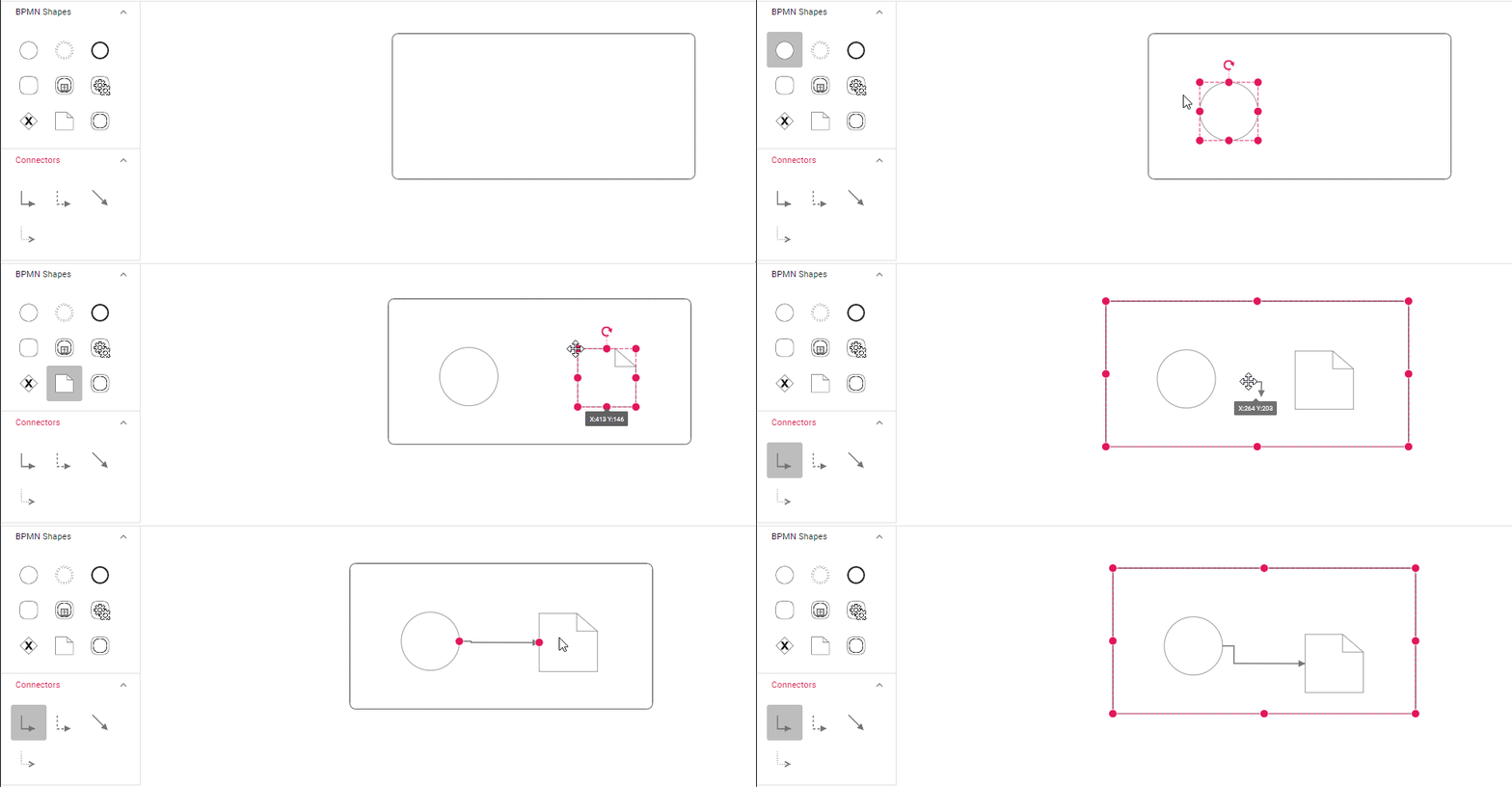
Drag and drop the BPMN nodes to the BPMN ExpandedSubProcess.
While resizing or dragging the child element, if the child element bounds are within the ExpandedSubProcess bounds, the ExpandedSubProcess size will be updated along with that.
The following image shows how to add BPMNNode into the BPMN ExpandedSubProcess at runtime.
Add/remove Process Programmatically
The process for the expanded sub-process can be added at runtime using the addProcess method and removed at runtime using the removeProcess method. The following example shows how to add and remove a process at runtime.
<template>
  <div id="app">
    <ejs-button ref="addprocess" id="addprocess">Add process</ejs-button>
    <ejs-button ref="removeprocess" id="removeprocess">remove process</ejs-button>
    <ejs-diagram
      id="diagram"
      ref="diagram"
      :width="width"
      :height="height"
      :nodes="nodes"
    ></ejs-diagram>
  </div>
</template>
<script setup>
import { onMounted, ref } from "vue";
import { provide } from "vue";
import {
  DiagramComponent as EjsDiagram,
  BpmnDiagrams,
  NodeConstraints,
} from "@syncfusion/ej2-vue-diagrams";
import { ButtonComponent as EjsButton } from "@syncfusion/ej2-vue-buttons";
const diagram = ref(null);
const addprocess = ref(null);
const removeprocess = ref(null);
const nodes = [
  {
    id: "start",
    height: 50,
    width: 50,
    margin: { left: 50, top: 50 },
    shape: { type: "Bpmn", shape: "Event" },
  },
  {
    id: "event2",
    height: 50,
    width: 50,
    margin: { left: 150, top: 50 },
    shape: { type: "Bpmn", shape: "Event", event: { type: "" } },
  },
  {
    id: "subProcess",
    width: 520,
    height: 250,
    offsetX: 355,
    offsetY: 230,
    constraints: NodeConstraints.Default | NodeConstraints.AllowDrop,
    shape: {
      shape: "Activity",
      type: "Bpmn",
      activity: {
        activity: "SubProcess",
        subProcess: {
          collapsed: false,
          processes: ["start"],
        },
      },
    },
  },
];

const width = "100%";
const height = "600px";

provide("diagram", [BpmnDiagrams]);
onMounted(function () {
  const diagramInstance = diagram.value.ej2Instances;
  const addprocessInstance = addprocess.value.ej2Instances;
  const removeprocessInstance = removeprocess.value.ej2Instances;
  let event = diagramInstance.nameTable["event2"];

  //Method to add process at runtime
  addprocessInstance.element.onclick = () => {
    diagramInstance.addProcess(event, "subProcess");
  };
  removeprocessInstance.element.onclick = () => {
    diagramInstance.removeProcess('event2');
  };
});
</script>
<style>
@import "../node_modules/@syncfusion/ej2-vue-diagrams/styles/material.css";
</style><template>
<div id="app">
<ejs-button v-on:click="addProcess">Add process </ejs-button>
<ejs-button v-on:click="removeProcess">Remove process </ejs-button>
<ejs-diagram
id="diagram"
ref="diagram"
:width="width"
:height="height"
:nodes="nodes"
></ejs-diagram>
</div>
</template>
<script>
import {
DiagramComponent,
BpmnDiagrams,
NodeConstraints,
} from '@syncfusion/ej2-vue-diagrams';
import { ButtonComponent } from '@syncfusion/ej2-vue-buttons';
let nodes = [
{
id: 'start',
height: 50,
width: 50,
margin: { left: 50, top: 50 },
shape: { type: 'Bpmn', shape: 'Event' },
},
{
id: 'event2',
height: 50,
width: 50,
margin: { left: 150, top: 50 },
shape: { type: 'Bpmn', shape: 'Event', event: { type: '' } },
},
{
id: 'subProcess',
width: 520,
height: 250,
offsetX: 355,
offsetY: 230,
constraints: NodeConstraints.Default | NodeConstraints.AllowDrop,
shape: {
shape: 'Activity',
type: 'Bpmn',
activity: {
activity: 'SubProcess',
subProcess: {
collapsed: false,
processes: ['start'],
},
},
},
}
];
export default {
name: 'App',
components: {
'ejs-diagram': DiagramComponent,
'ejs-button': ButtonComponent,
},
data() {
return {
width: '100%',
height: '600px',
nodes: nodes,
};
},
provide: {
diagram: [BpmnDiagrams],
},
methods: {
addProcess: function () {
var diagramInstance = this.$refs.diagram.ej2Instances;
let event = diagramInstance.nameTable['event2'];
/**
* parameter 1 - A process to be added
* parameter 2 - A string representing the parent ID where the process will be added.
*/
diagramInstance.addProcess(event, 'subProcess');
},
removeProcess: function () {
var diagramInstance = this.$refs.diagram.ej2Instances;
diagramInstance.removeProcess('event2');
},
},
};
</script>
<style>
@import "../node_modules/@syncfusion/ej2-vue-diagrams/styles/material.css";
</style>