BPMN Activity in Vue Diagram component
28 Mar 202524 minutes to read
Activity
The activity is the task that is performed in a business process. It is represented by a rounded rectangle.
There are two types of activities. They are listed as follows:
- Task: Occurs within a process and it is not broken down to a finer level of detail.
- Subprocess: Occurs within a process and it is broken down to a finer level of detail.
To create a BPMN activity, set the shape as activity. You also need to set the type of the BPMN activity by using the activity property of the node. By default, the type of the activity is set as task. The following code example illustrates how to create an activity.
<template>
    <div id="app">
        <ejs-diagram id="diagram" :width='width' :height='height' :nodes='nodes'></ejs-diagram>
    </div>
</template>
<script setup>
import { provide } from "vue";
import { DiagramComponent as EjsDiagram, BpmnDiagrams } from '@syncfusion/ej2-vue-diagrams';

const nodes = [{
    offsetX: 250,
    offsetY: 250,
    // Size of the node
    width: 100,
    height: 100,
    //Sets type as Bpmn and shape as Activity
    shape: {
        type: 'Bpmn',
        shape: 'Activity',
        //Sets activity as Task
        activity: {
            activity: 'Task'
        },
    },
}]
const width = "100%";
const height = "350px";

provide('diagram', [BpmnDiagrams]);
</script>
<style>
@import "../node_modules/@syncfusion/ej2-vue-diagrams/styles/material.css";
</style><template>
<div id="app">
<ejs-diagram id="diagram" :width='width' :height='height' :nodes='nodes'></ejs-diagram>
</div>
</template>
<script>
import { DiagramComponent, BpmnDiagrams } from '@syncfusion/ej2-vue-diagrams';
let nodes = [{
offsetX: 250,
offsetY: 250,
// Size of the node
width: 100,
height: 100,
//Sets type as Bpmn and shape as Activity
shape: {
type: 'Bpmn',
shape: 'Activity',
//Sets activity as Task
activity: {
activity: 'Task'
},
},
}]
export default {
name: "App",
components: {
"ejs-diagram": DiagramComponent
},
data() {
return {
width: "100%",
height: "350px",
nodes: nodes
}
},
provide: {
diagram: [BpmnDiagrams]
}
}
</script>
<style>
@import "../node_modules/@syncfusion/ej2-vue-diagrams/styles/material.css";
</style>The different activities of BPMN process are listed as follows.
Tasks
The task property of the bpmn activity allows you to define the type of task such as sending, receiving, user based task, etc. By default, the type property of task is set as none. The following code illustrates how to create different types of
BPMN tasks.
<template>
    <div id="app">
        <ejs-diagram id="diagram" :width='width' :height='height' :nodes='nodes'></ejs-diagram>
    </div>
</template>
<script setup>
import { provide } from "vue";
import { DiagramComponent as EjsDiagram, BpmnDiagrams } from '@syncfusion/ej2-vue-diagrams';

const nodes = [{
      // Position of the node
      offsetX: 150,
      offsetY: 150,
      // Size of the node
      width: 100,
      height: 100,
      //Sets type as Bpmn and shape as activity
      shape: {
        type: 'Bpmn',
        shape: 'Activity',
        //Sets activity as Task
        activity: {
          activity: 'Task',
          //Sets the type of the task as Send
          task: {
            type: 'Send',
          },
        },
      },
    },
    {
      // Position of the node
      offsetX: 350,
      offsetY: 150,
      // Size of the node
      width: 100,
      height: 100,
      //Sets type as Bpmn and shape as activity
      shape: {
        type: 'Bpmn',
        shape: 'Activity',
        //Sets activity as Task
        activity: {
          activity: 'Task',
          //Sets the type of the task as Service
          task: {
            type: 'Service',
          },
        },
      },
    },
    {
      // Position of the node
      offsetX: 550,
      offsetY: 150,
      // Size of the node
      width: 100,
      height: 100,
      //Sets type as Bpmn and shape as activity
      shape: {
        type: 'Bpmn',
        shape: 'Activity',
        //Sets activity as Task
        activity: {
          activity: 'Task',
          //Sets the type of the task as BusinessRule
          task: {
            type: 'BusinessRule',
          },
        },
      },
    },
    {
      // Position of the node
      offsetX: 750,
      offsetY: 150,
      // Size of the node
      width: 100,
      height: 100,
      //Sets type as Bpmn and shape as activity
      shape: {
        type: 'Bpmn',
        shape: 'Activity',
        //Sets activity as Task
        activity: {
          activity: 'Task',
          //Sets the type of the task as Receive
          task: {
            type: 'Receive',
          },
        },
      },
    },
    {
      // Position of the node
      offsetX: 150,
      offsetY: 350,
      // Size of the node
      width: 100,
      height: 100,
      //Sets type as Bpmn and shape as activity
      shape: {
        type: 'Bpmn',
        shape: 'Activity',
        //Sets activity as Task
        activity: {
          activity: 'Task',
          //Sets the type of the task as InstantiatingReceive
          task: {
            type: 'InstantiatingReceive',
          },
        },
      },
    },
    {
      // Position of the node
      offsetX: 350,
      offsetY: 350,
      // Size of the node
      width: 100,
      height: 100,
      //Sets type as Bpmn and shape as activity
      shape: {
        type: 'Bpmn',
        shape: 'Activity',
        //Sets activity as Task
        activity: {
          activity: 'Task',
          //Sets the type of the task as Manual
          task: {
            type: 'Manual',
          },
        },
      },
    },
    {
      // Position of the node
      offsetX: 550,
      offsetY: 350,
      // Size of the node
      width: 100,
      height: 100,
      //Sets type as Bpmn and shape as activity
      shape: {
        type: 'Bpmn',
        shape: 'Activity',
        //Sets activity as Task
        activity: {
          activity: 'Task',
          //Sets the type of the task as Script
          task: {
            type: 'Script',
          },
        },
      },
    },
    {
      // Position of the node
      offsetX: 750,
      offsetY: 350,
      // Size of the node
      width: 100,
      height: 100,
      //Sets type as Bpmn and shape as activity
      shape: {
        type: 'Bpmn',
        shape: 'Activity',
        //Sets activity as Task
        activity: {
          activity: 'Task',
          //Sets the type of the task as User
          task: {
            type: 'User',
          },
        },
      },
    },
    {
      // Position of the node
      offsetX: 450,
      offsetY: 550,
      // Size of the node
      width: 100,
      height: 100,
      //Sets type as Bpmn and shape as activity
      shape: {
        type: 'Bpmn',
        shape: 'Activity',
        //Sets activity as Task
        activity: {
          activity: 'Task',
          //Sets the type of the task as None
          task: {
            type: 'None',
          },
        },
      },
    }]

const width = "100%";
const height = "600px";

provide('diagram', [BpmnDiagrams]);
</script>
<style>
@import "../node_modules/@syncfusion/ej2-vue-diagrams/styles/material.css";
</style><template>
<div id="app">
<ejs-diagram id="diagram" :width='width' :height='height' :nodes='nodes'></ejs-diagram>
</div>
</template>
<script>
import { DiagramComponent, BpmnDiagrams } from '@syncfusion/ej2-vue-diagrams';
let nodes = [{
// Position of the node
offsetX: 150,
offsetY: 150,
// Size of the node
width: 100,
height: 100,
//Sets type as Bpmn and shape as activity
shape: {
type: 'Bpmn',
shape: 'Activity',
//Sets activity as Task
activity: {
activity: 'Task',
//Sets the type of the task as Send
task: {
type: 'Send',
},
},
},
},
{
// Position of the node
offsetX: 350,
offsetY: 150,
// Size of the node
width: 100,
height: 100,
//Sets type as Bpmn and shape as activity
shape: {
type: 'Bpmn',
shape: 'Activity',
//Sets activity as Task
activity: {
activity: 'Task',
//Sets the type of the task as Service
task: {
type: 'Service',
},
},
},
},
{
// Position of the node
offsetX: 550,
offsetY: 150,
// Size of the node
width: 100,
height: 100,
//Sets type as Bpmn and shape as activity
shape: {
type: 'Bpmn',
shape: 'Activity',
//Sets activity as Task
activity: {
activity: 'Task',
//Sets the type of the task as BusinessRule
task: {
type: 'BusinessRule',
},
},
},
},
{
// Position of the node
offsetX: 750,
offsetY: 150,
// Size of the node
width: 100,
height: 100,
//Sets type as Bpmn and shape as activity
shape: {
type: 'Bpmn',
shape: 'Activity',
//Sets activity as Task
activity: {
activity: 'Task',
//Sets the type of the task as Receive
task: {
type: 'Receive',
},
},
},
},
{
// Position of the node
offsetX: 150,
offsetY: 350,
// Size of the node
width: 100,
height: 100,
//Sets type as Bpmn and shape as activity
shape: {
type: 'Bpmn',
shape: 'Activity',
//Sets activity as Task
activity: {
activity: 'Task',
//Sets the type of the task as InstantiatingReceive
task: {
type: 'InstantiatingReceive',
},
},
},
},
{
// Position of the node
offsetX: 350,
offsetY: 350,
// Size of the node
width: 100,
height: 100,
//Sets type as Bpmn and shape as activity
shape: {
type: 'Bpmn',
shape: 'Activity',
//Sets activity as Task
activity: {
activity: 'Task',
//Sets the type of the task as Manual
task: {
type: 'Manual',
},
},
},
},
{
// Position of the node
offsetX: 550,
offsetY: 350,
// Size of the node
width: 100,
height: 100,
//Sets type as Bpmn and shape as activity
shape: {
type: 'Bpmn',
shape: 'Activity',
//Sets activity as Task
activity: {
activity: 'Task',
//Sets the type of the task as Script
task: {
type: 'Script',
},
},
},
},
{
// Position of the node
offsetX: 750,
offsetY: 350,
// Size of the node
width: 100,
height: 100,
//Sets type as Bpmn and shape as activity
shape: {
type: 'Bpmn',
shape: 'Activity',
//Sets activity as Task
activity: {
activity: 'Task',
//Sets the type of the task as User
task: {
type: 'User',
},
},
},
},
{
// Position of the node
offsetX: 450,
offsetY: 550,
// Size of the node
width: 100,
height: 100,
//Sets type as Bpmn and shape as activity
shape: {
type: 'Bpmn',
shape: 'Activity',
//Sets activity as Task
activity: {
activity: 'Task',
//Sets the type of the task as None
task: {
type: 'None',
},
},
},
}]
export default {
name: "App",
components: {
"ejs-diagram": DiagramComponent,
},
data() {
return {
width: "100%",
height: "600px",
nodes: nodes,
}
},
provide: {
diagram: [BpmnDiagrams]
}
}
</script>
<style>
@import "../node_modules/@syncfusion/ej2-vue-diagrams/styles/material.css";
</style>The various types of BPMN tasks are tabulated as follows.
| Shape | Image |
|---|---|
| Service | 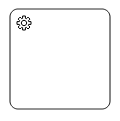 |
| Send | 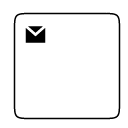 |
| Receive | 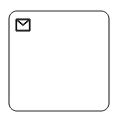 |
| Instantiating Receive | 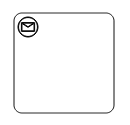 |
| Manual | 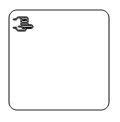 |
| Business Rule | 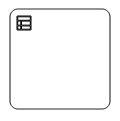 |
| User | 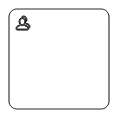 |
| Script | 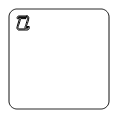 |
Collapsed Subprocess
A Collapsed Sub-Process is a group of tasks, which is used to hide or reveal details of additional levels . The following code explains how to create a Collapsed Sub-Process.
<template>
    <div id="app">
        <ejs-diagram id="diagram" :width='width' :height='height' :nodes='nodes'></ejs-diagram>
    </div>
</template>
<script setup>
import { provide } from "vue";
import { DiagramComponent as EjsDiagram, BpmnDiagrams } from '@syncfusion/ej2-vue-diagrams';

const nodes = [{
    // Position of the node
    offsetX: 250,
    offsetY: 250,
    // Size of the node
    width: 100,
    height: 100,
    //Sets type as Bpmn and shape as Activity
    shape: {
        type: 'Bpmn',
        shape: 'Activity',
        //Sets activity as SubProcess and collapsed of subprocess as true
        activity: {
            activity: 'SubProcess',
            subProcess: {
                collapsed: true
            }
        }
    },
}]

const width = "100%";
const height = "350px";

provide('diagram', [BpmnDiagrams]);
</script>
<style>
@import "../node_modules/@syncfusion/ej2-vue-diagrams/styles/material.css";
</style><template>
<div id="app">
<ejs-diagram id="diagram" :width='width' :height='height' :nodes='nodes'></ejs-diagram>
</div>
</template>
<script>
import { DiagramComponent, BpmnDiagrams } from '@syncfusion/ej2-vue-diagrams';
let nodes = [{
// Position of the node
offsetX: 250,
offsetY: 250,
// Size of the node
width: 100,
height: 100,
//Sets type as Bpmn and shape as Activity
shape: {
type: 'Bpmn',
shape: 'Activity',
//Sets activity as SubProcess and collapsed of subprocess as true
activity: {
activity: 'SubProcess',
subProcess: {
collapsed: true
}
}
},
}]
export default {
name: "App",
components: {
"ejs-diagram": DiagramComponent
},
data() {
return {
width: "100%",
height: "350px",
nodes: nodes,
}
},
provide: {
diagram: [BpmnDiagrams]
}
}
</script>
<style>
@import "../node_modules/@syncfusion/ej2-vue-diagrams/styles/material.css";
</style>Loop
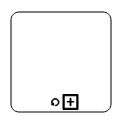
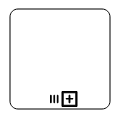
Loop is a task that is internally being looped. The loop property of task allows you to define the type of loop. The default value for loop is none.
You can define the loop property in subprocess BPMN shape as shown in the following code.
<template>
    <div id="app">
        <ejs-diagram id="diagram" :width='width' :height='height' :nodes='nodes'></ejs-diagram>
    </div>
</template>
<script setup>
import { provide } from "vue";
import { DiagramComponent as EjsDiagram, BpmnDiagrams } from '@syncfusion/ej2-vue-diagrams';

const nodes = [{
      // Position of the node
      offsetX: 100,
      offsetY: 100,
      // Size of the node
      width: 100,
      height: 100,
      annotations: [{ content: 'Standard', offset: { x: 0.5, y: 1.2 } }],
      //Sets type as Bpmn and shape as Activity
      shape: {
        type: 'Bpmn',
        shape: 'Activity',
        //Sets activity as Task
        activity: {
          activity: 'Task',
          //Sets loop of the task as Standard
          task: {
            loop: 'Standard',
          },
        },
      },
    },
    {
      // Position of the node
      offsetX: 300,
      offsetY: 100,
      // Size of the node
      width: 100,
      height: 100,
      annotations: [{ content: 'None', offset: { x: 0.5, y: 1.2 } }],
      //Sets type as Bpmn and shape as activity
      shape: {
        type: 'Bpmn',
        shape: 'Activity',
        //Sets Activity as SubProcess
        activity: {
          activity: 'SubProcess',
          //Sets collapsed as true and loop as None
          subProcess: {
            collapsed: true,
            loop: 'None',
          },
        },
      },
    },
    {
      // Position of the node
      offsetX: 500,
      offsetY: 100,
      // Size of the node
      width: 100,
      height: 100,
      annotations: [
        { content: 'ParallelMultiInstance', offset: { x: 0.5, y: 1.2 } },
      ],
      //Sets type as Bpmn and shape as activity
      shape: {
        type: 'Bpmn',
        shape: 'Activity',
        //Sets Activity as SubProcess
        activity: {
          activity: 'SubProcess',
          //Sets collapsed as true and loop as ParallelMultiInstance
          subProcess: {
            collapsed: true,
            loop: 'ParallelMultiInstance',
          },
        },
      },
    },
    {
      // Position of the node
      offsetX: 700,
      offsetY: 100,
      // Size of the node
      width: 100,
      height: 100,
      annotations: [
        { content: 'SequenceMultiInstance', offset: { x: 0.5, y: 1.2 } },
      ],
      //Sets type as Bpmn and shape as activity
      shape: {
        type: 'Bpmn',
        shape: 'Activity',
        //Sets Activity as SubProcess
        activity: {
          activity: 'SubProcess',
          //Sets collapsed as true and loop as SequenceMultiInstance
          subProcess: {
            collapsed: true,
            loop: 'SequenceMultiInstance',
          },
        },
      },
    }]

const width = "100%";
const height = "600px";

provide('diagram', [BpmnDiagrams]);
</script>
<style>
@import "../node_modules/@syncfusion/ej2-vue-diagrams/styles/material.css";
</style><template>
<div id="app">
<ejs-diagram id="diagram" :width='width' :height='height' :nodes='nodes'></ejs-diagram>
</div>
</template>
<script>
import { DiagramComponent, BpmnDiagrams } from '@syncfusion/ej2-vue-diagrams';
let nodes = [{
// Position of the node
offsetX: 100,
offsetY: 100,
// Size of the node
width: 100,
height: 100,
annotations: [{ content: 'Standard', offset: { x: 0.5, y: 1.2 } }],
//Sets type as Bpmn and shape as Activity
shape: {
type: 'Bpmn',
shape: 'Activity',
//Sets activity as Task
activity: {
activity: 'Task',
//Sets loop of the task as Standard
task: {
loop: 'Standard',
},
},
},
},
{
// Position of the node
offsetX: 300,
offsetY: 100,
// Size of the node
width: 100,
height: 100,
annotations: [{ content: 'None', offset: { x: 0.5, y: 1.2 } }],
//Sets type as Bpmn and shape as activity
shape: {
type: 'Bpmn',
shape: 'Activity',
//Sets Activity as SubProcess
activity: {
activity: 'SubProcess',
//Sets collapsed as true and loop as None
subProcess: {
collapsed: true,
loop: 'None',
},
},
},
},
{
// Position of the node
offsetX: 500,
offsetY: 100,
// Size of the node
width: 100,
height: 100,
annotations: [
{ content: 'ParallelMultiInstance', offset: { x: 0.5, y: 1.2 } },
],
//Sets type as Bpmn and shape as activity
shape: {
type: 'Bpmn',
shape: 'Activity',
//Sets Activity as SubProcess
activity: {
activity: 'SubProcess',
//Sets collapsed as true and loop as ParallelMultiInstance
subProcess: {
collapsed: true,
loop: 'ParallelMultiInstance',
},
},
},
},
{
// Position of the node
offsetX: 700,
offsetY: 100,
// Size of the node
width: 100,
height: 100,
annotations: [
{ content: 'SequenceMultiInstance', offset: { x: 0.5, y: 1.2 } },
],
//Sets type as Bpmn and shape as activity
shape: {
type: 'Bpmn',
shape: 'Activity',
//Sets Activity as SubProcess
activity: {
activity: 'SubProcess',
//Sets collapsed as true and loop as SequenceMultiInstance
subProcess: {
collapsed: true,
loop: 'SequenceMultiInstance',
},
},
},
}]
export default {
name: "App",
components: {
"ejs-diagram": DiagramComponent
},
data() {
return {
width: "100%",
height: "600px",
nodes: nodes
}
},
provide: {
diagram: [BpmnDiagrams]
}
}
</script>
<style>
@import "../node_modules/@syncfusion/ej2-vue-diagrams/styles/material.css";
</style>The following table contains various types of BPMN loops.
| Loops | Task | Subprocess |
|---|---|---|
| Standard | 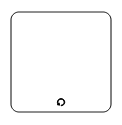 |
 |
| SequenceMultiInstance | 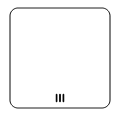 |
 |
| ParallelMultiInstance | 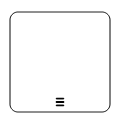 |
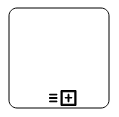 |
Compensation
Compensation is triggered, when operation is partially failed and enabled it with the compensation property of the bpmn activity.
By default, the compensation is set to false.
<template>
    <div id="app">
        <ejs-diagram id="diagram" :width='width' :height='height' :nodes='nodes'></ejs-diagram>
    </div>
</template>
<script setup>
import { provide } from "vue";
import { DiagramComponent as EjsDiagram, BpmnDiagrams } from '@syncfusion/ej2-vue-diagrams';

const nodes = [{
    // Position of the node
    offsetX: 100,
    offsetY: 100,
    // Size of the node
    width: 100,
    height: 100,
    //Sets type as Bpmn and shape as Activity
    shape: {
        type: 'Bpmn',
        shape: 'Activity',
        //Sets activity as Task
        activity: {
            activity: 'Task',
            //Sets compensation of the task as true
            task: {
                compensation: true
            }
        },
    },
},
{
    // Position of the node
    offsetX: 300,
    offsetY: 100,
    // Size of the node
    width: 100,
    height: 100,
    //Sets type as Bpmn and shape as Activity
    shape: {
        type: 'Bpmn',
        shape: 'Activity',
        //Sets activity as SubProcess
        activity: {
            activity: 'SubProcess',
            //Set the collapsed as true and compensation as true
            subProcess: {
                collapsed: true,
                compensation: true
            }
        },
    },
}]

const width = "100%";
const height = "350px";

provide('diagram', [BpmnDiagrams]);
</script>
<style>
@import "../node_modules/@syncfusion/ej2-vue-diagrams/styles/material.css";
</style><template>
<div id="app">
<ejs-diagram id="diagram" :width='width' :height='height' :nodes='nodes'></ejs-diagram>
</div>
</template>
<script>
import { DiagramComponent, BpmnDiagrams } from '@syncfusion/ej2-vue-diagrams';
let nodes = [{
// Position of the node
offsetX: 100,
offsetY: 100,
// Size of the node
width: 100,
height: 100,
//Sets type as Bpmn and shape as Activity
shape: {
type: 'Bpmn',
shape: 'Activity',
//Sets activity as Task
activity: {
activity: 'Task',
//Sets compensation of the task as true
task: {
compensation: true
}
},
},
},
{
// Position of the node
offsetX: 300,
offsetY: 100,
// Size of the node
width: 100,
height: 100,
//Sets type as Bpmn and shape as Activity
shape: {
type: 'Bpmn',
shape: 'Activity',
//Sets activity as SubProcess
activity: {
activity: 'SubProcess',
//Set the collapsed as true and compensation as true
subProcess: {
collapsed: true,
compensation: true
}
},
},
}]
export default {
name: "App",
components: {
"ejs-diagram": DiagramComponent
},
data() {
return {
width: "100%",
height: "350px",
nodes: nodes,
}
},
provide: {
diagram: [BpmnDiagrams]
}
}
</script>
<style>
@import "../node_modules/@syncfusion/ej2-vue-diagrams/styles/material.css";
</style>Call
A call activity is a global subprocess that is reused at various points of the business flow and set it with the call property of the task.By default, the call property is false.
<template>
    <div id="app">
        <ejs-diagram id="diagram" :width='width' :height='height' :nodes='nodes'></ejs-diagram>
    </div>
</template>
<script setup>
import { provide } from "vue";
import { DiagramComponent as EjsDiagram, BpmnDiagrams } from '@syncfusion/ej2-vue-diagrams';

const nodes = [{
    // Position of the node
    offsetX: 250,
    offsetY: 250,
    // Size of the node
    width: 100,
    height: 100,
    //Sets type as Bpmn and shape as Activity
    shape: {
        type: 'Bpmn',
        shape: 'Activity',
        //Sets the activity as task
        activity: {
            activity: 'Task',
            //Sets the call of the task as true
            task: {
                call: true
            }
        },
    },
}]

const width = "100%";
const height = "350px";

provide('diagram', [BpmnDiagrams]);
</script>
<style>
@import "../node_modules/@syncfusion/ej2-vue-diagrams/styles/material.css";
</style><template>
<div id="app">
<ejs-diagram id="diagram" :width='width' :height='height' :nodes='nodes'></ejs-diagram>
</div>
</template>
<script>
import { DiagramComponent, BpmnDiagrams } from '@syncfusion/ej2-vue-diagrams';
let nodes = [{
// Position of the node
offsetX: 250,
offsetY: 250,
// Size of the node
width: 100,
height: 100,
//Sets type as Bpmn and shape as Activity
shape: {
type: 'Bpmn',
shape: 'Activity',
//Sets the activity as task
activity: {
activity: 'Task',
//Sets the call of the task as true
task: {
call: true
}
},
},
}]
export default {
name: "App",
components: {
"ejs-diagram": DiagramComponent
},
data() {
return {
width: "100%",
height: "350px",
nodes: nodes,
}
},
provide: {
diagram: [BpmnDiagrams]
}
}
</script>
<style>
@import "../node_modules/@syncfusion/ej2-vue-diagrams/styles/material.css";
</style>NOTE
This Property is only applicable for task Type activity.
Ad-Hoc
An adhoc subprocess is a group of tasks that are executed in any order or skipped in order to fulfill the end condition and set it with the adhoc property of subprocess. By default, the adhoc property is false.
<template>
    <div id="app">
        <ejs-diagram id="diagram" :width='width' :height='height' :nodes='nodes'></ejs-diagram>
    </div>
</template>
<script setup>
import { provide } from "vue";
import { DiagramComponent as EjsDiagram, BpmnDiagrams } from '@syncfusion/ej2-vue-diagrams';

const nodes = [{
    // Position of the node
    offsetX: 250,
    offsetY: 250,
    // Size of the node
    width: 100,
    height: 100,
    //Sets type as Bpmn and shape as Activity
    shape: {
        type: 'Bpmn',
        shape: 'Activity',
        //Sets activity as SubProcess
        activity: {
            activity: 'SubProcess',
            //Sets collapsed as true and adhoc as true
            subProcess: {
                collapsed: true,
                adhoc: true
            }
        },
    },
}]

const width = "100%";
const height = "350px";

provide('diagram', [BpmnDiagrams]);
</script>
<style>
@import "../node_modules/@syncfusion/ej2-vue-diagrams/styles/material.css";
</style><template>
<div id="app">
<ejs-diagram id="diagram" :width='width' :height='height' :nodes='nodes'></ejs-diagram>
</div>
</template>
<script>
import { DiagramComponent, BpmnDiagrams } from '@syncfusion/ej2-vue-diagrams';
let nodes = [{
// Position of the node
offsetX: 250,
offsetY: 250,
// Size of the node
width: 100,
height: 100,
//Sets type as Bpmn and shape as Activity
shape: {
type: 'Bpmn',
shape: 'Activity',
//Sets activity as SubProcess
activity: {
activity: 'SubProcess',
//Sets collapsed as true and adhoc as true
subProcess: {
collapsed: true,
adhoc: true
}
},
},
}]
export default {
name: "App",
components: {
"ejs-diagram": DiagramComponent
},
data() {
return {
width: "100%",
height: "350px",
nodes: nodes
}
},
provide: {
diagram: [BpmnDiagrams]
}
}
</script>
<style>
@import "../node_modules/@syncfusion/ej2-vue-diagrams/styles/material.css";
</style>Boundary
Boundary represents the type of task that is being processed. The boundary property of subprocess allows you to define the type of boundary. By default, it is set as default.
<template>
    <div id="app">
        <ejs-diagram id="diagram" :width='width' :height='height' :nodes='nodes'></ejs-diagram>
    </div>
</template>
<script setup>
import { provide } from "vue";
import { DiagramComponent as EjsDiagram, BpmnDiagrams } from '@syncfusion/ej2-vue-diagrams';

const nodes = [{
        // Position of the node
        offsetX: 250,
        offsetY: 250,
        // Size of the node
        width: 100,
        height: 100,
        //Sets type as Bpmn and shape as Activity
        shape: {
            type: 'Bpmn',
            shape: 'Activity',
            //Sets activity as SubProcess
            activity: {
                activity: 'SubProcess',
                //Sets collapsed as true and boundary as Call
                subProcess: {
                    collapsed: true,
                    boundary: 'Call'
                }
            },
        },
    },
    {
        // Position of the node
        offsetX: 450,
        offsetY: 250,
        // Size of the node
        width: 100,
        height: 100,
        //Sets type as Bpmn and shape as Activity
        shape: {
            type: 'Bpmn',
            shape: 'Activity',
            //Sets activity as SubProcess
            activity: {
                activity: 'SubProcess',
                //Sets collapsed as true and boundary as Event
                subProcess: {
                    collapsed: true,
                    boundary: 'Event'
                }
            },
        },
    },
    {
        // Position of the node
        offsetX: 650,
        offsetY: 250,
        // Size of the node
        width: 100,
        height: 100,
        //Sets type as Bpmn and shape as Activity
        shape: {
            type: 'Bpmn',
            shape: 'Activity',
            //Sets activity as SubProcess
            activity: {
                activity: 'SubProcess',
                //Sets collapsed as true and boundary as Default
                subProcess: {
                    collapsed: false,
                    boundary: 'Default'
                }
            },
        },
    }]

const width = "100%";
const height = "600px";

provide('diagram', [BpmnDiagrams]);
</script>
<style>
@import "../node_modules/@syncfusion/ej2-vue-diagrams/styles/material.css";
</style><template>
<div id="app">
<ejs-diagram id="diagram" :width='width' :height='height' :nodes='nodes'></ejs-diagram>
</div>
</template>
<script>
import { DiagramComponent, BpmnDiagrams } from '@syncfusion/ej2-vue-diagrams';
let nodes = [{
// Position of the node
offsetX: 250,
offsetY: 250,
// Size of the node
width: 100,
height: 100,
//Sets type as Bpmn and shape as Activity
shape: {
type: 'Bpmn',
shape: 'Activity',
//Sets activity as SubProcess
activity: {
activity: 'SubProcess',
//Sets collapsed as true and boundary as Call
subProcess: {
collapsed: true,
boundary: 'Call'
}
},
},
},
{
// Position of the node
offsetX: 450,
offsetY: 250,
// Size of the node
width: 100,
height: 100,
//Sets type as Bpmn and shape as Activity
shape: {
type: 'Bpmn',
shape: 'Activity',
//Sets activity as SubProcess
activity: {
activity: 'SubProcess',
//Sets collapsed as true and boundary as Event
subProcess: {
collapsed: true,
boundary: 'Event'
}
},
},
},
{
// Position of the node
offsetX: 650,
offsetY: 250,
// Size of the node
width: 100,
height: 100,
//Sets type as Bpmn and shape as Activity
shape: {
type: 'Bpmn',
shape: 'Activity',
//Sets activity as SubProcess
activity: {
activity: 'SubProcess',
//Sets collapsed as true and boundary as Default
subProcess: {
collapsed: false,
boundary: 'Default'
}
},
},
}]
export default {
name: "App",
components: {
"ejs-diagram": DiagramComponent
},
data() {
return {
width: "100%",
height: "600px",
nodes: nodes
}
},
provide: {
diagram: [BpmnDiagrams]
}
}
</script>
<style>
@import "../node_modules/@syncfusion/ej2-vue-diagrams/styles/material.css";
</style>The following table contains various types of BPMN boundaries.
| Boundary | Image |
|---|---|
| Call | 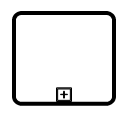 |
| Event | 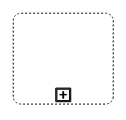 |
| Default | 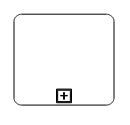 |
SubProcess types
The different types of subprocess are as follows:
* Event subprocess
* Transaction
Event subprocess
A subprocess is defined as an event subprocess, when it is triggered by an event. An event subprocess is placed within another subprocess which is not part of the normal flow of its parent process. You can set event to a subprocess with the event and trigger property of the subprocess. The type property of subprocess allows you to define the type of subprocess whether it should be event subprocess or transaction subprocess.
<template>
    <div id="app">
        <ejs-diagram id="diagram" :width='width' :height='height' :nodes='nodes'></ejs-diagram>
    </div>
</template>
<script setup>
import { provide } from "vue";
import { DiagramComponent as EjsDiagram, BpmnDiagrams } from '@syncfusion/ej2-vue-diagrams';

const nodes = [{
  // Position of the node
  offsetX: 250,
  offsetY: 250,
  // Size of the node
  width: 100,
  height: 100,
  //Sets type as Bpmn and shape as activity
  shape: {
    type: 'Bpmn',
    shape: 'Activity',
    //Sets activity as SubProcess
    activity: {
      activity: 'SubProcess',
      //Sets the collapsed as true and type as Event
      subProcess: {
        collapsed: false,
        type: 'Event',
        //Sets event as Start and trigger as Message
        events: [
          {
            id: 'event',
            event: 'Start',
            trigger: 'Message',
            offset: { x: 0.5, y: 0 },
          },
        ],
      },
    },
  },
}]

const width = "100%"
const height = "600px";

provide('diagram', [BpmnDiagrams]);
</script>
<style>
@import "../node_modules/@syncfusion/ej2-vue-diagrams/styles/material.css";
</style><template>
<div id="app">
<ejs-diagram id="diagram" :width='width' :height='height' :nodes='nodes'></ejs-diagram>
</div>
</template>
<script>
import { DiagramComponent, BpmnDiagrams } from '@syncfusion/ej2-vue-diagrams';
let nodes = [{
// Position of the node
offsetX: 250,
offsetY: 250,
// Size of the node
width: 100,
height: 100,
//Sets type as Bpmn and shape as activity
shape: {
type: 'Bpmn',
shape: 'Activity',
//Sets activity as SubProcess
activity: {
activity: 'SubProcess',
//Sets the collapsed as true and type as Event
subProcess: {
collapsed: false,
type: 'Event',
//Sets event as Start and trigger as Message
events: [
{
id: 'event',
event: 'Start',
trigger: 'Message',
offset: { x: 0.5, y: 0 },
},
],
},
},
},
}]
export default {
name: "App",
components: {
"ejs-diagram": DiagramComponent
},
data() {
return {
width: "100%",
height: "600px",
nodes: nodes,
}
},
provide: {
diagram: [BpmnDiagrams]
}
}
</script>
<style>
@import "../node_modules/@syncfusion/ej2-vue-diagrams/styles/material.css";
</style>Transaction Subprocess
-
transactionis a set of activities that logically belong together, in which all contained activities must complete their parts of the transaction; otherwise the process is undone. The execution result of a transaction is one of Successful Completion, Unsuccessful Completion (Cancel), and Hazard (Exception). Theeventsproperty of subprocess allows to represent these results as an event attached to the subprocess. -
The event object allows you to define the type of event by which the subprocess will be triggered. The name of the event can be defined to identify the event at runtime.
-
The event’s offset property is used to set the fraction/ratio (relative to parent) that defines the position of the event shape.
-
The trigger property defines the type of the event trigger.
-
You can also use define ports and labels to subprocess events by using event’s ports and labels properties.
<template>
    <div id="app">
        <ejs-diagram id="diagram" :width='width' :height='height' :nodes='nodes'></ejs-diagram>
    </div>
</template>
<script setup>
import { provide } from "vue";
import { DiagramComponent as EjsDiagram, BpmnDiagrams } from '@syncfusion/ej2-vue-diagrams';

const nodes = [{
      // Position of the node
      offsetX: 350,
      offsetY: 250,
      // Size of the node
      width: 100,
      height: 100,
      //Sets type as Bpmn and shape as activity
      shape: {
        type: 'Bpmn',
        shape: 'Activity',
        //Sets activity as SubProcess
        activity: {
          activity: 'SubProcess',
          //Sets the collapsed as true and type as Event
          subProcess: {
            collapsed: true,
            type: 'Transaction',
            //Sets transaction
            transaction: {
              success: {
                id: 'success',
                event: 'Start',
                trigger: 'None',
              },
              failure: {
                id: 'failure',
                event: 'ThrowingIntermediate',
                trigger: 'Error',
              },
              cancel: {
                id: 'cancel',
                event: 'End',
                trigger: 'Cancel',
              },
            },
          },
        },
      },
    }]

const width = "100%";
const height = "600px";

provide('diagram', [BpmnDiagrams]);
</script>
<style>
@import "../node_modules/@syncfusion/ej2-vue-diagrams/styles/material.css";
</style><template>
<div id="app">
<ejs-diagram id="diagram" :width='width' :height='height' :nodes='nodes'></ejs-diagram>
</div>
</template>
<script>
import { DiagramComponent, BpmnDiagrams } from '@syncfusion/ej2-vue-diagrams';
const nodes = [{
// Position of the node
offsetX: 350,
offsetY: 250,
// Size of the node
width: 100,
height: 100,
//Sets type as Bpmn and shape as activity
shape: {
type: 'Bpmn',
shape: 'Activity',
//Sets activity as SubProcess
activity: {
activity: 'SubProcess',
//Sets the collapsed as true and type as Event
subProcess: {
collapsed: true,
type: 'Transaction',
//Sets transaction
transaction: {
success: {
id: 'success',
event: 'Start',
trigger: 'None',
},
failure: {
id: 'failure',
event: 'ThrowingIntermediate',
trigger: 'Error',
},
cancel: {
id: 'cancel',
event: 'End',
trigger: 'Cancel',
},
},
},
},
},
}]
export default {
name: "App",
components: {
"ejs-diagram": DiagramComponent
},
data() {
return {
width: "100%",
height: "600px",
nodes: nodes,
}
},
provide: {
diagram: [BpmnDiagrams]
}
}
</script>
<style>
@import "../node_modules/@syncfusion/ej2-vue-diagrams/styles/material.css";
</style>