How can I help you?
Getting Started with the Vue Accumulation Chart Component in Vue 3
23 Mar 202612 minutes to read
This article provides a step-by-step guide for setting up a Vite project with JavaScript and integrating the Syncfusion® Vue Accumulation Chart component using either the Composition API or the Options API.
The Composition API organizes related logic into reusable composition functions and is recommended for larger or composition-oriented code bases. The Options API organizes component logic with data, methods, and life cycle hooks and may be preferable for smaller components or teams familiar with Vue 2 patterns.
Prerequisites
System requirements for Syncfusion® Vue UI components
Set up the Vite project
A recommended approach for beginning with Vue is to scaffold a project using Vite. To create a new Vite project, use one of the commands that are specific to either NPM or Yarn.
npm create vite@latestor
yarn create viteUse the interactive setup and follow these steps:
- Define the project name. For this article, use
my-project.? Project name: » my-project - Select
Vueas the framework to create a Vue 3 project.
? Select a framework: » - Use arrow-keys. Return to submit.
Vanilla
> Vue
  React
  Preact
  Lit
  Svelte
Others- Choose
JavaScriptas the project variant.
? Select a variant: » - Use arrow-keys. Return to submit.
> JavaScript
  TypeScript
  Customize with create-vue ↗
Nuxt ↗- After creating the project, install dependencies by running:
cd my-project
npm install
or
cd my-project
yarn install
Now that my-project is ready to run with default settings, let’s add Syncfusion® components to the project.
Add Syncfusion® Vue packages
Syncfusion® Vue component packages are available at npmjs.com. To use Syncfusion® Vue components in the project, install the corresponding npm package.
This article uses the Vue Accumulation Chart component as an example. To use the Vue Accumulation Chart component in the project, install the @syncfusion/ej2-vue-charts package with:
npm install @syncfusion/ej2-vue-chartsor
yarn add @syncfusion/ej2-vue-chartsNote: npm v5+ saves packages to
dependenciesby default;--saveis not required.
Add Syncfusion® Vue component
Follow the below steps to add the Vue Accumulation Chart component using Composition API or Options API:
1.First, import and register the Accumulation Chart component and its child directives in the script section of the src/App.vue file. If you are using the Composition API, you should add the setup attribute to the script tag to indicate that Vue will be using the Composition API.
<script setup>
import { provide } from 'vue';
import { AccumulationChartComponent, AccumulationSeriesCollectionDirective as EAccumulationSeriesCollection, AccumulationSeriesDirective as EAccumulationSeries, AccumulationLegend,
PieSeries, AccumulationTooltip } from "@syncfusion/ej2-vue-charts";

let accumulationchart = [PieSeries, AccumulationLegend, AccumulationTooltip];
provide('accumulationchart', accumulationchart);
</script><script>
import { AccumulationChartComponent, AccumulationSeriesCollectionDirective, AccumulationSeriesDirective, AccumulationLegend,
PieSeries, AccumulationTooltip } from "@syncfusion/ej2-vue-charts";
//Component registration
export default {
name: "App",
components: {
"ejs-accumulationchart": AccumulationChartComponent,
"e-accumulation-series-collection": AccumulationSeriesCollectionDirective,
"e-accumulation-series": AccumulationSeriesDirective
}
}
</script>- In the
templatesection, define the Accumulation Chart component with thedataSourceproperty.
<template>
    <ejs-accumulationchart id="container" :legendSettings="legendSettings" :tooltip="tooltip">
        <e-accumulation-series-collection>
            <e-accumulation-series :dataSource='data' xName='x' yName='y' innerRadius="20%"> </e-accumulation-series>
        </e-accumulation-series-collection>
    </ejs-accumulationchart>
</template>
3.Declare the values for the dataSource property in the script section.
<script setup>
let data = [
    { x: 'Argentina', y: 505370 },
    { x: 'Belgium', y: 551500 },
    { x: 'Cuba', y: 312685 },
    { x: 'Dominican Republic', y: 350000 },
    { x: 'Egypt', y: 301000 },
    { x: 'Kazakhstan', y: 300000 },
    { x: 'Somalia', y: 357022 }
];
let legendSettings = { visible: true };
let tooltip = { enable: true };
</script><script>
data() {
return {
data: [
{ x: 'Argentina', y: 505370 },
{ x: 'Belgium', y: 551500 },
{ x: 'Cuba', y: 312685 },
{ x: 'Dominican Republic', y: 350000 },
{ x: 'Egypt', y: 301000 },
{ x: 'Kazakhstan', y: 300000 },
{ x: 'Somalia', y: 357022 }
],
legendSettings: { visible: true },
tooltip: {
enable: true
}
};
}
</script>Here is the summarized code for the above steps in the src/App.vue file:
<template>
    <ejs-accumulationchart id="container" :legendSettings="legendSettings" :tooltip="tooltip">
        <e-accumulation-series-collection>
            <e-accumulation-series :dataSource='data' xName='x' yName='y' innerRadius="20%"> </e-accumulation-series>
        </e-accumulation-series-collection>
    </ejs-accumulationchart>
</template>

<script setup>
import { provide } from 'vue';
import { AccumulationChartComponent, AccumulationSeriesCollectionDirective as EAccumulationSeriesCollection, AccumulationSeriesDirective as EAccumulationSeries, AccumulationLegend,
PieSeries, AccumulationTooltip } from "@syncfusion/ej2-vue-charts";

let data = [
    { x: 'Argentina', y: 505370 },
    { x: 'Belgium', y: 551500 },
    { x: 'Cuba', y: 312685 },
    { x: 'Dominican Republic', y: 350000 },
    { x: 'Egypt', y: 301000 },
    { x: 'Kazakhstan', y: 300000 },
    { x: 'Somalia', y: 357022 }
];
let legendSettings = { visible: true };
let tooltip = { enable: true };
let accumulationchart = [PieSeries, AccumulationLegend, AccumulationTooltip];
provide('accumulationchart', accumulationchart);
</script><template>
<ejs-accumulationchart id="container" :legendSettings="legendSettings" :tooltip="tooltip">
<e-accumulation-series-collection>
<e-accumulation-series :dataSource='data' xName='x' yName='y' innerRadius="20%"> </e-accumulation-series>
</e-accumulation-series-collection>
</ejs-accumulationchart>
</template>
<script>
import { AccumulationChartComponent, AccumulationSeriesCollectionDirective, AccumulationSeriesDirective, AccumulationLegend,
PieSeries, AccumulationTooltip } from "@syncfusion/ej2-vue-charts";
//Component registration
export default {
name: "App",
components: {
"ejs-accumulationchart": AccumulationChartComponent,
"e-accumulation-series-collection": AccumulationSeriesCollectionDirective,
"e-accumulation-series": AccumulationSeriesDirective
},
data() {
return {
data: [
{ x: 'Argentina', y: 505370 },
{ x: 'Belgium', y: 551500 },
{ x: 'Cuba', y: 312685 },
{ x: 'Dominican Republic', y: 350000 },
{ x: 'Egypt', y: 301000 },
{ x: 'Kazakhstan', y: 300000 },
{ x: 'Somalia', y: 357022 }
],
legendSettings: { visible: true },
tooltip: {
enable: true
},
tooltip: {
enable: true
},
},
provide: {
accumulationchart: [ PieSeries, AccumulationLegend, AccumulationTooltip ]
},
};
};
</script>Run the project
To run the project, use the following command:
npm run devor
yarn run devThe output will appear as follows:
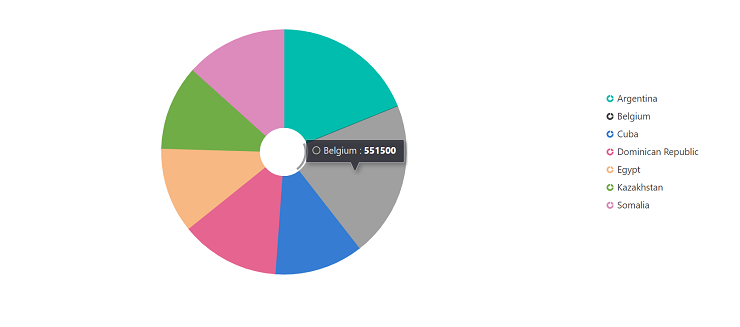
Verify the chart
After starting the development server, confirm the chart renders correctly:
- Start the development server with
npm run devoryarn run dev. - Open the project URL shown in the terminal (commonly
http://localhost:5173) and verify the chart displays with legend and tooltip. - If the chart does not render, open the browser console and check for errors related to missing modules, incorrect imports, or incompatible Vue versions.
Troubleshooting (common issues)
- Chart not rendering: ensure chart modules (for example,
PieSeries,AccumulationLegend,AccumulationTooltip) are provided viaprovide(Composition API) orprovide/provide:(Options API). - Wrong package version: confirm
@syncfusion/ej2-vue-chartsmatches the project’s Vue version. - Missing child directives: ensure
AccumulationSeriesCollectionDirectiveandAccumulationSeriesDirectiveare registered when using directives. - Console errors: inspect import paths and verify dependencies are installed.
Sample: vue-3-accumulation-chart-getting-started.
For migrating from Vue 2 to Vue 3, refer to themigrationdocumentation.