How can I help you?
Getting Started with React MaskedTextBox component
10 Feb 20268 minutes to read
This section explains the steps required to create a simple React MaskedTextBox component and demonstrate its basic usage in a React environment.
Ready to streamline your Syncfusion® React development? Discover the full potential of Syncfusion® React components with Syncfusion® AI Coding Assistant. Effortlessly integrate, configure, and enhance your projects with intelligent, context-aware code suggestions, streamlined setups, and real-time insights—all seamlessly integrated into your preferred AI-powered IDEs like VS Code, Cursor, Syncfusion® CodeStudio and more. Explore Syncfusion® AI Coding Assistant.
Setup for local development
Easily set up a React application using create-vite-app, which provides a faster development environment, smaller bundle sizes, and optimized builds compared to traditional tools like create-react-app. For detailed steps, refer to the Vite installation instructions. Vite sets up your environment using JavaScript and optimizes your application for production.
Note: To create a React application using
create-react-app, refer to this documentation for more details.
To create a new React application, run the following command.
npm create vite@latest my-appThis command will prompt you for a few settings for the new project, such as selecting a framework and a variant.
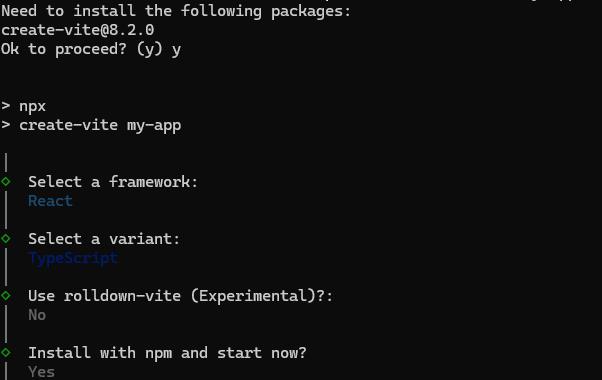
To set up a React application in TypeScript environment, run the following command.
npm create vite@latest my-app -- --template react-ts
cd my-app
npm run dev
To set up a React application in JavaScript environment, run the following command.
npm create vite@latest my-app -- --template react
cd my-app
npm run dev
Adding Syncfusion® MaskedTextBox packages
All the available Essential® JS 2 packages are published in the npmjs.com public registry.
To install the MaskedTextBox component, use the following command
npm install @syncfusion/ej2-react-inputs --saveThe –save will instruct NPM to include the MaskedTextBox package inside of the dependencies section of the package.json.
Adding CSS reference
The following CSS files are available in the ../node_modules/@syncfusion package folder. Add these as references in src/App.css.
@import "../node_modules/@syncfusion/ej2-base/styles/tailwind3.css";
@import "../node_modules/@syncfusion/ej2-react-inputs/styles/tailwind3.css";
To refer App.css in the application then import it in the src/App.tsx file.
Adding MaskedTextBox component
The React MaskedTextBox component can be added to the application by following these steps. To get started, add the MaskedTextBox component to the src/App.tsx file using the following code.
The following maskedtextbox code should be placed in the src/App.tsx file.
[Class-component]
import * as React from "react";
import { MaskedTextBoxComponent } from '@syncfusion/ej2-react-inputs';
import './App.css';

export default class App extends React.Component<{}, {}> {
  public render() {
    return (
      <MaskedTextBoxComponent placeholder="Enter Name"></MaskedTextBoxComponent>
    );
  }
};
[Functional-component]
import * as React from "react";
import { MaskedTextBoxComponent } from '@syncfusion/ej2-react-inputs';
import './App.css';

export default function App() {
  return (
    <MaskedTextBoxComponent placeholder="Enter Name"></MaskedTextBoxComponent>
  );
};
Set the Mask
Set the input mask using the mask property to validate user input. For details about mask tokens and configuration, see the mask configuration guide at mask-configuration.
The following example demonstrates the 0 mask token, which requires a single digit from 0 to 9 for each position.
[Class-component]
import * as React from "react";
import { MaskedTextBoxComponent } from '@syncfusion/ej2-react-inputs';
import './App.css';

export default class App extends React.Component<{}, {}> {
  public render() {
    return (
      <MaskedTextBoxComponent mask={'000-000-0000'}></MaskedTextBoxComponent>
    );
  }
};
[Functional-component]
import * as React from "react";
import { MaskedTextBoxComponent } from '@syncfusion/ej2-react-inputs';
import './App.css';

export default function App() {
  return (
    <MaskedTextBoxComponent mask={'000-000-0000'}></MaskedTextBoxComponent>
  );
};
Run the application
Run the npm run dev command in the terminal to start the development server. This command compiles your code and serves the application locally, opening it in the browser.
npm run devThe output appears as follows.
[Class-component]
import { MaskedTextBoxComponent } from '@syncfusion/ej2-react-inputs';
import * as React from "react";
import * as ReactDOM from "react-dom";
// initializes MaskedTextBox component
// sets value to the MaskedTextBox
export default class App extends React.Component {
    render() {
        return (<div>
            <label className='label'>Enter the mobile number</label>
            <MaskedTextBoxComponent mask={'000-000-0000'}/>
          </div>);
    }
}
;
ReactDOM.render(<App />, document.getElementById('maskedContainer'));
import { MaskedTextBoxComponent } from '@syncfusion/ej2-react-inputs';
import * as React from "react";
import * as ReactDOM from "react-dom";
// initializes MaskedTextBox component
// sets value to the MaskedTextBox
export default class App extends React.Component<{}, {}> {
public render() {
return (
<div>
<label className='label'>Enter the mobile number</label>
<MaskedTextBoxComponent mask={'000-000-0000'} />
</div>
);
}
};
ReactDOM.render(<App />, document.getElementById('maskedContainer'));[Functional-component]
import { MaskedTextBoxComponent } from '@syncfusion/ej2-react-inputs';
import * as React from 'react';
import * as ReactDOM from 'react-dom';
// initializes MaskedTextBox component
// sets value to the MaskedTextBox
function App() {
    return (<div>
      <label className="label">Enter the mobile number</label>
      <MaskedTextBoxComponent mask={'000-000-0000'}/>
    </div>);
}
ReactDOM.render(<App />, document.getElementById('maskedContainer'));
import { MaskedTextBoxComponent } from '@syncfusion/ej2-react-inputs';
import * as React from 'react';
import * as ReactDOM from 'react-dom';
// initializes MaskedTextBox component
// sets value to the MaskedTextBox
function App() {
return (
<div>
<label className="label">Enter the mobile number</label>
<MaskedTextBoxComponent mask={'000-000-0000'} />
</div>
);
}
ReactDOM.render(<App />, document.getElementById('maskedContainer'));Refer to the React MaskedTextBox feature tour page for its groundbreaking feature representations. You can also explore our React MaskedTextBox component example that shows how to render the MaskedTextBox in React.