How can I help you?
Swimlane in Symbol Palette
17 Mar 202620 minutes to read
The React Diagram component provides comprehensive support for adding swimlane shapes and phases to the symbol palette. Swimlanes help organize process flows by grouping related activities into lanes, making complex diagrams more readable and structured.
Add Swimlane to Palette
The diagram component supports adding both swimlane containers and individual phases to the symbol palette. This enables users to drag and drop pre-configured swimlane elements into their diagrams.
import * as React from "react";
import * as ReactDOM from "react-dom";
import { SymbolPaletteComponent } from "@syncfusion/ej2-react-diagrams";
//Initialize the flowshapes for the symbol palette
export function getswimlaneShapes() {
    let swimlaneShapes = [
        {
            id: 'stackCanvas1',
            shape: {
                type: 'SwimLane', lanes: [
                    {
                        id: 'lane1',
                        style: { strokeColor: 'black' }, height: 60, width: 150,
                        header: { width: 50, height: 50, style: { strokeColor: 'black', fontSize: 11 } },
                    }
                ],
                orientation: 'Horizontal', isLane: true
            },
            height: 60,
            width: 140,
            offsetX: 70,
            offsetY: 30,
        }, {
            id: 'stackCanvas2',
            shape: {
                type: 'SwimLane',
                lanes: [
                    {
                        id: 'lane1',
                        style: { strokeColor: 'black' }, height: 150, width: 60,
                        header: { width: 50, height: 50, style: { strokeColor: 'black', fontSize: 11 } },
                    }
                ],
                orientation: 'Vertical', isLane: true
            },
            height: 140,
            width: 60,
            // style: { fill: '#f5f5f5' },
            offsetX: 70,
            offsetY: 30,
        }, {
            id: 'verticalPhase',
            shape: {
                type: 'SwimLane',
                phases: [{ style: { strokeWidth: 1, strokeDashArray: '3,3', strokeColor: '#A9A9A9' }, }],
                annotations: [{ text: '' }],
                orientation: 'Vertical', isPhase: true
            },
            height: 60,
            width: 140
        }, {
            id: 'horizontalPhase',
            shape: {
                type: 'SwimLane',
                phases: [{ style: { strokeWidth: 1, strokeDashArray: '3,3', strokeColor: '#A9A9A9' }, }],
                annotations: [{ text: '' }],
                orientation: 'Horizontal', isPhase: true
            },
            height: 60,
            width: 140
        }
    ];
    return swimlaneShapes;
}
function setPaletteNodeDefaults(node) {
    node.width = 70;
    node.height = 70;
    node.style.strokeColor = '#3A3A3A';
}
// Initialize the Symbol palette
function App() {
    return (<SymbolPaletteComponent id="container" expandMode={'Multiple'} palettes={[
            {
                id: 'swimlane',
                expanded: true,
                symbols: getswimlaneShapes(),
                title: 'Swimlane Shapes',
            },
        ]} symbolPreview={{
            height: 70,
            width: 70,
            offset: {
                x: 0.5,
                y: 0.5
            },
        }} symbolMargin={{
            left: 12,
            right: 12,
            top: 12,
            bottom: 12
        }}
    //Returns the default properties of node
    getNodeDefaults={setPaletteNodeDefaults} getSymbolInfo={(symbol) => {
            return {
                fit: true
            };
        }}/>);
}
const root = ReactDOM.createRoot(document.getElementById('diagram'));
root.render(<App />);
import * as React from "react";
import * as ReactDOM from "react-dom";
import { NodeModel, SymbolInfo, SymbolPaletteComponent } from "@syncfusion/ej2-react-diagrams";
//Initialize the flowshapes for the symbol palette
export function getswimlaneShapes(): NodeModel[] {
let swimlaneShapes : NodeModel[]= [
{
id: 'stackCanvas1',
shape: {
type: 'SwimLane', lanes: [
{
id: 'lane1',
style: { strokeColor: 'black' }, height: 60, width: 150,
header: { width: 50, height: 50, style: { strokeColor: 'black', fontSize: 11 } },
}
],
orientation: 'Horizontal', isLane: true
},
height: 60,
width: 140,
offsetX: 70,
offsetY: 30,
}, {
id: 'stackCanvas2',
shape: {
type: 'SwimLane',
lanes: [
{
id: 'lane1',
style: { strokeColor: 'black' }, height: 150, width: 60,
header: { width: 50, height: 50, style: { strokeColor: 'black', fontSize: 11 } },
}
],
orientation: 'Vertical', isLane: true
},
height: 140,
width: 60,
// style: { fill: '#f5f5f5' },
offsetX: 70,
offsetY: 30,
}, {
id: 'verticalPhase',
shape: {
type: 'SwimLane',
phases: [{ style: { strokeWidth: 1, strokeDashArray: '3,3', strokeColor: '#A9A9A9' }, }],
annotations: [{ text: '' }],
orientation: 'Vertical', isPhase: true
},
height: 60,
width: 140
}, {
id: 'horizontalPhase',
shape: {
type: 'SwimLane',
phases: [{ style: { strokeWidth: 1, strokeDashArray: '3,3', strokeColor: '#A9A9A9' }, }],
annotations: [{ text: '' }],
orientation: 'Horizontal', isPhase: true
},
height: 60,
width: 140
}
];
return swimlaneShapes;
}
function setPaletteNodeDefaults(node: NodeModel): void {
node.width = 70;
node.height = 70;
node.style.strokeColor = '#3A3A3A';
}
// Initialize the Symbol palette
function App() {
return (
<SymbolPaletteComponent
id="container"
expandMode={'Multiple'}
palettes={[
{
id: 'swimlane',
expanded: true,
symbols: getswimlaneShapes(),
title: 'Swimlane Shapes',
},
]}
symbolPreview={{
height: 70,
width: 70,
offset: {
x: 0.5,
y: 0.5
},
}}
symbolMargin={{
left: 12,
right: 12,
top: 12,
bottom: 12
}}
//Returns the default properties of node
getNodeDefaults={setPaletteNodeDefaults}
getSymbolInfo = {
(symbol: NodeModel): SymbolInfo => {
return {
fit: true
};
}
}
/>
);
}
const root = ReactDOM.createRoot(document.getElementById('diagram'));
root.render(<App />);Drag and Drop Swimlane to Palette
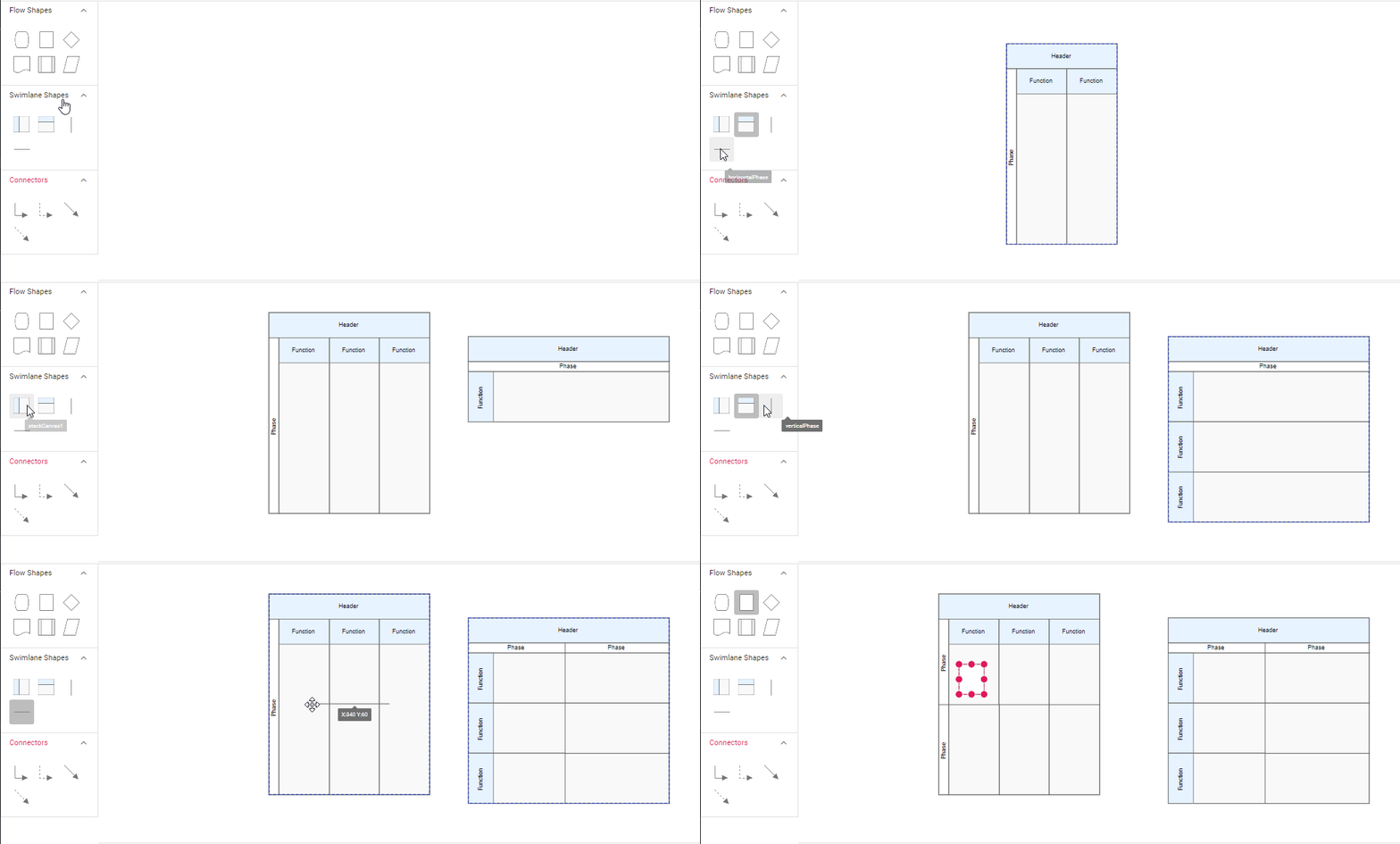
- The drag and drop support for swimlane shapes has been provided.
- Horizontal lanes can be added to vertical swimlanes, and vice versa.
- The phase will only drop on swimlane shape with same orientation. The following image illustrates how to drag symbol from palette.