How can I help you?
Connector Annotations in React Diagram Component
9 Feb 202616 minutes to read
Connector annotations are text labels that can be positioned along connector paths to provide descriptive information or context. These annotations offer flexible positioning and styling options to enhance diagram readability and communication.
Annotations on connectors can be precisely positioned and customized using the following properties of the Annotation class:
- Offset - Controls position along the connector path (0 to 1).
- Alignment - Aligns annotation relative to connector segments.
- Displacement - Moves annotation away from its calculated position.
- SegmentAngle - Rotates annotation based on connector direction.
- HorizontalAlignment - Controls horizontal positioning.
- VerticalAlignment - Controls vertical positioning.
- Margin - Adds spacing around the annotation.
Annotation offset
The offset for pathAnnotation accepts a number value ranging from 0 to 1, representing the position along the connector path from source to target point. An offset value of 0 positions the annotation at the source point, while 1 positions it at the target point. The default offset value is 0.5, which centers the annotation on the connector.
The following code example demonstrates how to configure the offset for connector annotations:
import * as React from "react";
import * as ReactDOM from "react-dom";
import { DiagramComponent } from "@syncfusion/ej2-react-diagrams";
// A node is created and stored in nodes array.
let connector = [{
    sourcePoint: { x: 200, y: 100 },
    targetPoint: { x: 300, y: 200 },
    type: 'Straight',
    //Path annotation offset
    annotations: [{ content: 'annotation', offset: 0.2 }],
    }];
// initialize Diagram component
function App() {
    return (<DiagramComponent id="container" width={'100%'} height={'600px'} connectors={connector}/>);
}
const root = ReactDOM.createRoot(document.getElementById('diagram'));
root.render(<App />);
import * as React from "react";
import * as ReactDOM from "react-dom";
import {
DiagramComponent,
ConnectorModel
} from "@syncfusion/ej2-react-diagrams";
// A node is created and stored in nodes array.
let connector: ConnectorModel[] = [{
sourcePoint: { x: 200, y: 100 },
targetPoint: { x: 300, y: 200 },
type: 'Straight',
//Path annotation offset
annotations: [{ content: 'annotation', offset: 0.2 }],
}];
// initialize Diagram component
function App() {
return (
<DiagramComponent
id="container"
width={'100%'}
height={'600px'}
connectors={connector}
/>
);
}
const root = ReactDOM.createRoot(document.getElementById('diagram'));
root.render(<App />);The following image shows the position of the annotation with respect to different offsets.

Annotation alignment
Connector annotations can be aligned relative to their segment path using the alignmentproperty. This property offers three alignment options:
- Before - Positions the annotation before the calculated offset point.
- Center - Centers the annotation at the offset point (default).
- After - Positions the annotation after the calculated offset point.
The following code example illustrates how to align connector annotations.
import * as React from "react";
import * as ReactDOM from "react-dom";
import { DiagramComponent } from "@syncfusion/ej2-react-diagrams";
// A node is created and stored in nodes array.
let node = [{
        id: 'node1',
        // Position of the node
        offsetX: 100,
        offsetY: 100,
        // Size of the node
        width: 100,
        height: 100,
        // Sets the annotation for the node
        annotations: [{
                content: 'Task1'
            }]
    }, {
        id: 'node2',
        // Position of the node
        offsetX: 300,
        offsetY: 100,
        // Size of the node
        width: 100,
        height: 100,
        // Sets the annotation for the node
        annotations: [{
                content: 'Task2'
            }]
    }];
let connector = [{
        sourceID: 'node1',
        targetID: 'node2',
        type: 'Orthogonal',
        targetDecorator: { shape: 'None' },
        // Sets the annotation for the connector
        annotations: [{
                content: '0',
                // Sets the offset for the content
                offset: 0,
                alignment: 'Before',
            }, {
                content: '1',
                // Sets the offset for the content
                offset: 1,
                alignment: 'After',
            }]
    }];
// initialize Diagram component
function App() {
    return (<DiagramComponent id="container" width={'100%'} height={'600px'} nodes={node} connectors={connector}/>);
}
const root = ReactDOM.createRoot(document.getElementById('diagram'));
root.render(<App />);
import * as React from "react";
import * as ReactDOM from "react-dom";
import {
DiagramComponent,
NodeModel, ConnectorModel
} from "@syncfusion/ej2-react-diagrams";
// A node is created and stored in nodes array.
let node: NodeModel[] = [{
id: 'node1',
// Position of the node
offsetX: 100,
offsetY: 100,
// Size of the node
width: 100,
height: 100,
// Sets the annotation for the node
annotations: [{
content: 'Task1'
}]
}, {
id: 'node2',
// Position of the node
offsetX: 300,
offsetY: 100,
// Size of the node
width: 100,
height: 100,
// Sets the annotation for the node
annotations: [{
content: 'Task2'
}]
}];
let connector: ConnectorModel[] = [{
sourceID: 'node1',
targetID: 'node2',
type: 'Orthogonal',
targetDecorator: { shape: 'None' },
// Sets the annotation for the connector
annotations: [{
content: '0',
// Sets the offset for the content
offset: 0,
alignment: 'Before',
}, {
content: '1',
// Sets the offset for the content
offset: 1,
alignment: 'After',
}]
}];
// initialize Diagram component
function App() {
return (
<DiagramComponent
id="container"
width={'100%'}
height={'600px'}
nodes={node}
connectors={connector}
/>
);
}
const root = ReactDOM.createRoot(document.getElementById('diagram'));
root.render(<App />);Displacement of annotation
The Displacement property allows annotations to be moved away from their calculated position by a specified distance. This feature is particularly useful for avoiding overlaps with connector paths or improving visual clarity.
The following example shows how to apply displacement to connector annotations:
import * as React from "react";
import * as ReactDOM from "react-dom";
import { DiagramComponent } from "@syncfusion/ej2-react-diagrams";
// A node is created and stored in nodes array.
let connector = [{
    sourcePoint: { x: 200, y: 100 },
    targetPoint: { x: 500, y: 100 },
    //Path annotation offset
    annotations: [{ content: 'annotation', alignment: 'After', displacement: { x: 50, y: 50 }, }],
    }];
// initialize Diagram component
function App() {
    return (<DiagramComponent id="container" width={'100%'} height={'600px'} connectors={connector}/>);
}
const root = ReactDOM.createRoot(document.getElementById('diagram'));
root.render(<App />);
import * as React from "react";
import * as ReactDOM from "react-dom";
import {
DiagramComponent,
ConnectorModel
} from "@syncfusion/ej2-react-diagrams";
// A node is created and stored in nodes array.
let connector: ConnectorModel[] = [{
sourcePoint: { x: 200, y: 100 },
targetPoint: { x: 500, y: 100 },
//Path annotation offset
annotations: [{ content: 'annotation', alignment: 'After', displacement: { x: 50, y: 50 }, }],
}];
// initialize Diagram component
function App() {
return (
<DiagramComponent
id="container"
width={'100%'}
height={'600px'}
connectors={connector}
/>
);
}
const root = ReactDOM.createRoot(document.getElementById('diagram'));
root.render(<App />);NOTE
Displacement is only applicable when we use alignment as After or Before.
Segment angle for annotation
The segmentAngle property controls whether annotations rotate to match the connector segment direction. When set to true, annotations automatically rotate based on the angle of the connector segment they are positioned on, creating a more integrated visual appearance. When set to false (default), annotations maintain their original orientation regardless of connector direction.
The following code example demonstrates how to configure segment angle rotation:
import * as React from "react";
import * as ReactDOM from "react-dom";
import { DiagramComponent } from "@syncfusion/ej2-react-diagrams";
// A node is created and stored in nodes array.
let connector = [{
    sourcePoint: { x: 200, y: 100 },
    targetPoint: { x: 500, y: 250 },
    type: 'Orthogonal',
    //Path annotation offset
    annotations: [{ content: 'annotation', segmentAngle: true, offset: 0.2 }],
    }];
// initialize Diagram component
function App() {
    return (<DiagramComponent id="container" width={'100%'} height={'600px'} connectors={connector}/>);
}
const root = ReactDOM.createRoot(document.getElementById('diagram'));
root.render(<App />);
import * as React from "react";
import * as ReactDOM from "react-dom";
import {
DiagramComponent,
ConnectorModel
} from "@syncfusion/ej2-react-diagrams";
// A node is created and stored in nodes array.
let connector: ConnectorModel[] = [{
sourcePoint: { x: 200, y: 100 },
targetPoint: { x: 500, y: 250 },
type: 'Orthogonal',
//Path annotation offset
annotations: [{ content: 'annotation', segmentAngle: true, offset: 0.2 }],
}];
// initialize Diagram component
function App() {
return (
<DiagramComponent
id="container"
width={'100%'}
height={'600px'}
connectors={connector}
/>
);
}
const root = ReactDOM.createRoot(document.getElementById('diagram'));
root.render(<App />);| Segment angle | Output |
|---|---|
| True | 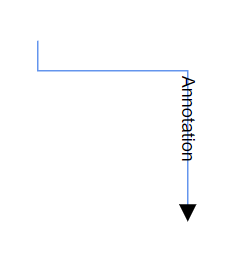 |
| False | 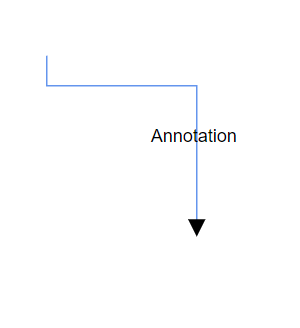 |