How can I help you?
BPMN Text Annotation in React Diagram Component
9 Feb 202624 minutes to read
Overview
A BPMN object can be associated with a text annotation that provides additional details about objects within a flow without affecting the actual process flow. Text annotations serve as documentation elements that help explain or clarify specific aspects of the BPMN diagram.
A TextAnnotation points to or references another BPMN shape through the textAnnotationTarget property. When the target shape is moved or deleted, any TextAnnotations attached to the shape will automatically move or be deleted as well. This ensures that TextAnnotations remain associated with their target shapes, though the TextAnnotation can be repositioned to any offset from its target.
The annotation element can be switched from one BPMN node to another by simply dragging the source end of the annotation connector to the desired BPMN node. By default, the TextAnnotation shape includes a connection to its target.
- By default, the TextAnnotation shape has a connection.
The textAnnotationDirection property controls the shape direction of the text annotation. By default, this property is set to Auto, which automatically determines the optimal direction based on the target’s position.
To set the size for text annotation, use the width and height properties of the node.
The offsetX and offsetY properties determine the distance between the BPMN node and the TextAnnotation.
import * as React from "react";
import * as ReactDOM from "react-dom";
import { DiagramComponent, Inject, BpmnDiagrams } from "@syncfusion/ej2-react-diagrams";
// A node is created and stored in nodes array.
let nodes = [
    {
    id: 'event1', style: { strokeWidth: 2 },
    height:70,width:70,offsetX:400,offsetY:200,
    shape: { type: 'Bpmn', shape: 'Event',
        event: { event: 'Start', trigger: 'None' },
        }
    },
    //node with target
    {
        id: 'textNode1', width: 70, height: 70,
        offsetX:400,offsetY:400,
        annotations:[{content:'textNode1'}],
            shape: {
                type: 'Bpmn', shape: 'TextAnnotation',
                textAnnotation:{ textAnnotationDirection:'Auto',textAnnotationTarget:'event1'}
            }
    },
    //Node without target
    {
        id: 'textNode2', width: 70, height: 70,
        offsetX:600,offsetY:400,
        annotations:[{content:'textNode1'}],
            shape: {
                type: 'Bpmn', shape: 'TextAnnotation',
                textAnnotation:{ textAnnotationDirection:'Auto',textAnnotationTarget:''}
            }
    },]
// initialize diagram component
function App() {
    return (<DiagramComponent id="container" width={'100%'} height={'600px'}
    // Add node
    nodes={nodes}>
      <Inject services={[BpmnDiagrams]}/>
    </DiagramComponent>);
}
const root = ReactDOM.createRoot(document.getElementById('diagram'));
root.render(<App />);
import * as React from "react";
import * as ReactDOM from "react-dom";
import {
Diagram,
DiagramComponent,
Inject,
NodeModel,
BpmnShape,
BpmnSubProcessModel,
BpmnShapeModel,
BpmnDiagrams,
BpmnActivityModel,
BpmnFlowModel,
BpmnGatewayModel
} from "@syncfusion/ej2-react-diagrams";
// A node is created and stored in nodes array.
let nodes: NodeModel[] = [
{
id: 'event1', style: { strokeWidth: 2 },
height:70,width:70,offsetX:400,offsetY:200,
shape: {
type: 'Bpmn', shape: 'Event',
event: { event: 'Start', trigger: 'None' },
}
},
//node with target
{
id: 'textNode1', width: 70, height: 70,
offsetX:400,offsetY:400,
annotations:[{content:'textNode1'}],
shape: {
type: 'Bpmn', shape: 'TextAnnotation',
textAnnotation:{ textAnnotationDirection:'Auto',textAnnotationTarget:'event1'}
}
},
//Node without target
{
id: 'textNode2', width: 70, height: 70,
offsetX:600,offsetY:400,
annotations:[{content:'textNode1'}],
shape: {
type: 'Bpmn', shape: 'TextAnnotation',
textAnnotation:{ textAnnotationDirection:'Auto',textAnnotationTarget:''}
}
},]
// initialize diagram component
function App() {
return (
<DiagramComponent
id="container"
width={'100%'}
height={'600px'}
// Add node
nodes={nodes}
>
<Inject services={[BpmnDiagrams]} />
</DiagramComponent>
);
}
const root = ReactDOM.createRoot(document.getElementById('diagram'));
root.render(<App />);Text Annotation in Palette.
Text annotation nodes can be rendered in the symbol palette alongside other BPMN shapes. The following example demonstrates how to render BPMN text annotation nodes in the symbol palette.
import * as React from "react";
import * as ReactDOM from "react-dom";
import { SymbolPaletteComponent,Diagram,BpmnDiagrams, DiagramComponent} from "@syncfusion/ej2-react-diagrams";

Diagram.Inject(BpmnDiagrams);
SymbolPaletteComponent.Inject(BpmnDiagrams);
//Initialize the basicshapes for the symbol palette
export function getBPMNShapes() {
    let bpmnShapes = [
        {
            id: 'Start',
            width: 35,
            height: 35,
            shape: {
              type: 'Bpmn',
              shape: 'Event',
              event: { event: 'Start' },
            },
          },
          {
            id: 'Gateway',
            width: 35,
            height: 35,
            offsetX: 100,
            offsetY: 100,
            shape: {
              type: 'Bpmn',
              shape: 'Gateway',
              gateway: { type: 'Exclusive' }
            },
          },
          {
            id: 'DataObject',
            width: 35,
            height: 35,
            offsetX: 500,
            offsetY: 100,
            shape: {
              type: 'Bpmn',
              shape: 'DataObject',
              dataObject: { collection: false, type: 'None' },
            },
          },
          {
            id: 'textAnnotation',
            width: 35,
            height: 35,
            shape: {
              type: 'Bpmn',
              shape: 'TextAnnotation',
            },
            annotations: [{ content: 'textAnnotation' }],
          },
    ];
    return bpmnShapes;
}
//Initializes the symbol palette
function App() {
    return (
        <div style=>
            <div id="palette-space" className="sb-mobile-palette">
            <SymbolPaletteComponent
                id="container"
                palettes={[
                {
                    id: 'uml',
                    expanded: true,
                    symbols: getBPMNShapes(),
                    title: 'BPMN Shapes',
                },
                ]}
                symbolHeight={80}
                symbolWidth={80}
                getNodeDefaults={(symbol) => {
                symbol.width = 100;
                symbol.height = 100;
                }}
                //Sets the margin of the dragging helper relative to the mouse cursor
                symbolMargin=
                getSymbolInfo={(symbol) => {
                //Defines the symbol description
                return { fit: true, description: { text: symbol.id } };
                }}
            />
            </div>
            <div id="diagram-space" className="sb-mobile-diagram">
            <DiagramComponent
                id="diagram"
                width={'800px'}
                height={'445px'}
            ></DiagramComponent>
            </div>
        </div>
    );
}
const root = ReactDOM.createRoot(document.getElementById('diagram'));
root.render(<App />);
import * as React from "react";
import * as ReactDOM from 'react-dom';
import { SymbolPaletteComponent,Diagram,BpmnDiagrams, DiagramComponent} from "@syncfusion/ej2-react-diagrams";
Diagram.Inject(BpmnDiagrams);
SymbolPaletteComponent.Inject(BpmnDiagrams);
//Initialize the basicshapes for the symbol palette
export function getBPMNShapes() {
let bpmnShapes = [
{
id: 'Start',
width: 35,
height: 35,
shape: {
type: 'Bpmn',
shape: 'Event',
event: { event: 'Start' },
},
},
{
id: 'Gateway',
width: 35,
height: 35,
offsetX: 100,
offsetY: 100,
shape: {
type: 'Bpmn',
shape: 'Gateway',
gateway: { type: 'Exclusive' }
},
},
{
id: 'DataObject',
width: 35,
height: 35,
offsetX: 500,
offsetY: 100,
shape: {
type: 'Bpmn',
shape: 'DataObject',
dataObject: { collection: false, type: 'None' },
},
},
{
id: 'textAnnotation',
width: 35,
height: 35,
shape: {
type: 'Bpmn',
shape: 'TextAnnotation',
},
annotations: [{ content: 'textAnnotation' }],
},
];
return bpmnShapes;
}
//Initializes the symbol palette
function App() {
return (
<div style=>
<div id="palette-space" className="sb-mobile-palette">
<SymbolPaletteComponent
id="container"
palettes={[
{
id: 'uml',
expanded: true,
symbols: getBPMNShapes(),
title: 'BPMN Shapes',
},
]}
symbolHeight={80}
symbolWidth={80}
getNodeDefaults={(symbol) => {
symbol.width = 100;
symbol.height = 100;
}}
//Sets the margin of the dragging helper relative to the mouse cursor
symbolMargin=
getSymbolInfo={(symbol) => {
//Defines the symbol description
return { fit: true, description: { text: symbol.id } };
}}
/>
</div>
<div id="diagram-space" className="sb-mobile-diagram">
<DiagramComponent
id="diagram"
width={'800px'}
height={'445px'}
></DiagramComponent>
</div>
</div>
);
}
const root = ReactDOM.createRoot(document.getElementById('diagram'));
root.render(<App />);Connect the TextAnnotation to BPMN Node
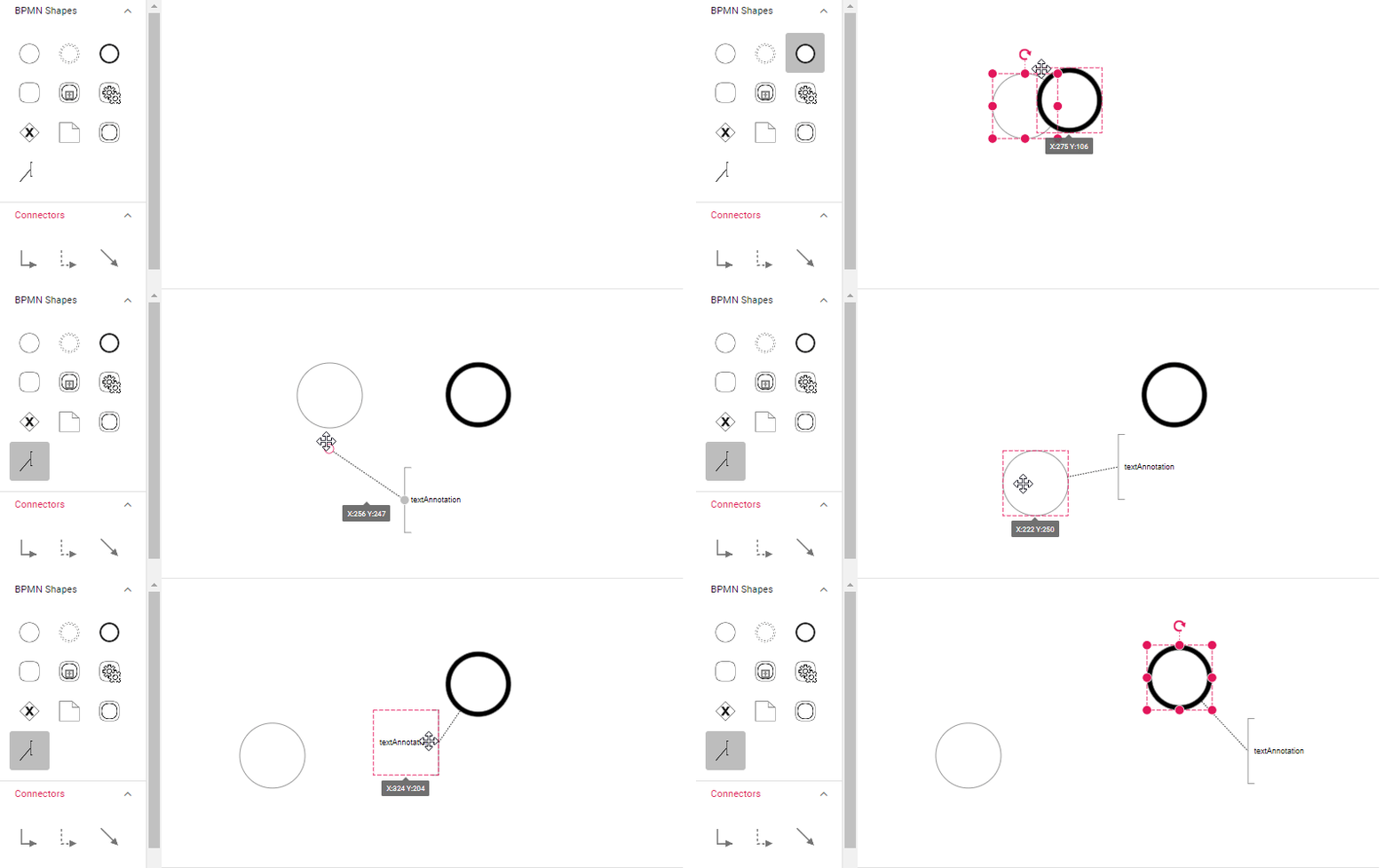
Users can drag and drop any BPMN shapes from the palette to the diagram and establish connections between BPMN nodes and text annotations through interactive manipulation.
The following image demonstrates how to drag a symbol from the palette and connect the text annotation to a BPMN node using interaction.
Text Annotation Direction
The text annotation supports several directional orientations to optimize the visual layout of the diagram:
| Text annotation direction | Image |
|---|---|
| Auto | 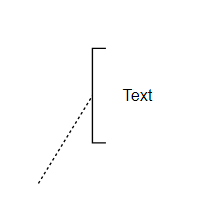 |
| Left | 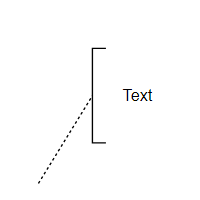 |
| Right | 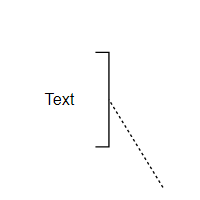 |
| Top | 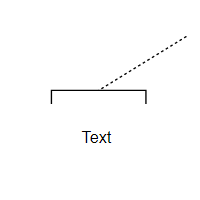 |
| Bottom | 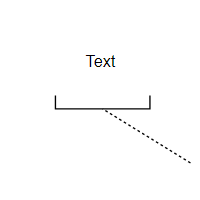 |
Add Text Annotation at Runtime
Text annotations can be added dynamically using either the addTextAnnotation method or the add method of the diagram. The following example shows how to use these methods to add a text annotation node programmatically.
import * as React from "react";
import * as ReactDOM from 'react-dom';
import { DiagramComponent, Inject, BpmnDiagrams, randomId } from "@syncfusion/ej2-react-diagrams";
import { ButtonComponent } from '@syncfusion/ej2-react-buttons';

let diagramInstance;
let nodes = [
    {
        id: 'event',
        offsetX: 200,
        offsetY: 200,
        width: 70,
        height: 70,
        shape: { type: 'Bpmn', shape: 'Event' },
    },
]
const addTextAnnotation = function () {
    let event = diagramInstance.nodes[0];
    let textAnnotation = {
        name: 'newAnnotation' + randomId(),
        angle: 0,
        length: 100,
        width: 100,
        height: 40,
        text: 'New Annotation',
    };
    /**
     * parameter 1 - TextAnnotation to be added
     * parameter 2 - The parent node where the text annotation will be added as a child.
     */
    diagramInstance.addTextAnnotation(textAnnotation, event);
}

const addTextAnnotationNode = function () {
    let textAnnotation = {
        id: 'textAnnotation' + randomId(),
        offsetX: 300,
        offsetY: 100,
        width: 100,
        height: 40,
        annotations: [{ content: 'Text Annotation' }],
        shape: {
            type: 'Bpmn',
            shape: 'TextAnnotation',
            textAnnotation: {
                //Parent node of text annotation
                textAnnotationTarget: 'event',
                textAnnotationDirection: 'Auto',
            },
        },
    };
    /**
     * parameter 1 - TextAnnotation to be added to the event node
     */
    diagramInstance.add(textAnnotation);
}

const addTextAnnotationAlone = function () {
    let textAnnotation = {
        id: 'textAnnotationAlone' + randomId(),
        offsetX: 300,
        offsetY: 300,
        width: 100,
        height: 70,
        annotations: [{ content: 'Text Annotation' }],
        shape: {
            type: 'Bpmn',
            shape: 'TextAnnotation',
        },
    };
    /**
     * parameter 1 - TextAnnotation to be added to diagram without parent
     */
    diagramInstance.add(textAnnotation);
}
// initialize diagram component
function App() {
    return (<div>
        <ButtonComponent content="Add text Annotation" onClick={addTextAnnotation} />
        <ButtonComponent content="Add text Annotation Node" onClick={addTextAnnotationNode} />
        <ButtonComponent content="Add text Annotation Alone" onClick={addTextAnnotationAlone} /><DiagramComponent id="container" width={'100%'} height={'600px'} ref={(diagram) => (diagramInstance = diagram)}
            // Add node
            nodes={nodes}
        >
            <Inject services={[BpmnDiagrams]} />
        </DiagramComponent></div>);
}
const root = ReactDOM.createRoot(document.getElementById('diagram'));
root.render(<App />);
import * as React from "react";
import * as ReactDOM from 'react-dom';
import { DiagramComponent, NodeModel, Node, Inject, BpmnDiagrams, randomId } from "@syncfusion/ej2-react-diagrams";
import { ButtonComponent } from '@syncfusion/ej2-react-buttons';
let diagramInstance:DiagramComponent;
let nodes: NodeModel[] = [
{
id: 'event',
offsetX: 200,
offsetY: 200,
width: 70,
height: 70,
shape: { type: 'Bpmn', shape: 'Event' },
},
]
const addTextAnnotation = function () {
let event = diagramInstance.nodes[0];
let textAnnotation = {
name: 'newAnnotation' + randomId(),
angle: 0,
length: 100,
width: 100,
height: 40,
text: 'New Annotation',
};
/**
* parameter 1 - TextAnnotation to be added
* parameter 2 - The parent node where the text annotation will be added as a child.
*/
diagramInstance.addTextAnnotation(textAnnotation, event);
}
const addTextAnnotationNode = function () {
let textAnnotation = {
id: 'textAnnotation' + randomId(),
offsetX: 300,
offsetY: 100,
width: 100,
height: 40,
annotations: [{ content: 'Text Annotation' }],
shape: {
type: 'Bpmn',
shape: 'TextAnnotation',
textAnnotation: {
//Parent node of text annotation
textAnnotationTarget: 'event',
textAnnotationDirection: 'Auto',
},
},
};
/**
* parameter 1 - TextAnnotation to be added to the event node
*/
diagramInstance.add(textAnnotation as Node);
}
const addTextAnnotationAlone = function () {
let textAnnotation = {
id: 'textAnnotationAlone' + randomId(),
offsetX: 300,
offsetY: 300,
width: 100,
height: 70,
annotations: [{ content: 'Text Annotation' }],
shape: {
type: 'Bpmn',
shape: 'TextAnnotation',
},
};
/**
* parameter 1 - TextAnnotation to be added to diagram without parent
*/
diagramInstance.add(textAnnotation as Node);
}
// initialize diagram component
function App() {
return (<div>
<ButtonComponent content="Add text Annotation" onClick={addTextAnnotation} />
<ButtonComponent content="Add text Annotation Node" onClick={addTextAnnotationNode} />
<ButtonComponent content="Add text Annotation Alone" onClick={addTextAnnotationAlone} /><DiagramComponent id="container" width={'100%'} height={'600px'} ref={(diagram) => (diagramInstance = diagram)}
// Add node
nodes={nodes}
>
<Inject services={[BpmnDiagrams]} />
</DiagramComponent></div>);
}
const root = ReactDOM.createRoot(document.getElementById('diagram'));
root.render(<App />);