How can I help you?
State Persistence in React DataManager
15 Apr 202624 minutes to read
State persistence in the Syncfusion React DataManager stores every data operation state—sorting, filtering, paging, and grouping—inside the browser’s localStorage. After a reload or route transition, the stored state is replayed automatically so the DataManager Query configuration stays aligned with the last interaction. Enable the feature by setting enablePersistence={true} and assigning a unique id to each DataManager instance.
Benefits of enabling state persistence:
- State persistence delivers a seamless experience with no loss of state across reloads or navigations.
- Reapplies the last known query state as soon as the component initializes.
- Keeps dashboards or multipage apps consistent without manual wiring.
Consider a sales analytics dashboard that persists a descending sort on “Revenue” plus filters on the “Region” column. When the React view remounts, the DataManager restores the saved query automatically, so the Grid or any bound component renders exactly as the user left it.
The first sample demonstrates how to enable persistence in a React component and display the fetched data. An initial paging query (skip(5).take(8)) runs once, and the paging state is cached and replayed across reloads.
import React, { useEffect, useState } from 'react';
import { DataManager, UrlAdaptor, Query } from '@syncfusion/ej2-data';
import { Row } from './rowTemplate';

const SERVICE_URL = 'https://services.syncfusion.com/react/production/api/UrlDataSource';

const App = () => {
  const [items, setItems] = useState([]);

  useEffect(() => {
    const dataManager = new DataManager({
      url: SERVICE_URL,
      adaptor: new UrlAdaptor(),
      enablePersistence: true,
      id: 'PersistBasicPaging',
    });

    dataManager
      .executeQuery(new Query().skip(5).take(8))
      .then((e) => {
        const rows = e.result.map((row) => (
          <Row key={row.EmployeeID} {...row} />
        ));
        setItems(rows);
      });
  }, []);

  return (
    <table id="datatable" className="e-table">
      <thead>
        <tr>
          <th>Employee ID</th>
          <th>Employees</th>
          <th>Designation</th>
        </tr>
      </thead>
      <tbody>{items}</tbody>
    </table>
  );
};

export default App;
import * as React from 'react';
import { useEffect, useState } from 'react';
import { DataManager, UrlAdaptor, Query, ReturnOption } from '@syncfusion/ej2-data';
import { IOrders } from './orders';
import { Row } from './rowTemplate';
const SERVICE_URL: string = 'https://services.syncfusion.com/react/production/api/UrlDataSource';
const App: React.FC = () => {
const [items, setItems] = useState<JSX.Element[]>([]);
useEffect(() => {
const dataManager = new DataManager({
url: SERVICE_URL,
adaptor: new UrlAdaptor(),
enablePersistence: true,
id: 'PersistBasicPaging',
});
dataManager
.executeQuery(new Query().skip(5).take(8))
.then((e: ReturnOption) => {
const rows = (e.result as IOrders[]).map((row: IOrders) => (
<Row key={row.EmployeeID} {...row} />
));
setItems(rows);
});
}, []);
return (
<table id="datatable" className="e-table">
<thead>
<tr>
<th>Employee ID</th>
<th>Employees</th>
<th>Designation</th>
</tr>
</thead>
<tbody>{items}</tbody>
</table>
);
};
export default App;export interface IOrders {
EmployeeID: number;
Employees: string;
Designation: string;
Order_Details: object[];
}import React from 'react';
export const Row = (props) => {
return (
<tr>
<td>{props.EmployeeID}</td>
<td>{props.Employees}</td>
<td>{props.Designation}</td>
</tr>
);
};import * as React from 'react';
import { IOrders } from './orders';
export const Row: React.FC<IOrders> = (props) => {
return (
<tr>
<td>{props.EmployeeID}</td>
<td>{props.Employees}</td>
<td>{props.Designation}</td>
</tr>
);
};Preventing a query from persistence
By default, the React DataManager persists every query that mutates the result set (sorting, searching, filtering, grouping, selection, and paging). When a view only needs a subset of those states, configure the ignoreOnPersist property with the query keys that must be skipped. This lets you keep paging and filtering while ignoring selection or search input.
The following query types can be excluded through ignoreOnPersist. Provide the property with an array of the desired keys:
Supported query keys:
| Operation | Query Key |
|---|---|
| Sorting | onSortBy |
| Searching | onSearch |
| Filtering | onWhere |
| Grouping | Grouping |
-
ignoreOnPersistaccepts astring[], so you can list as many query keys as the scenario requires. - The sample below excludes both
onSortByandonSearch, so every reload reapplies the persisted filters or paging but never restores the previous sort order or search value.
import React, { useEffect, useState } from 'react';
import { DataManager, UrlAdaptor, Query } from '@syncfusion/ej2-data';
import { Row } from './rowTemplate';

const SERVICE_URL = 'https://services.syncfusion.com/react/production/api/UrlDataSource';

const App = () => {
  const [items, setItems] = useState([]);

  useEffect(() => {
    const dataManager = new DataManager({
      url: SERVICE_URL,
      adaptor: new UrlAdaptor(),
      enablePersistence: true,
      id: 'PersistIgnoreSortSearch',
      // sort and search query won't persist
      ignoreOnPersist: ['onSortBy', 'onSearch'],
    });

    dataManager
      .executeQuery(new Query().sortBy('Designation', 'descending').take(8))
      .then((e) => {
        const result = e.result.map((row) => (
          <Row key={row.EmployeeID} {...row} />
        ));
        setItems(result);
      });
  }, []);

  return (
    <table id="datatable" className="e-table">
      <thead>
        <tr>
          <th>Employee ID</th>
          <th>Employees</th>
          <th>Designation</th>
        </tr>
      </thead>
      <tbody>{items}</tbody>
    </table>
  );
};

export default App;
import * as React from 'react';
import { useEffect, useState } from 'react';
import { DataManager, UrlAdaptor, Query, ReturnOption } from '@syncfusion/ej2-data';
import { IOrders } from './orders';
import { Row } from './rowTemplate';
const SERVICE_URL: string = 'https://services.syncfusion.com/react/production/api/UrlDataSource';
const App: React.FC = () => {
const [items, setItems] = useState<JSX.Element[]>([]);
useEffect(() => {
const dataManager = new DataManager({
url: SERVICE_URL,
adaptor: new UrlAdaptor(),
enablePersistence: true,
id: 'PersistIgnoreSortSearch',
// sort and search query won't persist
ignoreOnPersist: ['onSortBy', 'onSearch'],
});
dataManager
.executeQuery(new Query().sortBy('Designation', 'descending').take(8))
.then((e: ReturnOption) => {
const result = (e.result as IOrders[]).map((row: IOrders) => (
<Row key={row.EmployeeID} {...row} />
));
setItems(result);
});
}, []);
return (
<table id="datatable" className="e-table">
<thead>
<tr>
<th>Employee ID</th>
<th>Employees</th>
<th>Designation</th>
</tr>
</thead>
<tbody>{items}</tbody>
</table>
);
};
export default App;export interface IOrders {
EmployeeID: number;
Employees: string;
Designation: string;
Order_Details: object[];
}import React from 'react';
export const Row = (props) => {
return (
<tr>
<td>{props.EmployeeID}</td>
<td>{props.Employees}</td>
<td>{props.Designation}</td>
</tr>
);
};import * as React from 'react';
import { IOrders } from './orders';
export const Row: React.FC<IOrders> = (props) => {
return (
<tr>
<td>{props.EmployeeID}</td>
<td>{props.Employees}</td>
<td>{props.Designation}</td>
</tr>
);
};Get or set persisted data
The Syncfusion React DataManager exposes built-in helpers to read or mutate the state stored in localStorage. Use them whenever you need to inspect the saved configuration, seed a default state, or hydrate another component with the same persisted query.
-
getPersistedData(id)returns the serialized query state for the specified DataManagerid, including persisted operations such as filtering, sorting, search text, and paging details. -
setPersistData(originalEvent, id, query)overwrites the stored state with a customQueryobject. Pass null fororiginalEventwhen the change is not triggered by a UI event.
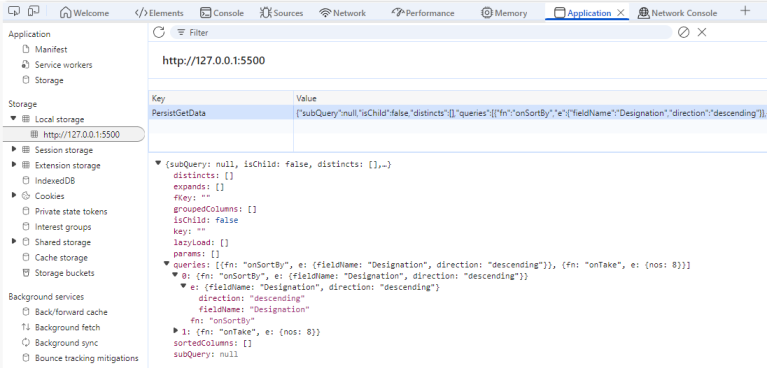
In the following example, getPersistedData retrieves and logs the sorting state for the DataManager with the id “JohnDoe”, where the data was sorted by the “Designation” field in “descending” order.
import React, { useEffect, useState } from 'react';
import { DataManager, UrlAdaptor, Query } from '@syncfusion/ej2-data';
import { Row } from './rowTemplate';

const SERVICE_URL = 'https://services.syncfusion.com/react/production/api/UrlDataSource';

const App = () => {
  const [items, setItems] = useState([]);

  useEffect(() => {
    const dataManager = new DataManager({
      url: SERVICE_URL,
      adaptor: new UrlAdaptor(),
      enablePersistence: true,
      id: 'PersistGetData',
    });

    dataManager
      .executeQuery(new Query().sortBy('Designation', 'descending').take(8))
      .then((e) => {
        const result = e.result.map((row) => (
          <Row key={row.EmployeeID} {...row} />
        ));
        setItems(result);
      });

    console.log(dataManager.getPersistedData('PersistGetData'));
  }, []);

  return (
    <table id="datatable" className="e-table">
      <thead>
        <tr>
          <th>Employee ID</th>
          <th>Employees</th>
          <th>Designation</th>
        </tr>
      </thead>
      <tbody>{items}</tbody>
    </table>
  );
};

export default App;
import * as React from 'react';
import { useEffect, useState } from 'react';
import { DataManager, UrlAdaptor, Query, ReturnOption } from '@syncfusion/ej2-data';
import { IOrders } from './orders';
import { Row } from './rowTemplate';
const SERVICE_URL: string = 'https://services.syncfusion.com/react/production/api/UrlDataSource';
const App: React.FC = () => {
const [items, setItems] = useState<JSX.Element[]>([]);
useEffect(() => {
const dataManager = new DataManager({
url: SERVICE_URL,
adaptor: new UrlAdaptor(),
enablePersistence: true,
id: 'PersistGetData',
});
dataManager
.executeQuery(new Query().sortBy('Designation', 'descending').take(8))
.then((e: ReturnOption) => {
const result = (e.result as IOrders[]).map((row: IOrders) => (
<Row key={row.EmployeeID} {...row} />
));
setItems(result);
});
console.log(dataManager.getPersistedData('PersistGetData'));
}, []);
return (
<table id="datatable" className="e-table">
<thead>
<tr>
<th>Employee ID</th>
<th>Employees</th>
<th>Designation</th>
</tr>
</thead>
<tbody>{items}</tbody>
</table>
);
};
export default App;export interface IOrders {
EmployeeID: number;
Employees: string;
Designation: string;
Order_Details: object[];
}import React from 'react';
export const Row = (props) => {
return (
<tr>
<td>{props.EmployeeID}</td>
<td>{props.Employees}</td>
<td>{props.Designation}</td>
</tr>
);
};import * as React from 'react';
import { IOrders } from './orders';
export const Row: React.FC<IOrders> = (props) => {
return (
<tr>
<td>{props.EmployeeID}</td>
<td>{props.Employees}</td>
<td>{props.Designation}</td>
</tr>
);
};
The setPersistData method inserts or replaces the stored query for a DataManager. When the call is not triggered from an event, pass null as the first argument, then supply the target id and Query instance that describes the operations to persist.
In this example, the existing persisted query sorted by “Designation” is replaced with a new query that applies a “descending” sort on “EmployeeID”.
import React, { useEffect, useRef, useState } from 'react';
import { DataManager, UrlAdaptor, Query } from '@syncfusion/ej2-data';
import { Row } from './rowTemplate';

const SERVICE_URL = 'https://services.syncfusion.com/react/production/api/UrlDataSource';
const QUERY1 = new Query().sortBy('Designation', 'descending').take(8);
const QUERY2 = new Query().sortBy('EmployeeID', 'descending').take(8);

const App = () => {
  const [items, setItems] = useState([]);
  const dataManagerRef = useRef(null);

  useEffect(() => {
    const dataManager = new DataManager({
      url: SERVICE_URL,
      adaptor: new UrlAdaptor(),
      enablePersistence: true,
      id: 'PersistSetData',
    });

    dataManagerRef.current = dataManager;

    dataManager.executeQuery(QUERY1).then((e) => {
      const result = e.result.map((row) => (
        <Row key={row.EmployeeID} {...row} />
      ));
      setItems(result);
    });

    dataManager.setPersistData(null, 'PersistSetData', QUERY2);
  }, []);

  return (
    <div>
      <table id="datatable" className="e-table">
        <thead>
          <tr>
            <th>Employee ID</th>
            <th>Employees</th>
            <th>Designation</th>
          </tr>
        </thead>
        <tbody>{items}</tbody>
      </table>
    </div>
  );
};

export default App;
import * as React from 'react';
import { useEffect, useRef, useState } from 'react';
import { DataManager, UrlAdaptor, Query, ReturnOption } from '@syncfusion/ej2-data';
import { IOrders } from './orders';
import { Row } from './rowTemplate';
const SERVICE_URL: string = 'https://services.syncfusion.com/react/production/api/UrlDataSource';
const QUERY1 = new Query().sortBy('Designation', 'descending').take(8);
const QUERY2 = new Query().sortBy('EmployeeID', 'descending').take(8);
const App: React.FC = () => {
const [items, setItems] = useState<JSX.Element[]>([]);
const dataManagerRef = useRef<DataManager | null>(null);
useEffect(() => {
const dataManager = new DataManager({
url: SERVICE_URL,
adaptor: new UrlAdaptor(),
enablePersistence: true,
id: 'PersistSetData',
});
dataManagerRef.current = dataManager;
dataManager.executeQuery(QUERY1).then((e: ReturnOption) => {
const result = (e.result as IOrders[]).map((row: IOrders) => (
<Row key={row.EmployeeID} {...row} />
));
setItems(result);
});
dataManager.setPersistData(null, 'PersistSetData', QUERY2);
}, []);
return (
<div>
<table id="datatable" className="e-table">
<thead>
<tr>
<th>Employee ID</th>
<th>Employees</th>
<th>Designation</th>
</tr>
</thead>
<tbody>{items}</tbody>
</table>
</div>
);
};
export default App;export interface IOrders {
EmployeeID: number;
Employees: string;
Designation: string;
Order_Details: object[];
}import React from 'react';
export const Row = (props) => {
return (
<tr>
<td>{props.EmployeeID}</td>
<td>{props.Employees}</td>
<td>{props.Designation}</td>
</tr>
);
};import * as React from 'react';
import { IOrders } from './orders';
export const Row: React.FC<IOrders> = (props) => {
return (
<tr>
<td>{props.EmployeeID}</td>
<td>{props.Employees}</td>
<td>{props.Designation}</td>
</tr>
);
};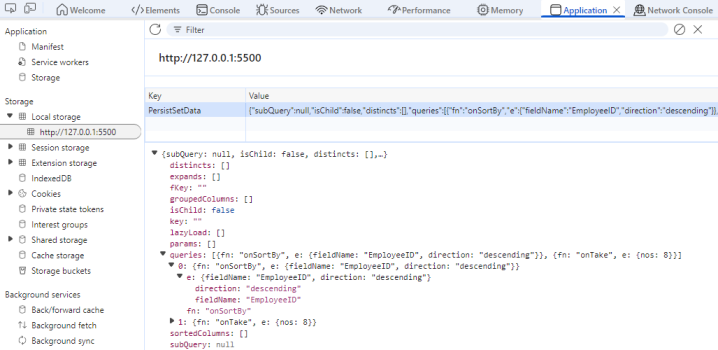
The setPersistData method updates the persisted query state of the DataManager with the specified query.
Restoring the initial state of data manager
For state persistence overview, refer to the introduction section. Scenarios such as application resets, user preference changes, or logout flows require clearing the stored state so every user starts from a known baseline.
The clearPersistence() method removes the entry associated with its id. The next render uses the default query configuration defined in the component.
The following sample demonstrates how to clear the persisted state in the DataManager using the clearPersistence method:
import React, { useEffect, useRef, useState } from 'react';
import { DataManager, Query, UrlAdaptor } from '@syncfusion/ej2-data';
import { Row } from './rowTemplate';

const SERVICE_URL = 'https://services.syncfusion.com/react/production/api/UrlDataSource';

const App = () => {
  const [items, setItems] = useState([]);
  const dataManagerRef = useRef(null);

  useEffect(() => {
    const dataManager = new DataManager({
      url: SERVICE_URL,
      adaptor: new UrlAdaptor(),
      enablePersistence: true,
      id: 'PersistClearState',
    });

    dataManagerRef.current = dataManager;

    const query = new Query().sortBy('Designation', 'descending').take(8);
    dataManager.executeQuery(query).then((e) => {
      setItems(e.result);
    });
  }, []);

  const applyDM = () => {
    if (!dataManagerRef.current) return;

    const newQuery = new Query().sortBy('EmployeeID', 'descending').take(8);
    dataManagerRef.current.executeQuery(newQuery).then((e) => {
      setItems(e.result);
    });
  };

  const clearDM = () => {
    dataManagerRef.current?.clearPersistence();
  };

  return (
    <div>
      <div style=>
        <button onClick={applyDM}>Apply Query</button>
        <button onClick={clearDM}>Clear Persistence</button>
      </div>

      <table id="datatable" className="e-table">
        <thead>
          <tr>
            <th>Employee ID</th>
            <th>Employees</th>
            <th>Designation</th>
          </tr>
        </thead>
        <tbody>
          {items.map((data, index) => (
            <Row key={index} {...data} />
          ))}
        </tbody>
      </table>
    </div>
  );
};

export default App;
import * as React from 'react';
import { useEffect, useRef, useState } from 'react';
import { DataManager, Query, ReturnOption, UrlAdaptor } from '@syncfusion/ej2-data';
import { IOrders } from './orders';
import { Row } from './rowTemplate';
const SERVICE_URL: string = 'https://services.syncfusion.com/react/production/api/UrlDataSource';
const App: React.FC = () => {
const [items, setItems] = useState<IOrders[]>([]);
const dataManagerRef = useRef<DataManager | null>(null);
useEffect(() => {
const dataManager = new DataManager({
url: SERVICE_URL,
adaptor: new UrlAdaptor(),
enablePersistence: true,
id: 'PersistClearState',
});
dataManagerRef.current = dataManager;
const query = new Query().sortBy('Designation', 'descending').take(8);
dataManager.executeQuery(query).then((e: ReturnOption) => {
setItems(e.result as IOrders[]);
});
}, []);
const applyDM = () => {
if (!dataManagerRef.current) return;
const newQuery = new Query().sortBy('EmployeeID', 'descending').take(8);
dataManagerRef.current.executeQuery(newQuery).then((e: ReturnOption) => {
setItems(e.result as IOrders[]);
});
};
const clearDM = () => {
dataManagerRef.current.clearPersistence();
};
return (
<div>
<div style=>
<button onClick={applyDM}>Apply Query</button>
<button onClick={clearDM}>Clear Persistence</button>
</div>
<table id="datatable" className="e-table">
<thead>
<tr>
<th>Employee ID</th>
<th>Employees</th>
<th>Designation</th>
</tr>
</thead>
<tbody>
{items.map((data: IOrders, index: number) => (
<Row key={index} {...data} />
))}
</tbody>
</table>
</div>
);
};
export default App;export interface IOrders {
EmployeeID: number;
Employees: string;
Designation: string;
Order_Details: object[];
}import React from 'react';
export const Row = (props) => {
return (
<tr>
<td>{props.EmployeeID}</td>
<td>{props.Employees}</td>
<td>{props.Designation}</td>
</tr>
);
};import * as React from 'react';
import { IOrders } from './orders';
export const Row: React.FC<IOrders> = (props) => {
return (
<tr>
<td>{props.EmployeeID}</td>
<td>{props.Employees}</td>
<td>{props.Designation}</td>
</tr>
);
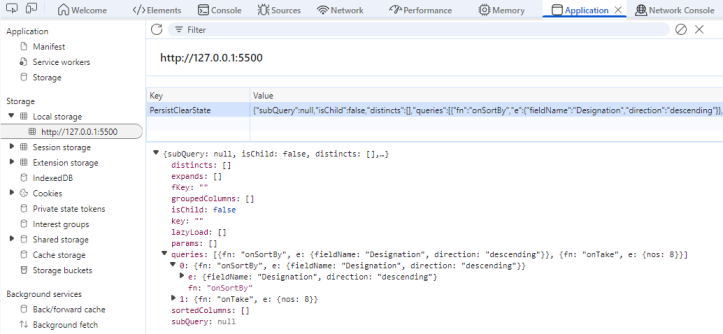
};In this sample, the DataManager is initially configured to sort the data by the “Designation” field in descending order. This query is executed on load, and the resulting state is automatically stored in the browser’s localStorage due to the enablePersistence setting.
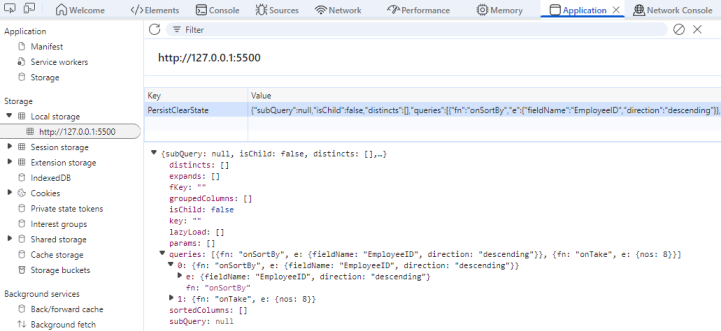
When the Apply Query button is clicked, a new query is applied. The table updates by sorting on the “EmployeeID” field and stores the latest query state in localStorage.
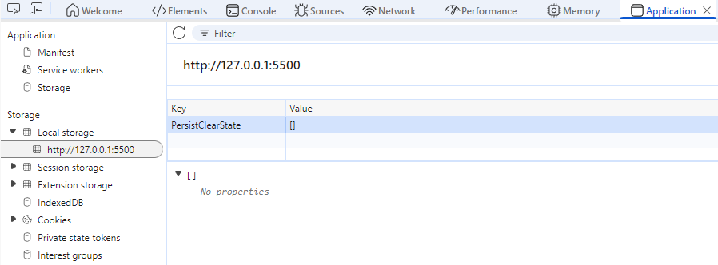
When the Clear Persistence button is clicked, the clearPersistence() method removes the stored query state from localStorage. This restores the DataManager to its original state, so any previously applied queries such as sorting are no longer retained after a page reload.
Use case: e-commerce wishlist that remembers state
The accompanying e-commerce demo wires a single persistent DataManager to both GridComponent and ChartComponent. The Grid lists the full catalog, while the Chart visualizes review data that is sourced from the same query results. Every sort, filter, or paging action taken in either component is tracked by the shared DataManager, so refreshing the browser reapplies the exact combination of operations.
In this scenario, sorting and filtering are persisted, but search text is deliberately excluded by adding onSearch to ignoreOnPersist. Users keep their curated wishlists and view states without storing potentially noisy keyword input.
Step 1: Choose a username from the dropdown list. The selected value becomes the DataManager id, so each user receives an isolated entry inside window.localStorage.
Step 2: Interact with the Grid by selecting products, adding them to a wishlist via toolbar actions, filtering by category, or toggling between price-based sort buttons. These operations are saved per user. The Chart instantly reflects any persisted filters and sorts because it shares the DataManager instance.
Step 3: Use the Logout button to simulate leaving the application.
Step 4: After logging back in (or refreshing), pick the same username. The Grid and Chart reload the wishlist and persisted query so the interface resumes exactly where the user stopped. Use the Clear Wishlist button when you want to remove the stored preferences for that profile.
Explore the full React sample for implementation details.