Task Dependency in EJ2 JavaScript Gantt Chart Control
10 Oct 202624 minutes to read
Task dependency in the EJ2 JavaScript Gantt Chart control establishes relationships between tasks, affecting scheduling where changes to predecessors impact successors. Dependencies are categorized into four types—Start to Start (SS), Start to Finish (SF), Finish to Start (FS), and Finish to Finish (FF)—mapped via the taskFields.dependency property in the data source. Parent dependencies are enabled by default with allowParentDependency set to true, allowing relationships between parent-parent, child-child, parent-child, and child-parent tasks. Offsets support day, hour, or minute units for precise timing, and validation modes handle conflicts during editing via the actionBegin event. Connector lines are customized using connectorLineWidth and connectorLineBackground, with the queryTaskbarInfo event enabling dynamic styling. Public methods like addPredecessor and removePredecessor allow programmatic management, ensuring accurate visualization with ARIA labels for accessibility and responsive scaling for mobile views.
Configure task dependencies
Task dependencies are defined in the data source as string values (e.g., ‘2FS+3d’ for Finish to Start with 3-day offset) and mapped using taskFields.dependency. Parent dependencies can be enabled by allowParentDependency property. By default, the allowParentDependency property will be true.
Multiple predecessor relationships can be defined in a single task by assigning a comma-separated string to the Predecessor field, such as '2FS,3FS'. This configuration allows the Gantt Chart to interpret and render multiple dependencies during the initial data load.
{ TaskID: 4, TaskName: 'Soil test approval', StartDate: new Date('04/02/2024'), Duration: 0, Predecessor: '3FS,2FS', Progress: 30 }The following example establishes dependencies. This code renders connector lines for dependencies like ‘2FS’ and updates taskbars when changes occur.
var ganttChart = new ej.gantt.Gantt({
    dataSource: GanttData,
    height: '380px',
    taskFields: {
        id: 'TaskID',
        name: 'TaskName',
        startDate: 'StartDate',
        endDate: 'EndDate',
        dependency: 'Predecessor',
        duration: 'Duration',
        progress: 'Progress',
        parentID: 'ParentID'
    }
});
ganttChart.appendTo('#Gantt');
<!DOCTYPE html>
<html lang="en">
<head>
<title>EJ2 Gantt</title>
<meta charset="utf-8">
<meta name="viewport" content="width=device-width, initial-scale=1.0">
<meta name="description" content="Typescript Gantt Controls">
<meta name="author" content="Syncfusion">
<link href="index.css" rel="stylesheet">
<link href="https://cdn.syncfusion.com/ej2/35.1.37/tailwind3.css" rel="stylesheet" type="text/css">
<script src="https://cdn.syncfusion.com/ej2/35.1.37/dist/ej2.min.js" type="text/javascript"></script>
<script src="es5-datasource.js" type="text/javascript"></script>
</head>
<body>
<div id="container">
<div id="Gantt"></div>
</div>
<script>
var ele = document.getElementById('container');
if(ele) {
ele.style.visibility = "visible";
}
</script>
<script src="index.js" type="text/javascript"></script>
</body>
</html>Understand task relationship types
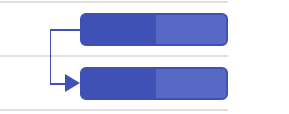
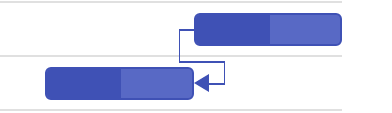
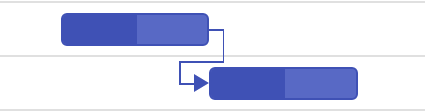
Task relationships are categorized into four types based on start and finish dates:
-
Start to Start (SS): Successor starts with predecessor.
-
Start to Finish (SF): Successor finishes when predecessor starts.
-
Finish to Start (FS): Successor starts after predecessor finishes (default).
-
Finish to Finish (FF): Successor finishes with predecessor.
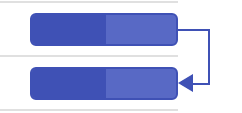
Specify types in the data source (e.g., ‘2SS+1h’) for hour-based offsets.
Configure predecessor offsets with duration units
Predecessor offsets support day, hour, or minute units (e.g., ‘2FS+3h’), allowing precise delays or leads between tasks.
The following example uses duration units. This code applies offsets such as ‘2FS+3h’, adjusting the taskbars accordingly.
var ganttChart = new ej.gantt.Gantt({
    dataSource: GanttData,
    height: '400px',
    taskFields: {
        id: 'TaskID',
        name: 'TaskName',
        startDate: 'StartDate',
        dependency: 'Predecessor',
        duration: 'Duration',
        progress: 'Progress',
        parentID: 'ParentID'
    },
    columns: [
        { field: 'TaskID', headerText: 'Task ID', textAlign: 'Left', width: '100' },
        { field: 'Predecessor', headerText: 'Depedency', width: '150' },
        { field: 'TaskName', headerText: 'Task Name', width: '150' },
        { field: 'StartDate', headerText: 'Start Date', width: '150' },
        { field: 'Duration', headerText: 'Duration', width: '150' },
        { field: 'Progress', headerText: 'Progress', width: '150' }
    ]
});
ganttChart.appendTo('#Gantt');
<!DOCTYPE html>
<html lang="en">
<head>
<title>EJ2 Gantt</title>
<meta charset="utf-8">
<meta name="viewport" content="width=device-width, initial-scale=1.0">
<meta name="description" content="Typescript Gantt Controls">
<meta name="author" content="Syncfusion">
<link href="index.css" rel="stylesheet">
<link href="https://cdn.syncfusion.com/ej2/35.1.37/tailwind3.css" rel="stylesheet" type="text/css">
<script src="https://cdn.syncfusion.com/ej2/35.1.37/dist/ej2.min.js" type="text/javascript"></script>
<script src="es5-datasource.js" type="text/javascript"></script>
</head>
<body>
<div id="container">
<div id="Gantt"></div>
</div>
<script>
var ele = document.getElementById('container');
if(ele) {
ele.style.visibility = "visible";
}
</script>
<script src="index.js" type="text/javascript"></script>
</body>
</html>Predecessor offset synchronization on initial load
The autoUpdatePredecessorOffset property specifies whether the Gantt Chart automatically adjusts and synchronizes the predecessor offset values (e.g., “+2”, “-1d”) in the predecessor column display and the underlying data during initial data load/binding, so they match the actually rendered taskbar positions and dependency lines.
-
When enabled: During the initial data binding/load, the Gantt recalculates the offset portions of predecessor strings based on the final rendered dates after applying calendar rules, weekends, holidays, and working times. The predecessor column in the grid and the corresponding data field values are updated to reflect these accurate offsets - preventing visual or data mismatch between what is displayed and what was actually used for rendering dependency lines - without affecting task dates, durations, or triggering any scheduling/validation logic.
-
When disabled: The predecessor column displays exactly the offset values provided in the original data source, even if they no longer match the rendered dependency lines due to calendar adjustments. This can result in visual inconsistencies where the grid shows one offset (e.g., “5FS+0”) while the drawn arrow connects tasks with a different effective offset (e.g., equivalent to +2 due to non-working days). No automatic correction occurs during load.
// Switch toggle.
var switchObj = new ej.buttons.Switch({ checked: true, change: Onchange, });
switchObj.appendTo('#switch');
function Onchange() {
  if (switchObj.checked) {
    gantt.autoUpdatePredecessorOffset = true;
  }
  else {
    gantt.autoUpdatePredecessorOffset = false;
  }
}
var ganttChart = new ej.gantt.Gantt({
  dataSource: GanttData,
  height: '420px',
  taskFields: {
    id: 'TaskID',
    name: 'TaskName',
    startDate: 'StartDate',
    duration: 'Duration',
    progress: 'Progress',
    dependency:'Predecessor',
    baselineStartDate: "BaselineStartDate",
    baselineEndDate: "BaselineEndDate",
    child: 'subtasks',
  },
  editSettings: {
    allowAdding: true,
    allowEditing: true,
    allowDeleting: true,
    allowTaskbarEditing: true,
    showDeleteConfirmDialog: true,
  },
  autoUpdatePredecessorOffset: true,
  eventMarkers: [
      {
          day: '04/10/2019',
          cssClass: 'e-custom-event-marker',
          label: 'Project approval and kick-off'
      }
  ],
  holidays: [{
      from: "04/04/2019",
      to: "04/05/2019",
      label: " Public holidays",
      cssClass: "e-custom-holiday"

  },
  {
      from: "04/12/2019",
      to: "04/12/2019",
      label: " Public holiday",
      cssClass: "e-custom-holiday"

  }],
  columns: [
    { field: 'TaskID', headerText: 'Task ID', textAlign: 'Left', width: '100' },
    { field: 'Predecessor', headerText: 'Depedency', width: '150' },
    { field: 'TaskName', headerText: 'Task Name', width: '150' },
    { field: 'StartDate', headerText: 'Start Date', width: '150' },
    { field: 'Duration', headerText: 'Duration', width: '150' },
    { field: 'Progress', headerText: 'Progress', width: '150' },
  ],
});
ganttChart.appendTo('#Gantt');
<!DOCTYPE html>
<html lang="en">
<head>
<title>EJ2 Gantt</title>
<meta charset="utf-8">
<meta name="viewport" content="width=device-width, initial-scale=1.0">
<meta name="description" content="Typescript Gantt Controls">
<meta name="author" content="Syncfusion">
<link href="index.css" rel="stylesheet">
<link href="https://cdn.syncfusion.com/ej2/35.1.37/tailwind3.css" rel="stylesheet" type="text/css">
<script src="https://cdn.syncfusion.com/ej2/35.1.37/dist/ej2.min.js" type="text/javascript"></script>
<script src="es5-datasource.js" type="text/javascript"></script>
</head>
<body>
<div id="container">
<label>Update Predecessor Offset</label>
<input id="switch" />
<div id="Gantt"></div>
</div>
<script>
var ele = document.getElementById('container');
if(ele) {
ele.style.visibility = "visible";
}
</script>
<script src="index.js" type="text/javascript"></script>
</body>
</html>Disable automatic dependency offset updates
Automatic offset updates during taskbar editing are disabled with updateOffsetOnTaskbarEdit set to false, allowing manual updates via the dependency tab or predecessor column.
The following example disables automatic updates. This code preserves dependency offsets during edits, requiring manual adjustments.
var ganttChart = new ej.gantt.Gantt({
    dataSource: GanttData,
    height: '450px',
    taskFields: {
        id: 'TaskID',
        name: 'TaskName',
        startDate: 'StartDate',
        dependency: 'Predecessor',
        duration: 'Duration',
        progress: 'Progress',
        parentID: 'ParentID'
    },
    updateOffsetOnTaskbarEdit : false,
    editSettings: {
        allowAdding: true,
        allowEditing: true,
        allowDeleting: true,
        allowTaskbarEditing: true,
        showDeleteConfirmDialog: true
    },
    toolbar: ['Add', 'Cancel', 'CollapseAll', 'Delete', 'Edit', 'ExpandAll', 'NextTimeSpan', 'PrevTimeSpan', 'Search', 'Update', 'Indent', 'Outdent'],
    columns: [
        { field: 'TaskID', headerText: 'Task ID', textAlign: 'Left', width: '100' },
        { field: 'Predecessor', headerText: 'Depedency', width: '150' },
        { field: 'TaskName', headerText: 'Task Name', width: '150' },
        { field: 'StartDate', headerText: 'Start Date', width: '150' },
        { field: 'Duration', headerText: 'Duration', width: '150' },
        { field: 'Progress', headerText: 'Progress', width: '150' }
    ]
});
ganttChart.appendTo('#Gantt');
<!DOCTYPE html>
<html lang="en">
<head>
<title>EJ2 Gantt</title>
<meta charset="utf-8">
<meta name="viewport" content="width=device-width, initial-scale=1.0">
<meta name="description" content="Typescript Gantt Controls">
<meta name="author" content="Syncfusion">
<link href="index.css" rel="stylesheet">
<link href="https://cdn.syncfusion.com/ej2/35.1.37/tailwind3.css" rel="stylesheet" type="text/css">
<script src="https://cdn.syncfusion.com/ej2/35.1.37/dist/ej2.min.js" type="text/javascript"></script>
<script src="es5-datasource.js" type="text/javascript"></script>
</head>
<body>
<div id="container">
<div id="Gantt"></div>
</div>
<script>
var ele = document.getElementById('container');
if(ele) {
ele.style.visibility = "visible";
}
</script>
<script src="index.js" type="text/javascript"></script>
</body>
</html>Handle dependency validation modes
Dependency validation during editing uses the actionBegin event with requestType: 'validateLinkedTask'. The validateMode argument defines modes:
-
respectLink: Prioritizes links, reverting invalid edits. -
removeLink: Prioritizes editing, removing conflicting links. -
preserveLinkWithEditing: Updates offsets to maintain links (default).
The following example enables respectLink mode. This code reverts edits violating links, ensuring dependency integrity.
var ganttChart = new ej.gantt.Gantt({
	dataSource: GanttData,
    height: '380px',
    taskFields: {
        id: 'TaskID',
        name: 'TaskName',
        startDate: 'StartDate',
        endDate: 'EndDate',
        dependency: 'Predecessor',
        duration: 'Duration',
        progress: 'Progress',
        parentID: 'ParentID'
    },
    editSettings: {
        allowTaskbarEditing: true
    },
    actionBegin: (args) => {
        if (args.requestType == "validateLinkedTask") {
            args.validateMode.respectLink = true;
        }
    }
});
ganttChart.appendTo('#Gantt');
<!DOCTYPE html>
<html lang="en">
<head>
<title>EJ2 Gantt</title>
<meta charset="utf-8">
<meta name="viewport" content="width=device-width, initial-scale=1.0">
<meta name="description" content="Typescript Gantt Controls">
<meta name="author" content="Syncfusion">
<link href="index.css" rel="stylesheet">
<link href="https://cdn.syncfusion.com/ej2/35.1.37/tailwind3.css" rel="stylesheet" type="text/css">
<script src="https://cdn.syncfusion.com/ej2/35.1.37/dist/ej2.min.js" type="text/javascript"></script>
<script src="es5-datasource.js" type="text/javascript"></script>
</head>
<body>
<div id="container">
<div id="Gantt"></div>
</div>
<script>
var ele = document.getElementById('container');
if(ele) {
ele.style.visibility = "visible";
}
</script>
<script src="index.js" type="text/javascript"></script>
</body>
</html>Use validation dialog
When all validation modes are disabled in actionBegin, a dialog prompts users to choose modes like canceling edits or removing links, based on the successor’s start date relative to the predecessor.
The following example enables the validation dialog. This code displays options like “Remove the link and move the task” for conflicts.
var ganttChart = new ej.gantt.Gantt({
	dataSource: GanttData,
    height: '380px',
    taskFields: {
        id: 'TaskID',
        name: 'TaskName',
        startDate: 'StartDate',
        endDate: 'EndDate',
        dependency: 'Predecessor',
        duration: 'Duration',
        progress: 'Progress',
        parentID: 'ParentID'
    },
    editSettings: {
        allowTaskbarEditing: true
    },
    actionBegin: (args) => {
        if (args.requestType == "validateLinkedTask") {
            args.validateMode.preserveLinkWithEditing = false;
        }
    }
});
ganttChart.appendTo('#Gantt');
<!DOCTYPE html>
<html lang="en">
<head>
<title>EJ2 Gantt</title>
<meta charset="utf-8">
<meta name="viewport" content="width=device-width, initial-scale=1.0">
<meta name="description" content="Typescript Gantt Controls">
<meta name="author" content="Syncfusion">
<link href="index.css" rel="stylesheet">
<link href="https://cdn.syncfusion.com/ej2/35.1.37/tailwind3.css" rel="stylesheet" type="text/css">
<script src="https://cdn.syncfusion.com/ej2/35.1.37/dist/ej2.min.js" type="text/javascript"></script>
<script src="es5-datasource.js" type="text/javascript"></script>
</head>
<body>
<div id="container">
<div id="Gantt"></div>
</div>
<script>
var ele = document.getElementById('container');
if(ele) {
ele.style.visibility = "visible";
}
</script>
<script src="index.js" type="text/javascript"></script>
</body>
</html>Show or hide dependency lines dynamically
Dependency lines are hidden or shown by toggling visibility: hidden on .e-gantt-dependency-view-container, allowing dynamic control for focused views.
The following example toggles dependency lines. This code hides lines on button click, with ARIA updates for accessibility.
// Switch toggle.
var switchObj = new ej.buttons.Switch({ checked: false, change: Onchange, });
switchObj.appendTo('#switch');
function Onchange() {
  var ganttDependencyViewContainer = document.querySelector('.e-gantt-dependency-view-container');
  if (switchObj.checked) {
    ganttDependencyViewContainer.style.visibility = 'hidden';
  }
  else {
    ganttDependencyViewContainer.style.visibility = 'visible';
  }
}
var ganttChart = new ej.gantt.Gantt({
  dataSource: GanttData,
  height: '420px',
  taskFields: {
    id: 'TaskID',
    name: 'TaskName',
    startDate: 'StartDate',
    dependency: 'Predecessor',
    duration: 'Duration',
    progress: 'Progress',
    parentID: 'ParentID',
  },
  editSettings: {
    allowAdding: true,
    allowEditing: true,
    allowDeleting: true,
    allowTaskbarEditing: true,
    showDeleteConfirmDialog: true,
  },
  columns: [
    { field: 'TaskID', headerText: 'Task ID', textAlign: 'Left', width: '100' },
    { field: 'Predecessor', headerText: 'Depedency', width: '150' },
    { field: 'TaskName', headerText: 'Task Name', width: '150' },
    { field: 'StartDate', headerText: 'Start Date', width: '150' },
    { field: 'Duration', headerText: 'Duration', width: '150' },
    { field: 'Progress', headerText: 'Progress', width: '150' },
  ],
});
ganttChart.appendTo('#Gantt');
<!DOCTYPE html>
<html lang="en">
<head>
<title>EJ2 Gantt</title>
<meta charset="utf-8">
<meta name="viewport" content="width=device-width, initial-scale=1.0">
<meta name="description" content="Typescript Gantt Controls">
<meta name="author" content="Syncfusion">
<link href="index.css" rel="stylesheet">
<link href="https://cdn.syncfusion.com/ej2/35.1.37/tailwind3.css" rel="stylesheet" type="text/css">
<script src="https://cdn.syncfusion.com/ej2/35.1.37/dist/ej2.min.js" type="text/javascript"></script>
<script src="es5-datasource.js" type="text/javascript"></script>
</head>
<body>
<div id="container">
<label>Show/Hide Dependency Line</label>
<input type="checkbox" id="switch" />
<div id="Gantt"></div>
</div>
<script>
var ele = document.getElementById('container');
if(ele) {
ele.style.visibility = "visible";
}
</script>
<script src="index.js" type="text/javascript"></script>
</body>
</html>Managing predecessor dependencies
You can manage task dependencies by adding, updating, or removing predecessor links. These methods control task order and execution:
- addPredecessor: Adds a predecessor to a task to define its dependency.
- removePredecessor: Removes an existing dependency from the task.
- updatePredecessor: Updates the dependency details using the task’s ID.
ej.gantt.Gantt.Inject(ej.gantt.Edit);

var ganttChart = new ej.gantt.Gantt({
    dataSource: GanttData,
    height: '380px',
    taskFields: {
        id: 'TaskID',
        name: 'TaskName',
        startDate: 'StartDate',
        dependency: 'Predecessor',
        duration: 'Duration',
        progress: 'Progress',
        parentID: 'ParentID'
    },
    editSettings: {
        allowTaskbarEditing: true,
        allowEditing: true,
        allowAdding: true,
        allowDeleting: true
    },
});
ganttChart.appendTo('#Gantt');


let add = new ej.buttons.Button();
add.appendTo('#add');

let update = new ej.buttons.Button();
update.appendTo('#update');

let remove= new ej.buttons.Button();
remove.appendTo('#remove');

document.getElementById('add').addEventListener('click', () => {
    var ganttObj= document.getElementById('Gantt').ej2_instances[0];
    ganttObj.addPredecessor(2, '3SF,7FS');
});

document.getElementById('remove').addEventListener('click', () => {
    var ganttObj= document.getElementById('Gantt').ej2_instances[0];
    ganttObj.removePredecessor(4);
});

document.getElementById('update').addEventListener('click', () => {
    var ganttObj= document.getElementById('Gantt').ej2_instances[0];
    ganttObj.updatePredecessor(8, '7FS');
});
<!DOCTYPE html>
<html lang="en">
<head>
<title>EJ2 Gantt</title>
<meta charset="utf-8">
<meta name="viewport" content="width=device-width, initial-scale=1.0">
<meta name="description" content="Typescript Gantt Controls">
<meta name="author" content="Syncfusion">
<link href="index.css" rel="stylesheet">
<link href="https://cdn.syncfusion.com/ej2/35.1.37/tailwind3.css" rel="stylesheet" type="text/css">
<script src="https://cdn.syncfusion.com/ej2/35.1.37/dist/ej2.min.js" type="text/javascript"></script>
<script src="es5-datasource.js" type="text/javascript"></script>
</head>
<body>
<div id="container">
<div id="button">
<button id="add">Add Predecessor</button>
<button id="remove">Remove Predecessor</button>
<button id="update">Update Predecessor</button>
</div>
<div id="Gantt"></div>
</div>
<script>
var ele = document.getElementById('container');
if(ele) {
ele.style.visibility = "visible";
}
</script>
<script src="index.js" type="text/javascript"></script>
</body>
</html>Customize connector lines
Connector lines are styled globally with connectorLineWidth and connectorLineBackground.
The following example sets the connector line background color as red:
var ganttChart = new ej.gantt.Gantt({
    dataSource: GanttData,
    height: '440px',
    taskFields: {
        id: 'TaskID',
        name: 'TaskName',
        startDate: 'StartDate',
        dependency: 'Predecessor',
        duration: 'Duration',
        progress: 'Progress',
        parentID: 'ParentID'
    },
    connectorLineWidth:2,
    connectorLineBackground:'red',
});
ganttChart.appendTo('#Gantt');
<!DOCTYPE html>
<html lang="en">
<head>
<title>EJ2 Gantt</title>
<meta charset="utf-8">
<meta name="viewport" content="width=device-width, initial-scale=1.0">
<meta name="description" content="Typescript Gantt Controls">
<meta name="author" content="Syncfusion">
<link href="index.css" rel="stylesheet">
<link href="https://cdn.syncfusion.com/ej2/35.1.37/tailwind3.css" rel="stylesheet" type="text/css">
<script src="https://cdn.syncfusion.com/ej2/35.1.37/dist/ej2.min.js" type="text/javascript"></script>
<script src="es5-datasource.js" type="text/javascript"></script>
</head>
<body>
<div id="container">
<div id="Gantt"></div>
</div>
<script>
var ele = document.getElementById('container');
if(ele) {
ele.style.visibility = "visible";
}
</script>
<script src="index.js" type="text/javascript"></script>
</body>
</html>Disable predecessor validation
By default, Gantt Chart task dates are validated based on predecessor values. To disable this validation, set the enablePredecessorValidation property to false.
var ganttChart = new ej.gantt.Gantt({
    dataSource: GanttData,
    height: '380px',
    taskFields: {
        id: 'TaskID',
        name: 'TaskName',
        startDate: 'StartDate',
        endDate: 'EndDate',
        dependency: 'Predecessor',
        duration: 'Duration',
        progress: 'Progress',
        parentID: 'ParentID'
    },
    enablePredecessorValidation:false
});
ganttChart.appendTo('#Gantt');
<!DOCTYPE html>
<html lang="en">
<head>
<title>EJ2 Gantt</title>
<meta charset="utf-8">
<meta name="viewport" content="width=device-width, initial-scale=1.0">
<meta name="description" content="Typescript Gantt Controls">
<meta name="author" content="Syncfusion">
<link href="index.css" rel="stylesheet">
<link href="https://cdn.syncfusion.com/ej2/35.1.37/tailwind3.css" rel="stylesheet" type="text/css">
<script src="https://cdn.syncfusion.com/ej2/35.1.37/dist/ej2.min.js" type="text/javascript"></script>
<script src="es5-datasource.js" type="text/javascript"></script>
</head>
<body>
<div id="container">
<div id="Gantt"></div>
</div>
<script>
var ele = document.getElementById('container');
if(ele) {
ele.style.visibility = "visible";
}
</script>
<script src="index.js" type="text/javascript"></script>
</body>
</html>Limitation
When virtualization is enabled, dependency lines are shown only for tasks currently visible in the viewport. If two tasks are connected by a line, the line will appear only if at least one of the tasks is visible. If both tasks are expanded and the line spans across pages, it will still be displayed as long as one task is in view.