Upload in EJ2 JavaScript File Manager component
2 Jul 202624 minutes to read
The EJ2 JavaScript File Manager component provides an uploadSettings property with options to control file uploads, including file size limits, allowed extensions, directory uploads, sequential and chunked uploads, auto-close behavior, and more.
Directory upload
Enable folder uploads by setting directoryUpload to true inside uploadSettings. When directoryUpload: true users can upload entire folders; when false, only individual files are allowed. Simultaneous uploading of files and folders is not supported.
var hostUrl = 'https://physical-service.syncfusion.com/';
// inject feature modules of the File Manager
ej.filemanager.FileManager.Inject(ej.filemanager.DetailsView, ej.filemanager.Toolbar, ej.filemanager.NavigationPane);
// initialize File Manager control
var filemanagerInstance = new ej.filemanager.FileManager({
    ajaxSettings: {
        url: hostUrl + 'api/FileManager/FileOperations',
        getImageUrl: hostUrl + 'api/FileManager/GetImage',
        uploadUrl: hostUrl + 'api/FileManager/Upload',
        downloadUrl: hostUrl + 'api/FileManager/Download'
    },
    uploadSettings: { directoryUpload: true },
    height: '380px'
});
filemanagerInstance.appendTo('#filemanager');
<!DOCTYPE html>
<html lang="en">
<head>
<title>Essential JS 2 File Manager</title>
<meta charset="utf-8">
<meta name="viewport" content="width=device-width, initial-scale=1.0">
<meta name="description" content="Essential JS 2 File Manager Control">
<meta name="author" content="Syncfusion">
<link href="index.css" rel="stylesheet">
<link href="https://cdn.syncfusion.com/ej2/34.1.29/ej2-base/styles/bootstrap5.3.css" rel="stylesheet">
<link href="https://cdn.syncfusion.com/ej2/34.1.29/ej2-inputs/styles/bootstrap5.3.css" rel="stylesheet">
<link href="https://cdn.syncfusion.com/ej2/34.1.29/ej2-popups/styles/bootstrap5.3.css" rel="stylesheet">
<link href="https://cdn.syncfusion.com/ej2/34.1.29/ej2-buttons/styles/bootstrap5.3.css" rel="stylesheet">
<link href="https://cdn.syncfusion.com/ej2/34.1.29/ej2-splitbuttons/styles/bootstrap5.3.css" rel="stylesheet">
<link href="https://cdn.syncfusion.com/ej2/34.1.29/ej2-layouts/styles/bootstrap5.3.css" rel="stylesheet">
<link href="https://cdn.syncfusion.com/ej2/34.1.29/ej2-navigations/styles/bootstrap5.3.css" rel="stylesheet">
<link href="https://cdn.syncfusion.com/ej2/34.1.29/ej2-grids/styles/bootstrap5.3.css" rel="stylesheet">
<link href="https://cdn.syncfusion.com/ej2/34.1.29/ej2-filemanager/styles/bootstrap5.3.css" rel="stylesheet">
<script src="https://cdn.syncfusion.com/ej2/34.1.29/dist/ej2.min.js" type="text/javascript"></script>
</head>
<body>
<div id="filemanager"></div>
<script>
var ele = document.getElementById('container');
if (ele) {
ele.style.visibility = "visible";
}
</script>
<script src="index.js" type="text/javascript"></script>
</body>
</html>#container {
visibility: hidden;
}
#loader {
color: #008cff;
height: 40px;
width: 30%;
position: absolute;
top: 45%;
left: 45%;
}Note: When
directoryUploadis set totrue, only folders can be uploaded. When it is set tofalse, only individual files can be uploaded. Simultaneous uploading of files and folders is not supported.
To learn more about folder upload actions, refer to this link
Sequential upload
The sequentialUpload property controls whether users can upload files one by one in a sequential manner in the EJ2 JavaScript File Manager control.
To enable sequential upload, set the sequentialUpload property to true in the uploadSettings configuration.
When set to true, the selected files will process sequentially (one after the other) to the server. If the file uploaded successfully or failed, the next file will upload automatically in this sequential upload. This feature helps to reduce the upload traffic and reduce the failure of file upload.
var hostUrl = 'https://physical-service.syncfusion.com/';
// inject feature modules of the File Manager
ej.filemanager.FileManager.Inject(ej.filemanager.DetailsView, ej.filemanager.Toolbar, ej.filemanager.NavigationPane);
// initialize File Manager control
var filemanagerInstance = new ej.filemanager.FileManager({
    ajaxSettings: {
        url: hostUrl + 'api/FileManager/FileOperations',
        getImageUrl: hostUrl + 'api/FileManager/GetImage',
        uploadUrl: hostUrl + 'api/FileManager/Upload',
        downloadUrl: hostUrl + 'api/FileManager/Download'
    },
    uploadSettings: { sequentialUpload: true },
    height: '380px'
});
filemanagerInstance.appendTo('#filemanager');
<!DOCTYPE html>
<html lang="en">
<head>
<title>Essential JS 2 File Manager</title>
<meta charset="utf-8">
<meta name="viewport" content="width=device-width, initial-scale=1.0">
<meta name="description" content="Essential JS 2 File Manager Control">
<meta name="author" content="Syncfusion">
<link href="index.css" rel="stylesheet">
<link href="https://cdn.syncfusion.com/ej2/34.1.29/ej2-base/styles/bootstrap5.3.css" rel="stylesheet">
<link href="https://cdn.syncfusion.com/ej2/34.1.29/ej2-inputs/styles/bootstrap5.3.css" rel="stylesheet">
<link href="https://cdn.syncfusion.com/ej2/34.1.29/ej2-popups/styles/bootstrap5.3.css" rel="stylesheet">
<link href="https://cdn.syncfusion.com/ej2/34.1.29/ej2-buttons/styles/bootstrap5.3.css" rel="stylesheet">
<link href="https://cdn.syncfusion.com/ej2/34.1.29/ej2-splitbuttons/styles/bootstrap5.3.css" rel="stylesheet">
<link href="https://cdn.syncfusion.com/ej2/34.1.29/ej2-layouts/styles/bootstrap5.3.css" rel="stylesheet">
<link href="https://cdn.syncfusion.com/ej2/34.1.29/ej2-navigations/styles/bootstrap5.3.css" rel="stylesheet">
<link href="https://cdn.syncfusion.com/ej2/34.1.29/ej2-grids/styles/bootstrap5.3.css" rel="stylesheet">
<link href="https://cdn.syncfusion.com/ej2/34.1.29/ej2-filemanager/styles/bootstrap5.3.css" rel="stylesheet">
<script src="https://cdn.syncfusion.com/ej2/34.1.29/dist/ej2.min.js" type="text/javascript"></script>
</head>
<body>
<div id="filemanager"></div>
<script>
var ele = document.getElementById('container');
if (ele) {
ele.style.visibility = "visible";
}
</script>
<script src="index.js" type="text/javascript"></script>
</body>
</html>#container {
visibility: hidden;
}
#loader {
color: #008cff;
height: 40px;
width: 30%;
position: absolute;
top: 45%;
left: 45%;
}The screenshot below shows that each file begins uploading only after the previous one completes. This demonstrates how the sequentialUpload property works in the File Manager control.

To learn more about folder upload actions, refer to this link
Chunk upload
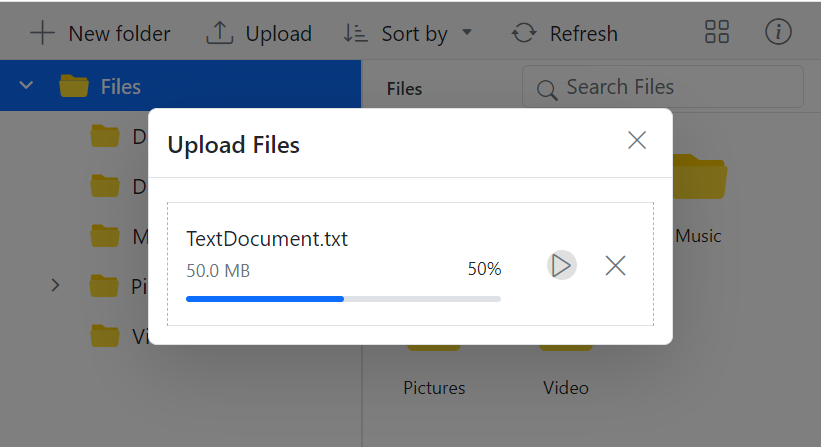
Use chunkSize to split large files into smaller parts uploaded sequentially. This enables pause/resume and improves resilience for large transfers.
In the following example, the chunkSize is set to 5 MB (5,242,880 bytes), and the maxFileSize is set to 70 MB (73,728,000 bytes). This means files that are up to 70 MB will be uploaded in 5 MB chunks.
var hostUrl = 'https://physical-service.syncfusion.com/';
// inject feature modules of the File Manager
ej.filemanager.FileManager.Inject(ej.filemanager.DetailsView, ej.filemanager.Toolbar, ej.filemanager.NavigationPane);
// initialize File Manager control
var filemanagerInstance = new ej.filemanager.FileManager({
    ajaxSettings: {
        url: hostUrl + 'api/FileManager/FileOperations',
        getImageUrl: hostUrl + 'api/FileManager/GetImage',
        uploadUrl: hostUrl + 'api/FileManager/Upload',
        downloadUrl: hostUrl + 'api/FileManager/Download'
    },
    uploadSettings: { autoUpload: true, chunkSize: 5242880, maxFileSize: 73728000 },
    height: '380px'
});
filemanagerInstance.appendTo('#filemanager');
<!DOCTYPE html>
<html lang="en">
<head>
<title>Essential JS 2 File Manager</title>
<meta charset="utf-8">
<meta name="viewport" content="width=device-width, initial-scale=1.0">
<meta name="description" content="Essential JS 2 File Manager Control">
<meta name="author" content="Syncfusion">
<link href="index.css" rel="stylesheet">
<link href="https://cdn.syncfusion.com/ej2/34.1.29/ej2-base/styles/bootstrap5.3.css" rel="stylesheet">
<link href="https://cdn.syncfusion.com/ej2/34.1.29/ej2-inputs/styles/bootstrap5.3.css" rel="stylesheet">
<link href="https://cdn.syncfusion.com/ej2/34.1.29/ej2-popups/styles/bootstrap5.3.css" rel="stylesheet">
<link href="https://cdn.syncfusion.com/ej2/34.1.29/ej2-buttons/styles/bootstrap5.3.css" rel="stylesheet">
<link href="https://cdn.syncfusion.com/ej2/34.1.29/ej2-splitbuttons/styles/bootstrap5.3.css" rel="stylesheet">
<link href="https://cdn.syncfusion.com/ej2/34.1.29/ej2-layouts/styles/bootstrap5.3.css" rel="stylesheet">
<link href="https://cdn.syncfusion.com/ej2/34.1.29/ej2-navigations/styles/bootstrap5.3.css" rel="stylesheet">
<link href="https://cdn.syncfusion.com/ej2/34.1.29/ej2-grids/styles/bootstrap5.3.css" rel="stylesheet">
<link href="https://cdn.syncfusion.com/ej2/34.1.29/ej2-filemanager/styles/bootstrap5.3.css" rel="stylesheet">
<script src="https://cdn.syncfusion.com/ej2/34.1.29/dist/ej2.min.js" type="text/javascript"></script>
</head>
<body>
<div id="filemanager"></div>
<script>
var ele = document.getElementById('container');
if (ele) {
ele.style.visibility = "visible";
}
</script>
<script src="index.js" type="text/javascript"></script>
</body>
</html>#container {
visibility: hidden;
}
#loader {
color: #008cff;
height: 40px;
width: 30%;
position: absolute;
top: 45%;
left: 45%;
}Chunk upload provides pause and resume options, offering users enhanced control over the file upload process.
Note:
- Chunk upload will function when the selected file size is greater than the specified chunk size. Otherwise, it uploads files normally.
- The pause and resume features are available only when the chunk upload is enabled.
Auto upload
Control automatic uploading with autoUpload. Default is true. Set to false, the files will not be uploaded automatically, giving you a chance to manipulate the files before uploading them to the server.
var hostUrl = 'https://physical-service.syncfusion.com/';
// inject feature modules of the File Manager
ej.filemanager.FileManager.Inject(ej.filemanager.DetailsView, ej.filemanager.Toolbar, ej.filemanager.NavigationPane);
// initialize File Manager Control
var filemanagerInstance = new ej.filemanager.FileManager({
    ajaxSettings: {
        url: hostUrl + 'api/FileManager/FileOperations',
        getImageUrl: hostUrl + 'api/FileManager/GetImage',
        uploadUrl: hostUrl + 'api/FileManager/Upload',
        downloadUrl: hostUrl + 'api/FileManager/Download'
    },
    uploadSettings: { autoUpload: false },
    height: '380px'
});
filemanagerInstance.appendTo('#filemanager');
<!DOCTYPE html>
<html lang="en">
<head>
<title>Essential JS 2 File Manager</title>
<meta charset="utf-8">
<meta name="viewport" content="width=device-width, initial-scale=1.0">
<meta name="description" content="Essential JS 2 File Manager Control">
<meta name="author" content="Syncfusion">
<link href="index.css" rel="stylesheet">
<link href="https://cdn.syncfusion.com/ej2/34.1.29/ej2-base/styles/bootstrap5.3.css" rel="stylesheet">
<link href="https://cdn.syncfusion.com/ej2/34.1.29/ej2-inputs/styles/bootstrap5.3.css" rel="stylesheet">
<link href="https://cdn.syncfusion.com/ej2/34.1.29/ej2-popups/styles/bootstrap5.3.css" rel="stylesheet">
<link href="https://cdn.syncfusion.com/ej2/34.1.29/ej2-buttons/styles/bootstrap5.3.css" rel="stylesheet">
<link href="https://cdn.syncfusion.com/ej2/34.1.29/ej2-splitbuttons/styles/bootstrap5.3.css" rel="stylesheet">
<link href="https://cdn.syncfusion.com/ej2/34.1.29/ej2-layouts/styles/bootstrap5.3.css" rel="stylesheet">
<link href="https://cdn.syncfusion.com/ej2/34.1.29/ej2-navigations/styles/bootstrap5.3.css" rel="stylesheet">
<link href="https://cdn.syncfusion.com/ej2/34.1.29/ej2-grids/styles/bootstrap5.3.css" rel="stylesheet">
<link href="https://cdn.syncfusion.com/ej2/34.1.29/ej2-filemanager/styles/bootstrap5.3.css" rel="stylesheet">
<script src="https://cdn.syncfusion.com/ej2/34.1.29/dist/ej2.min.js" type="text/javascript"></script>
</head>
<body>
<div id="filemanager"></div>
<script>
var ele = document.getElementById('container');
if (ele) {
ele.style.visibility = "visible";
}
</script>
<script src="index.js" type="text/javascript"></script>
</body>
</html>#container {
visibility: hidden;
}
#loader {
color: #008cff;
height: 40px;
width: 30%;
position: absolute;
top: 45%;
left: 45%;
}Auto close
Use autoClose to automatically close the upload dialog after uploads finish. Default is false; set to true to auto-close.
var hostUrl = 'https://physical-service.syncfusion.com/';
// inject feature modules of the File Manager
ej.filemanager.FileManager.Inject(ej.filemanager.DetailsView, ej.filemanager.Toolbar, ej.filemanager.NavigationPane);
// initialize File Manager Control
var filemanagerInstance = new ej.filemanager.FileManager({
    ajaxSettings: {
        url: hostUrl + 'api/FileManager/FileOperations',
        getImageUrl: hostUrl + 'api/FileManager/GetImage',
        uploadUrl: hostUrl + 'api/FileManager/Upload',
        downloadUrl: hostUrl + 'api/FileManager/Download',

    },
    uploadSettings: { autoClose: false },
    height: '380px'
});
filemanagerInstance.appendTo('#filemanager');
<!DOCTYPE html>
<html lang="en">
<head>
<title>Essential JS 2 File Manager</title>
<meta charset="utf-8">
<meta name="viewport" content="width=device-width, initial-scale=1.0">
<meta name="description" content="Essential JS 2 File Manager Control">
<meta name="author" content="Syncfusion">
<link href="index.css" rel="stylesheet">
<link href="https://cdn.syncfusion.com/ej2/34.1.29/ej2-base/styles/bootstrap5.3.css" rel="stylesheet">
<link href="https://cdn.syncfusion.com/ej2/34.1.29/ej2-inputs/styles/bootstrap5.3.css" rel="stylesheet">
<link href="https://cdn.syncfusion.com/ej2/34.1.29/ej2-popups/styles/bootstrap5.3.css" rel="stylesheet">
<link href="https://cdn.syncfusion.com/ej2/34.1.29/ej2-buttons/styles/bootstrap5.3.css" rel="stylesheet">
<link href="https://cdn.syncfusion.com/ej2/34.1.29/ej2-splitbuttons/styles/bootstrap5.3.css" rel="stylesheet">
<link href="https://cdn.syncfusion.com/ej2/34.1.29/ej2-layouts/styles/bootstrap5.3.css" rel="stylesheet">
<link href="https://cdn.syncfusion.com/ej2/34.1.29/ej2-navigations/styles/bootstrap5.3.css" rel="stylesheet">
<link href="https://cdn.syncfusion.com/ej2/34.1.29/ej2-grids/styles/bootstrap5.3.css" rel="stylesheet">
<link href="https://cdn.syncfusion.com/ej2/34.1.29/ej2-filemanager/styles/bootstrap5.3.css" rel="stylesheet">
<script src="https://cdn.syncfusion.com/ej2/34.1.29/dist/ej2.min.js" type="text/javascript"></script>
</head>
<body>
<div id="filemanager"></div>
<script>
var ele = document.getElementById('container');
if (ele) {
ele.style.visibility = "visible";
}
</script>
<script src="index.js" type="text/javascript"></script>
</body>
</html>#container {
visibility: hidden;
}
#loader {
color: #008cff;
height: 40px;
width: 30%;
position: absolute;
top: 45%;
left: 45%;
}Prevent upload based on file extensions
The allowedExtensions property specifies which file types are allowed for upload in the File Manager control by defining their extensions.
This property lets you define which file types can be uploaded by specifying allowed extensions, separated by commas. For example, to allow only image files, you would set the allowedExtensions property to .jpg,.png.
By setting the allowedExtensions property, you restrict the file types that can be uploaded. Only files with the specified extensions will be accepted.
If you want to allow only image files like .jpg and .png, you should set the property as follows:
var hostUrl = 'https://physical-service.syncfusion.com/';
// inject feature modules of the File Manager
ej.filemanager.FileManager.Inject(ej.filemanager.DetailsView, ej.filemanager.Toolbar, ej.filemanager.NavigationPane);
// initialize File Manager control
var filemanagerInstance = new ej.filemanager.FileManager({
    ajaxSettings: {
        url: hostUrl + 'api/FileManager/FileOperations',
        getImageUrl: hostUrl + 'api/FileManager/GetImage',
        uploadUrl: hostUrl + 'api/FileManager/Upload',
        downloadUrl: hostUrl + 'api/FileManager/Download'
    },
    uploadSettings: { allowedExtensions: ".jpg,.png" },
    height: '380px'
});
filemanagerInstance.appendTo('#filemanager');
<!DOCTYPE html>
<html lang="en">
<head>
<title>Essential JS 2 File Manager</title>
<meta charset="utf-8">
<meta name="viewport" content="width=device-width, initial-scale=1.0">
<meta name="description" content="Essential JS 2 File Manager Control">
<meta name="author" content="Syncfusion">
<link href="index.css" rel="stylesheet">
<link href="https://cdn.syncfusion.com/ej2/34.1.29/ej2-base/styles/bootstrap5.3.css" rel="stylesheet">
<link href="https://cdn.syncfusion.com/ej2/34.1.29/ej2-inputs/styles/bootstrap5.3.css" rel="stylesheet">
<link href="https://cdn.syncfusion.com/ej2/34.1.29/ej2-popups/styles/bootstrap5.3.css" rel="stylesheet">
<link href="https://cdn.syncfusion.com/ej2/34.1.29/ej2-buttons/styles/bootstrap5.3.css" rel="stylesheet">
<link href="https://cdn.syncfusion.com/ej2/34.1.29/ej2-splitbuttons/styles/bootstrap5.3.css" rel="stylesheet">
<link href="https://cdn.syncfusion.com/ej2/34.1.29/ej2-layouts/styles/bootstrap5.3.css" rel="stylesheet">
<link href="https://cdn.syncfusion.com/ej2/34.1.29/ej2-navigations/styles/bootstrap5.3.css" rel="stylesheet">
<link href="https://cdn.syncfusion.com/ej2/34.1.29/ej2-grids/styles/bootstrap5.3.css" rel="stylesheet">
<link href="https://cdn.syncfusion.com/ej2/34.1.29/ej2-filemanager/styles/bootstrap5.3.css" rel="stylesheet">
<script src="https://cdn.syncfusion.com/ej2/34.1.29/dist/ej2.min.js" type="text/javascript"></script>
</head>
<body>
<div id="filemanager"></div>
<script>
var ele = document.getElementById('container');
if (ele) {
ele.style.visibility = "visible";
}
</script>
<script src="index.js" type="text/javascript"></script>
</body>
</html>#container {
visibility: hidden;
}
#loader {
color: #008cff;
height: 40px;
width: 30%;
position: absolute;
top: 45%;
left: 45%;
}Restrict external drag-and-drop upload
The File Manager control provides support for external drag-and-drop functionality for uploading files by dragging them from the local file system to File Manager.
To completely prevent the external drag-and-drop upload functionality (i.e., disallowing users from dragging and dropping files from outside into the File Manager), you can set the dropArea property to null. This can be done by accessing the File Manager instance via its class methods.
Note: Setting the
allowDragAndDropproperty to false will not prevent the file upload operation through external drag and drop. It will only prevent drag-and-drop actions within the File Manager control.
The following example demonstrates how to prevent the external drag-and-drop upload actions for all types of files in the File Manager control.
var hostUrl = 'https://physical-service.syncfusion.com/';
// inject feature modules of the File Manager
ej.filemanager.FileManager.Inject(ej.filemanager.DetailsView, ej.filemanager.Toolbar, ej.filemanager.NavigationPane);
// initialize File Manager control
var filemanagerInstance = new ej.filemanager.FileManager({
    ajaxSettings: {
        url: hostUrl + 'api/FileManager/FileOperations',
        getImageUrl: hostUrl + 'api/FileManager/GetImage',
        uploadUrl: hostUrl + 'api/FileManager/Upload',
        downloadUrl: hostUrl + 'api/FileManager/Download'
    },
    created: function () {
        filemanagerInstance.uploadObj.dropArea = null;  // Restrict file uploads by dragging them from the local file system to the File Manager.
    },
    height: '380px'
});
filemanagerInstance.appendTo('#filemanager');
<!DOCTYPE html>
<html lang="en">
<head>
<title>Essential JS 2 File Manager</title>
<meta charset="utf-8">
<meta name="viewport" content="width=device-width, initial-scale=1.0">
<meta name="description" content="Essential JS 2 File Manager Control">
<meta name="author" content="Syncfusion">
<link href="index.css" rel="stylesheet">
<link href="https://cdn.syncfusion.com/ej2/34.1.29/ej2-base/styles/bootstrap5.3.css" rel="stylesheet">
<link href="https://cdn.syncfusion.com/ej2/34.1.29/ej2-inputs/styles/bootstrap5.3.css" rel="stylesheet">
<link href="https://cdn.syncfusion.com/ej2/34.1.29/ej2-popups/styles/bootstrap5.3.css" rel="stylesheet">
<link href="https://cdn.syncfusion.com/ej2/34.1.29/ej2-buttons/styles/bootstrap5.3.css" rel="stylesheet">
<link href="https://cdn.syncfusion.com/ej2/34.1.29/ej2-splitbuttons/styles/bootstrap5.3.css" rel="stylesheet">
<link href="https://cdn.syncfusion.com/ej2/34.1.29/ej2-layouts/styles/bootstrap5.3.css" rel="stylesheet">
<link href="https://cdn.syncfusion.com/ej2/34.1.29/ej2-navigations/styles/bootstrap5.3.css" rel="stylesheet">
<link href="https://cdn.syncfusion.com/ej2/34.1.29/ej2-grids/styles/bootstrap5.3.css" rel="stylesheet">
<link href="https://cdn.syncfusion.com/ej2/34.1.29/ej2-filemanager/styles/bootstrap5.3.css" rel="stylesheet">
<script src="https://cdn.syncfusion.com/ej2/34.1.29/dist/ej2.min.js" type="text/javascript"></script>
</head>
<body>
<div id="filemanager"></div>
<script>
var ele = document.getElementById('container');
if (ele) {
ele.style.visibility = "visible";
}
</script>
<script src="index.js" type="text/javascript"></script>
</body>
</html>#container {
visibility: hidden;
}
#loader {
color: #008cff;
height: 40px;
width: 30%;
position: absolute;
top: 45%;
left: 45%;
}