How can I help you?
Add swimlane to palette
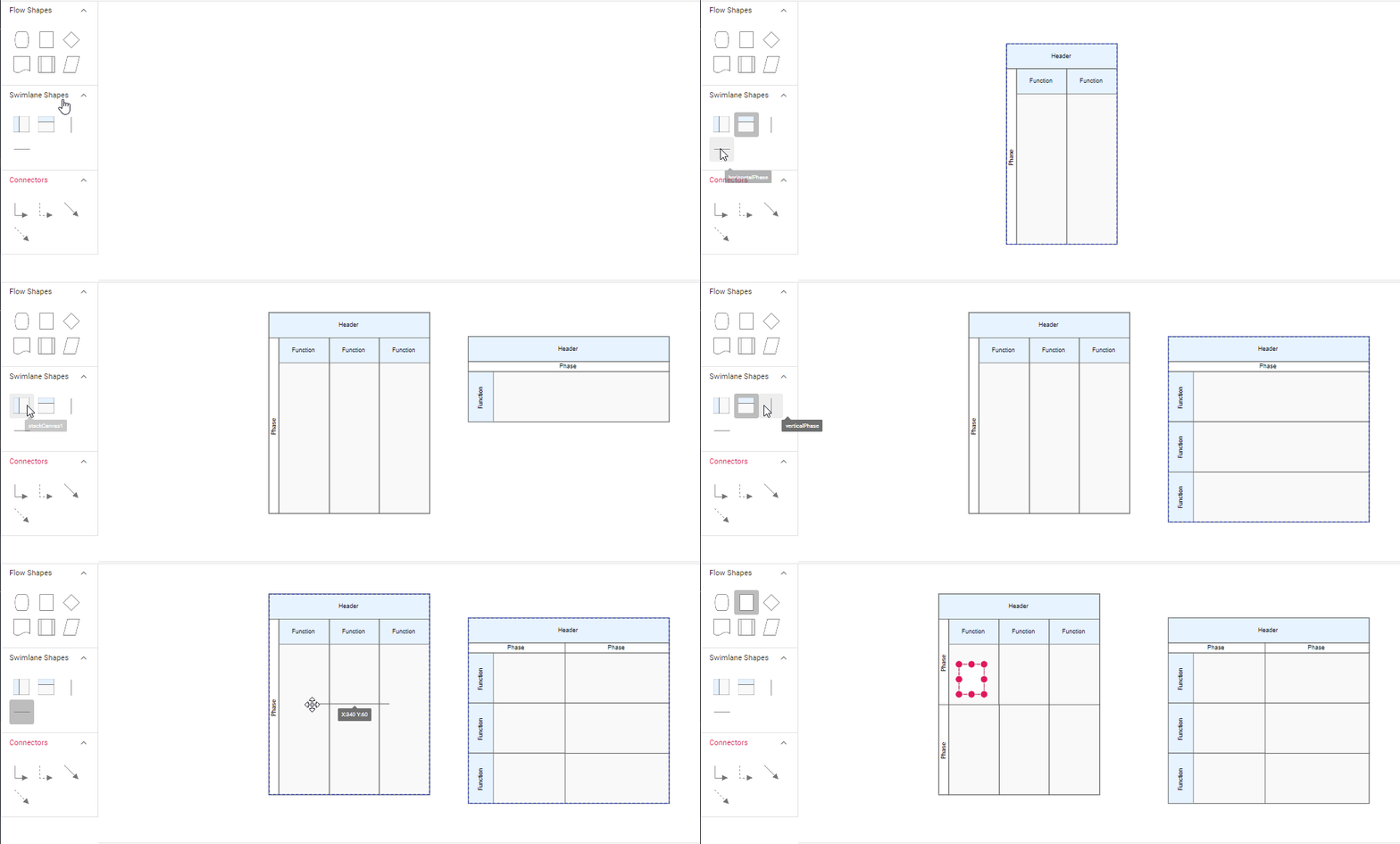
Diagram provides the support to add swimlane and phases to symbol palette. The following code sample illustrate how to add swimlane and phases to palette.
/**
 * Default symbol palette sample
 */
//Initialize the flowshapes for the symbol palatte
var swimlaneShapes = [
    {
      id: 'stackCanvas1',
      shape: {
        type: 'SwimLane',
        lanes: [
          {
            id: 'lane1',
            style: { strokeColor: 'black' },
            height: 60,
            width: 150,
            header: {
              width: 50,
              height: 50,
              style: { strokeColor: 'black', fontSize: 11 },
            },
          },
        ],
        orientation: 'Horizontal',
        isLane: true,
      },
      height: 60,
      width: 140,
      offsetX: 70,
      offsetY: 30,
    },
    {
      id: 'stackCanvas2',
      shape: {
        type: 'SwimLane',
        lanes: [
          {
            id: 'lane1',
            style: { strokeColor: 'black' },
            height: 150,
            width: 60,
            header: {
              width: 50,
              height: 50,
              style: { strokeColor: 'black', fontSize: 11 },
            },
          },
        ],
        orientation: 'Vertical',
        isLane: true,
      },
      height: 140,
      width: 60,
      // style: { fill: '#f5f5f5' },
      offsetX: 70,
      offsetY: 30,
    },
    {
      id: 'verticalPhase',
      shape: {
        type: 'SwimLane',
        phases: [
          {
            style: {
              strokeWidth: 1,
              strokeDashArray: '3,3',
              strokeColor: '#A9A9A9',
            },
          },
        ],
        annotations: [{ text: '' }],
        orientation: 'Vertical',
        isPhase: true,
      },
      height: 60,
      width: 140,
    },
    {
      id: 'horizontalPhase',
      shape: {
        type: 'SwimLane',
        phases: [
          {
            style: {
              strokeWidth: 1,
              strokeDashArray: '3,3',
              strokeColor: '#A9A9A9',
            },
          },
        ],
        annotations: [{ text: '' }],
        orientation: 'Horizontal',
        isPhase: true,
      },
      height: 60,
      width: 140,
    },
  ];
  function setPaletteNodeDefaults(node) {
    node.width = 100;
    node.height = 100;
    node.style.strokeColor = '#3A3A3A';
  }
  var palette = new ej.diagrams.SymbolPalette({
    expandMode: 'Multiple',
    width:'20%',
    palettes: [
      {
        id: 'swimlane',
        expanded: true,
        symbols: swimlaneShapes,
        title: 'Swimlane Shapes',
      },
    ],
    symbolPreview: {
      height: 100,
      width: 100,
      offset: {
        x: 0.5,
        y: 0.5,
      },
    },
    symbolMargin: {
      left: 12,
      right: 12,
      top: 12,
      bottom: 12,
    },
    enableSearch: true,
    getNodeDefaults: setPaletteNodeDefaults,
    getSymbolInfo: (symbol) => {
      return {
        fit: true,
      };
    },
  });

  palette.appendTo('#palette');

  let diagram = new ej.diagrams.Diagram(
    {
      width: '80%',
      height: 900,
    },
    '#element'
  );
<!DOCTYPE html><html lang="en"><head>
<title>EJ2 Diagram</title>
<meta charset="utf-8">
<meta name="viewport" content="width=device-width, initial-scale=1.0">
<meta name="description" content="Typescript UI Controls">
<meta name="author" content="Syncfusion">
<link href="index.css" rel="stylesheet">
<link href="https://cdn.syncfusion.com/ej2/33.1.44/ej2-base/styles/material.css" rel="stylesheet">
<link href="https://cdn.syncfusion.com/ej2/33.1.44/ej2-buttons/styles/material.css" rel="stylesheet">
<link href="https://cdn.syncfusion.com/ej2/33.1.44/ej2-popups/styles/material.css" rel="stylesheet">
<link href="https://cdn.syncfusion.com/ej2/33.1.44/ej2-splitbuttons/styles/material.css" rel="stylesheet">
<link href="https://cdn.syncfusion.com/ej2/33.1.44/ej2-diagrams/styles/material.css" rel="stylesheet">
<link href="https://cdn.syncfusion.com/ej2/33.1.44/ej2-navigations/styles/fabric.css" rel="stylesheet">
<script src="https://cdn.syncfusion.com/ej2/33.1.44/dist/ej2.min.js" type="text/javascript"></script>
</head>
<body>
<div id="container">
<div id="container">
<div id="palette" style="float: left"></div>
<div id="element" style="float: right"></div>
</div>
</div>
<script>
var ele = document.getElementById('container');
if(ele) {
ele.style.visibility = "visible";
}
</script>
<script src="index.js" type="text/javascript"></script>
</body></html>Drag and drop swimlane to palette
- The drag and drop support for swimlane shapes has been provided.
- Horizontal lanes can be added to vertical swimlanes, and vice versa.
- The phase will only drop on swimlane shape with same orientation. The following image illustrates how to drag symbol from palette.