CRUD operations in Syncfusion EJ2 JavaScript DataManager
22 Jul 202524 minutes to read
The Syncfusion EJ2 JavaScript DataManager enables seamless Create, Read, Update, and Delete (CRUD) operations on data, whether it is stored locally in the browser or remotely on a server. You can manipulate data using the DataManager by calling its built-in methods and then binding it to UI components such as Grid, Gantt, or Scheduler. These components automatically trigger CRUD actions based on user interactions, such as editing a row or deleting a record.
Each datasource type handles CRUD operations differently. To manage this, DataManager uses data adaptors translate DataManager actions into the appropriate format for the target datasource.
Data Adaptors and CRUD Translation:
| Adaptor Type | Target DataSource | Notes |
|---|---|---|
JsonAdaptor |
Local JSON data | All changes are made in-memory. Useful for offline scenarios. |
UrlAdaptor |
RESTful WebAPIs endpoints | Sends GET/POST/PUT/DELETE requests to remote URLs. |
WebApiAdaptor |
ASP.NET Web API | Formats requests per Web API standards (e.g., OData-style queries). |
ODataAdaptor / V4 |
OData services | Compatible with OData-compliant services and supports query options. |
RemoteSaveAdaptor |
Remote, batch updates | Batches multiple CRUD operations into a single request. |
CustomAdaptor |
Developer-defined | Extend the base class to fully control how CRUD requests behave. |
Performing CRUD operations
The process of performing CRUD operations varies depending on the datasource:
-
For local data, operations are performed directly on in-memory or client-side collections.
-
For remote data, CRUD actions are translated into HTTP requests sent to specified service endpoints, allowing interaction with centralized servers or cloud databases.
Local data
Local data CRUD operations allow you to efficiently manage and manipulate data stored in your application without the need for external servers or APIs. This is useful for smaller applications, offline use cases, or situations where you want to quickly manipulate temporary datasets within your application.
To perform CRUD operations on local data using Syncfusion EJ2 JavaScript DataManager, follow these steps:
1. Initialize the DataManager with local data:
You can initialize the DataManager with a dataset by either:
-
Assigning a JavaScript object array to the
jsonproperty. -
Passing the dataset directly to the
DataManagerconstructor.
2. Perform CRUD operations using the following DataManager methods:
-
insert : The JSON data passed as a parameter to the insert method that is inserted to the datasource of the dataManager.
-
update: Modifies or updates an existing record in the datasource using a unique key.
-
remove : Removes a record from the local datasource using a unique key.
// Compile template for inserting data rows.
let template= '<tr><td>${OrderID}</td><td>${CustomerID}</td><td>${EmployeeID}</td></tr>';
var compiledFunction = ej.base.compile(template);

// Get the table and initialize DataManager.
let table= document.getElementById('datatable');
let datamanger= new ej.data.DataManager(data);

// Function to render table data.
function renderTable() {
    datamanger.executeQuery(new ej.data.Query()).then((e) => {
        table.tBodies[0].innerHTML = ''; // Clear existing data.
        (e.result).forEach((data) => {
            table.tBodies[0].appendChild(compiledFunction(data)[0].firstChild);
        });
    });
}

// Insert new record
let insertBtn = document.getElementById('insertBtn');
insertBtn.onclick = () => {
    let orderid = document.getElementById('OrderID');
    let cusid = document.getElementById('CustomerID');
    let empid = document.getElementById('EmployeeID');

    if (!orderid.value || !cusid.value || !empid.value) {
        document.getElementById('message').innerText = 'All fields are required to insert a new order.';
        return;
    }
    const exists =  (datamanger.dataSource.json).some(item => item.OrderID === Number(orderid.value));
    if (exists) {
        document.getElementById('message').innerText ='OrderID ' + orderid.value + ' already exists. Please use a unique OrderID.';
        return;
    }

    let newData = {
        OrderID: parseInt(orderid.value),
        CustomerID: cusid.value,
        EmployeeID: parseInt(empid.value)
    };

    datamanger.insert(newData);
    renderTable();
};

// Update record.
let updateBtn = document.getElementById('updateBtn');
updateBtn.onclick = () => {
    let orderid = document.getElementById('updateOrderID');
    let cusid = document.getElementById('updateCustomerID');
    let empid = document.getElementById('updateEmployeeID');

    let updatedData = {
        OrderID: +orderid.value,
        CustomerID: cusid.value,
        EmployeeID: +empid.value
    };

    if (!updatedData.OrderID) {
        document.getElementById('message').innerText ='OrderID is required to update';
        return;
    }
    datamanger.update('OrderID', updatedData);
    renderTable();
};

// Delete a record.
let deleteBtn =document.getElementById('deleteBtn');
deleteBtn.onclick = () => {
    let orderid = document.getElementById('deleteOrderID');
    if (!orderid.value) {
        document.getElementById('message').innerText ='OrderID is required to delete';
        return;
    }

    datamanger.remove('OrderID', { OrderID: parseInt(orderid.value) });
    renderTable();
};

// Initial table render.
renderTable();
<!DOCTYPE html>
<html lang="en">
<head>
<title>EJ2 DataManager</title>
<meta charset="utf-8">
<meta name="viewport" content="width=device-width, initial-scale=1.0">
<meta name="description" content="Typescript DataManager Control">
<meta name="author" content="Syncfusion">
<link href="index.css" rel="stylesheet">
<style>
table {
border-collapse: collapse;
width: 100%;
margin-top: 20px;
font-family: Roboto;
}
th,
td {
border: 1px solid #e0e0e0;
padding: 8px 12px;
text-align: left;
white-space: nowrap;
}
.form-section {
margin: 10px 0;
}
input {
margin-right: 10px;
width: 120px;
}
input {
width: 120px;
padding: 10px;
margin-bottom: 15px;
border: 1px solid #ccc;
border-radius: 4px;
box-sizing: border-box;
font-size: 14px;
font-family: Roboto;
transition: border-color 0.3s ease;
}
input:focus {
border-color: #3f51b5;
outline: none;
}
#message {
color: red;
margin-top: 10px;
text-align: center;
}
.e-form button,
.e-form input[type="button"] {
padding: 10px 20px;
background-color: #3f51b5;
color: white;
border: none;
border-radius: 4px;
font-weight: 500;
cursor: pointer;
transition: background-color 0.3s ease;
}
.e-form button:hover,
.e-form input[type="button"]:hover {
background-color: #303f9f;
}
</style>
<script src="https://cdn.syncfusion.com/ej2/32.1.19/dist/ej2.min.js" type="text/javascript"></script>
<script src="es5-datasource.js" type="text/javascript"></script>
<script src="https://cdn.syncfusion.com/ej2/syncfusion-helper.js" type ="text/javascript"></script>
</head>
<body>
<div id="container">
<!-- Insert Form -->
<div class="e-form">
<h3>Insert Record</h3>
<input type="number" id="OrderID" placeholder="Order ID" />
<input type="text" id="CustomerID" placeholder="Customer ID" />
<input type="number" id="EmployeeID" placeholder="Employee ID" />
<input type="button" value="Insert" id="insertBtn" />
</div>
<!-- Update Form -->
<div class="e-form">
<h3>Update Record</h3>
<input type="number" id="updateOrderID" placeholder="Order ID" />
<input type="text" id="updateCustomerID" placeholder="Customer ID" />
<input type="number" id="updateEmployeeID" placeholder="Employee ID" />
<input type="button" value="Update" id="updateBtn" />
</div>
<!-- Delete Form -->
<div class="e-form">
<h3>Delete Record</h3>
<input type="number" id="deleteOrderID" placeholder="Order ID" />
<input type="button" value="Delete" id="deleteBtn" />
</div>
<div id="message"></div>
<!-- Data Table -->
<table id="datatable">
<thead>
<tr>
<th>Order ID</th>
<th>Customer ID</th>
<th>Employee ID</th>
</tr>
</thead>
<tbody>
</tbody>
</table>
</div>
<script>
var ele = document.getElementById('container');
if (ele) {
ele.style.visibility = "visible";
}
</script>
<script src="index.js" type="text/javascript"></script>
</body>
</html>
- Primary key name is required by the update method to find the record to be updated.
- Primary key name and its value are required to find the record to be removed.
Remote data
Remote data CRUD operations allow you to manage data hosted on a remote server or external API using the Syncfusion EJ2 JavaScript DataManager. This is especially useful for modern web applications that interact with centralized databases or cloud services, ensuring seamless synchronization between client and server.
To perform CRUD operations on remote data using DataManager, follow these steps:
1. Initialize the DataManager with remote data:
You can bind the DataManager to a remote datasource by specifying the service endpoint URL in the url property. Additionally, to handle CRUD operations properly, you should specify separate URLs for insert, update, and remove actions using the properties:
-
insertUrl: The endpoint URL to insert (create) new records. -
updateUrl: The endpoint URL to update existing records. -
removeUrl: The endpoint URL to delete records.
The DataManager uses these URLs to perform the respective operations by sending appropriate HTTP requests to the server.
To retrieve data from the remote server, use the DataManager’s executeQuery method. This method converts the Query object into a server request and sends it to the specified endpoint. It then waits for the server response in JSON format and returns the resulting data.
2. Perform CRUD operations using the following DataManager methods:
Use the following DataManager methods to perform client-side CRUD actions, which are automatically translated into HTTP requests to the corresponding remote URLs:
| Method | Description |
|---|---|
| insert | Sends a POST request to insertUrl to create a new record. |
| update | Sends a PUT/PATCH request to updateUrl to modify an existing record, identified by a primary key. |
| remove | Sends a DELETE request to removeUrl to remove a record, using a primary key to identify it. |
// Compile template for inserting data rows.
const template = '<tr><td>${OrderID}</td><td>${CustomerID}</td><td>${EmployeeID}</td></tr>';
const compiledFunction = ej.base.compile(template);
let localData = [];
// Get the table and initialize DataManager.
const table = document.getElementById('datatable');
const datamanager = new ej.data.DataManager({
    // Use remote server host and port instead of 'xxxx'.
    url: 'https://localhost:xxxx/api/Order',
    insertUrl: 'https://localhost:xxxx/api/Order/Insert',
    updateUrl: 'https://localhost:xxxx/api/Order/Update',
    removeUrl: 'https://localhost:xxxx/api/Order/Remove',
    adaptor: new ej.data.UrlAdaptor()
});

// Initial table render.
renderTable();

async function renderTable() {
    const e = await datamanager.executeQuery(new ej.data.Query());
    if (e && e.result && e.result.result) {
        localData = (e.result.result);
        table.tBodies[0].innerHTML = '';
        (e.result.result).forEach((data) => {
            if (data && data.OrderID) {
                table.tBodies[0].appendChild(compiledFunction(data)[0].firstChild);
            }
        });
    }
}

// Insert new record.
const insertBtn = document.getElementById('insertBtn');
insertBtn.onclick = async () => {
  const orderid = document.getElementById('insertOrderID');
  const cusid = document.getElementById('insertCustomerID');
  const empid = document.getElementById('insertEmployeeID');
  if (!orderid.value || !cusid.value || !empid.value) {
    document.getElementById('message').innerText = 'All fields are required to insert a new order.';
    return;
  }
  const orderIdValue = parseInt(orderid.value, 10);
  const exists = localData.some(item => item.OrderID === orderIdValue);
  if (exists) {
    document.getElementById('message').innerText = `OrderID ${orderIdValue} already exists. Please use a unique OrderID.`;
    return;
  }
  const newData = {
    OrderID: parseInt(orderid.value, 10),
    CustomerID: cusid.value,
    EmployeeID: parseInt(empid.value, 10)
  };
  await datamanager.insert(newData, new ej.data.Query());
  await renderTable();
};

// Update a record.
const updateBtn = document.getElementById('updateBtn');
updateBtn.onclick = async () => {
  const orderid = document.getElementById('updateOrderID');
  const cusid = document.getElementById('updateCustomerID');
  const empid = document.getElementById('updateEmployeeID');
  const updatedData = {
    OrderID: parseInt(orderid.value, 10),
    CustomerID: cusid.value,
    EmployeeID: parseInt(empid.value, 10)
  };
  if (!updatedData.OrderID) {
    document.getElementById('message').innerText = 'OrderID is required to update';
    return;
  }
  await datamanager.update('OrderID', updatedData, new ej.data.Query());
  await renderTable();
};

// Delete a record.
const deleteBtn = document.getElementById('deleteBtn');
deleteBtn.onclick = async () => {
  const orderid = document.getElementById('deleteOrderID');
  if (!orderid.value) {
    document.getElementById('message').innerText = 'OrderID is required to delete';
    return;
  }
  await datamanager.remove('OrderID', { OrderID: parseInt(orderid.value, 10) }, new ej.data.Query());
  await renderTable();
};
<!DOCTYPE html>
<html lang="en">
<head>
<title>EJ2 Grid</title>
<meta charset="utf-8">
<meta name="viewport" content="width=device-width, initial-scale=1.0">
<meta name="description" content="Typescript Grid Control">
<meta name="author" content="Syncfusion">
<link href="index.css" rel="stylesheet">
<style>
table {
border-collapse: collapse;
width: 100%;
margin-top: 20px;
font-family: Roboto;
}
th,
td {
border: 1px solid #e0e0e0;
padding: 8px 12px;
text-align: left;
white-space: nowrap;
}
.form-section {
margin: 10px 0;
}
input {
margin-right: 10px;
width: 120px;
}
#message {
color: red;
margin-top: 10px;
text-align: center;
}
.e-form button,
.e-form input[type="button"] {
padding: 5px 16px;
background-color: #3f51b5;
color: white;
border: none;
border-radius: 4px;
font-weight: 500;
cursor: pointer;
transition: background-color 0.3s ease;
}
.e-form button:hover,
.e-form input[type="button"]:hover {
background-color: #303f9f;
}
</style>
<script src="https://cdn.syncfusion.com/ej2/32.1.19/dist/ej2.min.js" type="text/javascript"></script>
<script src="https://cdn.syncfusion.com/ej2/syncfusion-helper.js" type ="text/javascript"></script>
</head>
<body>
<div id="container">
<!-- Insert Form -->
<div class="e-form">
<h3>Insert Record</h3>
<input type="number" id="insertOrderID" placeholder="Order ID" />
<input type="text" id="insertCustomerID" placeholder="Customer ID" />
<input type="number" id="insertEmployeeID" placeholder="Employee ID" />
<input type="button" value="Insert" id="insertBtn" />
</div>
<!-- Update Form -->
<div class="e-form">
<h3>Update Record</h3>
<input type="number" id="updateOrderID" placeholder="Order ID" />
<input type="text" id="updateCustomerID" placeholder="Customer ID" />
<input type="number" id="updateEmployeeID" placeholder="Employee ID" />
<input type="button" value="Update" id="updateBtn" />
</div>
<!-- Delete Form -->
<div class="e-form">
<h3>Delete Record</h3>
<input type="number" id="deleteOrderID" placeholder="Order ID" />
<input type="button" value="Delete" id="deleteBtn" />
</div>
<div id="message"></div>
<!-- Data Table -->
<table id="datatable">
<thead>
<tr>
<th>Order ID</th>
<th>Customer ID</th>
<th>Employee ID</th>
</tr>
</thead>
<tbody>
</tbody>
</table>
</div>
<script>
var ele = document.getElementById('container');
if (ele) {
ele.style.visibility = "visible";
}
</script>
<script src="index.js" type="text/javascript"></script>
</body>
</html>using Microsoft.AspNetCore.Http;
using Microsoft.AspNetCore.Mvc;
using Syncfusion.EJ2.Base;
using UrlAdaptor.Models;
namespace UrlAdaptor.Controllers
{
[ApiController]
public class OrderController : Controller
{
/// <summary>
/// Processes the DataManager request to perform paging operations (skip and take) on the ordersdetails data.
/// </summary>
/// <param name="DataManagerRequest">Contains the details of the data operation requested, including paging parameters.</param>
/// <returns>Returns a JSON object with the paginated data and the total record count.</returns>
[HttpPost]
[Route("api/[controller]")]
public object Post([FromBody] DataManagerRequest DataManagerRequest)
{
// Retrieve data from the data source (e.g., database).
IQueryable<OrdersDetails> DataSource = GetOrderData().AsQueryable();
// Initialize dataOperations instance.
QueryableOperation queryableOperation = new QueryableOperation();
// Get the total count of records.
int totalRecordsCount = DataSource.Count();
// Handling paging operation.
if (DataManagerRequest.Skip != 0)
{
DataSource = queryableOperation.PerformSkip(DataSource, DataManagerRequest.Skip);
}
if (DataManagerRequest.Take != 0)
{
DataSource = queryableOperation.PerformTake(DataSource, DataManagerRequest.Take);
}
// Return the paginated data and the total record count.
return new { result = DataSource, count = totalRecordsCount };
}
/// <summary>
/// Retrieves all order data records from the data source.
/// </summary>
/// <returns>Returns a list of all order records.</returns>
[HttpGet]
[Route("api/[controller]")]
public List<OrdersDetails> GetOrderData()
{
var data = OrdersDetails.GetAllRecords().ToList();
return data;
}
/// <summary>
/// Inserts a new data item into the data collection.
/// </summary>
/// <param name="newRecord">It contains the new record detail which is need to be inserted.</param>
/// <returns>Returns void</returns>
[HttpPost]
[Route("api/Grid/Insert")]
public void Insert([FromBody] CRUdatamangerodel<OrdersDetails> newRecord)
{
if (newRecord.value != null)
{
OrdersDetails.GetAllRecords().Insert(0, newRecord.value);
}
}
/// <summary>
/// Update a existing data item from the data collection.
/// </summary>
/// <param name="Order">It contains the updated record detail which is need to be updated.</param>
/// <returns>Returns void.</returns>
[HttpPost]
[Route("api/Grid/Update")]
public void Update([FromBody] CRUdatamangerodel<OrdersDetails> Order)
{
var updatedOrder = Order.value;
if (updatedOrder != null)
{
var data = OrdersDetails.GetAllRecords().FirstOrDefault(or => or.OrderID == updatedOrder.OrderID);
if (data != null)
{
// Update the existing record.
data.OrderID = updatedOrder.OrderID;
data.CustomerID = updatedOrder.CustomerID;
data.EmployeeID = updatedOrder.EmployeeID;
// Update other properties similarly.
}
}
}
/// <summary>
/// Remove a specific data item from the data collection.
/// </summary>
/// <param name="value">It contains the specific record detail which is need to be removed.</param>
/// <return>Returns void.</return>
[HttpPost]
[Route("api/Grid/Remove")]
public void Remove([FromBody] CRUdatamangerodel<OrdersDetails> value)
{
int orderId = int.Parse((value.key).ToString());
var data = OrdersDetails.GetAllRecords().FirstOrDefault(orderData => orderData.OrderID == orderId);
if (data != null)
{
// Remove the record from the data collection.
OrdersDetails.GetAllRecords().Remove(data);
}
}
public class CRUdatamangerodel<T> where T : class
{
public string? action { get; set; }
public string? keyColumn { get; set; }
public object? key { get; set; }
public T? value { get; set; }
public List<T>? added { get; set; }
public List<T>? changed { get; set; }
public List<T>? deleted { get; set; }
public IDictionary<string, object>? @params { get; set; }
}
}
}namespace UrlAdaptor.Models
{
public class OrdersDetails
{
public static List<OrdersDetails> order = new List<OrdersDetails>();
public OrdersDetails()
{
}
public OrdersDetails(
int OrderID, string CustomerId, int EmployeeId, double Freight, bool Verified,
DateTime OrderDate, string ShipCity, string ShipName, string ShipCountry,
DateTime ShippedDate, string ShipAddress)
{
this.OrderID = OrderID;
this.CustomerID = CustomerId;
this.EmployeeID = EmployeeId;
this.Freight = Freight;
this.ShipCity = ShipCity;
this.Verified = Verified;
this.OrderDate = OrderDate;
this.ShipName = ShipName;
this.ShipCountry = ShipCountry;
this.ShippedDate = ShippedDate;
this.ShipAddress = ShipAddress;
}
public static List<OrdersDetails> GetAllRecords()
{
if (order.Count() == 0)
{
int code = 10000;
for (int i = 1; i < 10; i++)
{
order.Add(new OrdersDetails(code + 1, "ALFKI", i + 0, 2.3 * i, false, new DateTime(1991, 05, 15), "Berlin", "Simons bistro", "Denmark", new DateTime(1996, 7, 16), "Kirchgasse 6"));
order.Add(new OrdersDetails(code + 2, "ANATR", i + 2, 3.3 * i, true, new DateTime(1990, 04, 04), "Madrid", "Queen Cozinha", "Brazil", new DateTime(1996, 9, 11), "Avda. Azteca 123"));
order.Add(new OrdersDetails(code + 3, "ANTON", i + 1, 4.3 * i, true, new DateTime(1957, 11, 30), "Cholchester", "Frankenversand", "Germany", new DateTime(1996, 10, 7), "Carrera 52 con Ave. Bolívar #65-98 Llano Largo"));
order.Add(new OrdersDetails(code + 4, "BLONP", i + 3, 5.3 * i, false, new DateTime(1930, 10, 22), "Marseille", "Ernst Handel", "Austria", new DateTime(1996, 12, 30), "Magazinweg 7"));
order.Add(new OrdersDetails(code + 5, "BOLID", i + 4, 6.3 * i, true, new DateTime(1953, 02, 18), "Tsawassen", "Hanari Carnes", "Switzerland", new DateTime(1997, 12, 3), "1029 - 12th Ave. S."));
code += 5;
}
}
return order;
}
public int? OrderID { get; set; }
public string? CustomerID { get; set; }
public int? EmployeeID { get; set; }
public double? Freight { get; set; }
public string? ShipCity { get; set; }
public bool? Verified { get; set; }
public DateTime OrderDate { get; set; }
public string? ShipName { get; set; }
public string? ShipCountry { get; set; }
public DateTime ShippedDate { get; set; }
public string? ShipAddress { get; set; }
}
}
- The update method requires the primary key name to locate the record to be modified, while the remove method requires both the primary key name and its value to identify the record to be deleted.
- In remote datasources, when the primary key field is an identity field, then it is advised to return the created data in the response.
Handling batch operations
The Syncfusion EJ2 JavaScript DataManager supports batch operations, allowing multiple CRUD actions such as create, update, and delete to be submitted in a single request. This feature improves performance by minimizing the number of HTTP requests sent to the datasource, reducing network overhead and enhancing efficiency.
Use the saveChanges method to commit all pending changes (insertions, updates, and deletions) in a single call. This eliminates the need for individual requests for each action.
How Batch processing works:
Batch processing involves maintaining three separate arrays to track different types of data modifications:
-
addedRecords — Records to add.
-
changedRecords — Records to update.
-
deletedRecords — Records to delete.
These arrays are then passed to the DataManager’s saveChanges method along with the primary key field name, which uniquely identifies each record.
Below is an example demonstrating batch CRUD operations using local data:
let template = '<tr><td>${OrderID}</td><td>${CustomerID}</td><td>${EmployeeID}</td></tr>';

let compiledFunction = ej.base.compile(template);

let table =document.getElementById('datatable');
let datamanager = new ej.data.DataManager({ json: data.slice(0, 4) });

datamanager.executeQuery(new ej.data.Query())
    .then((e) => {
        (e.result).forEach((data) => {
            table.tBodies[0].appendChild(compiledFunction(data)[0].firstChild);
        });
    });
var changes = {
    changedRecords: [], addedRecords: [], deletedRecords: []
};

document.getElementById('added').onclick = () => {
    let orderid = document.getElementById('addOrderID');
    let cusid = document.getElementById('addCustomerID');
   let empid = document.getElementById('addEmployeeID');
    changes.addedRecords.push({
        OrderID: +orderid.value,
        CustomerID: cusid.value,
        EmployeeID: +empid.value
    });
};

document.getElementById('changed').onclick = () => {
    let orderid = document.getElementById('updateOrderID');
    let cusid = document.getElementById('updateCustomerID');
   let empid = document.getElementById('updateEmployeeID');
    changes.changedRecords.push({
        OrderID: +orderid.value,
        CustomerID: cusid.value,
        EmployeeID: +empid.value
    });
};

document.getElementById('deleted').onclick = () => {
   let orderid = document.getElementById('deleteOrderID');
    changes.deletedRecords.push({
        OrderID: +orderid.value
    });
};

document.getElementById('save').onclick = () => {
    datamanager.saveChanges(changes, 'OrderID');
    changes = { changedRecords: [], addedRecords: [], deletedRecords: [] };
    datamanager.executeQuery(new ej.data.Query())
        .then((e) => {
            table.tBodies[0].innerHTML = '';
            (e.result).forEach((data) => {
                table.tBodies[0].appendChild(compiledFunction(data)[0].firstChild);
            });
        });
};
<!DOCTYPE html>
<html lang="en">
<head>
<title>EJ2 Grid</title>
<meta charset="utf-8">
<meta name="viewport" content="width=device-width, initial-scale=1.0">
<meta name="description" content="Typescript Grid Control">
<meta name="author" content="Syncfusion">
<link href="index.css" rel="stylesheet">
<style>
.e-form {
background: #f9f9f9;
padding: 20px;
margin-bottom: 15px;
border-radius: 8px;
box-shadow: 0 2px 5px rgba(0, 0, 0, 0.1);
}
.e-form h3 {
margin-top: 0;
font-size: 18px;
color: #333;
margin-bottom: 10px;
}
.e-form .form-row {
display: flex;
flex-wrap: wrap;
gap: 10px;
align-items: center;
}
.e-form input[type="text"],
.e-form input[type="number"] {
flex: 1;
min-width: 150px;
padding: 10px;
font-size: 14px;
border: 1px solid #ccc;
border-radius: 4px;
}
.e-form input[type="button"] {
padding: 10px 20px;
background-color: #007bff;
color: white;
font-size: 14px;
border: none;
border-radius: 4px;
cursor: pointer;
}
.e-form input[type="button"]:hover {
background-color: #0056b3;
}
label {
font-weight: bold;
margin-bottom: 8px;
}
table {
border-collapse: collapse;
width: 100%;
margin-top: 20px;
font-family: Roboto;
}
th,
td {
border: 1px solid #e0e0e0;
padding: 8px 12px;
text-align: left;
white-space: nowrap;
}
</style>
<script src="https://cdn.syncfusion.com/ej2/32.1.19/dist/ej2.min.js" type="text/javascript"></script>
<script src="es5-datasource.js" type="text/javascript"></script>
<script src="https://cdn.syncfusion.com/ej2/syncfusion-helper.js" type ="text/javascript"></script>
</head>
<body>
<div id="container">
<div class="e-form">
<h3>Insert Record</h3>
<input type="number" id="addOrderID" placeholder="Order ID" />
<input type="text" id="addCustomerID" placeholder="Customer ID" />
<input type="number" id="addEmployeeID" placeholder="Employee ID" />
<input type="button" value="Insert" id="added" />
</div>
<hr />
<div class="e-form">
<h3>Update Record</h3>
<input type="number" id="updateOrderID" placeholder="Order ID" />
<input type="text" id="updateCustomerID" placeholder="Customer ID" />
<input type="number" id="updateEmployeeID" placeholder="Employee ID" />
<input type="button" value="Update" id="changed" />
</div>
<hr />
<div class="e-form">
<h3>Delete Record</h3>
<input type="number" id="deleteOrderID" placeholder="Order ID" />
<input type="button" value="Delete" id="deleted" />
</div>
<hr />
<div class="e-form">
<label>Click to Save All Changes:</label>
<input type="button" value="Save Changes" id="save" />
</div>
<table id="datatable" class="e-table">
<thead>
<tr>
<th>Order ID</th>
<th>Customer ID</th>
<th>Employee ID</th>
</tr>
</thead>
<tbody></tbody>
</table>
</div>
<script>
var ele = document.getElementById('container');
if (ele) {
ele.style.visibility = "visible";
}
</script>
<script src="index.js" type="text/javascript"></script>
</body>
</html>Handling server errors
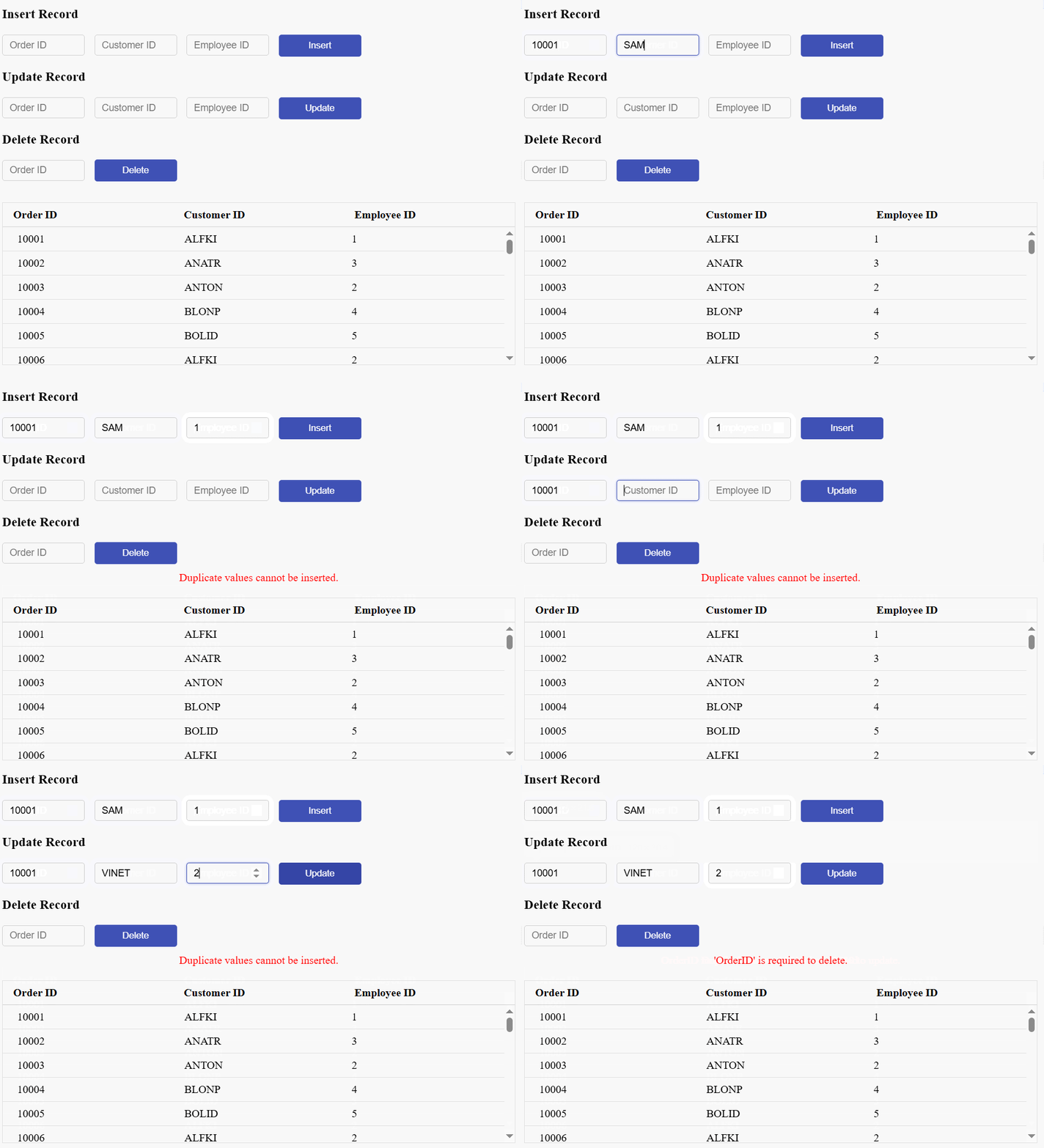
When performing data operations using Syncfusion’s DataManager, such as fetching, inserting, updating, or deleting data from a remote server, these operations are asynchronous and can encounter errors due to server issues, network problems, or invalid requests.
To manage these failures effectively, you can use the catch method available on the promise returned by the DataManager operation. The catch block allows you to gracefully handle errors by:
-
Identify and capture failures caused by unreachable endpoints, timeouts, or server-side issues.
-
Prevent application crashes by safely intercepting unhandled promise rejections.
-
Display user-friendly error messages (e.g., “Failed to load data. Please try again later.”) to inform the user of the problem.
-
Log error details for developers to analyze, helping with faster debugging and resolution.
-
Trigger fallback logic, such as retry mechanisms or offline storage access.
The following sample demonstrates how to use the catch block to manage errors during DataManager operations.
// Compile template for inserting data rows.
const template = '<tr><td>${OrderID}</td><td>${CustomerID}</td><td>${EmployeeID}</td></tr>';
const compiledFunction = ej.base.compile(template);
let localData = [];
// Get the table and initialize DataManager.
const table = document.getElementById('datatable');
const datamanager = new ej.data.DataManager({
    // Use remote server host and port instead of 'xxxx'.
    url: 'https://localhost:xxxx/api/Order',
    insertUrl: 'https://localhost:xxxx/api/Order/Insert',
    updateUrl: 'https://localhost:xxxx/api/Order/Update',
    removeUrl: 'https://localhost:xxxx/api/Order/Remove',
    adaptor: new ej.data.UrlAdaptor()
});

// Initial table render.
renderTable();

function renderTable() {
  datamanager.executeQuery(new ej.data.Query())
    .then((e) => {
      if (e && e.result && e.result.result) {
        localData = e.result.result;
        table.tBodies[0].innerHTML = '';
        localData.forEach((data) => {
          if (data && data.OrderID) {
            table.tBodies[0].appendChild(compiledFunction(data)[0].firstChild);
          }
        });
      }
    })
    .catch((error) => {
      console.error("Server error while fetching data:", error);
      document.getElementById('message').innerText = "An error occurred while loading data. Please try again later."
    });
}


// Insert new record.
const insertBtn = document.getElementById('insertBtn');
insertBtn.onclick = () => {
  const orderid = document.getElementById('insertOrderID');
  const cusid = document.getElementById('insertCustomerID');
  const empid = document.getElementById('insertEmployeeID');
  const newData = {
    OrderID: parseInt(orderid.value, 10),
    CustomerID: cusid.value,
    EmployeeID: parseInt(empid.value, 10)
  };
  datamanager.insert(newData, new ej.data.Query())
    .then(() => {
      document.getElementById('message').innerText = '';
      return renderTable();
    })
    .catch(async (err) => {
      if (Array.isArray(err) && err[0]?.error instanceof Response) {
        const response = err[0].error;
        const errorData = await response.json();
        err.message = errorData.message || 'Failed to insert record.';
      }
      document.getElementById('message').innerText = err.message;
    });

};

// Update a record.
const updateBtn = document.getElementById('updateBtn');
updateBtn.onclick = () => {
  const orderid = document.getElementById('updateOrderID');
  const cusid = document.getElementById('updateCustomerID');
  const empid = document.getElementById('updateEmployeeID');
  const updatedData = {
    OrderID: parseInt(orderid.value, 10),
    CustomerID: cusid.value,
    EmployeeID: parseInt(empid.value, 10)
  };
  datamanager.update('OrderID', updatedData, new ej.data.Query())
    .then(() => {
    document.getElementById('message').innerText = '';
    return renderTable();
  })
    .catch(async (err) => {
      if (Array.isArray(err) && err[0]?.error instanceof Response) {
        const response = err[0].error;
        const errorData = await response.json();
        err.message = errorData.message || 'Failed to update record.';
      }
      document.getElementById('message').innerText = err.message;
    });

};

// Delete a record.
const deleteBtn = document.getElementById('deleteBtn');
deleteBtn.onclick = () => {
  const orderid = document.getElementById('deleteOrderID');
  datamanager.remove('OrderID', { OrderID: parseInt(orderid.value, 10) }, new ej.data.Query())
    .then(() => {
    document.getElementById('message').innerText = '';
    return renderTable();
  })
    .catch(async (err) => {
      if (Array.isArray(err) && err[0]?.error instanceof Response) {
        const response = err[0].error;
        const errorData = await response.json();
        err.message = errorData.message || 'Failed to delete record.';
      }
      document.getElementById('message').innerText = err.message;
    });
};
<!DOCTYPE html>
<html lang="en">
<head>
<title>EJ2 Grid</title>
<meta charset="utf-8">
<meta name="viewport" content="width=device-width, initial-scale=1.0">
<meta name="description" content="Typescript Grid Control">
<meta name="author" content="Syncfusion">
<link href="index.css" rel="stylesheet">
<style>
#datatable {
width: 100%;
border-collapse: collapse;
table-layout: fixed;
font-family: Roboto;
border: 1px solid #e0e0e0;
}
#datatable thead {
display: table;
width: 100%;
table-layout: fixed;
position: sticky;
top: 0;
background: white;
z-index: 1;
}
#datatable thead th {
border-bottom: 1px solid #ccc;
padding: 8px 10px 8px 15px;
text-align: left;
white-space: nowrap;
box-sizing: border-box;
}
#datatable tbody {
display: block;
max-height: 200px;
overflow-y: auto;
overflow-x: hidden;
width: 100%;
}
#datatable tbody tr {
display: table;
width: 100%;
table-layout: fixed;
}
#datatable td {
border-bottom: 1px solid #e0e0e0;
padding: 8px 21px;
text-align: left;
white-space: nowrap;
box-sizing: border-box;
}
.form-section {
margin: 10px 0;
}
input {
margin-right: 10px;
width: 120px;
}
#message {
color: red;
margin-top: 10px;
text-align: center;
padding-bottom: 20px;
}
input[type="number"],
input[type="text"] {
margin-right: 10px;
width: 120px;
padding: 6px 10px;
font-size: 14px;
border: 1px solid #ccc;
border-radius: 4px;
box-sizing: border-box;
transition: border-color 0.3s ease;
}
input[type="number"]:focus,
input[type="text"]:focus {
outline: none;
border-color: #3f51b5;
box-shadow: 0 0 5px rgba(63, 81, 181, 0.5);
}
.e-form button,
.e-form input[type="button"] {
padding: 8px 16px;
background-color: #3f51b5;
color: white;
border: none;
border-radius: 4px;
font-weight: 500;
cursor: pointer;
transition: background-color 0.3s ease;
}
.e-form button:hover,
.e-form input[type="button"]:hover {
background-color: #303f9f;
}
</style>
<script src="https://cdn.syncfusion.com/ej2/32.1.19/dist/ej2.min.js" type="text/javascript"></script>
<script src="https://cdn.syncfusion.com/ej2/syncfusion-helper.js" type ="text/javascript"></script>
</head>
<body>
<div id="container">
<!-- Insert Form -->
<div class="e-form">
<h3>Insert Record</h3>
<input type="number" id="insertOrderID" placeholder="Order ID" />
<input type="text" id="insertCustomerID" placeholder="Customer ID" />
<input type="number" id="insertEmployeeID" placeholder="Employee ID" />
<input type="button" value="Insert" id="insertBtn" />
</div>
<!-- Update Form -->
<div class="e-form">
<h3>Update Record</h3>
<input type="number" id="updateOrderID" placeholder="Order ID" />
<input type="text" id="updateCustomerID" placeholder="Customer ID" />
<input type="number" id="updateEmployeeID" placeholder="Employee ID" />
<input type="button" value="Update" id="updateBtn" />
</div>
<!-- Delete Form -->
<div class="e-form">
<h3>Delete Record</h3>
<input type="number" id="deleteOrderID" placeholder="Order ID" />
<input type="button" value="Delete" id="deleteBtn" />
</div>
<div id="message"></div>
<!-- Data Table -->
<table id="datatable">
<thead>
<tr>
<th>Order ID</th>
<th>Customer ID</th>
<th>Employee ID</th>
</tr>
</thead>
<tbody>
</tbody>
</table>
</div>
<script>
var ele = document.getElementById('container');
if (ele) {
ele.style.visibility = "visible";
}
</script>
<script src="index.js" type="text/javascript"></script>
</body>
</html>using Microsoft.AspNetCore.Http;
using Microsoft.AspNetCore.Mvc;
using Syncfusion.EJ2.Base;
using UrlAdaptor.Models;
namespace UrlAdaptor.Controllers
{
public class OrderController : ControllerBase
{
/// <summary>
/// Processes the DataManager request to perform searching, filtering, sorting, and paging operations.
/// </summary>
/// <param name="DataManagerRequest">Contains the details of the data operation requested.</param>
/// <returns>Returns a JSON object data and the total record count.</returns>
[HttpPost]
[Route("api/[controller]")]
public object Post([FromBody] DataManagerRequest DataManagerRequest)
{
// Retrieve data from the data source (e.g., database)
IQueryable<OrdersDetails> DataSource = GetOrderData().AsQueryable();
// Initialize queryableOperation instance.
QueryableOperation queryableOperation = new QueryableOperation();
// Get the total count of records.
int totalRecordsCount = DataSource.Count();
// Return data based on the request
return new { result = DataSource, count = totalRecordsCount };
}
/// <summary>
/// Retrieves all order records from the data source.
/// </summary>
/// <returns>A list of <see cref="OrdersDetails"/> objects representing all orders.</returns>
[HttpGet]
[Route("api/[controller]")]
public List<OrdersDetails> GetOrderData()
{
var data = OrdersDetails.GetAllRecords().ToList();
return data;
}
/// <summary>
/// Inserts a new data item into the data collection.
/// </summary>
/// <param name="addRecord">The order to be inserted.</param>
/// <returns>It returns the newly inserted record detail.</returns>
[HttpPost]
[Route("api/[controller]/Insert")]
public IActionResult Insert([FromBody] CRUDModel<OrdersDetails> value)
{
if (value.value.OrderID == null || value.value.CustomerID == "" || value.value.EmployeeID == null)
{
return BadRequest(new { message = "All fields are required to insert a new order." });
}
var existingOrder = OrdersDetails.order.FirstOrDefault(or => or.OrderID == value.value.OrderID);
if (existingOrder == null)
{
OrdersDetails.order.Insert(0, value.value);
return Ok(new { success = true });
}
else
{
return BadRequest(new { success = false, message = "Duplicate values cannot be inserted." });
}
}
/// <summary>
/// Updates an existing order.
/// </summary>
/// <param name="updateRecord">The updated order details.</param>
/// <returns>It returns the updated order details.</returns>
[HttpPost]
[Route("api/[controller]/Update")]
public IActionResult Update([FromBody] CRUDModel<OrdersDetails> Order)
{
var updatedOrder = Order.value;
if (updatedOrder.OrderID < 10010 || updatedOrder.OrderID < 10030)
{
return BadRequest(new { message = "OrderID must be between 10010 and 10030 to update." });
}
else if (updatedOrder.OrderID==null)
{
return BadRequest(new { message = "'OrderID is required to update" });
}
var data = OrdersDetails.GetAllRecords().FirstOrDefault(or => or.OrderID == updatedOrder.OrderID);
if (data == null)
{
return NotFound(new { message = "Order not found." });
}
// Update the existing record.
data.OrderID = updatedOrder.OrderID;
data.CustomerID = updatedOrder.CustomerID;
data.EmployeeID = updatedOrder.EmployeeID;
// Update other properties similarly.
return Ok(new { success = true });
}
[HttpPost]
[Route("api/[controller]/Remove")]
public IActionResult Remove([FromBody] CRUDModel<OrdersDetails> value)
{
if (value == null || value.key == null)
{
return BadRequest(new { message = "'OrderID' is required to delete." });
}
int orderId = int.Parse((value.key).ToString());
if (orderId < 10031 || orderId > 10045)
{
return BadRequest(new { message = "OrderID must be between 10031 and 10045 to delete." });
}
var data = OrdersDetails.GetAllRecords().FirstOrDefault(orderData => orderData.OrderID == orderId);
if (data == null)
{
return NotFound(new { message = "Order not found." });
}
OrdersDetails.GetAllRecords().Remove(data);
return Ok(new { success = true });
}
}
public class CRUDModel<T> where T : class
{
public string? action { get; set; }
public string? keyColumn { get; set; }
public object? key { get; set; }
public T? value { get; set; }
public List<T>? added { get; set; }
public List<T>? changed { get; set; }
public List<T>? deleted { get; set; }
public IDictionary<string, object>? @params { get; set; }
}
}namespace UrlAdaptor.Models
{
public class OrdersDetails
{
public static List<OrdersDetails> order = new List<OrdersDetails>();
public OrdersDetails()
{
}
public OrdersDetails(
int OrderID, string CustomerId, int EmployeeId, double Freight, bool Verified,
DateTime OrderDate, string ShipCity, string ShipName, string ShipCountry,
DateTime ShippedDate, string ShipAddress)
{
this.OrderID = OrderID;
this.CustomerID = CustomerId;
this.EmployeeID = EmployeeId;
this.Freight = Freight;
this.ShipCity = ShipCity;
this.Verified = Verified;
this.OrderDate = OrderDate;
this.ShipName = ShipName;
this.ShipCountry = ShipCountry;
this.ShippedDate = ShippedDate;
this.ShipAddress = ShipAddress;
}
public static List<OrdersDetails> GetAllRecords()
{
if (order.Count() == 0)
{
int code = 10000;
for (int i = 1; i < 10; i++)
{
order.Add(new OrdersDetails(code + 1, "ALFKI", i + 0, 2.3 * i, false, new DateTime(1991, 05, 15), "Berlin", "Simons bistro", "Denmark", new DateTime(1996, 7, 16), "Kirchgasse 6"));
order.Add(new OrdersDetails(code + 2, "ANATR", i + 2, 3.3 * i, true, new DateTime(1990, 04, 04), "Madrid", "Queen Cozinha", "Brazil", new DateTime(1996, 9, 11), "Avda. Azteca 123"));
order.Add(new OrdersDetails(code + 3, "ANTON", i + 1, 4.3 * i, true, new DateTime(1957, 11, 30), "Cholchester", "Frankenversand", "Germany", new DateTime(1996, 10, 7), "Carrera 52 con Ave. Bolívar #65-98 Llano Largo"));
order.Add(new OrdersDetails(code + 4, "BLONP", i + 3, 5.3 * i, false, new DateTime(1930, 10, 22), "Marseille", "Ernst Handel", "Austria", new DateTime(1996, 12, 30), "Magazinweg 7"));
order.Add(new OrdersDetails(code + 5, "BOLID", i + 4, 6.3 * i, true, new DateTime(1953, 02, 18), "Tsawassen", "Hanari Carnes", "Switzerland", new DateTime(1997, 12, 3), "1029 - 12th Ave. S."));
code += 5;
}
}
return order;
}
public int? OrderID { get; set; }
public string? CustomerID { get; set; }
public int? EmployeeID { get; set; }
public double? Freight { get; set; }
public string? ShipCity { get; set; }
public bool? Verified { get; set; }
public DateTime OrderDate { get; set; }
public string? ShipName { get; set; }
public string? ShipCountry { get; set; }
public DateTime ShippedDate { get; set; }
public string? ShipAddress { get; set; }
}
}