Getting Started with Syncfusion® JavaScript (ES5) Circular Gauge Control
22 Jul 20264 minutes to read
Build your first Syncfusion JavaScript (ES5) application with a simple Circular Gauge in just a few minutes. This quickstart guides you through creating a minimal, runnable HTML page that loads the Syncfusion EJ2 Circular Gauge control from the CDN, initializes it, and displays a pointer value.
Prerequisites
- Visual Studio Code or another text editor
- A modern web browser
- A local web server, such as the Visual Studio Code Live Server extension
Dependencies
The Circular Gauge control is available in the @syncfusion/ej2-circulargauge package. The following dependencies are required:
|-- @syncfusion/ej2-circulargauge
    |-- @syncfusion/ej2-base
    |-- @syncfusion/ej2-svg-base
    |-- @syncfusion/ej2-pdf-export
Quick Setup
Step 1: Create the Folder and Files
Create a folder named quickstart in your preferred directory.
Inside the quickstart folder, create the following files:
index.htmlindex.js
Step 2: Add Syncfusion® CDN Resources
You can load the Circular Gauge control by using individual package scripts or the combined Syncfusion bundle. Choose only one of these approaches.
Individual Package Scripts
Add the following script references to the <head> section of index.html. Load the dependencies before the Circular Gauge control script.
<script src="https://cdn.syncfusion.com/ej2/33.2.3/ej2-base/dist/global/ej2-base.min.js" type="text/javascript"></script>
<script src="https://cdn.syncfusion.com/ej2/33.2.3/ej2-svg-base/dist/global/ej2-svg-base.min.js" type="text/javascript"></script>
<script src="https://cdn.syncfusion.com/ej2/33.2.3/ej2-circulargauge/dist/global/ej2-circulargauge.min.js" type="text/javascript"></script>
If the application uses PDF export, add the following script before the Circular Gauge script:
<script src="https://cdn.syncfusion.com/ej2/33.2.3/ej2-pdf-export/dist/global/ej2-pdf-export.min.js" type="text/javascript"></script>Combined Bundle
Alternatively, load all Syncfusion JavaScript components from a single combined bundle:
<script src="https://cdn.syncfusion.com/ej2/33.2.3/dist/ej2.min.js" type="text/javascript"></script>Step 3: Add the Syncfusion® Circular Gauge Control
The index.html file contains the gauge container and references index.js, which contains the Circular Gauge initialization.
The global scripts added in Step 2 register the ej.circulargauge.CircularGauge class in the ej namespace. Therefore, no module imports are required.
// initialize circulargauge control.
var circulargauge = new ej.circulargauge.CircularGauge();
// Render initialized circulargauge.
circulargauge.appendTo('#element');
<!DOCTYPE html><html lang="en"><head>
<title>EJ2 Animation</title>
<meta charset="utf-8">
<meta name="viewport" content="width=device-width, initial-scale=1.0">
<meta name="description" content="Typescript UI Controls">
<meta name="author" content="Syncfusion">
<link href="index.css" rel="stylesheet">
<link href="https://cdn.syncfusion.com/ej2/34.1.29/ej2-popups/styles/material.css" rel="stylesheet">
<script src="https://cdn.syncfusion.com/ej2/34.1.29/dist/ej2.min.js" type="text/javascript"></script>
</head>
<body>
<div id="container">
<div id="element"></div>
</div>
<script>
var ele = document.getElementById('container');
if(ele) {
ele.style.visibility = "visible";
}
</script>
<script src="index.js" type="text/javascript"></script>
</body></html>The new ej.circulargauge.CircularGauge({...}) call creates the Circular Gauge.
circulargauge.appendTo('#element') renders the control inside the <div id="element"> element declared in index.html.
Step 4: Open the Application in a Browser
Open quickstart/index.html through a local web server.
If you are using the Visual Studio Code Live Server extension:
- Right-click
index.htmlin the Explorer. - Select Open with Live Server.
- Open the URL displayed by Live Server, such as
http://127.0.0.1:5500/.
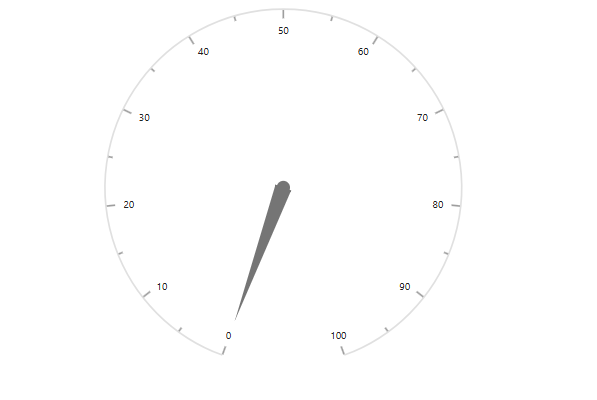
The browser displays the initialized Circular Gauge.
Output
The following screenshot shows the output of the Syncfusion Circular Gauge quick start application:
Troubleshooting
-
The page is blank. Open
index.htmlthrough a local web server instead of opening the file directly from the file system. -
ej is not defined. Ensure that the Syncfusion CDN scripts are loaded beforeindex.js. -
ej.circulargaugeis undefined. Verify thatej2-circulargauge.min.jsis loaded after its required dependencies. -
The gauge is not displayed. Make sure the container ID in
index.htmlmatches the selector passed toappendTo('#element'). -
The pointer does not appear at the expected position. Confirm that the pointer
valueis within the axisminimumandmaximumrange.