Data Label in ASP.NET MVC TreeMap
7 Aug 202612 minutes to read
Data Labels are used to identify the name of items or groups in the TreeMap component. Data Labels will be shown by specifying the data source properties in the labelPath of the leafItemSettings.
Add labels
Add labels to show additional information about the items in the TreeMap. By default, the visibility of the label is true. Customize label visibility using the showLabels property in leafItemSettings.
@{
    var mapsData = new List<Syncfusion.EJ2.TreeMap.TreeMapColorMapping>();
    mapsData.Add(new Syncfusion.EJ2.TreeMap.TreeMapColorMapping() { Value="25", Color="#634D6F" });
    mapsData.Add(new Syncfusion.EJ2.TreeMap.TreeMapColorMapping() { Value="12", Color="#B34D6D" });
    mapsData.Add(new Syncfusion.EJ2.TreeMap.TreeMapColorMapping() { Value="9", Color="#557C5C" });
    mapsData.Add(new Syncfusion.EJ2.TreeMap.TreeMapColorMapping() { Value="7", Color="#44537F" });
    mapsData.Add(new Syncfusion.EJ2.TreeMap.TreeMapColorMapping() { Value="6", Color="#637392" });
    mapsData.Add(new Syncfusion.EJ2.TreeMap.TreeMapColorMapping() { Value="3", Color="#7C754D" });
    mapsData.Add(new Syncfusion.EJ2.TreeMap.TreeMapColorMapping() { Value="2", Color="#2E7A64" });
    mapsData.Add(new Syncfusion.EJ2.TreeMap.TreeMapColorMapping() { Value="1", Color="#95659A" });
}
@using Syncfusion.EJ2;
<div id="container">
	<ejs-treemap id="container" load="load" height="350px" weightValuePath="Count" equalColorValuePath="Count">
		<e-treemap-leafitemsettings labelPath="State" colorMapping="mapsData" showLabels="true" labelPosition="@Syncfusion.EJ2.TreeMap.LabelPosition.Center">
			<e-leafitemsettings-labelstyle color="white"></e-leafitemsettings-labelstyle>
		</e-treemap-leafitemsettings>
		<e-treemap-legendsettings visible="true" position="@Syncfusion.EJ2.TreeMap.LegendPosition.Top" shape="@Syncfusion.EJ2.TreeMap.LegendShape.Rectangle"></e-treemap-legendsettings>
	</ejs-treemap>
</div>
<script>
    function load(args)
    {
        var data = [
            { Title: 'State wise International Airport count in South America', State: "Brazil", Count: 25 },
            { Title: 'State wise International Airport count in South America', State: "Colombia", Count: 12 },
            { Title: 'State wise International Airport count in South America', State: "Argentina", Count: 9 },
            { Title: 'State wise International Airport count in South America', State: "Ecuador", Count: 7 },
            { Title: 'State wise International Airport count in South America', State: "Chile", Count: 6 },
            { Title: 'State wise International Airport count in South America', State: "Peru", Count: 3 },
            { Title: 'State wise International Airport count in South America', State: "Venezuela", Count: 3 },
            { Title: 'State wise International Airport count in South America', State: "Bolivia", Count: 2 },
            { Title: 'State wise International Airport count in South America', State: "Paraguay", Count: 2 },
            { Title: 'State wise International Airport count in South America', State: "Uruguay", Count: 2 },
            { Title: 'State wise International Airport count in South America', State: "Falkland Islands", Count: 1 },
            { Title: 'State wise International Airport count in South America', State: "French Guiana", Count: 1 },
            { Title: 'State wise International Airport count in South America', State: "Guyana", Count: 1 },
            { Title: 'State wise International Airport count in South America', State: "Suriname", Count: 1 },
        ];
        args.treemap.dataSource = data;
    }
</script>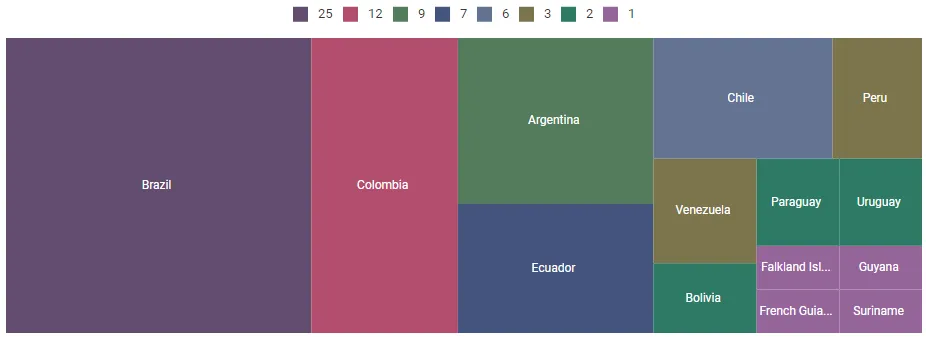
Format
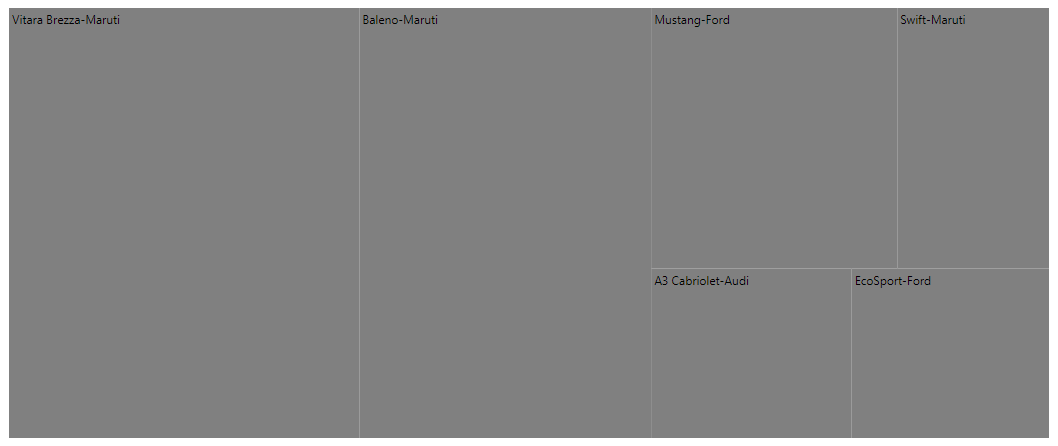
Customize the labels for each item using the labelFormat property in the leafItemSettings.
@using Syncfusion.EJ2;
<div id="container">
@Html.EJS().TreeMap("container").Load("load").WeightValuePath("count").LeafItemSettings(leaf => leaf.LabelPath("Car").LabelFormat("${Car}-${Brand}")).Render()
</div>
<script>
    function load(args)
    {
        var data = [
            { Car: 'Mustang', Brand: 'Ford', count: 232 },
            { Car: 'EcoSport', Brand: 'Ford', count: 121 },
            { Car: 'Swift', Brand: 'Maruti', count: 143 },
            { Car: 'Baleno', Brand: 'Maruti', count: 454 },
            { Car: 'Vitara Brezza', Brand: 'Maruti', count: 545 },
            { Car: 'A3 Cabriolet', Brand: 'Audi', count: 123 },
            { car: 'RS7 Sportback', Brand: 'Audi', count: 523 }
        ];
        args.treemap.dataSource = data;
    }
</script>
using System;
using System.Collections.Generic;
using System.Diagnostics;
using System.Linq;
using System.Threading.Tasks;
using Microsoft.AspNetCore.Mvc;
using EJ2_Core_Application.Models;
using Newtonsoft.Json;
namespace EJ2_Core_Application.Controllers
{
public class HomeController : Controller
{
public IActionResult Index()
{
return View();
}
}
}
Template
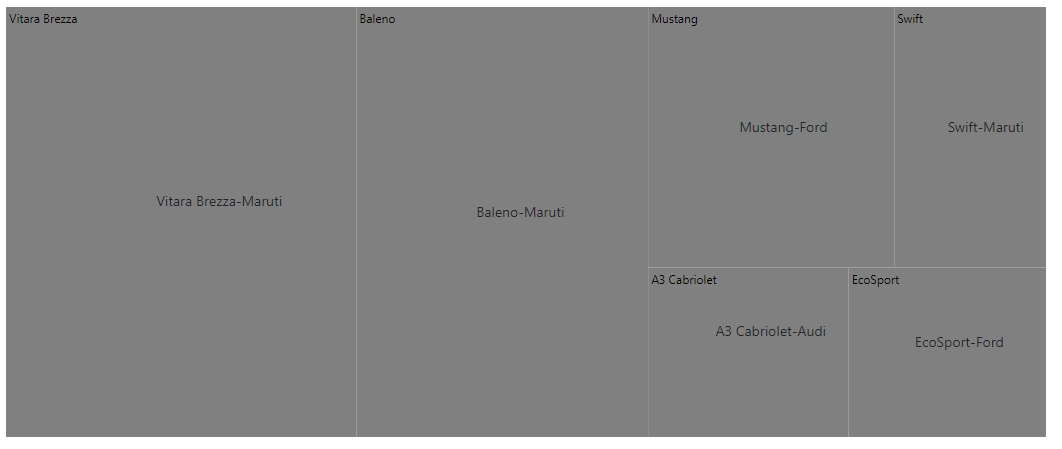
The template supports customizing labels of each leaf node using the labelTemplate property. It uses Essential® JS2 template engine to render elements and the position of templates can be customize using the templatePosition property.
@using Syncfusion.EJ2;
<div id="container">
@Html.EJS().TreeMap("container").Load("load").WeightValuePath("count").LeafItemSettings(leaf => leaf.LabelPath("Car").LabelTemplate("<div>-</div>").TemplatePosition(Syncfusion.EJ2.TreeMap.LabelPosition.Center)).Render()
</div>
<script>
    function load(args)
    {
        var data = [
            { Car:'Mustang', Brand:'Ford', count:232 },
            { Car:'EcoSport', Brand:'Ford', count:121 },
            { Car:'Swift', Brand:'Maruti', count:143 },
            { Car:'Baleno', Brand:'Maruti', count:454 },
            { Car:'Vitara Brezza', Brand:'Maruti', count:545 },
            { Car:'A3 Cabriolet', Brand:'Audi',count:123 },
            { car:'RS7 Sportback', Brand:'Audi', count:523 }
        ];
        args.treemap.dataSource = data;
    }
</script>
using System;
using System.Collections.Generic;
using System.Diagnostics;
using System.Linq;
using System.Threading.Tasks;
using Microsoft.AspNetCore.Mvc;
using EJ2_Core_Application.Models;
using Newtonsoft.Json;
namespace EJ2_Core_Application.Controllers
{
public class HomeController : Controller
{
public IActionResult Index()
{
return View();
}
}
}
InterSectAction
When the label size in each item exceeds the actual size, use the interSectAction property in the leafItemSettings to customize the labels.
@using Syncfusion.EJ2;
<div id="container">
@Html.EJS().TreeMap("container").Load("load").WeightValuePath("count").LeafItemSettings(leaf => leaf.LabelPath("Car").LabelFormat("${Car}-${Brand}").InterSectAction(Syncfusion.EJ2.TreeMap.LabelAlignment.WrapByWord)).Render()
</div>
<script>
    function load(args)
    {
        var data = [
            { Car: 'Mustang', Brand: 'Ford', count: 232 },
            { Car: 'EcoSport', Brand: 'Ford', count: 121 },
            { Car: 'Swift', Brand: 'Maruti', count: 143 },
            { Car: 'Baleno', Brand: 'Maruti', count: 454 },
            { Car: 'Vitara Brezza', Brand: 'Maruti', count: 545 },
            { Car: 'A3 Cabriolet', Brand: 'Audi', count: 123 },
            { car: 'RS7 Sportback', Brand: 'Audi', count: 523 }
        ];
        args.treemap.dataSource = data;
    }
</script>
using System;
using System.Collections.Generic;
using System.Diagnostics;
using System.Linq;
using System.Threading.Tasks;
using Microsoft.AspNetCore.Mvc;
using EJ2_Core_Application.Models;
using Newtonsoft.Json;
namespace EJ2_Core_Application.Controllers
{
public class HomeController : Controller
{
public IActionResult Index()
{
return View();
}
}
}