How can I help you?
Customize the Empty Record Template in ASP.NET MVC TreeGrid
29 Aug 20251 minute to read
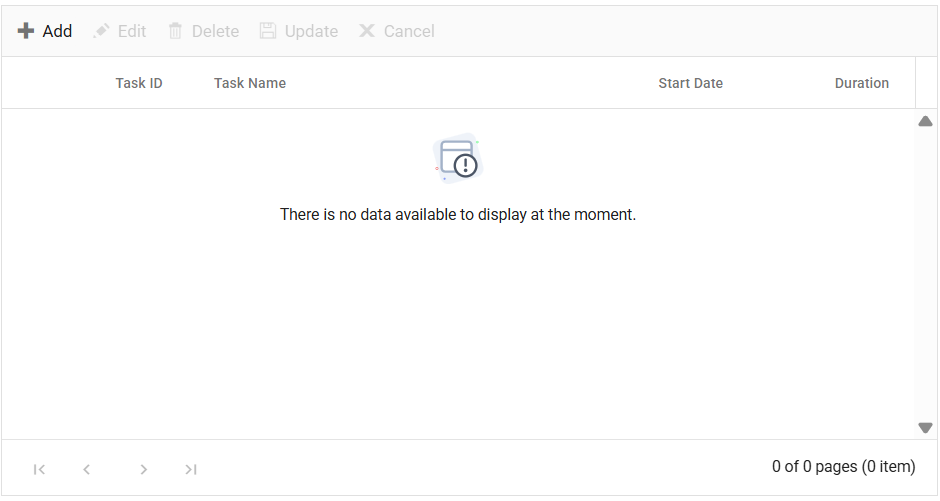
The empty record template feature in the TreeGrid allows you to use custom content such as images, text, or other components, when the TreeGrid doesn’t contain any records to display. This feature replaces the default message of No records to display typically shown in the TreeGrid.
To activate this feature, set the EmptyRecordTemplate property of the TreeGrid. The EmptyRecordTemplate property expects the HTML element or a function that returns the HTML element.
In the following example, an image and text have been rendered as a template to indicate that the TreeGrid has no data to display.
@Html.EJS().TreeGrid("TreeGrid").DataSource((IEnumerable<object>)ViewBag.DataSource).Columns(col =>
{
   col.Field("TaskId").HeaderText("Task ID").Width(70).IsPrimaryKey(true).TextAlign(Syncfusion.EJ2.Grids.TextAlign.Right).Add();
   col.Field("TaskName").HeaderText("Task Name").Width(160).Add();
   col.Field("StartDate").HeaderText("Start Date").Format("yMd").TextAlign(Syncfusion.EJ2.Grids.TextAlign.Right).Width(90).Add();
   col.Field("Duration").HeaderText("Duration").Width(80).TextAlign(Syncfusion.EJ2.Grids.TextAlign.Right).Add();
}).ChildMapping("Children").TreeColumnIndex(1).EditSettings(edit => { edit.AllowAdding(true).AllowEditing(true).AllowDeleting(true).Mode(Syncfusion.EJ2.Grids.EditMode.Normal);}).Toolbar(new List<string>() { "Add", "Edit", "Delete", "Update", "Cancel" }).EmptyRecordTemplate("#emptytemplate").Render()

<script id="emptytemplate" type="text/x-template">
    <div class='emptyRecordTemplate' >
       < img src="@Url.Content("~/images/emptyRecordTemplate.svg")" class="e-emptyRecord" alt="No record">
        <span>There is no data available to display at the moment.</span>
    </div>
</script>

<style>
    .emptyRecordTemplate {
        text-align: center;
    }
    .e-emptyRecord {
        display: block;
        margin: 10px auto;
    }
</style>
public IActionResult Index()
{
var tree = TreeData.GetFormatData();
ViewBag.data = tree;
return View();
}