Adornments in ASP.NET MVC TextArea
14 Sep 20268 minutes to read
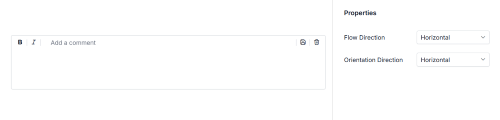
Adornments allow you to add custom elements before or after the TextArea using the prependTemplate and appendTemplate properties. These elements can include icons, text labels, or action buttons for formatting and content management. With orientation support, you can arrange adornments horizontally or vertically using adornmentFlow and adornmentOrientation for flexible layouts.
Common Use Cases
- Visual Indicators: Icons for context (e.g., edit, comment).
- Formatting Tools: Buttons for bold, italic, underline.
- Content Actions: Save, clear, or submit buttons.
- Validation & Status: Character count or error icons.
- Flexible Layout: Horizontal or vertical adornment flow.
Adding Adornments with Orientation to TextArea
Use prependTemplate and appendTemplate to add custom HTML content before and after the TextArea.
-
prependTemplate: Renders elements before the textarea. -
appendTemplate: Renders elements after the textarea.
You can control how adornments are positioned and arranged using the adornmentFlow and adornmentOrientation properties. Both properties accept only Horizontal or Vertical values defined in the AdornmentsDirection type.
-
adornmentFlow: Defines where adornments appear around the TextArea.- Horizontal: Prepend on the left, append on the right.
- Vertical: Prepend above, append below.
-
adornmentOrientation: Defines how items inside each adornment are arranged.- Horizontal: Items displayed in a row.
- Vertical: Items displayed in a column.
The following example demonstrates how to add adornments with orientation in the TextArea control.
@using Syncfusion.EJ2.Inputs
@using Syncfusion.EJ2.Buttons
@using Syncfusion.EJ2.DropDowns
@using EJ2MVCSampleBrowser.Models
@using Syncfusion.EJ2
@{
    List<string> orientationData = new List<string>() { "Horizontal", "Vertical" };
}
@section ControlsSection {
    <div class="col-lg-8 control-section multiline">
        <div class="content-wrapper ador-textarea">
            <div class="multiline-row">
                @Html.EJS().TextArea("icontemplate").Placeholder("Add a comment").CssClass("e-outline").FloatLabelType(FloatLabelType.Auto).PrependTemplate("<span class='e-icons e-bold'></span><span class='e-input-separator'></span><span class='e-icons e-italic'></span><span class='e-input-separator'></span>").AppendTemplate("<span class='e-input-separator'></span><span class='e-icons e-save'></span><span class='e-input-separator'></span><span class='e-icons e-trash'></span>").Rows(5).Cols(500).ResizeMode(Resize.None).Render()
            </div>
        </div>
    </div>

    <div class="col-lg-4 property-section">
        <table id="property" title="Properties" class="multiline-property">
            <tr>
                <td> Flow Direction </td>
                <td>
                    <div>
                        @Html.EJS().DropDownList("flow-orientation").PopupHeight("200px").Index(0).DataSource(orientationData).Change("onFlowChange").Render()
                    </div>
                </td>
            </tr>
            <tr>
                <td> Orientation Direction </td>
                <td>
                    <div>
                        @Html.EJS().DropDownList("orient-orientation").PopupHeight("200px").Index(0).DataSource(orientationData).Change("onOrientChange").Render()
                    </div>
                </td>
            </tr>
        </table>
    </div>
}

<script type="text/javascript">
    function onFlowChange(args) {
        var textArea = document.getElementById('icontemplate').ej2_instances[0];
        textArea.adornmentFlow = args.value;
        textArea.appendTemplate = (args.value === 'Horizontal') ?
            '<span class="e-input-separator"></span><span class="e-icons e-save"></span><span class="e-input-separator"></span><span class="e-icons e-trash"></span>' :
            '<span class="e-input-separator"></span><span class="e-icons e-save"></span><span class="e-input-separator"></span><span class="e-icons e-trash"></span>';
        textArea.dataBind();
    }
    function onOrientChange(args) {
        var textArea = document.getElementById('icontemplate').ej2_instances[0];
        textArea.adornmentOrientation = args.value;
        textArea.appendTemplate = (args.value === 'Horizontal') ?
            '<span class="e-input-separator"></span><span class="e-icons e-save"></span><span class="e-input-separator"></span><span class="e-icons e-trash"></span>' :
            '<span class="e-input-separator"></span><span class="e-icons e-save"></span><span class="e-input-separator"></span><span class="e-icons e-trash"></span>';
        textArea.dataBind();
    }
</script>

@*custom code start*@
<style>
    .content-wrapper div.multiline-row {
        margin: 0 auto;
        padding: 40px 0px 0px;
    }
    .multiline-property .left-side {
        font-size: 14px;
        padding: 8px;
    }
    .multiline-property.property-panel-table div.multiline {
        padding-left: 0px;
    }
    .property-panel-content td {
        padding: 10px 0px;
        width: 50%;
    }
    .e-bigger .ador-textarea .e-prepend-template {
        padding-right: 0 !important;
    }
    .e-bigger.material3 .ador-textarea .e-outline.e-float-input:not(.e-error):not(.e-valid-input):not(.e-input-focus) textarea:not(:focus):valid ~ label.e-float-text.e-label-bottom,
    .e-bigger.material3-dark .ador-textarea .e-outline.e-float-input:not(.e-error):not(.e-valid-input):not(.e-input-focus) textarea:not(:focus):valid ~ label.e-float-text.e-label-bottom {
        top: -11px !important;
    }
    .e-bigger.material3 .ador-textarea .e-input-separator,
    .e-bigger.material3-dark .ador-textarea .e-input-separator {
        margin-top: 3px !important;
    }
    .e-bigger.material3 .ador-textarea .e-textarea,
    .e-bigger.material3-dark .ador-textarea .e-textarea {
        margin-top: 10px !important;
    }
    .e-bigger.fluent2 .ador-textarea .e-outline.e-float-input:not(.e-error):not(.e-valid-input):not(.e-input-focus) textarea:not(:focus):valid ~ label.e-float-text.e-label-bottom,
    .e-bigger.fluent2-dark .ador-textarea .e-outline.e-float-input:not(.e-error):not(.e-valid-input):not(.e-input-focus) textarea:not(:focus):valid ~ label.e-float-text.e-label-bottom,
    .e-bigger.fluent2-highcontrast .ador-textarea .e-outline.e-float-input:not(.e-error):not(.e-valid-input):not(.e-input-focus) textarea:not(:focus):valid ~ label.e-float-text.e-label-bottom {
        top: -8px !important;
    }
    .e-bigger.fluent2 .ador-textarea .e-input-separator,
    .e-bigger.fluent2-dark .ador-textarea .e-input-separator,
    .e-bigger.fluent2-highcontrast .ador-textarea .e-input-separator {
        margin-top: 2px !important;
    }
    .e-bigger.tailwind3 .ador-textarea .e-outline.e-float-input:not(.e-error):not(.e-valid-input):not(.e-input-focus) textarea:not(:focus):valid ~ label.e-float-text.e-label-bottom,
    .e-bigger.tailwind3-dark .ador-textarea .e-outline.e-float-input:not(.e-error):not(.e-valid-input):not(.e-input-focus) textarea:not(:focus):valid ~ label.e-float-text.e-label-bottom {
        top: -7px !important;
    }
    .e-bigger.bootstrap5\.3 .ador-textarea .e-outline.e-float-input:not(.e-error):not(.e-valid-input):not(.e-input-focus) textarea:not(:focus):valid ~ label.e-float-text.e-label-bottom,
    .e-bigger.bootstrap5\.3-dark .ador-textarea .e-outline.e-float-input:not(.e-error):not(.e-valid-input):not(.e-input-focus) textarea:not(:focus):valid ~ label.e-float-text.e-label-bottom {
        top: 19px !important;
    }
    .e-bigger.bootstrap5\.3 .ador-textarea .e-textarea,
    .e-bigger.bootstrap5\.3-dark .ador-textarea .e-textarea,
    .e-bigger.fluent2 .ador-textarea .e-textarea,
    .e-bigger.fluent2-dark .ador-textarea .e-textarea,
    .e-bigger.fluent2-highcontrast .ador-textarea .e-textarea {
        margin-top: 3px !important;
    }
    .tailwind3 .ador-textarea .e-textarea,
    .tailwind3-dark .ador-textarea .e-textarea {
        margin-top: 6px !important;
    }
    .e-bigger.tailwind3 div.e-input-group.e-prepend-wrapper.e-multi-line-input.e-outline.e-float-input.e-control-wrapper Label.e-label-top,
    .e-bigger.tailwind3-dark div.e-input-group.e-prepend-wrapper.e-multi-line-input.e-outline.e-float-input.e-control-wrapper Label.e-label-top {
        top: -26px !important;
    }
</style>
@*custom code end*@
Output be like the below.