# Inline editor mode in the ej2-asp-mvc Rich Text Editor Control
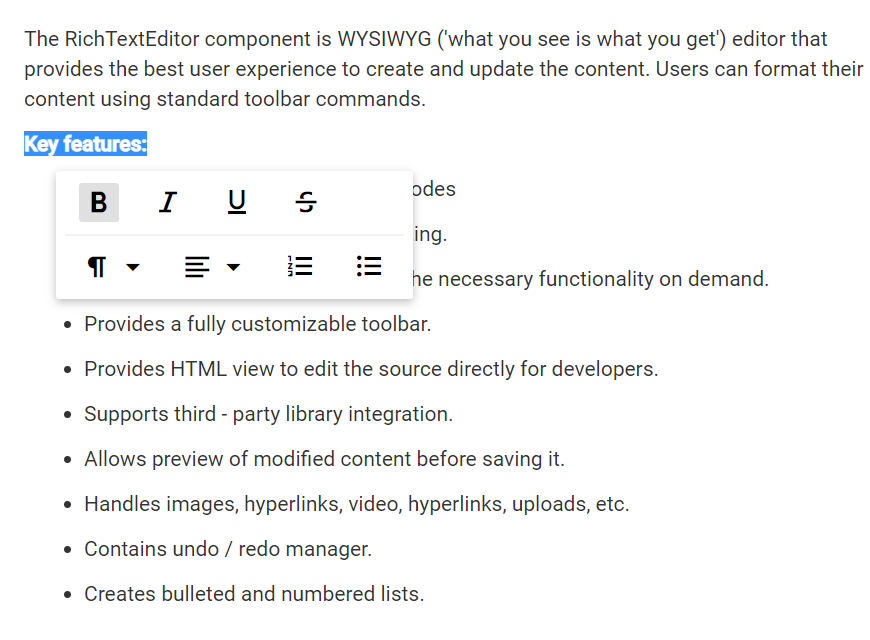
Inline editing is a feature of the Rich Text Editor that allows users to edit content directly within the editor where it is displayed. Unlike traditional editing interfaces where the editor toolbar is in a separate area at the top or bottom, inline editing offers a seamless, on-the-spot editing experience. You can click on the text or select the text you wish to edit and make changes immediately.
Enable inline editing in the Rich Text Editor by using the [InlineMode](https://help.syncfusion.com/cr/aspnetmvc-js2/Syncfusion.EJ2.RichTextEditor.RichTextEditor.html#Syncfusion_EJ2_RichTextEditor_RichTextEditor_InlineMode) with the `Enable` property as `true`. This configuration activates the feature, allowing direct content editing within its displayed context.
## Toolbar on Selection
The inline toolbar in the Rich Text Editor is triggered based on the [OnSelection](https://help.syncfusion.com/cr/aspnetmvc-js2/Syncfusion.EJ2.RichTextEditor.RichTextEditorInlineMode.html#Syncfusion_EJ2_RichTextEditor_RichTextEditorInlineMode_OnSelection) option within the inlineMode settings.
When `OnSelection` is set to `true`, the toolbar appears only when text is selected. If `OnSelection` is set to `false`, the inline toolbar appears when editable text is focused, regardless of selection.
This feature enhances the inline editing experience by providing immediate access to formatting options.
{% tabs %}
{% highlight razor tabtitle="CSHTML" %}
@Html.EJS().RichTextEditor("inlineMode").InlineMode(e => e.Enable(true).OnSelection(true)).ToolbarSettings(e => e.Items((object)ViewBag.items)).Value(ViewBag.value).Render()
{% endhighlight %}
{% highlight c# tabtitle="Controller.cs" %}
public class HomeController : Controller
{
public ActionResult Index()
{
ViewBag.value = @"The Syncfusion Rich Text Editor, a WYSIWYG (what you see is what you get) editor, is a user interface that allows you to create, edit, and format rich text content. You can try out a demo of this editor here.
Key features:
Provides <IFRAME> and <DIV> modes.
Bulleted and numbered lists.
Handles images, hyperlinks, videos, hyperlinks, uploads, etc.
Contains undo/redo manager.
";
ViewBag.items = new[] { "Bold", "Italic", "Underline", "StrikeThrough", "-",
"Formats", "Alignments", "OrderedList", "UnorderedList" };
return View();
}
}
{% endhighlight %}
{% endtabs %}