Use custom helper inside the loop with templates in ASP.NET MVC Grid
12 Mar 20252 minutes to read
The Syncfusion ASP.NET MVC Grid allows you to use custom helpers inside the loop with Template property of a column. This feature enables you to create complex templates that can incorporate additional helper functions.
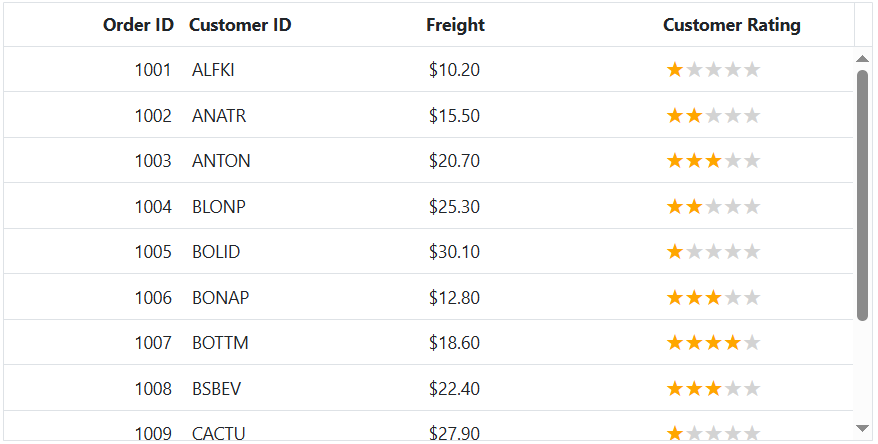
The Customer Rating column includes a custom template defined using Template. Inside this template, iterates through the item array and generates tag, displayed as stars using the CSS below:
.e-grid .rating .star:before {
    content: '★';
}

.e-grid .rating .star {
    font-size: 132%;
    color: lightgrey;
}
The class is dynamically assigned based on the rating value, highlighting the stars using the CSS below:
.e-grid .rating .star.checked {
    color: #ffa600;
}
This is demonstrated in the following example:
@Html.EJS().Grid("Grid").DataSource((IEnumerable<object>)ViewBag.DataSource).Height("348px").Columns(col =>
{
    col.Field("OrderID").HeaderText("Order ID").Width("120").TextAlign(Syncfusion.EJ2.Grids.TextAlign.Right).Add();
    col.Field("CustomerID").HeaderText("Customer ID").Width("150").Add();
    col.Field("Freight").HeaderText("Freight").Width("120").Format("C2").TextAlign(Syncfusion.EJ2.Grids.TextAlign.Right).Add();
    col.Field("CustomerRating").HeaderText("Customer Rating").Width("150").Template("#ratingTemplate").Add();
}).Render()
<script type="text/x-template" id="ratingTemplate">
    ${ RatingStars(data.CustomerRating) }
</script>
<script>
    function RatingStars(rating) {
        let ratingHTML = '<span class="rating">';
        for (let i = 1; i <= 5; i++) {
            ratingHTML += `<span class="star ${i <= rating ? 'checked' : ''}"></span>`;
        }
        ratingHTML += '</span>';
        return ratingHTML;
    }
</script>
<style>
    .e-grid .rating .star:before {
        content: '★';
    }

    .e-grid .rating .star {
        font-size: 132%;
        color: lightgrey;
    }

    .rating .star.checked {
        color: #ffa600;
    }
</style>
public IActionResult Index()
{
ViewBag.DataSource = OrderDetails.GetAllRecords();
return View();
}