BaseLine in ASP.NET MVC Syncfusion Gantt Component
18 Jun 202624 minutes to read
The baseline feature in the Gantt component enables comparison between original planned schedules and actual task execution timelines. This visualization provides clear insights into schedule deviations, helping assess project performance and identify areas requiring attention. Baseline functionality displays both the original planned timeline and current progress side-by-side for comprehensive project tracking.
Before implementing baseline functionality, ensure the data source includes baseline date fields and configure the TaskFields object with appropriate field mappings. The baseline feature requires proper field mapping to display planned versus actual timelines effectively.
Baseline fields:
- BaselineStartDate: Represents the originally planned start date of a task. This value is used to compare against the actual start date to identify schedule deviations.
- BaselineEndDate: Represents the originally planned end date of a task. It is used to compare against the actual end date.
-
BaselineDuration: Represents the total planned duration of the task. This value is critical for baseline visualization. To represent a baseline milestone, this property must be explicitly set to
0. SettingBaselineStartDateandBaselineEndDateto the same value without settingbaselineDurationto0will result in a one-day baseline task, not a milestone.
Implement baseline
To enable baseline, configure the Gantt component by setting RenderBaseline to true, mapping BaselineStartDate, BaselineEndDate, and optionally BaselineDuration in TaskFields. To customize appearance set the BaselineColor property or the .e-baseline-bar CSS class for advanced styling.
List<GanttDataSource> data = new List<GanttDataSource>
{
    ...

    new GanttDataSource
    {
        TaskID = 7,
        TaskName = "List materials",
        StartDate = new DateTime(2019, 4, 4),
        Duration = 3,
        Progress = 50,
        ParentID = 5,
        BaselineStartDate = new DateTime(2019, 4, 2),
        BaselineEndDate = new DateTime(2019, 4, 4),
        BaselineDuration = 2 // Regular baseline.
    },
    new GanttDataSource
    {
        TaskID = 8,
        TaskName = "Estimation approval",
        StartDate = new DateTime(2019, 4, 4),
        BaselineStartDate = new DateTime(2019, 04, 02),
        Duration = 0,
        Progress = 50,
        ParentID = 5,
        BaselineDuration = 0 // Milestone baseline.
    }
};@Html.EJS().Gantt("Gantt")
.DataSource((IEnumerable<object>)ViewBag.DataSource)
.RenderBaseline(true)
.BaselineColor("red") // Here you can customize base line color.
.Render().e-gantt .e-gantt-chart .e-baseline-bar {
height: 4px;
border-radius: 2px;
opacity: 0.9;
background-color: #4caf50;
}The following example demonstrates complete baseline configuration with proper field mapping:
@Html.EJS().Gantt("Gantt").DataSource((IEnumerable<object>)ViewBag.DataSource).RenderBaseline(true).BaselineColor("red").Height("450px").TaskFields(ts => ts.Id("TaskID").Name("TaskName").StartDate("StartDate").Duration("Duration").Progress("Progress").BaselineStartDate("BaselineStartDate").BaselineEndDate("BaselineEndDate").BaselineDuration("BaselineDuration").ParentID("ParentID")).ProjectStartDate("03/31/2019").ProjectEndDate("05/31/2019").Render()public IActionResult Index()
{
ViewBag.DataSource = ganttData();
return View();
}
public static List<GanttDataSource> ganttData()
{
List<GanttDataSource> data = new List<GanttDataSource>
{
new GanttDataSource
{
TaskID = 1,
TaskName = "Project Initiation",
StartDate = new DateTime(2019, 4, 2),
EndDate = new DateTime(2019, 4, 21)
},
new GanttDataSource
{
TaskID = 2,
TaskName = "Identify Site location",
StartDate = new DateTime(2019, 4, 2),
Duration = 0,
Progress = 50,
ParentID = 1,
BaselineStartDate = new DateTime(2019, 4, 2),
BaselineEndDate = new DateTime(2019, 4, 6)
},
new GanttDataSource
{
TaskID = 3,
TaskName = "Perform Soil test",
StartDate = new DateTime(2019, 4, 2),
Duration = 4,
Progress = 50,
ParentID = 1,
Predecessor = "2FS",
BaselineStartDate = new DateTime(2019, 4, 4),
BaselineEndDate = new DateTime(2019, 4, 9),
BaselineDuration = 5
},
new GanttDataSource
{
TaskID = 4,
TaskName = "Soil test approval",
StartDate = new DateTime(2019, 4, 2),
Duration = 4,
Progress = 50,
ParentID = 1,
BaselineStartDate = new DateTime(2019, 4, 8),
BaselineDuration = 4
},
new GanttDataSource
{
TaskID = 5,
TaskName = "Project Estimation",
StartDate = new DateTime(2019, 4, 2),
EndDate = new DateTime(2019, 4, 21)
},
new GanttDataSource
{
TaskID = 6,
TaskName = "Develop floor plan for estimation",
StartDate = new DateTime(2019, 4, 4),
Duration = 3,
Progress = 50,
ParentID = 5,
BaselineStartDate = new DateTime(2019, 4, 4),
BaselineEndDate = new DateTime(2019, 4, 8)
},
new GanttDataSource
{
TaskID = 7,
TaskName = "List materials",
StartDate = new DateTime(2019, 4, 4),
Duration = 3,
Progress = 50,
ParentID = 5,
BaselineStartDate = new DateTime(2019, 4, 2),
BaselineEndDate = new DateTime(2019, 4, 4),
BaselineDuration = 2
},
new GanttDataSource
{
TaskID = 8,
TaskName = "Estimation approval",
StartDate = new DateTime(2019, 4, 4),
BaselineStartDate = new DateTime(2019, 04, 02),
Duration = 0,
Progress = 50,
ParentID = 5,
BaselineDuration = 0
}
};
return data;
}
public class GanttDataSource
{
public int TaskID { get; set; }
public string? TaskName { get; set; }
public DateTime StartDate { get; set; }
public DateTime BaselineStartDate { get; set; }
public DateTime BaselineEndDate { get; set; }
public int? BaselineDuration { get; set; }
public DateTime? EndDate { get; set; }
public int? Duration { get; set; }
public int? Progress { get; set; }
public int? ParentID { get; set; }
public string? Predecessor { get; set; }
public List<int>? Resources { get; set; }
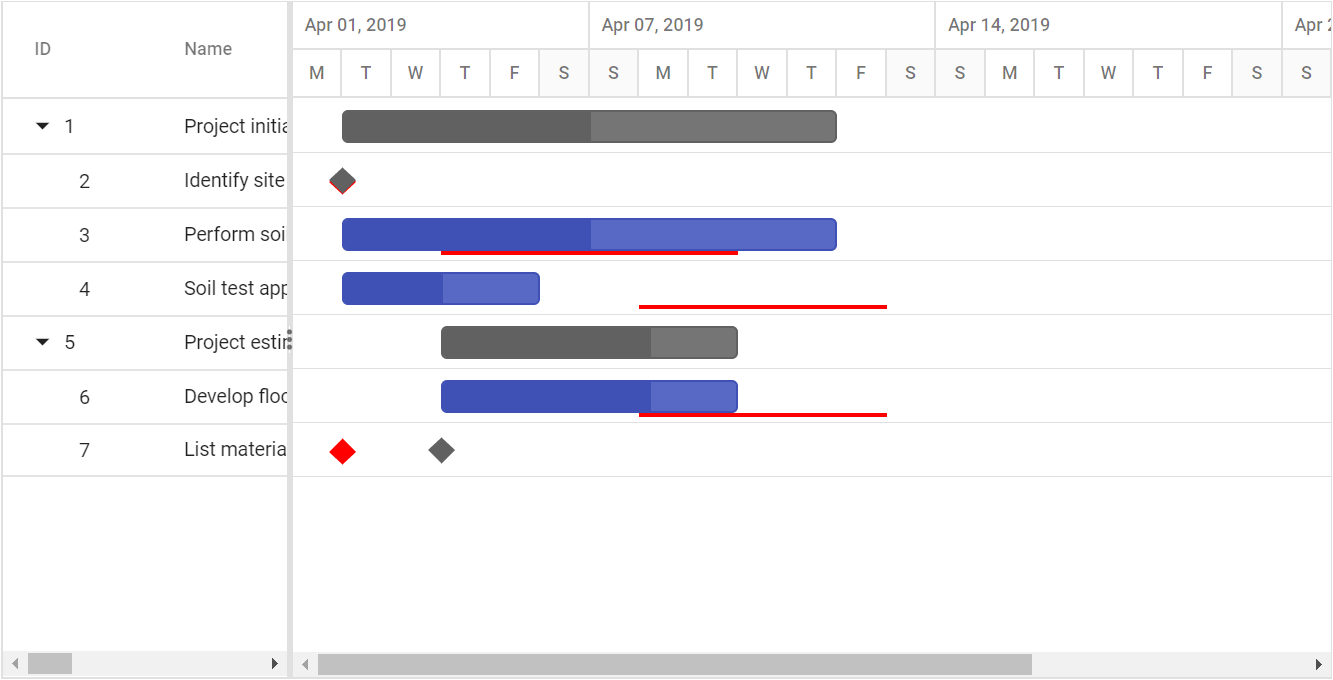
}The following screenshot shows the baseline in Gantt control.
Customize baseline templates
The baselineTemplate property allows customization of baseline rendering by replacing the default baseline UI with a custom HTML structure. This enables advanced scenarios such as rendering additional baseline elements, visual indicators, or multiple baselines using task-specific data.
Set the baselineTemplate property with a template string or function. The template receives the task data object, which can be used to dynamically generate baseline elements.
Multiple baseline rendering using template
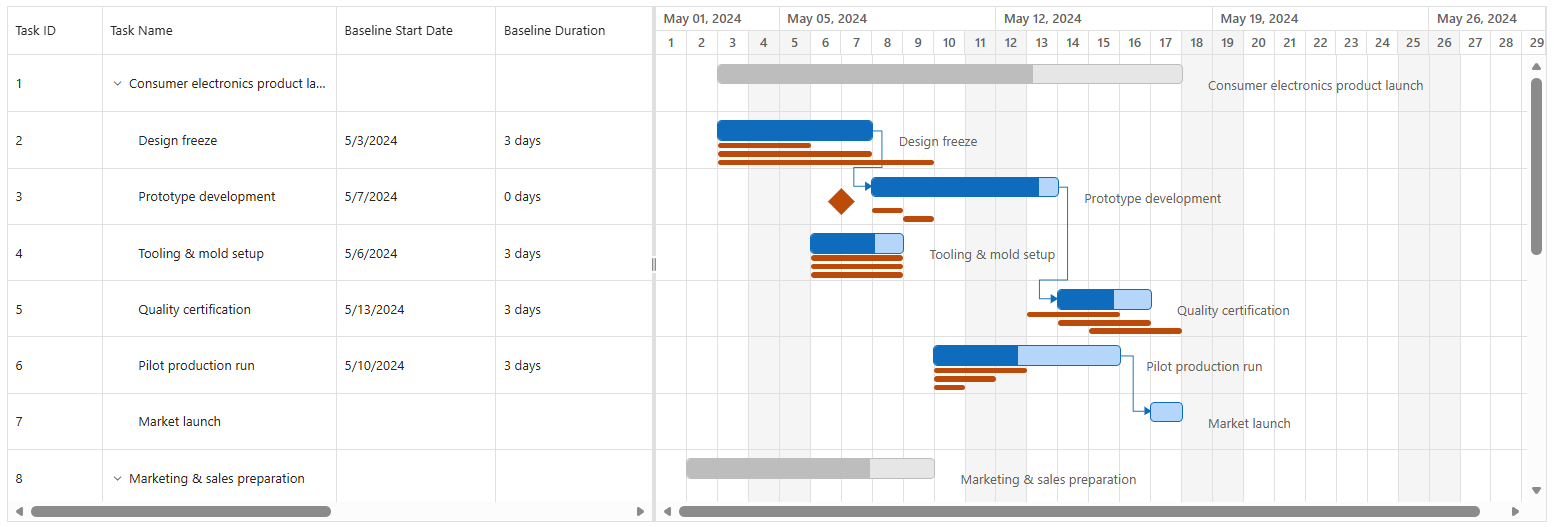
By default, the Gantt component supports a single baseline per task. However, using the baselineTemplate, you can extend this behavior to render multiple baselines by maintaining additional baseline data within a custom field in your data source.
This enables rich visualization scenarios such as:
- Comparing original vs revised schedules.
- Visualizing multiple planning phases.
- Highlighting deviations across timeline checkpoints.
The following example demonstrates how to render multiple baselines using baselineTemplate.
@model List<WebApplication.Controllers.GanttDataSource>
@{
	ViewBag.Title = "Home Page";
}


@using Syncfusion.EJ2.Gantt

<div>
	@Html.EJS().Gantt("GanttContainer").DataSource((IEnumerable<object>)Model).Height("450px").RowHeight(60).TaskbarHeight(20).HighlightWeekends(true).AllowSelection(true).RenderBaseline(true).BaselineColor("red").GridLines(Syncfusion.EJ2.Gantt.GridLine.Both).TaskFields(ts => ts.Id("TaskId").Name("TaskName").StartDate("StartDate").EndDate("EndDate").Duration("Duration").Progress("Progress").BaselineStartDate("BaselineStartDate").BaselineEndDate("BaselineEndDate").ParentID("ParentID")).SplitterSettings(ss => ss.ColumnIndex(3)).LabelSettings(ls => ls.TaskLabel("TaskName")).BaselineTemplate("#baselineTemplate").Columns(col => { col.Field("TaskId").HeaderText("ID").Add(); col.Field("TaskName").HeaderText("Name").Width(270).Add(); col.Field("BaselineStartDate").HeaderText("Baseline Start Date").Width(180).Add(); col.Field("BaselineDuration").HeaderText("Baseline Duration").Width(180).Add(); col.Field("BaselineStartDate1").HeaderText("Baseline1 Start Date").Width(180).Add(); col.Field("BaselineDuration1").HeaderText("Baseline1 Duration").Width(180).Add(); col.Field("BaselineStartDate2").HeaderText("Baseline2 Start Date").Width(180).Add(); col.Field("BaselineDuration2").HeaderText("Baseline2 Duration").Width(180).Add(); }).Render()
</div>

<script id="baselineTemplate" type="text/x-jsrender">

</script>

<script>
    function renderBaselines(props) {

        if (props.hasChildRecords) {
            return '';
        }

        var ganttElem = document.getElementById("GanttContainer");
        if (!ganttElem || !ganttElem.ej2_instances || !ganttElem.ej2_instances[0]) return '';

        var gantt = ganttElem.ej2_instances[0];
        var taskRecord = props.taskData;
        var ganttProps = taskRecord.ganttProperties;
        var chartRowsModule = gantt.chartRowsModule;

        var baselineTop = chartRowsModule.baselineTop;
        var baselineHeight = chartRowsModule.baselineHeight;
        var taskBarHeight = chartRowsModule.taskBarHeight;
        var milestoneHeight = chartRowsModule.milestoneHeight;
        var milestoneMarginTop = chartRowsModule.milestoneMarginTop;

        var rowHeight = gantt.rowHeight;
        var renderBaseline = gantt.renderBaseline;
        var enableRtl = gantt.enableRtl;

        var taskSpacing = 9;
        var baselineSpacing = 4;

        function getLeft(date) {
            return gantt.dataOperation.getTaskLeft(new Date(date), false, ganttProps.calendarContext);
        }

        function getWidth(start, duration) {
            if (!start || duration == null || duration === 0) return 0;
            var end = new Date(start);
            end.setDate(end.getDate() + duration);
            return getLeft(end) - getLeft(start);
        }

        function render(start, duration, index) {
            if (!start) return '';

            var left = getLeft(start);
            var width = getWidth(start, duration);

            if (duration === 0) {
                var milestoneSize = renderBaseline ? taskBarHeight : (taskBarHeight - 10);
                var baselineMilestoneHeight = renderBaseline ? 5 : 2;
                var leftPos = enableRtl
                    ? (left - (milestoneHeight / 2) + 3)
                    : (left - (milestoneHeight / 2) + 1);

                var marginTop =
                    (-Math.floor(rowHeight - milestoneMarginTop) + baselineMilestoneHeight) +
                    2 +
                    (index * baselineSpacing);

                return `<div style="position:absolute;width:${milestoneSize}px;height:${milestoneSize}px;
                    transform:rotate(45deg);
                    ${enableRtl ? 'right' : 'left'}:${leftPos}px;
                    margin-top:${marginTop}px;">
                </div>`;
            }

            return `<div style="position:absolute;
                ${enableRtl ? 'right' : 'left'}:${left}px;
                margin-top:${baselineTop + (index * taskSpacing)}px;
                width:${width}px;height:${baselineHeight}px;">
            </div>`;
        }

        return `
            <div>
                ${render(taskRecord.taskData.BaselineStartDate, taskRecord.taskData.BaselineDuration, 0)}
                ${render(taskRecord.taskData.BaselineStartDate1, taskRecord.taskData.BaselineDuration1, 1)}
                ${render(taskRecord.taskData.BaselineStartDate2, taskRecord.taskData.BaselineDuration2, 2)}
            </div>
        `;
    }
</script>
using System;
using System.Collections.Generic;
using System.Linq;
using System.Web;
using System.Web.Mvc;
namespace WebApplication.Controllers
{
public class HomeController : Controller
{
public ActionResult Index()
{
return View(ganttData());
}
public static List<GanttDataSource> ganttData()
{
List<GanttDataSource> GanttDataSourceCollection = new List<GanttDataSource>()
{
new GanttDataSource()
{
TaskID = 1,
TaskName = "Consumer electronics launch",
StartDate = new DateTime(2024, 05, 01),
EndDate = new DateTime(2024, 05, 14),
Progress = 58
},
new GanttDataSource()
{
TaskID = 2,
TaskName = "Design freeze",
StartDate = new DateTime(2024, 05, 03),
Duration = 3,
BaselineStartDate = new DateTime(2024, 05, 03),
BaselineDuration = 3,
BaselineStartDate1 = new DateTime(2024, 05, 03),
BaselineDuration1 = 5,
BaselineStartDate2 = new DateTime(2024, 05, 03),
BaselineDuration2 = 7,
Progress = 100,
ParentID = 1
},
new GanttDataSource()
{
TaskID = 3,
TaskName = "Prototype development",
StartDate = new DateTime(2024, 05, 08),
Duration = 4,
BaselineStartDate = new DateTime(2024, 05, 07),
BaselineDuration = 0,
BaselineStartDate1 = new DateTime(2024, 05, 08),
BaselineDuration1 = 1,
BaselineStartDate2 = new DateTime(2024, 05, 09),
BaselineDuration2 = 1,
Progress = 90,
ParentID = 1
},
new GanttDataSource()
{
TaskID = 4,
TaskName = "Tooling & mold setup",
StartDate = new DateTime(2024, 05, 10),
Duration = 3,
BaselineStartDate = new DateTime(2024, 05, 10),
BaselineDuration = 3,
BaselineStartDate1 = new DateTime(2024, 05, 10),
BaselineDuration1 = 3,
BaselineStartDate2 = new DateTime(2024, 05, 10),
BaselineDuration2 = 3,
Progress = 70,
ParentID = 1
},
new GanttDataSource()
{
TaskID = 5,
TaskName = "Quality certification",
StartDate = new DateTime(2024, 05, 13),
Duration = 3,
BaselineStartDate = new DateTime(2024, 05, 13),
BaselineDuration = 3,
BaselineStartDate1 = new DateTime(2024, 05, 14),
BaselineDuration1 = 3,
BaselineStartDate2 = new DateTime(2024, 05, 15),
BaselineDuration2 = 3,
Progress = 60,
ParentID = 1
},
new GanttDataSource()
{
TaskID = 6,
TaskName = "Pilot production run",
StartDate = new DateTime(2024, 05, 10),
Duration = 4,
BaselineStartDate = new DateTime(2024, 05, 10),
BaselineDuration = 3,
BaselineStartDate1 = new DateTime(2024, 05, 10),
BaselineDuration1 = 2,
BaselineStartDate2 = new DateTime(2024, 05, 10),
BaselineDuration2 = 1,
Progress = 45,
ParentID = 1
},
new GanttDataSource()
{
TaskID = 7,
TaskName = "Market launch",
StartDate = new DateTime(2024, 05, 15),
Duration = 0,
BaselineStartDate = new DateTime(2024, 05, 14),
BaselineDuration = 0,
BaselineStartDate1 = new DateTime(2024, 05, 15),
BaselineDuration1 = 0,
BaselineStartDate2 = new DateTime(2024, 05, 16),
BaselineDuration2 = 0,
ParentID = 1
}
};
return GanttDataSourceCollection;
}
}
public class GanttDataSource
{
public int TaskID { get; set; }
public string TaskName { get; set; }
public DateTime StartDate { get; set; }
public DateTime? EndDate { get; set; }
public int? Duration { get; set; }
public int Progress { get; set; }
public int? ParentID { get; set; }
// Baseline fields
public DateTime? BaselineStartDate { get; set; }
public int? BaselineDuration { get; set; }
public DateTime? BaselineStartDate1 { get; set; }
public int? BaselineDuration1 { get; set; }
public DateTime? BaselineStartDate2 { get; set; }
public int? BaselineDuration2 { get; set; }
}
}