Customization in ASP.NET MVC Chips
17 Aug 202610 minutes to read
This section explains the customization of styles, leading icons, avatars, and trailing icons in the Chips control.
Styles
The Chips control has the following predefined styles that can be defined using the cssClass property.
| Class | Description |
|---|---|
| e-primary | Represents a primary Chips. |
| e-success | Represents a positive Chips. |
| e-info | Represents an informative Chips. |
| e-warning | Represents a Chips with caution. |
| e-danger | Represents a negative Chips. |
@Html.EJS().ChipList("chip-avatar").EnableDelete(true).Chips(chip =>
                        {
                            chip.Text("Primary").CssClass("e-primary").Enabled(true).Add();
                            chip.Text("Success").CssClass("e-success").Enabled(true).Add();
                            chip.Text("Info").CssClass("e-info").Enabled(true).Add();
                            chip.Text("Warning").CssClass("e-warning").Enabled(true).Add();
                            chip.Text("Danger").CssClass("e-danger").Enabled(true).Add();
                        }).Render()
public IActionResult Index()
{
return View();
}
Leading Icon
You can add and customize the leading icon of Chips using the leadingIconCss property.
@Html.EJS().ChipList("chip-avatar").Chips(chip =>
  {
      chip.Text("Andrew").LeadingIconCss("andrew").Enabled(true).Add();
      chip.Text("Janet").LeadingIconCss("janet").Enabled(true).Add();
      chip.Text("Laura").LeadingIconCss("laura").Enabled(true).Add();
      chip.Text("Margaret").LeadingIconCss("margaret").Enabled(true).Add();
  }).Render()

<style>
#chip-avatar .andrew {
background-image: url('https://ej2.syncfusion.com/aspnetcore/css/chips/images/andrew.png')
}

#chip-avatar .margaret {
background-image: url('https://ej2.syncfusion.com/aspnetcore/css/chips/images/margaret.png')
}

#chip-avatar .laura {
background-image: url('https://ej2.syncfusion.com/aspnetcore/css/chips/images/laura.png')
}

#chip-avatar .janet {
background-image: url('https://ej2.syncfusion.com/aspnetcore/css/chips/images/janet.png')
}
</style>
public IActionResult Index()
{
return View();
}
Avatar
You can add and customize the avatar of Chips using the avatarIconCss property.
@Html.EJS().ChipList("chip-avatar").Chips(chip => {
  chip.Text("Andrew").AvatarIconCss("andrew").Enabled(true).Add();
  chip.Text("Janet").AvatarIconCss("janet").Enabled(true).Add();
  chip.Text("Laura").AvatarIconCss("laura").Enabled(true).Add();
  chip.Text("Margaret").AvatarIconCss("margaret").Enabled(true).Add();
}).Render()

<style>
chip-avatar .andrew {
        background-image: url('https://ej2.syncfusion.com/aspnetcore/css/chips/images/andrew.png')
    }

    #chip-avatar .margaret {
        background-image: url('https://ej2.syncfusion.com/aspnetcore/css/chips/images/margaret.png')
    }

    #chip-avatar .laura {
        background-image: url('https://ej2.syncfusion.com/aspnetcore/css/chips/images/laura.png')
    }

    #chip-avatar .janet {
        background-image: url('https://ej2.syncfusion.com/aspnetcore/css/chips/images/janet.png')
    }
</style>
public IActionResult Index()
{
return View();
}
Avatar Content
You can add and customize the avatar content of Chips using the avatarText property.
@Html.EJS().ChipList("chip-avatar").Chips(chip =>
                        {
                            chip.Text("Andrew").AvatarText("A").Enabled(true).Add();
                            chip.Text("Janet").AvatarText("J").Enabled(true).Add();
                            chip.Text("Laura").AvatarText("L").Enabled(true).Add();
                            chip.Text("Margaret").AvatarText("M").Enabled(true).Add();
                        }).Render()
public IActionResult Index()
{
return View();
}
Trailing Icon
You can add and customize the trailing icon of Chips using the trailingIconCss property.
@Html.EJS().ChipList("chip-avatar").Chips(chip =>
                        {
                            chip.Text("Andrew").TrailingIconCss("e-dlt-btn").Enabled(true).Add();
                            chip.Text("Janet").TrailingIconCss("e-dlt-btn").Enabled(true).Add();
                            chip.Text("Laura").TrailingIconCss("e-dlt-btn").Enabled(true).Add();
                            chip.Text("Margaret").TrailingIconCss("e-dlt-btn").Enabled(true).Add();
                        }).Render()
public IActionResult Index()
{
return View();
}Outline Chips
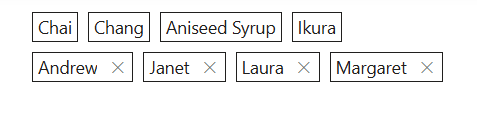
Outline Chips have a border with a transparent background. It can be set using the cssClass property.
<div>
@Html.EJS().ChipList("chip-avatar1").CssClass("e-outline").Chips(chip =>
                        {
                            chip.Text("Chai").Enabled(true).Add();
                            chip.Text("Chung").Enabled(true).Add();
                            chip.Text("Aniseed Syrup").Enabled(true).Add();
                            chip.Text("Ikura").Enabled(true).Add();
                        }).Render()

@Html.EJS().ChipList("chip-avatar2").CssClass("e-outline").EnableDelete(true).Chips(chip =>
                        {
                            chip.Text("Andrew").Enabled(true).Add();
                            chip.Text("Janet").Enabled(true).Add();
                            chip.Text("Laura").Enabled(true).Add();
                            chip.Text("Margaret").Enabled(true).Add();
                        }).Render()
</div>
public IActionResult Index()
{
return View();
}
Template
The Template property of the Chips control allows users to fully customize the layout and design of each Chips. By using the Template property, users can include custom HTML elements such as links, icons, or additional content.
@Html.EJS().ChipList("chip-avatar").Chips(chip =>
{
    chip.LeadingIconCss("trendingIcon").Template("#trendingNewsTemplate").Enabled(true).Add();
    chip.LeadingIconCss("cameraIcon").Template("#photoOfTheDayTemplate").Enabled(true).Add();
    chip.LeadingIconCss("trendingIcon").Template("#techNewsTemplate").Enabled(true).Add();
}).Render()

<script id="trendingNewsTemplate" type="text/x-template">
    <a href="https://timesofindia.indiatimes.com/news" target="_blank" class="anchorElement">#BreakingNews</a>
    <span class="textElement">125k posts</span>
</script>

<script id="photoOfTheDayTemplate" type="text/x-template">
    <a href="https://blog.google/products/photos/" target="_blank" class="anchorElement">#PhotoOfTheDay</a>
</script>

<script id="techNewsTemplate" type="text/x-template">
    <a href="https://indianexpress.com/section/technology/" target="_blank" class="anchorElement">#TechNews</a>
    <span class="textElement">107k posts</span>
</script>

<style>
#chip-avatar .trendingIcon {
	margin: 4px 0 4px 6px;
	width: 16px;
	height: 16px;
	background-image: url('data:image/svg+xml;utf8;base64,PHN2ZyB4bWxucz0iaHR0cDovL3d3dy53My5vcmcvMjAwMC9zdmciIGhlaWdodD0iNDgiIHdpZHRoPSI0OCI+PHBhdGggZD0ibTMyIDEyIDQuNTkgNC41OS05Ljc2IDkuNzUtOC04TDQgMzMuMTcgNi44MyAzNmwxMi0xMiA4IDggMTIuNTgtMTIuNTlMNDQgMjRWMTJ6Ii8+PHBhdGggZD0iTTAgMGg0OHY0OEgweiIgZmlsbD0ibm9uZSIvPjwvc3ZnPg==');
  }

  #chip-avatar .cameraIcon {
	margin: 4px 0 4px 6px;
	width: 16px;
	height: 16px;
	background-image: url('data:image/svg+xml;utf8;base64,PHN2ZyB4bWxucz0iaHR0cDovL3d3dy53My5vcmcvMjAwMC9zdmciIHZpZXdCb3g9IjAgMCAyNCAyNCI+PHBhdGggZD0iTTE5LDYuNUgxNy43MmwtLjMyLTFhMywzLDAsMCwwLTIuODQtMkg5LjQ0QTMsMywwLDAsMCw2LjYsNS41NWwtLjMyLDFINWEzLDMsMCwwLDAtMywzdjhhMywzLDAsMCwwLDMsM0gxOWEzLDMsMCwwLDAsMy0zdi04QTMsMywwLDAsMCwxOSw2LjVabTEsMTFhMSwxLDAsMCwxLTEsMUg1YTEsMSwwLDAsMS0xLTF2LThhMSwxLDAsMCwxLDEtMUg3YTEsMSwwLDAsMCwxLS42OGwuNTQtMS42NGExLDEsMCwwLDEsLjk1LS42OGg1LjEyYTEsMSwwLDAsMSwuOTUuNjhsLjU0LDEuNjRBMSwxLDAsMCwwLDE3LDguNWgyYTEsMSwwLDAsMSwxLDFabS04LTlhNCw0LDAsMSwwLDQsNEE0LDQsMCwwLDAsMTIsOC41Wm0wLDZhMiwyLDAsMSwxLDItMkEyLDIsMCwwLDEsMTIsMTQuNVoiLz48L3N2Zz4=');
  }

  #chip-avatar .anchorElement {
	margin: 0 4px;
	font-weight: 600;
	height: 16px;
	line-height: 16px;
	font-size: 12px;
	color: #0f6cbd;
	text-decoration: none;
  }

  #chip-avatar .textElement {
	font-weight: 400;
	height: 14px;
	line-height: 14px;
	font-size: 10px;
	margin-right: 6px;
  }
</style>
public IActionResult Index()
{
return View();
}