Inline Content in ASP.NET MVC Block Editor control
25 Mar 202624 minutes to read
Content in the Block Editor is managed through the content property of blocks.
Each content can have properties like contentType, content, properties, and more to customize the appearance and behavior of your text.
Setting content type
You can specify the type of content using the contentType property. The Block Editor supports several content types through the ContentType enum:
| Built-in Content Type | Description |
|---|---|
| Text | Represents plain text content. |
| Link | Represents a hyperlink. |
| Mention | Represents a user mention. |
| Label | Represents a label or tag. |
By default, the content type is set to
Text.
ContentType
// Adding inline text
{
    blockType = "Paragraph",
    content = new List<object>()
        {
        new { contentType = 'Text', content = "Inline Text" }
    }
}
Configure text content
You can configure Text content by setting the contentType property to Text. The default content type is Text.
Configure hyperlink
To create a hyperlink, set the contentType property to Link. You can configure the link’s URL using the properties property.
Configure link properties
Link settings control the behavior and properties of hyperlinks in your content. You can configure link settings using the properties property.
Link settings accepts the following options:
| Option | Description | Default Value |
|---|---|---|
url |
Specifies the destination URL of the link. | '' |
ContentType & Properties
{
    blockType = "Paragraph",
    content = new List<object>()
        {
        new
        {
            contentType = 'Link',
            content = 'hyperlinks',
            properties = {
                url = 'https://ej2.syncfusion.com/documentation',
            }
        }
    }
}
Configure Label
You can render labels by setting the contentType property as Label. Additionally, by configuring the properties property, you can customize how labels behave in your editor. This setup allows you to define the trigger character and specify the available label items.
Built-in items
The Block Editor comes with offers different built-in options. These include:
- Progress: In-progress, On-hold, Done
- Priority: High, Medium, Low
Customize label
You can customize the labels by using the properties property with type Label.
ContentType & Properties
// Adding inline label
{
    blockType = "Paragraph",
    content = new List<object>()
        {
        new {contentType = 'Label', properties = { lableId = "progress" }}
        }
}
Trigger Character configuration
You can use the triggerChar property to specify the character that will trigger the label suggestions popup while typing. The default trigger character is $.
Label items configuration
The labelItems array allows you to define the available labels in your editor. Each label item can have the following properties:
| Property | Description |
|---|---|
id |
Unique identifier for the label |
text |
Display text for the label |
groupHeader |
Category/group name for organizing labels |
labelColor |
Background color of the label |
iconCss |
CSS class for an icon to display with label |
When users type the trigger character followed by text, a popup will appear showing matching label items from which they can select. The selected label will be inserted into the content as a Label content item.
Using labels with group headers
Labels with the same groupHeader value will be grouped together in the label selection popup:
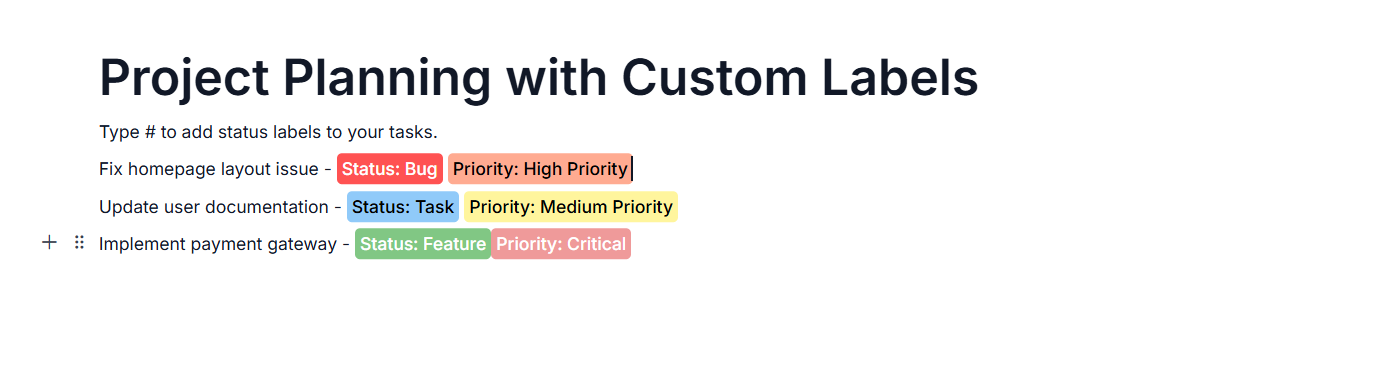
The below sample demonstrates the customization of labels in the Block Editor.
@using Syncfusion.EJ2.BlockEditor

<div id='blockeditor-container'>
    @Html.EJS().BlockEditor("block-editor").Blocks((List<BlockModel>)ViewBag["BlocksData"]).LabelSettings(ViewBag["labelSettings"]).Render()
</div>

<style>
    #blockeditor-container {
       margin: 20px auto;
    }
</style>
using Syncfusion.EJ2.BlockEditor;
public List<BlockModel> BlocksData { get; set; } = new List<BlockModel>();
public LabelSettings labelSettings { get; set; }
private List<LabelItemModel> labelItems { get; set; }
public class BlockModel
{
public string id { get; set; }
public string blockType { get; set; }
public object properties { get; set; }
public List<object> content { get; set; }
}
public ActionResult Label()
{
BlocksData.Add(new BlockModel
{
blockType = "Heading",
properties = new { level = 1},
content = new List<object>()
{
new
{
contentType = "Text",
content = "Project Planning with Custom Labels"
}
}
});
BlocksData.Add(new BlockModel
{
blockType = "Paragraph",
content = new List<object>()
{
new
{
contentType = "Text",
content = "Type # to add status labels to your tasks."
}
}
});
BlocksData.Add(new BlockModel
{
blockType = "Paragraph",
content = new List<object>()
{
new
{
contentType = "Text",
content = "Fix homepage layout issue - "
},
new
{
contentType = "Label",
props = new { labelId = "bug" }
},
new
{
contentType = "Text",
content = " "
},
new
{
contentType = "Label",
props = new { labelId = "high" }
}
}
});
BlocksData.Add(new BlockModel
{
blockType = "Paragraph",
content = new List<object>()
{
new
{
contentType = "Text",
content = "Update user documentation - "
},
new
{
contentType = "Label",
props = new { labelId = "task" }
},
new
{
contentType = "Text",
content = ""
},
new
{
contentType = "Label",
props = new { labelId = "medium" }
}
}
});
BlocksData.Add(new BlockModel
{
blockType = "Paragraph",
content = new List<object>()
{
new
{
contentType = "Text",
content = "Implement payment gateway - "
},
new
{
contentType = "Label",
props = new { labelId = "feature" }
},
new
{
contentType = "Text",
content = ""
},
new
{
contentType = "Label",
props = new { labelId = "critical" }
}
}
});
labelItems = new List<object>()
{
new
{
id = "bug",
text = "Bug",
labelColor = "#ff5252",
groupHeader = "Status"
},
new
{
id = "task",
text = "Task",
labelColor = "#90caf9",
groupHeader = "Status"
},
new
{
id = "feature",
text = "Feature",
labelColor = "#81c784",
groupHeader = "Status"
},
new
{
id = "enhancement",
text = "Enhancement",
labelColor = "#ba68c8",
groupHeader = "Status"
},
new
{
id = "low",
text = "Low Priority",
labelColor = "#c5e1a5",
groupHeader = "Priority"
},
new
{
id = "medium",
text = "Medium Priority",
labelColor = "#fff59d",
groupHeader = "Priority"
},
new
{
id = "high",
text = "High Priority",
labelColor = "#ffab91",
groupHeader = "Priority"
},
new
{
id = "critical",
text = "Critical",
labelColor = "#ef9a9a",
groupHeader = "Priority"
}
};
labelSettings = new LabelSettings()
{
TriggerChar = "#",
Items = labelItems
};
ViewBag.labelSettings = labelSettings;
ViewBag.BlocksData = BlocksData;
return View();
}
Configure mention
Mentions are references to users or entities that can be inserted into your content. You can configure mention content by setting the contentType property to Mention.
Mentions are typically triggered by the @ character and are linked to the Users collection defined in the Block Editor.
ContentType
// Adding inline code
{
    blockType = "Paragraph",
    content = new List<object>()
    {
        new {
            contentType = "Mention", properties = new { userId = "user1" }
        }
    }
}
Applying inline styles
The Block Editor allows you to apply rich formatting to block contents using the styles property.
The styles property supports the following formatting options:
| Style Property | Description | Default Value |
|---|---|---|
| bold | Makes the text bold | false |
| italic | Makes the text italicized | false |
| underline | Adds an underline to the text | false |
| strikethrough | Adds a line through the text | false |
| color | Sets the text color (HEX or RGBA format) | ’’ |
| backgroundColor | Sets the background color for the text | ’’ |
| superscript | Displays the text as superscript | false |
| subscript | Displays the text as subscript | false |
| uppercase | Converts the text to uppercase | false |
| lowercase | Converts the text to lowercase | false |
| inlineCode | Converts the text to InlineCode | false |
You can apply one or more of these styles to any content element for rich text formatting.